The best vector database for RAG over a website or docs is pgvector if you already run Postgres, Qdrant if you want a dedicated store you can self-host or rent, Chroma for a prototype or one small app, and Pinecone if you want no servers at all.
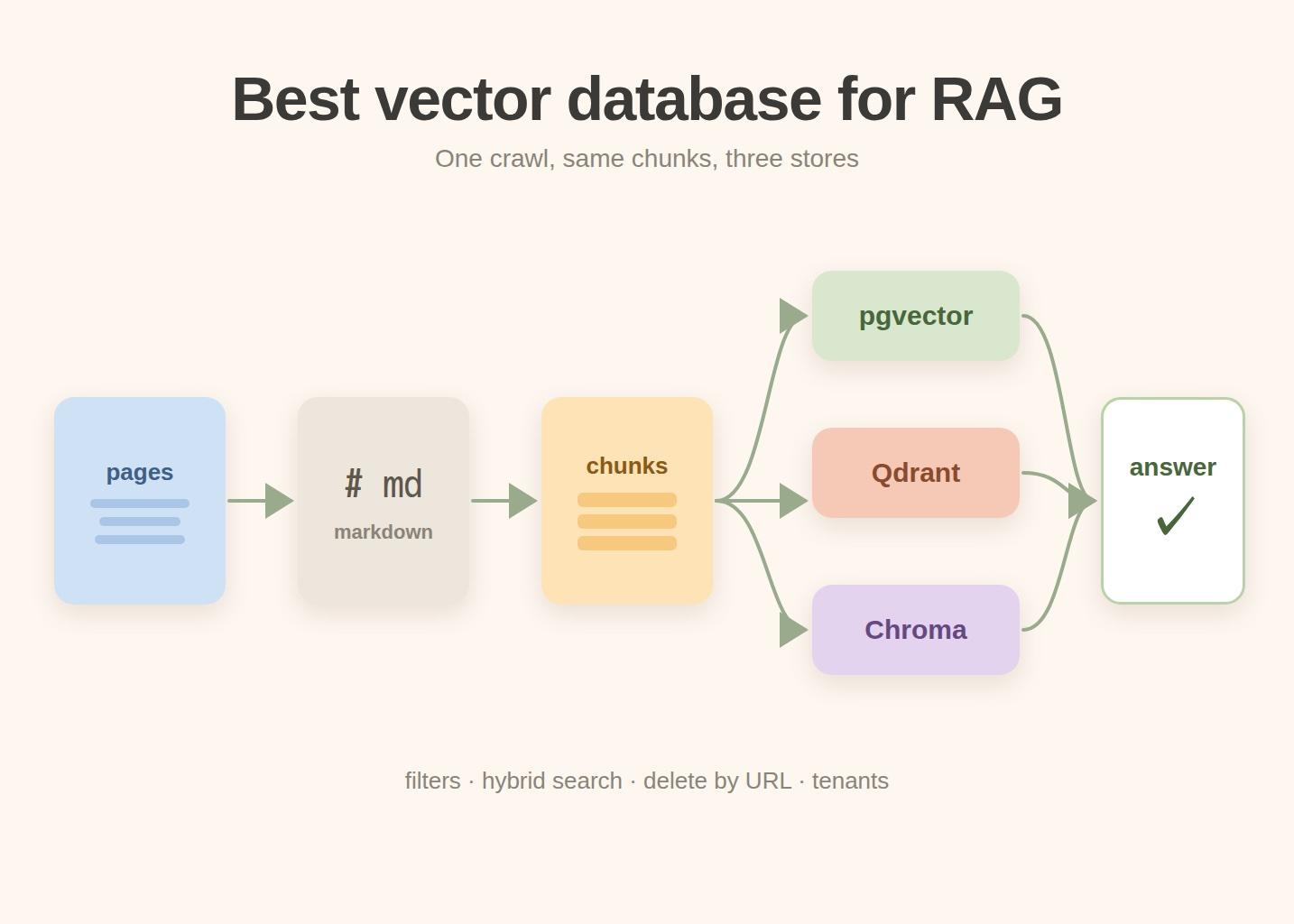
I loaded one crawl of 486 docs chunks into pgvector, Qdrant and Chroma. All three returned the same answer pages, so the choice came down to filtered search, exact-term search and tenant isolation. Speed rarely decides anything at this size (the 14 vector databases compared post has recall and latency numbers).
I build WebCrawlerAPI, so the crawl step is the part I know best. Tests ran and docs were read on November 21, 2026.
Best vector database for RAG, by situation
Start from the retrieval problem you want to avoid, then pick the database.
| Situation | Pick | Evidence | Caveat |
|---|---|---|---|
| Answers must stay inside one product area, version or customer | pgvector, Qdrant or Chroma | Tested here: 5 of 5 results under a 3.9% filter (Test 1) | pgvector needs hnsw.iterative_scan on. With off and the index forced, it returned 1 of 5 |
| Users paste error codes and parameter names | Any of the three: extract the exact term and filter or boost on it, then test hybrid on your own queries | Tested here: on 13 error codes, Chroma $contains and Qdrant BM25 + RRF hit 13 at rank 1 against 12 for vector-only. Over all 20 queries, Qdrant hybrid tied dense-only at 16 (Test 2) | Postgres full-text + RRF dropped to 14 of 20 on this corpus. $contains needs the bare term |
| One knowledge base per customer | Qdrant is_tenant, a pgvector tenant column or RLS, a Chroma database per tenant | Tested here: 0 results from the other tenant in 120 per approach (Test 3) | A Postgres superuser bypasses RLS |
| Pages change every week | Any of the three. pgvector if you want the replace in one transaction | Tested here: all three went from 28 to 26 chunks on replace by URL | Qdrant runs its batch in order and Chroma needs two calls; neither is a transaction |
| No servers to run | Pinecone | Not tested here. Namespaces per customer: Pinecone tutorial | Needs a cloud account |
| Built-in BM25 hybrid and multi-tenancy | Weaviate | Not tested here. Hybrid search: Weaviate tutorial; multi-tenancy per Weaviate docs | That tutorial did not test tenants |
Picking by stack, budget or scale instead? Postgres teams also have Supabase, MongoDB teams have Atlas Vector Search, a laptop needs only sqlite-vec or LanceDB, and hundreds of millions of vectors point to Milvus or Zilliz Cloud. If you already run Elasticsearch or OpenSearch, add vectors there. The vector database comparison with prices and free tiers has the full list.
For the best free or open-source vector database for RAG, the three I tested are all free to self-host: pgvector under the PostgreSQL License, Qdrant and Chroma under Apache-2.0.
What a vector database for RAG must do
Four retrieval needs decide the pick: filtered search that still returns k results, exact-term retrieval, replace by source URL and tenant isolation. Then there is the ops question: who runs it and who backs it up.
| Requirement | pgvector | Qdrant | Chroma |
|---|---|---|---|
| Filtered top-k | WHERE + hnsw.iterative_scan: 1/5 with off, 5/5 with relaxed_order (tested) | Filter in the search request: 5/5 in 4 configs (tested) | where: 5/5 (tested) |
| Exact terms (20 queries, hit@1) | Vector 16, full-text + vector RRF 14 (tested) | Dense 16, BM25 + dense RRF 16 (tested) | Vector 16, $contains then vector 17 (tested). Hybrid Search API is Chroma Cloud only (docs) |
| Replace by URL | DELETE + INSERT, one transaction (tested) | Delete by filter + upsert in one batch_update_points, run in order, no transaction (tested) | delete(where=) + upsert, two calls (tested) |
| Tenants | tenant_id column + WHERE, or RLS (tested) | tenant_id keyword index with is_tenant=true (tested) | One database per tenant (tested) |
| Licence | PostgreSQL License | Apache-2.0 | Apache-2.0 |
| Managed option | Any managed Postgres with pgvector, such as Supabase | Qdrant Cloud, with a free tier | Chroma Cloud |
Licences were read on GitHub, and the Qdrant and Chroma docs and pricing pages, on November 21, 2026. Self-hosting costs nothing in licences, but you own upgrades and backups. A managed service takes that work for a monthly bill.
What is a vector database, and how does it fit RAG?
A vector database stores embeddings (lists of numbers that encode meaning) next to their text and metadata. It finds the nearest neighbours of a query vector with an approximate index, most often HNSW. A "normal" database matches exact values; a vector database ranks rows by closeness in meaning.
RAG (retrieval-augmented generation) is a pattern: retrieve relevant text, add it to the prompt, generate an answer. A vector database is one way to do the retrieve step (the RAG explainer walks through the loop). You don't always need one: if users ask with the words your docs use, keyword search can do the retrieval.
Vector database tutorial: one crawl, three stores
pgvector, Qdrant and Chroma are open source and run in Docker with no account. Pinecone needs a cloud account, so it stayed out. Recall and latency for these stores are already in the comparison post, so this run tests the retrieval failure points instead.
The setup:
- Target: https://webcrawlerapi.com/docs, 54 pages, 486 chunks.
- Embeddings: BAAI/bge-small-en-v1.5 (384 dims) and Qdrant/bm25 sparse vectors, both through fastembed 0.9.1 inside the container. A hosted embedding API changes the dims and nothing else here (embedding models compared).
- Stores: pgvector/pgvector:0.8.7-pg17, qdrant/qdrant:v1.20.2, chromadb/chroma:1.5.9, all on one Docker network with no host ports.
- 12 questions with exact expected URLs, written before any store was loaded or queried.
All scripts and raw outputs are in the code folder.
Step 1: Crawl the site to markdown
The crawl API does the crawl. I used the Python SDK (Node users have the JS SDK). Put your API key in the WEBCRAWLERAPI_API_KEY environment variable (YOUR_API_KEY in examples).
import json, os, time
from pathlib import Path

from webcrawlerapi import WebCrawlerAPI

crawler = WebCrawlerAPI(api_key=os.environ["WEBCRAWLERAPI_API_KEY"])
OUT = Path("pages"); OUT.mkdir(exist_ok=True)

job = crawler.crawl_async(
    url="https://webcrawlerapi.com/docs",
    items_limit=60,
    output_formats=["markdown"],
    whitelist_regexp=r"^https://webcrawlerapi\.com/docs(/.*)?$",
    respect_robots_txt=True,
    max_age=0,                # skip the 7-day cache, fetch fresh pages
    main_content_only=True,
)

deadline = time.time() + 600  # 10 minutes
status = crawler.get_job(job.id)
while status.status in ("new", "in_progress"):
    if time.time() > deadline:
        raise SystemExit(f"still {status.status} after 10 minutes")
    time.sleep(max(status.recommended_pull_delay_ms or 0, 1000) / 1000)
    status = crawler.get_job(job.id)

done = [i for i in status.job_items if i.status == "done"]
for n, item in enumerate(sorted(done, key=lambda i: i.original_url)):
    md = item.get_markdown() or ""
    head = json.dumps({"url": item.original_url, "title": item.title})
    (OUT / f"{n:03d}.md").write_text(f"---\n{head}\n---\n{md}")
The loop polls while the job status is new or in_progress, sleeping at least a second. max_age=0 skips the 7-day cache, and the regex keeps the crawl inside /docs (filters guide).
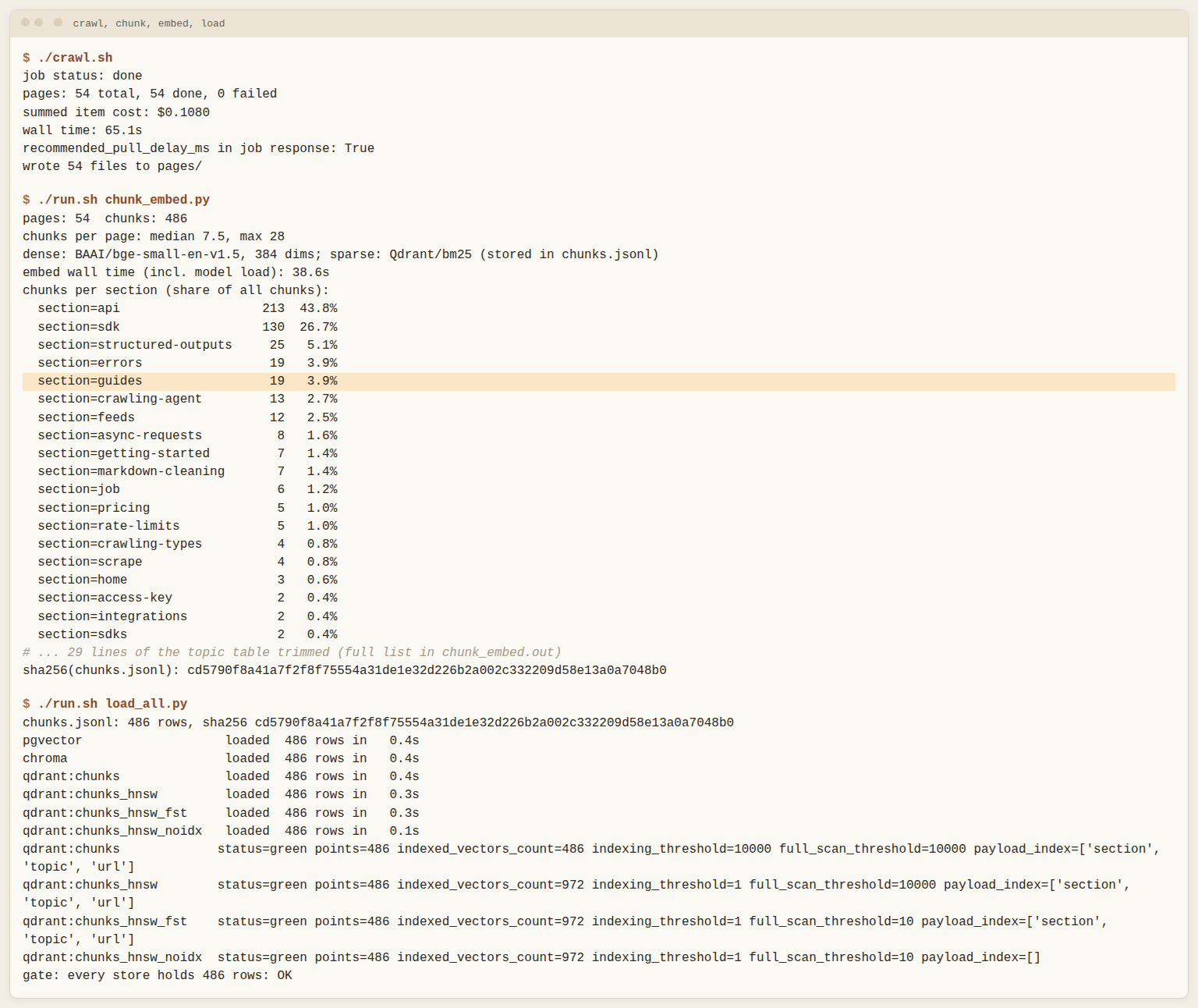
Result: 54 pages done (all of /docs, under the limit of 60), 0 failed, $0.1080 in summed item cost, 65.1 seconds.
To run this on your own docs, change url and whitelist_regexp and set your key. My 54 pages cost $0.108. The longer version of this pipeline is in the Python knowledge base guide and the website to markdown knowledge base guide.
Step 2: Chunk and embed once
Each page is split at H1 to H3 headings with a soft 1,500-character cap (it cuts only on blank lines, so a chunk with a long code block can go over). Every chunk gets a url, a section (like api or guides), a topic and a deterministic uuid5 id that all three stores accept:
import json, uuid
from pathlib import Path
from urllib.parse import urlparse

from fastembed import SparseTextEmbedding, TextEmbedding

DENSE, SPARSE, MAX_CHARS = "BAAI/bge-small-en-v1.5", "Qdrant/bm25", 1500


def fields(url):
    seg = urlparse(url).path.strip("/").split("/")          # docs/api/crawl
    return (seg[1] if len(seg) > 1 else "home"), (seg[2] if len(seg) > 2 else "")


# clean(), split_headings() and cap() are in the full chunk_embed.py
rows = []
for f in sorted(Path("pages").glob("*.md")):
    _, head, md = f.read_text().split("---\n", 2)
    meta = json.loads(head)
    section, topic = fields(meta["url"])
    i = 0
    for heading, text in split_headings(clean(md)):
        for piece in cap(text):
            rows.append({"id": str(uuid.uuid5(uuid.NAMESPACE_URL, f"{meta['url']}#{i}")),
                         "url": meta["url"], "section": section, "topic": topic,
                         "heading": heading, "text": piece})
            i += 1

dense = TextEmbedding(DENSE, cache_dir="/models")
sparse = SparseTextEmbedding(SPARSE, cache_dir="/models")
texts = [r["text"] for r in rows]
for r, d, s in zip(rows, dense.embed(texts), sparse.embed(texts)):
    r["embedding"] = [round(float(x), 6) for x in d]
    r["sparse"] = {"indices": s.indices.tolist(), "values": [round(float(v), 6) for v in s.values]}
    r["model"], r["dim"] = DENSE, len(r["embedding"])

with open("chunks.jsonl", "w") as fh:
    for r in rows:
        fh.write(json.dumps(r) + "\n")
i += 1 keeps every chunk id unique. Output: one chunks.jsonl with 486 rows (median 7.5 chunks per page, max 28), loaded by every store and checked by its sha256. More on splitting in chunk markdown by headers and chunking strategies.
Step 3: The store-specific part
Each adapter has the same functions: setup, upsert, search(vec, k, where), replace_url, count, plus one keyword option. Non-blank lines: pgvector 74, Qdrant 57, Chroma 40, and 36 for the shared harness. The real differences are in replace_url.
pgvector deletes and inserts inside one transaction, so a reader never sees the page half replaced:
def replace_url(self, url, chunks):
    with self.conn.transaction(), self.conn.cursor() as cur:
        cur.execute(f"DELETE FROM {self.t} WHERE url = %s", (url,))
        self._insert(cur, chunks)
Qdrant sends both operations in one request. Its docs say batch operations "are executed in order". They say nothing about atomicity, so I don't count on it being a transaction:
def replace_url(self, url, chunks):
    client.batch_update_points(self.name, update_operations=[
        models.DeleteOperation(delete=models.FilterSelector(filter=flt({"url": url}))),
        models.UpsertOperation(upsert=models.PointsList(points=[point(c) for c in chunks])),
    ], wait=True)
Chroma needs two calls. Its thin client (chromadb-client) ships no embedding model, so the collection is created with embedding_function=None and every call passes vectors:
def replace_url(self, url, chunks):
    self.col.delete(where={"url": url})
    self.upsert(chunks)
Qdrant filters work without a payload index. The index makes filtering faster, and strict mode can block filters on unindexed fields (unindexed_filtering_retrieve: false). I created the url, section and topic keyword indexes before upserting. Base Qdrant setup is in the Qdrant Docker tutorial.
RAG retrieval tests: filters, exact terms, tenants
Test 1: Do you get k results under a selective filter?
A support bot scoped to one product area sends a filter on every query. If the store returns 1 chunk instead of 5, the answer gets worse and nothing in your logs says why.
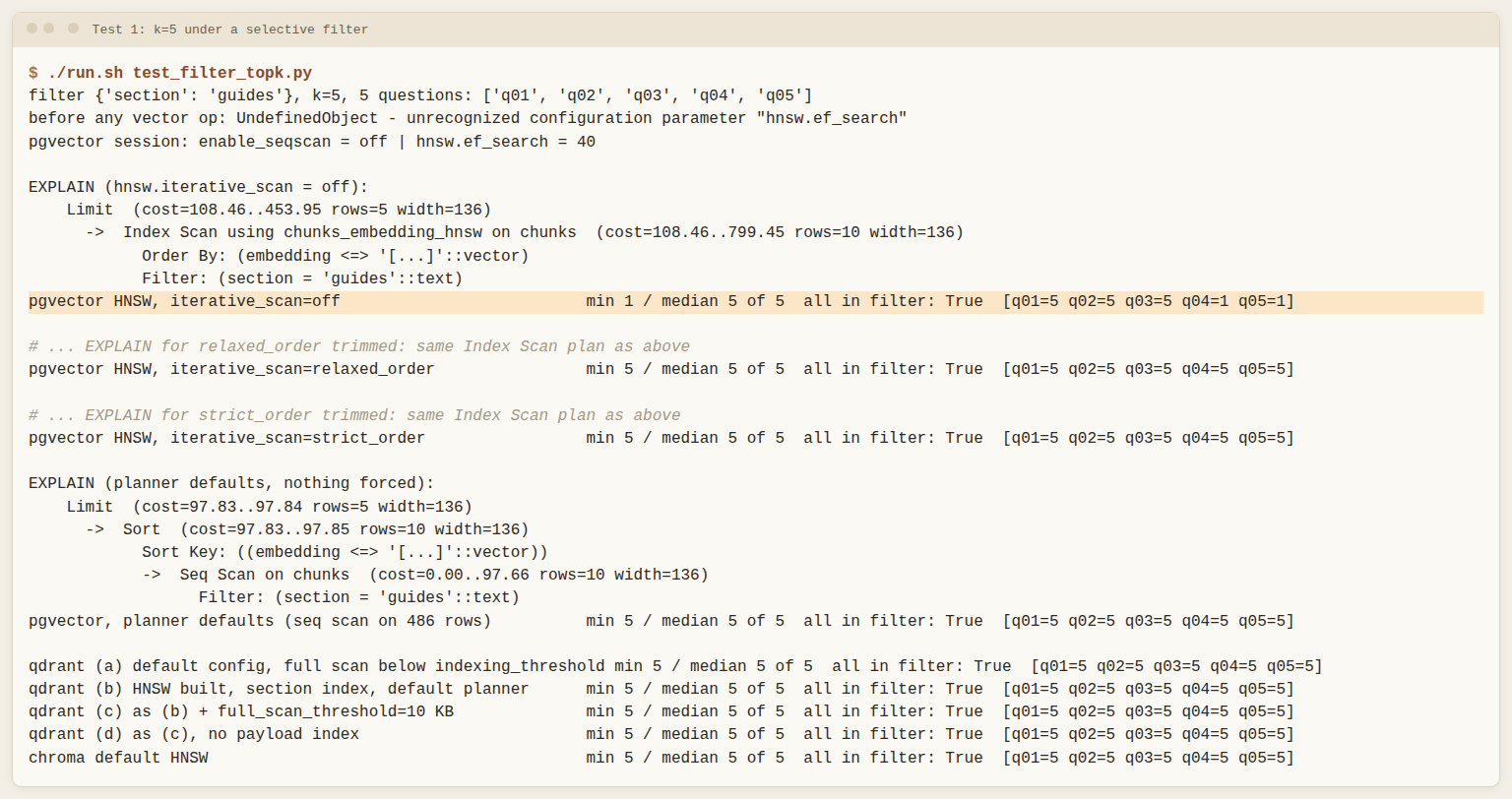
I filtered on section = "guides": 19 of 486 chunks, 3.9%. Five questions ran with k=5: three about guides content and two off-topic ones (pricing and the Ruby SDK). Off-topic questions are the worst case, because their nearest neighbours are almost all outside the filter.
| Store / setting | Results of 5 (min / median) | All in section |
|---|---|---|
| pgvector, HNSW forced, hnsw.iterative_scan = off | 1 / 5 | yes |
| pgvector, HNSW forced, relaxed_order or strict_order | 5 / 5 | yes |
| pgvector, planner defaults (seq scan) | 5 / 5 | yes |
| Qdrant, 4 configs | 5 / 5 | yes |
| Chroma, default HNSW | 5 / 5 | yes |
The pgvector failure was exactly the two off-topic questions: 1 result each. All three guides questions got 5 even with off.
At 486 rows, Postgres picks a sequential scan, which is exact. To reproduce large-table behaviour on a small table, I forced the index with SET enable_seqscan = off and kept the default hnsw.ef_search of 40. EXPLAIN showed Index Scan using chunks_embedding_hnsw for all three forced runs. The pgvector README describes the cause: with approximate indexes, "filtering is applied after the index is scanned". Version 0.8.0 added iterative index scans, which keep scanning until enough rows pass the filter:
SET hnsw.iterative_scan = relaxed_order;
Three caveats before you ship it. relaxed_order can return rows slightly out of distance order, and the README shows a materialized CTE that re-sorts them. Iterative scans stop at hnsw.max_scan_tuples (20,000 by default), so a filter that matches few rows of a big table can still come back short. With a connection pool, use SET LOCAL inside the transaction or ALTER ROLE ... SET for the app role, so the setting does not depend on which connection you get.
I ran four Qdrant configs, from the default collection (a full scan below indexing_threshold, so it proves nothing about HNSW) to HNSW built with a lowered full_scan_threshold and no payload index (details in load_all.out). Qdrant does not report which plan it used, and its planner may pick an exact scan for a filtered set this small, so I only claim what I saw: 5 of 5 in all four configs, and 5 of 5 for Chroma.
Test 2: Exact terms and hybrid search
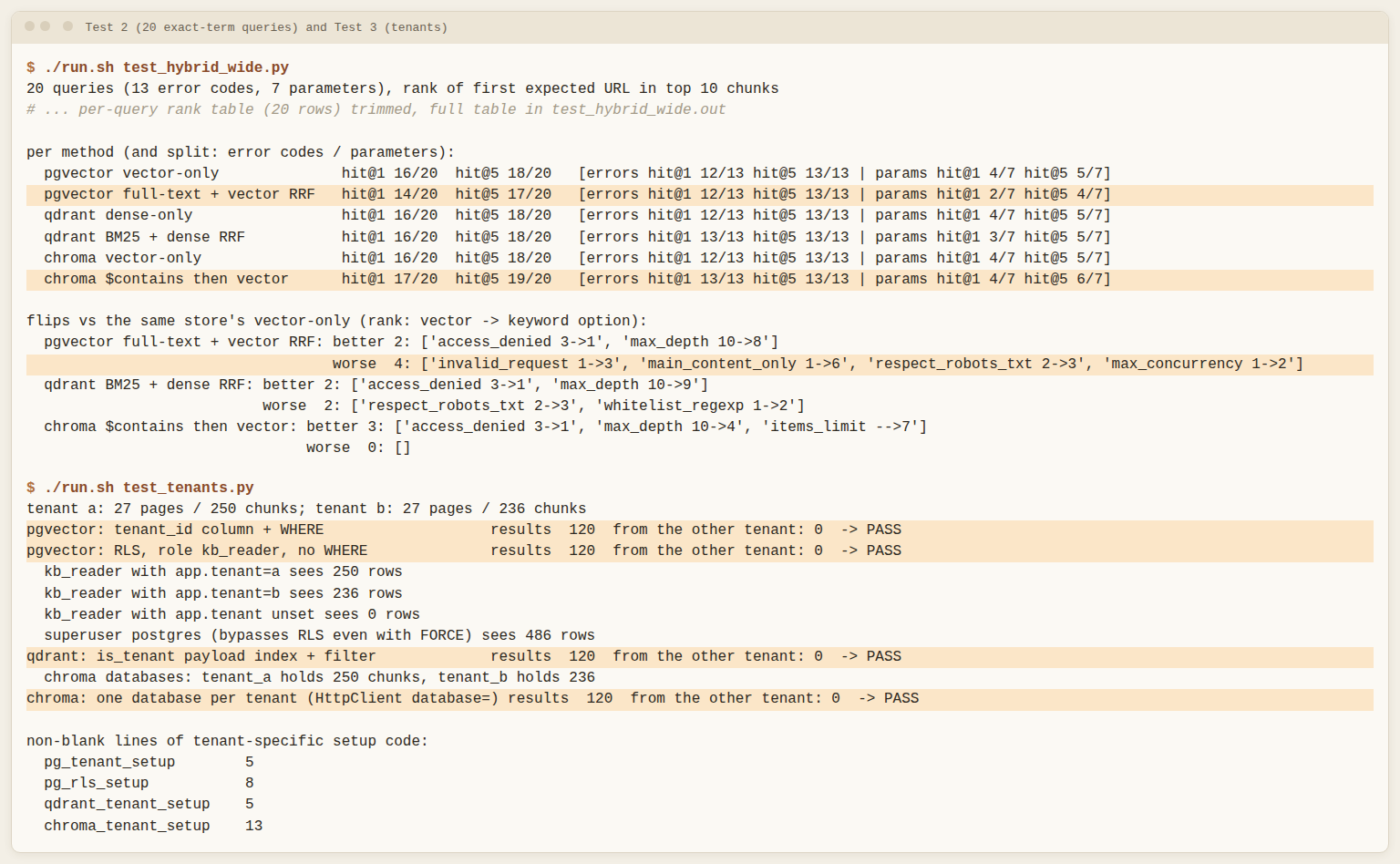
I ran 20 exact-term queries. 13 cover every error code in the errors docs ("Job failed with error <code>, what does it mean?"). The other 7 ask about parameters such as max_depth and main_content_only ("What does the <param> parameter do?"). Each query has fixed expected pages, and I recorded the rank of the first one in the top 10 chunks. The keyword options:
- pgvector: Postgres full-text (ts_rank) and vector rank, fused with RRF in one SQL statement. The pgvector README suggests full-text for hybrid search and RRF to combine results.
- Qdrant: BM25 sparse vectors with the IDF modifier plus dense, fused with RRF in the Query API.
- Chroma: where_document={"$contains": term}, then vector ranking. The keyword only narrows the candidates. Chroma's sparse and hybrid search sit in the Search API, which is "available in Chroma Cloud only", so I did not test it.
| Method | hit@1 (of 20) | hit@5 | Error codes, hit@1 (of 13) | Parameters, hit@1 (of 7) |
|---|---|---|---|---|
| pgvector vector-only | 16 | 18 | 12 | 4 |
| pgvector full-text + vector RRF | 14 | 17 | 12 | 2 |
| Qdrant dense-only | 16 | 18 | 12 | 4 |
| Qdrant BM25 + dense RRF | 16 | 18 | 13 | 3 |
| Chroma vector-only | 16 | 18 | 12 | 4 |
| Chroma $contains then vector | 17 | 19 | 13 | 4 |
Naive hybrid was not a free win on this corpus. Vector-only already put all 13 error-code pages in the top 5, and the three vector-only runs ranked all 20 queries identically. Every keyword option fixed the one error-code miss at rank 1 (access_denied, 3 to 1). Postgres full-text + RRF also made 4 queries worse: invalid_request 1 to 3, main_content_only 1 to 6, respect_robots_txt 2 to 3 and max_concurrency 1 to 2. Qdrant's hybrid made 2 worse (respect_robots_txt 2 to 3, whitelist_regexp 1 to 2). Only Chroma's filter pulled items_limit into the top 10, at rank 7.
My guess for the Postgres losses is tokenisation (not measured). to_tsvector('english', 'website_access_denied') gives 'access' 'deni' 'websit', so main_content_only turns into two common words, main and content ("only" is a stop word), and my OR-of-words query also matches every chunk that says "parameter". fastembed's Qdrant/bm25 kept website_access_deni as one token.
Phrasing mattered as much as the method. In my first 3-question run, "Job item failed with website_access_denied, what does it mean?" put /docs/errors at rank 3 with vector-only, while the shorter template above found it at rank 1. If users paste error codes, extract the code and filter on it, then test any hybrid setup on your own queries before you trust it.
Test 3: Tenant isolation
I split the crawl into two synthetic tenants (alternating pages by URL: 27 pages and 250 chunks, 27 pages and 236 chunks). Each tenant ran all 12 questions at k=5. Pass means zero results from the other tenant.
| Approach | Results | From other tenant | Setup lines |
|---|---|---|---|
| pgvector tenant_id column + WHERE | 120 | 0 | 5 |
| pgvector RLS, non-owner role, query with no WHERE | 120 | 0 | 8 |
| Qdrant tenant_id keyword index, is_tenant=true, + filter | 120 | 0 | 5 |
| Chroma one database per tenant (HttpClient(database=...)) | 120 | 0 | 13 |
The RLS policy is the part worth copying, because it protects you from a forgotten WHERE:
ALTER TABLE chunks_tenants ENABLE ROW LEVEL SECURITY;
ALTER TABLE chunks_tenants FORCE ROW LEVEL SECURITY;
CREATE POLICY tenant_isolation ON chunks_tenants
    USING (tenant_id = current_setting('app.tenant', true));
The role kb_reader saw 250 rows as tenant a, 236 as tenant b and 0 with no tenant set. Only the postgres superuser saw all 486, even with FORCE. That matches the Postgres docs: superusers and BYPASSRLS roles always bypass row security. Do not query as a superuser from your app.
Answer hits and replace by URL
All three stores returned identical rankings: 9 of 12 questions hit the expected page at rank 1 and 10 of 12 in the top 5. Both misses were identical in all three stores, so the store was not the cause. "How do I scrape a list of URLs in one batch" returned five SDK pages, and "How do I check the status of a crawl job?" returned /docs/async-requests and SDK pages instead of the job page. Those SDK pages also cover batch scraping and job status, so the retriever picked plausible pages. I'd look at chunk headings first.
For replace by URL I took the largest page (/docs/sdk/java, 28 chunks) and re-ingested it with 2 chunks dropped:
| Store | Call(s) | Chunks for the URL |
|---|---|---|
| pgvector | DELETE + INSERT, one transaction | 28 to 26 |
| Qdrant | batch_update_points, ordered | 28 to 26 |
| Chroma | delete(where=), then upsert() | 28 to 26 |
As a control, a pgvector upsert without the delete left 28 chunks: the 2 stale chunks stayed. The Chroma tutorial measured the same thing, and the Qdrant tutorial deletes by URL for the same reason.
Gotchas from the run
- SHOW hnsw.ef_search failed with unrecognized configuration parameter until a vector operation loaded pgvector in that session.
- psycopg 3 auto-prepares a query after more than 5 runs. The cached plan ignored RESET enable_seqscan and kept returning 1 of 5; prepare_threshold=None fixed it.
- Qdrant indexed_vectors_count includes sparse vectors (486 on a collection with no dense HNSW), so it does not prove HNSW is built.
- The first fastembed run downloaded about 65 MB of models. Keep the cache on a volume.
Outputs for each are in the code README.
Keep it fresh
A docs knowledge base goes stale page by page. Recrawl on a schedule with max_age=0, hash each page's markdown, and only re-embed pages whose hash changed. Replace those by URL and delete chunks for pages that disappeared. Cadence is in how often to recrawl, and the change-detection loop is in keep a support bot in sync with your docs.
FAQ
What is the best vector database for RAG?
For RAG over a website or docs: pgvector if you run Postgres, Qdrant for a dedicated store you can self-host or rent, Chroma for a prototype, Pinecone if you want no servers. In my test on 486 docs chunks, all three open-source stores found the same answer pages, so filters, exact terms and tenants decided it.
Which vector database is best for RAG if I already use Postgres?
pgvector. Filter with WHERE, replace a changed page with DELETE and INSERT in one transaction, and set hnsw.iterative_scan = relaxed_order so filtered HNSW queries usually return k results.
What is the best free or open-source vector database for RAG?
pgvector (PostgreSQL License), Qdrant (Apache-2.0) and Chroma (Apache-2.0), licences read on GitHub on November 21, 2026. All three ran in Docker with no account. Free cloud tiers and prices are in the vector database comparison on this blog.
Is a vector database needed for RAG?
Not always. If users ask with the words your docs use, keyword search can do the retrieval. In my 20 exact-term queries, vector search alone found the right page in the top 5 for 18, and an exact-term filter raised that to 19, so a keyword fallback is worth having.
What is the difference between RAG and a vector database?
RAG is a pattern: retrieve relevant text, add it to the prompt, generate an answer. A vector database is one way to do the retrieve step.
Is SQL a vector database?
No, SQL is a query language. Postgres with the pgvector extension stores vectors and runs nearest-neighbour search from SQL, exact or with an HNSW index.
Why does my vector search return fewer results with a filter?
With an approximate index the filter runs after the index scan, so a selective filter can drop most candidates. In my run with the HNSW index forced and hnsw.iterative_scan = off, pgvector returned 1 of 5 results for two off-topic questions under a 3.9% filter, and relaxed_order fixed it.
How do I keep customers' data separate in a RAG vector database?
Put a tenant id on every chunk and filter on it, or isolate per database. With two synthetic tenants, a pgvector tenant_id column, pgvector row-level security, a Qdrant is_tenant index and one Chroma database per tenant all returned 0 results from the other tenant, but a Postgres superuser bypassed RLS and saw all 486 rows.
How do I load my website or docs into a vector database for RAG?
Crawl the site to markdown, split it at headings, embed each chunk and upsert it with its source URL so you can replace it on recrawl. In this post, 54 docs pages became 486 chunks for $0.1080 of crawl cost.
Which vector database I'd pick for RAG
If you already run Postgres, use pgvector and set hnsw.iterative_scan before you ship filtered search. For a dedicated server, Qdrant ships BM25 sparse vectors and an is_tenant index in the stock image; its hybrid tied dense-only here at 16 of 20. Chroma had the shortest adapter (40 lines), so it is a fair prototype pick, and its $contains filter handles exact terms (ranked hybrid is Chroma Cloud only).
If users paste error codes or parameter names, extract the exact term and filter or boost on it. Then test hybrid on your own queries before you turn it on: on these docs, Postgres full-text + RRF did worse than vector search alone. In my run the store was the easiest part to swap, and the crawl, chunks and metadata decided answer quality.
To get your own site into any of them, start with the crawl API (docs), or paste a URL into the free website to markdown tool to see the markdown first.