Pinecone Vector Database Tutorial: Website to Pinecone With Integrated Embeddings
This Pinecone vector database tutorial loads a crawled docs site into a Pinecone index where Pinecone embeds the text for you, then searches it with plain text and a section filter. I ran every command on November 6, 2026, in Docker, with pinecone 10.3.0 on a free Starter account. The outputs below are copied from those runs.
The input is 304 chunks from the WebCrawlerAPI docs. This is the store step of the website to markdown knowledge base guide, for a support bot or in-product search. If you build that bot for several customers, read on: Pinecone's per-customer namespaces are the best reason to pick it, and I measured them. No chunks yet? Crawl your own site builds them with the crawl API.
I do not cover pods, BYOC, dedicated read nodes, Pinecone Assistant or hybrid search. For how Pinecone compares with the other stores, see the vector database comparison. I wanted to see what the "zero ops" promise costs in practice, so that is what the numbers below are about.
What the Pinecone vector database is and what the free Starter tier gives you
Pinecone is a managed, closed source vector database. You call an API to create an index and to read and write documents, and Pinecone runs the storage and the search. Data lives in namespaces inside an index. Every upsert, search and delete targets exactly one namespace.
Pinecone changed its main API in 2026. A document index has a schema, stores JSON documents, and can embed a text field for you. That is what this post uses. The older integrated index (create_index_for_model, upsert_records) still works, and most tutorials still show it, but the docs file it under the legacy vector index path. I ran both (see the legacy call).
Starter limits, from the Pinecone docs (rate limits, object limits and pricing), read November 6, 2026:
| Limit | Starter |
|---|---|
| Cloud and region | AWS us-east-1 only |
| Serverless indexes | 5 |
| Namespaces per index | 100 (Builder 1,000) |
| Storage | 2 GB |
| Write units per month | 2,000,000 |
| Read units per month | 1,000,000 |
| Egress per month | 1 GB |
| Embedding tokens per month, per model | 5,000,000 |
| llama-text-embed-v2 tokens per minute | 250,000 |
Builder is $20 per month flat and blocks usage past its limits instead of billing it. Standard has a $50 per month minimum, Enterprise $500. Reaching a monthly usage limit returns 429, and reaching an object limit (indexes, namespaces, storage) returns 403. I did not find an inactivity or auto-pause policy for Starter in the docs I read.
Crawl your own site
I did not re-crawl for this post. I reused the file from the Chroma tutorial (304 rows from 52 pages), so the numbers compare with the other tutorials in this series. Pinecone embeds the text itself, so I ignored the vectors in that file, except in the bring-your-own-vectors test.
To get the same input for your site, create an API key at dash.webcrawlerapi.com/access and run build_chunks.py. It sends POST https://api.webcrawlerapi.com/v1/crawl, polls GET /v1/job/<id> until the job is done, downloads each item's markdown, splits it by headers and writes chunks.jsonl. That script also embeds the chunks with Ollama, which you can skip if you only use integrated embedding.
ollama pull nomic-embed-text
WEBCRAWLERAPI_API_KEY=YOUR_API_KEY python build_chunks.py https://webcrawlerapi.com/docs \
  --items-limit 50 --whitelist 'https://webcrawlerapi\.com/docs.*'
The request body is url, items_limit, output_formats, respect_robots_txt and the whitelist regexp. See the crawl endpoint docs and the job docs. Splitting is covered in chunking by headers.
Run Pinecone from Docker
There is no database to run. Docker only holds a small Python image with the SDK, so nothing is installed on the host. The key reaches the container through --env-file, never on the command line.
FROM python:3.11-slim
ENV PYTHONDONTWRITEBYTECODE=1 PYTHONUNBUFFERED=1
WORKDIR /work
COPY requirements.txt .
RUN pip install --no-cache-dir -r requirements.txt && pip freeze > /pip-freeze.txt
pinecone==10.3.0
requests==2.34.2
# PINECONE_ENV_FILE holds one line: PINECONE_API_KEY=YOUR_API_KEY
docker run --rm --env-file "$PINECONE_ENV_FILE" -v "$DATA_DIR":/data -v "$PWD":/work:ro \
  kb-pinecone:10.3.0 python version_check.py
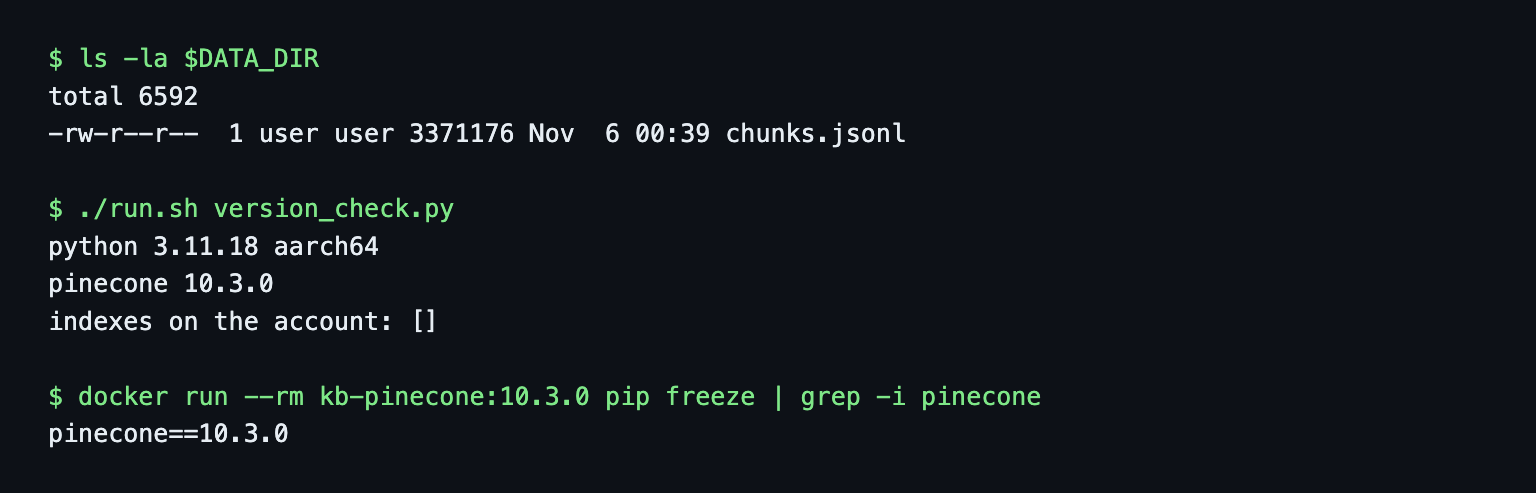
An empty list from pc.indexes.list() is the connectivity check. run.sh wraps the docker run line. My scripts also scrub the key and the index host from everything they print, because the host contains your project name.
Create a document index with integrated embedding in Python
One string field is enough. embed tells Pinecone to embed that field's text on upsert and the query text on search.
import os
from pinecone import Pinecone, SchemaBuilder

pc = Pinecone(api_key=os.environ["PINECONE_API_KEY"])

schema = SchemaBuilder().add_string_field("chunk_text", embed={"model": "llama-text-embed-v2"}).build()
pc.indexes.create(name="kb-docs", schema=schema)  # waits until the index is ready
The SDK accepts embed= on add_string_field. I checked the signature in the container before using it, because the docs only show the JSON form. The call above was ready after 7.9 seconds. Pinecone chose the rest and fixed it at creation: 1,024 dimensions, cosine, AWS us-east-1, truncate: END on write and on query. Metadata fields such as url, heading and section are not declared. Any field you upsert besides the ranking fields is stored and filterable.
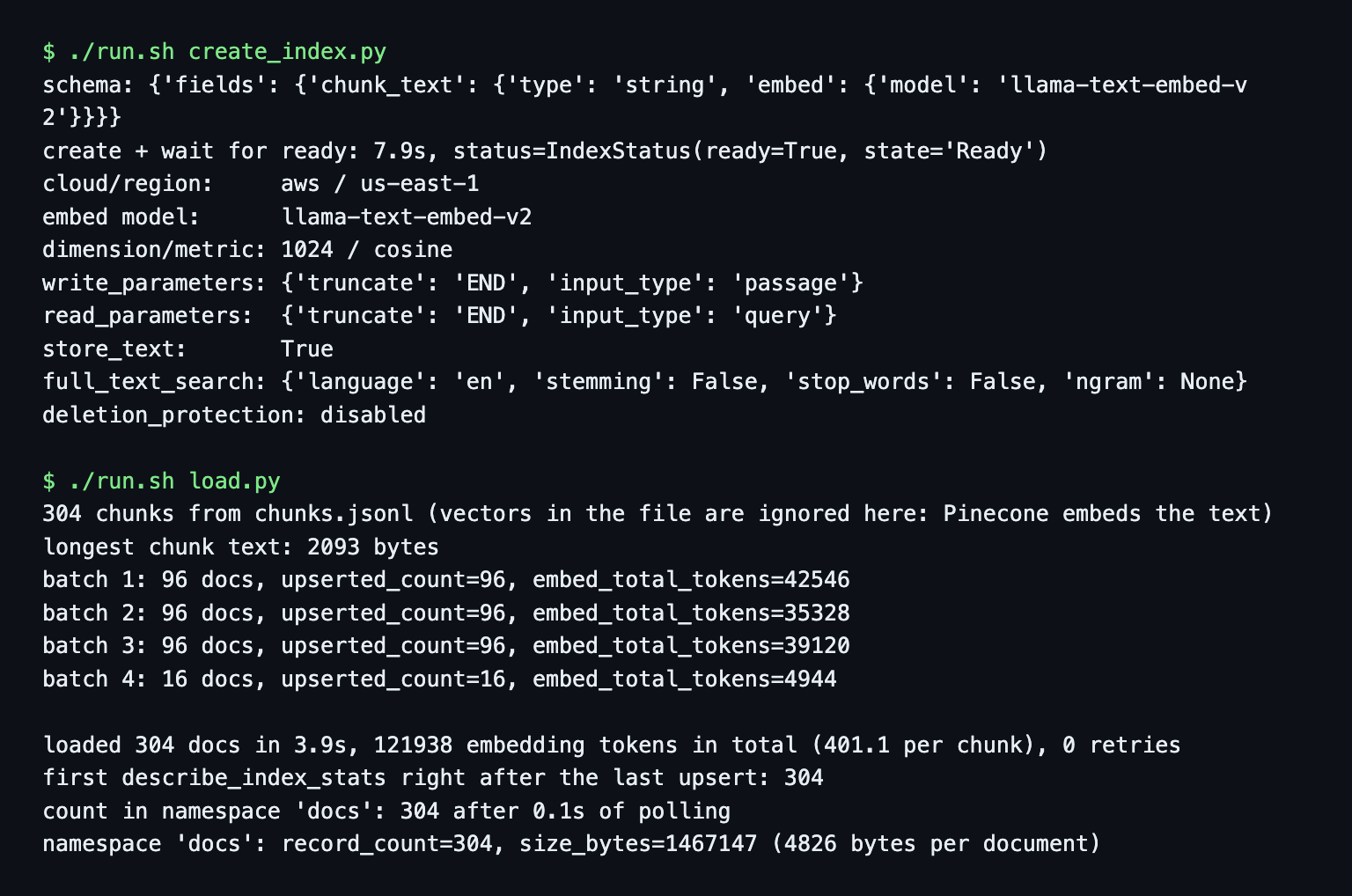
The schema cannot change after creation, so a different model or dimension means delete and recreate. store_text defaults to true, so the chunk text comes back in search results and counts toward storage. Pinecone also indexed the field for keyword (BM25) search without being asked, which is how hybrid search starts on a document index. I did not test it.
Embedding models depend on the plan. The integrated embedding docs name llama-text-embed-v2 as the default. The model gallery (read November 6, 2026) adds text-embedding-3-small and text-embedding-3-large on every plan and gemini-embedding-2 from Builder up. I tried Gemini on Starter and got 403 PERMISSION_DENIED ... not available on the Starter plan.
Embedding also has a processing location, which matters if you have data-residency rules. The gallery lists llama-text-embed-v2 as us. For the OpenAI models, the processing locations page says Starter and Builder are limited to global, which includes regions outside the United States, and only Standard and Enterprise can set us. I did not run the OpenAI models.
Load the chunks: upsert text, not vectors
Each chunk becomes a document with an _id, the text in chunk_text and three metadata fields. The chunk text already starts with its # Heading line, so I kept the heading as a separate field only for display and filtering.
from common import batches, to_doc   # to_doc: _id, chunk_text, url, heading, section

index = pc.index(name="kb-docs")      # pc from the previous snippet
docs = [to_doc(r) for r in rows]     # rows come from chunks.jsonl, 304 of them
tokens = 0
for batch in batches(docs, 96):      # 96 is the hard cap when a field is embedded
    res = index.documents.upsert(namespace="docs", documents=batch)
    tokens += res.usage.embed_total_tokens
section is the second URL segment (/docs/api/crawl gives api), which makes 19 sections.
The load took 3.9 seconds for four requests. The full script retries on 429 with backoff and never needed to. describe_index_stats showed 304 right after the last upsert, and describe_namespace reported 1,467,147 bytes, which is 4,826 bytes per document. That is within 1% of the formula in the cost section. The size field read 0 for the first 4.7 seconds. One document over the batch cap fails with a clear message: Number of documents (97) exceeds the maximum limit of 96 documents per upsert request (limits_probe.out).
Embedding tokens depend on how you batch
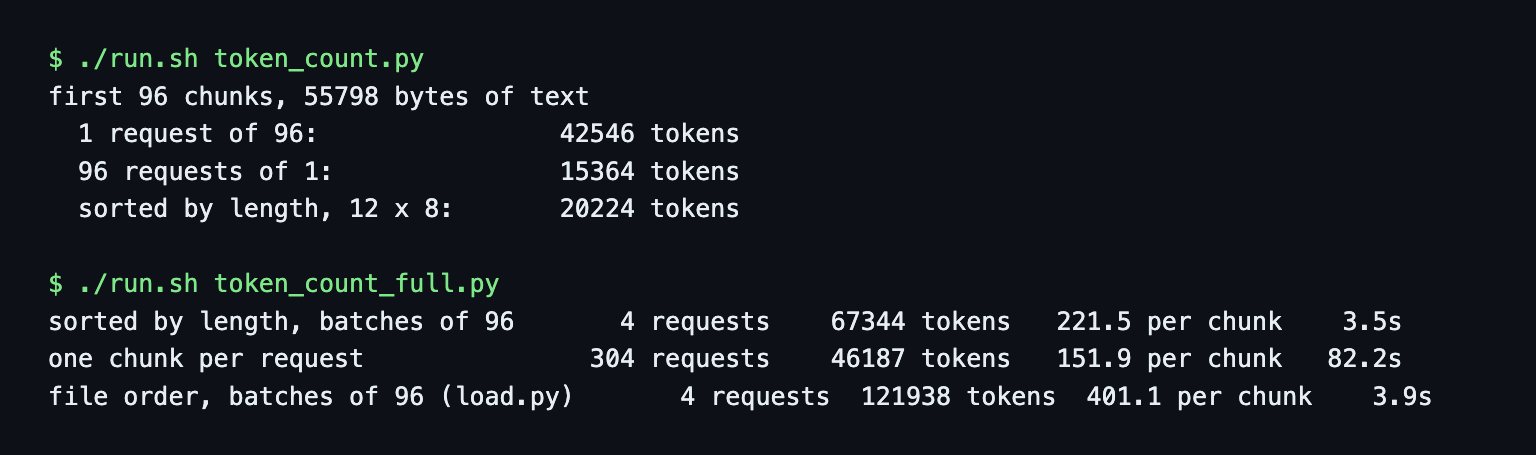
The load reported 121,938 embedding tokens, or 401 per chunk. That looked off. My longest chunk (2,093 bytes) cost 371 tokens on its own, so the average chunk could not cost more. I tested three batching patterns on the same text, reading usage.embed_total_tokens:
| Batching | Requests | Tokens | Per chunk | Time |
|---|---|---|---|---|
| File order, 96 per request | 4 | 121,938 | 401.1 | 3.9 s |
| Sorted by length, 96 per request | 4 | 67,344 | 221.5 | 3.5 s |
| One chunk per request | 304 | 46,187 | 151.9 | 82.2 s |
My reading is that Pinecone pads every document in a request to the longest one, and the usage figure counts the padding. I did not see the padding documented, and Starter is free, so I cannot show an invoice. The console usage page shows read units, write units and storage but not embedding tokens (screenshot below), so I could not confirm the metered figure there. If this figure is what gets metered, unsorted batches of 96 cost 2.6 times the tokens of one chunk at a time, and the free allowance is counted in tokens.
A 63,600-byte text was accepted and reported 2,050 tokens, so llama-text-embed-v2 truncated it at its 2,048-token limit (truncate: END) without an error.
Search with plain text and a section filter
res = index.documents.search(
    namespace="docs",
    top_k=5,
    score_by=[{"type": "embed", "fields": ["chunk_text"], "query": "How do I cancel a running crawl job?"}],
    filter={"section": {"$eq": "api"}},          # optional
    include_fields=["url", "heading", "section"],
)
for m in res.to_dict()["matches"]:
    print(m["_score"], m["url"])
From my laptop a search took 121 to 560 ms (mean 333 ms over the six questions, query.out) and reports usage={'read_units': 1, 'embed_total_tokens': 14}. I ran my six test questions, each with a known expected page, and checked that the expected URL is in the top 5.
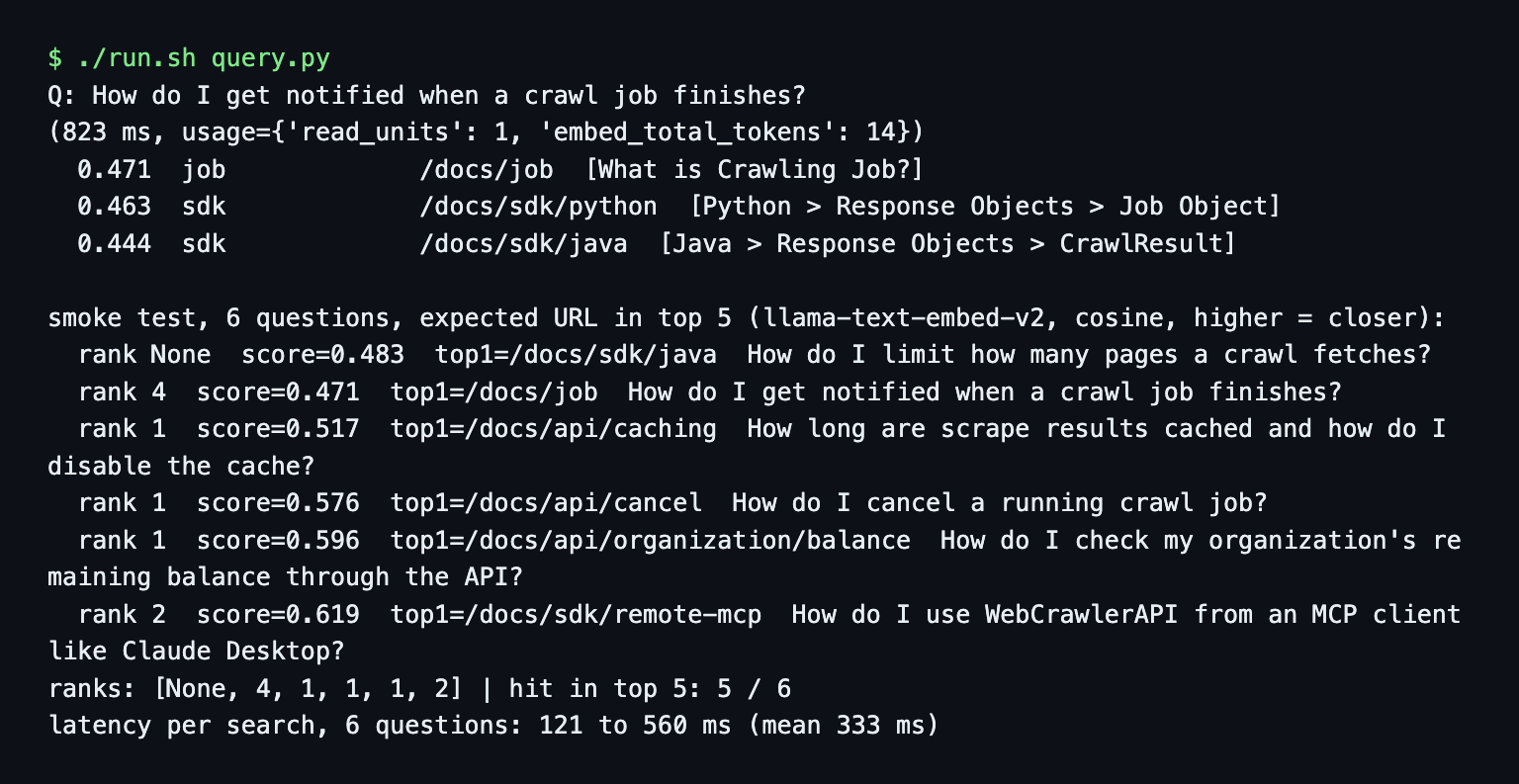
The ranks were 5 of 6 in the top 5: [None, 4, 1, 1, 1, 2]. The same questions ranked [1, 2, 1, 1, 1, 2] with the vectors I made with nomic-embed-text. For "How do I limit how many pages a crawl fetches?", Pinecone returned /docs/sdk/java first and never showed /docs/api/crawl in the top 5. The next section shows that this is the model and not the database. If your own questions matter, run them before you commit to a model. The embedding models guide covers the trade-offs.
Filters use the metadata you upserted. $eq, $in and $ne all worked, and every hit satisfied the filter.
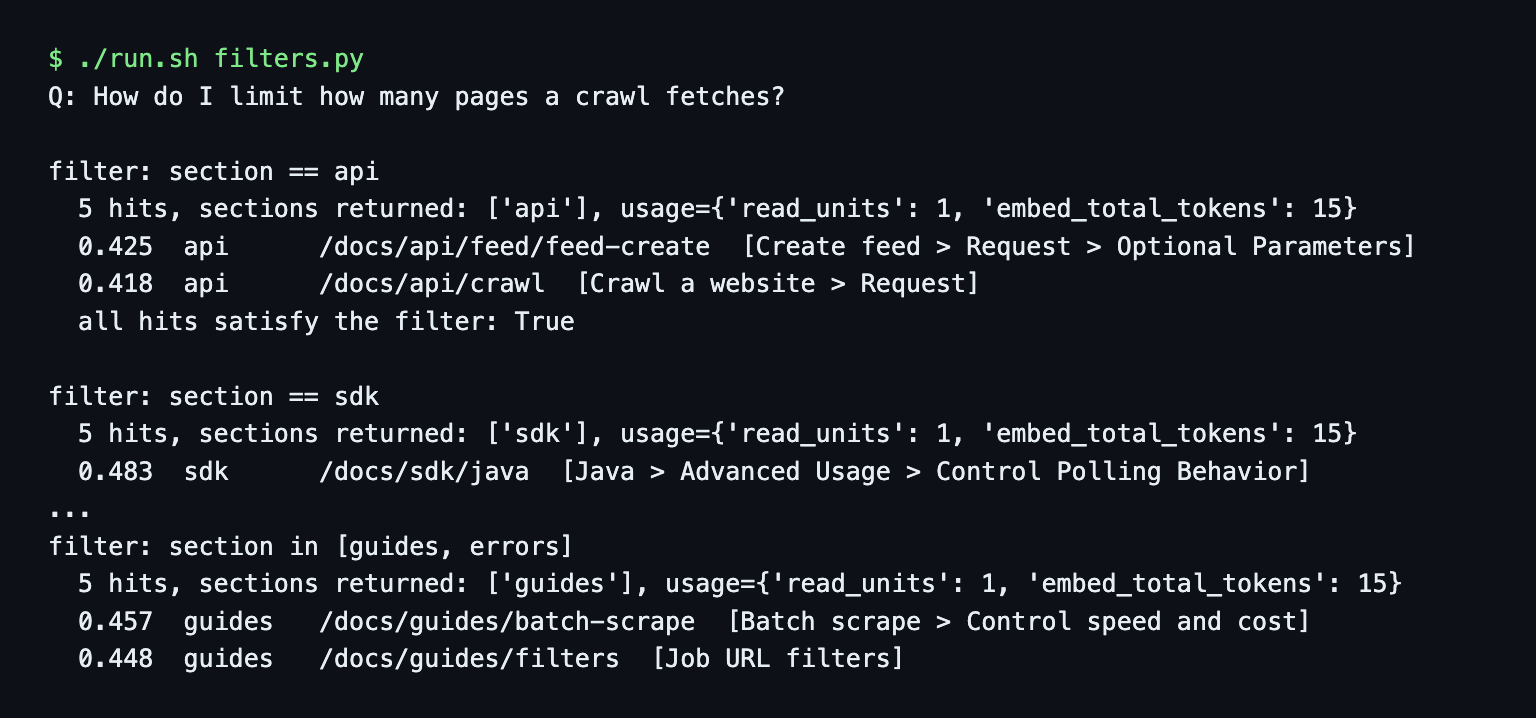
The filter also repaired the missed question. With section == api, /docs/api/crawl ranked 2nd. Filtering on a section you can infer from the page the user is on is the cheapest fix I found for a ranking miss.
Bring your own vectors to isolate the model
To separate the store from the model, I made a second index with add_dense_vector_field("embedding", dimension=768, metric="cosine") and upserted the 304 nomic-embed-text vectors from chunks.jsonl. Queries used Ollama with the search_query: prefix and a dense_vector clause in score_by.
schema = SchemaBuilder().add_dense_vector_field("embedding", dimension=768, metric="cosine").build()
pc.indexes.create(name="kb-docs-byo", schema=schema)
# ... upsert {"_id", "embedding": [...], "url", ...}, then:
score_by=[{"type": "dense_vector", "fields": ["embedding"], "values": query_vector}]
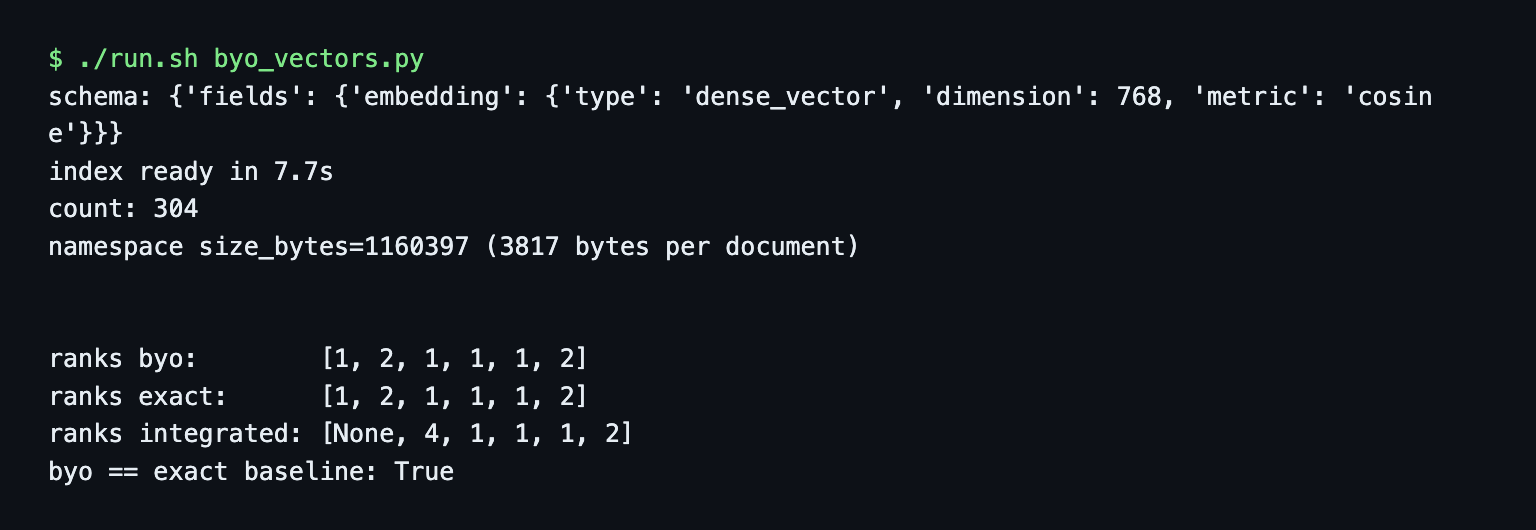
| Index | Embedding | Dimensions | Ranks for the six questions | Bytes per document |
|---|---|---|---|---|
| kb-docs (integrated) | llama-text-embed-v2 | 1,024 | [None, 4, 1, 1, 1, 2] | 4,826 |
| kb-docs-byo (your vectors) | nomic-embed-text | 768 | [1, 2, 1, 1, 1, 2] | 3,817 |
The bring-your-own ranks equal an exact cosine search in plain Python over the same vectors, so the store ranks exactly what the vectors say. The gap to the integrated run is the model. Bring your own vectors if you already embed with another model or need one Pinecone does not host. The price is that your code owns the embedding step again.
Namespaces: one per customer, a filter for sections
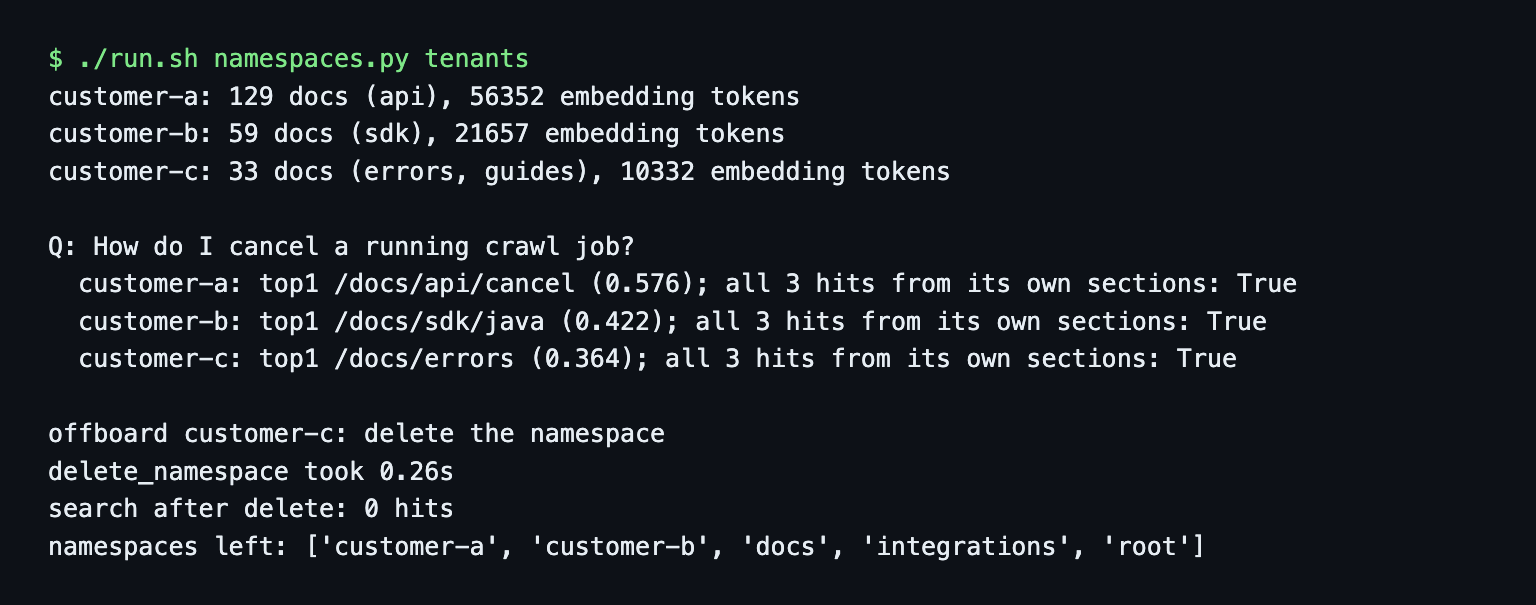
If you build a support bot for B2B customers, give each customer a namespace. The multitenancy guide (read November 6, 2026) lists the reasons: each namespace is stored separately, one tenant cannot slow another, a search costs by the size of its own namespace, and offboarding is deleting the namespace.
I faked three customers from the same chunks: customer-a got the api pages (129 chunks), customer-b the sdk pages (59) and customer-c the errors and guides pages (33). The question "How do I cancel a running crawl job?" returned only pages from its own customer in all three namespaces. Customer A's top hit was /docs/api/cancel at 0.576, B's was /docs/sdk/java at 0.422. Offboarding customer-c took 0.26 seconds. A search in the deleted namespace then returned 0 hits and no error, which means a typo in a namespace name looks like an empty knowledge base.
One namespace per site section does not pay off
The series plan said "namespaces per site section". I built it and measured it. Same 304 chunks, 19 namespaces, my six questions. Search everything means searching each namespace and merging by score, because one call reaches one namespace.
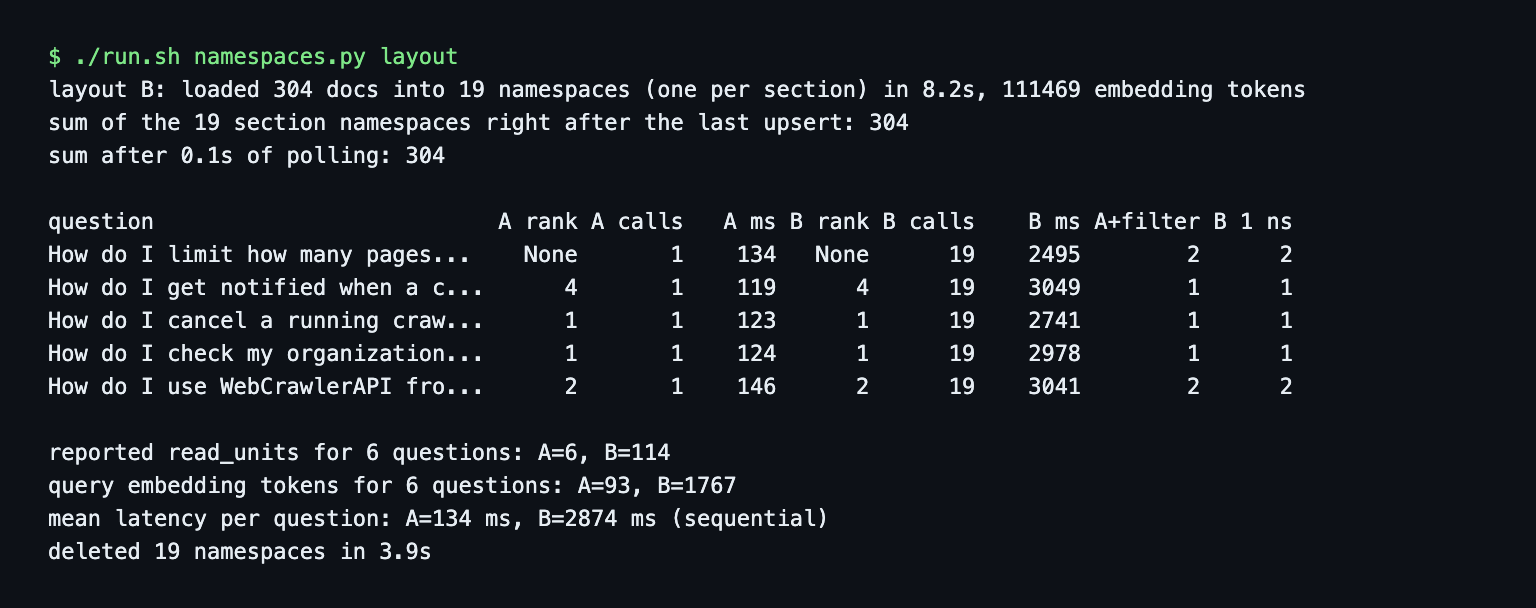
Ranks were the same in both layouts. One namespace needed 6 searches for the six questions, at 134 ms per question. With 19 namespaces it was 114 searches and 2,874 ms per question (19 sequential calls). Query embedding tokens went from 93 to 1,767, because every call embeds the question again. The docs price a query at 1 read unit per GB of namespace with a 0.25 minimum, so at 1.4 MB every search is at the minimum in either layout and splitting saves nothing until a namespace passes 0.25 GB. Use one namespace per site and section as a filter.
One thing went wrong in this run. Deleting the 19 namespaces took 3.9 seconds, but root and integrations were still listed afterwards, and a second delete removed them (namespaces_layout.out, leftovers.out). List the namespaces again after deleting. Starter allows 100 namespaces per index, so up to 100 customers.
Re-crawl: update, delete by URL, no stale chunks
An upsert with an existing _id overwrites that document. It cannot know that a page lost chunks. I took /docs/api/feed/feed-create (5 chunks), pretended a re-crawl found 3 and upserted those.
# wrong: the 3 new chunks overwrite 3 documents, 2 old ones stay
index.documents.upsert(namespace="docs", documents=new_chunks)

# right: delete everything of that page, then upsert
d = index.documents.delete(namespace="docs", filter={"url": {"$eq": url}})
print(d.matched_records)       # 5
index.documents.upsert(namespace="docs", documents=new_chunks)
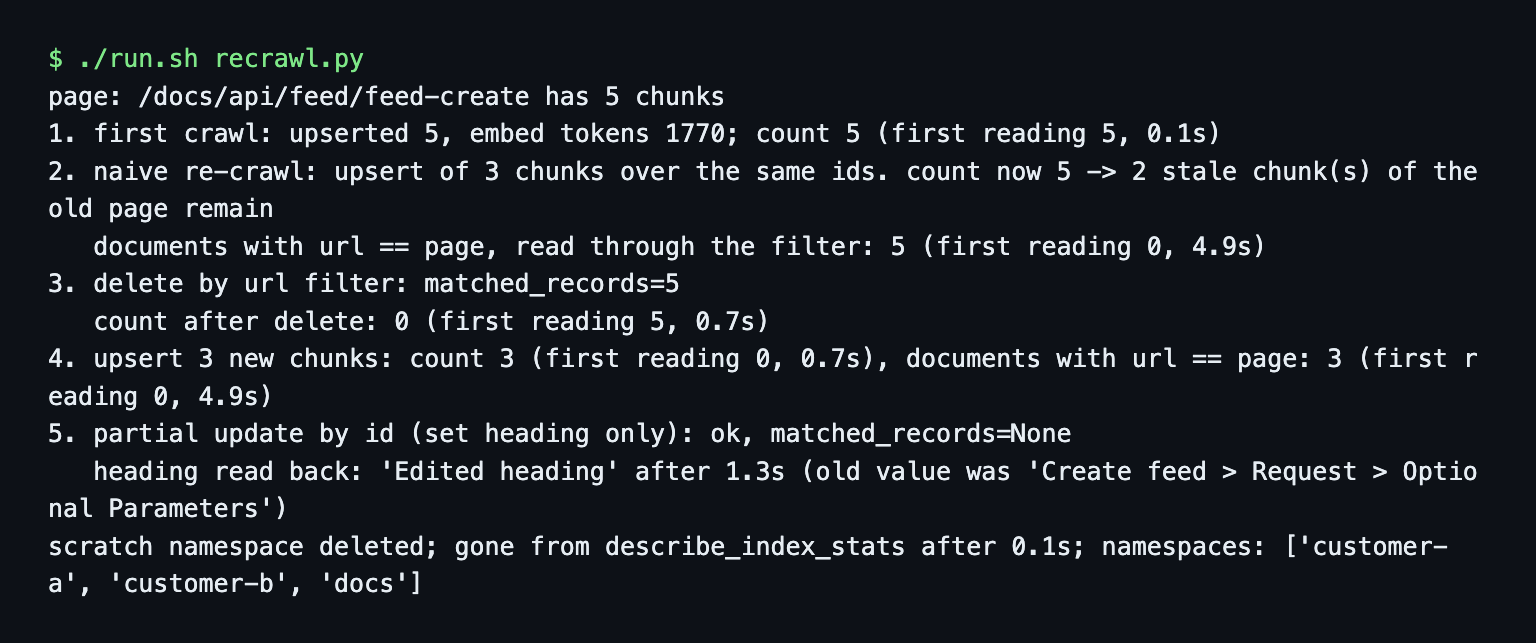
After the naive upsert the namespace still held 5 documents. After delete by URL and a new upsert it held 3. delete by filter returned matched_records=5, and the count read 5 for the first 0.7 seconds after the delete before it read 0. Reading by metadata filter lagged more: a filtered fetch found 0 documents for 4.9 seconds after an upsert while the count already said 5. Poll the count before you assert on it after a delete.
A partial change to one chunk uses documents.update with the id and the fields to set. The new heading was readable after 1.3 seconds. Two limits I hit: a text-match filter in a delete fails with Text match operators ($match_phrase, $match_all, $match_any) are only supported in query requests, and delete has no prefix argument. documents.list(prefix="7a") exists, so list ids and delete by id if your ids carry the URL.
For how often to re-crawl and how to find changed pages, see how often to re-crawl and keeping a support bot in sync.
What Pinecone costs for 10,000 pages
I did not load 58,000 chunks. This is calculated from the documented formulas (understand cost and pricing, read November 6, 2026) and from ratios I measured. cost.py prints every step.
| Item | Low | High |
|---|---|---|
| Storage per month | $0.09 | $0.09 |
| First load, writes | $0.16 | $1.24 |
| First load, embedding | $1.42 | $3.75 |
| 100,000 searches including query tokens | $0.69 | $2.04 |
| Usage total, first month | $2.36 | $7.12 |
In practice the plan minimum is the bill: $20 on Builder, $50 on Standard. The usage above fits inside it. Here are the formulas behind each row.
My corpus has 304 chunks from 52 pages, which is 5.85 chunks per page, so 10,000 pages is 58,462 chunks. The measured size is 4,826 bytes per document (id 16 B, metadata 87 B, text 586 B, a 1,024-dimension vector at 4 B per dimension).
- Storage. Size = documents x (id + metadata + text + dimensions x 4). 58,462 x 4,826 B = 0.28 GB. At $0.33 per GB per month that is $0.09. Starter holds 2 GB, Builder 10 GB.
- Writes. An upsert costs 1 write unit per KB of request (minimum 5), plus 1 per KB of any record it overwrites. The first load is 39,000 units if the request counts only text and metadata and 276,000 if it counts the full stored document. At $4 to $4.50 per million that is $0.16 to $1.24. Starter has 2M a month. A 10% re-crawl overwrites 5,846 chunks, about 31,000 units.
- Embedding. Tokens x $0.16 per million for llama-text-embed-v2. With the three batching results above, the first load is 8.88M, 12.95M or 23.45M tokens, so $1.42, $2.07 or $3.75. Starter allows 5M tokens per month per model and Builder 10M. From January 1, 2027 the first load fits no Starter month in any pattern. It fits Builder (10M) only when sent one chunk at a time (8.88M). At 250,000 tokens per minute it also needs 36 to 94 minutes.
- Reads. One search is max(0.25, namespace size in GB) read units. At 0.28 GB, 100,000 searches are 28,215 units, or $0.45 to $0.51 at $16 to $18 per million. The API reported read_units: 1 for every search of my 1.4 MB namespace, so if you are billed that figure it is 100,000 units, $1.60 to $1.80. Add 1.5M query tokens ($0.24) for 15-token questions.
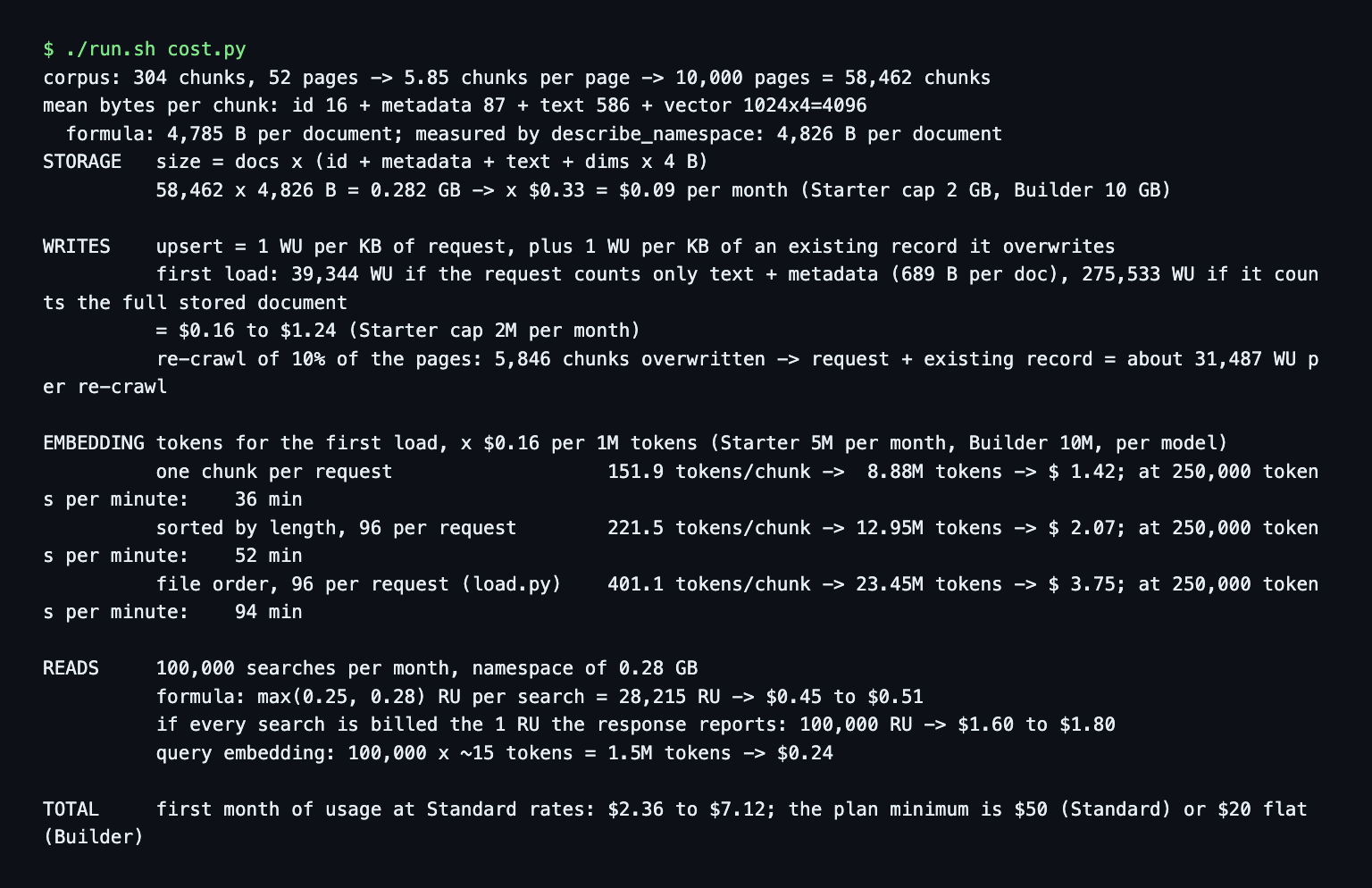
The first load of a 10,000-page site does not fit a Starter month, and heavy batching can push it past Builder too. The estimate assumes no dedicated read nodes and a 1,024-dimension index. Rates vary by cloud and region ($4 to $4.50 for write units, $16 to $18 for read units). The vector database comparison has the pricing table for the other vendors.
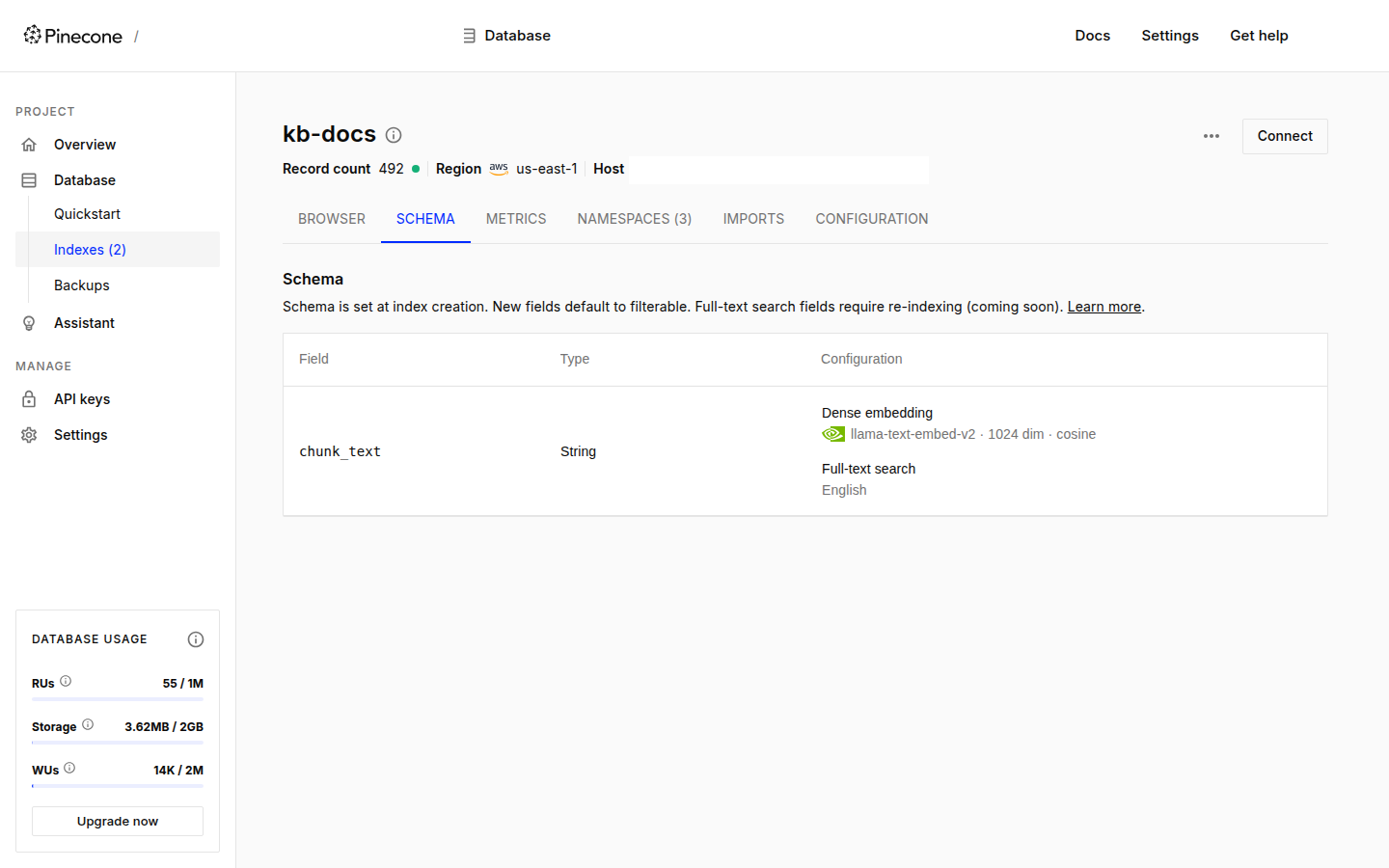
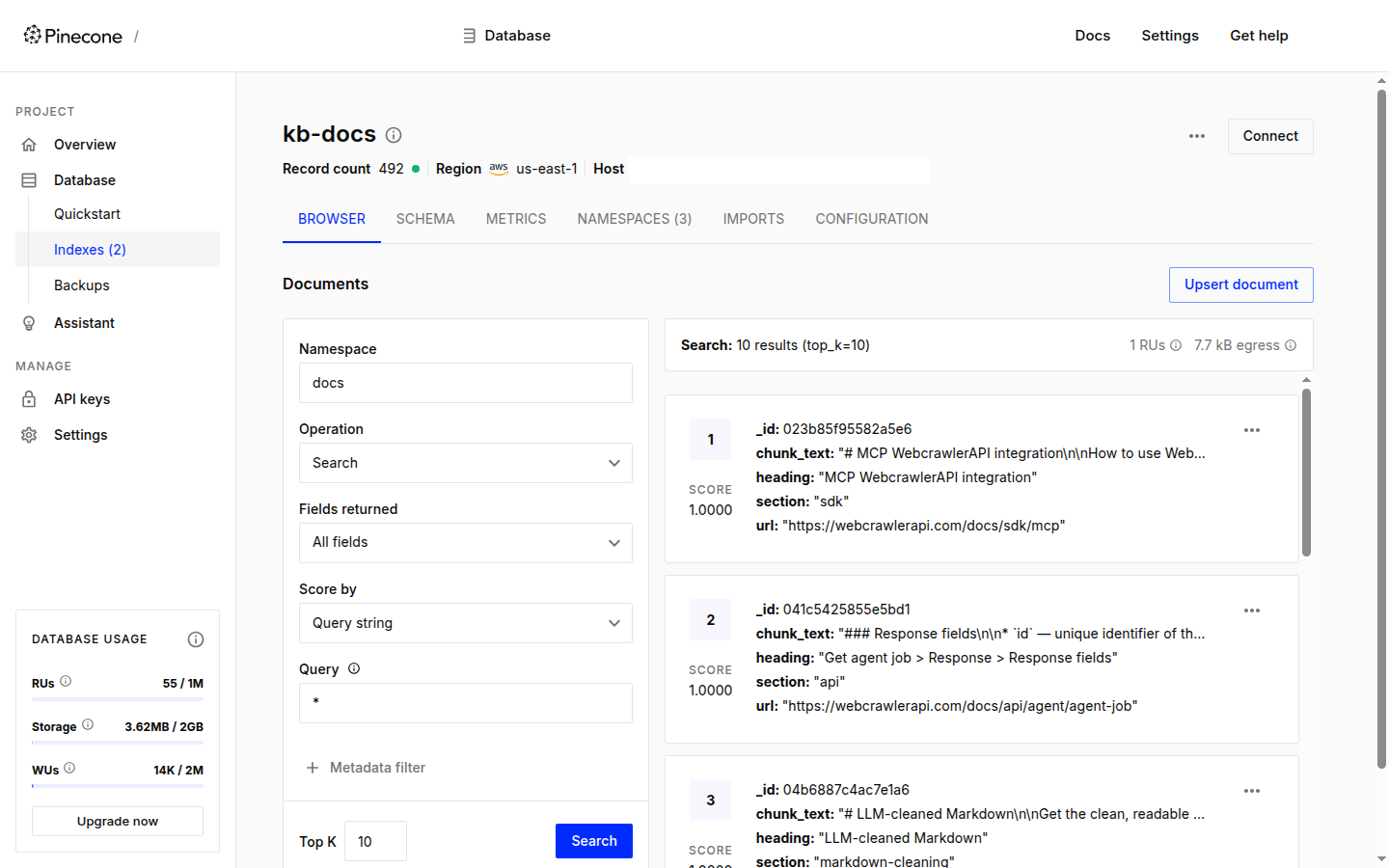
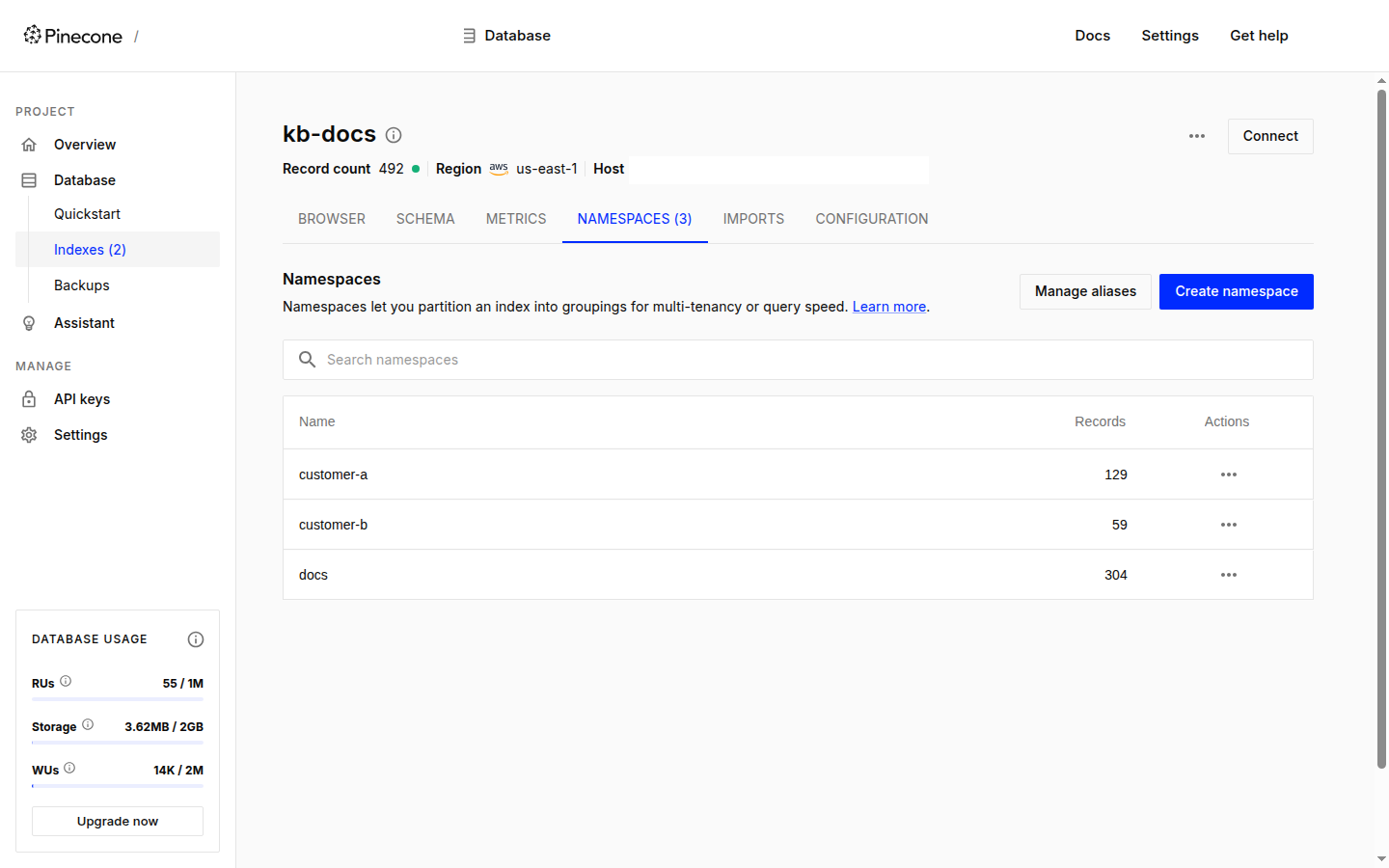
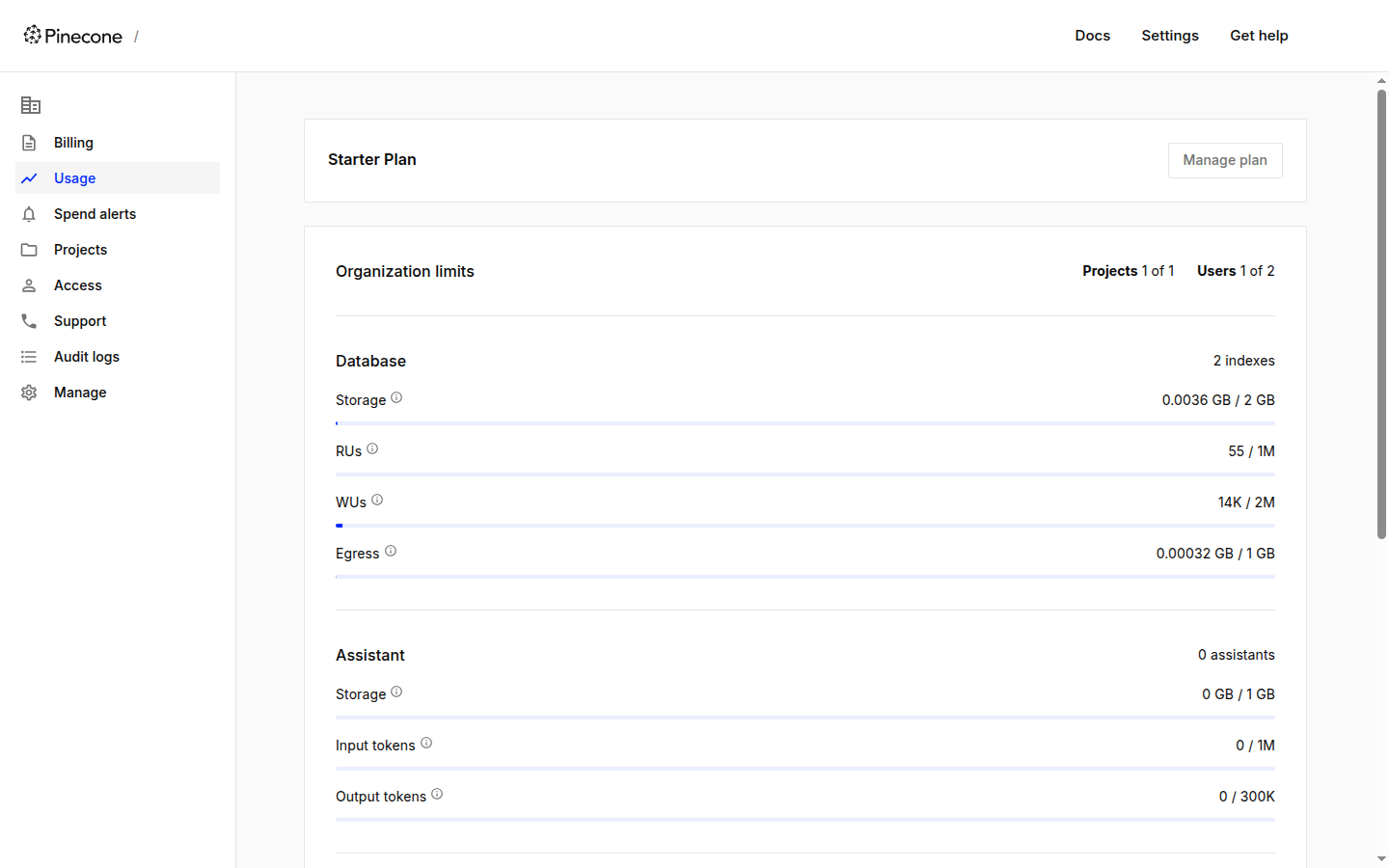
My test run used a small part of the Starter allowance, mostly on repeated loads and the batching tests. The console usage page shows read units, write units and storage:
Pinecone stores the chunks and WebCrawlerAPI makes them. Crawl your docs with items_limit 50, get markdown per page, and re-crawl on a schedule to feed the delete-by-URL step above.
When not Pinecone
For pgvector vs Pinecone, the Supabase tutorial covers the pgvector side with a run. The hub has the Pinecone alternatives list and the pricing table. My picks from the runs:
- You already run Postgres. Use pgvector. Filters are SQL, DELETE ... WHERE url = is your freshness story and there is no per-token bill, but you embed yourself.
- You want a server you control. Qdrant is open source and runs in one Docker command.
- Keyword and vector together is the main need. Weaviate. Pinecone can do it with a full_text_search field, which I did not test.
- A prototype or a small app. Chroma or LanceDB need no account. Milvus has one client API from a laptop file to a cluster.
Reasons to avoid Pinecone, all from this run or the docs: no self-hosting, closed source, usage billing that is harder to predict than a fixed server, Starter only in us-east-1, and per-minute embedding token caps. What it did well: a search index with no embedding code and no server, 12 seconds after the first call.
Gotchas I hit
- The legacy flow still exists. create_index_for_model and upsert_records worked for me (legacy_probe.out), but documents.upsert on that index failed with This index is not served by the documents API. Pick one API per index.
- Rejected inputs. A vector or an empty string in an embedded field returns a 400 with the document id in the message. processing_location on llama-text-embed-v2 returned Model llama-text-embed-v2 has no processing location.
Clean up
Delete the indexes when you are done. Starter allows 5, and I kept at most 3 at a time. cleanup.sh deletes kb-docs, kb-docs-byo and a leftover kb-legacy index if present, with the key from the environment, and removes the local Docker image.
Keep it fresh and next steps
Re-crawl, then replace one URL at a time: delete by url, then upsert the new chunks. The earlier steps are the Python walkthrough and the chunking strategies guide.
Other databases in this series: the vector database comparison, Supabase pgvector, Qdrant and Chroma. The full path from crawl to store is in the website to markdown knowledge base guide.
Every script has its output saved next to it. Start with the README. chunks.jsonl is not included, build_chunks.py makes it.
To try this on your own docs, create an API key, crawl your site with items_limit 50 (see the crawl docs and the crawl API), and run load.py on the result.