Supabase pgvector Tutorial: Load a Website and Query It
At the end of this tutorial a documentation site sits in a Supabase table as 304 vectors, a SQL function called match_chunks returns the closest chunks for a question, and three callers use it: the REST API, supabase-js and an Edge Function. Everything below was run on self-hosted Supabase (official Docker Compose, Postgres 17.6, pgvector 0.8.2) with the nomic-embed-text model on Ollama, which returns 768 dimensions. Where the hosted dashboard differs, the step says so, and the differences are listed in one table.
Tests run November 1 and 2, 2026. This is a small smoke test on one laptop, not a benchmark. For index internals (HNSW against IVFFlat, operators, 100,000 rows) see pgvector knowledge base search. For the whole pipeline around this step, see website to markdown knowledge base.
What you build: a Supabase vector database for a website
The running example is a support bot that answers questions from the WebCrawlerAPI docs. The bot needs the right chunk of documentation for each question, and a Supabase vector database can supply it with plain Postgres.
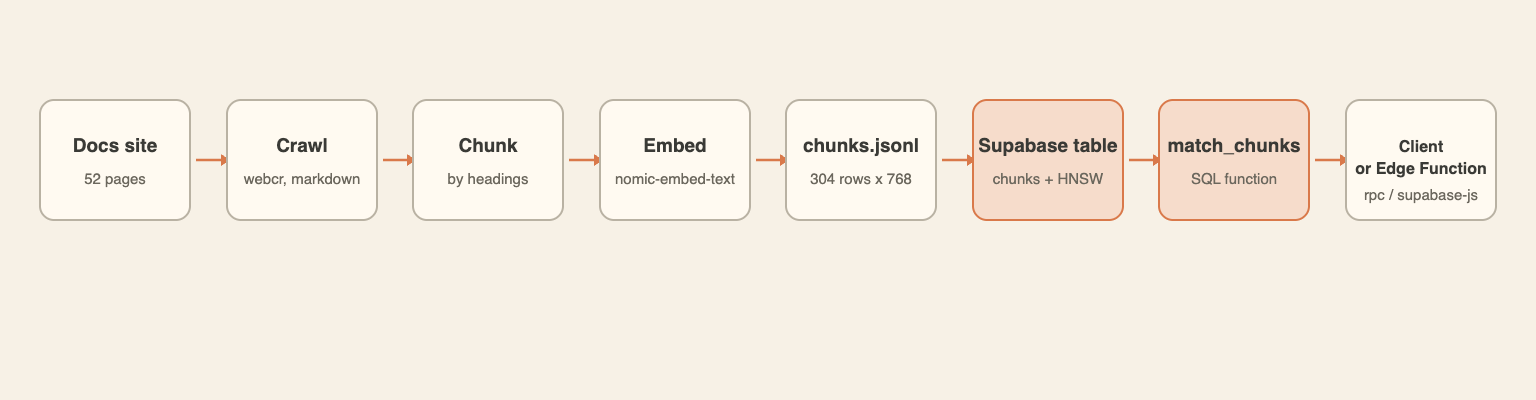
The first four boxes happened before this post and produce a file, chunks.jsonl. The last four are the tutorial. Code, run outputs and a README with image digests are in the code folder. The full chunks.jsonl (about 3 MB) is not published. ingest.py produces it, and a 3-row sample is in the folder.
Hosted Supabase against this local run
| This run (self-hosted) | Hosted project | |
|---|---|---|
| Where | docker compose -p kb-supabase, ports bound to 127.0.0.1 | A project in the Supabase dashboard |
| Studio and API | http://localhost:8100 (gateway) | Project URL from the dashboard |
| Keys | Generated into a local .env with utils/generate-keys.sh | From the project dashboard |
| Postgres | Pooler on 127.0.0.1:5432, user postgres.<tenant id> | Connection string from the dashboard |
| Embeddings | Ollama on the host | Any hosted embeddings API (same dimension rule) |
| Edge Functions | Files copied into volumes/functions | supabase functions deploy |
What was and was not run here: everything in steps 1 to 8 and the checks ran on the self-hosted stack above. The hosted column comes from the Supabase docs (read November 1 and 2, 2026), and no hosted project was run. Also not run: Neon, per-customer RLS policies, supabase-js inserts and the plain curl crawl in step 0.
The compose file listed Envoy as the default gateway, not Kong, so the "Kong on port 8000" steps found in older guides do not apply. Port 8000 was also taken by another container on this machine, so the gateway runs on 8100.
Step 0: Get the data (chunks.jsonl)
The file comes from an earlier run of the pipeline in build a knowledge base from a website in Python. Fifty-two pages of webcrawlerapi.com/docs were crawled with the webcr command line client, which calls WebCrawlerAPI and keeps the API key in its own store, so no key appears in the scripts. Pages were split by headings as in markdown chunking in Python, then embedded. These two calls are the core of ingest.py:
# crawl: save every page under /docs as markdown in ./pages
subprocess.run(["webcr", SITE, "-l", "60", "-d", "3", "-w", "/docs", "-o", str(PAGES)], check=True)

# embed: nomic-embed-text through a local Ollama server
resp = requests.post("http://localhost:11434/api/embed",
                     json={"model": "nomic-embed-text", "input": [prefix + t for t in texts]})
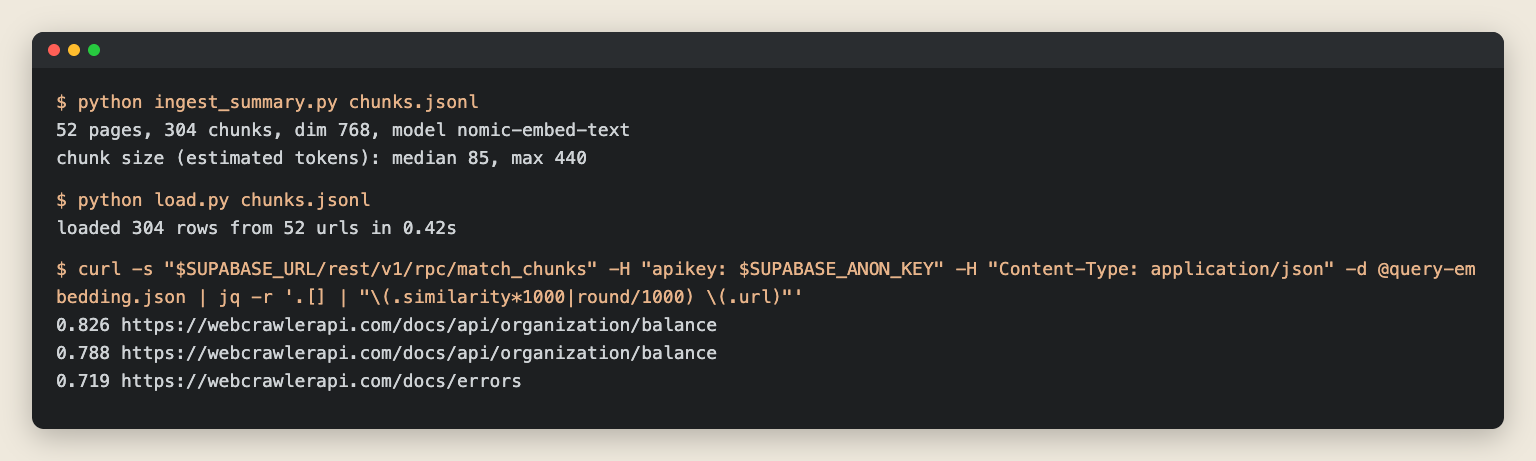
The summary printed by ingest_summary.py on the file used here:
52 pages, 304 chunks, dim 768, model nomic-embed-text
chunk size (estimated tokens): median 85, max 440
Token counts are estimates (words times 4/3). The crawl is estimated at about $0.10 (52 pages at the pay-as-you-go price of $0.002 per page, from the pricing page; no billing record was checked). Embeddings were free because Ollama runs locally.
Ollama is used here because it needs no account. The series default is text-embedding-3-small with 1536 dimensions. In the embedding model comparison, nomic-embed-text reached 61.3% section recall@1 against 63.4% for text-embedding-3-small, which is a tie within noise. Whatever model is chosen, the vector column in step 3 must match its dimension.
Each line of the file is one chunk. The embedding is cut here for reading:
{
  "id": "f6b0f4d87ab47b44",
  "url": "https://webcrawlerapi.com/docs",
  "heading": "Build with WebCrawlerAPI",
  "text": "# Build with WebCrawlerAPI\n\nTurn any page into clean markdown with one request. ...",
  "embedding": [0.00792278, 0.0015181096, -0.1349272, "... 765 more"],
  "model": "nomic-embed-text",
  "dim": 768
}
webcr is the WebCrawlerAPI command line client (it updates through Homebrew or npm). webcr auth set YOUR_API_KEY stores the key once. In the call above, -l 60 stops the crawl at 60 pages, -d 3 goes at most 3 links deep from the start URL, -w /docs crawls only URLs matching /docs, and -o saves each page as markdown in ./pages. Per its help text, webcr calls POST /v1/crawl and then downloads the result. A small crawl with the same command but -l 3 -d 1 was re-run on November 2 and saved 3 markdown files (out/crawl-3.out), about $0.006 at $0.002 per page. The same crawl as a plain API call, in the form documented in the crawl API docs:
curl --request POST --url https://api.webcrawlerapi.com/v1/crawl \
  --header 'Authorization: Bearer YOUR_API_KEY' --header 'Content-Type: application/json' \
  --data '{"url": "https://webcrawlerapi.com/docs", "items_limit": 60, "max_depth": 3, "whitelist_regexp": "/docs"}'
To use your own site, create an API key in the dashboard, crawl your docs URL, and point SITE in ingest.py at it. The crawl API page lists the options.
Step 1: Start Supabase and open Studio
The compose folder comes from a shallow sparse clone of supabase/supabase. Secrets are generated, never copied from .env.example (its demo keys are public). The full command list is in the docker README. The core of it:
cp .env.example .env
sh utils/generate-keys.sh --update-env   # writes JWT secret, API keys and passwords into .env

# publish only on loopback; 8000 was busy here, so the gateway uses 8100
sed -i.bak 's|^API_GW_HTTP_PORT=.*|API_GW_HTTP_PORT=127.0.0.1:8100|' .env
# (two more sed lines bind the 5432 and 6543 pooler ports to 127.0.0.1)

docker compose -p kb-supabase up -d
docker compose -p kb-supabase ps
All 11 containers reported healthy shortly after start. The images were supabase/postgres:17.6.1.136, supabase/studio:2026.10.12-sha-3699278, postgrest/postgrest:v14.18 and supabase/edge-runtime:v1.77.4. Studio opened at http://localhost:8100 behind basic auth with the generated dashboard password.
Two things behaved differently from what a hosted project suggests. The db container publishes no port; the Postgres you can connect to from the host is the Supavisor pooler on 5432, and its user name carries the tenant id (postgres.your-tenant-id with the default .env). A plain postgres user fails with FATAL: (ENOIDENTIFIER) no tenant identifier provided. And a hosted project is one click in the dashboard, with a region and a database password to choose.
Step 2: Enable the vector extension
In Studio this is Database, Extensions, search for vector, flip the switch. The dialog proposes the extensions schema, which is also where the Supabase docs put it (vector columns guide).
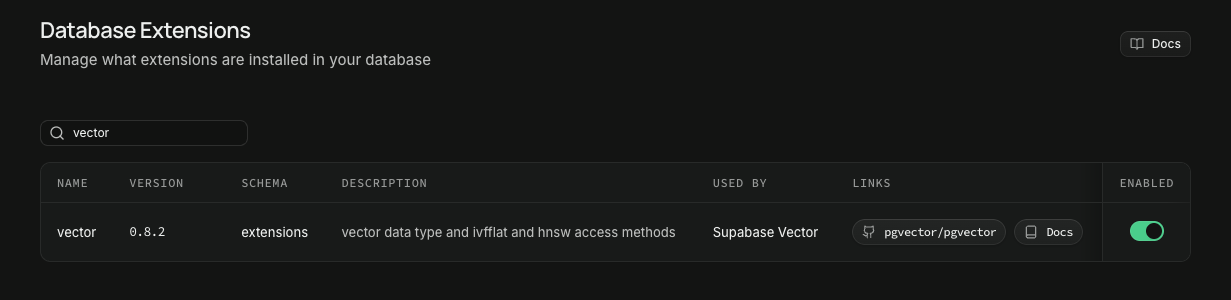
The SQL equivalent (the first statement is also in schema.sql):
create extension if not exists vector with schema extensions;
select extname, extversion from pg_extension where extname = 'vector';
 extname | extversion
---------+------------
 vector  | 0.8.2
Step 3: Create the chunks table and the HNSW index
The whole schema.sql was run through psql in the database container (output in out/schema.out) and the pieces are shown next.
Table with vector(768)
create table public.chunks (
  id        text primary key,
  url       text not null,
  section   text generated always as (
              coalesce(nullif(split_part(substring(url from '/docs/?(.*)$'), '/', 1), ''), 'root')
            ) stored,
  heading   text not null,
  text      text not null,
  embedding extensions.vector(768) not null
);
section is derived from the URL (api for /docs/api/crawl, sdk for /docs/sdk/mcp) and lets the support bot restrict answers to one part of the docs. The loaded data has 19 sections, led by api with 129 chunks and sdk with 59. The 768 must equal the model's output size. A different model means a new column and a re-embed.
HNSW index
create index chunks_embedding_hnsw
  on public.chunks using hnsw (embedding extensions.vector_cosine_ops);
Cosine is the operator the query uses, so the index uses vector_cosine_ops. Tuning and the comparison with IVFFlat are in pgvector knowledge base search.
Row Level Security
Supabase exposes every table in public through the REST API, so the table gets RLS and a read-only policy:
alter table public.chunks enable row level security;
create policy "chunks are readable by anon and authenticated"
  on public.chunks for select to anon, authenticated using (true);
Tested with the anon key: calling match_chunks works (step 6), and an insert is refused:
{"code":"42501", ... "message":"new row violates row-level security policy for table \"chunks\""}
HTTP 401
Per-customer isolation would need one policy per tenant.
Step 4: Load the chunks
load.py uses psycopg 3 and COPY, with vectors sent in pgvector's text format:
with cur.copy("copy public.chunks (id, url, heading, text, embedding) from stdin") as cp:
    for r in rows:
        vec = "[" + ",".join(map(str, r["embedding"])) + "]"
        cp.write_row((r["id"], r["url"], r["heading"], r["text"], vec))
loaded 304 rows from 52 urls in 0.42s
COPY through the pooler session port worked without extra settings. In Studio, Table Editor shows the rows with the embedding column rendered as [0.028284427,0.0466...:
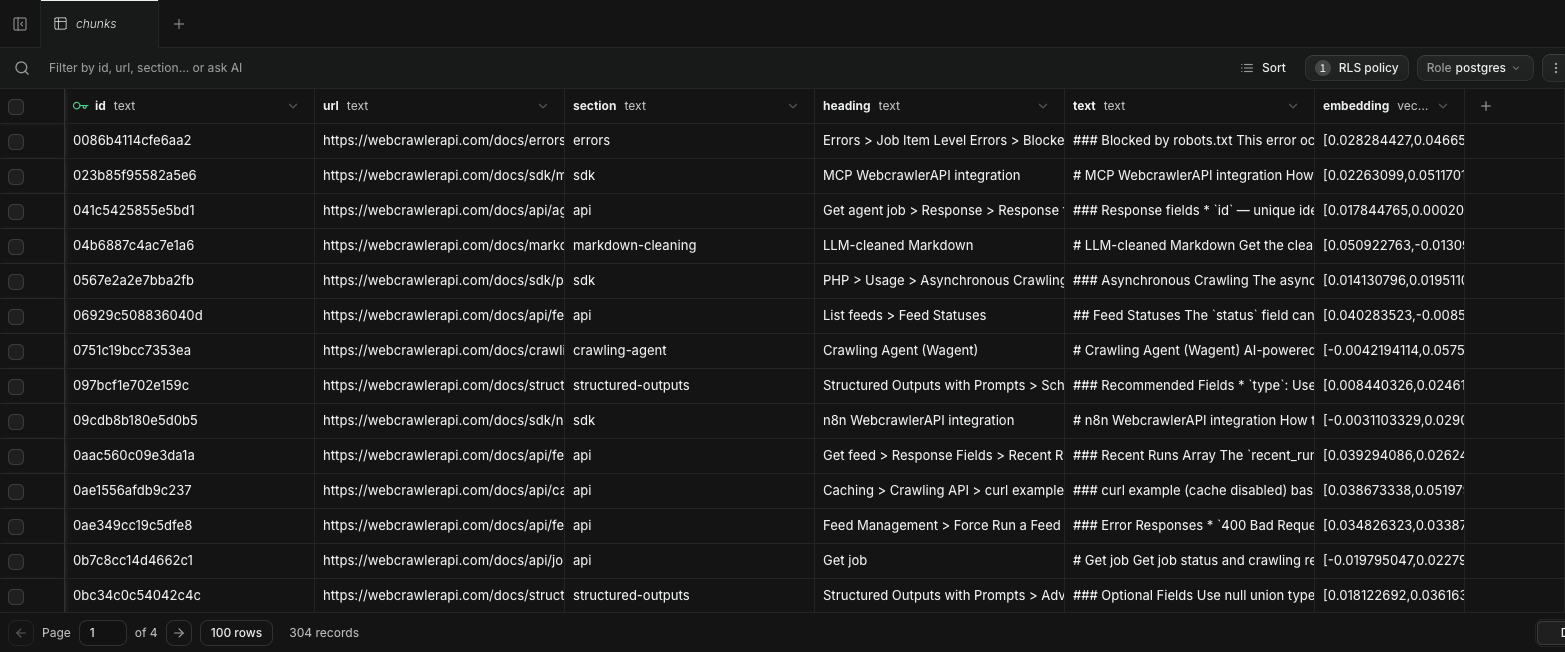
On a hosted project the load script is the same. Only DATABASE_URL changes to the connection string from the dashboard.
Step 5: The match_chunks function in Supabase pgvector
PostgREST cannot send pgvector's distance operators, so the search is a SQL function and clients call it with rpc(). This follows the pattern in the Supabase semantic search guide, with a section filter added:
create or replace function public.match_chunks (
  query_embedding extensions.vector(768),
  match_threshold float default 0.0,
  match_count int default 5,
  filter_section text default null
)
returns table (id text, url text, heading text, text text, similarity float)
language sql stable
set search_path = public, extensions
as $$
  select c.id, c.url, c.heading, c.text,
         1 - (c.embedding <=> query_embedding) as similarity
  from public.chunks c
  where (filter_section is null or c.section = filter_section)
    and c.embedding <=> query_embedding < 1 - match_threshold
  order by c.embedding <=> query_embedding asc
  limit match_count;
$$;
The line set search_path = public, extensions is there because of a failure. The first version of the function worked in psql and in Studio, then failed through the REST API:
operator does not exist: extensions.vector <=> extensions.vector (code 42883)
The role that runs rpc() calls does not have extensions on its search path in this stack, while the postgres role does. The function now sets its own path. The Supabase docs example has no such line. This may be specific to the self-hosted compose. The line is harmless in both places.
Run it in the SQL editor
The editor should not need 768 numbers pasted into it, so a query embedding for "How do I cancel a running crawl job?" was stored in a scratch table first (demo_query.py in the code folder does this). The SQL behind it:
create table public.demo_query (question text, embedding extensions.vector(768));
insert into public.demo_query values ('How do I cancel a running crawl job?', '[...768 floats from Ollama...]');
-- in the editor:
select url, heading, round(similarity::numeric, 3) as similarity
from match_chunks((select embedding from demo_query), 0.0, 5);
The result:
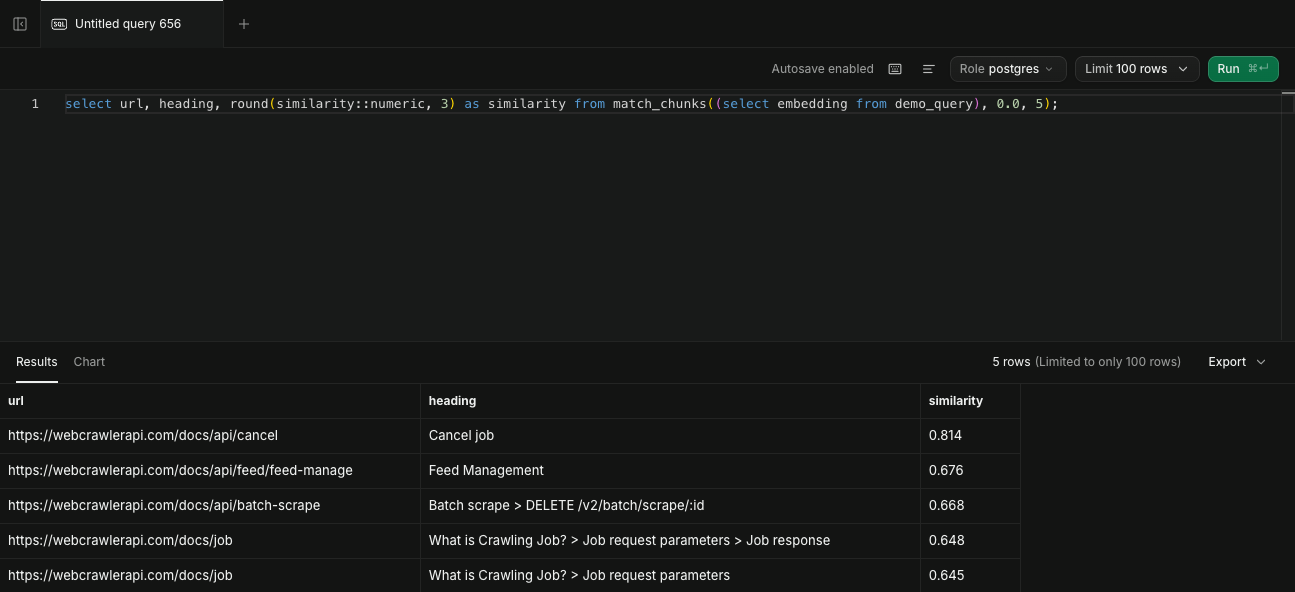
The scratch table was dropped afterwards. The answer page, /docs/api/cancel, is first at 0.814, with the next result at 0.676.
Filter by section
The same question ("How do I get notified when a crawl job finishes?") with and without filter_section:
-- no filter
0.745  /docs/api/cancel          [Cancel job]
0.729  /docs/async-requests      [Async and Webhooks > Using API calls]
0.714  /docs/api/job             [Get job > Response]
-- filter_section = 'api'
0.745  /docs/api/cancel          [Cancel job]
0.714  /docs/api/job             [Get job > Response]
0.700  /docs/api/crawl           [Crawl a website > Response]
The filter removed the page that answers the question. The webhook docs live in async-requests, outside the api section. A filter makes answers narrower, and it only helps when the question belongs to that section. Use it for scoped bots ("answer only from the API docs"), not as a default.
The Supabase guide also says to put the filter inside the function rather than chaining .eq() after rpc(), because PostgREST applies a chained filter to the already limited result. That is why filter_section is a function argument.
Step 6: Query from your app with REST and supabase-js
The query embedding comes from Ollama on the host, with the search_query: prefix that nomic-embed-text expects (see the embedding post). make_query_json.py in the code folder writes it (python make_query_json.py "How do I check my organization's remaining balance through the API?"). It calls Ollama through embed_query from ingest.py, which adds the prefix, and saves {"query_embedding": [...], "match_count": 3}. The REST call sends that file:
curl -s "$SUPABASE_URL/rest/v1/rpc/match_chunks" \
  -H "apikey: YOUR_SUPABASE_ANON_KEY" -H "Content-Type: application/json" \
  -d @query-embedding.json   # {"query_embedding": [768 floats], "match_count": 3}
For "How do I check my organization's remaining balance through the API?":
0.826 https://webcrawlerapi.com/docs/api/organization/balance
0.788 https://webcrawlerapi.com/docs/api/organization/balance
0.719 https://webcrawlerapi.com/docs/errors
supabase-js 2.118.0 on Node (query.mjs) returned the same three rows:
const supabase = createClient(process.env.SUPABASE_URL, process.env.SUPABASE_ANON_KEY);
const { data, error } = await supabase.rpc("match_chunks", {
  query_embedding: embeddings[0],
  match_count: 3,
});
Python has two paths in query.py: psycopg straight to Postgres, and supabase-py 2.33.0 through PostgREST (--rest). On the cancel question both returned identical top 5 lists (out/cancel-psycopg.out and out/cancel-rest.out).
The key in the commands is a placeholder. The anon key is the one safe to put in a client, because RLS limits what it can do. The service role key bypasses RLS and stays on servers.
On a hosted project the base URL and keys come from the dashboard, and embeddings come from a hosted API instead of Ollama. The dimension rule stays.
Step 7: Embed the query inside an Edge Function
The goal is a single endpoint for a front end: send a question, get the top chunks. The function embeds the question, then calls match_chunks with the project's own client:
Deno.serve(async (req) => {
  const { question } = await req.json();
  const query_embedding = await embed(question);   // Ollama via host.docker.internal:11434
  const supabase = createClient(Deno.env.get("SUPABASE_URL")!, Deno.env.get("SUPABASE_ANON_KEY")!);
  const { data, error } = await supabase.rpc("match_chunks", { query_embedding, match_count: 3 });
  if (error) return Response.json({ error: error.message }, { status: 500 });
  return Response.json({ results: data.map((r) => ({ url: r.url, heading: r.heading, similarity: r.similarity })) });
});
The snippet is an excerpt (the embed() helper and imports are left out); the full file is functions/kb-query/index.ts in the code folder. Self-hosted Supabase serves any folder under volumes/functions, so copying kb-query/index.ts there was the whole deploy. No restart was needed. Studio then listed it under Edge Functions.
The request and the function log:
$ curl -s "$SUPABASE_URL/functions/v1/kb-query" -H "Authorization: Bearer YOUR_SUPABASE_ANON_KEY" \
    -d '{"question":"How do I cancel a running crawl job?"}'
{"results":[{"url":"https://webcrawlerapi.com/docs/api/cancel","heading":"Cancel job","similarity":0.8138...}, ...]}

[Info] kb-query embed=12ms search=3ms top=https://webcrawlerapi.com/docs/api/cancel
Ollama stayed bound to localhost. The container reached it through host.docker.internal:11434, which Docker Desktop forwards to the host, so OLLAMA_HOST=0.0.0.0 was not needed.
The log line is from docker logs supabase-edge-functions on a warm call. The first two calls after the function was added were slower: 46 to 49 ms to embed and 7 to 12 ms to search (out/edge-logs.out).
Hosted deploys use the Supabase CLI: supabase login, supabase link --project-ref ..., then supabase functions deploy kb-query, and API keys for the embedding provider are stored with supabase secrets set (Supabase docs). Ollama is not reachable from a hosted project, so the embed() function must call a hosted embeddings API with the same 768 dimensions, or the column must change.
Step 8: Answer a question with citations
The last step feeds the top 5 chunks to a chat model and asks for an answer that cites the url field. answer.py in the code folder does it with gemma4:26b on local Ollama, still bound to localhost:
rows = conn.execute("select url, heading, text from match_chunks(%s::extensions.vector, 0.0, 5, null)", (vec,)).fetchall()
context = "\n\n".join(f"[{i}] {url} ({heading})\n{text}" for i, (url, heading, text) in enumerate(rows, 1))
prompt = ("Answer the question using only the documentation excerpts below. "
          "Cite the source URL of every claim in parentheses. If the excerpts do not contain the answer, say so.\n\n"
          f"{context}\n\nQuestion: {question}")
For "How do I cancel a running crawl job?" the model answered: use PUT https://api.webcrawlerapi.com/v1/job/:id/cancel, and items that are not in progress and not done are marked canceled and not charged, citing https://webcrawlerapi.com/docs/api/cancel. That matches the cancel docs page. The first call took 32 s (the next call took 7.9 s, so model loading is the likely cause).
For the cache question the facts were right (7 days, 604800 seconds, max_age set to 0 disables the cache), but the model cited chunk numbers like [1], [2], [4] instead of URLs. It ignored the citation instruction. With a small local model, check the citation format in code, or print the retrieved URLs next to the answer as answer.py does (out/answer.out).
Check it works: top-5 hits, speed and index use
Six questions were written by hand from the docs pages, each with a gold page. Top-5 contains the gold page in 6 of 6 cases. This is a smoke test of the wiring. Retrieval quality across models is in the embedding comparison.
| # | Question (hand-written) | Gold page | Rank in top 5 | Top-1 similarity |
|---|---|---|---|---|
| 1 | How do I limit how many pages a crawl fetches? | /docs/api/crawl | 1 | 0.756 |
| 2 | How do I get notified when a crawl job finishes? | /docs/async-requests | 2 | 0.745 |
| 3 | How long are scrape results cached and how do I disable the cache? | /docs/api/caching | 1 | 0.814 |
| 4 | How do I cancel a running crawl job? | /docs/api/cancel | 1 | 0.814 |
| 5 | How do I check my organization's remaining balance through the API? | /docs/api/organization/balance | 1 | 0.826 |
| 6 | How do I use WebCrawlerAPI from an MCP client like Claude Desktop? | /docs/sdk/mcp | 2 | 0.847 |
Latency is the median of 20 warm calls per path (3 warm-up calls first), cycling through the six questions, on one laptop with everything local:
| Path | p50 ms | min ms | max ms |
|---|---|---|---|
| SQL via psycopg (embedding precomputed) | 2.2 | 2.0 | 3.0 |
| REST rpc via PostgREST (embedding precomputed) | 4.8 | 3.3 | 27.3 |
| Ollama embed only | 13.4 | 11.3 | 17.9 |
| Edge Function end to end (embed + search) | 20.0 | 17.4 | 26.4 |
The embedding call is the slowest single part. The two database paths are a few milliseconds on 304 rows. These numbers say nothing about hosted Supabase, where the network sits in between.
Sizes after loading:
| Metric | Value |
|---|---|
| Rows | 304 |
| Table heap, pg_relation_size('chunks') | 256 kB |
| TOAST table (the 768-float vectors live here), pg_relation_size(reltoastrelid) | 1216 kB |
| Table without indexes, pg_table_size('chunks') (heap + TOAST + free space and visibility maps) | 1552 kB |
| Primary key index | 40 kB |
| HNSW index | 1224 kB |
| Everything, pg_total_relation_size('chunks') | 2816 kB |
| HNSW build on 304 rows | 0.08 s |
The parts add up: 1552 kB (table, TOAST, free-space and visibility maps) + 40 kB + 1224 kB = 2816 kB. The vectors sit in TOAST, which is why the heap alone is only 256 kB. Both the TOAST data and the HNSW index are about 4 KB per row.
EXPLAIN ANALYZE: does the query use the index?
The check is a plain top-5 cosine query on the table (the same order by and limit as match_chunks, without the function wrapper). With default planner settings it does not use the index. At 304 rows the planner prefers a sequential scan:
Limit  (cost=42.37..42.38 rows=5 width=33) (actual time=0.843..0.844 rows=5 loops=1)
  ->  Sort  (cost=42.37..43.13 rows=304 width=33) (actual time=0.843..0.843 rows=5 loops=1)
        Sort Key: ((embedding <=> '[...768 floats]'::vector))
        Sort Method: top-N heapsort  Memory: 25kB
        ->  Seq Scan on chunks  (cost=0.00..37.32 rows=304 width=33) (actual time=0.013..0.810 rows=304 loops=1)
Execution Time: 0.854 ms
After set enable_seqscan = off (a test switch, not a production setting), the HNSW index is used:
Limit  (cost=614.28..616.47 rows=5 width=33) (actual time=0.153..0.165 rows=5 loops=1)
  ->  Index Scan using chunks_embedding_hnsw on chunks  (cost=614.28..747.60 rows=304 width=33) (actual time=0.153..0.165 rows=5 loops=1)
        Order By: (embedding <=> '[...768 floats]'::vector)
Execution Time: 0.173 ms
The planner puts a higher cost on the index scan (614 against 42), so it keeps the sequential scan until the table grows. The index is for tables with tens of thousands of rows, and 0.85 ms against 0.17 ms is not a benchmark.
When Supabase pgvector is the wrong choice
- Postgres is already running elsewhere. A second Postgres in a separate Supabase project means a second set of keys, backups and bills. Add pgvector to the existing database instead (pgvector knowledge base search uses plain Docker Postgres).
- Free tier limits matter. The Supabase pricing page, read November 2, 2026, lists a Free plan with a 500 MB database and says free projects pause after 1 week of inactivity (limit of 2 active projects). This corpus took 2.8 MB, so size is not the issue for a docs site, but a paused project would break a bot nobody visits for a week.
- Very large or high-traffic collections. At that scale a dedicated vector database may fit better. The vector database comparison for a website knowledge base has the table.
For Neon, the other hosted Postgres, its pgvector docs page says CREATE EXTENSION IF NOT EXISTS vector; enables the extension and that pgvector is available on every Neon plan with no add-on. Read the Neon pgvector docs.
Keep it fresh and next steps
When the docs change, crawl again and upsert by id (a hash of the URL and chunk index), so unchanged rows are not duplicated. Deleting rows for removed pages is a separate step (see the recrawl post for skipping unchanged pages). How often to recrawl a website for an AI knowledge base covers the schedule. Chunk size and overlap are discussed in chunking strategies for a knowledge base. The same chunks are also loaded into Qdrant in Docker with payload filters and Weaviate with hybrid search. A Pinecone tutorial is coming.
Run it on your own docs
Crawl your site with WebCrawlerAPI (crawl docs, crawl API), run ingest.py against your URL, load the result with load.py and the same schema.sql. Pay-as-you-go crawling is $0.002 per page (see pricing), so a 50-page docs site costs about $0.10. If you switch to text-embedding-3-small, change vector(768) to vector(1536) before loading.