Elasticsearch Vector Search Tutorial: Hybrid BM25 + kNN Over a Crawled Website, Plus OpenSearch
This Elasticsearch vector search tutorial indexes 304 chunks of a crawled docs site, queries them with BM25, kNN and Elasticsearch hybrid search (RRF), and then repeats the whole thing on OpenSearch. It is for a team that already runs one of the two for site search and wants vectors for a support bot or docs assistant, or for anyone on Algolia DocSearch who wants to own the crawl and the index. I ran every command on November 9, 2026, in Docker, with Elasticsearch 9.5.6 and OpenSearch 3.9.0.
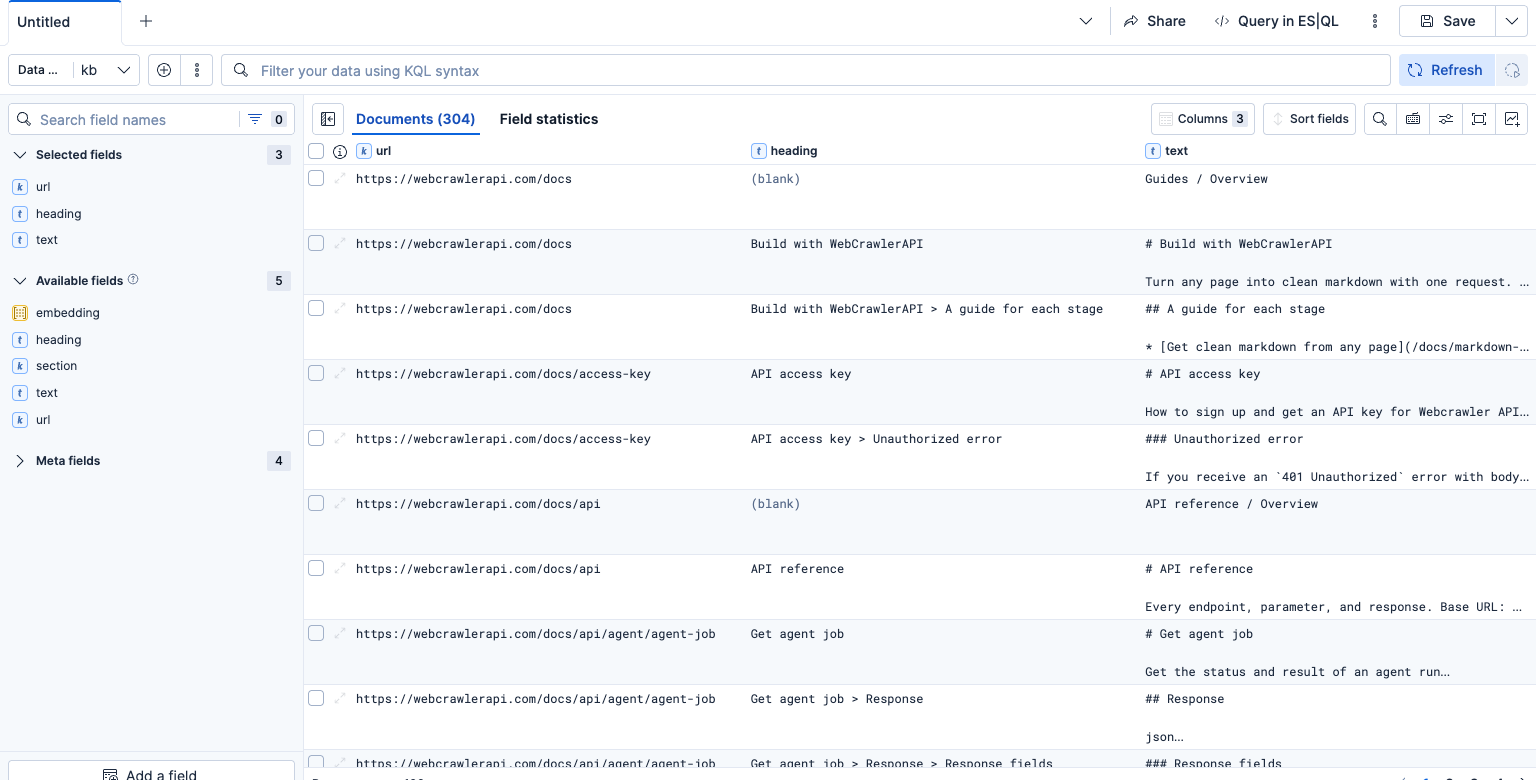
The input is the same 304 chunks from 52 WebCrawlerAPI docs pages that the Chroma and sqlite-vec posts used, with the same 6 questions, so the results line up. This is the search-engine option for the store step of the website to markdown knowledge base guide. For other stores see the vector database comparison. 304 chunks is a smoke test. I would not pick Elasticsearch for a corpus this small if I did not already run it. All code and outputs are in the code folder.
What I found:
- Elasticsearch RRF returned 403 on the default Basic license. OpenSearch ran RRF with no license step.
- Hybrid did not beat kNN on 6 questions. It did win on the exact token 429.
- Both engines returned identical kNN top-5 page lists.
Why Elasticsearch or OpenSearch for a docs knowledge base
A vector database answers "which chunk means the same thing as this question", but it is weak on exact strings. A search engine keeps the old tools next to the vectors: BM25 on tokens like max_depth or 429, field boosts, filters, highlights and aggregations. Hybrid search (keyword and vector results fused into one list) is the reason to put both in one index.
Two parts of a support bot need this. Filters by product area (section: api) keep answers inside the right docs, and re-crawl updates replace one page's chunks without a rebuild. Both are covered below.
OpenSearch forked from Elasticsearch 7.10, and both engines do BM25 on Lucene. The licenses and the paid features differ, and that mattered in my run.
Crawl your own site
The chunks in this post came from a crawl of the WebCrawlerAPI docs. For your site, create an API key on the dashboard and send POST https://api.webcrawlerapi.com/v1/crawl with a url and an items_limit. Optional fields from the crawl docs include whitelist_regexp, main_content_only and max_depth. Poll GET /v1/job/<id> until the job finishes (job docs), then download each item's markdown_content_url.
curl --request POST \
  --url https://api.webcrawlerapi.com/v1/crawl \
  --header 'Authorization: Bearer YOUR_API_KEY' \
  --header 'Content-Type: application/json' \
  --data '{"url": "https://yoursite.com/docs", "items_limit": 50, "whitelist_regexp": "https://yoursite\\.com/docs.*"}'
The build_chunks.py script from the Chroma post wraps these calls, splits the markdown by headers and embeds the chunks. I did not re-run the crawl here. The Chroma post measured a separate 50-page crawl on November 5, 2026 (59.7 seconds); the 52-page file used here came from an earlier crawl. Chunking choices are in chunk markdown by headers, the Python walkthrough and the embedding model comparison. The input file has sha256 7c62db92...e145, and a new crawl will give you different chunks and ranks.
Run Elasticsearch locally with Docker Compose
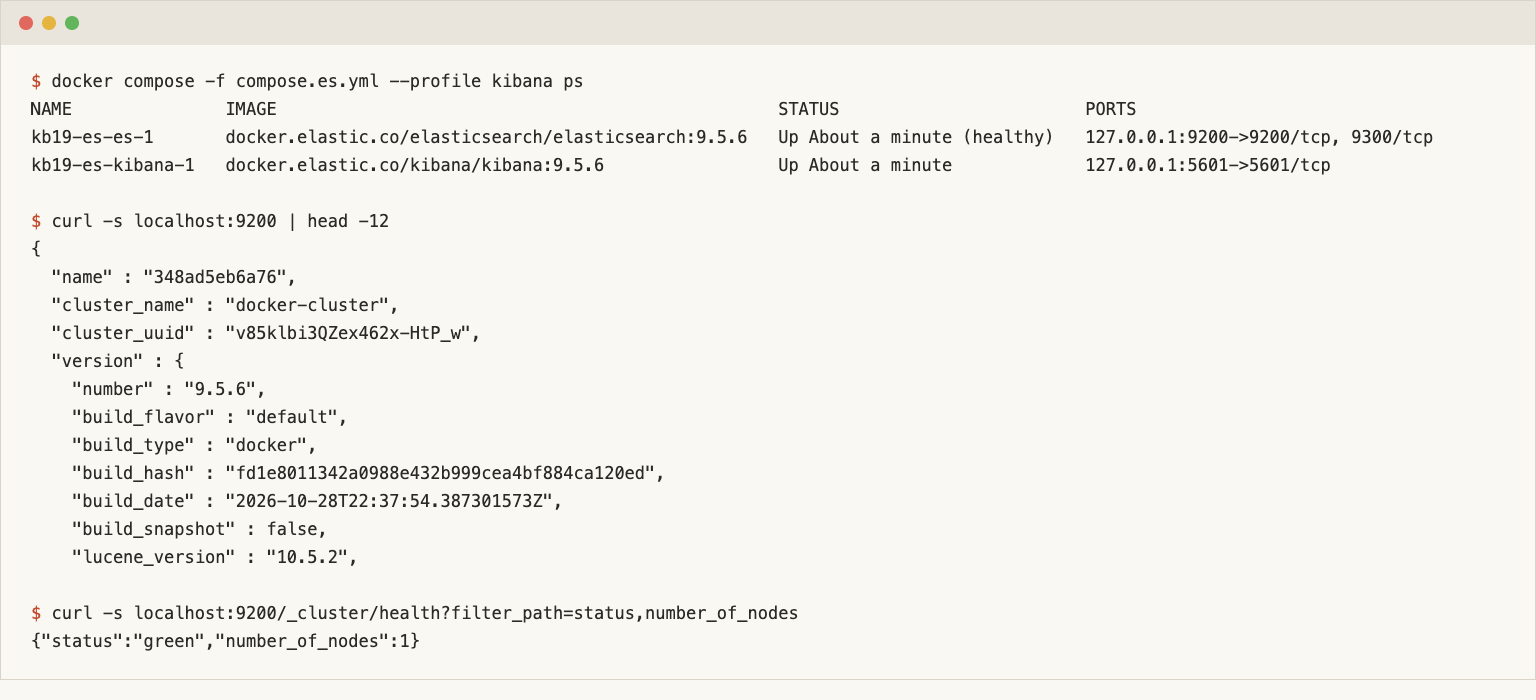
I pinned docker.elastic.co/elasticsearch/elasticsearch:9.5.6, the top entry on Elastic's release notes page that day. The compose file runs one node with a 512 MB heap and a 1.5 GB container limit. Kibana sits behind a profile, so it only starts for screenshots.
services:
  es:
    image: docker.elastic.co/elasticsearch/elasticsearch:9.5.6
    environment:
      - discovery.type=single-node
      - xpack.security.enabled=false   # demo only
      - bootstrap.memory_lock=false
      - ES_JAVA_OPTS=-Xms512m -Xmx512m
    mem_limit: 1536m
    ports:
      - "127.0.0.1:9200:9200"
Security is off and the port is bound to 127.0.0.1. That is acceptable on a laptop and nowhere else. Elasticsearch 8 and later enable security by default, so on a server you keep it on and handle the generated password and TLS properly.
On licensing, I read Elastic's licensing FAQ on November 9, 2026. It says the source of Elasticsearch and Kibana is available under SSPL 1.0, AGPLv3 or the Elastic License 2.0, at your choice, and that the default distribution stays under the Elastic License 2.0. OpenSearch's FAQ says the whole project is under Apache 2.0. Ask a lawyer before you rely on my summary.
Elasticsearch dense_vector mapping for the chunks
One index, one shard, no replicas (so a single node reports green). url and section are keywords for filters. heading is its own text field so BM25 can boost it, and embedding is a dense_vector.
PUT kb
{
  "settings": { "number_of_shards": 1, "number_of_replicas": 0 },
  "mappings": { "properties": {
    "url":       { "type": "keyword" },
    "section":   { "type": "keyword" },
    "heading":   { "type": "text" },
    "text":      { "type": "text" },
    "embedding": { "type": "dense_vector", "dims": 768, "index": true, "similarity": "cosine" }
  } }
}
I chose cosine. The vectors are unit length, so dot_product would rank the same, and I did not time the difference. I did not set index_options, so I asked the cluster what it picked:
"index_options": { "type": "bbq_hnsw", "m": 16, "ef_construction": 100, "rescore_vector": { "oversample": 3.0 } }
That surprised me. On 9.5.6 a plain dense_vector gets a quantized HNSW graph with rescoring, not float32 HNSW. Index size and recall follow from that default, so read it on your version instead of trusting an older tutorial. The standard analyzer also keeps max_depth as a single token (_analyze output in es_setup.out), so a search for depth will not match it.
Bulk index the chunks
Bulk loading uses plain requests against _bulk, not the Elasticsearch Python client. Two engines and two client majors would have meant two pins, and requests==2.32.3 talks to both. The script builds NDJSON with _id set to the chunk id, which makes later reloads idempotent:
for r in rows:
    lines.append(json.dumps({"index": {"_index": "kb", "_id": r["id"]}}))
    lines.append(json.dumps({"url": r["url"], "section": section_of(r["url"]), "heading": r["heading"],
                             "text": r["text"], "embedding": r["embedding"]}))
requests.post(f"{BASE}/_bulk?refresh=true", data="\n".join(lines) + "\n",
              headers={"Content-Type": "application/x-ndjson"})
The load took 0.45 seconds with 0 errors, _count returned 304, and the index is 1,171,574 bytes after a force merge to one segment. The raw float32 vectors alone are 933,888 bytes, and I did not break the index size down further. section is the second URL path segment (api, sdk, guides, 19 values in total).
Elasticsearch hybrid search: BM25, kNN and RRF
Query vectors come from qvecs.json, computed on the host with Ollama and search_query: prefixed to each question. The containers never call Ollama. Results below are page-level: the expected page must appear among the first 5 distinct pages.
BM25 with a boosted heading
{ "multi_match": { "query": "How do I limit how many pages a crawl fetches?",
                   "fields": ["text", "heading^2"] } }
I did not guess the boost. I ran heading^1, ^2 and ^3 on the 6 questions plus the exact-term query 429. Going from 1 to 2 moved two questions from a miss to a hit (the page limit question to rank 2, the balance question to rank 1) and pushed the MCP question from rank 1 to rank 2. Going to 3 changed nothing. I kept 2. One question (the webhook one) missed under every boost, because BM25 does not connect "notified" with "webhook".
kNN
{ "knn": { "field": "embedding", "query_vector": [0.0339, 0.0781, "..."], "k": 20, "num_candidates": 100 } }
num_candidates is how many vectors each shard checks before it keeps the best k. Raising it costs time and buys recall, and I left it at 100 because 304 vectors do not stress it. Cosine scores come back as (1 + cos) / 2, so the best SDK chunk scored 0.861. The ranks matched the series: 1, 2, 1, 1, 1, 2, the same as numpy, Chroma and sqlite-vec.
Elasticsearch hybrid search with RRF
Reciprocal rank fusion gives each chunk 1 / (rank_constant + rank) from every list it appears in and adds the scores, so the two score scales never need to match. For weighting and alpha sweeps see the Weaviate hybrid search post. In Elasticsearch it is a retriever:
GET kb/_search
{
  "size": 20,
  "retriever": { "rrf": {
    "retrievers": [
      { "standard": { "query": { "multi_match": { "query": "...", "fields": ["text", "heading^2"] } } } },
      { "knn": { "field": "embedding", "query_vector": [ ... ], "k": 50, "num_candidates": 100 } }
    ],
    "rank_window_size": 50,
    "rank_constant": 60
  } }
}
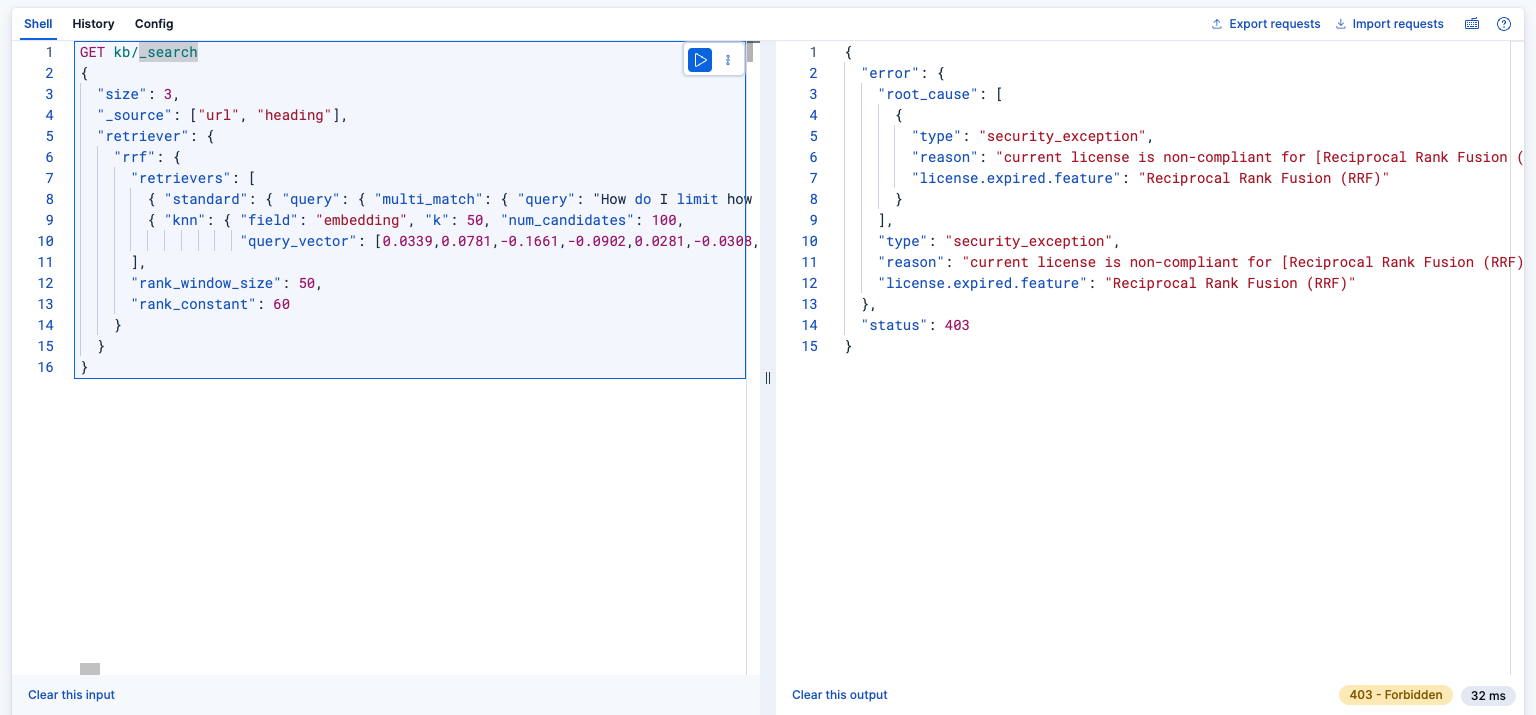
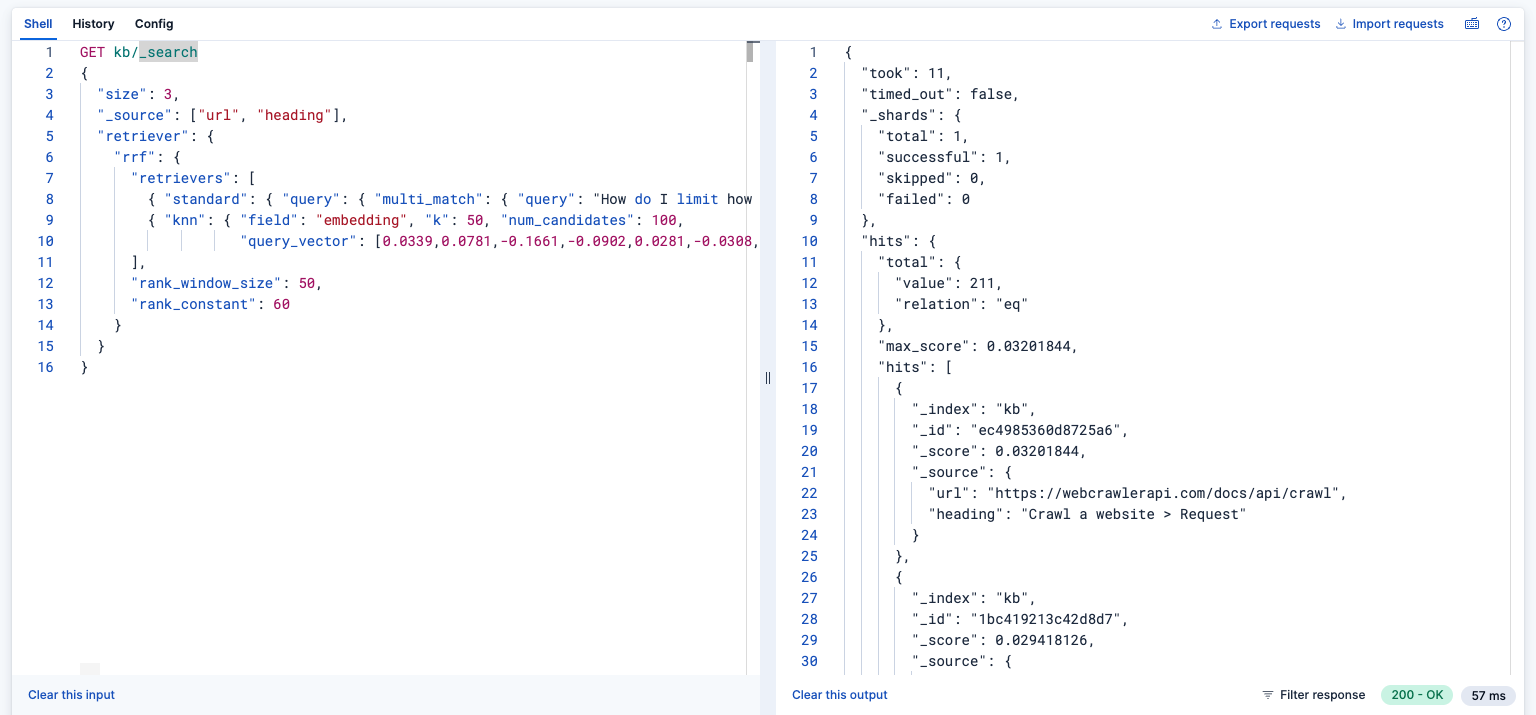
On a fresh 9.5.6 container with the default Basic license this returned HTTP 403:
security_exception: current license is non-compliant for [Reciprocal Rank Fusion (RRF)]
GET _license said basic and I had not activated anything. Elastic's subscriptions page lists "Reciprocal Rank Fusion (RRF) for hybrid search" as a feature row, but I could not read its tier from the page text, so I trust the 403. Starting a 30-day trial (POST _license/start_trial?acknowledge=true, allowed once per cluster) made the same query work. In Kibana Dev Tools it looks like this on Basic and, after the trial, with a result:
If you stay on Basic, run the two searches and fuse them yourself. This is the same math in a few lines:
def rrf(lists, k=60):
    score = {}
    for lst in lists:
        for rank, cid in enumerate(lst, 1):
            score[cid] = score.get(cid, 0) + 1.0 / (k + rank)
    return sorted(score, key=score.get, reverse=True)
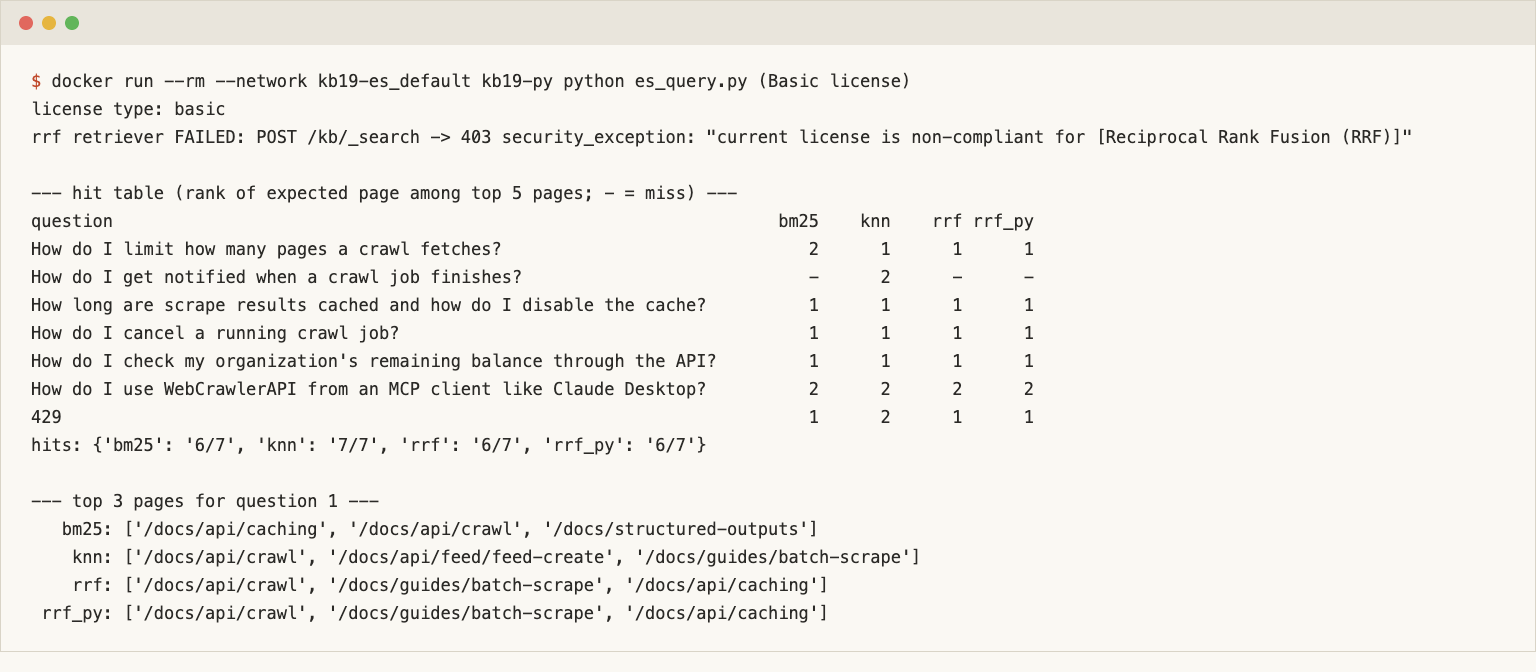
I fed it the top 50 chunk ids from the BM25 query and the top 50 from kNN, matching rank_window_size. With equal windows it returned the same top 5 chunk ids as the native retriever on all 7 queries (es_query_trial.out). Match the window when you compare the two.
Filters, highlights and re-crawl updates
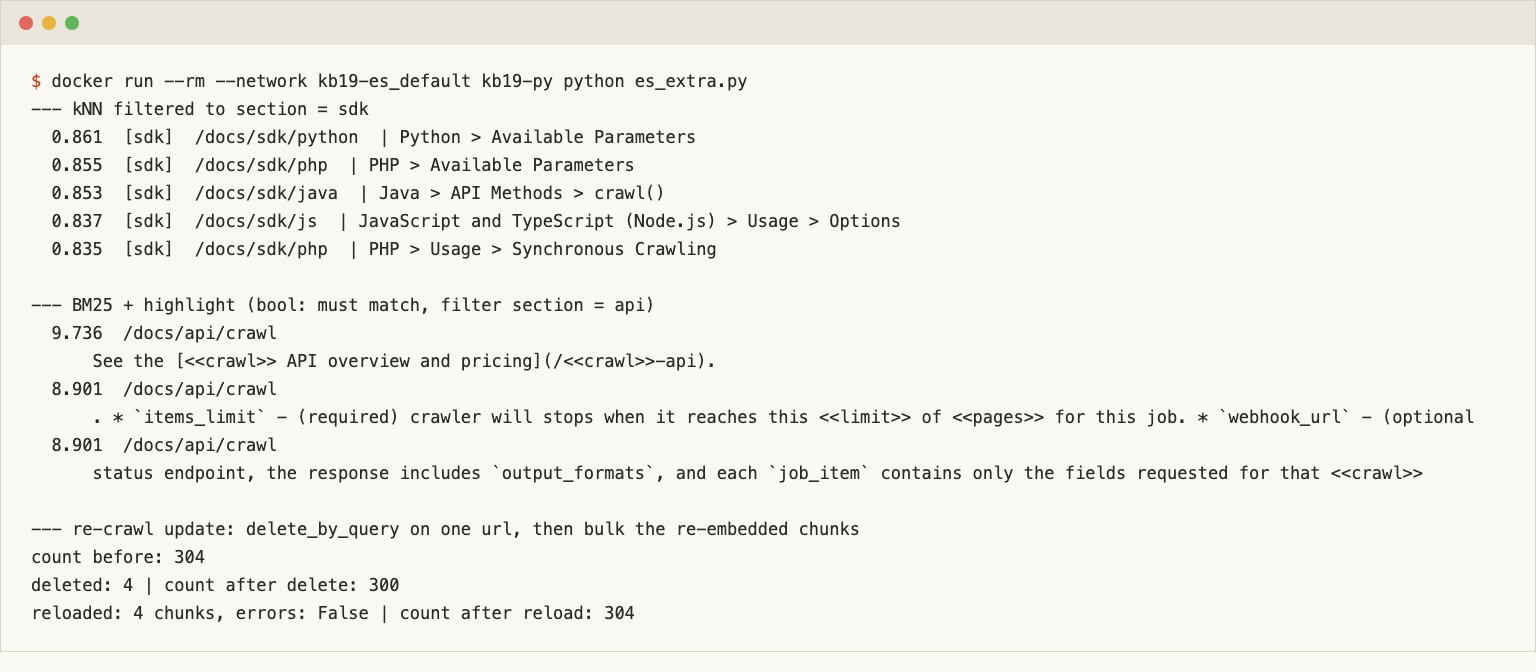
A kNN search takes a filter inside the knn clause. A support bot can use this to answer from section: sdk only when the user is reading the Python SDK docs. Filtering the page-limit question to section: sdk returned five chunks, all with section: sdk, led by the Python SDK parameters chunk. A BM25 bool query takes the same term filter in its filter clause, and highlight marks the matches:
{ "query": { "bool": {
    "must":   { "multi_match": { "query": "limit pages crawl", "fields": ["text", "heading^2"] } },
    "filter": { "term": { "section": "api" } } } },
  "highlight": { "fields": { "text": { "fragment_size": 120, "number_of_fragments": 1 } } } }
The top hits were all /docs/api/crawl chunks, and the second one has limit and pages marked in the items_limit line.
For a re-crawl, delete the page's chunks and bulk the new ones. _delete_by_query on the url keyword plus a reload of the re-embedded chunks took the count from 304 to 300 (4 chunks deleted for /docs/api/crawl) and back to 304:
POST kb/_delete_by_query?refresh=true
{ "query": { "term": { "url": "https://webcrawlerapi.com/docs/api/crawl" } } }
Pages that did not change need no new embeddings. This is a local delete and reload, not an incremental crawl feature of the API.
OpenSearch vector search and hybrid search on the same chunks
OpenSearch 3.9.0 was the latest tag on Docker Hub (pushed October 26, 2026). I ran it after docker compose down -v on the Elasticsearch stack, with DISABLE_SECURITY_PLUGIN=true, a 512 MB heap and the same demo caveat. The official image already has the opensearch-knn and opensearch-neural-search plugins.
The mapping needs index.knn: true and a knn_vector. The 3.9 docs name Faiss as the default engine. I picked lucene instead, because its docs table says it filters during the search while Faiss post-filters. My probe accepted cosinesimil, innerproduct and l2 on both.
"embedding": { "type": "knn_vector", "dimension": 768,
               "method": { "name": "hnsw", "engine": "lucene", "space_type": "cosinesimil" } }
OpenSearch hybrid search with a search pipeline
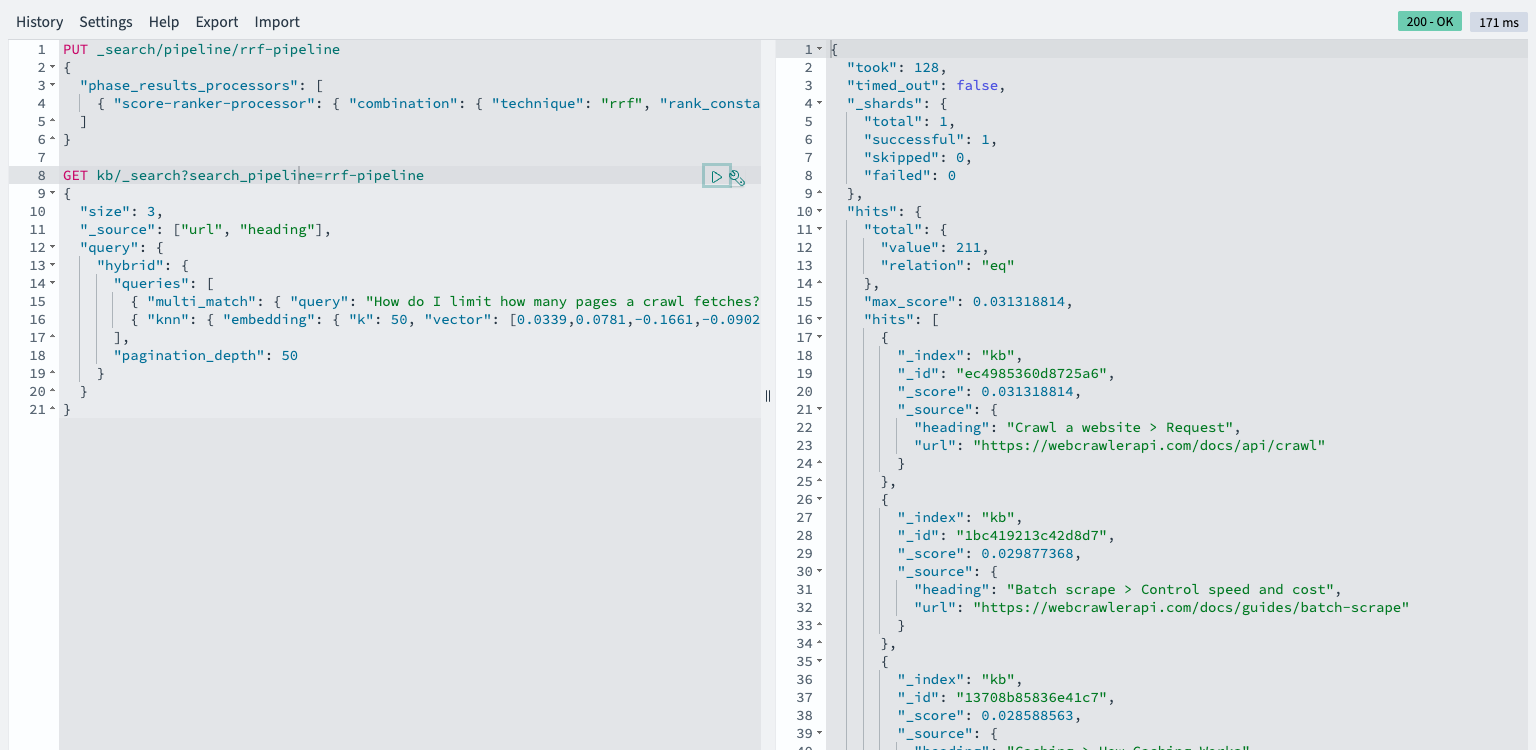
A hybrid query plus a search pipeline decides how clause results combine. I created two:
PUT _search/pipeline/norm-pipeline
{ "phase_results_processors": [ { "normalization-processor": {
    "normalization": { "technique": "min_max" }, "combination": { "technique": "arithmetic_mean" } } } ] }

PUT _search/pipeline/rrf-pipeline
{ "phase_results_processors": [ { "score-ranker-processor": {
    "combination": { "technique": "rrf", "rank_constant": 60 } } } ] }

GET kb/_search?search_pipeline=rrf-pipeline
{ "size": 20, "query": { "hybrid": { "queries": [
    { "multi_match": { "query": "...", "fields": ["text", "heading^2"] } },
    { "knn": { "embedding": { "vector": [ ... ], "k": 50 } } } ],
  "pagination_depth": 50 } } }
Both processors ran with no license step (score-ranker-processor arrived in 2.19, and the hybrid query must be top level). A filter inside the hybrid query and a highlight block both worked with the RRF pipeline (os_extra.out), and the re-crawl update gave 304, 300, 304.
What the hit table shows
Every mode on both engines, as the rank of the expected page in the top 5 (a dash means a miss). Elasticsearch RRF is the Python fallback, which matched the native retriever.
| Query | ES BM25 | ES kNN | ES RRF | OS BM25 | OS kNN | OS min_max | OS RRF |
|---|---|---|---|---|---|---|---|
| Limit pages | 2 | 1 | 1 | 2 | 1 | 1 | 1 |
| Job notification | - | 2 | - | - | 2 | 4 | - |
| Cache | 1 | 1 | 1 | 1 | 1 | 1 | 1 |
| Cancel job | 1 | 1 | 1 | 1 | 1 | 1 | 1 |
| Balance | 1 | 1 | 1 | 1 | 1 | 1 | 1 |
| MCP client | 2 | 2 | 2 | 2 | 2 | 2 | 2 |
| 429 | 1 | 2 | 1 | 1 | 2 | 1 | 1 |
| Hits (6 questions) | 5 | 6 | 5 | 5 | 6 | 6 | 5 |
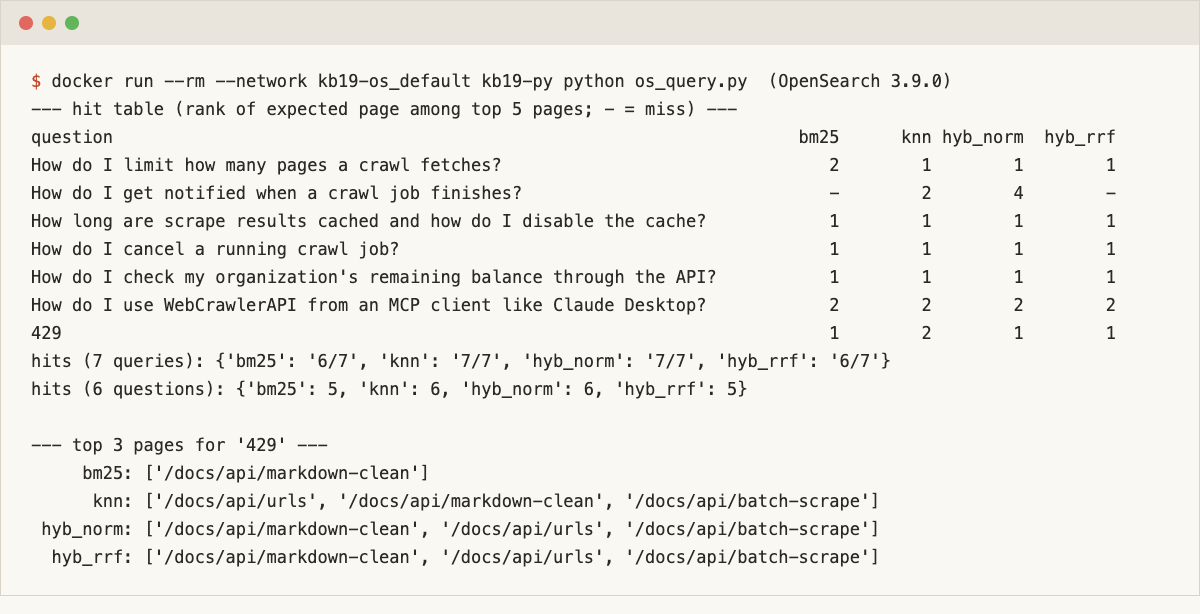
The engines agree: the kNN top-5 page lists were identical on 7 of 7 queries, and BM25 ranks matched too. At 304 chunks any difference between them is noise. Hybrid did not beat kNN on the questions. It helped on 429, where the only page that matches that token (/docs/api/markdown-clean) went to rank 1 in every keyword and hybrid mode. The webhook question is the one hybrid hurts: BM25 pulls other pages above /docs/async-requests, and RRF drops it from the top 5. The sqlite-vec post showed the same 6 of 6 against 5 of 6 pattern. I did not tune weights or windows to change that.
When to stay on Elasticsearch or OpenSearch
If you already run one of them for site search, add the vector field there. You keep your access control, snapshots and dashboards, and the chunks sit next to the keyword index you already trust. If you run Postgres, stay there with pgvector (search patterns). For one file with no server, see the sqlite-vec post.
Between the two engines, the practical difference in my run was the license gate. OpenSearch ran RRF, min_max hybrid, filters and highlights with no license step. Elasticsearch refused RRF on Basic, and I needed the trial or a Python fusion. If your hybrid needs RRF and you want a self-managed free tier, that decides it. Elastic Cloud is the managed Elasticsearch option. I tested neither managed service and cite no prices. The hub has the wider comparison.
If you want an AWS vector database, Amazon OpenSearch Service is AWS's managed OpenSearch. Its docs page (read November 9, 2026) says it deploys, operates and scales OpenSearch clusters, billed by instance hours for domains and by OpenSearch Compute Units for Serverless. I did not run my index there.
Algolia DocSearch describes a crawler that indexes docs on a schedule and, per its page on November 9, 2026, is free for open-source and technical docs. Replacing it means you own the crawl, the chunking and the index, and you build the search box yourself.
Gotchas and what this test did not cover
The RRF license gate, the bbq_hnsw default, the (1 + cos) / 2 score scale and the window match are covered above. Two smaller notes: I set number_of_replicas to 0 from the start, so both single nodes reported green, and I did not hit the Linux vm.max_map_count limit on Docker Desktop for Mac (on a Linux host you may need to raise it).
This was 304 chunks, 6 questions and one run per mode. I did not measure latency across engines, scale, quantization settings, rerankers, semantic_text or inference endpoints, cluster sizing or any cloud service. I disabled security on both engines.
Clean up and next steps
docker compose -f compose.es.yml --profile kibana down -v and the same for compose.os.yml remove the containers, networks and volumes. docker rmi removes the images. To index your own site, create an API key, crawl your docs with a low items_limit, run build_chunks.py and point es_load.py or os_load.py at the result. The crawl API page has the details. The pillar guide covers the rest of the pipeline, including keeping the index fresh. For other stores see the hub.