Qdrant Docker Tutorial: Load a Crawled Website and Filter by Section
This Qdrant Docker tutorial goes from a chunks.jsonl file to filtered semantic search in a local container. I ran every command below on November 1, 2026, against Qdrant 1.20.0 and qdrant-client 1.20.0. If you want a self hosted vector database for a docs knowledge base, this is the whole path, with the output I got.
The input is 304 chunks from 52 pages of the WebCrawlerAPI docs (webcrawlerapi.com/docs). They were crawled with the webcr CLI, split at headings and embedded with Ollama nomic-embed-text (768 dimensions). Chunking by headers and embedding model choice have their own posts. This is the store step of the website to markdown knowledge base guide. For how Qdrant compares to other open source vector database options, see the vector database comparison.
Qdrant Docker quick answer
docker run -d --name kb-qdrant \
  -p 127.0.0.1:6333:6333 -p 127.0.0.1:6334:6334 \
  -v kb-qdrant-storage:/qdrant/storage \
  qdrant/qdrant
Then three calls with qdrant-client: create_collection, upsert, and query_points with a query_filter. The rest of the post is those three calls with real data, plus the things that surprised me.
What you need
- Docker (any recent Docker Desktop or engine).
- Python 3.10 or newer. I used 3.11.2.
- qdrant-client==1.20.0 and requests==2.34.2. The full pip freeze is in the code folder.
- A chunks.jsonl with one JSON object per line: id, url, heading, text, embedding, model, dim. Mine has 304 lines (sha256 7c62db92...e145).
- Ollama running at localhost:11434 with nomic-embed-text, because the question must be embedded with the same model as the chunks. A hosted model with a different dimension would not fit this collection.
I do not ship chunks.jsonl with the code, because the embeddings make it 3.4 MB. To get one, crawl your own docs to markdown with the crawl endpoint, split them as in the chunking post, and embed them. The Python knowledge base walkthrough shows the whole chain, and crawl to markdown files covers the first step.
Run Qdrant in Docker
The script is run_qdrant.sh:
docker run -d --name kb-qdrant \
  -p 127.0.0.1:6333:6333 -p 127.0.0.1:6334:6334 \
  -v kb-qdrant-storage:/qdrant/storage \
  qdrant/qdrant
Port 6333 serves the REST API and the dashboard. Port 6334 is gRPC. I bound both to 127.0.0.1 so nothing outside the machine can reach an instance that has no API key. Locally that is fine. A server that is reachable from the network needs an API key and TLS.
The -v flag matters. Qdrant keeps its data in /qdrant/storage, and without a volume that directory dies with the container.
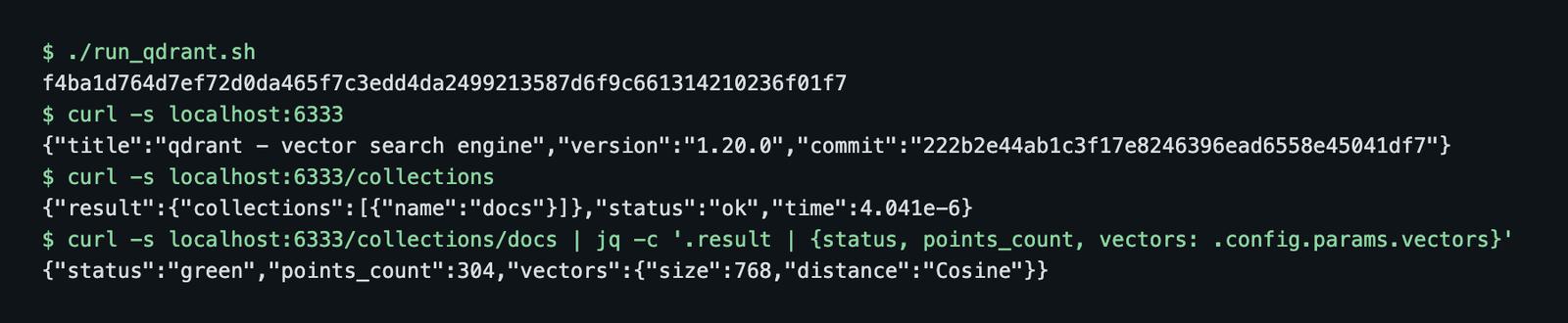
The curl localhost:6333 call returns the version, {"title":"qdrant - vector search engine","version":"1.20.0",...}. That is how I know the image I pulled as qdrant/qdrant (no tag, so latest) was 1.20.0. An untagged image will change under you, so pin a tag such as qdrant/qdrant:v1.20.0 if you want to repeat this later.
Check that the data survives
persist_check.sh removes the container, starts a new one on the same volume and reads the count:
kb-qdrant
43628f07e688982cf831136f839e44ec178f41288c916e66b9caf64375fa4577
points_count after rm + run: 304
The data is back after docker rm -f. Only docker volume rm removes it.
Docker Compose version
The same setup as a docker-compose.yml:
services:
  qdrant:
    image: qdrant/qdrant
    container_name: kb-qdrant
    ports:
      - "127.0.0.1:6333:6333"
      - "127.0.0.1:6334:6334"
    volumes:
      - kb-qdrant-storage:/qdrant/storage
    restart: unless-stopped

volumes:
  kb-qdrant-storage:
    external: true   # the volume created by run_qdrant.sh; drop 'external' for a fresh one
I stopped the docker run container first, since both use port 6333. docker compose up -d then served the same collection: points_count via compose: 304. docker compose down removed the container and left the volume.
Load the chunks file
Everything below shares common.py, which reads the file and checks it:
def read_chunks(path=CHUNKS):
    rows = [json.loads(line) for line in open(path)]
    models = {r["model"] for r in rows}
    dims = {r["dim"] for r in rows}
    assert len(models) == 1 and len(dims) == 1, (models, dims)
    return rows, models.pop(), dims.pop()
The model and dimension come from the file, so a different embedding model changes nothing in the script. The assertion catches a file built from two models, which would give nonsense scores without any error. Mine printed 304 chunks, model=nomic-embed-text, dim=768.
Create the collection
client = QdrantClient(url="http://localhost:6333")
client.create_collection(
    "docs",
    vectors_config=models.VectorParams(size=dim, distance=models.Distance.COSINE),
)
I used cosine distance. Text embeddings carry meaning in direction, not length, and Qdrant normalizes vectors for cosine on insert. I checked the vector lengths in my file: every one is between 0.9999994 and 1.0000006, so cosine and dot product give the same ranking here. The README of the shared pipeline said the vectors were not normalized. That was wrong, which I only learned by computing the norms. Check yours rather than trusting a note.
One unnamed vector per point is the simplest layout. Named vectors are for points that need several embeddings, for example a dense and a sparse one.
Add payload indexes
client.create_payload_index("docs", "section", models.PayloadSchemaType.KEYWORD)
client.create_payload_index("docs", "url", models.PayloadSchemaType.KEYWORD)
A payload index speeds up filtering on a field. At 304 points it makes no practical difference, and I did not measure one. I create them early anyway, because the two fields I filter on (section and url) are the same at 304 points and at 300,000.
I created the indexes on the empty collection, before the upsert. Qdrant also accepts them on a filled collection.
Filters also work without an index. A filter on the unindexed heading field gave the right answer (unindexed field 'heading' == 'Cancel job': 1). So a missing index is a performance problem, not a correctness problem. The output is in gotchas.out.
Upsert chunks with a payload
Each point carries the original chunk_id, the url, the heading, a section and the text. The section is the second segment of the URL path, so /docs/guides/filters becomes guides. The first segment is always docs in this crawl, and the three chunks of the docs landing page get root.
def section_of(url):
    rest = url.split("/docs", 1)[1].strip("/")
    return rest.split("/")[0] if rest else "root"
The load script printed the split:
| section | chunks |
|---|---|
| api | 129 |
| sdk | 59 |
| structured-outputs | 18 |
| guides | 17 |
| errors | 16 |
| crawling-agent | 10 |
| feeds | 10 |
| async-requests | 8 |
| getting-started | 6 |
| markdown-cleaning | 5 |
| pricing | 5 |
| crawling-types | 4 |
| job | 4 |
| root | 3 |
| scrape | 3 |
| access-key | 2 |
| integrations | 2 |
| rate-limits | 2 |
| sdks | 1 |
That makes 19 sections adding up to 304. A section field costs almost nothing to build from the crawl URLs, and it lets you query only the API reference or only the guides.
The point ID gotcha
My first upsert failed. The id in chunks.jsonl is 16 hex characters (the first 16 characters of a SHA-1). Qdrant takes only an unsigned integer or a UUID, and gotcha_id.py shows the error:
UnexpectedResponse: Unexpected Response: 400 (Bad Request)
... "value 7a98e091a559c766 is not a valid point ID, valid values are either an unsigned integer or a UUID"
The fix is a UUID5 from the old ID under a fixed namespace. It is stable, so a re-run overwrites the same points instead of adding new ones. The original ID stays in the payload as chunk_id.
NS = uuid.UUID("6f1c5a3e-0000-4000-8000-000000000000")
points = [
    models.PointStruct(
        id=str(uuid.uuid5(NS, r["id"])),
        vector=r["embedding"],
        payload={"chunk_id": r["id"], "url": r["url"], "heading": r["heading"],
                 "section": section_of(r["url"]), "text": r["text"]},
    )
    for r in rows
]
for i in range(0, len(points), 64):
    client.upsert("docs", points=points[i : i + 64], wait=True)

print("count (exact):", client.count("docs", exact=True).count)
Output: count (exact): 304. That matches the 304 lines in the file. I used batches of 64 and wait=True, so the call returns after the points are stored.
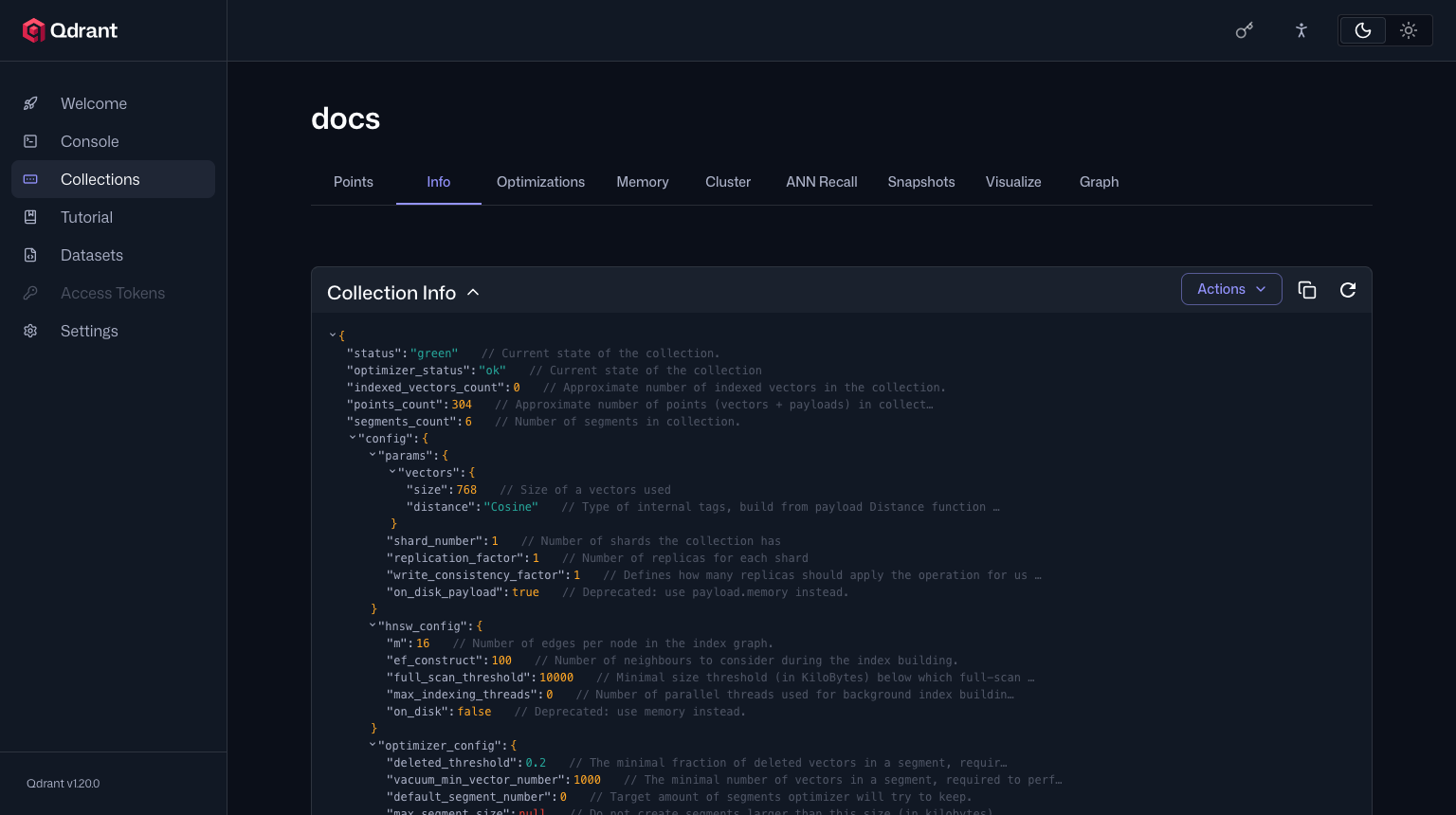
The collection info shows points_count: 304 and 6 segments. It also shows indexed_vectors_count: 0. That threw me at first. The HNSW setting full_scan_threshold is 10000 KB, and 304 vectors are far below it. Qdrant searches this collection by scanning, which at this size is the right call.
Search with a payload filter by section
The question is embedded with the search_query: prefix that nomic-embed-text needs for queries. Documents were embedded with search_document: . Leave the prefix out and the scores drop.
vec = embed_query("How do I get notified when a crawl job finishes?", model)

res = client.query_points(
    "docs",
    query=vec,
    query_filter=models.Filter(must=[
        models.FieldCondition(key="section", match=models.MatchValue(value="sdk"))
    ]),
    limit=5,
    with_payload=True,
)
Same question three times: with no filter, then with section = sdk, then with section = guides:
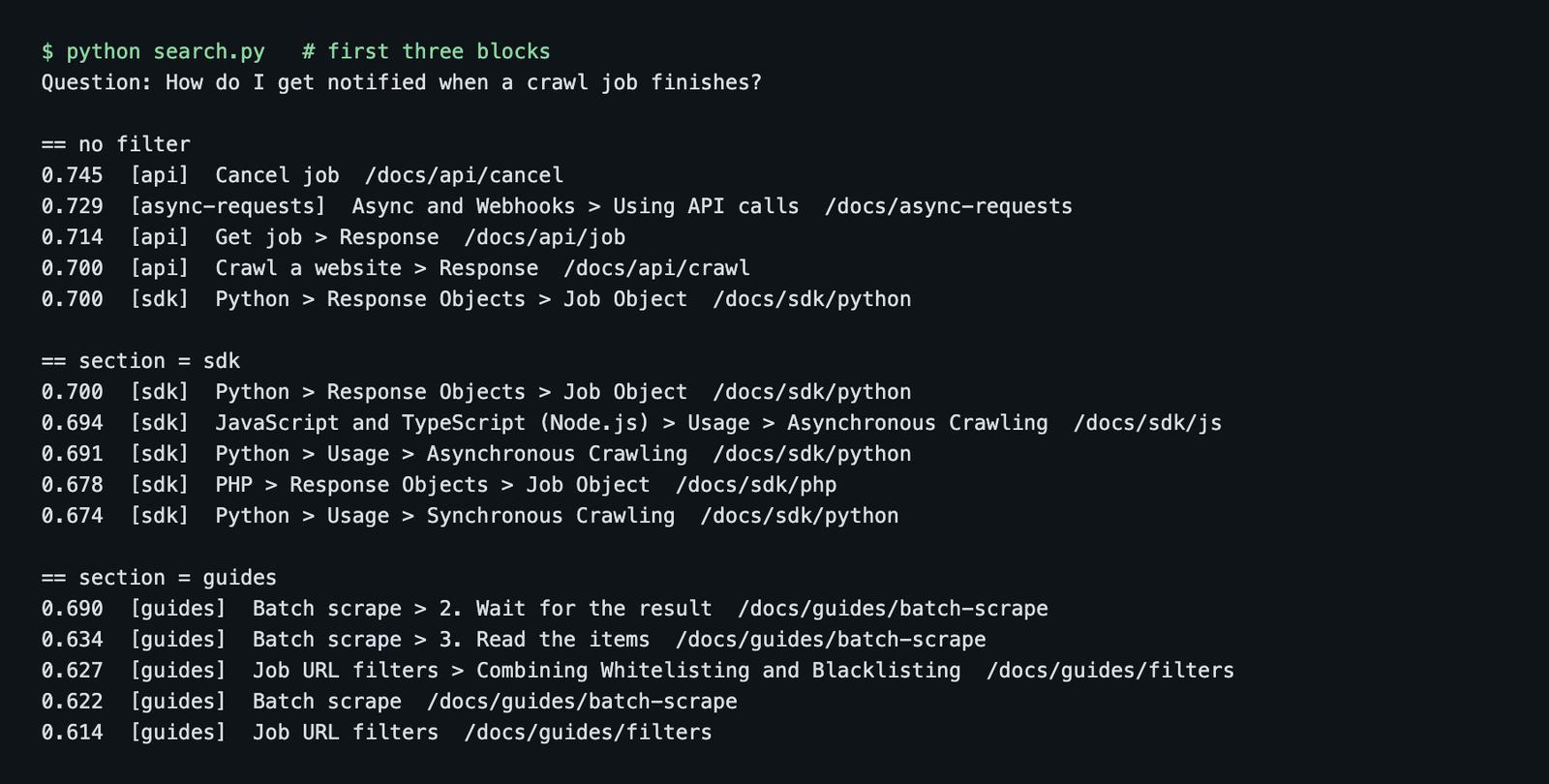
The unfiltered top hit is "Cancel job" (0.745). The chunk I wanted, "Async and Webhooks > Using API calls", is second (0.729). It is one run on one question, so it says nothing about the model overall. It does show why the filter is useful. When the question comes from the SDK page, section = sdk gives five SDK chunks, and section = guides gives the batch scrape and URL filter guides. All results in each filtered run had the requested section (the script asserts it).
A filter narrows where to look. It does not fix the ranking inside a section. For which model ranks better, see the embedding model test.
Payload filter variants
search.py also counts how many chunks each filter matches, with client.count(..., exact=True). The total is 304.
| Filter | Meaning | Hits |
|---|---|---|
| must section = api | only the API reference | 129 |
| must section = sdk | only the SDKs | 59 |
| must section MatchAny [guides, errors] | section is one of two values | 33 |
| should section = api, section = sdk | either one (OR) | 188 |
| must_not section = api | everything except the API | 175 |
| must section = api, must_not url = /docs/api/crawl | API reference without one page | 125 |
The numbers add up: 129 + 59 = 188, 304 - 129 = 175, and 129 - 4 = 125, since /docs/api/crawl has four chunks. MatchAny gave 33, which is 17 guides plus 16 errors.
f = models.Filter
sdk_or_api = f(should=[sec("api"), sec("sdk")])
not_api = f(must_not=[sec("api")])
two_sections = f(must=[models.FieldCondition(key="section", match=models.MatchAny(any=["guides", "errors"]))])
I also tried MatchText, which matches words inside a text field. A MatchText("webhook") filter on text found 30 chunks without any text index, and 30 after I created a full-text index. So on this data the index changed nothing in the count. The full-text index is for speed and for tokenizer options, and I removed it again (gotchas.out).
Browse, scroll and count points
scroll lists points with a filter and pages through them with next_page_offset. I read the errors section, five per page:
page 1: 5 points, first heading: 'Errors > Job Item Level Errors > LLM Max Context Length Error', next_page_offset: 46e1eff9-5dd9-5656-ab1d-ed2ad0b5eb89
page 2: 5 points, first heading: 'Errors > Job Item Level Errors > Internal error', next_page_offset: a3a61fad-7bd1-5aa2-9adb-5d4adde47f08
page 3: 5 points, first heading: 'Errors > Job Item Level Errors > Host returned error', next_page_offset: eb75a5be-9906-5954-9997-9423ecf911e5
page 4: 1 points, first heading: 'Errors > Job Item Level Errors > Name resolution error', next_page_offset: None
errors chunks seen via scroll: 16
The last page has next_page_offset: None. The 16 matches the table.
Scrolling and counting by url is also how you update a store after a re-crawl. Delete every chunk of the changed page, then upsert the new ones. I tried it on /docs/api/crawl:
before: total=304, chunks for https://webcrawlerapi.com/docs/api/crawl: 4
after delete: total = 300
after re-upsert: total = 304
The delete is client.delete("docs", points_selector=models.FilterSelector(filter=by_url), wait=True). Because the IDs are UUID5s of the chunk ID, a re-upsert of an unchanged chunk also lands on the same point. If a page gets shorter, you still need the delete, since old chunk numbers would stay behind. Picking only the changed pages is covered in how often to re-crawl and keeping a support bot in sync. A post on re-embedding only changed pages is planned.
Qdrant dashboard
The dashboard is at http://localhost:6333/dashboard. No setup, since it ships in the image. I screenshotted it with Puppeteer from the running container.
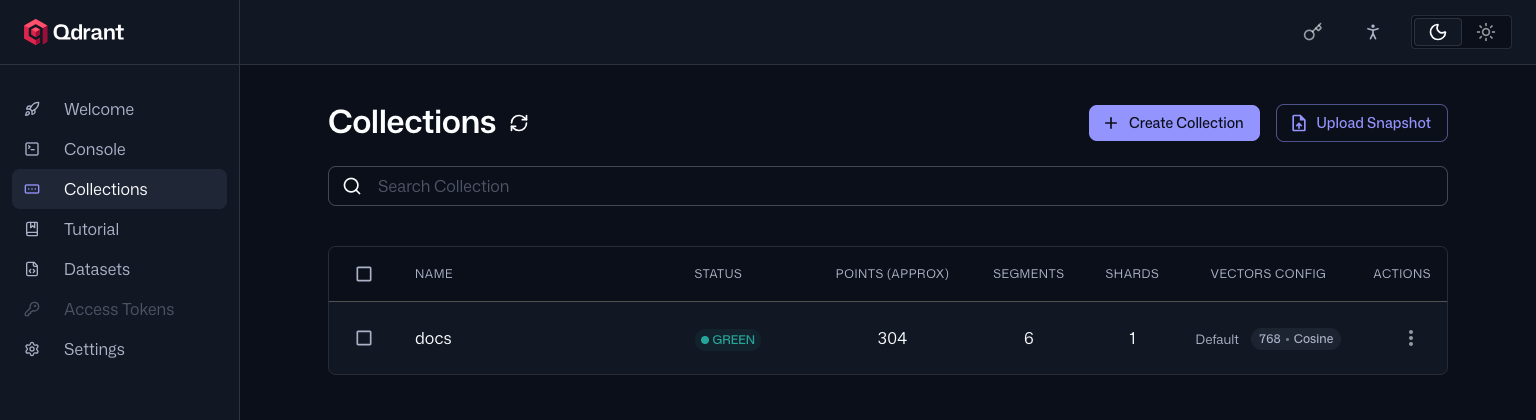
The collections page shows the status (green), points, segments and vector config. The collection page has tabs for points, info and more. The points tab has a filter box that takes key:value. I typed section:errors:
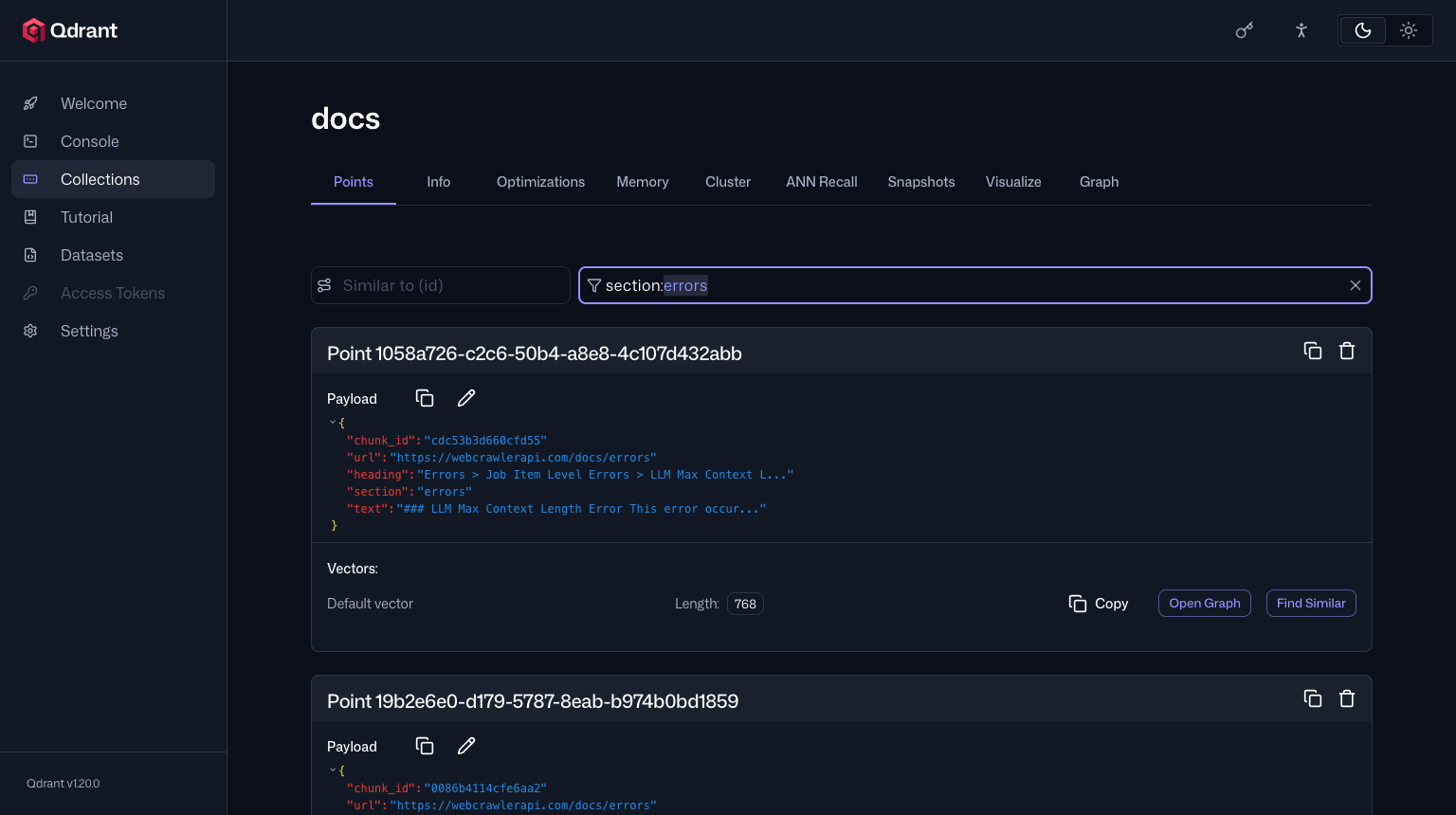
Each point shows its payload (chunk_id, url, heading, section, text) and the vector length, 768. The dashboard truncates text in the view. For auditing what a crawl put into the store, this is quicker than a script.
One quirk: the dashboard's #/collections/docs/info and #/collections/docs/points addresses loaded as a blank page when I opened them directly in a fresh browser. Opening #/collections/docs and clicking the tabs worked. That only mattered for my automated screenshots.
Qdrant Cloud vs local
Run it locally to learn it, or to keep a private docs index on one machine. Use Qdrant Cloud when nobody wants to run a server.
Facts read from Qdrant's docs on November 2, 2026 (check the pricing page and the create cluster docs before relying on them): the free tier needs no credit card and gives one node with 0.5 vCPU, 1 GB RAM and 4 GB disk. Free clusters are suspended after one week unused and deleted after four weeks of inactivity. When you outgrow it you move to a Standard cluster.
I did not run Cloud, so I have no numbers for it. The code change is the client line: QdrantClient(url=..., api_key=os.environ["QDRANT_API_KEY"]).
For a B2B SaaS or support-bot team the same setup carries over, with two additions. Any instance reachable from outside localhost needs an API key, so keep the key in an environment variable and never in the repo. And if one collection serves several customers, add a customer_id payload field with a keyword index and put it in a must condition on every query, the same way section works above. I did not build or benchmark that here, so treat it as a pattern and test it on your data before trusting the isolation.
Qdrant vs Pinecone, for a docs site: Qdrant is open source and self-hostable with an optional managed cloud. Pinecone is managed only. At a few hundred or thousand pages both work, so the real choice is whether you want a container to look after. The comparison post has both with their free tiers.
If you already run Postgres, a separate service may not be needed. The pgvector tutorial does the same job inside the database you have.
Gotchas I hit
- Point IDs. The 16-character hex ID from the chunks file is rejected with a 400. Use a UUID5 and keep the old ID in the payload.
- latest is a moving tag. qdrant/qdrant gave 1.20.0 on November 1, 2026. Pin a tag for a repeatable setup.
- A wrong note about normalization. The pipeline README said the vectors were not normalized. They are unit length. I used cosine anyway.
- Query prefix. nomic-embed-text needs search_query: on queries. The chunk vectors were built with search_document: .
- The shell alias. On my Mac, docker is a shell alias, so a script run with ./run_qdrant.sh reported docker: command not found. I put the Docker binary directory on PATH for the session. If a script cannot find docker, check for an alias.
- indexed_vectors_count is 0. It looks like a failure and is not. The collection is under the full-scan threshold.
I did not hit a client and server version warning, since both were 1.20.0, and I did not measure the effect of payload indexes on speed.
Clean up
docker stop kb-qdrant && docker rm kb-qdrant
docker volume rm kb-qdrant-storage   # deletes the data
Removing the container is not enough. The volume holds the data, as the persistence check showed. To drop only the data and keep the server, call client.delete_collection("docs").
Keep it fresh and next steps
To refresh the store after a change, re-crawl the pages, delete by url and upsert (see the scroll section). Crawl your own site to markdown with the crawl API and the crawl endpoint docs, then reuse these scripts with your own chunks.jsonl. Docs on URL filters cover limiting which pages are crawled.
The same chunks are loaded into Supabase pgvector in the Supabase pgvector tutorial and into Weaviate with a hybrid search test in the Weaviate tutorial. A Milvus tutorial is planned. For all the other databases, see the vector database comparison.
Crawl your own site
The chunks in this post came from a docs crawl. To get the same input for your site, crawl it to markdown with the crawl API and see the crawl endpoint docs for the request options.
Scripts: run_qdrant.sh, docker-compose.yml, common.py, load.py, search.py, scroll_count.py, gotchas.py, cleanup.sh, plus the saved outputs such as search.out and the README. chunks.jsonl is not included, see the README for how to regenerate it.