MongoDB Atlas Vector Search Tutorial: Website Knowledge Base From Markdown
This MongoDB Atlas Vector Search tutorial stores 304 chunks of a crawled docs site in one collection, builds a vector index and a text index, and runs $vectorSearch, a filter, hybrid search with $rankFusion and a re-crawl update. It is for a team that already runs MongoDB for app data and wants the support bot's chunks in the same database. Every command ran on November 10, 2026 on the Atlas Local Docker image (MongoDB 9.0.4). The search calls are the ones you would send to Atlas. The M0 section further down comes from the docs only.
This is the MongoDB option for the store step of the website to markdown knowledge base guide, with the same 304 chunks and 6 questions as the Elasticsearch post. For other stores see the vector database comparison. 304 chunks is a smoke test. All code and outputs are in the code folder.
What I found:
- $rankFusion worked on the first try on MongoDB 9.0.4. Its top-5 ids matched my own Python fusion on 7 of 7 queries.
- Hybrid did not beat vector-only on 6 questions. It did win on the exact token 429.
- A section filter works in both hybrid pipelines once the field is mapped as a token. A filter on a field the index does not declare fails with an error.
My recommendation: keep the chunks in MongoDB if you already run it. If you do not, pick something smaller.
Why keep the chunks in MongoDB
If your app already runs on MongoDB, the docs bot can reuse your driver, auth, backups and tenant filters. A re-crawl is an ordinary delete and insert, and there is no second service to monitor. MongoDB is the vector database for the bot, and a process called mongot keeps the index in sync.
Teams on Postgres have the same argument for Supabase and pgvector (see also the pgvector search guide), and teams on a search engine have it for Elasticsearch. Two terms: Atlas Search is full-text search (a search index), and Atlas Vector Search is nearest-neighbor search over embeddings (a vectorSearch index).
MongoDB Atlas Local quickstart: vector search without Atlas
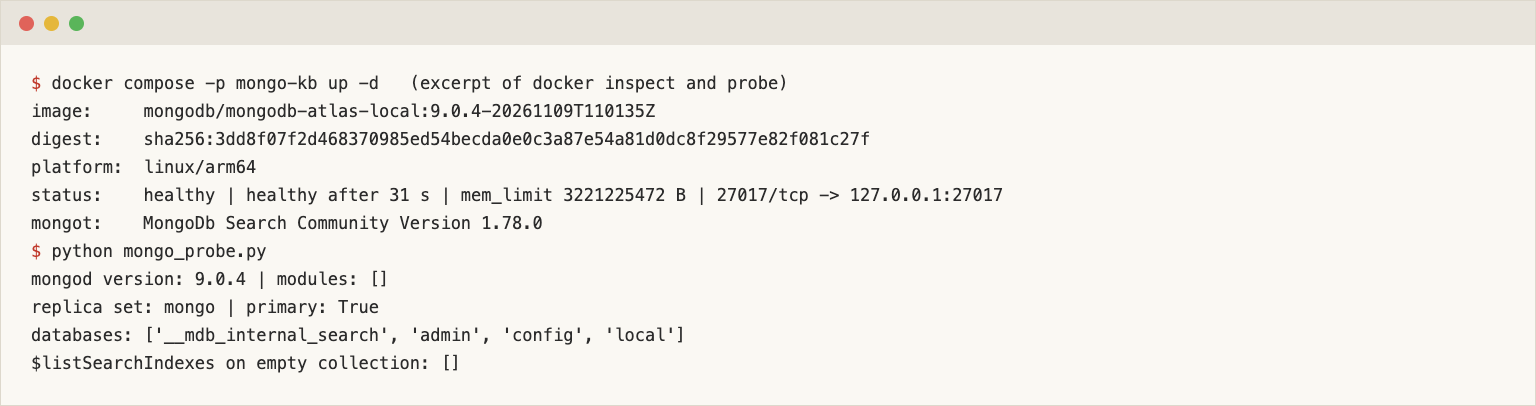
The official image mongodb/mongodb-atlas-local runs mongod and mongot as a single-node replica set. No account, no billing. I pinned an exact build tag, because latest, 9, 9.0 and 9.0.4 all pointed at the same manifest that day and will move.
services:
  mongo:
    image: mongodb/mongodb-atlas-local:9.0.4-20261109T110135Z
    container_name: mongo-kb-mongo
    hostname: mongo
    mem_limit: 3g
    ports:
      - "127.0.0.1:27017:27017"   # demo only: no auth, bound to localhost
Then the whole path in one file: load the chunks, create the vector index, wait for it, run one $vectorSearch. It is quickstart.py, and pip install pymongo==4.19.0 is the only dependency.
import json, time
from pymongo import MongoClient
from pymongo.operations import SearchIndexModel

client = MongoClient("mongodb://127.0.0.1:27017/?directConnection=true")
col = client["quickstart"]["chunks"]
col.drop()
rows = [json.loads(line) for line in open("chunks.jsonl")]
col.insert_many([{"_id": r["id"], "url": r["url"], "heading": r["heading"],
                  "text": r["text"], "embedding": r["embedding"]} for r in rows])

definition = {"fields": [{"type": "vector", "path": "embedding", "numDimensions": 768, "similarity": "cosine"}]}
col.create_search_index(SearchIndexModel(definition=definition, name="qs_vec", type="vectorSearch"))
while not any(i["name"] == "qs_vec" and i.get("queryable") for i in col.list_search_indexes()):
    time.sleep(0.25)                                   # PENDING -> READY

vec = embed("How do I limit how many pages a crawl fetches?")   # your embedding call, same model as the chunks
hits = col.aggregate([
    {"$vectorSearch": {"index": "qs_vec", "path": "embedding", "queryVector": vec, "numCandidates": 100, "limit": 3}},
    {"$project": {"url": 1, "heading": 1, "score": {"$meta": "vectorSearchScore"}}},
])
for h in hits:
    print(f"{h['score']:.4f}  {h['url']}  | {h['heading']}")
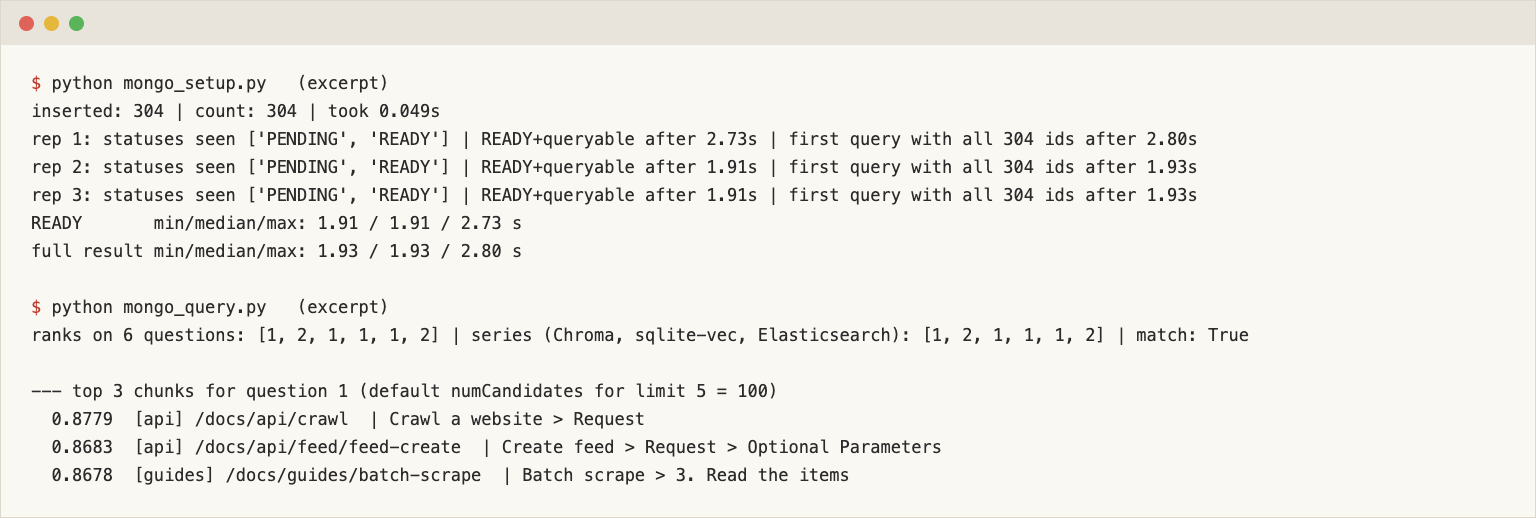
The script in the code folder differs in file paths, connects to the Compose service name mongo instead of 127.0.0.1, drops the database at the end, and reads a precomputed query vector from qvecs.json instead of calling embed(). It printed 0.8779 https://webcrawlerapi.com/docs/api/crawl | Crawl a website > Request first (quickstart.out).
The container was healthy 31 seconds after docker compose up. The image has a native arm64 build, so nothing ran under emulation on my Apple Silicon machine. The probe printed mongod 9.0.4, MongoDB Search Community (mongot) 1.78.0 and an empty $listSearchIndexes.
The image is big: 1.36 GB unpacked. Container memory went from 427 MiB at start to a peak of 1.01 GiB during the full run, against the 3 GiB limit I set (docker stats every 5 to 7 seconds, no OOM kill). That is for 304 chunks, not 100,000.
Docker Hub says 8.x images use a deprecated local-dev mongot and that $listSearchIndexes output differs between lines. Everything here belongs to the 9.0.4 tag. The image has no authentication by default and Docker Hub describes it as the Atlas Local experience for development, so I bound it to 127.0.0.1 and would not expose it.
Crawl your own site
The chunks came from a crawl of the WebCrawlerAPI docs. For your site, create an API key on the dashboard and send POST https://api.webcrawlerapi.com/v1/crawl with a url and an items_limit. Optional fields are in the crawl docs.
curl --request POST \
  --url https://api.webcrawlerapi.com/v1/crawl \
  --header 'Authorization: Bearer YOUR_API_KEY' \
  --header 'Content-Type: application/json' \
  --data '{"url": "https://yoursite.com/docs", "items_limit": 50, "output_formats": ["markdown"], "whitelist_regexp": "https://yoursite\\.com/docs.*"}'
# {"id": "23b81e21-c672-4402-a886-303f18de9555"}
The response is a job id. Poll GET /v1/job/<id> until status is done, then download each entry of job_items[].markdown_content_url (job docs). The build_chunks.py script wraps these calls, splits the markdown by headers and embeds the chunks with nomic-embed-text. I did not re-run the crawl for this post. Chunking and embedding choices are in build a knowledge base from a website in Python, chunk markdown by headers and the embedding model comparison. A new crawl gives different chunks and ranks.
Document shape: one document per chunk
Each chunk is one document: {_id, url, section, heading, text, embedding}. section is the second path segment of the URL (api, sdk, guides; 19 distinct values in this data) and the embedding is a plain array of 768 floats. Inserting 304 documents took 0.049 seconds and the collection holds 3,235,515 bytes.
I also tried one document per page, with a chunks array and an embedding in each element. The docs (read November 10, 2026) say you can't index embedding fields inside arrays of documents. The local image did not refuse. It accepted a vector index on chunks.embedding, reported READY after 2.1 seconds and answered a query with one result: the page. It could not say which of the four chunks matched, and a bot needs the chunk. The docs also list a nestedRoot option, which I did not test.
One document per chunk makes the later steps plain queries: delete by url, filter by section. The docs recommend BSON binary vectors for storage efficiency. I stored plain arrays and did not measure the difference.
Create the Atlas Vector Search index
The index lists the vector field and every field you want to filter on.
VEC_DEF = {"fields": [
    {"type": "vector", "path": "embedding", "numDimensions": 768, "similarity": "cosine"},
    {"type": "filter", "path": "url"},
    {"type": "filter", "path": "section"},
]}
col.create_search_index(SearchIndexModel(definition=VEC_DEF, name="kb_vec", type="vectorSearch"))
The same JSON works in mongosh and the Atlas UI. The docs list numDimensions up to 8192, similarity of euclidean, cosine or dotProduct, and quantization of none (the default), scalar, binary or binaryNoRescore. I used cosine and no quantization. The vectors have unit length, so dotProduct should rank the same, but I did not run it.
Creation is asynchronous. I polled $listSearchIndexes every 250 ms until status was READY and queryable was true, then polled $vectorSearch with limit 304 until it returned all 304 ids. Over three drop-and-recreate runs, READY took 2.73, 1.91 and 1.91 seconds (the first build was the slow one). A full result followed within 0.07 seconds each time. These are local single-node numbers and say nothing about an Atlas cluster. On disk the vector index took 1,100 KiB against 934,912 bytes of raw float32 vectors, and the text index 436 KiB.
Query with $vectorSearch
$vectorSearch must be the first pipeline stage. numCandidates is how many nearest neighbors the index considers before it returns the top limit. The docs recommend at least 20 times limit, so limit 5 means numCandidates 100, and a limit above numCandidates returns an error.
I ran the 6 test questions plus the exact token 429. A hit means the expected page is among the first 5 distinct pages after collapsing chunks to pages. The ranks were 1, 2, 1, 1, 1, 2, the same as Chroma, sqlite-vec and Elasticsearch on this data. 429 ranked 2.
exact: true runs an exact (ENN) scan. Its top-5 ids matched the approximate search on all 7 queries at numCandidates 10, 20, 100 and 304. That check is weak at this size: 100 candidates is a third of the corpus. If recall matters, measure it on your corpus with exact: true as ground truth.
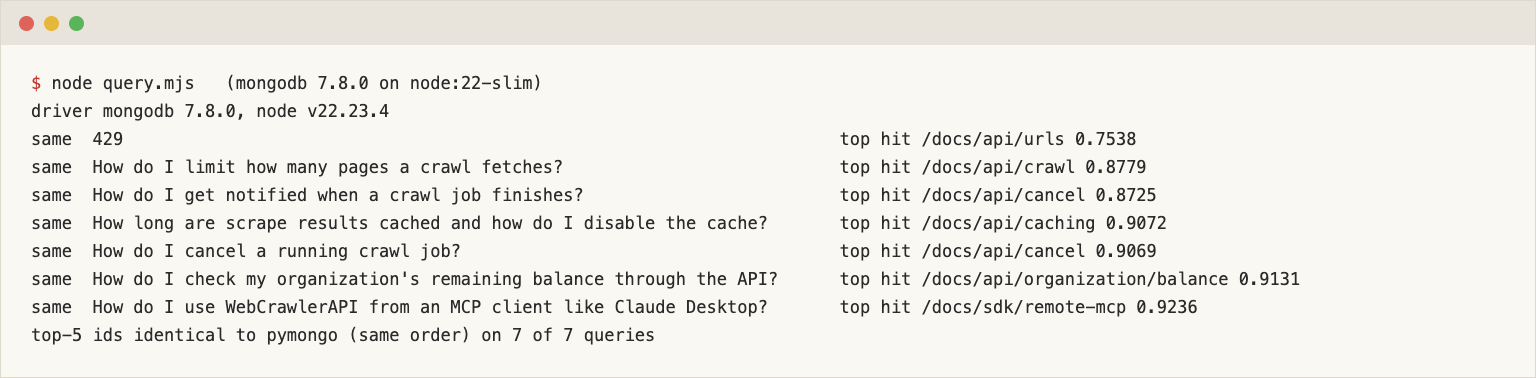
Query time on the local container, warm, 50 runs from a Python container on the Docker network: ANN median 5.0 ms, ANN with a filter 4.9 ms, ENN 4.6 ms. The vector database comparison is the place for cross-store numbers. The same pipeline in Node.js (mongodb 7.8.0, which needs Node 20.19 or newer) returned identical top-5 ids on 7 of 7 queries: see node/query.mjs and its output.
Filter by section or customer
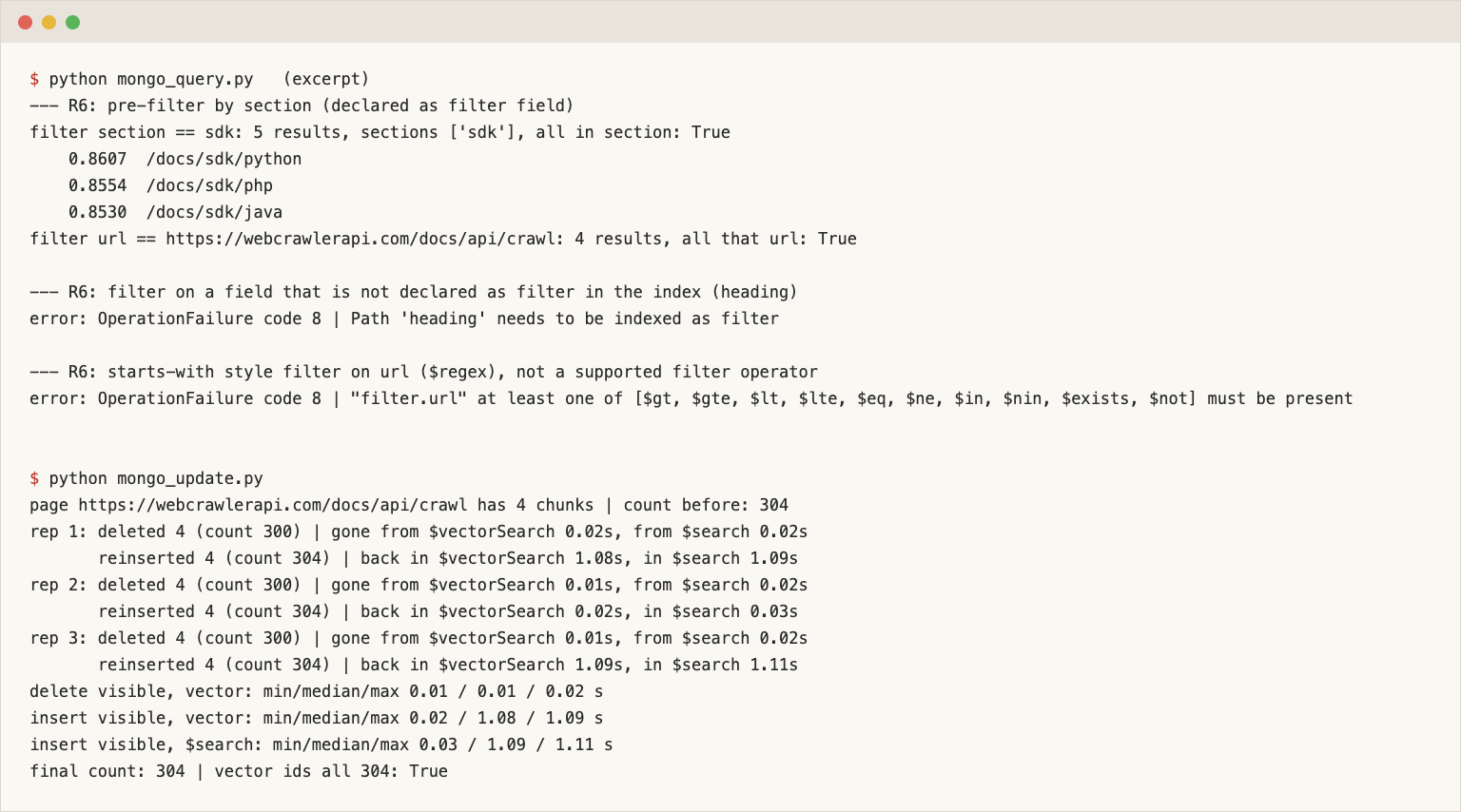
Declaring url and section as filter fields lets $vectorSearch pre-filter before the nearest-neighbor search, so you still get limit results from the allowed set. Add it as "filter": {"section": {"$eq": "sdk"}} inside the stage. With section == sdk all 5 results were SDK pages. With url == /docs/api/crawl I got the 4 chunks of that page. The operators on my build were $gt, $gte, $lt, $lte, $eq, $ne, $in, $nin, $exists and $not.
Two failures I hit on purpose:
- A filter on heading, which the index does not declare, failed with Path 'heading' needs to be indexed as filter. Adding a filter field later means changing the index definition.
- A starts-with filter, {"url": {"$regex": "^https://webcrawlerapi.com/docs/api"}}, failed with the operator list above. That is why section is its own field.
MongoDB hybrid search: Atlas Search plus $vectorSearch
Vector search found the expected page for 6 of 6 questions. For exact strings a keyword index does better, so I added a second index of type search, with dynamic off and three mapped fields. section is a token field so it can be used as a filter later.
TEXT_DEF = {"mappings": {"dynamic": False, "fields": {
    "text": {"type": "string"}, "heading": {"type": "string"}, "section": {"type": "token"}}}}
col.create_search_index(SearchIndexModel(definition=TEXT_DEF, name="kb_text", type="search"))
It was READY after 0.87 seconds. The query is a compound search that scores heading twice as high as text. Without the heading clause BM25 found the expected page for 4 of 7 queries, and with it 6 of 7.
For fusion I used $rankFusion, documented for MongoDB 8.0 and higher. It takes named input pipelines, each a selection pipeline with its own limit, and fuses them with reciprocal rank fusion (k=60).
[{"$rankFusion": {"input": {"pipelines": {
    "vector": [{"$vectorSearch": {"index": "kb_vec", "path": "embedding", "queryVector": vec,
                                  "numCandidates": 400, "limit": 50}}],
    "text":   [text_search_stage, {"$limit": 50}]}}}},
 {"$limit": 20}]
It ran on the first attempt, so the fallback I had prepared was not needed. As a cross-check I wrote the fusion by hand in Python (score = sum of 1 / (60 + rank)). The two top-5 id lists were identical, in order, on 7 of 7 queries. scoreDetails: true showed the same arithmetic for one chunk: rank 5 in the text list and rank 1 in the vector list gave 1/65 + 1/61 = 0.031778. The reciprocal rank math is in the Elasticsearch post.
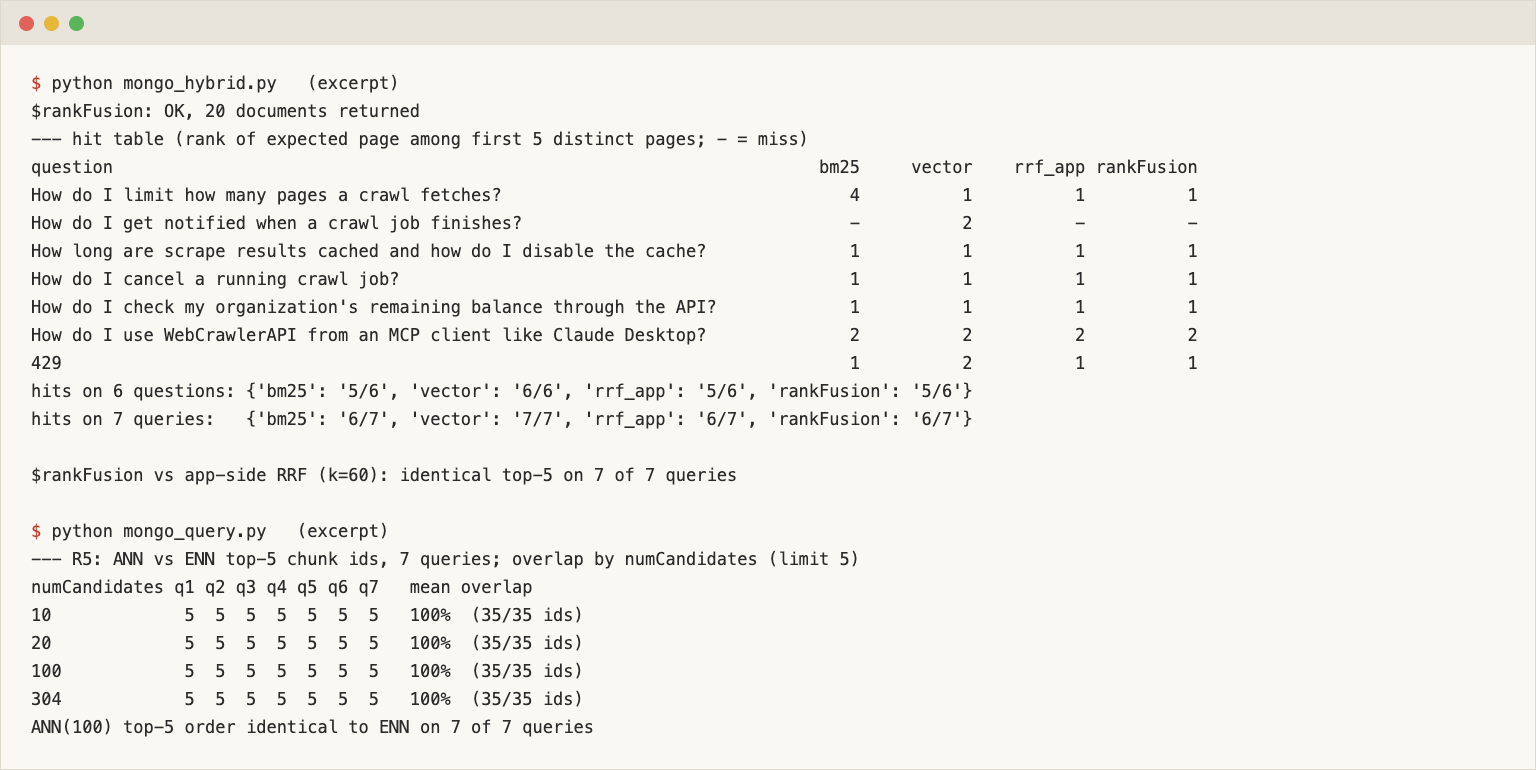
| Mode | Hits on 6 questions | Rank on 429 |
|---|---|---|
| $search (BM25) | 5 of 6 | 1 |
| $vectorSearch | 6 of 6 | 2 |
| Python RRF (k=60) | 5 of 6 | 1 |
| $rankFusion | 5 of 6 | 1 |
Hybrid did not beat vector search here. The miss is the job-notification question ("How do I get notified when a crawl job finishes?"). Vector search ranked /docs/async-requests second, BM25 did not return it in the top 5 pages, and the fused list put /docs/api/crawl, /docs/api/job and /docs/job on top. One weighting try (vector 2, text 1) did not fix it. On the exact token 429, BM25 and both fusions ranked the right page first. If your users paste error codes or parameter names, that is the case for the second index. Cost: $rankFusion took 14.4 ms median against 4.7 ms for $search alone (30 runs, local).
Section filter in hybrid search
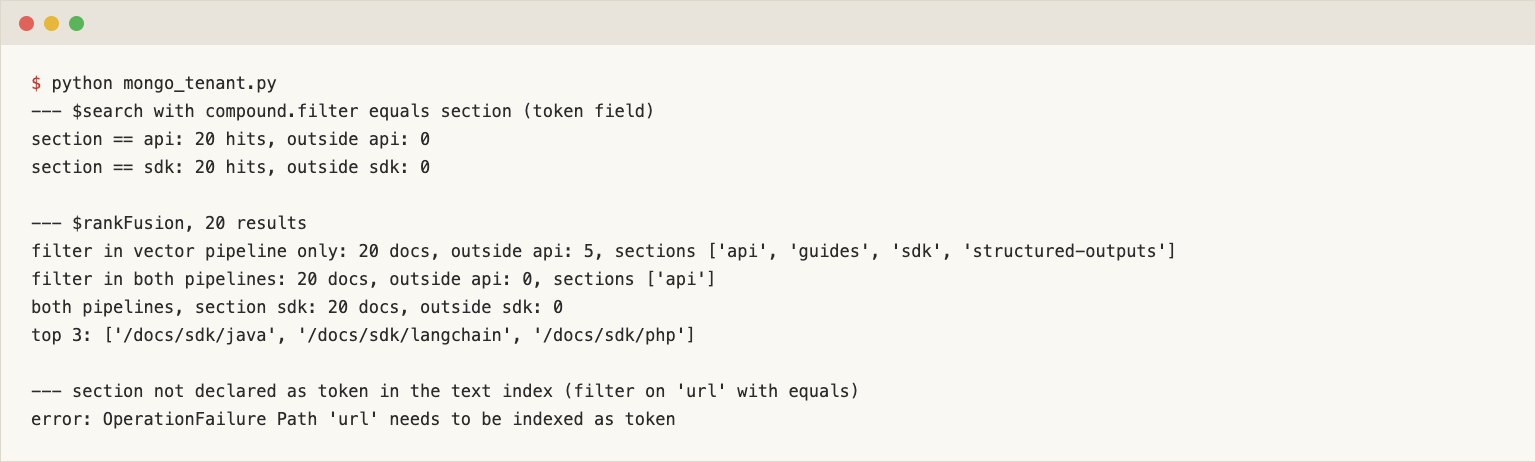
A filter in $vectorSearch does not apply to the other pipeline. With the filter only in the vector pipeline (section == api), 5 of the 20 fused results came from other sections. The fix is a compound filter in $search using the token mapping, plus the same filter in the vector pipeline:
text_stage = {"$search": {"index": "kb_text", "compound": {
    "must": [{"text": {"query": q, "path": ["text", "heading"]}}],
    "filter": [{"equals": {"path": "section", "value": "api"}}]}}}
vector_stage = {"$vectorSearch": {..., "filter": {"section": {"$eq": "api"}}}}   # both go into $rankFusion
With both filters, 20 of 20 fused results were in api (and 20 of 20 in sdk for an sdk run). If a field is not mapped in the search index, the filter errors: for url, Path 'url' needs to be indexed as token. This is the tenant pattern for a support bot. I tested it on one field with 19 values and 304 documents. It is not a scale test.
Keep it fresh: re-crawl and update
When a page changes, delete its chunks by url and insert the re-embedded ones. For /docs/api/crawl, which has 4 chunks:
col.delete_many({"url": PAGE})              # count 304 -> 300
col.insert_many([doc_of(r) for r in rows])  # count 300 -> 304
Counts went 304, 300, 304 on each of three repetitions. I polled every 250 ms until the 4 deleted ids were gone, then until all 4 reinserted ids were back. Deletes were visible after 0.01 to 0.02 seconds. Inserts were visible after 0.02 to 1.09 seconds in the vector index and 0.03 to 1.11 seconds in the text index: two of three runs showed about a second of lag. So a new chunk can be missing for about a second after the insert returns, and you should not read your own write straight away in a flow that matters. That is a local single-node number, and the docs say mongot follows the collection through change streams.
Moving to a free Atlas cluster (M0)
I did not run this on an Atlas cluster and I did not create an Atlas account. This section comes from the MongoDB docs read on November 10, 2026. Re-read them before you rely on a number.
To move the code, create a Free cluster, add your IP to the access list, put the SRV connection string in MONGODB_URI and rerun the same scripts. The pipelines do not change. The docs say:
- A Free cluster stores at most 0.5 GB, counting documents and indexes. Flex stores 5 GB.
- Free allows 3 search or vector indexes in total and Flex allows 10. This setup uses two, so one is left.
- Free runs MongoDB 8.0 and Flex at least 8.0, which is the minimum for $rankFusion. Each project can have one Free cluster.
Here 304 chunks took 3.2 MB of documents and about 1.5 MB of indexes. At 30,000 chunks of the same size that is about 320 MB of documents before indexes, so the 0.5 GB ceiling is a design constraint. I cite no prices.
When MongoDB is the right store, and when it is not
- You already run MongoDB: keep the chunks there. One driver, one auth model, one backup.
- You have no MongoDB and a small corpus: use sqlite-vec or Chroma. A 1.36 GB image and a mongot process are a lot for a few hundred chunks.
- You are on Postgres: Supabase and pgvector.
- You want richer keyword ranking, boosts and highlights: Elasticsearch or OpenSearch.
- You want a small search engine with typo tolerance and an instant-search box: Meilisearch or Typesense.
The full comparison is in the vector database guide.
What this test did not cover
- 304 chunks, 6 questions, one embedding model, cosine only. No scale test, no quantization, no BSON binary vectors, no reranking.
- No Atlas cluster of any tier, no Search Nodes, no auto-embedding (Voyage AI autoEmbed).
- One image tag, 9.0.4-20261109T110135Z. The 8.x tags use a different mongot.
Clean up and next steps
docker compose -p mongo-kb -f compose.yml down -v
docker rmi mongo-kb-py mongo-kb-node
For the store step and freshness see the website to markdown knowledge base guide, and the vector database comparison for the other databases. WebCrawlerAPI produces the Markdown this collection stores: create an API key on the dashboard, start with a low items_limit, and read the crawl endpoint docs and the crawl API.