sqlite-vec Tutorial: A Website Knowledge Base in One SQLite File
This sqlite-vec tutorial turns a crawled website into one .db file you can query with SQL, copy with cp and run with no network. The setup I have in mind is a docs support bot. One kb.db is built in CI after each docs crawl, baked into the bot's image (or an app bundle, or a CLI) and rolled back by swapping the file. The whole file is 3.5 MB, a backup is cp, and I queried it in a container with --network none. I ran every command on November 8, 2026, with sqlite-vec 0.1.9. All output below comes from real runs.
The input is 304 chunks from 52 pages of the WebCrawlerAPI docs, embedded with Ollama nomic-embed-text (768 dimensions). It is the same file the Chroma and LanceDB posts used, and it comes from a WebCrawlerAPI crawl. This post is the single-file store step of the website to markdown knowledge base guide. For speed and recall across stores, see the vector database comparison. All code and outputs are in the code folder.

What sqlite-vec is
sqlite-vec is a SQLite extension written in C with no dependencies. It turns SQLite into a small vector database: it adds vec0 virtual tables that store float, int8 or binary vectors and answer nearest-neighbor queries. The repo is dual-licensed (the root folder has LICENSE-MIT and LICENSE-APACHE). It is the successor to sqlite-vss, and the README warns that it is pre-v1, so expect breaking changes. I pinned 0.1.9, the latest release on PyPI that day (released March 31, 2026).
The vec0 docs I read mention brute-force search when they explain partition keys and list no ANN index, so I treat queries as a full scan. That is fine for a docs site. At 304 vectors one query took about 1.6 ms (details below). The cost grows with the row count, so this is a store for thousands to maybe low hundreds of thousands of chunks, not millions. The repo's main branch has a sqlite-vec-diskann.c file and a benchmarks-ann folder. I did not test either, and the 0.1.9 docs do not describe an ANN index. Turso, libSQL and SQLite Cloud are not covered here.
sqlite-vec example in Python
The shortest path from chunks.jsonl (the file with id, url, heading, text and embedding per chunk) to a query. Install with pip install sqlite-vec==0.1.9 requests. This is minimal.py:
import json
import sqlite3

import requests
import sqlite_vec

rows = [json.loads(line) for line in open("chunks.jsonl")]

db = sqlite3.connect("mini.db")
db.enable_load_extension(True)
sqlite_vec.load(db)
db.enable_load_extension(False)
db.executescript("""
create table chunks(id integer primary key, url text, heading text, text text);
create virtual table vec_chunks using vec0(id integer primary key, embedding float[768] distance_metric=cosine);
""")
with db:
    for i, r in enumerate(rows, start=1):
        db.execute("insert into chunks values (?,?,?,?)", (i, r["url"], r["heading"], r["text"]))
        db.execute("insert into vec_chunks(id, embedding) values (?,?)", (i, sqlite_vec.serialize_float32(r["embedding"])))

question = "How do I limit how many pages a crawl fetches?"
body = {"model": "nomic-embed-text", "input": "search_query: " + question}
vec = requests.post("http://localhost:11434/api/embed", json=body).json()["embeddings"][0]
hits = db.execute("""
    select c.url, v.distance
    from (select id, distance from vec_chunks where embedding match ? and k = 3) v
    join chunks c on c.id = v.id
    order by v.distance""", [sqlite_vec.serialize_float32(vec)])
for url, distance in hits:
    print(round(distance, 3), url)
0.244 https://webcrawlerapi.com/docs/api/crawl
0.263 https://webcrawlerapi.com/docs/api/feed/feed-create
0.264 https://webcrawlerapi.com/docs/guides/batch-scrape
That output is from a real run (minimal.out, 304 rows). You need Ollama with nomic-embed-text for the question vector.
Install sqlite-vec in Docker
I run everything in python:3.12-slim. Extension loading is the usual snag. Some Python builds do not allow it, and a container removes the question. The image adds the sqlite3 CLI from apt and runs pip install -r requirements.txt (sqlite-vec==0.1.9, requests, duckdb). The scripts mount the code folder and the data folder:
docker build -t kb-sqlite-vec:py .
docker run --rm -v "$PWD":/work -v /path/to/data:/data:ro kb-sqlite-vec:py python setup.py
The README has the prerequisites and run.sh runs every step.
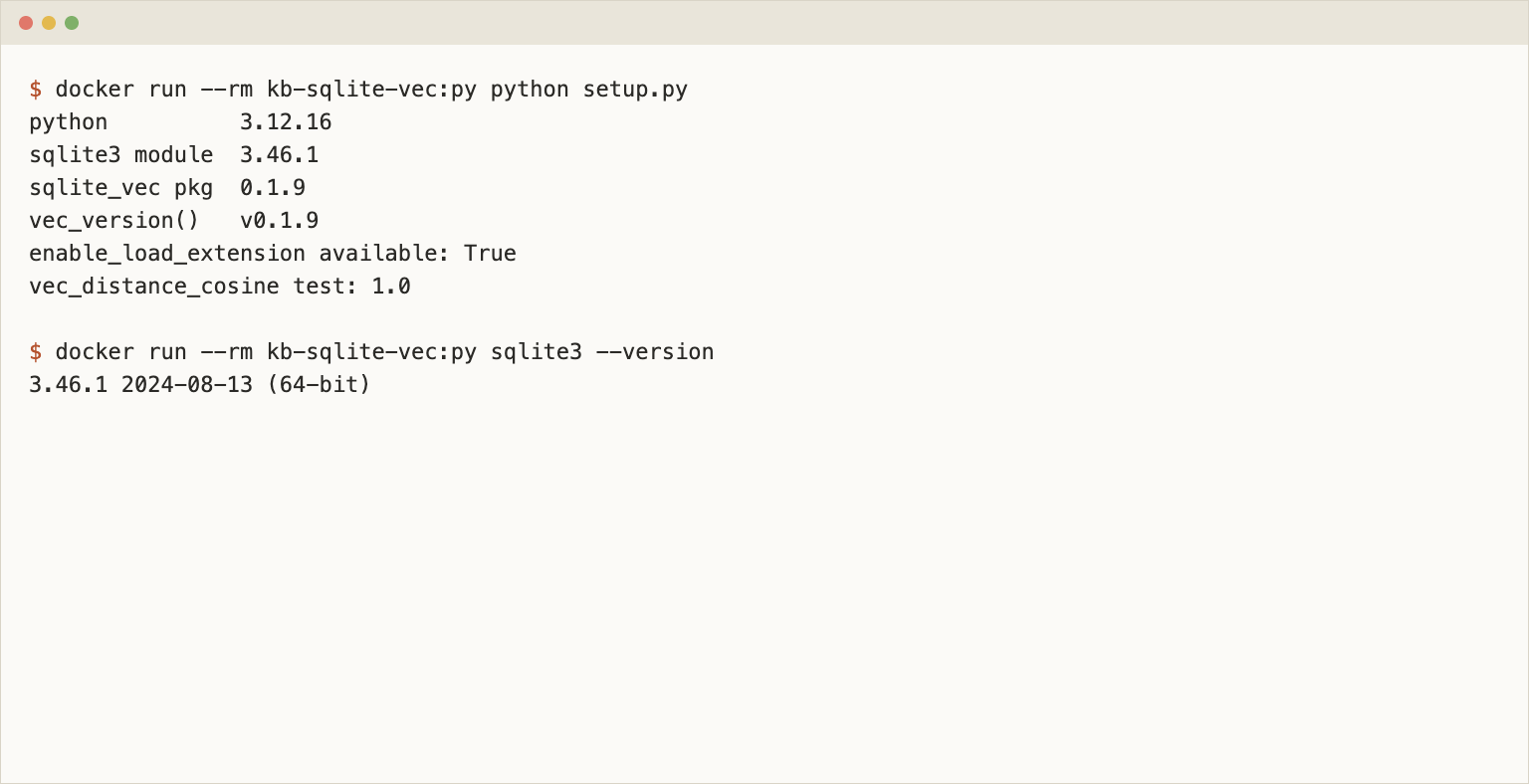
Both the Python module and the CLI in that image use SQLite 3.46.1. That matters for one detail later: the LIMIT form of a KNN query needs SQLite 3.41 or newer.
Create the vec0 table and load the chunks
I use two tables that share one integer id. A regular chunks table holds the text, the URL, the heading and the section. A vec0 table holds the vector and the one column I want to filter on. Deletes by URL, the FTS5 index and joins back to the text all work through that shared id.
create table chunks(
  id integer primary key,
  chunk_id text not null,
  url text not null,
  section text not null,
  heading text,
  text text not null
);
create index chunks_url on chunks(url);
create virtual table vec_chunks using vec0(
  id integer primary key,
  embedding float[768] distance_metric=cosine,
  section text
);
Two choices here. distance_metric=cosine is in the column definition. The KNN docs page shows that syntax, and without it MATCH uses L2 distance. section is a metadata column, so it can sit in the WHERE clause of a KNN query. The docs offer auxiliary columns (+url) to avoid the join, but those cannot appear in a KNN WHERE clause, and I wanted to find rows by URL in a regular table. I did not use a partition key. The docs advise hundreds of vectors per key value, and my 19 sections average 16 chunks.
The load is one transaction:
with db:
    for i, r in enumerate(rows, start=1):
        s = section_of(r["url"])  # second URL path segment: api, sdk, guides, ...
        db.execute("insert into chunks(id, chunk_id, url, section, heading, text) values (?,?,?,?,?,?)",
                   (i, r["id"], r["url"], s, r["heading"], r["text"]))
        db.execute("insert into vec_chunks(id, embedding, section) values (?,?,?)",
                   (i, sqlite_vec.serialize_float32(r["embedding"]), s))
load.py printed chunks: 304 and vec_chunks: 304, 19 sections (api 129, sdk 59, structured-outputs 18) and an insert time of 0.212 seconds for both tables. The file is 3,584,000 bytes, 875 pages of 4 KB, and it is the only file in the folder. The journal mode is the default (delete), so there is no -wal sidecar.
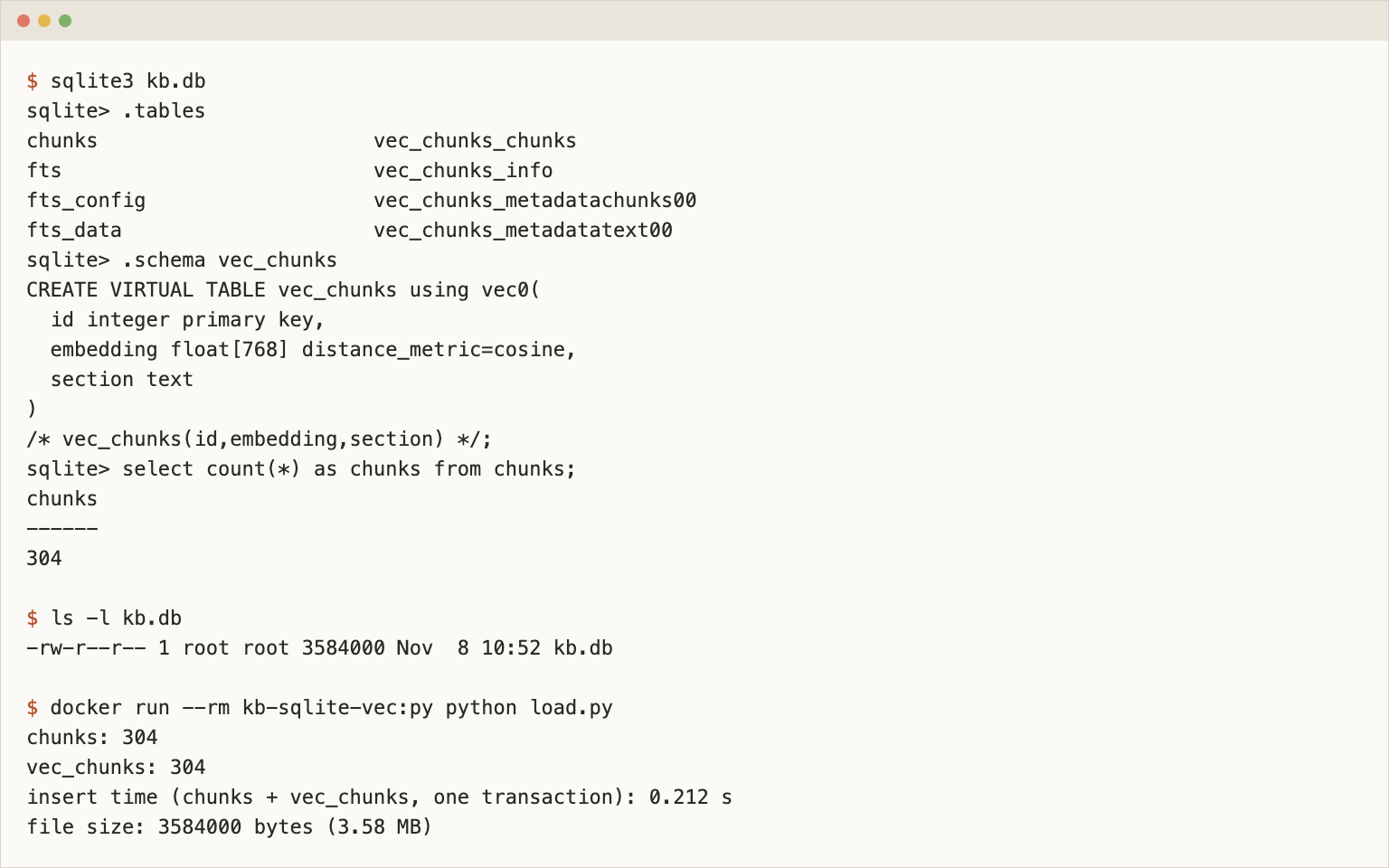
.tables shows that a vec0 table is vec_chunks plus internal tables such as vec_chunks_vector_chunks00, so back up the whole file.
SQLite vector search with vec0: KNN and metadata filters
A KNN query needs MATCH and either k = ? or a LIMIT. I join the result back to chunks for the URL and heading:
select c.url, c.heading, v.distance
from (select id, distance from vec_chunks where embedding match ? and k = 5) v
join chunks c on c.id = v.id
order by v.distance;
In Python, embed the question through Ollama with the search_query: prefix, serialize the vector like the stored ones and bind k as a second parameter. query.py runs this SQL with question vectors cached from Ollama (qvecs.json), so reruns need no model:
KNN = """
select c.url, c.heading, v.distance
from (select id, distance from vec_chunks where embedding match ? and k = ?) v
join chunks c on c.id = v.id
order by v.distance
"""

def top(question, n=5):
    vec = embed_query(question)  # POST to Ollama /api/embed, see common.py
    return db.execute(KNN, (sqlite_vec.serialize_float32(vec), n)).fetchall()
On 6 test questions the expected docs page was in the top 5 every time, at ranks 1, 2, 1, 1, 1, 2. The Chroma and LanceDB posts report the same ranks.
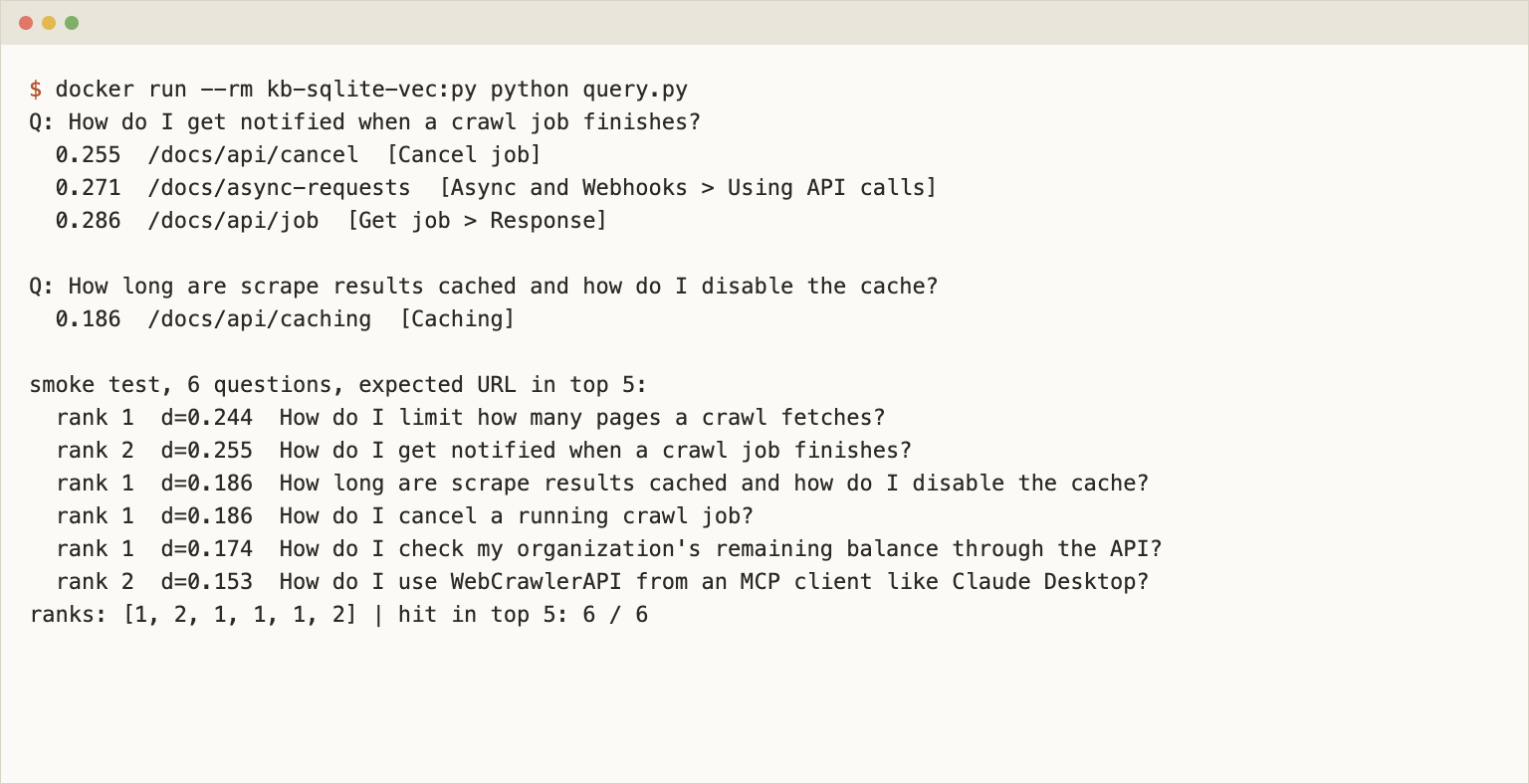
I checked the rules the docs state, on 0.1.9 and SQLite 3.46.1:
- limit 5 returns the same rows as k = 5.
- k = 5 limit 3 fails: Only LIMIT or 'k =?' can be provided, not both.
- A 384-dimension query vector against the 768 column fails with Dimension mismatch for query vector for the "embedding" column. Expected 768 dimensions but received 384.
Latency is one laptop and one run: 300 queries after a warm-up of 20, k = 5, query vector already computed. The median was 1.58 ms, the 95th percentile 4.66 ms and the slowest 7.07 ms. I do not compare it with other stores.
Filter by section
section = 'api' goes next to MATCH and k:
select c.url, c.section, v.distance
from (select id, distance from vec_chunks
      where embedding match ? and k = 5 and section = 'api') v
join chunks c on c.id = v.id order by v.distance;
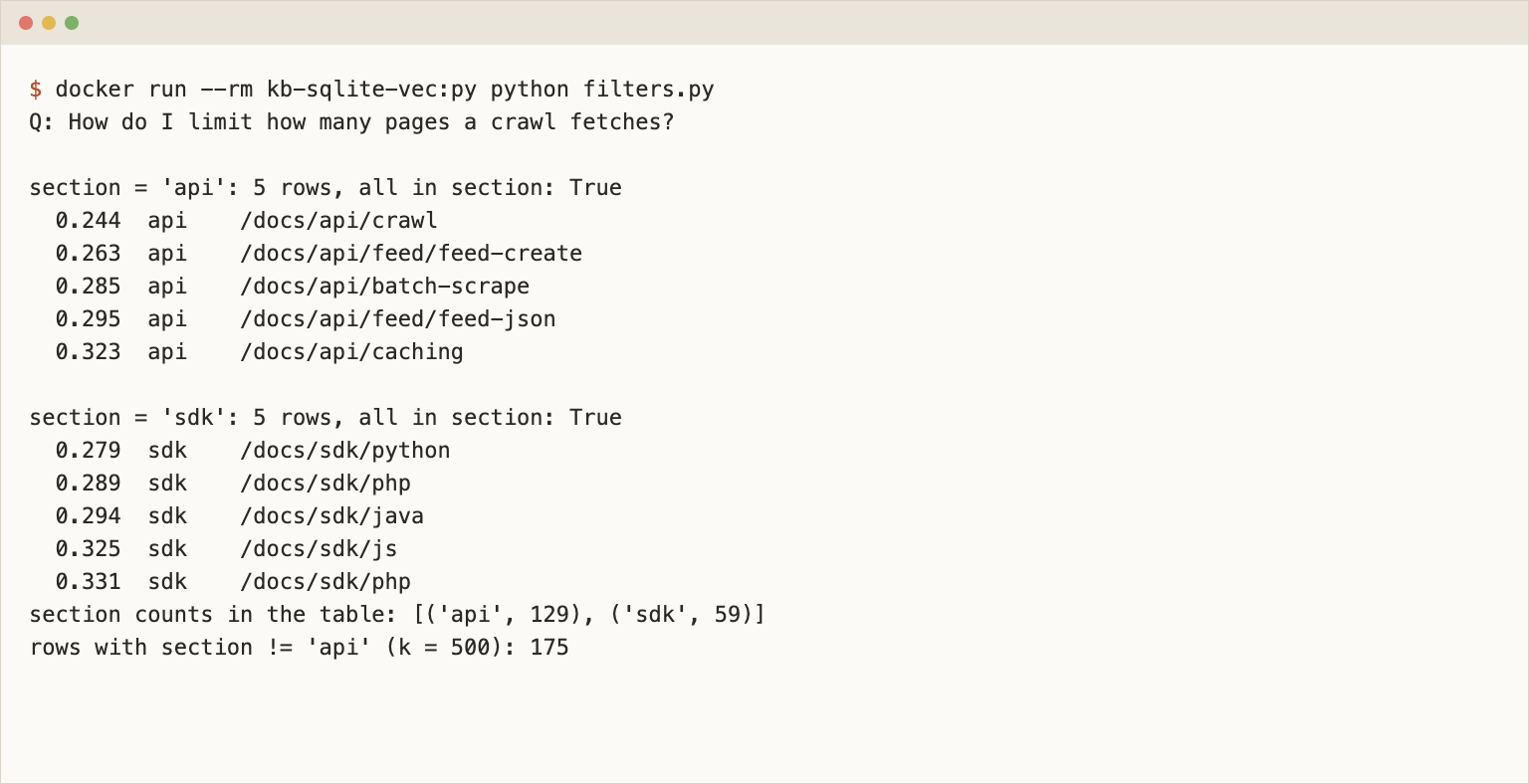
For "How do I limit how many pages a crawl fetches?" the api filter returned 5 rows, all in api, and the sdk filter returned 5 rows, all in sdk. A != 'api' filter with k = 500 returned 175 rows, which is 304 minus the 129 api chunks. IN did work in my run, but the docs list only =, !=, >, >=, < and <=, so I would not build on it. LIKE fails with An illegal WHERE constraint was provided on a vec0 metadata column in a KNN query. Filtering on url is not possible in the vec0 query at all, because url lives in chunks (no such column: url).
Hybrid search with FTS5 in plain SQL
Embeddings blur exact tokens. A status code like 429 or a parameter like max_depth is the kind of query where a keyword index helps, and FTS5 ships inside SQLite. The index goes on the regular chunks table, never on the vec0 table:
create virtual table fts using fts5(text, heading, content='chunks', content_rowid='id');
insert into fts(fts) values('rebuild');
content='chunks' means FTS5 stores only the index and reads the text from chunks. The rebuild took 0.010 seconds. The vector side and the keyword side meet on the shared rowid, and I fuse them with reciprocal rank fusion (RRF) in one statement:
with vec as (
  select id, row_number() over (order by distance) as rnk
  from vec_chunks where embedding match :v and k = 20
), kw as (
  select rowid as id, row_number() over (order by bm25(fts)) as rnk
  from fts where fts match :f order by bm25(fts) limit 20
), ids as (select id from vec union select id from kw)
select c.url, c.heading,
       coalesce(1.0 / (60 + vec.rnk), 0) + coalesce(1.0 / (60 + kw.rnk), 0) as score
from ids
left join vec on vec.id = ids.id
left join kw on kw.id = ids.id
join chunks c on c.id = ids.id
order by score desc limit 5;
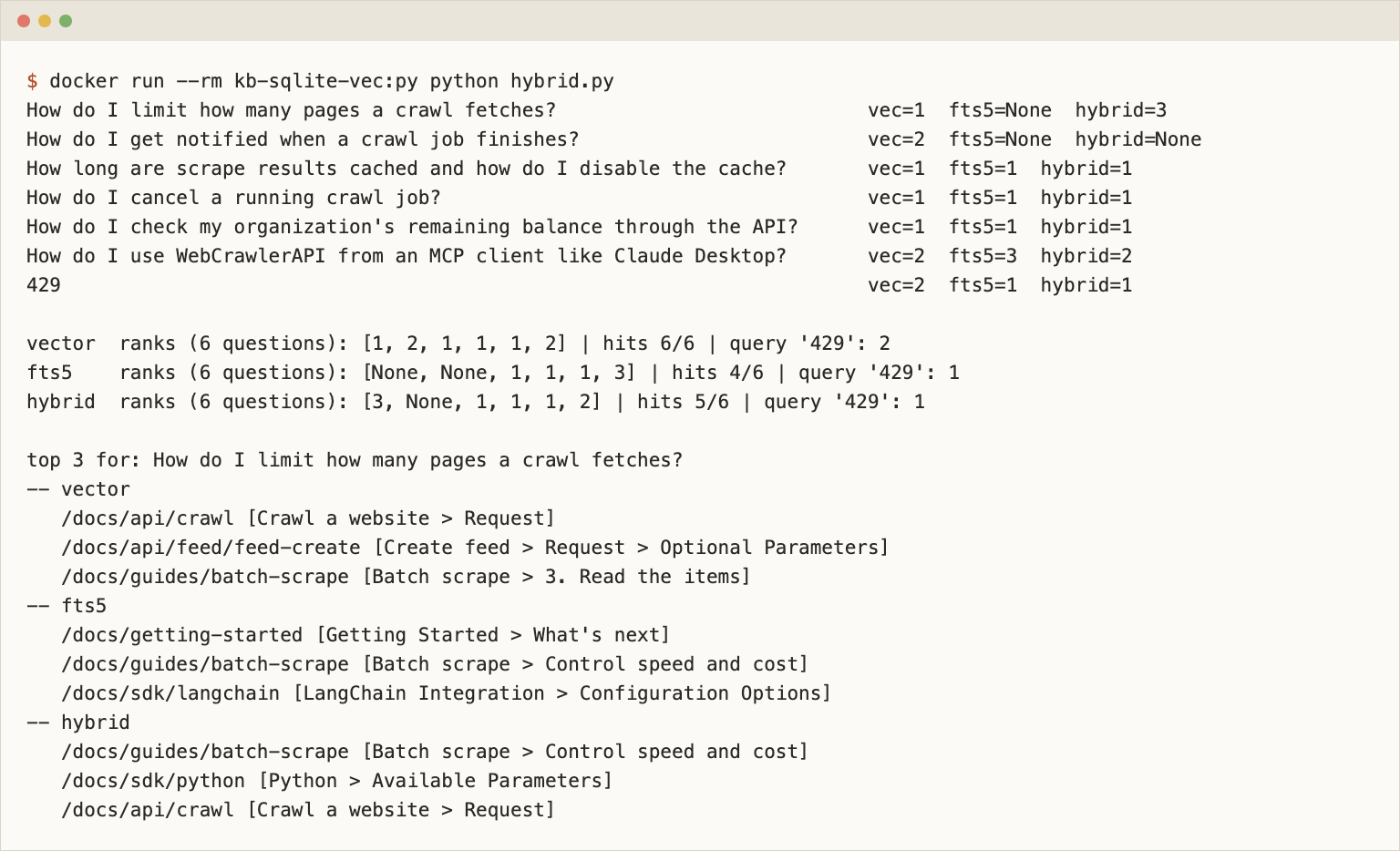
The constant 60 is the common default, and I did not tune it. For the keyword side I dropped a short stopword list from the question and joined the rest with OR, which is crude. I measured the 6 questions plus the query 429, whose expected page is /docs/api/markdown-clean.
| Mode | Questions with the expected page in top 5 | Ranks | Query 429 |
|---|---|---|---|
| Vector | 6 of 6 | 1, 2, 1, 1, 1, 2 | 2 |
| FTS5 | 4 of 6 | none, none, 1, 1, 1, 3 | 1 |
| Hybrid (RRF) | 5 of 6 | 3, none, 1, 1, 1, 2 | 1 |
Hybrid did not beat vector search on the natural-language questions. It made two of them worse: the page for "How do I get notified when a crawl job finishes?" fell out of the top 5, and the crawl endpoint page for the pages-limit question dropped from rank 1 to 3. An OR of common words such as crawl and pages pulls in many chunks. Hybrid helped on the exact token, where the right chunk went from second to first. A smarter keyword query (phrases, or an AND on rare words) could change the picture. I did not try it. Test the fused list on your own questions before you trust it.
One tokenizer check. The default FTS5 tokenizer splits max_depth into max and depth (max matched 50 chunks, depth 14). Searching the quoted phrase "max_depth" still matched exactly the 12 chunks that contain the literal string, so quote identifiers that contain underscores. The same idea runs in Weaviate.
Use the same file from Node.js
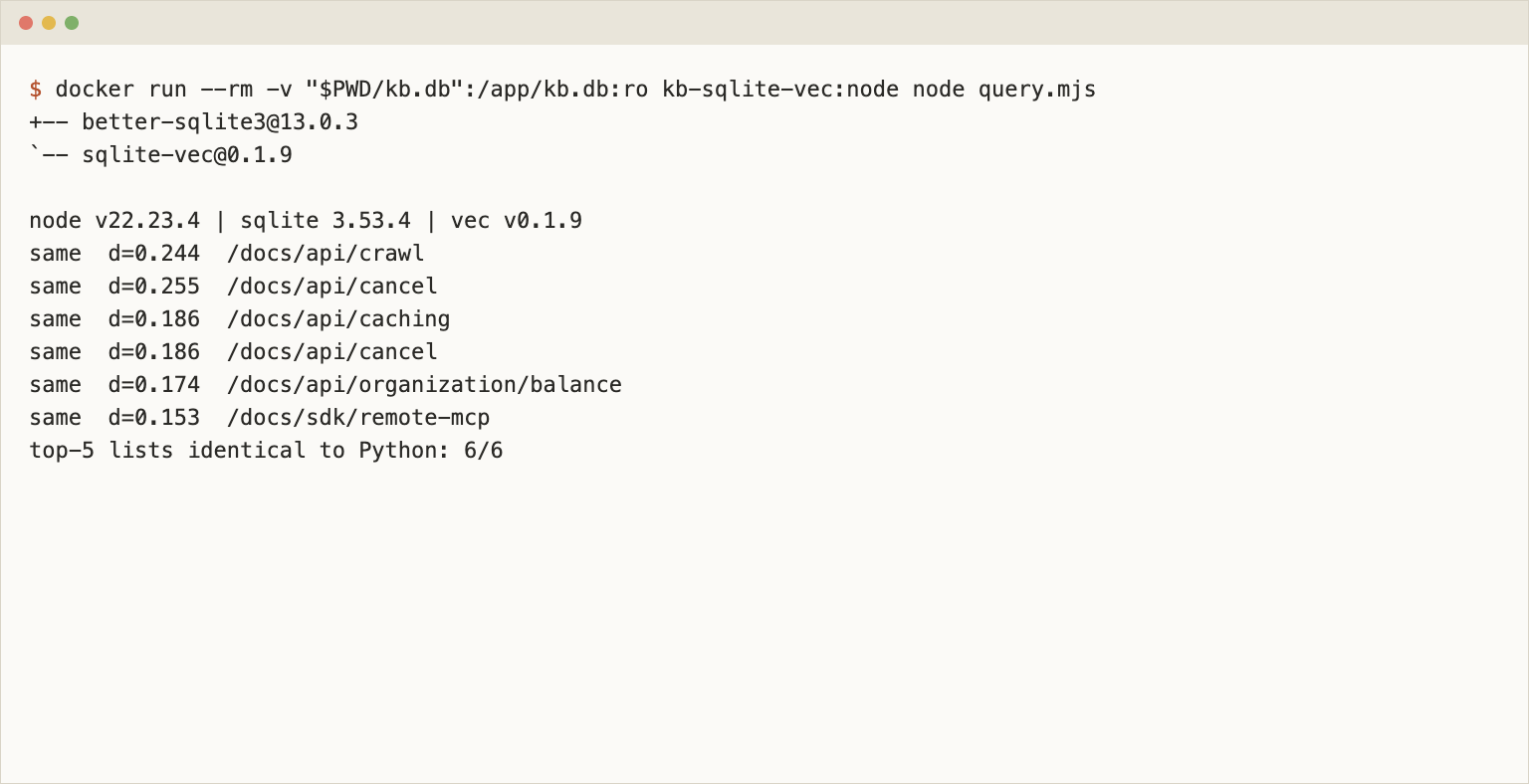
The point of one file is that another runtime can open it. In node:22-slim, npm install better-sqlite3 sqlite-vec@0.1.9 worked without extra apt packages. It installed better-sqlite3@13.0.3, which bundles SQLite 3.53.4 (the file was built with 3.46.1).
import Database from "better-sqlite3";
import * as sqliteVec from "sqlite-vec";

const db = new Database("kb.db", { readonly: true });
sqliteVec.load(db);

const knn = db.prepare(`
  select c.url, v.distance
  from (select id, distance from vec_chunks where embedding match ? and k = 5) v
  join chunks c on c.id = v.id
  order by v.distance`);

// queryVector is an array of 768 numbers from your embedding model
const rows = knn.all(new Float32Array(queryVector));
console.log(rows[0].url, rows[0].distance);
I ran the 6 questions through this code against the kb.db that Python wrote. All 6 top-5 URL lists were identical to the Python ones, including the order. The top hit for the pages-limit question was /docs/api/crawl at distance 0.244 in both.
Update a page without rebuilding the file
When a docs page changes, delete its old chunks and insert the new ones in one transaction. I delete by the shared id, the key of each vec0 row: select the ids for the URL from chunks, then delete those ids from vec_chunks and chunks. With an external-content FTS5 table you must also tell FTS5 about each removed row, before you delete it from chunks:
URL = "https://webcrawlerapi.com/docs/api/crawl"
ids = [r[0] for r in db.execute("select id from chunks where url = ?", (URL,))]
marks = ",".join("?" * len(ids))
with db:
    for i, h, t in db.execute("select id, heading, text from chunks where url = ?", (URL,)).fetchall():
        db.execute("insert into fts(fts, rowid, text, heading) values('delete', ?, ?, ?)", (i, t, h))
    db.execute(f"delete from vec_chunks where id in ({marks})", ids)
    db.execute(f"delete from chunks where id in ({marks})", ids)
On a copy of kb.db I deleted /docs/api/crawl, which has 4 chunks. The counts went from 304 to 300 in both tables, the page no longer appeared in the top 5 for the pages-limit question, and the phrase "max_depth" matched 10 chunks instead of 12. The re-insert needs a matching insert into fts(rowid, text, heading) per row. I re-inserted the same 4 chunks in 0.011 seconds: 304 again, the page back in the top 5, 12 matches, and integrity_check returned ok.
The file did not shrink. After deleting 4 of 304 chunks it was still 3,584,000 bytes with 0 free pages. VACUUM took it down by one page, to 3,579,904 bytes, and re-inserting grew it to 3,592,192. I did not test a larger delete, so run VACUUM after a big re-crawl and check the size yourself. How to decide what to re-crawl is in how often to re-crawl and keeping a support bot in sync.
Ship the file: offline copy and backup
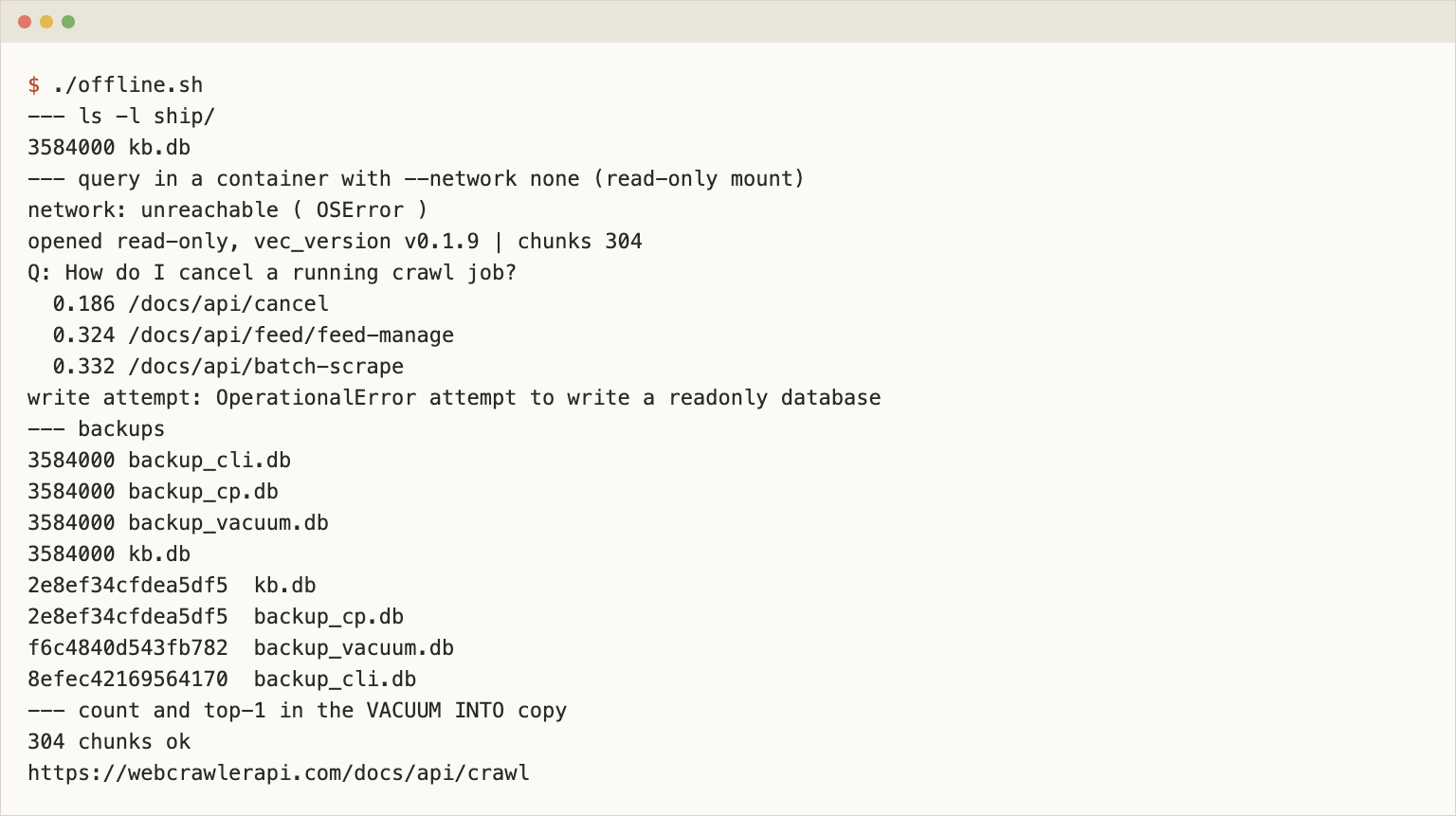
A single file makes this part easy. I copied kb.db into a new folder and ran the query in a container started with --network none, with the folder mounted read-only and the connection opened with mode=ro:
docker run --rm --network none -v "$PWD":/work:ro kb-sqlite-vec:py python offline_query.py /work/ship/kb.db
The script first tried to open a socket to a public IP, which failed, so the network was off. The query returned /docs/api/cancel at 0.186 for the cancel question, and a delete from chunks failed with attempt to write a readonly database. "Offline" has one condition: the question vectors must come from somewhere. I used vectors cached from Ollama. In production the embedding model must run on the device too, or you ship precomputed vectors.
For backups I made three copies (cp, VACUUM INTO and sqlite3 .backup) and compared them with the original. A plain cp gave a byte-identical file (same sha256 as kb.db). VACUUM INTO and sqlite3 .backup produced files of the same size with different hashes, which is expected because the pages are laid out again. The VACUUM INTO copy opened fine: 304 chunks, integrity_check ok, same top-1 for the pages-limit question. Use cp only while nothing writes to the file. I did not test concurrent writers or WAL mode.
Does it run on Cloudflare D1?
I found no sign that it does. On November 8, 2026 the D1 SQL statements page said D1 supports "a subset of SQLite extensions", listed the FTS5 module, the JSON extension and math functions, and pointed to the workerd source for the full list. sqlite-vec was not mentioned. I did not try to create a vec0 table there, so treat this as "not documented", not as a tested failure. FTS5 is on that list, so the keyword half of a hybrid query has a home on D1. The vector half would need another service. Check the page again before you plan around it.
DuckDB vector search as the other embedded option
DuckDB has a vss extension with an HNSW index. With DuckDB 1.4.1 I loaded the same 304 vectors into FLOAT[768]. An exact scan with array_cosine_distance on a file-backed database gave ranks 1, 2, 1, 1, 1, 2 in a 1,323,008 byte file. Creating the HNSW index on that file failed: HNSW indexes can only be created in in-memory databases, or when the configuration option 'hnsw_enable_experimental_persistence' is set to true. The DuckDB docs call vss experimental and warn that a crash can corrupt a persisted index. For ANN numbers see the hub.
When to use sqlite-vec
Pick sqlite-vec when the knowledge base is a file you ship: one kb.db per docs version, built in CI after the crawl, baked into the support-bot image, a CLI or a desktop app, and swapped out to roll back. It also fits a test fixture and a single-tenant bot with tens of thousands of chunks. Python and Node read the same file, and I queried it with the network off.
Pick something else when you need millions of vectors, many concurrent writers or an approximate index (see the hub for options). If you already run Postgres, pgvector keeps everything in one database. For a server with an HTTP API, the Chroma post covers the container route.
Crawl your own site
The chunks in this post came from a crawl of the WebCrawlerAPI docs. To get the same input for your site, register on the dashboard and create an API key at dash.webcrawlerapi.com/access. Then run build_chunks.py, the same script as in the Chroma post. It sends POST https://api.webcrawlerapi.com/v1/crawl, polls GET /v1/job/<id> until the job is done or error, downloads each item's markdown_content_url, splits the markdown by headers, embeds the chunks and writes chunks.jsonl.
ollama pull nomic-embed-text
WEBCRAWLERAPI_API_KEY=YOUR_API_KEY python build_chunks.py https://webcrawlerapi.com/docs \
  --items-limit 50 --whitelist 'https://webcrawlerapi\.com/docs.*'
Options are in the crawl endpoint docs. I did not re-run the crawl for this post. The input file has 304 rows, sha256 7c62db92...e145, the same hash as in the Chroma post. A fresh crawl returns a slightly different page set and chunk count, so your numbers and ranks will differ. For the chunking and model choices see chunking by headers, the Python walkthrough and the embedding model comparison.
Clean up and next steps
docker rmi kb-sqlite-vec:py kb-sqlite-vec:node removes the images, and deleting kb.db removes the store. To build the same file for your own site, create an API key on the dashboard, crawl your docs with items_limit set, run load.py and ship kb.db. Pricing is on the crawl API page. The pillar guide covers the rest of the pipeline. Other stores for the same chunks: Chroma, LanceDB, pgvector and the comparison hub.