Milvus Vector Database Tutorial: Load a Website With Milvus Lite, Then Zilliz Cloud
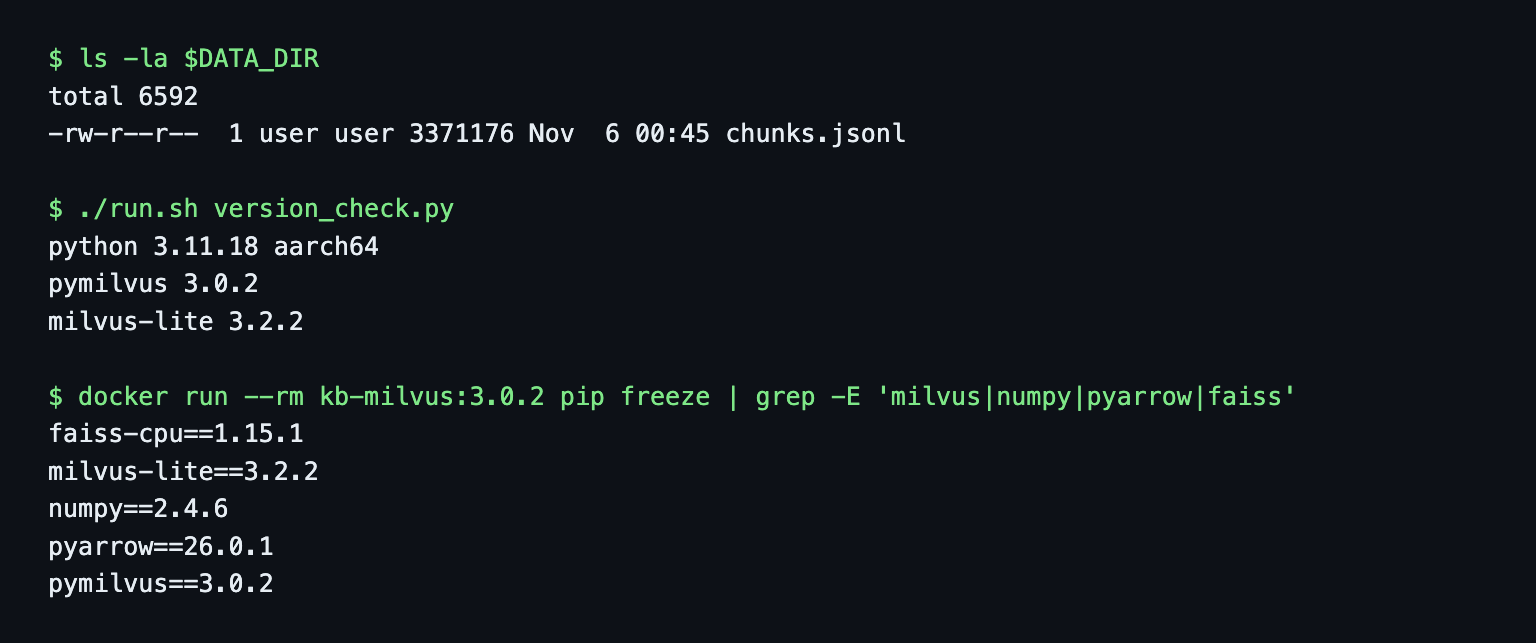
This Milvus vector database tutorial loads a crawled docs site into Milvus Lite, then runs the same code against a Zilliz Cloud cluster. I ran every command on November 6, 2026, in Docker, with pymilvus 3.0.2 and milvus-lite 3.2.2. The outputs below are copied from those runs.
The input is 304 chunks from the WebCrawlerAPI docs, embedded with Ollama nomic-embed-text (768 dimensions). This is the store step of the website to markdown knowledge base guide, for a support bot or in-product search. No chunks yet? Crawl your own site builds them with the crawl API.
I do not cover distributed Milvus, Kubernetes, GPU indexes or multimodal data. I did run Milvus Standalone with Attu once.

Run Milvus Lite in Docker
There is no server to start. The Docker part is a small Python image with pymilvus installed, and a bind mount so the database shows up on the host.
FROM python:3.11-slim
ENV PYTHONDONTWRITEBYTECODE=1 PYTHONUNBUFFERED=1
WORKDIR /work
COPY requirements.txt .
RUN pip install --no-cache-dir -r requirements.txt && pip freeze > /pip-freeze.txt
pymilvus[milvus_lite]==3.0.2
milvus-lite==3.2.2
requests==2.34.2
The extra matters. A plain pip install pymilvus does not install Lite, and MilvusClient("x.db") then fails with milvus-lite is required for local database connections. Please install it with: pip install pymilvus[milvus_lite] (gotchas_env.out). The image is 530 MB and built for arm64 here. Per the Milvus docs (read November 6, 2026), Windows needs milvus-lite named explicitly because pip skips the extra there. I did not test Windows.
docker build -t kb-milvus:3.0.2 .
export DATA_DIR=/path/to/folder/with/chunks.jsonl
./run.sh version_check.py
run.sh passes --user "$(id -u):$(id -g)" so the database files belong to me and not to root, and --add-host host.docker.internal:host-gateway so the container reaches Ollama on the Mac.
What Milvus, Milvus Lite and Zilliz Cloud are
Milvus is an open source vector database. Its GitHub README (read November 6, 2026) says Apache 2.0, with Zilliz as the major contributor. Milvus Lite is the in-process Python backend with the same MilvusClient API. Standalone and Distributed are the server deployments. Zilliz Cloud is the managed service.
The vector database comparison says Milvus fits very large scale. That holds for the server and cloud versions. This post uses Lite on 304 chunks as a prototype, and the same API later points at a server or Zilliz Cloud.
Crawl your own site
The chunks in this post came from a crawl of the WebCrawlerAPI docs. I did not re-crawl. I reused the file from the Chroma tutorial (304 rows, sha256 7c62db92...e145, checked before the run), so the numbers compare directly with the other tutorials in this series.
To get the same input for your site, register on the dashboard and create an API key at dash.webcrawlerapi.com/access. Then run build_chunks.py. It sends POST https://api.webcrawlerapi.com/v1/crawl, polls GET /v1/job/<id> until the job is done, downloads each item's markdown, splits it by headers, embeds the chunks and writes chunks.jsonl with id, url, heading, text, embedding, model and dim.
ollama pull nomic-embed-text
WEBCRAWLERAPI_API_KEY=YOUR_API_KEY python build_chunks.py https://webcrawlerapi.com/docs \
  --items-limit 50 --whitelist 'https://webcrawlerapi\.com/docs.*'
The script sends this request, which you can also run by hand:
curl -X POST https://api.webcrawlerapi.com/v1/crawl \
  -H "Authorization: Bearer YOUR_API_KEY" -H "Content-Type: application/json" \
  -d '{"url": "https://webcrawlerapi.com/docs", "items_limit": 50,
       "output_formats": ["markdown"], "respect_robots_txt": true,
       "whitelist_regexp": "https://webcrawlerapi\\.com/docs.*"}'
It returns a job id. Options are in the crawl endpoint docs and the job endpoint docs. The glossary entry on crawling a documentation site for an LLM knowledge base covers the settings.
Create the collection: schema, dynamic field and index
MilvusClient takes one argument that decides everything. A path ending in .db gives Lite, http://host:19530 gives a server, and a Zilliz endpoint plus a token gives Zilliz Cloud. I used an explicit schema, because the quick form create_collection(name, dimension=768) hides the choices:
from pymilvus import DataType, MilvusClient

client = MilvusClient("/data/kb.db")

schema = client.create_schema(auto_id=False, enable_dynamic_field=True)
schema.add_field("id", DataType.VARCHAR, is_primary=True, max_length=128)
schema.add_field("vector", DataType.FLOAT_VECTOR, dim=768)
schema.add_field("url", DataType.VARCHAR, max_length=512)
schema.add_field("heading", DataType.VARCHAR, max_length=512)
schema.add_field("section", DataType.VARCHAR, max_length=64)
schema.add_field("text", DataType.VARCHAR, max_length=16384)

index_params = client.prepare_index_params()
index_params.add_index(field_name="vector", index_type="AUTOINDEX", metric_type="COSINE")

client.create_collection("docs", schema=schema, index_params=index_params)
client.insert("docs", data=records)
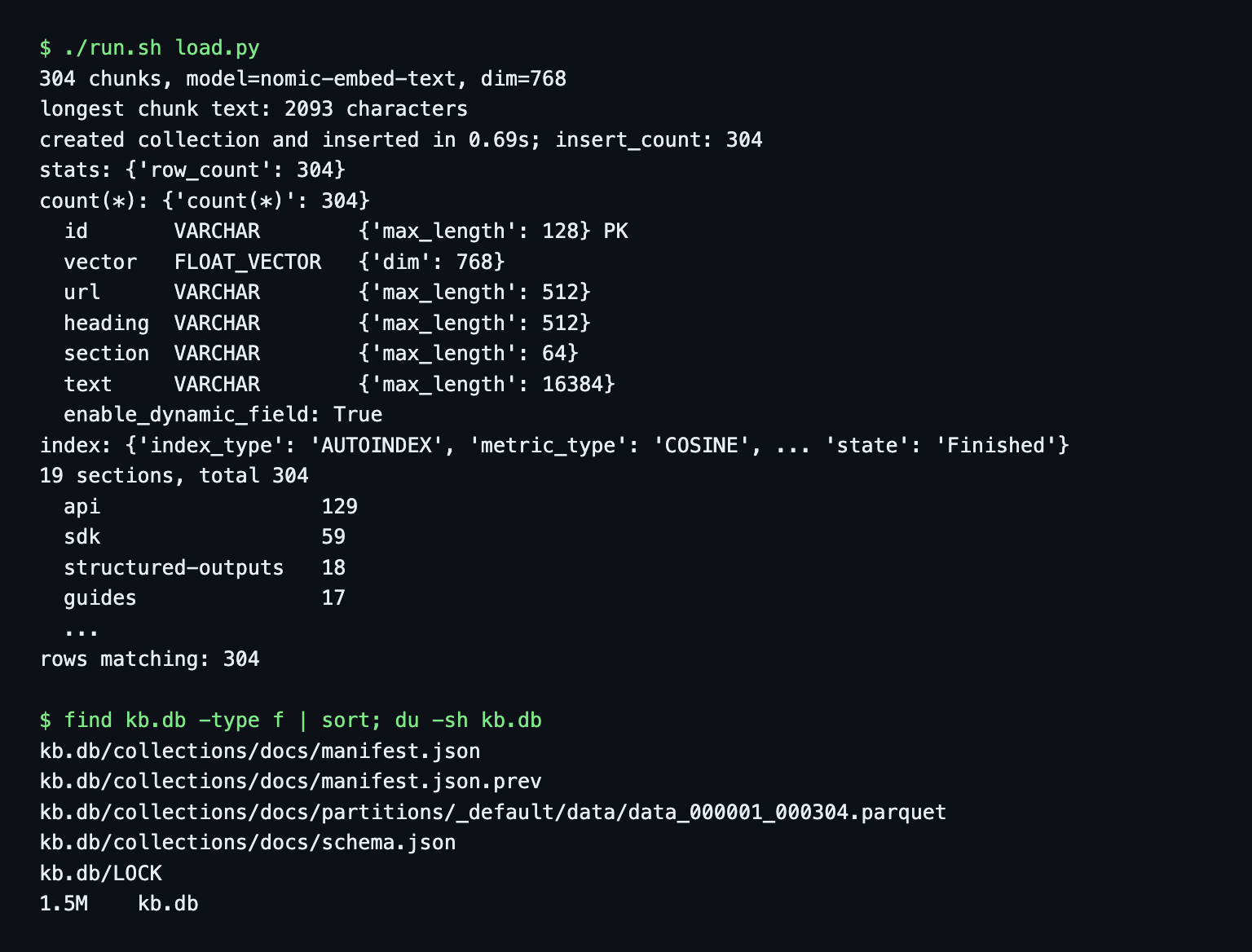
section is the second URL path segment (/docs/api/crawl gives api), the same rule as in the other posts, so 19 sections come out again. load.py inserted 304 rows in 0.69 seconds. The longest chunk is 2,093 characters. With max_length=1000 on a scratch collection the insert of the longest chunk failed with VARCHAR field 'text' value length 2093 exceeds max_length=1000 (gotchas.out).
enable_dynamic_field=True lets a row carry keys the schema does not declare. The model key is not in the schema, and model == "nomic-embed-text" still filtered 304 rows.
Where the data lives
The Milvus docs say MilvusClient("./milvus_demo.db") creates a directory in Lite 3.2.2, and I saw the same. Right after the load, kb.db held 5 files and 1.5 MB: a Parquet data file, a schema file, two manifests and a LOCK. Copy the whole directory, not just one file.
Do the index types matter at 304 rows?
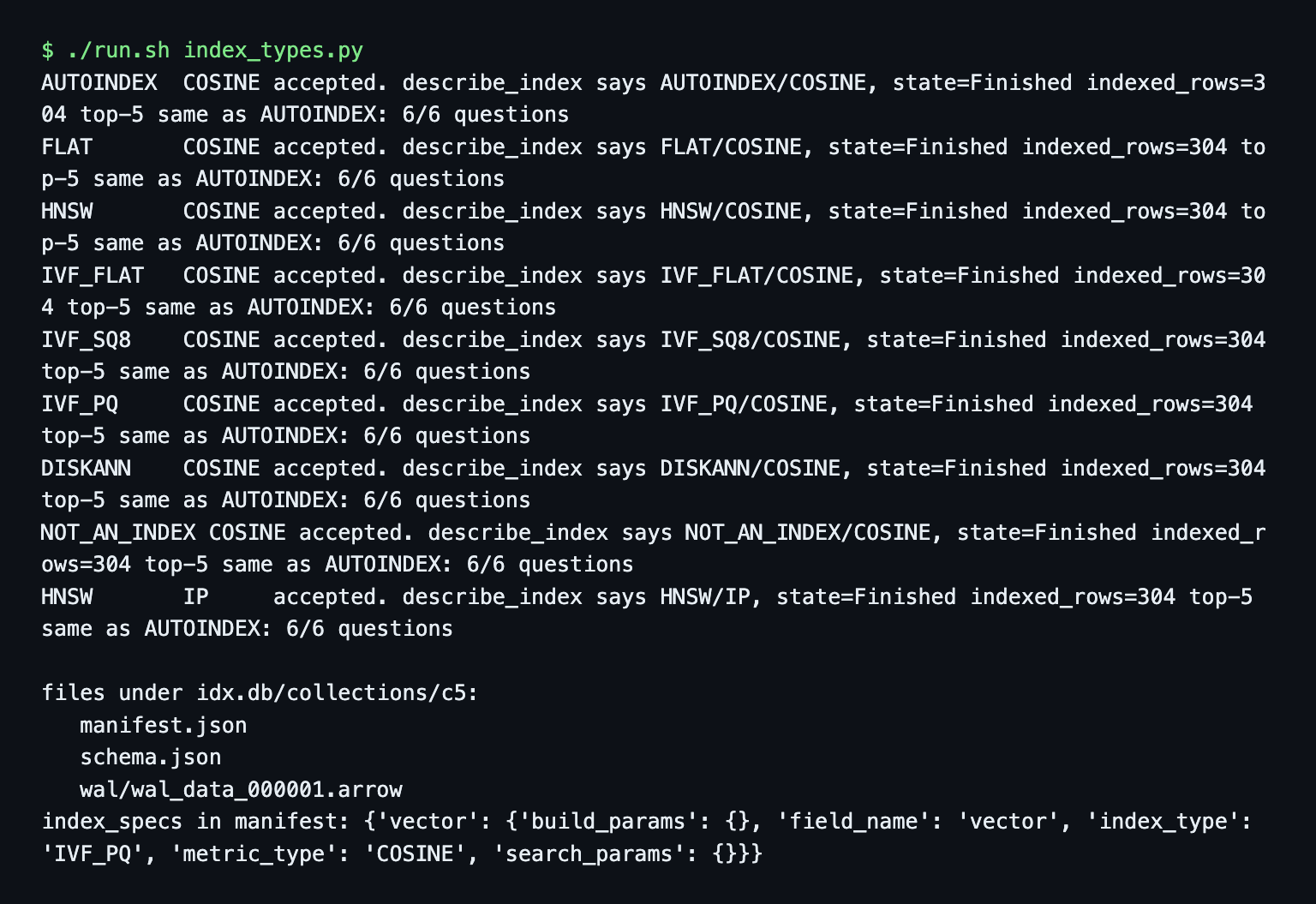
I tried eight index types on scratch collections (nine create_index calls, the last one HNSW with IP). The docs list FLAT, BRUTE_FORCE, IVF_FLAT, IVF_SQ8, HNSW, HNSW_SQ and AUTOINDEX for Lite and say Product Quantization is not supported. My run accepted all of them, including IVF_PQ, DISKANN and an index type I made up (NOT_AN_INDEX). describe_index reported back whatever I had asked for. For IVF_PQ the saved manifest showed build_params: {}, so the nlist, m and nbits I passed were not stored (index_types.out). All eight returned the same top-5 lists for all 6 questions.
At this size the index choice is just a label. Use AUTOINDEX, and do not trust describe_index on Lite to prove which index exists. The metric is COSINE. The embeddings have unit length, so IP ranks the same. The embedding model comparison matters more here.
Vector search and filter expressions
Embed the question with the search_query: prefix that nomic-embed-text expects, then search:
res = client.search("docs", data=[query_vector], limit=5,
                    filter="section == 'sdk'",
                    output_fields=["url", "heading", "section"])[0]
A reopened Lite collection is not loaded. My first search after a restart failed with Collection 'docs' is in state 'released'; call load() before search/get/query (code 101). Call client.load_collection("docs") after connecting. On Lite it is instant.
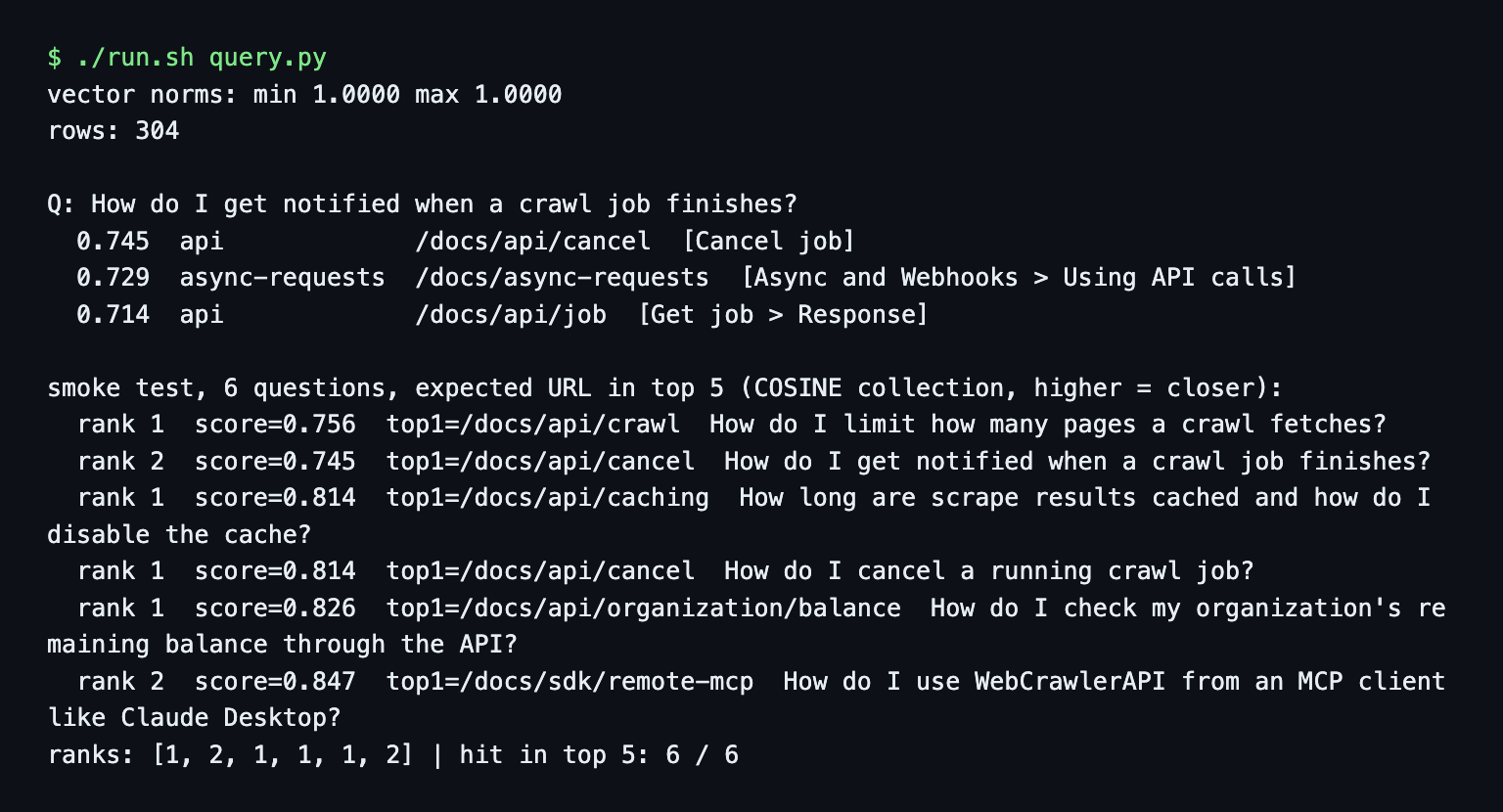
With the COSINE metric Milvus returns similarity, not distance. The question about crawl notifications gave 0.745 for the best chunk where LanceDB printed a distance of 0.255. Same ranking, opposite direction.
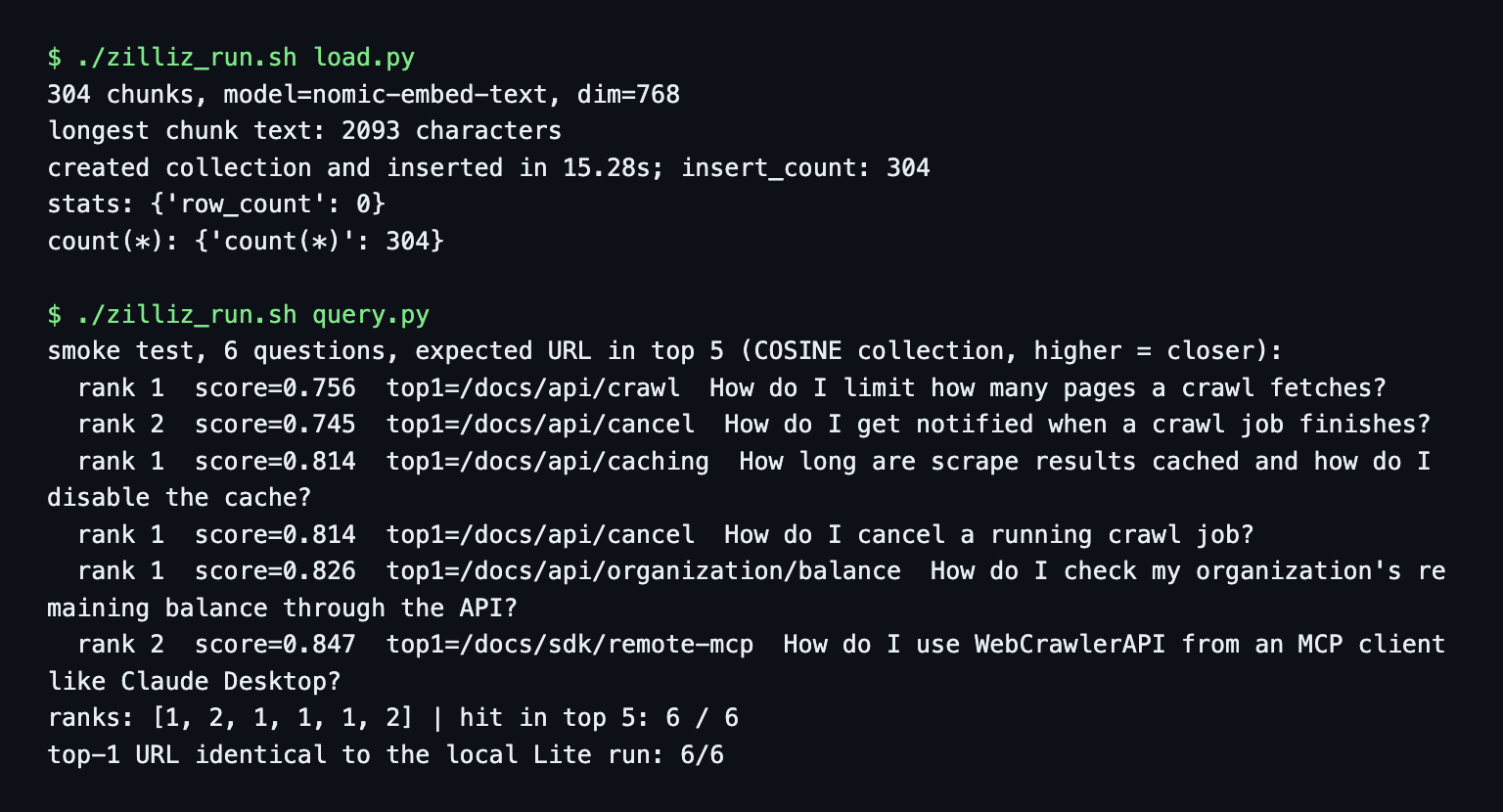
The 6-question smoke test (the expected page must be in the top 5, not a benchmark) found all 6, at ranks 1, 2, 1, 1, 1, 2. That equals the numpy baseline, the first Chroma run and LanceDB.
Filter expressions
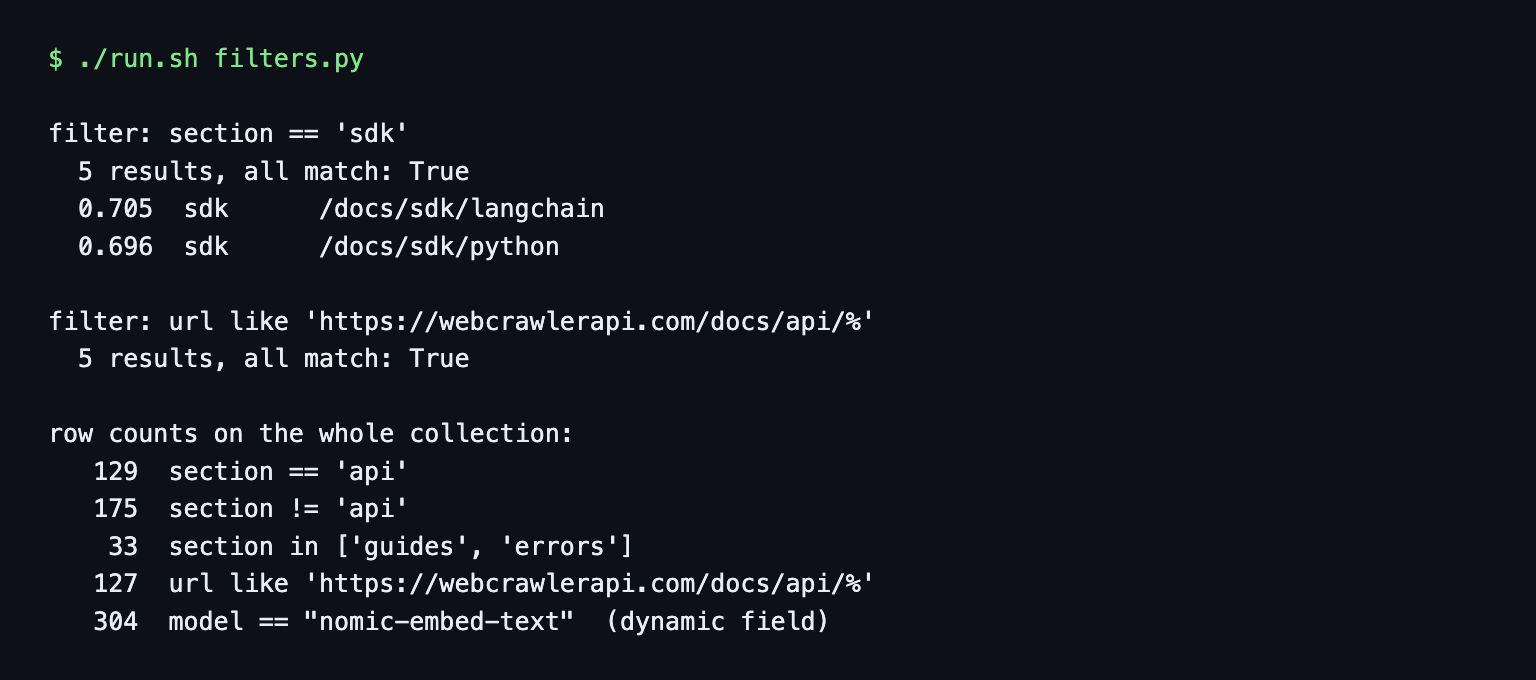
Filters are strings. I used equality, in, like and and:
"section == 'sdk'"
"section in ['guides', 'errors']"
"url like 'https://webcrawlerapi.com/docs/api/%'"
"section == 'sdk' and heading like '%Python%'"
Each returned 5 results and every result matched. Counts on the whole collection: section == 'api' 129 rows, section != 'api' 175, section in ['guides', 'errors'] 33. The like prefix gave 127, not 129, because two chunks belong to /docs/api itself without a trailing slash. client.query(filter=...) fetches rows without a vector.
An unescaped quote breaks a filter: heading == 'What's new' raised unterminated string literal (code 6). Escape it as \'.
Partition key for per-customer isolation
A support-bot product holds many customers' docs in one collection. Milvus has a field flag for that. I gave the collection a customer_id field with is_partition_key=True and num_partitions=8, then split the 304 chunks across three fake customers by a hash of the page URL (132, 83 and 89 chunks):
schema.add_field("customer_id", DataType.VARCHAR, max_length=64, is_partition_key=True)
client.search("docs_tenants", data=[qv], limit=5, filter="customer_id == 'customer_b'")
partition_key.py accepted it on Lite, on Zilliz Cloud and on a standalone server. For each customer, 5 of 5 results belonged to that customer. Without the filter, the top 5 mixed customer_a and customer_b. The key groups data physically, and the filter is what enforces isolation, so every query needs it.
One difference: with num_partitions=8, Zilliz and standalone listed 8 partitions (_default_0 to _default_7). Lite listed _default plus 16 _pk_ partitions and ignored my number.
Upsert, re-ingest and delete by URL
Upsert by primary key:
res = client.upsert("docs", data=rows) # {'upsert_count': 304, 'ids': [...]}
Upserting the same 304 chunks again returned upsert_count=304 and the count stayed 304. One changed chunk gave upsert_count=1, and client.get showed the new text right away.
The shrinking page. /docs/api/feed/feed-create has 5 chunks. I pretended a re-crawl returned only 3. Upserting those 3 left 5 rows for the URL, 2 of them stale. The fix is a delete by filter, then an upsert:
client.delete("docs", filter="url == 'https://webcrawlerapi.com/docs/api/feed/feed-create'")
client.upsert("docs", data=new_chunks)
The delete removed 5 rows (total 299), the upsert added 3 (total 302). See how often to re-crawl and how to sync changed pages.
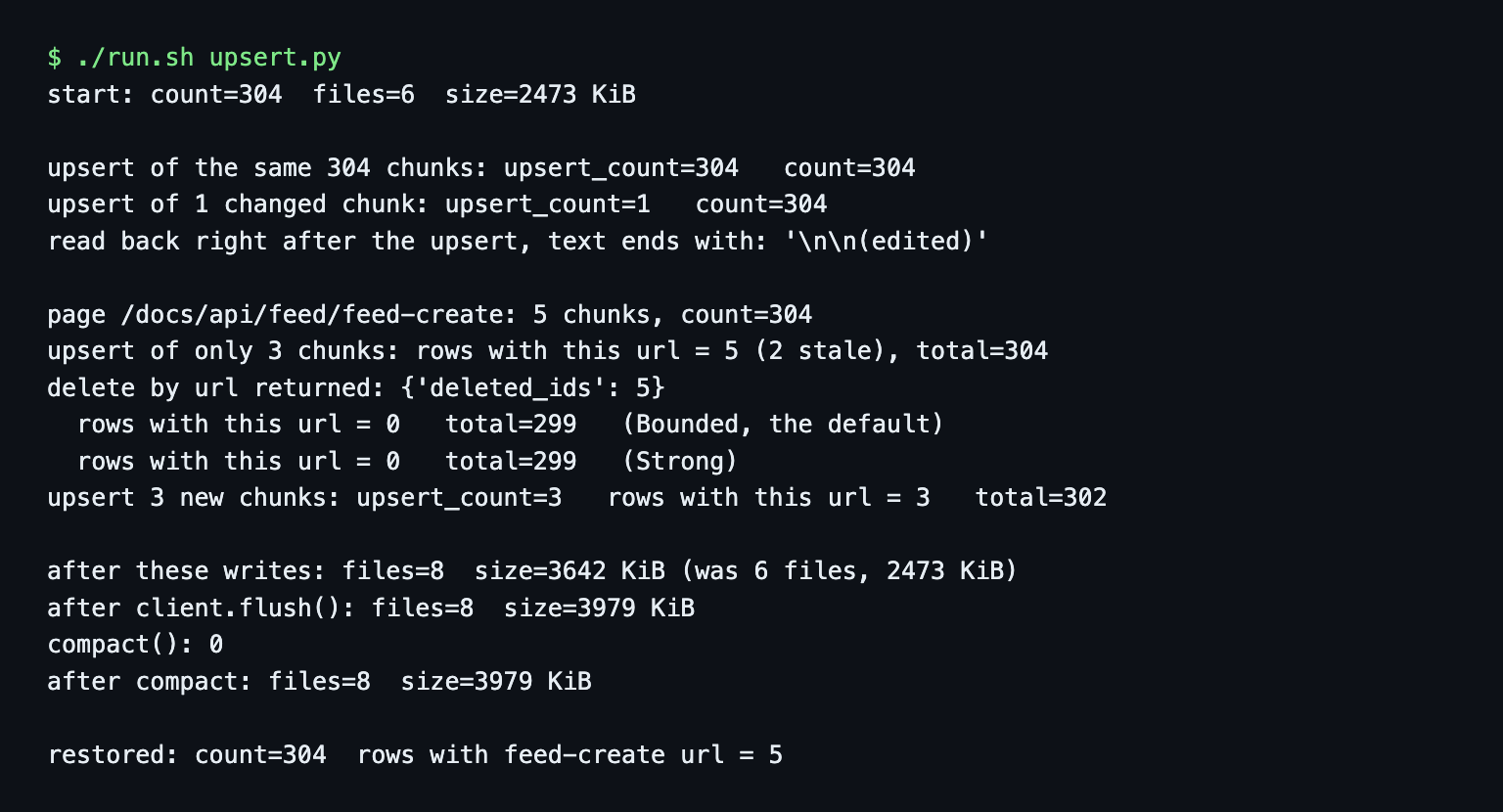
Disk size. After the whole script set had run, the Lite directory held 10 files and 6.3 MB by du (files_after_writes.out), against 5 files and 1.5 MB right after the load. upsert.py alone prints smaller numbers (8 files, 3,979 KiB after its flush in upsert.out) because it measures at its own point in that sequence. client.flush() and client.compact() (it returned 0) did not shrink anything. I did not find out when Lite reclaims the space.
Milvus Lite limits
The Milvus docs (milvus.io/docs/milvus_lite.md, read November 6, 2026) list limits including: one process owns a database directory at a time, writes to a collection must be serialized, there is no authentication or TLS, and Lite 3.x cannot open 2.x database files. They call it suitable for local development and small-scale workloads, and send large-scale production to Standalone, Distributed or Zilliz Cloud. I tested the first.
- Two processes. One container held kb.db open. A second container's MilvusClient("/data/kb.db") raised ConnectionConfigException: Open local milvus failed. The real cause sat in the log: DataDirLockedError: another process holds the lock on '/data/kb.db'. After the first one closed, the second opened it and read 304 rows (lite_lock.out).
Can you run Lite in production? For one process that owns its directory and a corpus that fits a laptop, nothing I ran broke. A web app with several workers cannot share the directory. That is when I would move to a server.
Move to Zilliz Cloud: same code, new URI
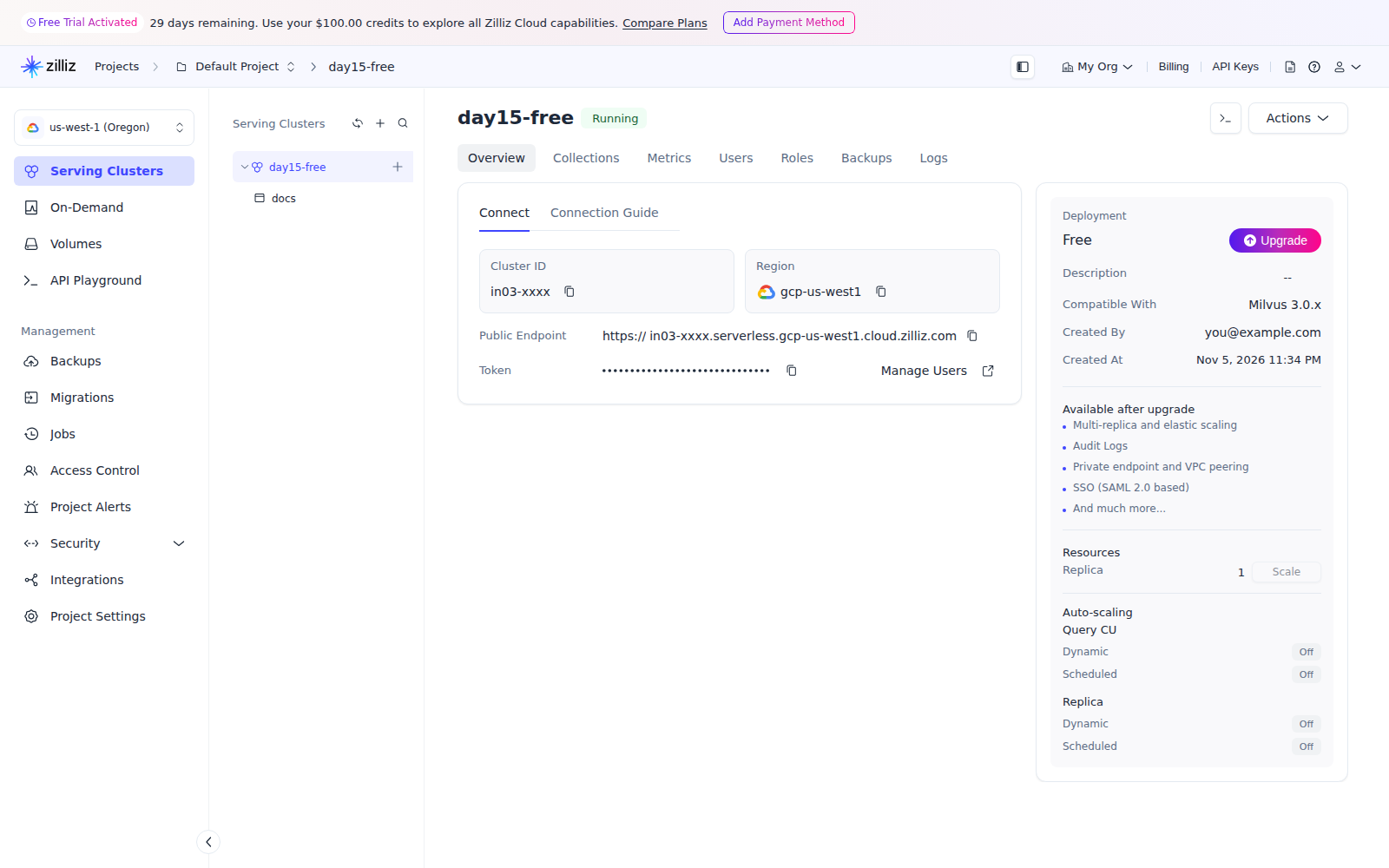
I signed up at Zilliz Cloud on the Free plan without a card and created a serverless Free cluster in gcp-us-west1 (the console says compatible with Milvus 3.0.x). I copied the endpoint and an API key into a file with mode 600 and passed it to Docker with --env-file, so neither appears in a command line or in the scripts.
The code change is the first argument:
# Lite
client = MilvusClient("/data/kb.db")

# Zilliz Cloud
client = MilvusClient(uri=os.environ["ZILLIZ_URI"], token=os.environ["ZILLIZ_TOKEN"])
Then I ran zilliz_run.sh with the same load.py, query.py, filters.py, partition_key.py and upsert.py. The collection held 304 rows, the smoke test gave ranks 1, 2, 1, 1, 1, 2, and the top result matched the local run for 6 of 6 questions, with the same scores to three decimals. The screenshots below hide my account email, the organization name and the cluster id: I edited those three strings on the page before capturing.
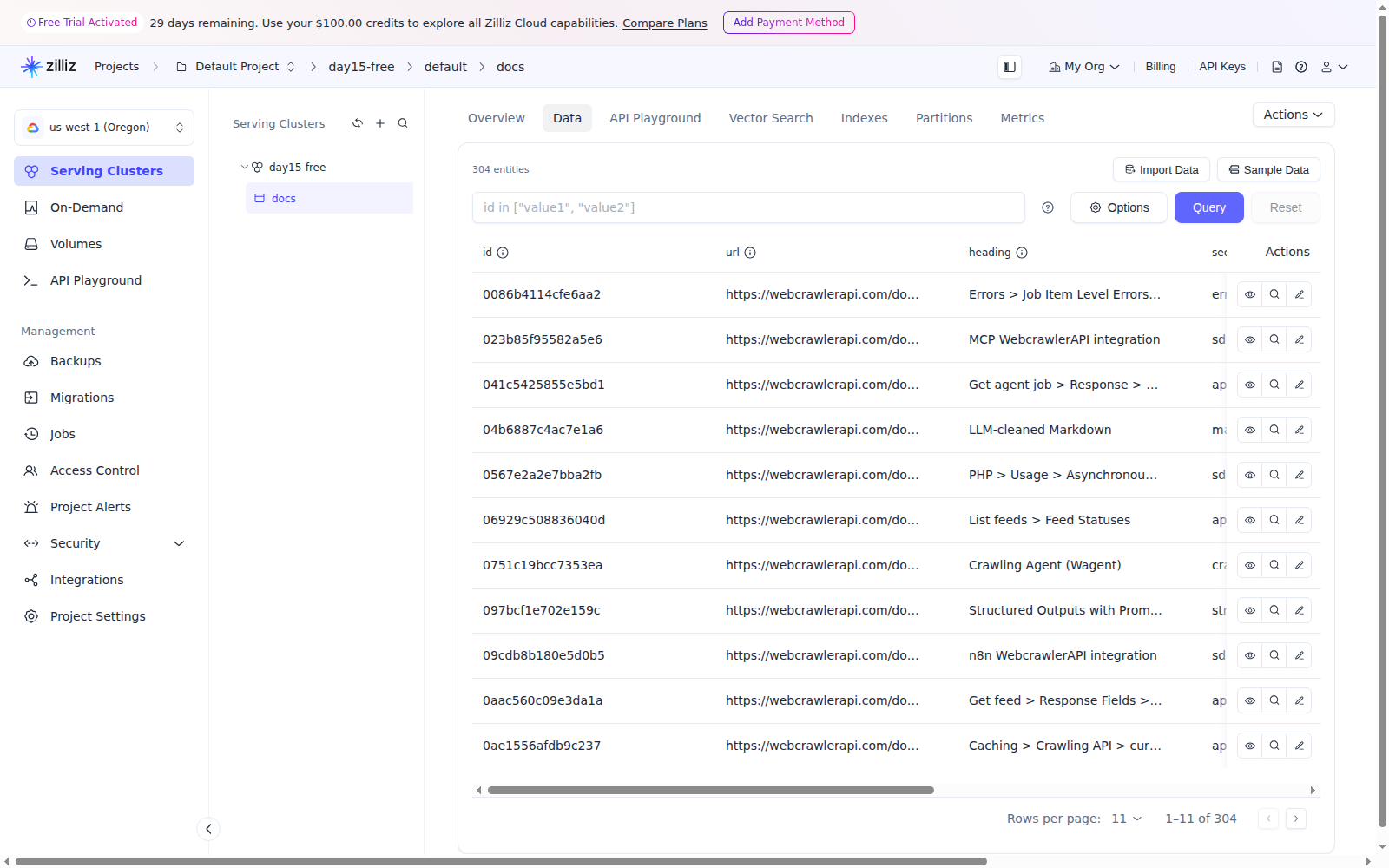
Three things differed from Lite:
- Loading was slower. Creating the collection and inserting 304 rows took 15.28 seconds (zilliz_load.out), against 0.69 seconds on Lite. The data goes over the internet to a cluster in us-west1.
- Reads can lag. Right after insert, get_collection_stats reported row_count: 0 while count(*) with consistency_level="Strong" returned 304. After a delete by URL, the default (Bounded) count still showed 5 rows for that URL while the total already read 299. Strong showed 0. Use Strong when a script writes and then checks.
- drop_collection timed out. Dropping a collection returned DEADLINE_EXCEEDED: The upstream server is timing out after 60 seconds in the saved run (the traceback is in zilliz_partition_key.out). The collection was gone afterwards, so the scripts wait for it to disappear.
Free plan facts, read November 6, 2026
zilliz.com/pricing lists the Free plan at $0 with 5 GB of storage, 2.5M vCUs per month and up to 5 collections. The Zilliz limits page says 1 Free cluster per organization, and that 5 GB is about 1 million 768-dimension vectors. The vector database comparison post lists the same 5 GB.
I did not find an inactivity or auto-pause policy for the Free plan in the Zilliz docs I read. Check it before you rely on the cluster for a live bot.
Milvus standalone in Docker with Attu
The official standalone_embed.sh starts Milvus Standalone with embedded etcd and local storage, so one container and no MinIO. It pins milvusdb/milvus:v3.0.5. I read the script instead of piping it to a shell and translated it into plain docker run calls without sudo, with ports bound to 127.0.0.1 (standalone_up.sh).
Docker reported it healthy after about 31 seconds, with 349 MiB of RAM at that point (standalone_health.out, a clean re-run) and 617 MiB later after the loads (standalone_stats.out). The image is 1.45 GB. The data folder reached 294 MB after I loaded 304 rows and ran all the test collections (so it is not the size of one 304-row collection), against 6.3 MB for the Lite directory after the full script set. Then uri="http://localhost:19530" was the only change: the same 5 scripts ran, with the same ranks and top-1 as Lite.
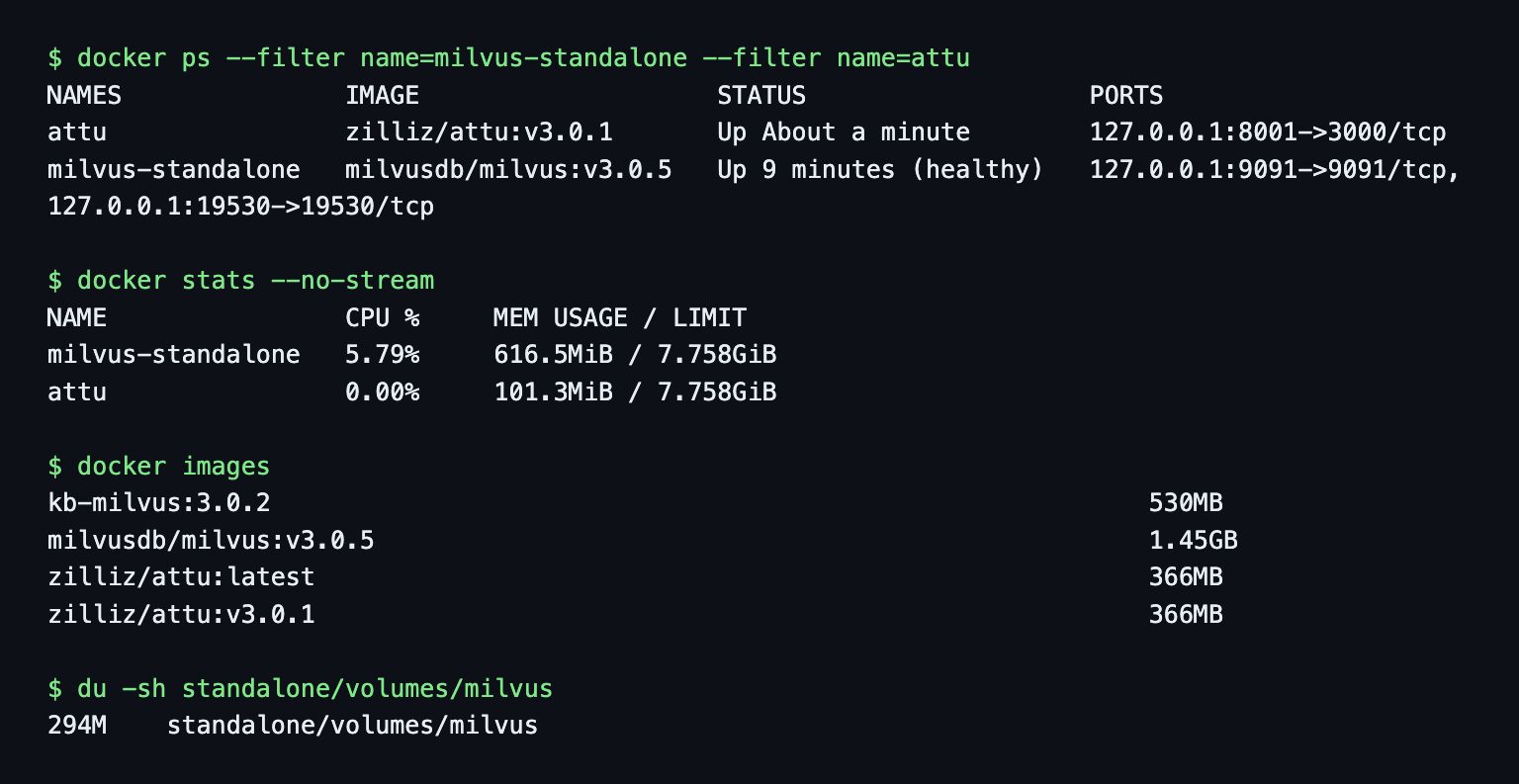
Attu v3.0.1 returned HTTP 401 on first open (standalone_health.out). It asks for a login by default. For a box on 127.0.0.1 I set ATTU_AUTH_MODE=none. Do not do that on a public host. In Attu I added a connection to host.docker.internal:19530 with auth set to None and opened the docs collection:
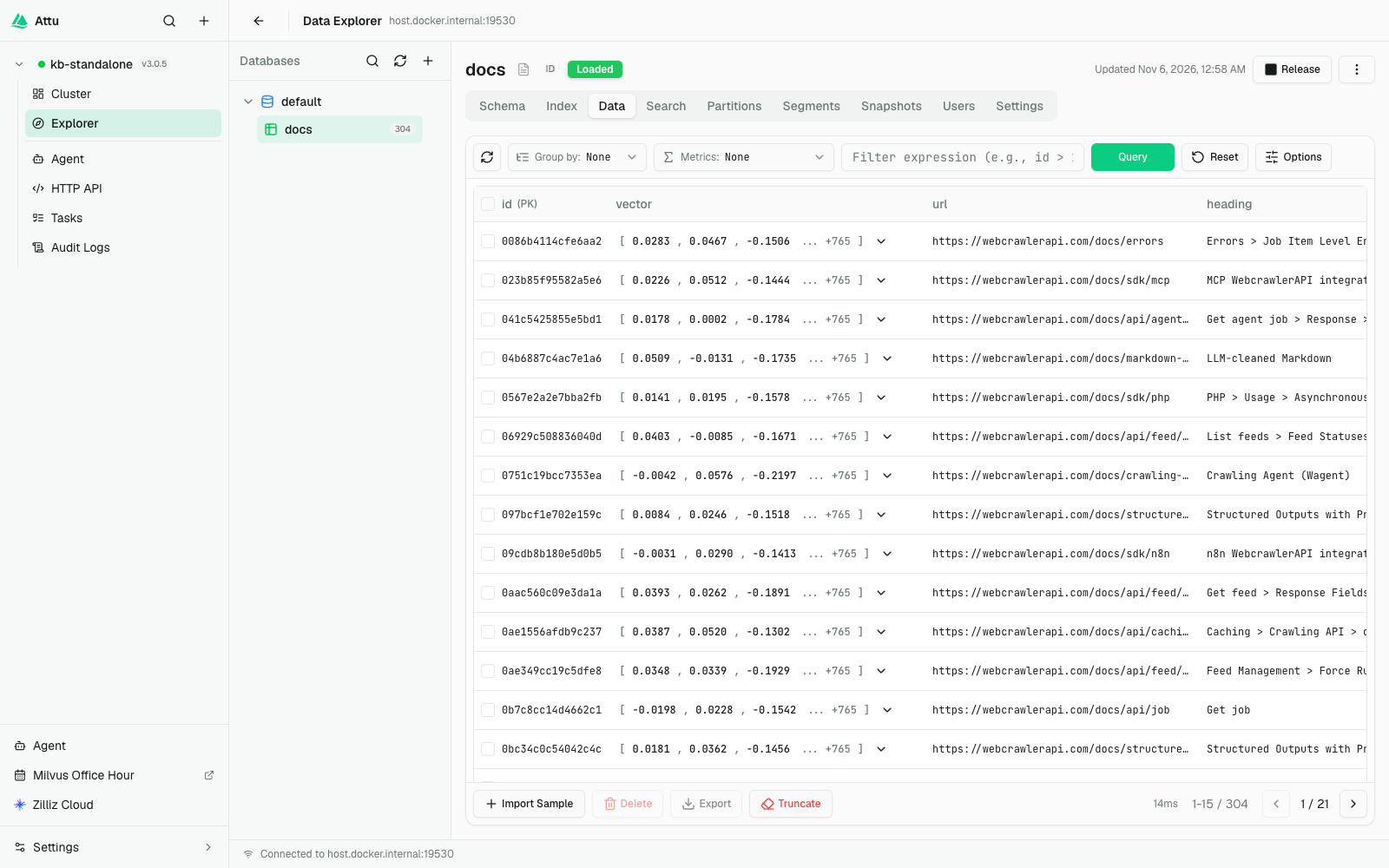
The first standalone load.py run stopped at its own assertion: count(*) returned 0 right after the insert. consistency_level="Strong" fixed it.
Gotchas I hit
- Env var name. pymilvus reads MILVUS_URI at import time. My first run had MILVUS_URI=/data/kb.db and crashed on import pymilvus with Illegal uri (gotchas_env.out). I renamed it.
- delete without a filter. client.delete("docs") raised The type of expr must be string and deleted nothing.
When Milvus, when Qdrant, when Weaviate
I pick Milvus when I want one API from a directory on my laptop to a managed cluster. In my runs the Lite, Standalone and Zilliz Cloud switch changed only the first argument of MilvusClient, and the filter, upsert and partition key code ran unchanged on all three. I pick Qdrant for a simple Docker server with payload indexes and a dashboard, and Weaviate when hybrid search is the point.
Milvus is a heavier server than Qdrant (a 1.45 GB image, and 294 MB of data after the test collections) and Lite cannot be shared between processes. If you already run Postgres, see the pgvector tutorial. For the milvus vs qdrant question, the vector database comparison has the table. The Pinecone tutorial covers the managed-only option. I plan separate posts on turbopuffer and sqlite-vec.
Clean up
Lite is a directory, so deleting it deletes the database. On Zilliz, drop the collection and delete the cluster when you are done. cleanup.sh has the local Docker and file commands.
Keep it fresh and next steps
A re-crawl job should replace pages one URL at a time: delete by URL, then upsert the new chunks. The earlier steps are the Python walkthrough, chunking by headers and the chunking strategies guide.
Other databases in this series: the vector database comparison, Chroma and LanceDB.
To try this on your own docs, create an API key, crawl your docs site with items_limit 50 (see the crawl docs), and run load.py on the result. If you build a support bot for B2B customers, the same crawl re-runs per customer docs site, and the customer_id partition key above keeps each customer's chunks apart.
Every script has its output saved next to it. Start with the README. chunks.jsonl is not included, build_chunks.py makes it.