
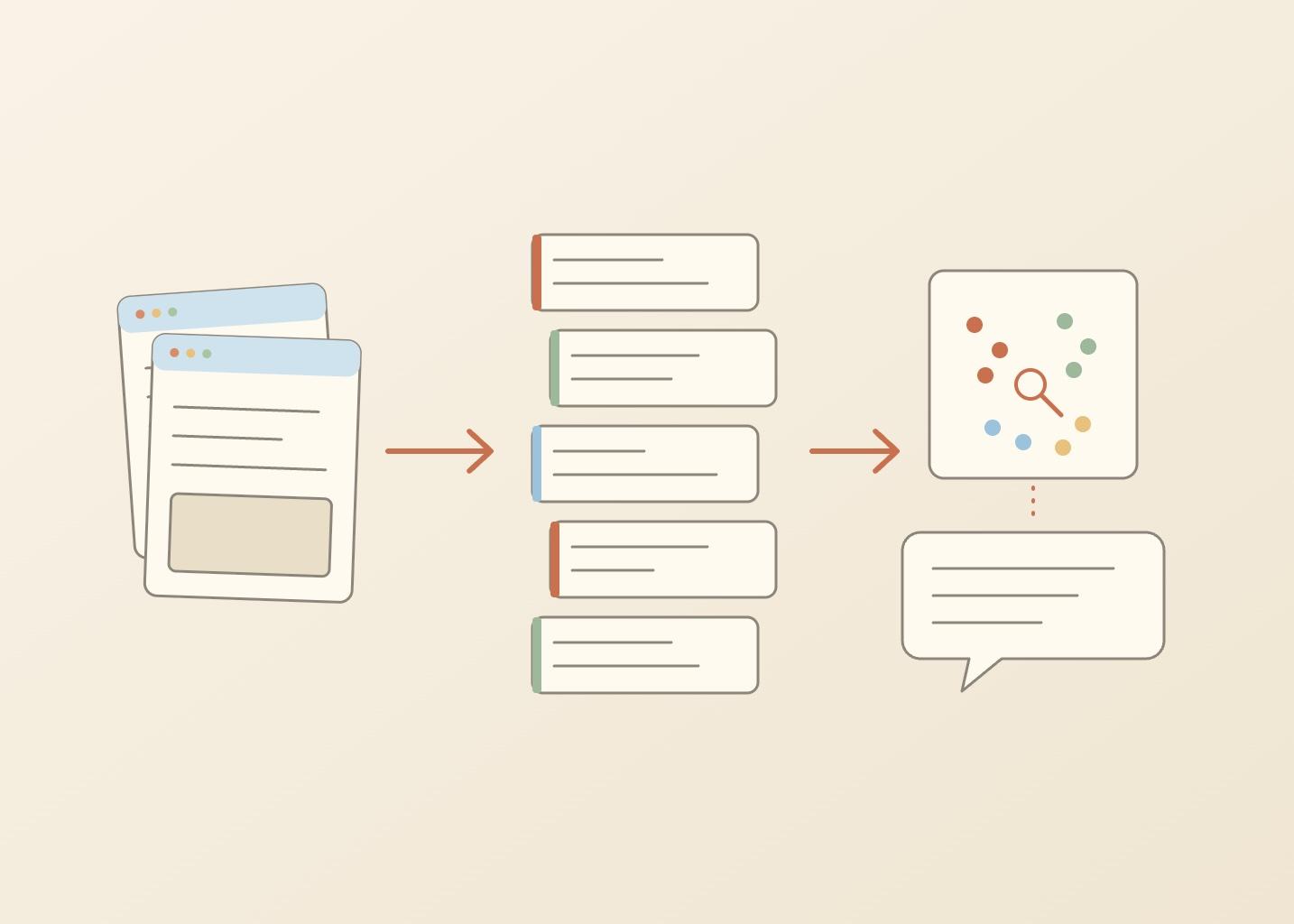
How to Build a Knowledge Base for AI From a Website in Python
How to build a knowledge base for AI from a website: crawl the pages to markdown, split them into chunks, embed every chunk, find the chunks closest to a question, and let a language model answer from them with the source URLs. This post does it in five small Python files and about 250 lines, with no database and no framework. The same steps work for a product docs site or a help center that a support bot has to answer from.
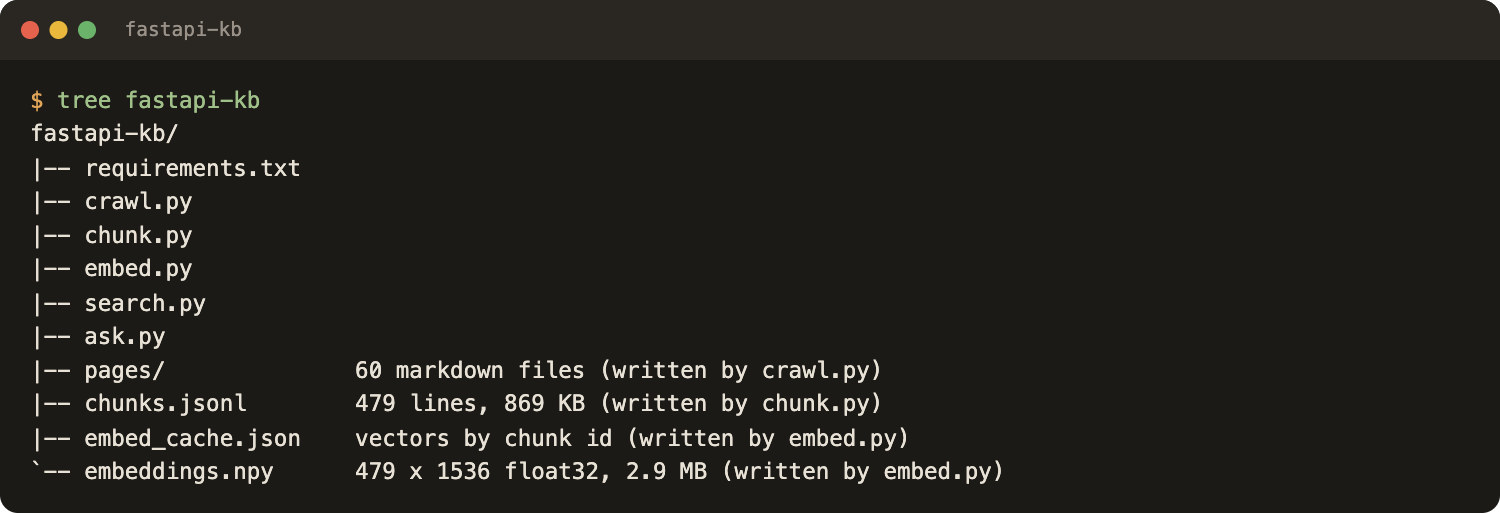
What comes out at the end is chunks.jsonl (text plus source URL), embeddings.npy (one vector per chunk), a search.py command that lists the best matches, and an ask.py command that answers with cited URLs, or says not found. This is the loop behind "chat with a website" tools. How it works is explained in how an AI knowledge base answers questions.
The demo site is the FastAPI documentation, and every number below comes from one real run on October 25, 2026. The decisions behind the pipeline (why markdown, where to store vectors, scale) are in the map post, Website to Markdown for Knowledge Bases. This post is the code.
How to build a knowledge base for AI: what you will build
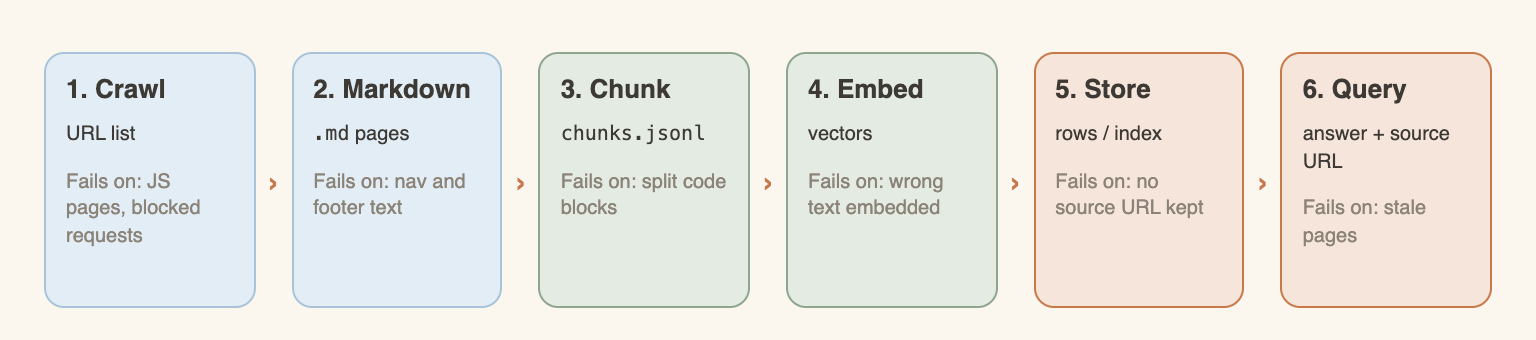
One file per step, each one reads what the previous one wrote:
Left out on purpose: a database, a framework, reranking, hybrid search. Python 3.11 or newer is assumed.
Setup: build a knowledge base in Python
Create a virtual environment and install four pinned packages:
# requirements.txt
webcrawlerapi==2.1.5
numpy==2.4.6
requests==2.34.2
tiktoken==0.14.0
python -m venv venv && source venv/bin/activate
pip install -r requirements.txt
export WEBCRAWLERAPI_API_KEY=YOUR_API_KEY
export OPENROUTER_API_KEY=YOUR_OPENROUTER_KEY
The first key comes from a WebCrawlerAPI account: create an API key there. Embeddings and answers go through OpenRouter, which exposes both with one key and one HTTP style, plain requests. Any embedding or chat provider works the same way, only the two URLs and model names change.
The whole run is cheap, and the totals are in What it costs. WebCrawlerAPI charges per crawled page ($0.002 on pay as you go, see pricing).
Step 1: Crawl the site to markdown
The site is fastapi.tiangolo.com. Before crawling, the licence and the rules were checked on October 25, 2026: the FastAPI repository is MIT licensed, and the docs robots.txt has no Allow or Disallow rules. The script still passes respect_robots_txt=True. For another site, do this check first, and see web scraping ethics. This step turns a website into LLM-ready markdown, one file per page.
# crawl.py
import os, re, sys, time, pathlib
from webcrawlerapi import WebCrawlerAPI

START = "https://fastapi.tiangolo.com/tutorial/"
ONLY = r"^https://fastapi\.tiangolo\.com/(tutorial|advanced)/"
LIMIT = int(sys.argv[1]) if len(sys.argv) > 1 else 60
MAX_POLLS, DEADLINE = 120, 600  # stop after 120 checks or 10 minutes

client = WebCrawlerAPI(api_key=os.environ["WEBCRAWLERAPI_API_KEY"])
job = client.crawl_async(
    url=START,
    items_limit=LIMIT,
    output_formats=["markdown"],
    whitelist_regexp=ONLY,
    respect_robots_txt=True,
    max_age=0,  # skip the 7-day cache, fetch fresh pages
)
print("job", job.id)

started = time.time()
for _ in range(MAX_POLLS):
    job = client.get_job(job.id)
    print(f"status={job.status} items={len(job.job_items)}")
    if job.status not in ("new", "in_progress"):
        break
    if time.time() - started > DEADLINE:
        break
    time.sleep(max(job.recommended_pull_delay_ms, 1000) / 1000)
else:
    sys.exit("gave up: too many polls")
if job.status != "done":
    sys.exit(f"job not finished, status={job.status}")

out = pathlib.Path("pages")
out.mkdir(exist_ok=True)
done = failed = 0
for item in job.job_items:
    if item.status != "done":
        failed += 1
        print("failed:", item.original_url, item.status)
        continue
    slug = re.sub(r"[^a-z0-9]+", "-", item.original_url.split(".dev/")[-1].split(".com/")[-1].lower()).strip("-")
    front = f'---\nurl: {item.original_url}\ntitle: "{item.title}"\n---\n\n'
    (out / f"{slug}.md").write_text(front + item.get_markdown())
    done += 1
print(f"{done} pages saved, {failed} failed, {time.time() - started:.1f}s")
What the script does:
- whitelist_regexp keeps the crawl inside the Tutorial and Advanced User Guide sections, and items_limit=60 stops it at 60 pages. See the crawl API docs for every parameter.
- max_age=0 forces a fresh crawl instead of the 7-day cache, see caching.
- The polling loop uses the delay the API recommends and has two exits, 120 checks or 10 minutes, so a stuck job cannot poll forever. For error codes, see errors; the script only prints the status.
- Pages are saved as pages/<name>.md with url and title in front matter. Those two fields become the citations later.
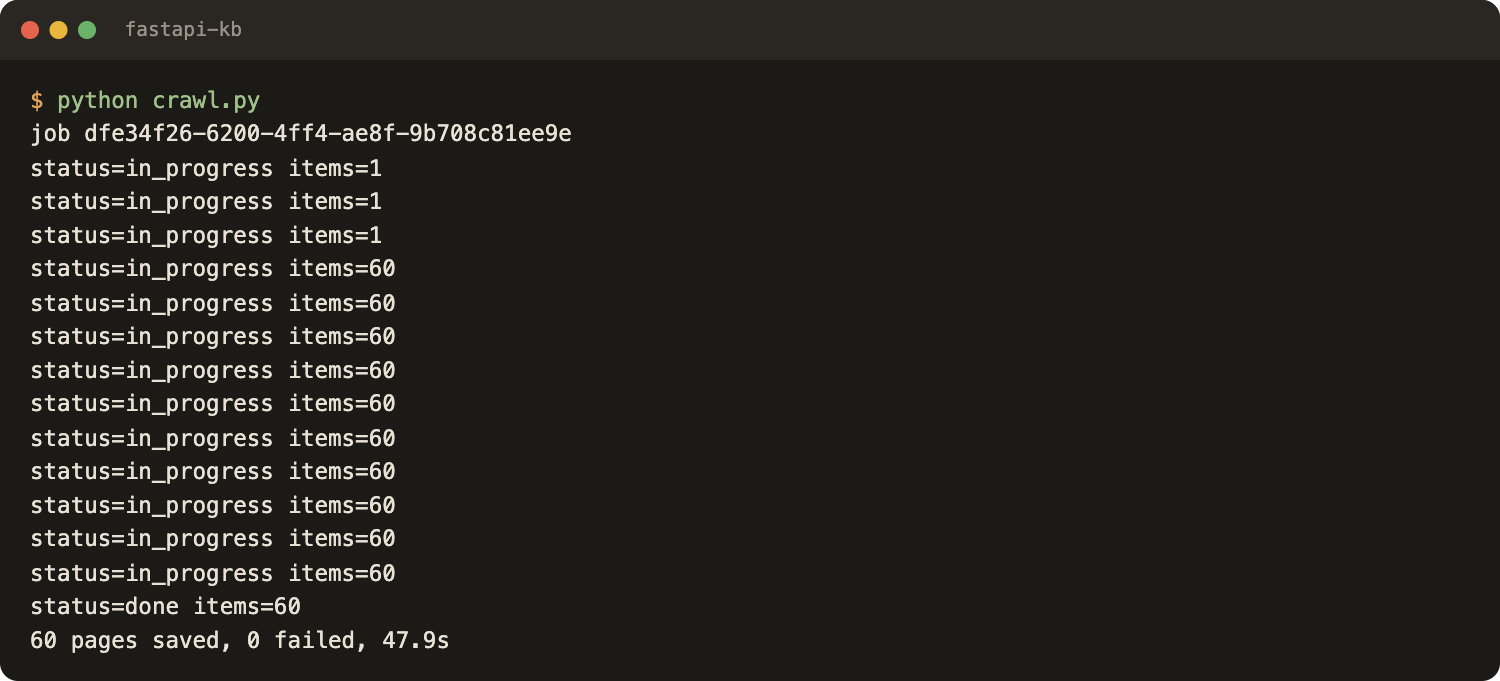
The run on October 25, 2026: 60 pages saved, 0 failed, 47.9 seconds from start to the last file. The folder is about 806 KB of markdown.
Building the crawler yourself is a fair option for a small static site: how to crawl a website with Python compares the ways. LangChain users can take a loader instead, see LangChain document loaders for websites.
Step 2: Split the markdown into chunks
A page in one vector is blurry, and a sentence in one vector has no context. So pages are cut into chunks of a few hundred tokens. This version is deliberately simple: split on ## and ### headings (ignoring lines inside code fences), merge neighbouring sections until a chunk would pass 350 tokens, and cut any single section above 800 tokens on line breaks. No overlap logic.
# chunk.py
import json, re, pathlib, hashlib
import tiktoken

enc = tiktoken.get_encoding("cl100k_base")
BUDGET = 350  # merge small sections until a chunk would pass this many tokens
HARD = 800    # a single section above this is cut on line breaks

def count(text):
    return len(enc.encode(text, disallowed_special=()))

def read_page(path):
    raw = pathlib.Path(path).read_text()
    head, body = raw[4:].split("\n---\n", 1)
    url = re.search(r"^url: (.*)$", head, re.M).group(1)
    title = re.search(r'^title: "(.*)"$', head, re.M).group(1)
    body = re.sub(r"\[\u00b6\]\([^)]*\)", "", body)  # drop the permalink links after headings
    body = re.sub(r"^\[Skip to content\].*\n", "", body, flags=re.M)
    body = "\n".join(l for l in body.splitlines() if len(l) < 1500)  # drop base64 blobs
    return url, title, body

def sections(body, title):
    """Yield (heading_path, text), splitting on ## and ### outside code fences."""
    path, buf, fence = [title], [], False
    for line in body.splitlines():
        if line.startswith("```"):
            fence = not fence
        m = None if fence else re.match(r"^(#{2,3}) (.+)", line)
        if m:
            if "\n".join(buf).strip():
                yield " > ".join(path), "\n".join(buf).strip()
            buf = []
            path = path[: len(m.group(1)) - 1] + [m.group(2).strip()]
        buf.append(line)
    if "\n".join(buf).strip():
        yield " > ".join(path), "\n".join(buf).strip()

def cut(text):
    """Cut a very long section on line breaks into pieces of at most HARD tokens."""
    if count(text) <= HARD:
        return [text]
    pieces, cur = [], ""
    for line in text.splitlines():
        if cur and count(cur + "\n" + line) > HARD:
            pieces.append(cur)
            cur = ""
        cur = (cur + "\n" + line) if cur else line
    return pieces + [cur]

def chunks_of(url, title, body):
    pieces = [(path, part) for path, text in sections(body, title) for part in cut(text)]
    cur_path, cur = None, ""
    for path, text in pieces:
        if cur and count(cur + "\n\n" + text) > BUDGET:
            yield cur_path, cur
            cur = ""
        if not cur:
            cur_path = path
        cur = (cur + "\n\n" + text) if cur else text
    if cur:
        yield cur_path, cur

rows, seen = [], set()
for f in sorted(pathlib.Path("pages").glob("*.md")):
    url, title, body = read_page(f)
    for heading_path, text in chunks_of(url, title, body):
        cid = hashlib.sha1((url + heading_path + text).encode()).hexdigest()[:12]
        if cid in seen:  # tabbed code samples repeat the same text
            continue
        seen.add(cid)
        rows.append({"id": cid, "url": url, "title": title,
                     "heading_path": heading_path, "text": text, "tokens": count(text)})

with open("chunks.jsonl", "w") as out:
    for r in rows:
        out.write(json.dumps(r) + "\n")

sizes = sorted(r["tokens"] for r in rows)
pages = len({r["url"] for r in rows})
print(f"{len(rows)} chunks from {pages} pages")
print(f"tokens per chunk: median {sizes[len(sizes) // 2]}, max {sizes[-1]}, total {sum(sizes)}")
read_page also drops permalink links, the "Skip to content" line and any line over 1,500 characters (base64 images), and duplicate chunks are skipped by id. Those lines were added after reading the first output, which is a good habit: look at the chunks before embedding them.
Every chunk keeps url, title and heading_path next to the text. Citations need the first and the last. For a longer look at chunk sizes and overlap, see chunking strategies for a knowledge base. A dedicated chunking tutorial is planned. Heading-based against fixed chunks was measured in the map post, with a mixed result, so nothing here claims it is better.
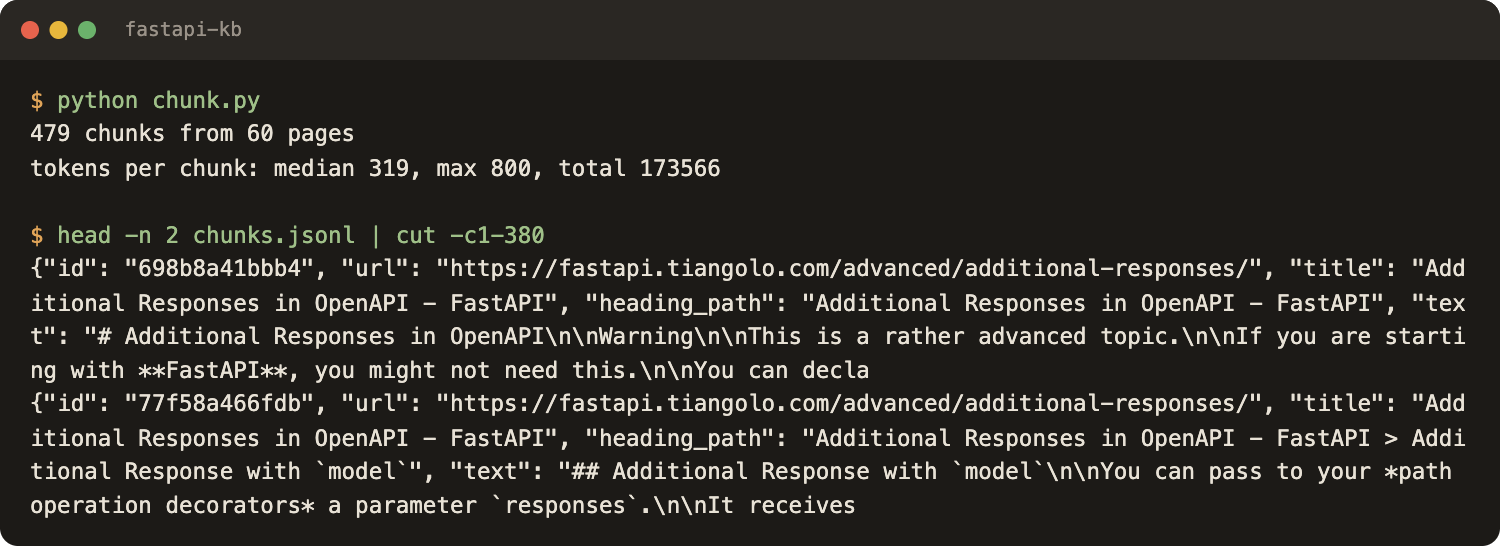
Result: 479 chunks from 60 pages, about 8 per page. Median 319 tokens, maximum 800, 173,566 tokens in total (cl100k_base). 13 chunks are under 30 tokens, mostly a short heading with a line under it. chunks.jsonl is 869 KB.
Step 3: Embed the chunks
An embedding model turns text into a vector, and texts with similar meaning land close together. The script embeds heading_path + text, so a chunk that says "the default is 7 days" travels with the heading that explains what the default is. The URL stays metadata.
# embed.py
import os, json, time, pathlib
import numpy as np
import requests

MODEL = "openai/text-embedding-3-small"
BATCH = 64
CACHE = pathlib.Path("embed_cache.json")  # chunk id -> vector

def embed_texts(texts):
    """Embed a list of strings through OpenRouter. Returns (vectors, tokens used)."""
    r = requests.post(
        "https://openrouter.ai/api/v1/embeddings",
        headers={"Authorization": "Bearer " + os.environ["OPENROUTER_API_KEY"]},
        json={"model": MODEL, "input": texts},
        timeout=120,
    )
    r.raise_for_status()
    body = r.json()
    data = sorted(body["data"], key=lambda d: d["index"])
    return [d["embedding"] for d in data], body["usage"]["prompt_tokens"]

def embed_input(chunk):
    return chunk["heading_path"] + "\n\n" + chunk["text"]

if __name__ == "__main__":
    chunks = [json.loads(l) for l in open("chunks.jsonl")]
    cache = json.loads(CACHE.read_text()) if CACHE.exists() else {}
    todo = [c for c in chunks if c["id"] not in cache]
    print(f"{len(chunks)} chunks, {len(chunks) - len(todo)} cached, {len(todo)} to embed")

    tokens, started = 0, time.time()
    for i in range(0, len(todo), BATCH):
        batch = todo[i : i + BATCH]
        vectors, used = embed_texts([embed_input(c) for c in batch])
        for c, v in zip(batch, vectors):
            cache[c["id"]] = v
        tokens += used
        print(f"batch {i // BATCH + 1}: {len(batch)} chunks, {used} tokens")
    CACHE.write_text(json.dumps(cache))

    E = np.array([cache[c["id"]] for c in chunks], dtype="float32")
    E /= np.linalg.norm(E, axis=1, keepdims=True)  # unit length: dot product = cosine
    np.save("embeddings.npy", E)
    print(f"saved embeddings.npy {E.shape}, {tokens} new tokens, {time.time() - started:.1f}s")
Notes:
- Chunks go out in batches of 64, one HTTP call each. The token count comes from the usage field of the response, so the cost is measured, not guessed.
- embed_cache.json stores vectors by chunk id. The id is a hash of url, heading path and text, so an unchanged chunk is never embedded twice, and an edited chunk gets a new id.
- Vectors are normalised to length 1, so a dot product later is the cosine similarity.
- chunks.jsonl stays the source of truth. Changing the model means deleting the cache and running the script again. A comparison of embedding models is planned.
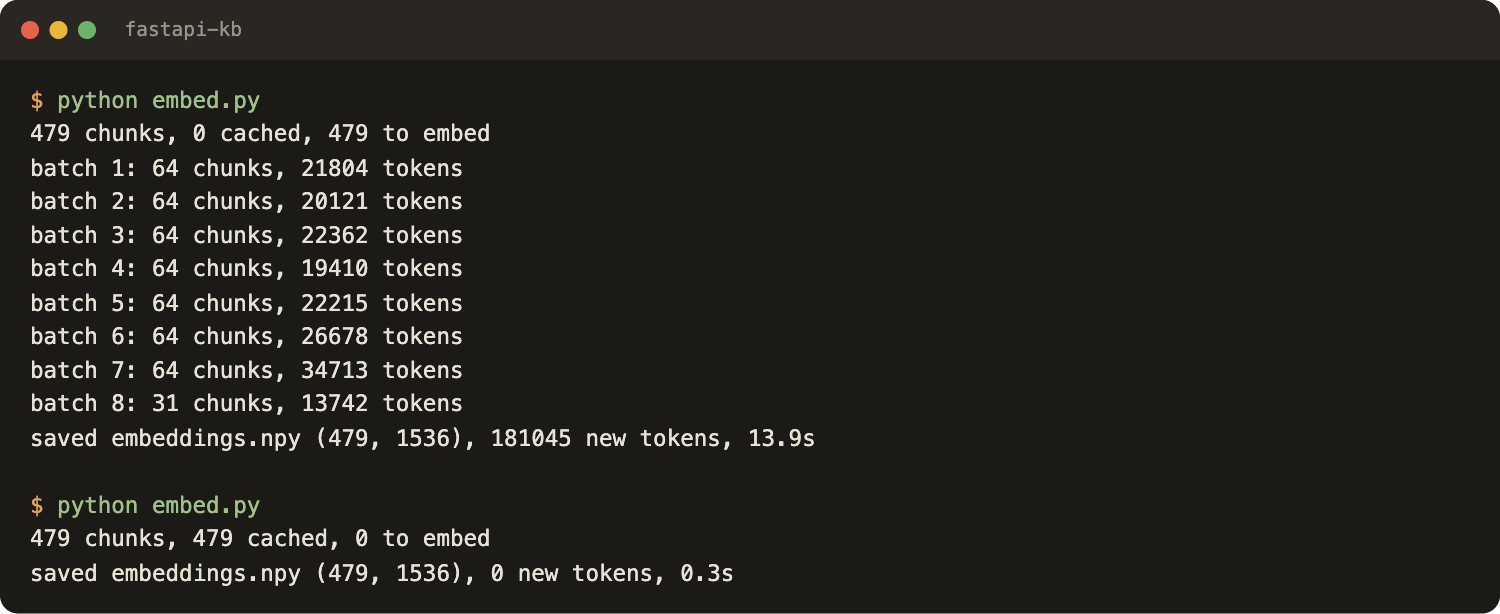
First run: 479 chunks in 8 batches, 181,045 tokens, 13.9 seconds, $0.00362 at $0.02 per 1M tokens. Tokens are higher than the 173,566 in the chunk file because the heading paths are embedded too. The output is embeddings.npy, 479 vectors of 1,536 floats, 2.9 MB. Second run: 479 cached, 0 new tokens, 0.3 seconds, no cost. The cache file itself is 14.8 MB of JSON, the price of the simple format.
Step 4: Search it
Search is the question embedded with the same model, one matrix product against all vectors, and the best five by score.
# search.py
import sys, json, time
import numpy as np
from embed import embed_texts

chunks = [json.loads(l) for l in open("chunks.jsonl")]
E = np.load("embeddings.npy")

def embed_query(query):
    vectors, _ = embed_texts([query])
    q = np.array(vectors[0], dtype="float32")
    return q / np.linalg.norm(q)

def top_k(q, k=5):
    scores = E @ q  # cosine similarity against every chunk
    best = np.argpartition(-scores, k)[:k]  # k best, unordered
    best = best[np.argsort(-scores[best])]  # now ordered
    return [(float(scores[i]), chunks[i]) for i in best]

def search(query, k=5):
    return top_k(embed_query(query), k)

if __name__ == "__main__":
    query = " ".join(sys.argv[1:])
    t0 = time.perf_counter()
    q = embed_query(query)
    t1 = time.perf_counter()
    hits = top_k(q)
    t2 = time.perf_counter()
    for rank, (score, c) in enumerate(hits, 1):
        print(f"{rank}. {score:.3f}  {c['url']}")
        print(f"   {c['heading_path']}")
        print(f"   {c['text'][:110]!r}...")
    print(f"embed call {1000 * (t1 - t0):.0f} ms, numpy search {1000 * (t2 - t1):.2f} ms")
np.argpartition finds the top five without sorting all 479 scores, and only those five get sorted. Run it:
python search.py "CORSMiddleware allow_origins"
python search.py "How do I send an email after the API has already responded?"
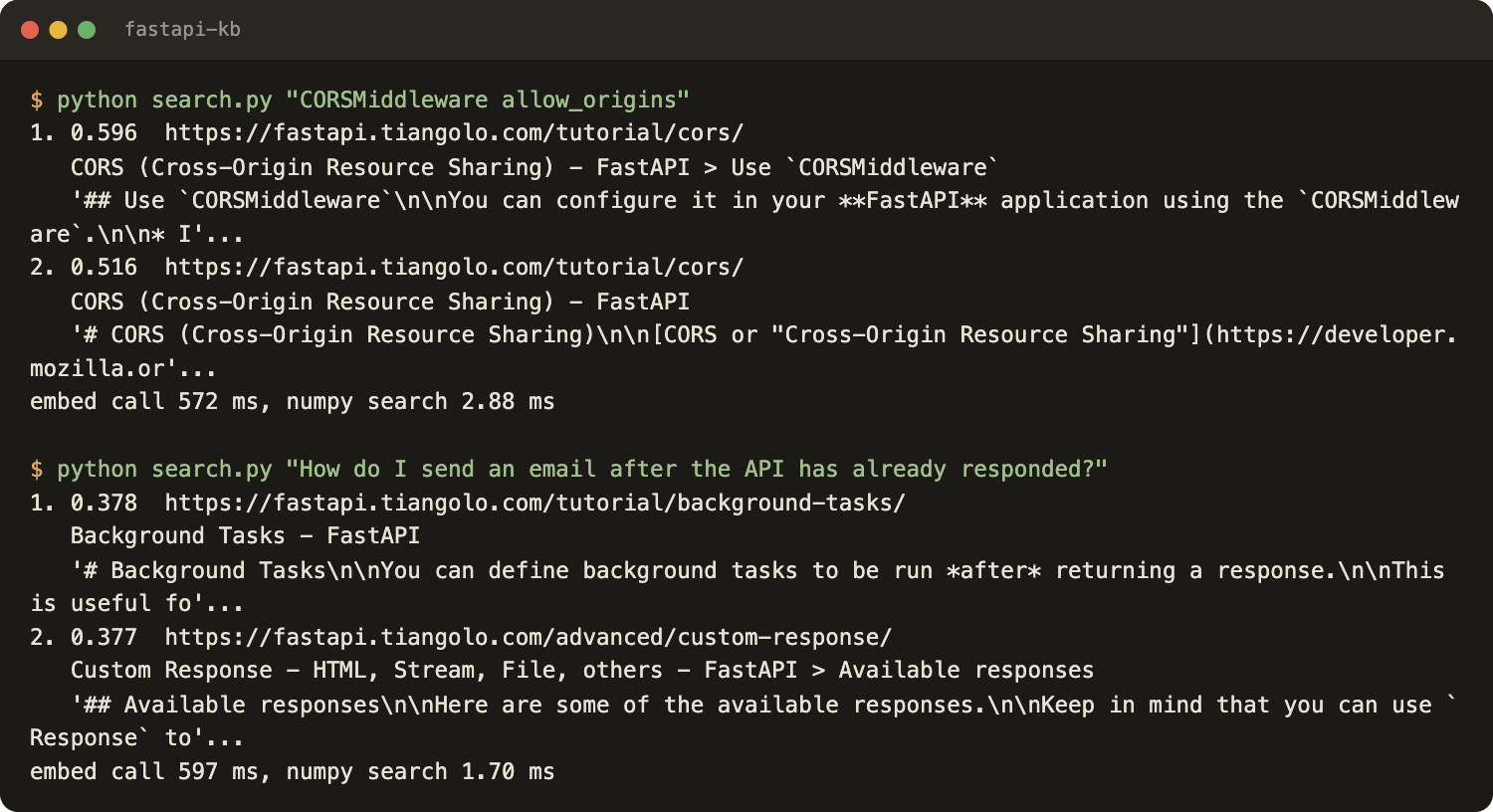
The first query uses the exact names from the docs, and the CORS page takes the top four places (best score 0.596). The second is a paraphrase with few shared keywords, and /tutorial/background-tasks/ is first, but with a low score of 0.378 and wrong neighbours right behind it. The search worked, but the scores say it was close.
It does not always work: a differently worded question about running code after a response ranked a middleware section first, and the background tasks page was not in the top five. Hybrid search or a reranker could help there. Neither was tried here.
Speed: the query embedding call took 572 to 597 ms in the runs shown, and the numpy search 0.5 to 2.9 ms across the runs shown. The network call is the slow part, not the maths. Where brute force stops being fine was not measured; for sizing see the vector database comparison.
Step 5: Answer with citations
The last file is the website-to-LLM step: it takes the five best chunks, puts them in the prompt with their URLs, and tells the model to answer only from them.
# ask.py
import os, sys
import requests
from search import search

MODEL = "anthropic/claude-haiku-5.5"
SYSTEM = (
    "You answer questions about the FastAPI documentation. Use only the context below. "
    "Be concise: four sentences at most. Cite the URL of every source you used in square brackets. "
    "If the context does not contain the answer, reply with exactly: not found"
)

def ask(question, k=5):
    hits = search(question, k)
    context = "\n\n".join(f"[source: {c['url']}]\n{c['text']}" for _, c in hits)
    r = requests.post(
        "https://openrouter.ai/api/v1/chat/completions",
        headers={"Authorization": "Bearer " + os.environ["OPENROUTER_API_KEY"]},
        json={
            "model": MODEL,
            "temperature": 0,
            "max_tokens": 600,
            "messages": [
                {"role": "system", "content": SYSTEM},
                {"role": "user", "content": f"Context:\n\n{context}\n\nQuestion: {question}"},
            ],
        },
        timeout=120,
    )
    r.raise_for_status()
    body = r.json()
    answer = body["choices"][0]["message"]["content"].strip()
    urls = list(dict.fromkeys(c["url"] for _, c in hits))
    sources = [u for u in urls if u in answer] or urls  # prefer the ones the model cited
    return answer, sources, body["usage"]

if __name__ == "__main__":
    answer, sources, usage = ask(" ".join(sys.argv[1:]))
    print(answer)
    if answer.lower().strip(".") != "not found":
        print("\nSources:")
        for url in sources:
            print(" -", url)
    print(f"\n({usage['prompt_tokens']} prompt tokens, {usage['completion_tokens']} completion tokens)")
The prompt asks for four sentences at most, URLs in square brackets, and the exact reply not found when the context has no answer. The script prints the sources the model actually cited, and falls back to all retrieved URLs if it cited none. Temperature is 0.
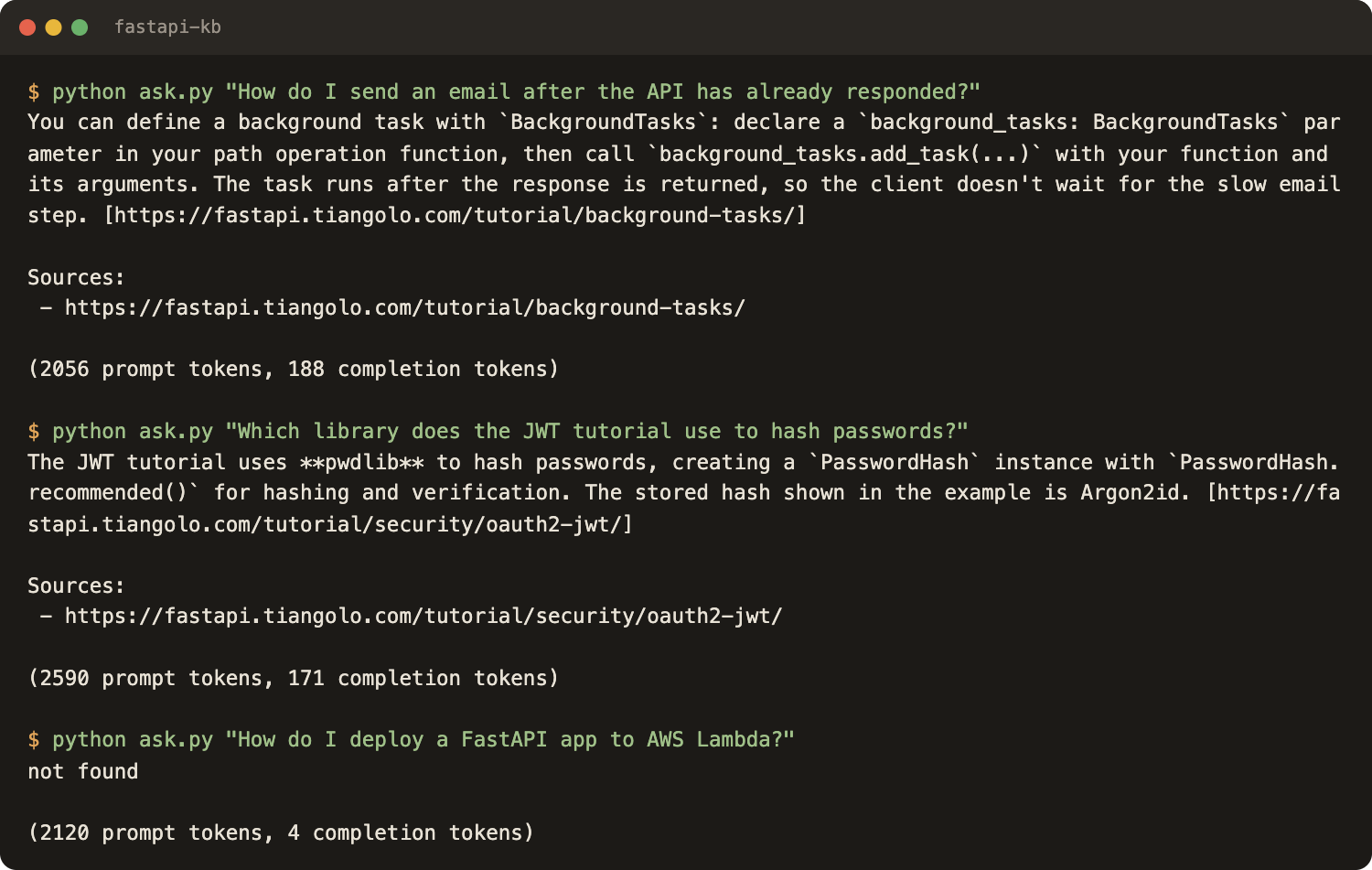
Eight questions were asked, each written to be answered from one or two pages, plus one the docs do not cover. Results of the run:
| Question | Answer from | Prompt / completion tokens |
|---|---|---|
| How do I send an email after the API has already responded? | /tutorial/background-tasks/ | 2,056 / 188 |
| How do I forbid extra fields in a query parameter model? | /tutorial/query-param-models/ | 3,712 / 230 |
| How do I allow a frontend on another domain to call my API? | /tutorial/cors/ | 2,082 / 361 |
| Which library does the JWT tutorial use to hash passwords? | /tutorial/security/oauth2-jwt/ (pwdlib) | 2,590 / 171 |
| How do I read a cookie in a path operation? | /tutorial/cookie-params/ and /tutorial/cookie-param-models/ | 1,896 / 287 |
| How do I upload a file? | /tutorial/request-files/ | 3,439 / 219 |
| What status code does a path operation return by default for a successful POST? | /tutorial/response-status-code/ (200) | 2,142 / 338 |
| How do I deploy a FastAPI app to AWS Lambda? | not found | 2,120 / 4 |
All seven answerable questions cited a page that holds the answer, and the unanswerable one returned not found instead of a made-up guide. That is a small test with questions written by the author, not a benchmark. The answers were read by hand against the pages for this post, and no grader was run.
Chat with a website
A terminal chat is a loop around the same function:
from ask import ask

while True:
    answer, sources, _ = ask(input("question> "))
    print(answer, sources)
That is the whole "chat with a website" trick, really. There is no memory between questions, so a follow-up like "and for POST?" will not work; rewriting it with the previous turn is the usual fix and is not in these files.
Limits
No reranking, no hybrid search, no freshness check, no tables or images. One site, one embedding model, eight questions.
Swap the store
chunks.jsonl is the contract: id, url, heading path, text, and one vector per row from embeddings.npy. Only the two numpy lines in search.py change.
| Store | Use when | What changes in search.py | Guide |
|---|---|---|---|
| Postgres with pgvector | Postgres is already running | top_k becomes one SQL query with ORDER BY embedding <=> ... | pgvector knowledge base search |
| Dedicated vector database (Qdrant, Chroma, LanceDB, Pinecone) | Many filters, tenants or a larger corpus | top_k calls the client query method | Comparison |
Other options are Supabase, Elasticsearch, managed knowledge bases and local apps. Step-by-step tutorials for them are planned.
Keep it fresh
A knowledge base that was right on build day and wrong six months later is worse than none.
- Recrawl on a schedule that matches the content, see how often to recrawl a website for an AI knowledge base. Keep max_age=0, or a recrawl can return a copy up to 7 days old.
- Run chunk.py and embed.py again. The cache means only new or changed chunks are embedded.
- Removed pages are not cleaned from embed_cache.json, so prune it, or the file only grows.
What it costs
All measured on October 25, 2026, one run, one crawl of 60 pages:
| Part | Amount | Cost |
|---|---|---|
| Crawl, 60 pages | 60 x $0.002 per page | $0.12 |
| Embeddings | 181,045 tokens in 8 batches | $0.00362 |
| 8 answers | 20,037 prompt and 1,798 completion tokens | $0.0029 |
| Run total | about $0.127 |
The per-1,000-pages line is arithmetic, not a measurement: crawl $2.00 at $0.002 per page, about 3.0M embedding tokens (about $0.06) and about 8,000 chunks, which is about 49 MB of float32 vectors. Crawling is the main cost, embeddings are a rounding error, and the answer model is cents per hundred questions. Engineering time is not in the table. Prices are as listed on October 25, 2026.
FAQ
How do I build a knowledge base for AI from a website?
Crawl the site to markdown, split the pages into chunks, embed each chunk, search the vectors with the embedded question, and give the top chunks to a language model that answers with source URLs. The five Python files in this post do exactly that, with no database.
Does ChatGPT have a knowledge base, and can I train ChatGPT on my website?
ChatGPT can work with files attached to a conversation (OpenAI help center, read October 25, 2026), which is an upload, not a crawled website. No training is needed here: the model stays unchanged, and the closest chunks are passed to it at question time.
How do I create my own AI database?
At this size, a JSON Lines file for text and metadata plus a numpy array for vectors is enough. A database helps with many more chunks, several writers, or filters by customer or language. See the swap table and the vector database comparison.
Do I need LangChain or a vector database for this?
No. The project uses the plain Python SDK, requests, numpy and tiktoken. LangChain fits when the rest of the stack uses it, and a vector database fits once the corpus outgrows a file.
How do I chat with a website in Python?
Call ask() from ask.py in a loop that reads input() and prints the answer with its sources. That is a knowledge base chatbot in Python without a web framework, and it has no memory between questions.
How do I keep the knowledge base up to date?
Recrawl on a schedule with max_age set to 0, then run chunk.py and embed.py again. The embedding cache is keyed by a hash of each chunk, so only new or changed chunks are embedded.
Conclusion
The whole loop fits in five files: crawl, chunk, embed, search, ask. To build an AI knowledge base from a docs site, this is enough to start. On 60 FastAPI pages it cost about 13 cents (crawl 47.9 seconds, embeddings 13.9 seconds), and the answers carried the source URL of the page that held the fact. The weak spots are the ones named above: paraphrased questions can miss, and nothing checks freshness.
Next steps:
- Read the map post, Website to Markdown for Knowledge Bases, for the decisions behind each step.
- Pick a store with the vector database comparison, or use Postgres with pgvector.
- Planned posts cover chunking in depth and embedding model comparisons.
- To run the crawl, get an API key on the crawl API page and read the crawl docs.
Notes on the numbers
One run on October 25, 2026, Python 3.11, webcrawlerapi 2.1.5: 60 pages, 0 failed, items_limit 60, max_age 0. Embeddings openai/text-embedding-3-small (1,536 dimensions), answers anthropic/claude-haiku-5.5 at temperature 0 with the top 5 chunks. Not measured: other sites, larger question sets, hybrid search, reranking, and corpus sizes where numpy search gets slow.
