
Website to Markdown for Knowledge Bases: Crawl, Chunk, Embed and Query
I'm Andrew, I build WebCrawlerAPI, and the most common question I get is some version of "how do I turn my website into something an AI can answer from?". The short answer is a five-step pipeline: crawl the site, get clean markdown, chunk it, embed the chunks, store them and query them. Each step has a different way to go wrong, and most bad answers from a support bot come from the first three steps, not from the model.
This post walks through the whole pipeline in order, with working code for the crawl and chunk steps, and numbers from a real run on a public docs site. Three decisions matter most: how clean the markdown is, where the chunk boundaries fall, and where the chunks are stored.
If only a few pages are needed right now, there is no need to write any code. The free website to markdown tool crawls up to 100 pages per job without signup. The rest of this post is for the case where the result has to feed something that is built and kept running.
Table of contents
- The pipeline in one picture
- Step 1: Get the website as markdown
- Why markdown
- Step 2: Chunk by headers, keep the source URL
- Step 3: Embed the chunks
- Step 4: Choose where to store it
- Step 5: Query it and answer with citations
- Keeping it fresh
- Other ways to use the same markdown
- What it costs
- FAQ
- Conclusion
The pipeline in one picture
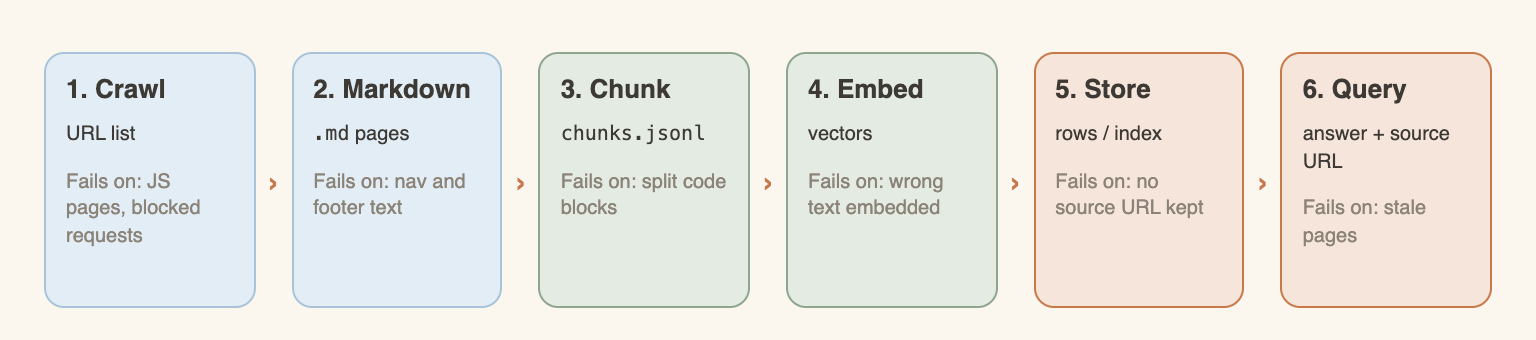
The picture has six boxes for five steps, because crawl and markdown fail in different ways. Each box produces a different kind of data and has its own typical failure:
- Crawl. A list of URLs and their content. It fails on pages that need JavaScript and on sites that block bots.
- Markdown. One .md file per page. It fails when navigation, footer and cookie text is mixed into the content.
- Chunk. Small pieces of text with metadata, one JSON line per chunk. It fails when a split cuts a code block or a table in half.
- Embed. One vector per chunk. It fails when the wrong text is embedded, for example a chunk without its heading.
- Store. Vectors, text and metadata in an index. It fails when the source URL is not stored, so an answer cannot cite anything.
- Query. The question is embedded, the closest chunks are found, and the model answers from them. It fails on stale pages.
A demo site is used through the whole post: the htmx documentation. It is open source, static, small, and its robots.txt allows crawling (Allow: /, read October 24, 2026). Every number below comes from a real run on that site on October 24, 2026, and each one names the run. Where something was not measured, the text says so.
The last two steps were also run end to end, on Postgres with pgvector and a real language model, and the results are in Step 5. A longer code tutorial, from crawl to a working chatbot, follows in this series. Until it is published, this post is the map.
Step 1: Get the website as markdown
What "clean" means
A web page is not its content. A typical docs page carries a navigation bar, a sidebar, a footer, a cookie notice, inline scripts and tracking markup. None of that belongs in a knowledge base. If it is embedded, it shows up in search results: the question "how do I cancel my plan" matches the footer link "Cancel plan" on every single page.
"Clean" means four things:
- Boilerplate is gone. Navigation, footers, banners and cookie text are removed. Only the main content remains.
- JavaScript-rendered pages are rendered. A plain HTTP request to a single-page app returns an empty shell. The page has to be loaded in a real browser first.
- Structure survives. Headings, lists, code blocks and tables are kept, because chunking and citations depend on them.
- Links are absolute. A relative link like /docs/setup means nothing once the page is copied out of its site.
Cleaning is easy to underestimate. Fetching HTML is simple. Getting consistent markdown out of 500 pages with different templates is the real work.
Crawl one site with a single job
With WebCrawlerAPI, one request starts a crawl for the whole site. The endpoint is POST /v1/crawl (docs). The parameters that matter for a knowledge base:
- url: the starting page.
- items_limit: maximum number of pages. Required. A cheap safety net against crawling more than intended.
- output_formats: ["markdown"] for this use case. html and cleaned are also available.
- main_content_only: true removes navigation, headers and footers.
- max_depth: how many link hops from the start page.
- whitelist_regexp and blacklist_regexp: keep the crawl inside one section of a site. See the filters guide.
- respect_robots_txt: set it to true to follow robots.txt rules.
- webhook_url: get a callback when the job is done instead of polling. See async requests.
For stubborn pages there is also clean_selectors, which removes elements by CSS selector before conversion. It is described in the cleaning guide. The Python and JavaScript SDKs may not expose it, so it is used with a raw request.
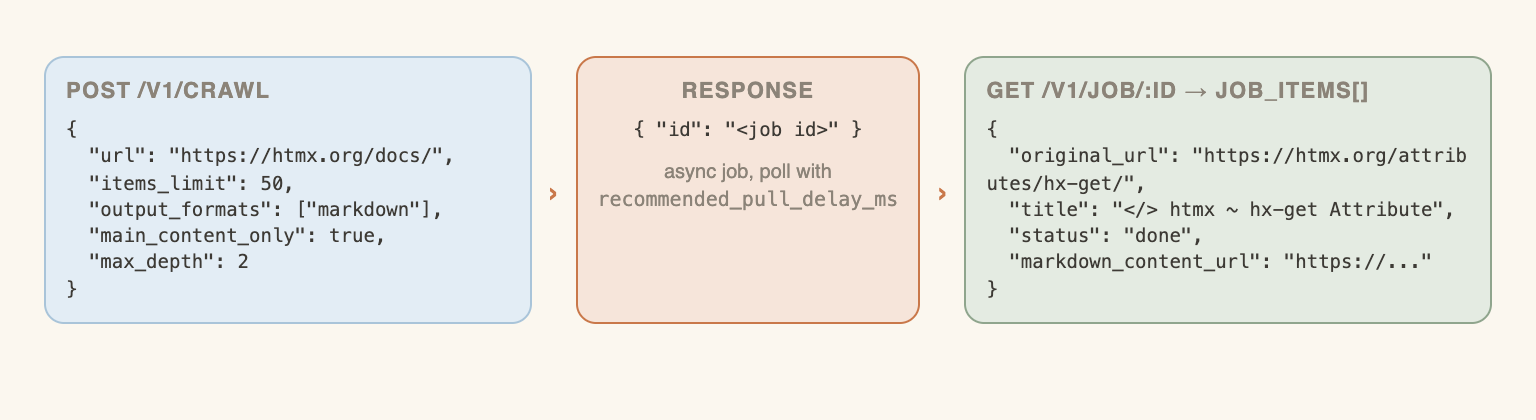
The request returns a job id. The job runs asynchronously, and GET /v1/job/:id (docs) returns its status and the list of job_items. Each item has the original_url, the title and a markdown_content_url. The response also carries recommended_pull_delay_ms, the polling interval the API suggests.
One detail from the run. The first attempt used https://htmx.org/docs/ as the start URL and a filter that only allowed /docs paths. It returned one page, because the htmx docs are one very long page, and the reference material lives on other paths (/reference/, /attributes/, /events/, /headers/, /examples/). The filter was widened to those paths and the second run returned 50 pages. Filters should match how a site is organised, not how its start page looks.
Python script
This is the script that produced the results in this post (SDK webcrawlerapi 2.1.5, Python 3.11). It starts the job, polls it, and writes one markdown file per page with the URL and title kept for later citations.
import os, re, time, datetime, pathlib
from webcrawlerapi import WebCrawlerAPI

client = WebCrawlerAPI(api_key=os.environ["WEBCRAWLERAPI_API_KEY"])
out = pathlib.Path("pages")
out.mkdir(exist_ok=True)

# Start the crawl job (async: returns immediately with a job id)
resp = client.crawl_async(
    url="https://htmx.org/docs/",
    items_limit=50,
    output_formats=["markdown"],
    main_content_only=True,
    max_depth=2,
    whitelist_regexp=r"^https://htmx\.org/(docs|reference|api|attributes|events|headers|examples)/?([^/]*/?)?$",
)

# Poll until the job is finished, using the delay the API recommends
while True:
    job = client.get_job(resp.id)
    print(f"status={job.status} items={len(job.job_items)}")
    if job.is_terminal:
        break
    time.sleep(max(job.recommended_pull_delay_ms, 1000) / 1000)

# Write one .md file per page, with the source URL in front matter
for item in job.job_items:
    if item.status != "done":
        continue
    name = re.sub(r"[^a-z0-9]+", "-", item.original_url.replace("https://htmx.org", "").lower()).strip("-") or "index"
    now = datetime.datetime.now(datetime.timezone.utc).strftime("%Y-%m-%dT%H:%M:%SZ")
    front = f'---\nurl: {item.original_url}\ntitle: "{item.title}"\ncrawled_at: {now}\n---\n\n'
    (out / f"{name}.md").write_text(front + item.get_markdown())
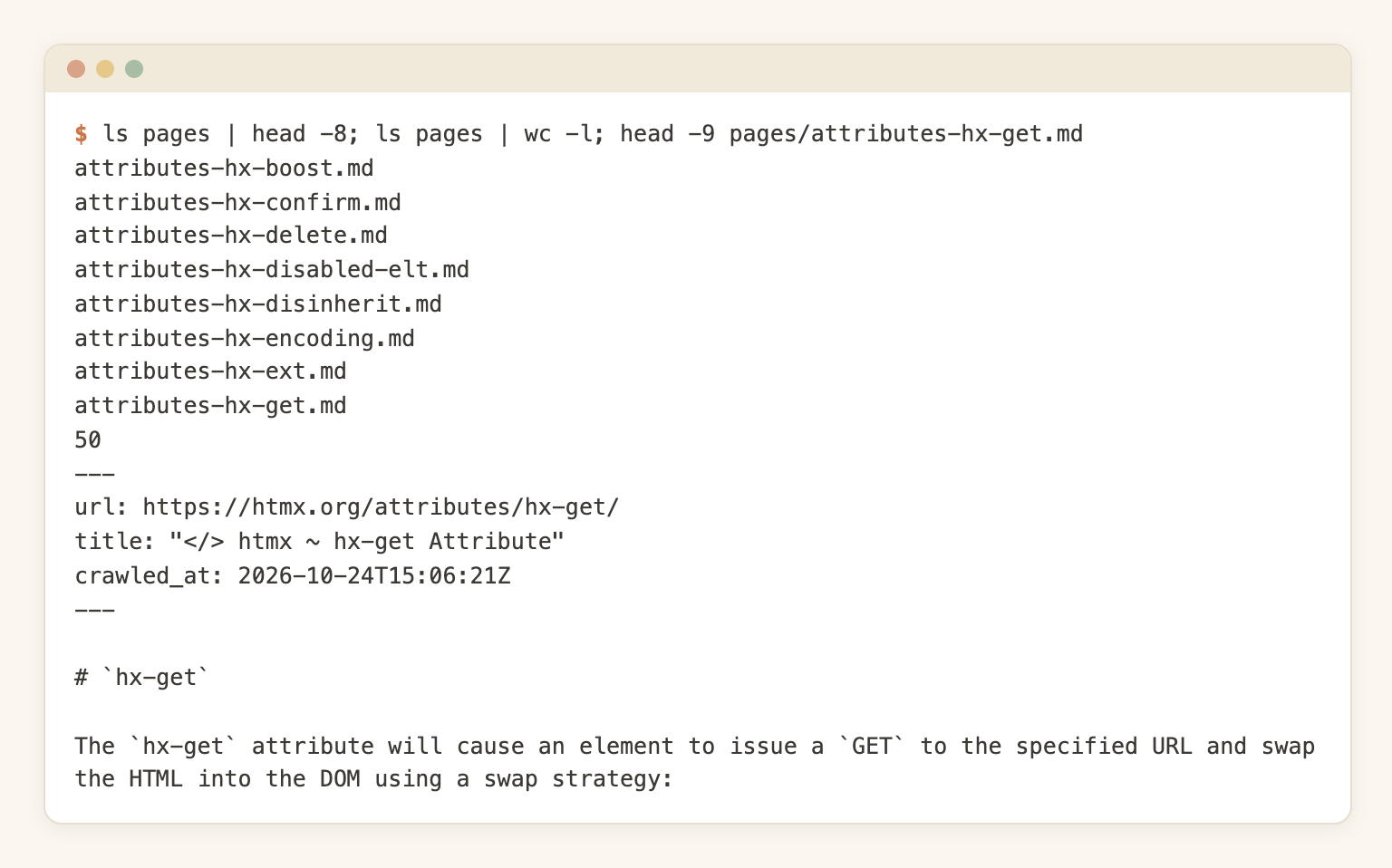
Run 2 (R2), October 24, 2026: 50 pages, 0 failed, job finished in 17.8 seconds. The summed cost field of the items was 0.1, which is 50 pages at $0.002 (pay as you go).
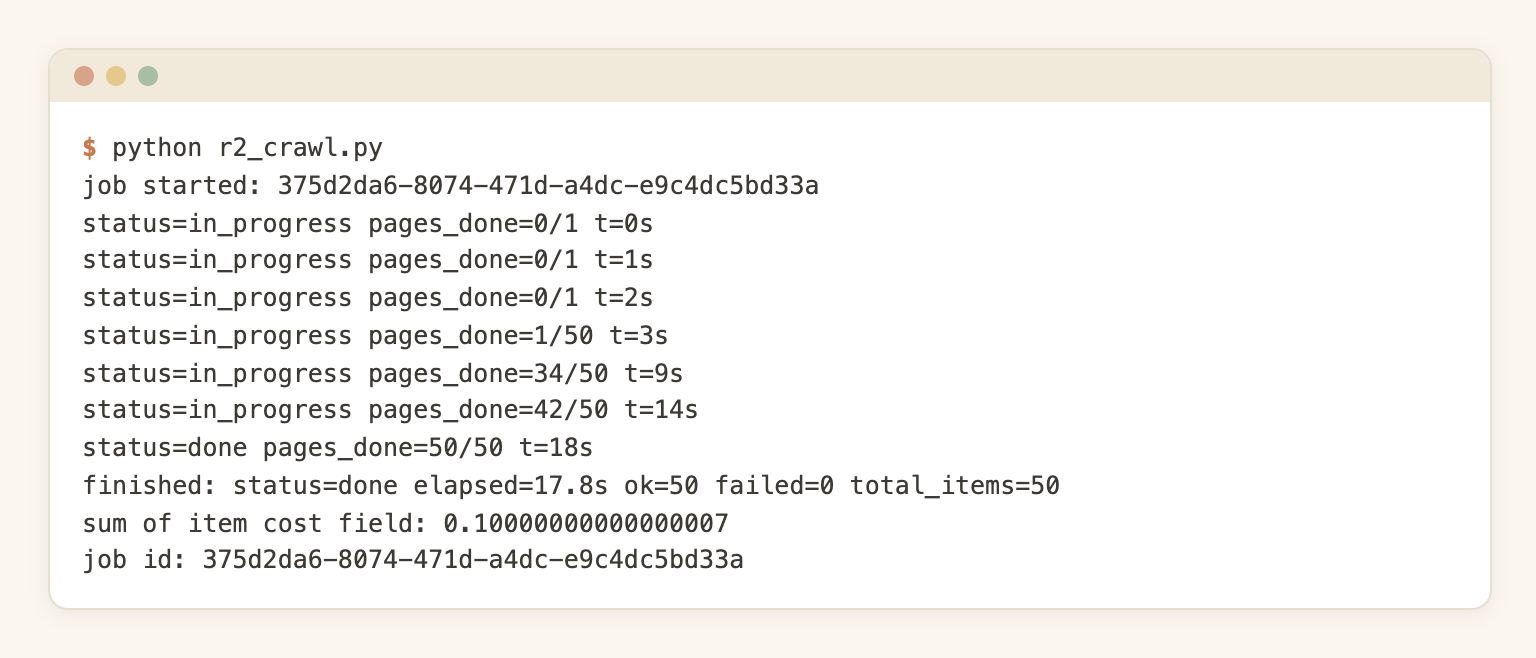
The files on disk, and the start of one of them:
Node.js version
The same flow with the JavaScript SDK (webcrawlerapi-js 2.2.5, Node 18+). The client's crawl() polls for the result itself. This one was run with items_limit: 5 as a check (5 items, status done); the 50-page numbers come from the Python run.
// Node 18+. npm i webcrawlerapi-js
const fs = require("node:fs/promises");
const { WebcrawlerClient } = require("webcrawlerapi-js");

const client = new WebcrawlerClient(process.env.WEBCRAWLERAPI_API_KEY);

async function main() {
  // crawl() starts the job and polls until it is done
  const job = await client.crawl({
    url: "https://htmx.org/docs/",
    items_limit: 50,
    output_formats: ["markdown"],
    main_content_only: true,
    max_depth: 2,
    whitelist_regexp: "^https://htmx\\.org/(docs|reference|api|attributes|events|headers|examples)/?([^/]*/?)?$",
  });
  console.log(`job ${job.id}: ${job.status}, ${job.job_items.length} items`);

  await fs.mkdir("pages", { recursive: true });
  for (const item of job.job_items) {
    if (item.status !== "done") continue;
    const markdown = await item.getMarkdown(); // downloads markdown_content_url
    // keep the source URL and title: they become citations later
    const header = `---\nurl: ${item.original_url}\ntitle: ${JSON.stringify(item.title)}\n---\n\n`;
    const name = new URL(item.original_url).pathname.replace(/\W+/g, "-").replace(/^-|-$/g, "") || "index";
    await fs.writeFile(`pages/${name}.md`, header + markdown);
  }
}
main();
Both SDKs are documented for Python and JavaScript. The same job can be started with curl against the endpoint, as shown in the crawl docs. Teams that cannot wait for a job can use a webhook instead of polling.
The combined file shortcut
GET /v1/job/:id/markdown/content (docs) returns every page of the job in one .md file, with each page preceded by a url: block. For the 50-page run, the download was 293,435 bytes with 50 url: blocks.
That is the right shape for tools that take one big file, like a notebook-style app. It is the wrong shape for chunking, because per-page metadata has to be parsed back out of the text. For a pipeline, the per-item files are better.
Alternatives, honestly
A crawl API is not the only way, and not always the best one:
- Do it yourself with a library. A static site with a few hundred pages and an existing crawler is a fair case for DIY. See HTML to markdown in JavaScript for the conversion step, and open-source web crawlers or Crawl4AI for the crawl step. DIY gets harder with JavaScript-heavy pages, blocked requests and retries. How to build a web crawler lists what is involved.
- One page, in the browser. The Chrome extension approach converts the page that is open. The URL to markdown tool does the same for a single URL.
- A converter library. A comparison of converter libraries is planned in this series.
- Cleaning with a language model. Possible, slower and priced per page. A post on that is planned.
The crawl API page and the web scraping API page describe the hosted option.
Politeness and legality
respect_robots_txt makes the crawler follow the site's robots.txt. Crawl only what there is a right to use, and keep the crawl small and slow enough to not hurt the site. The glossary has a short entry on robots.txt, and web scraping ethics covers the wider picture. For documentation crawls specifically, there is a short Q&A: how to crawl a documentation site for an LLM knowledge base.
To try it without code first, the free tool has one URL field and a Convert button, and it is free for up to 100 pages with no signup.
To run it from code, create an account (no credit card required) and use the API key in the snippets above.
Why markdown
Three reasons come up again and again.
Fewer tokens. Tokens are what embedding models and chat models are priced and limited by. Run 1 (R1), October 24, 2026: 10 htmx pages (the same crawl filter, items_limit 10), fetched as raw HTML and as markdown, counted with tiktoken.
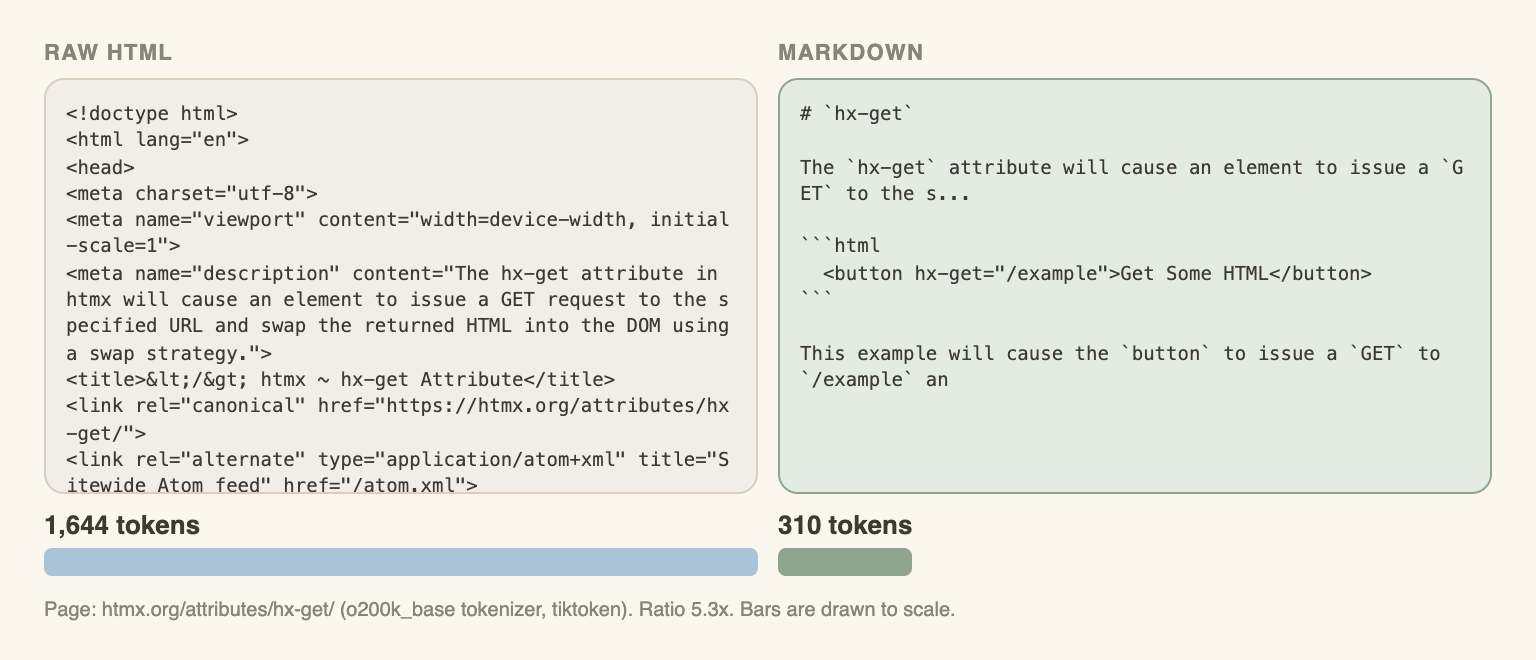
The full table:
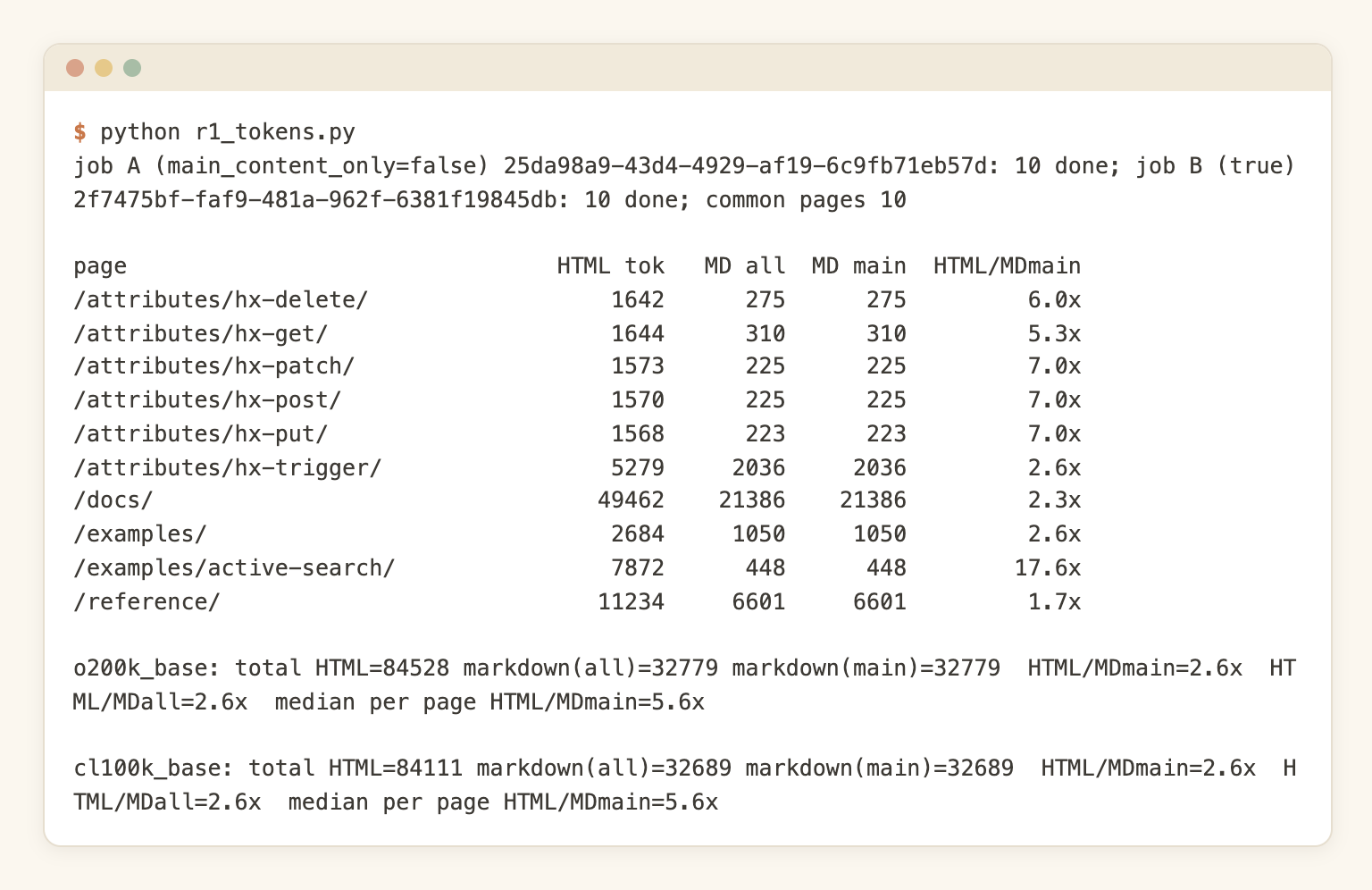
The results with the o200k_base tokenizer:
- Total for the 10 pages: 84,528 HTML tokens against 32,779 markdown tokens. That is 2.6 times fewer. The cl100k_base tokenizer gives nearly the same: 84,111 against 32,689.
- Per page, the ratio goes from 1.7x (/reference/, which is mostly tables of content) to 17.6x (/examples/active-search/, a small page with a large HTML shell).
- The median per-page ratio is 5.6x. Small pages gain the most, because the HTML shell is about the same size everywhere. The one huge page (/docs/, 49,462 HTML tokens against 21,386 markdown tokens) pulls the total ratio down to 2.6x.
A note on main_content_only: on this site, the markdown token counts were identical with the option on and off (32,779 both times). The htmx output had no navigation to begin with, so there was nothing to remove. Sites with heavy sidebars and footers may behave differently, but that was not measured, so no number is claimed.
Structure survives. Headings, lists, code fences and tables stay in markdown. A heading is a natural chunk boundary, and a heading path is useful context for a citation. Plain cleaned text loses both. The posts HTML vs markdown and cleaned text vs markdown compare the output formats in more detail.
Language models read it well. Markdown is common in training data, and it keeps the page readable for a person debugging the pipeline.
The caveat: markdown is not lossless. Complex tables with merged cells, interactive widgets, charts and text that lives inside images do not convert cleanly. For those pages, check a sample of the output by eye before trusting it.
Step 2: Chunk by headers, keep the source URL
An embedding model turns a piece of text into one vector. A whole page in one vector gets blurry: the vector is an average of everything on the page. Very small pieces lose context. So pages are cut into chunks.
Fixed-size splitting (every 400 or 500 tokens, no matter what) is simple, and it cuts code blocks and tables in half. A chunk that starts in the middle of a code block is hard to read. Markdown allows another approach: split on headings (## and ###), cap the size, and carry a little overlap only when a long section has to be cut. Be aware that this is not a proven retrieval win. In the test in Step 5, fixed 400-token windows found the right page first more often than header chunks did. What header splitting gives you is clean boundaries and a heading path for every citation.
Each chunk also carries metadata: the page url, the page title, and the heading path (for example hx-swap-oob > Nested OOB Swaps). That is what turns a search hit into a citation later. The post on chunking strategies for knowledge base content goes deeper on sizes, overlap and testing. Here is the version that was run:
import json, re, pathlib
import tiktoken

enc = tiktoken.get_encoding("o200k_base")
MAX_TOKENS, OVERLAP = 500, 50

def tokens(text):
    return len(enc.encode(text, disallowed_special=()))

def read_page(path):
    raw = pathlib.Path(path).read_text()
    m = re.match(r"---\n(.*?)\n---\n", raw, re.S)
    meta = dict(l.split(": ", 1) for l in m.group(1).splitlines())
    return {k: v.strip('"') for k, v in meta.items()}, raw[m.end():]

def split_sections(body):
    """Split on #, ## and ### headings. Lines inside code fences are ignored."""
    sections, path, buf, in_fence = [], [], [], False
    def flush():
        text = "\n".join(buf).strip()
        if text:
            sections.append((" > ".join(path), text))
    for line in body.splitlines():
        if line.startswith("```"):
            in_fence = not in_fence
        m = None if in_fence else re.match(r"^(#{1,3}) (.+)", line)
        if m:
            flush(); buf.clear()
            level = len(m.group(1))
            path[:] = path[: level - 1] + [m.group(2).strip()]
        buf.append(line)
    flush()
    return sections

def cap(text):
    """Cut a long section on blank lines, carry the last 50 tokens into the next piece."""
    if tokens(text) <= MAX_TOKENS:
        return [text]
    out, cur = [], ""
    for para in text.split("\n\n"):
        if cur and tokens(cur + "\n\n" + para) > MAX_TOKENS:
            out.append(cur)
            cur = enc.decode(enc.encode(cur)[-OVERLAP:]) + "\n\n" + para
        else:
            cur = (cur + "\n\n" + para) if cur else para
    if cur:
        out.append(cur)
    return out

with open("chunks.jsonl", "w") as out:
    for f in sorted(pathlib.Path("pages").glob("*.md")):
        meta, body = read_page(f)
        for heading_path, text in split_sections(body):
            for part in cap(text):
                out.write(json.dumps({"url": meta["url"], "title": meta["title"],
                                      "heading_path": heading_path, "text": part,
                                      "tokens": tokens(part)}) + "\n")
Run 3 (R3) chunked the 50 pages from R2 (no network, no API key):
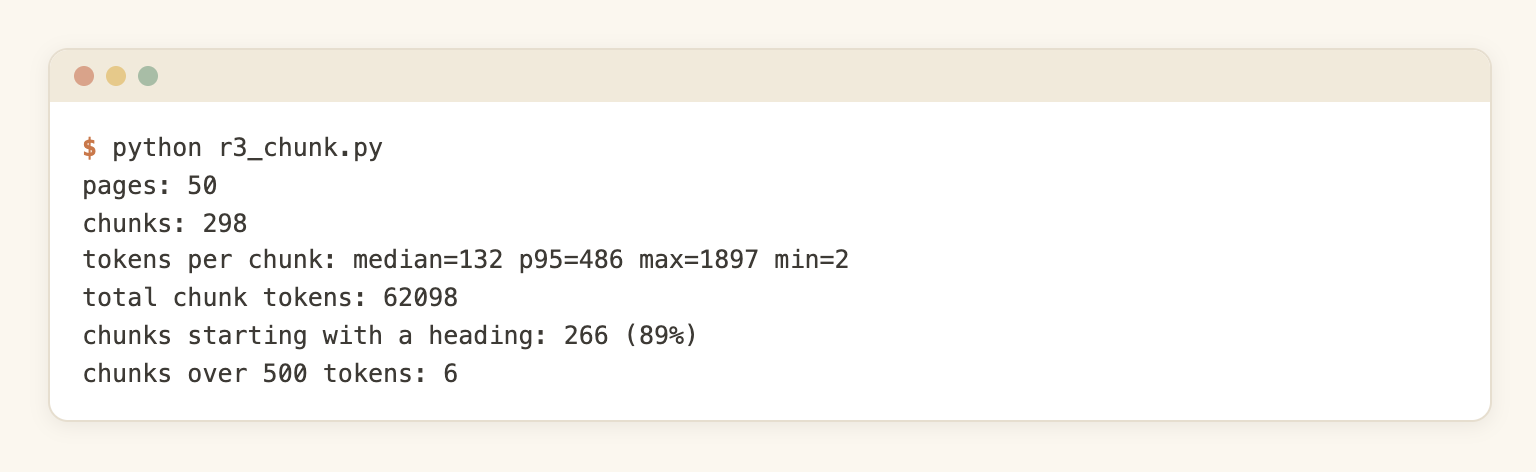
- 298 chunks from 50 pages, about 6 per page.
- Median chunk: 132 tokens. 95th percentile: 486 tokens.
- 266 of 298 chunks (89%) start with a heading.
- 6 chunks are over the 500 token cap. The cap only cuts on blank lines, so one long paragraph or one code block without a blank line stays whole. The largest chunk is 1,897 tokens. Keeping a code block in one piece is on purpose, but it is a case to handle if a model has a small input limit.
- The smallest chunk is 2 tokens (a page title with nothing under it). Tiny chunks like that are noise and should be merged into the next one or dropped.
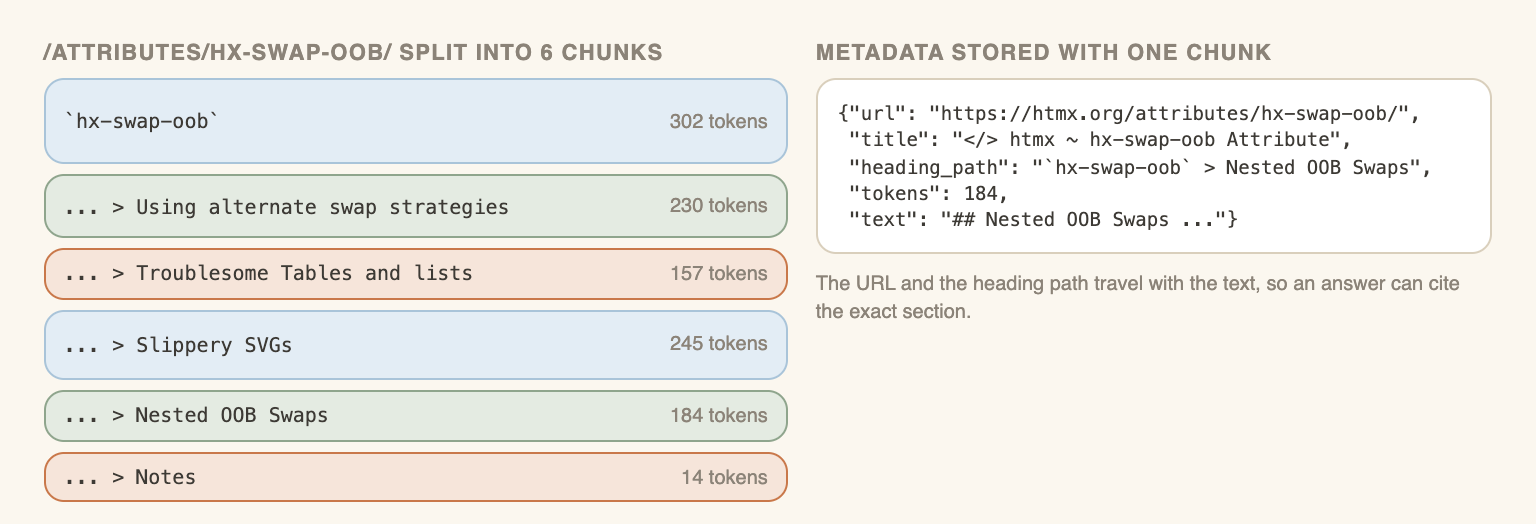
The picture shows a real page from the run (/attributes/hx-swap-oob/): six chunks from 14 to 302 tokens, each with its heading path. A dedicated post on header-based chunking is planned in this series.
Step 3: Embed the chunks
An embedding model maps a chunk of text to a vector, and chunks with similar meaning end up close together. Two practical points matter more than the choice of model.
What goes into the embedding input. Embedding the chunk text alone loses context: a chunk that says "the default is 7 days" means nothing without its page. A simple fix is to embed the heading path plus the text, for example Caching > Cache parameter followed by the chunk. The URL stays as metadata and is not embedded. The Step 5 test did not isolate this effect: the header set was embedded with heading paths and the fixed set without, so a difference between them cannot be credited to either choice alone.
Model choice, in four lines:
- A hosted embedding API is the fastest start and costs a small amount per million tokens.
- A local model costs nothing per call and needs a machine to run on.
- The vector dimension affects storage: more dimensions, more bytes per chunk.
- Changing the model later means re-embedding everything, so keep the chunk text and metadata, not only the vectors.
No model is recommended here. A comparison of embedding models on website content is planned in this series.
For the price, OpenRouter listed text-embedding-3-small at $0.02 per 1M tokens on October 24, 2026. This is a vendor figure and changes. The measured run in Step 5 embedded the 298 header chunks (heading paths included) as 66,664 tokens, which cost $0.00133. The cost table below scales this up.
Step 4: Choose where to store it
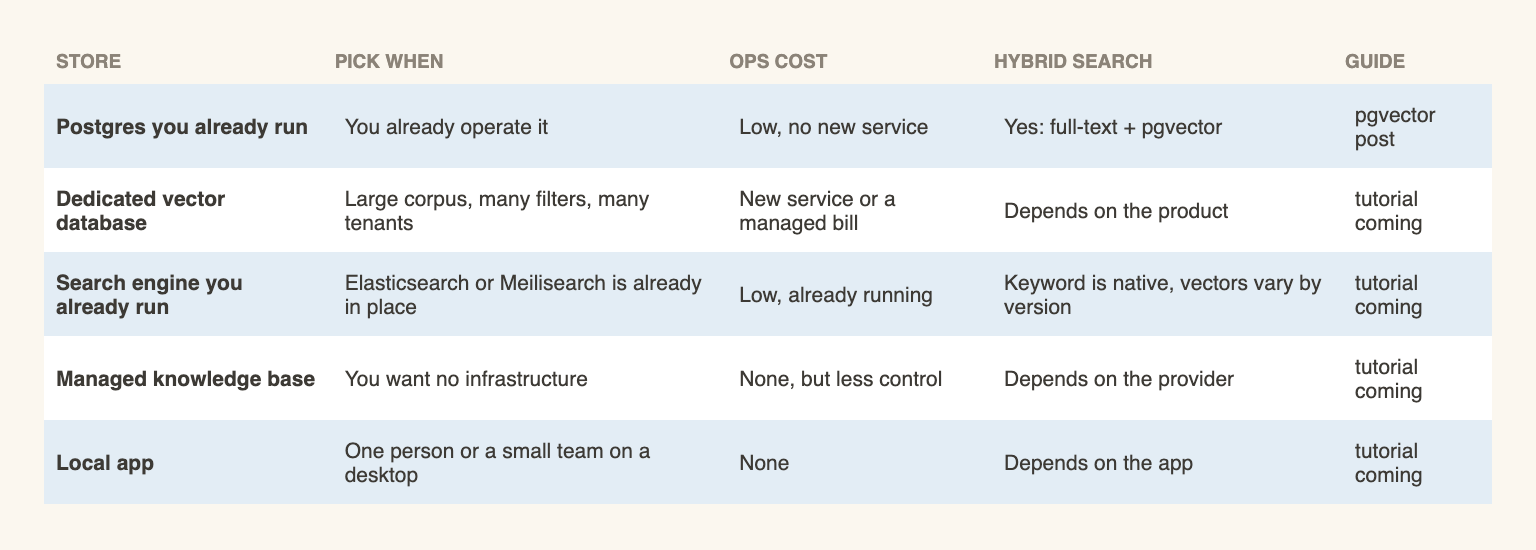
Storage attracts the most opinions and needs the fewest. The sizing is small. A docs site of a few thousand pages makes tens of thousands of chunks (the htmx run gave about 6 chunks per page), and almost any store handles that without effort. So the rule of thumb is: pick what is already operated.
| Store | Pick when | Ops cost | Hybrid (keyword + vector) search | Guide |
|---|---|---|---|---|
| Postgres already in use | The team already runs it | Low, no new service | Yes, full-text search plus the pgvector extension | pgvector knowledge base search |
| Dedicated vector database | Large corpus, many filters, many tenants | A new service or a managed bill | Depends on the product | Tutorials coming |
| Search engine already in use (Elasticsearch, Meilisearch) | The engine is already in place | Low | Keyword search is native, vector support depends on the version | Tutorials coming |
| Managed knowledge base (OpenAI, Gemini, Bedrock) | No infrastructure wanted | None, but less control | Depends on the provider | Tutorials coming |
| Local app (Open WebUI, AnythingLLM, Obsidian) | One person or a small team | None | Depends on the app | Tutorials coming |
This table is a starting point, not a benchmark. Only one row was measured, Postgres with pgvector (sizes and speed in Step 5), and only at 298 chunks. For a comparison of dedicated vector databases and the sizing maths, see best vector databases for a knowledge base. Step-by-step tutorials for each store are planned in this series.
Whatever the store, three fields must be saved next to each vector: the chunk text, the page url and the heading path. Without them there is nothing to show the model and nothing to cite.
Step 5: Query it and answer with citations
Retrieval has four moves:
- Embed the question with the same model used for the chunks.
- Find the closest chunks (top-k, commonly 3 to 8). Optionally combine this with keyword search (hybrid), which helps with exact names and error codes.
- Pass those chunks to the language model together with the question, and instruct it to answer only from them.
- Return the url and heading path of each chunk used, as the citations.
All four ran on the 50 htmx pages. Header-based chunking was expected to win here, and on retrieval it did not. The numbers are below.
The test setup
- Store. Postgres 16 with pgvector 0.8.7 (pgvector/pgvector:pg16) in Docker, on a network with no published ports. One HNSW index per table, cosine distance.
- Embeddings. openai/text-embedding-3-small through OpenRouter, 1,536 dimensions. OpenRouter listed it at $0.02 per 1M tokens on October 24, 2026.
- Answers. anthropic/claude-haiku-5.5 through OpenRouter, listed at $0.10 input and $0.50 output per 1M tokens (same date). Temperature 0, top 5 chunks as context.
- Two chunk sets from the same 50 pages. Header: the 298 chunks from Step 2, embedded as heading path plus text. Fixed: 178 windows of 400 tokens (cl100k_base), no overlap, no heading awareness, embedded as plain text.
- Questions. 20 questions written from the page content, each with one gold page. A hit means the gold page URL is among the URLs of the top k chunks. MRR is the mean of 1 divided by the rank of the first hit (top 5 only).
The compose file is the whole setup. The password is a throwaway for a container that has no published ports.
# docker-compose.yml
# db is on an internal-only network (no published ports, no internet).
# runner is on both networks; only this directory is mounted.
services:
  db:
    image: pgvector/pgvector:pg16
    environment:
      POSTGRES_PASSWORD: e2e-throwaway
      POSTGRES_DB: kb
    networks: [internal]
    healthcheck:
      test: ["CMD-SHELL", "pg_isready -U postgres -d kb"]
      interval: 2s
      retries: 30
  runner:
    build:
      context: .
      dockerfile: Dockerfile.runner
    working_dir: /work
    volumes:
      - ./:/work
    environment:
      - OPENROUTER_API_KEY
      - DATABASE_URL=postgresql://postgres:e2e-throwaway@db:5432/kb
    depends_on:
      db:
        condition: service_healthy
    networks: [internal, external]
networks:
  internal:
    internal: true
  external: {}
The runner image is python:3.12-slim plus requests, tiktoken and psycopg. The key is read from the OPENROUTER_API_KEY environment variable and never written to a file. Below are the core of the three scripts, trimmed (retries and the timing code are left out). First the two helpers:
# common.py
import os, requests

EMB_MODEL, DIM = "openai/text-embedding-3-small", 1536

def embed(texts):  # one call per batch, OpenRouter embeddings endpoint
    r = requests.post("https://openrouter.ai/api/v1/embeddings",
        headers={"Authorization": "Bearer " + os.environ["OPENROUTER_API_KEY"]},
        json={"model": EMB_MODEL, "input": texts}, timeout=120)
    r.raise_for_status()
    data = sorted(r.json()["data"], key=lambda x: x["index"])
    return [x["embedding"] for x in data]

def vec(v):  # pgvector text format
    return "[" + ",".join(f"{x:.8f}" for x in v) + "]"
Then the ingest. It reads chunks.jsonl from Step 2, embeds, inserts and builds the index:
# ingest.py
import os, json, psycopg
from common import embed, vec, DIM

rows = [json.loads(l) for l in open("chunks.jsonl")]
# embed the heading path plus the text; url and title stay as plain columns
inputs = [(r["heading_path"] + "\n\n" + r["text"]) if r["heading_path"] else r["text"] for r in rows]

with psycopg.connect(os.environ["DATABASE_URL"], autocommit=True) as c:
    c.execute("CREATE EXTENSION IF NOT EXISTS vector")
    c.execute(f"""CREATE TABLE IF NOT EXISTS chunks (
        id serial PRIMARY KEY, url text, title text, heading_path text,
        content text, tokens int, embedding vector({DIM}))""")
    for i in range(0, len(rows), 64):  # batches of 64 chunks
        batch = rows[i:i + 64]
        for r, v in zip(batch, embed(inputs[i:i + 64])):
            c.execute("INSERT INTO chunks (url,title,heading_path,content,tokens,embedding) "
                      "VALUES (%s,%s,%s,%s,%s,%s::vector)",
                      (r["url"], r["title"], r["heading_path"], r["text"], r["tokens"], vec(v)))
    c.execute("CREATE INDEX IF NOT EXISTS chunks_hnsw ON chunks USING hnsw (embedding vector_cosine_ops)")
And the query and answer step:
# query.py
import os, sys, requests, psycopg
from common import embed, vec  # same embedding model as the chunks

def search(question, k=5):
    v = vec(embed([question])[0])
    with psycopg.connect(os.environ["DATABASE_URL"]) as c:
        return c.execute(
            "SELECT url, heading_path, content, 1 - (embedding <=> %s::vector) AS cos "
            "FROM chunks ORDER BY embedding <=> %s::vector LIMIT %s", (v, v, k)).fetchall()

SYSTEM = ("Answer the question using only the provided context. Cite the source URL(s) you used, "
          "in the form [url]. If the context does not contain the answer, reply exactly 'not found'. "
          "Be concise (max 4 sentences).")

def answer(question):
    rows = search(question)
    context = "\n\n".join(f"[source: {url}]\n{content}" for url, _, content, _ in rows)
    r = requests.post("https://openrouter.ai/api/v1/chat/completions",
        headers={"Authorization": "Bearer " + os.environ["OPENROUTER_API_KEY"]},
        json={"model": "anthropic/claude-haiku-5.5", "temperature": 0, "max_tokens": 1500,
              "messages": [{"role": "system", "content": SYSTEM},
                           {"role": "user", "content": f"Context:\n{context}\n\nQuestion: {question}"}]},
        timeout=180)
    r.raise_for_status()
    return r.json()["choices"][0]["message"]["content"]

if __name__ == "__main__":
    print(answer(" ".join(sys.argv[1:])))
The ingest of both chunk sets:
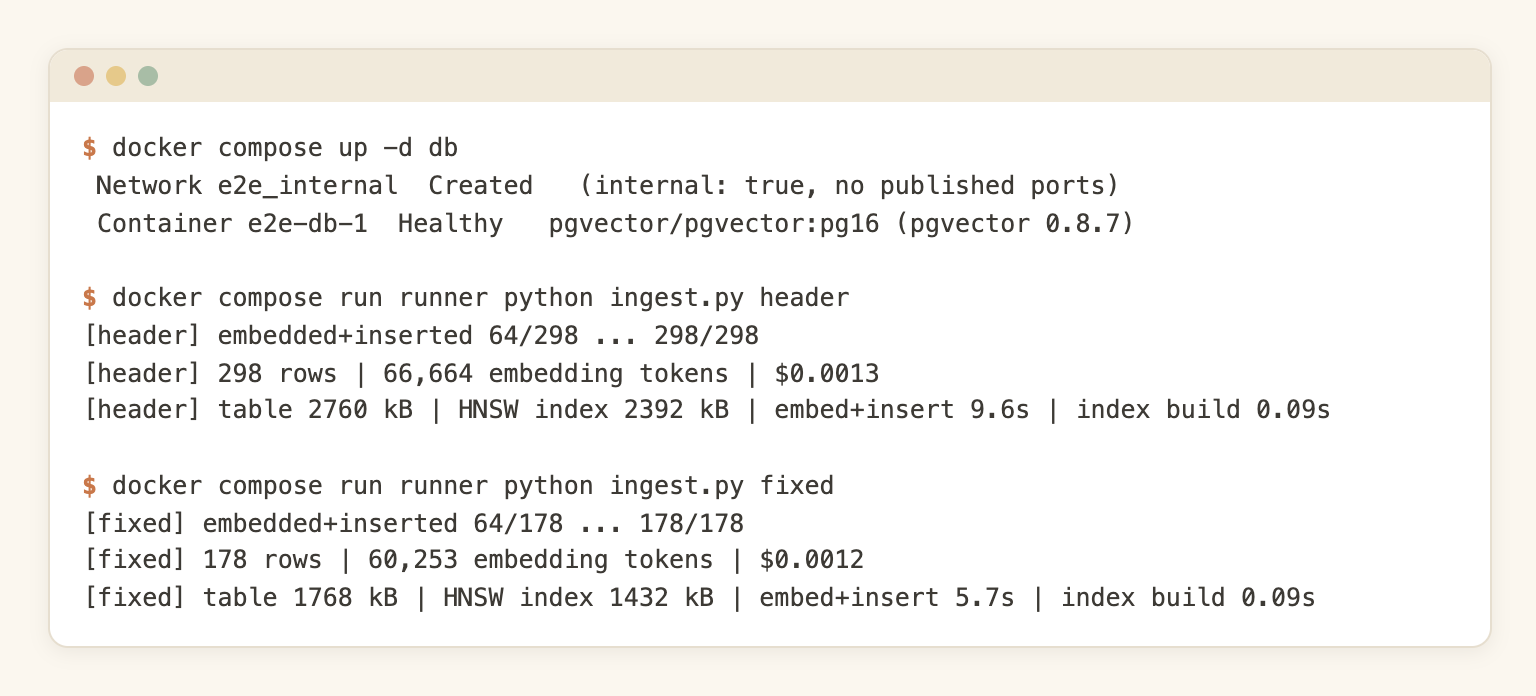
And one retrieval, with the question "How do I turn off an extension that a parent element enabled?":
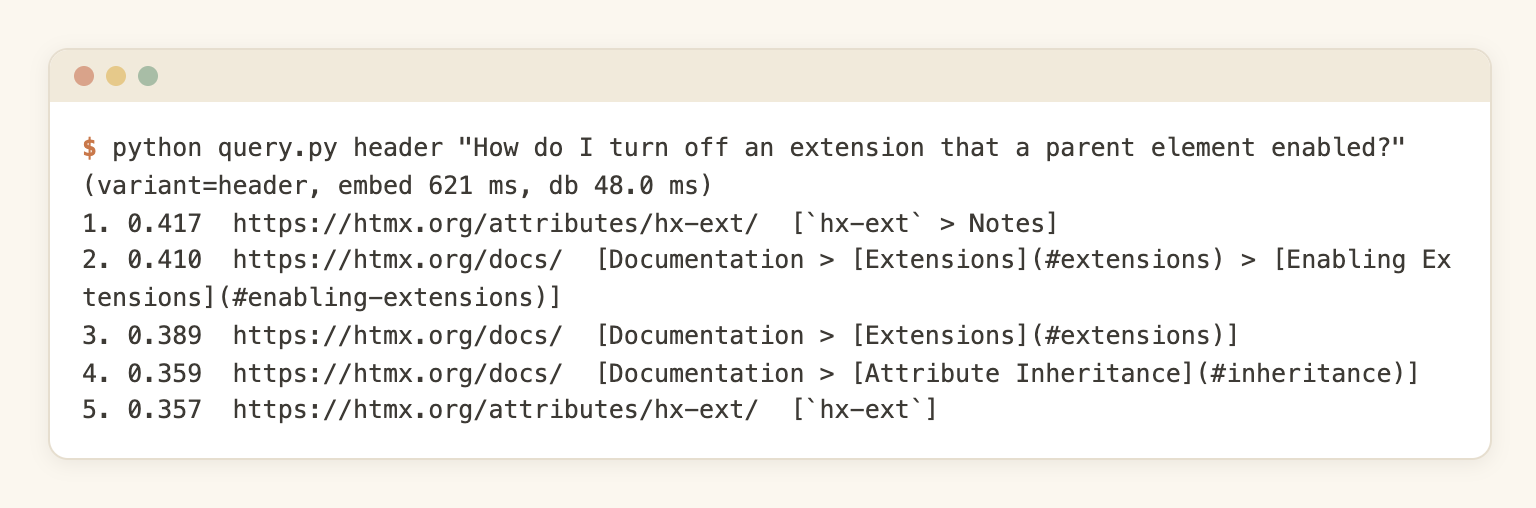
The first result is the hx-ext page. The same screenshot shows 48 ms for the database part: that was the first query of a fresh process. The repeated queries in the evaluation below took about a millisecond.
Retrieval results
| Chunking | Chunks | R@1 | R@3 | R@5 | MRR |
|---|---|---|---|---|---|
| Header based (heading path embedded) | 298 | 0.60 | 1.00 | 1.00 | 0.783 |
| Fixed 400-token windows | 178 | 0.75 | 0.95 | 1.00 | 0.863 |
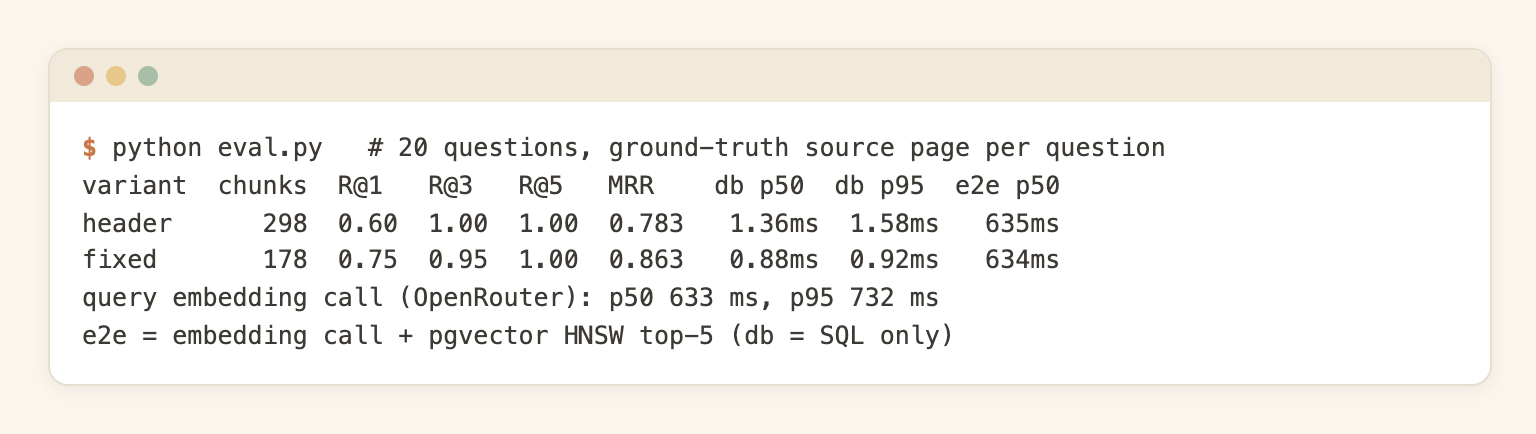
Fixed windows were better on the first result: the gold page was ranked first for 15 of 20 questions, against 12 of 20 for header chunks. Header chunks were better at three results: all 20 questions had the gold page in the top 3, against 19 for fixed windows. Both found the gold page by rank 5 every time.
So the result is mixed, and header chunking did not win where it was supposed to. A difference of three questions out of 20 is small, and I would not read it as more than a tie on retrieval.
One pattern in the misses is worth knowing. In 4 of the 8 questions where the header set did not rank the gold page first, the top chunk was a section of the long /docs/ page. That page covers every topic in short headed sections, and a heading path like Documentation > Confirmation matches a question about confirmation very well. Those sections are often a fair answer, but the test counts only one gold page per question, so it scores them as misses. A multi-page gold set would change the numbers.
Latency in this test was dominated by the embedding call, not by the database:
- Query embedding call through OpenRouter: 633 ms p50, 732 ms p95.
- pgvector HNSW top 5 (SQL only, 5 repeats per question): 1.36 ms p50 for header chunks, 0.88 ms for fixed windows.
- Together: about 635 ms p50.
The tables hold a few hundred rows, so the database timing says nothing about a large corpus.
Answers and citations
For each question, the top 5 chunks went to the answer model, once per chunk set (40 answers). Each answer was read against the page text and a one-line reference fact, and graded:
| Chunking | Correct | Partial | Wrong or refused | Cited URL matches the gold page |
|---|---|---|---|---|
| Header based | 19 | 1 | 0 | 19 of 20 |
| Fixed windows | 20 | 0 | 0 | 20 of 20 |
A second grader (gpt-5-mini) was run as a check and disagreed with that grade on one answer (it marked the hx-sync answer partial, the reading of the page text said correct). The one partial was the hx-preserve question on the header set: the answer left out that the element needs an unchanging id.
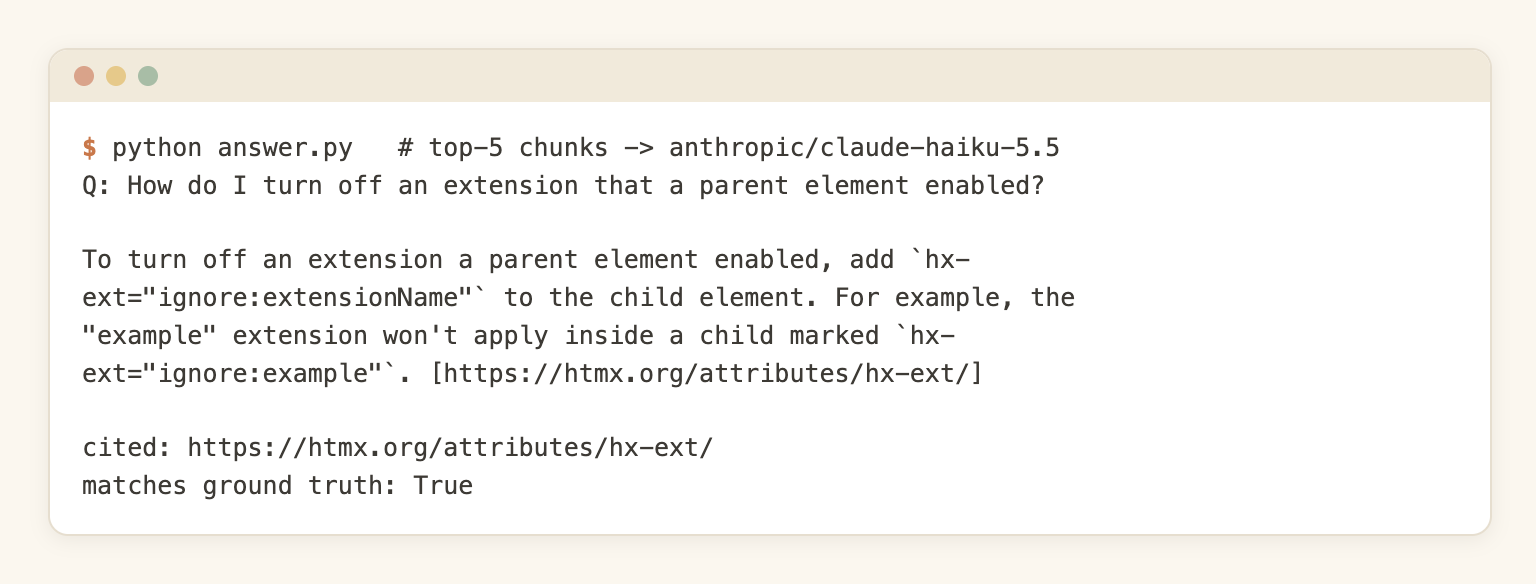
A good one, from the header set (the question was the one in the screenshot above):
Q: How do I turn off an extension that a parent element enabled?

To turn off an extension a parent element enabled, add `hx-ext="ignore:extensionName"`
to the child element. For example, the "example" extension won't apply inside a child
marked `hx-ext="ignore:example"`. [https://htmx.org/attributes/hx-ext/]
The one citation miss, also from the header set:
Q: How do I prevent a request from being sent for every keystroke in a live search box?

Use the `delay` modifier on the input's `hx-trigger`, combined with `changed`, for
example `hx-trigger="keyup changed delay:500ms"`. `delay:<time interval>` waits before
issuing the request, and if the event fires again the countdown resets, so requests fire
only after the user pauses typing ([https://htmx.org/attributes/hx-trigger/]). The
`changed` modifier also skips the request when the value hasn't actually changed
([https://htmx.org/docs/]).
The answer is correct. The gold page for this question is the live search example, which was ranked second in the retrieved chunks, and the model cited the hx-trigger reference page and the main docs instead. Both pages do say it. It is a miss only against a single gold page, but it shows the real limit of this kind of check: the citation was usable, and it still was not the page I had in mind.
What the test says, and what it does not
- On this site, with 20 questions, fixed 400-token windows retrieved at least as well as header chunks, and better on the first result. Header chunking is not a retrieval win by default.
- Header chunks still have two practical advantages that the hit rate does not show: every chunk carries a heading path for the citation, and chunk boundaries follow the page instead of a token count. The fixed windows have no heading path at all.
- Header chunks cost more to store. 298 rows against 178: 2,760 kB of table and 2,392 kB of HNSW index, against 1,768 kB and 1,432 kB. Embedding was $0.00133 against $0.00120, because the heading path adds tokens (66,664 against 60,253).
- The test does not show that fixed windows are better in general. It is one site of 50 pages, 20 questions, written from the pages themselves, so the wording often matches the pages. One embedding model, one store, no hybrid search, no reranking, no overlap on the windows, and one window size.
My takeaway: choose header splitting for the boundaries and the citation context, not because it ranks better, and measure both on your own questions before settling. The scripts above are small enough to do that in an afternoon.
The failure modes map back to earlier steps:
- Stale answers. The page changed and the chunks did not. This is a freshness problem (next section).
- Duplicate chunks. An old version of a page is still in the store next to the new one. Replace by URL, do not only add.
- Boilerplate in the top results. The same footer sentence ranks first for many questions. This is a cleaning problem in Step 1.
- Big pages that match everything. The /docs/ page in this test. Check which pages dominate the top results.
A step-by-step tutorial for this step, with a larger question set, is planned in this series; there is no link until it is live.
Keeping it fresh
A knowledge base that was correct on build day and is wrong six months later is worse than none. Nobody remembers it can be wrong.
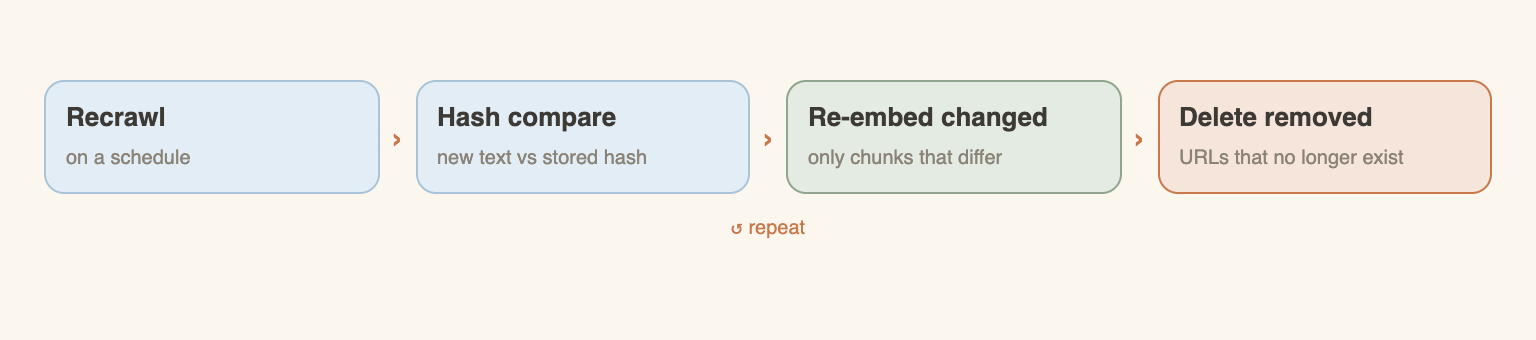
- Recrawl on a schedule that matches the content. Pricing and changelog pages change often. Reference docs change rarely. How often to recrawl a website for an AI knowledge base goes through the cadence by content type.
- Process only what changed. Compare a hash of each page's markdown with the stored hash and skip the unchanged ones. Keeping a support bot in sync with docs shows the flow. The glossary has a short answer too: how to keep a crawled knowledge base in sync.
- Mind the cache. Crawl and scrape requests are cached for 7 days by default (max_age, 604800 seconds). A recrawl inside that window can return the cached copy. Set max_age to 0 to force fresh content. See caching.
- Delete what disappeared. If a URL no longer exists, its chunks must go too, or the bot keeps citing a dead page.
- Re-embed only changed chunks. Embedding is cheap, but doing it for the whole site on every run is wasted work. A content hash per chunk solves it. A tutorial on this is planned.
Other ways to use the same markdown
The markdown files from Step 1 are not tied to one stack. A few other places they fit:
- LangChain. A document loader for websites. See LangChain document loaders for websites and the LangChain SDK docs.
- n8n or Dify. No-code workflows that load a docs site into a knowledge base. See docs site to knowledge base in n8n or Dify.
- A local search index. Put 1,000 pages of documentation into QMD.
- An MCP server. Agents can read the markdown through the MCP server. A tutorial for a docs MCP server is planned.
- NotebookLM and Obsidian. The combined file from Step 1 fits tools that take one document. A post on this is planned.
- llms.txt. The llms.txt generator builds an index of a site for language models.
What it costs
Prices were read on October 24, 2026 and will change. WebCrawlerAPI charges per crawled page (see pricing):
- Pay as you go: $0.002 per page.
- Professional ($99/month): $0.0015 per page.
- Business ($499/month): $0.001 per page.
- Only successful requests are charged.
The measured part: the 50-page run (R2) cost $0.10, which is 50 pages at $0.002. The same pages gave 298 header chunks. Embedding them with text-embedding-3-small took 66,664 tokens and cost $0.00133 (E1, Step 5), so about 1,333 embedding tokens per page, and 5.96 chunks per page. Stored in Postgres with pgvector, the table was 2,760 kB and the HNSW index 2,392 kB, 5,152 kB together. The table below scales those numbers to bigger sites. That is an extrapolation: it assumes the pages are as long as htmx reference pages, and it assumes the size grows in a straight line, which index sizes do not always do. A site of long articles will have more tokens per page, and a site of short pages fewer.
| Pages | Crawl at $0.002 | Crawl at $0.0015 | Crawl at $0.001 | Chunks | Embedding tokens | Embedding at $0.02 per 1M tokens | Postgres table plus HNSW index |
|---|---|---|---|---|---|---|---|
| 50 (measured) | $0.10 | $0.075 | $0.05 | 298 | 66,664 | $0.00133 | 5.0 MB |
| 1,000 | $2.00 | $1.50 | $1.00 | about 5,960 | about 1.33M | about $0.027 | about 100 MB |
| 10,000 | $20 | $15 | $10 | about 59,600 | about 13.3M | about $0.27 | about 1 GB |
| 100,000 | $200 | $150 | $100 | about 596,000 | about 133M | about $2.67 | about 10 GB |
How the table was computed:
- Crawl: pages times the per-page price, from the pricing page. Only the $0.002 rate for 50 pages was actually charged; the other two rates are arithmetic.
- Chunks and embedding tokens: pages times the measured 5.96 chunks and 1,333 tokens per page (298 chunks and 66,664 tokens over 50 pages).
- Embedding: tokens times $0.02 per 1M tokens, the OpenRouter price for text-embedding-3-small, read October 24, 2026. This is a vendor price, not a WebCrawlerAPI price. A different model has a different price.
- Postgres size: 5,152 kB for 50 pages, scaled linearly (about 103 kB per page). It includes the vectors (1,536 dimensions), chunk text and the index. A different dimension count, store or index setting gives another number.
The takeaway: crawling is the main cost of the pipeline, and embedding is small next to it. Storage for a few thousand pages is tiny. Answering is small too: the whole end-to-end test in Step 5, with 40 answers, a second grader and all the embedding calls, cost about $0.10 in OpenRouter charges, separate from the $0.10 crawl above. The costs that are not in the table are engineering time and the model that answers the questions.
Free options exist for small jobs: the website to markdown tool is free for up to 100 pages per job and needs no signup.
FAQ
How do I convert a whole website to markdown?
Start a crawl job: one request to POST /v1/crawl with the start URL, an items_limit and output_formats: ["markdown"], then read the markdown of every page from the job result. For up to 100 pages with no code and no signup, use the free website to markdown tool. See Step 1.
Is there a free website to markdown converter?
Yes. The WebCrawlerAPI website to markdown tool is free for up to 100 pages per job, without registration. Other free converters exist too, and many of them handle a single page at a time. For a whole site that has to be recrawled regularly, the API is the better fit.
Is there a website to markdown API?
Yes. POST /v1/crawl takes a URL and returns a job whose items have a markdown_content_url. A minimal request body is {"url": "https://example.com", "items_limit": 50, "output_formats": ["markdown"]}. See the crawl API docs and the code in Step 1.
How do I get clean markdown without the navigation and footer?
Set main_content_only to true in the crawl request. For stubborn elements, clean_selectors removes parts of a page by CSS selector before the conversion. It is documented in the cleaning guide and is used with a raw request, not through the SDKs. Check a sample of the output on every new site.
Why use markdown instead of HTML for an AI knowledge base?
It is smaller and it keeps structure. On 10 htmx pages, HTML was 84,528 tokens and markdown 32,779, so 2.6 times fewer, and 5.6 times fewer for the median page. Headings, lists and code blocks survive, which chunking needs. See Why markdown.
How do I chunk markdown for a knowledge base?
Split on headings, cap each chunk at a few hundred tokens, carry a small overlap only when a long section is cut, and store the page URL and heading path with every chunk. In the htmx run, this gave 298 chunks from 50 pages with a median of 132 tokens. Fixed 400-token windows found the right page first more often in the same test, so measure both on your own questions. See Step 2 and Step 5.
Is header-based chunking better than fixed-size chunking?
Not in the test in this post. On 50 htmx pages and 20 questions, the right page was ranked first for 15 questions with fixed 400-token windows and 12 with header chunks. Header chunks had the right page in the top 3 for all 20 questions, against 19. Header chunks keep a heading path for citations. It is a small test on one site, so check it on your own content. See Step 5.
Which database should I store the embeddings in?
Use what is already operated. A docs site of a few thousand pages is tens of thousands of chunks, which almost any store handles. Postgres with pgvector, a search engine already in place, or a dedicated vector database all work. In the test here, pgvector answered a top 5 query in about a millisecond on 298 chunks. See the table in Step 4.
How often should I recrawl?
It depends on the content. Pricing and changelog pages need frequent recrawls, reference docs rarely. Recrawl on a schedule and only re-embed pages whose content hash changed. Remember that results are cached for 7 days by default, so set max_age to 0 when fresh content is required. See Keeping it fresh.
What is a knowledge base in a chatbot, and how can I create my own?
It is the set of documents the chatbot answers from. To create one from a website: crawl the site to markdown, chunk it by headings, embed the chunks, store them with their source URL, and at question time fetch the closest chunks and let the model answer from them. That is the five steps above.
Can I turn a website into a knowledge base for a ChatGPT-style bot?
Yes, but it is search over your content, not training. The model is not changed. At question time, the closest chunks are found and given to the model as context, together with the question. This is also why updating the knowledge base is a recrawl, not a retraining job.
Conclusion
The pipeline is five steps and the order matters. Clean markdown comes first, because every later step inherits its mistakes. Then chunk, and keep the URL and the heading path with every chunk. Header splitting was not a retrieval win in the test here, so measure it against fixed windows on your own questions. Embed, store in whatever is already operated, and recrawl only what changed.
Where to go next depends on the case:
- One page or a few pages: use the free URL to markdown tool or the website to markdown tool (up to 100 pages, no signup).
- A whole site: create an account (no credit card required), start a crawl job with the Python or Node snippet from Step 1, and check the pricing page for the per-page rate.
- Code first: the Step 1 and Step 5 snippets run as they are. A longer tutorial that builds a knowledge base from a website in Python follows in this series.
Notes on the numbers
All runs were done on October 24, 2026 on https://htmx.org/docs/ and the pages linked from it.
- R1 (token counts): 10 pages, two jobs (main_content_only off and on), tiktoken o200k_base and cl100k_base.
- R2 (crawl): 1 job, 50 pages, 0 failed, 17.8 seconds, items_limit 50, max_depth 2, markdown output.
- R3 (chunker): local script over the R2 files, no network.
- E1 (end to end, Step 5): the same 50 pages and 298 header chunks, plus 178 fixed 400-token windows. Postgres 16 with pgvector 0.8.7 in Docker, openai/text-embedding-3-small (1,536 dimensions), top 5 chunks to anthropic/claude-haiku-5.5, 20 questions with one gold page each, 40 answers graded against a reference fact and the page text. Latency: 5 repeated queries per question after the embedding call.
- Combined download: 293,435 bytes, 50 url: blocks.
- Prices: text-embedding-3-small at $0.02 per 1M tokens, and claude-haiku-5.5 at $0.10 input and $0.50 output per 1M tokens, both as listed by OpenRouter on October 24, 2026.
- Measured in E1: retrieval hit rate and MRR for two chunking strategies, answer correctness and citation match on 40 answers, embedding cost, table and index size, and query latency.
- Not measured: other sites and content types, a question set larger than 20, questions with more than one valid page, other embedding models, other vector stores, hybrid (keyword plus vector) search, reranking, chunk overlap and window sizes other than 400 tokens, the main_content_only effect on sites with heavy boilerplate, and the Node script at 50 pages (checked at 5 pages).
