
Docs Site to Knowledge Base in n8n / Dify: Step-by-Step Template
Hi, I'm Andrew. A support bot is only as good as the docs it was fed. Copying pages by hand works for 5 pages and falls apart at 50.
In this post I'll show how to scrape a website in n8n and turn it into an AI knowledge base. The whole docs site is crawled with WebCrawlerAPI, cleaned up, and loaded into either an n8n vector store or a Dify knowledge base. Both workflows were built and run for real, and the JSON templates are at the end.
The test site was webcrawlerapi.com/docs: 20 pages crawled, 18 kept, 108 chunks stored, about 10 seconds end to end. I'll also show what went wrong, because some things did.
What we're building
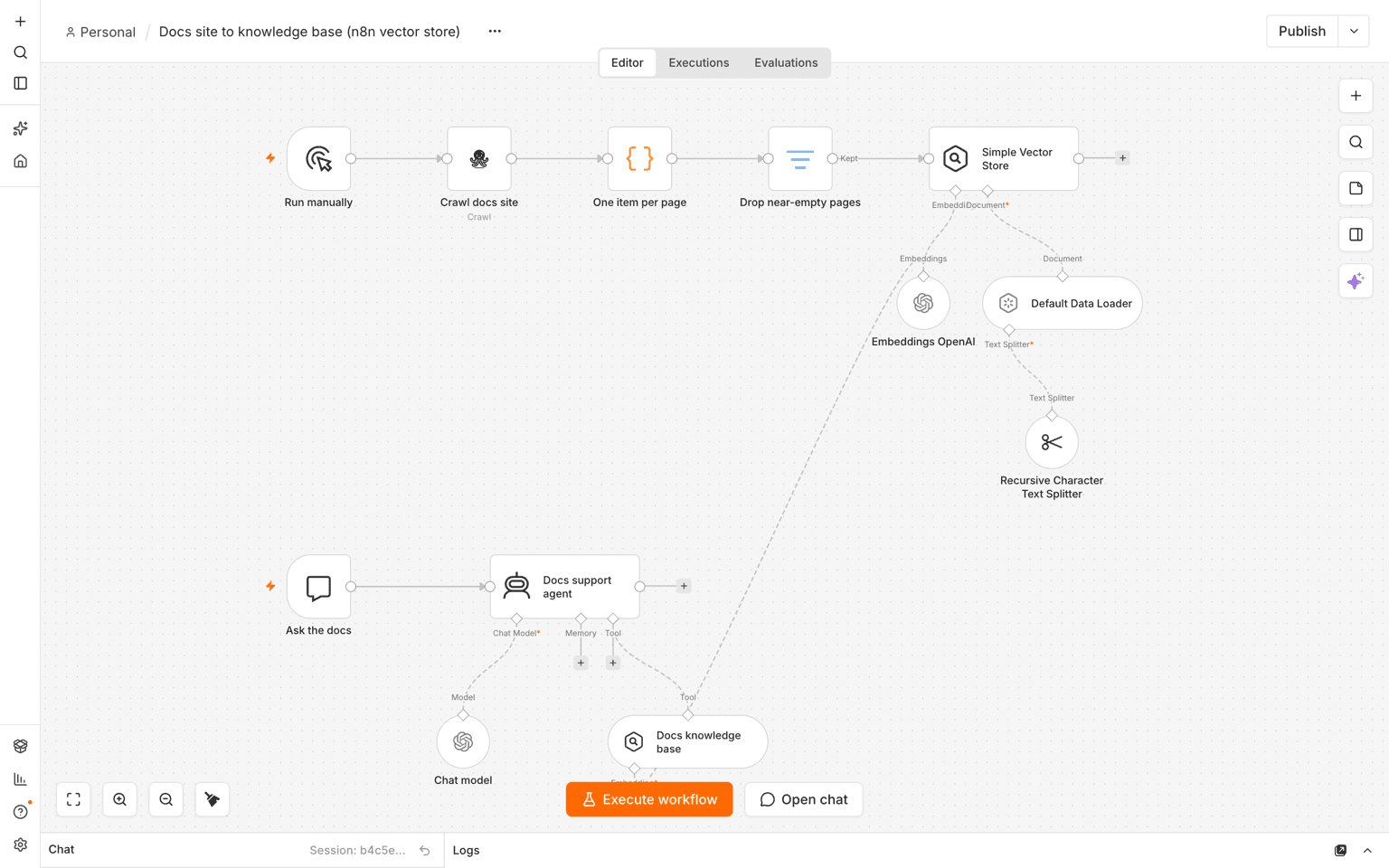
The pipeline is short:
- Crawl the docs site and get clean markdown for every page.
- Split the result into one item per page.
- Drop empty pages.
- Chunk and embed the pages (n8n target) or send them as documents (Dify target).
- Ask the knowledge base questions.
There are two targets. Here is how I'd choose:
- n8n vector store: pick it if you want everything in one workflow, with an AI agent on top. You choose the embedding model and the vector database.
- Dify knowledge base: pick it if Dify is already your bot platform. Dify does the chunking and indexing for you.
You'll need n8n (cloud or self-hosted), a WebCrawlerAPI key, and an embeddings key for the n8n target. Dify is optional.
Why markdown from a crawl, not raw HTML
Raw HTML is full of menus, footers and scripts. All of that lands inside your chunks and takes up space that real content should have.
Markdown keeps the headings and drops the noise, so chunks follow the structure of the page. If you want the longer comparison, I wrote about HTML vs markdown output formats. Chunk sizes are covered in chunking strategies for a knowledge base.
Step 1: Install the WebCrawlerAPI node and add credentials
In n8n, open Settings, then Community Nodes, and install n8n-nodes-webcrawlerapi. I used source version 0.3.10. Then create a credential and paste your API key from the dashboard.
If community nodes are disabled on your instance, the same calls can be made with the HTTP Request node. The setup is described in the n8n docs page.
Step 2: Crawl the docs site
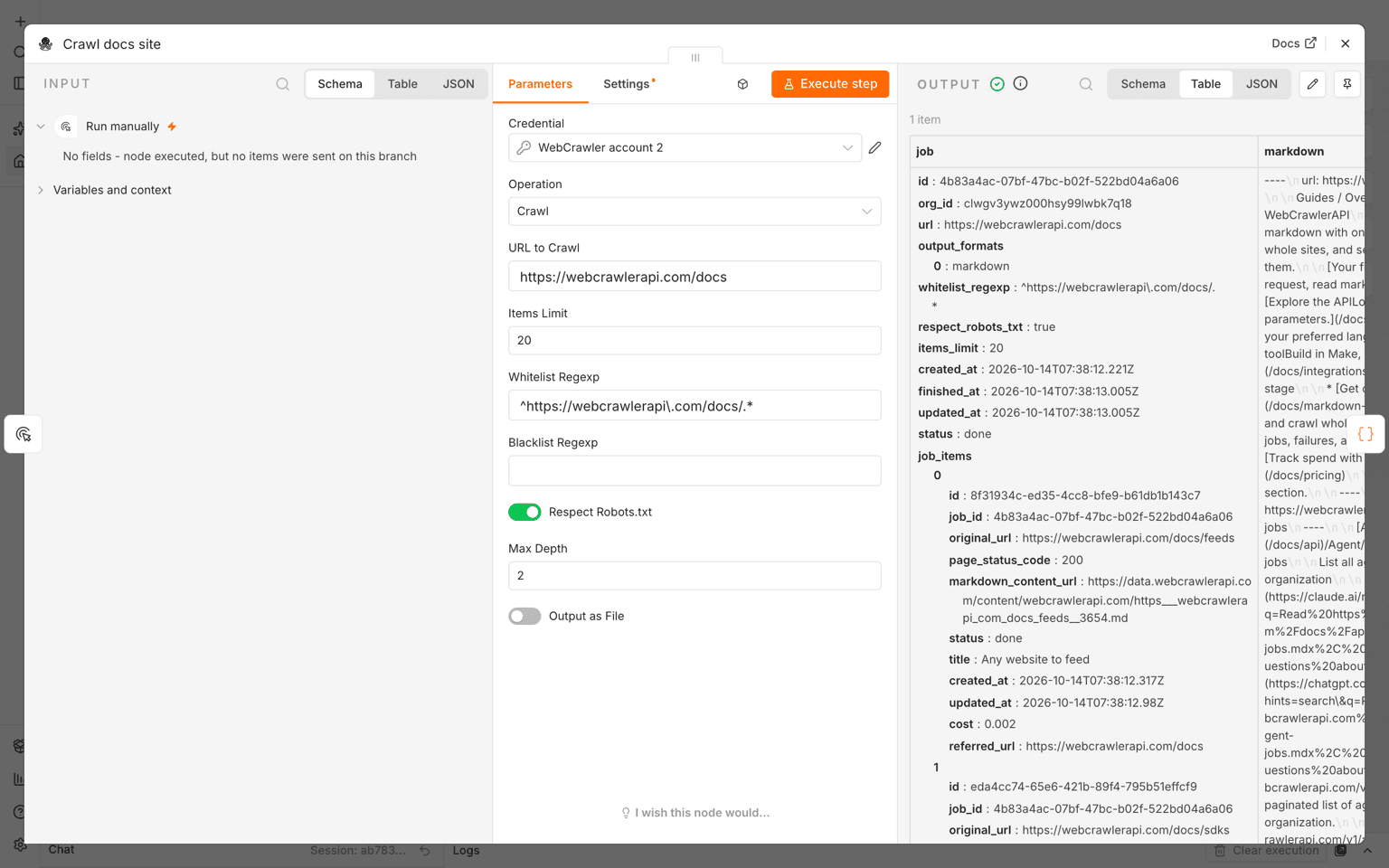
Add the WebCrawlerAPI node and set the operation to Crawl. These are the settings I used:
- URL: https://webcrawlerapi.com/docs
- Items limit: 20
- Max depth: 2
- Whitelist regexp: ^https://webcrawlerapi\.com/docs/.*
- Respect robots.txt: on
- Output: markdown
The whitelist keeps the crawl inside /docs. A blacklist can cut changelog or API reference pages if they are noisy.
What the node does
I expected an async job. It isn't one. The node blocks until the crawl is done: it starts the job, polls for the status, and then downloads the markdown. No Wait node and no webhook is needed. (There is a 30 minute hard timeout in the node.) More about the async side is in the async requests docs and the crawl API docs.
The first run took 32 seconds for 20 pages. Later runs of the same crawl took about 7.5 seconds in the node. Each page cost $0.002, so the 20 pages cost $0.04.
The output is one n8n item, not one per page. It has a job object (with job_items for titles and status) and a single markdown string where all pages are joined. Each page starts with a small header:
----
url: <page url>
----
So the next step has to split it.
Check your whitelist
I tried a whitelist that matches nothing (.../nomatch/.*). It did not fail. The seed page is always crawled, so I got 1 page back (the /docs page, 781 characters). A wrong whitelist silently gives you only the start page, so check the page count after the first run.
Step 3: Clean up and prepare the pages
A Code node turns the combined markdown into one item per page. The URL, title and crawl time are kept as metadata. They are needed later for citations.
// The WebCrawlerAPI node returns ONE item: the job plus one combined markdown string.
// Pages are separated by a small header: ----\nurl: <page url>\n----
const { markdown, job } = $input.first().json;
const titles = Object.fromEntries(job.job_items.map((i) => [i.original_url, i.title]));

const parts = markdown.split(/^----\nurl: (\S+)\n----\n/m);
const pages = [];
for (let i = 1; i < parts.length; i += 2) {
  pages.push({
    json: {
      url: parts[i],
      title: titles[parts[i]] || '',
      markdown: parts[i + 1].trim(),
      last_crawled_at: job.finished_at,
    },
  });
}
return pages;
After that, a Filter node drops near-empty pages (markdown length over 300 characters stays). In the test, 20 pages came out of the Code node and 18 passed. Dropped were /docs/sdks (202 characters) and /docs/integrations (255 characters), which are mostly link lists.
One edge case: if the markdown has no page separators, the Code node returns zero items and the nodes after it simply don't run. I didn't test a page with no markdown at all.
Step 4A: Load into an n8n vector store
The ingest part of the workflow has four pieces:
- Default Data Loader with metadata url, title and last_crawled_at.
- Recursive Character Text Splitter: chunk size 1000, overlap 100, markdown-aware. 18 pages became 108 chunks.
- Embeddings OpenAI with text-embedding-3-small. I used an OpenAI-compatible credential pointing at OpenRouter. A plain OpenAI key works the same way.
- Simple Vector Store, memory key docs_knowledge_base.
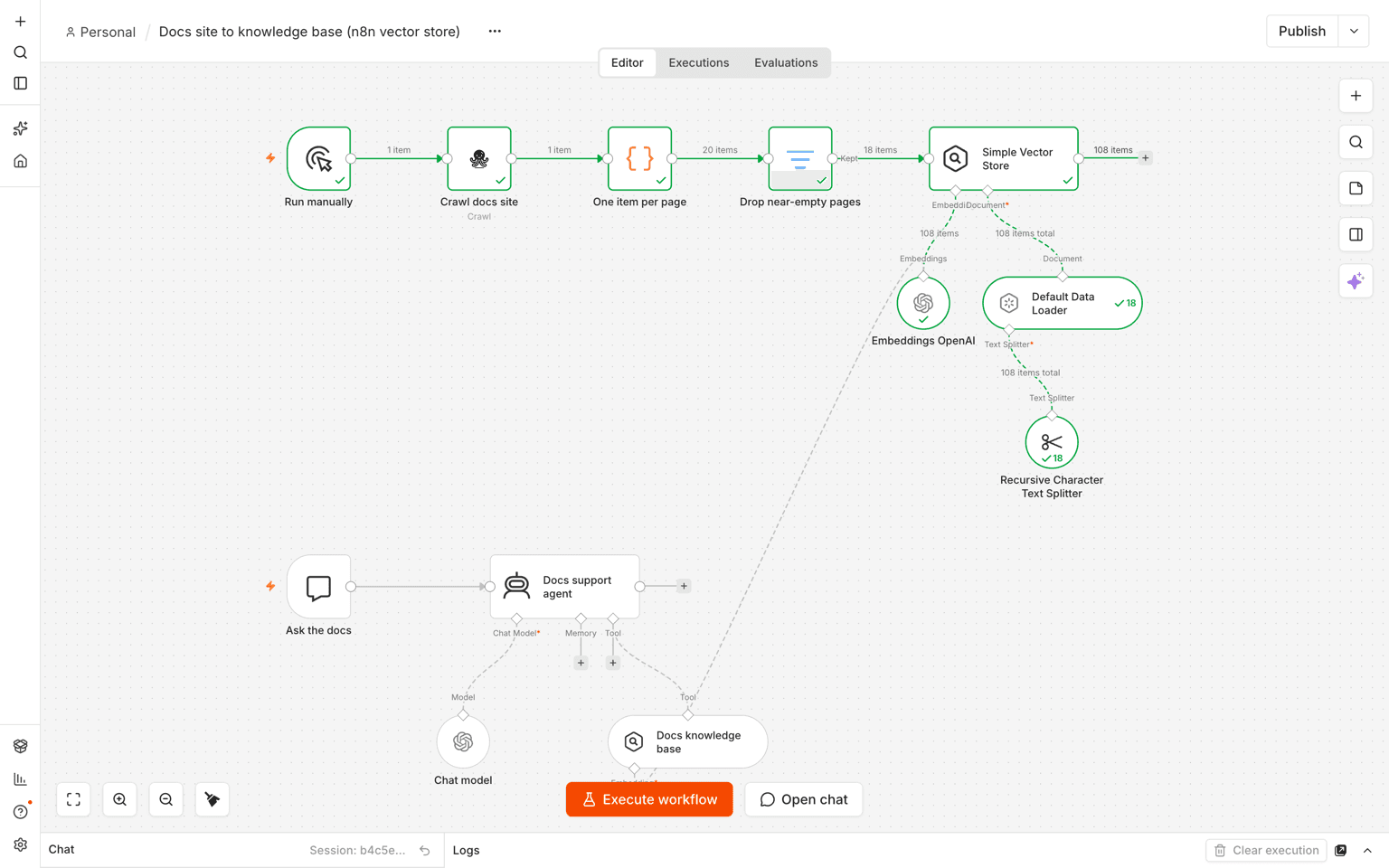
Timings from one execution: crawl 7.5 s, split 15 ms, filter 24 ms, embeddings 1.7 s, store insert 2 s. About 10 seconds in total.
The Simple Vector Store lives in memory. If n8n restarts, the data is gone. Fine for testing. For production, swap it for Postgres with pgvector, Qdrant or similar. I compared the options in best vector databases for a knowledge base and wrote a pgvector walkthrough.
Step 4B: Or load into a Dify knowledge base
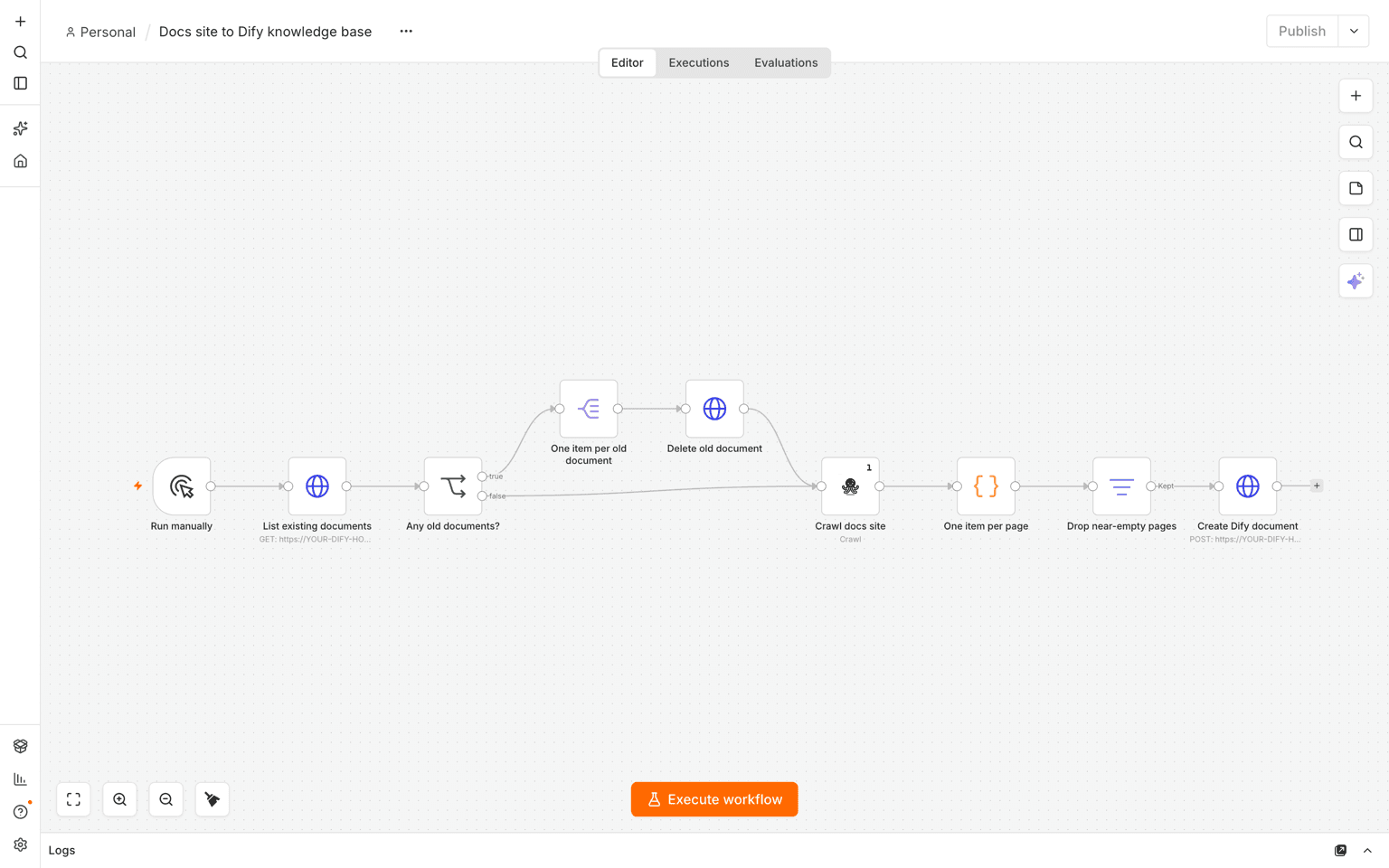
For Dify, the same crawl, Code node and filter are used. Then an HTTP Request node calls the Dify Knowledge API, once per page:
POST {dify}/v1/datasets/{dataset_id}/document/create-by-text
Authorization: Bearer <knowledge api key>

{
  "name": "<page url>",
  "text": "<page markdown>",
  "indexing_technique": "economy",
  "process_rule": { "mode": "automatic" }
}
The page URL is used as the document name, so every document can be traced back to its source. The Knowledge API key is created in Dify under Knowledge, Service API, API Key. In n8n it is stored as a Bearer Auth credential.
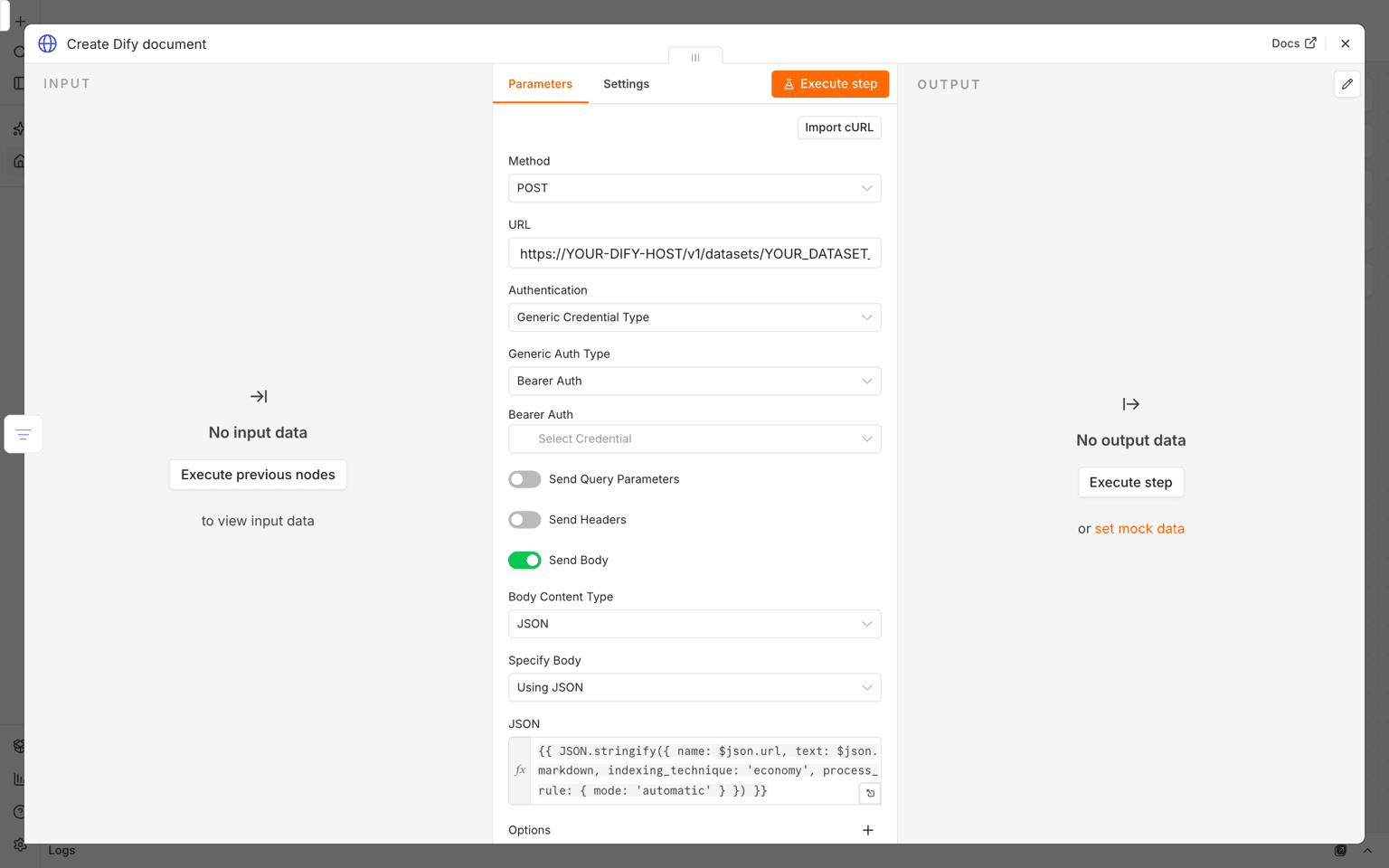
The URL field in my screenshot shows a temporary tunnel hostname. Yours should be your own Dify host.
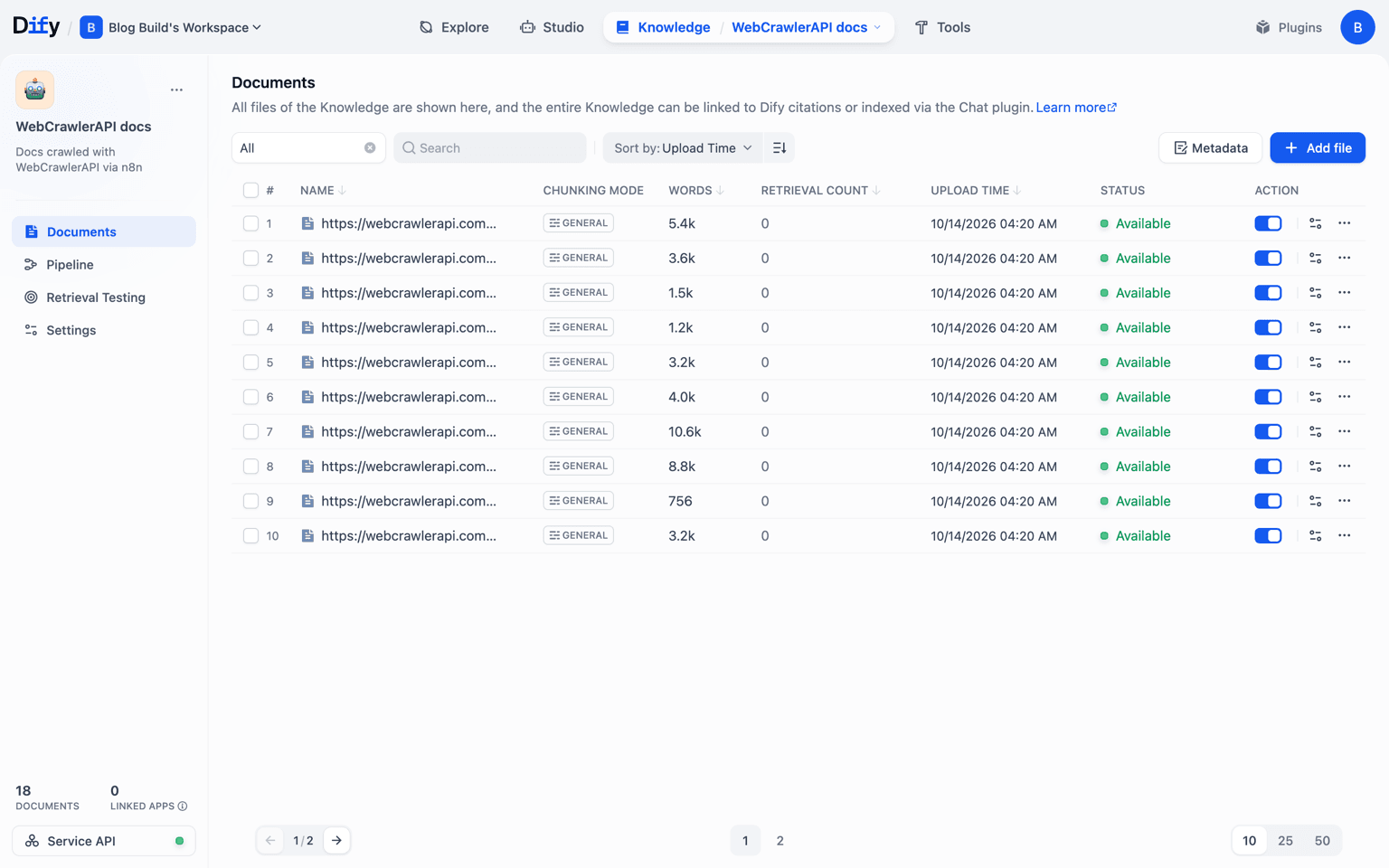
I set the node to batch size 1 with a 300 ms interval. Each run took about 13 seconds, with 18 documents created.
Dify gotchas
- Dify must be reachable from n8n. A hosted n8n can't see localhost. Use a public URL, or put both on the same network. For the build I ran Dify 1.10.1 self-hosted and exposed it through a temporary tunnel.
- Indexing is async. "Created" in n8n doesn't mean "searchable yet". Right after one run, 5 of 18 documents still showed "waiting" (after about 35 seconds). They were all completed shortly after.
- I used the economy index (keyword based). It needs no embedding key. The "High quality" (vector) indexing needs an embedding provider set up in Dify. I did not test it.
- Dify also has built-in website sync. I didn't test it, so I can't say how it compares. The reasons I'd still use n8n are scheduling, filtering and custom metadata.
Step 5: Test that it answers
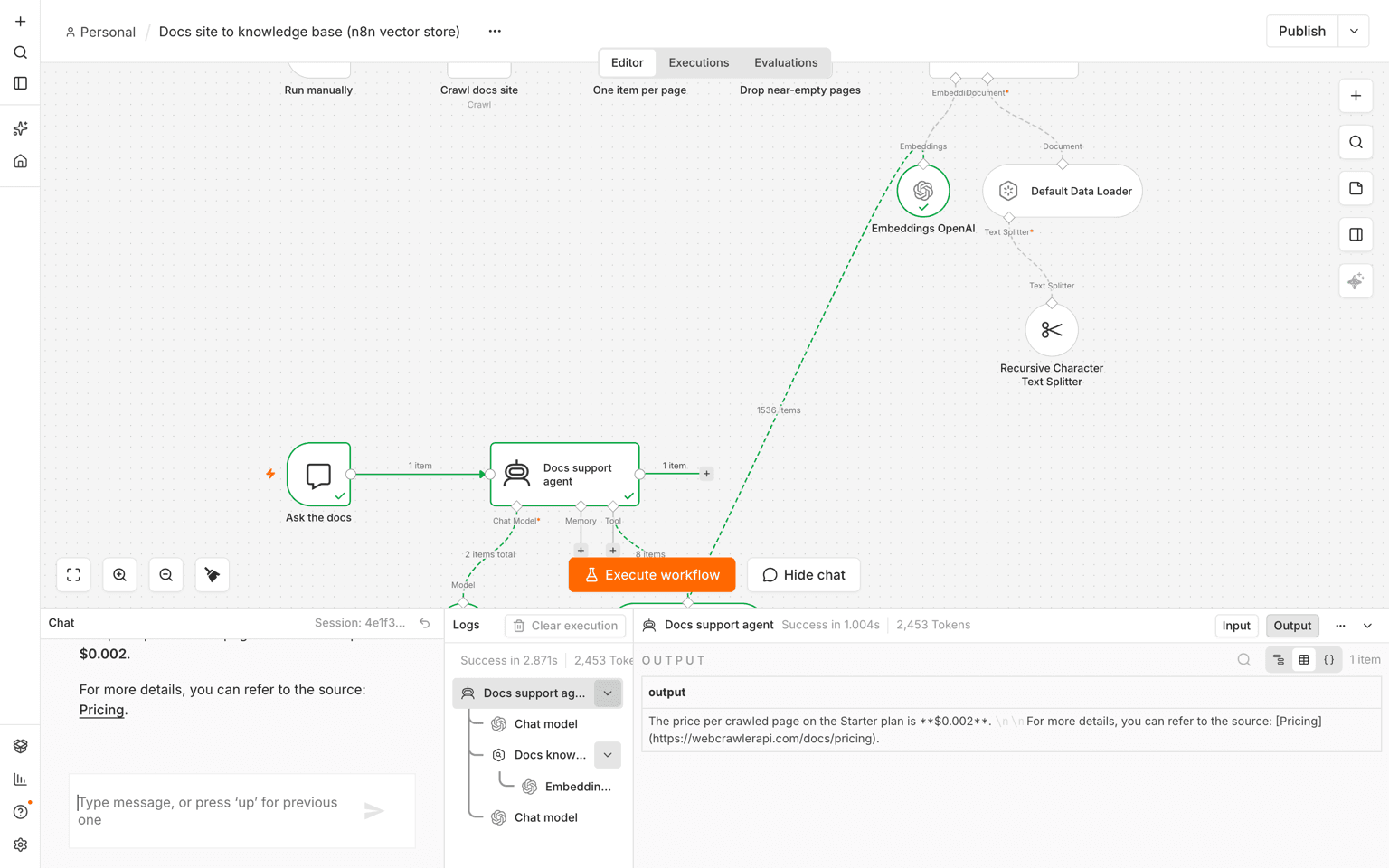
I added a Chat Trigger, an AI Agent (gpt-4o-mini) and the vector store as a tool. Then I asked 3 questions with known answers from the docs.
- "What is the price per crawled page on the Starter plan?" The answer was $0.002, with a link to /docs/pricing. Correct.
- "Which error code is returned when a page exceeds the LLM context window?" The answer was llm_max_context_length_error, from /docs/errors. Correct.
- "What is the default items_limit when creating a feed?" The first answer was weak: "not explicitly mentioned, example shows 10". The docs say the default is 10 in /docs/feeds.
The fix for question 3
In the execution data I checked which chunks came back. The top 4 were feed examples and error handling text. The chunk with the parameter list didn't make the cut. I raised topK from 4 to 8, asked again, and got "The default items_limit when creating a feed is 10", cited from /docs/feeds.
So if an answer is wrong, look at the retrieved chunks first. The model is often fine, and the right chunk just wasn't in the list.
Same questions in Dify
I ran the same questions in the Dify retrieval test (keyword search, economy index):
- The pricing question found /docs/pricing in all top 3 chunks.
- The error code question found /docs/errors in all top 3. The third was the context-length error text.
- The short query "default items_limit feed" missed /docs/feeds completely, even at top 8. Wrong.
- The full sentence "What is the default items_limit when creating a feed?" found it. The test returned 2 chunks: one from /docs/job and the parameter list from /docs/feeds.
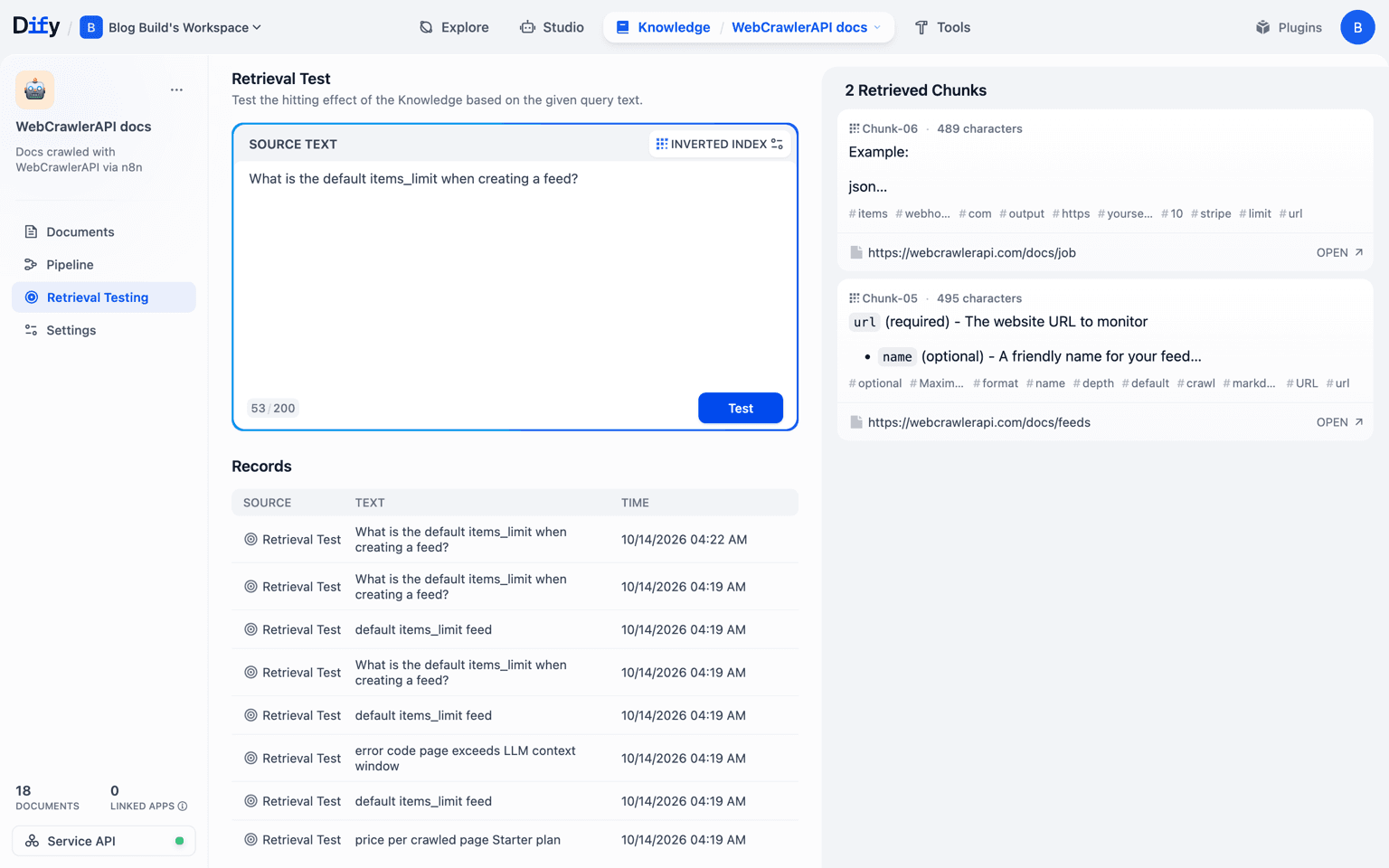
Keyword indexing is sensitive to wording. Short keyword-style queries missed the right page, and full questions found it. Vector indexing is probably less sensitive, but I didn't test it, so I won't claim it.
Keeping it fresh: schedule and re-sync
Swap the Manual Trigger for a Schedule Trigger. Weekly is a sane default for most docs. I wrote more about picking an interval in how often to recrawl a website for an AI knowledge base.
Re-runs have a trap, though.
Duplicates in the n8n store
With "Clear Store" off on the insert node, I ran ingestion 3 times on the same memory key. A pricing question then returned 8 chunks, and 3 of them were duplicates. Duplicates waste your topK slots.
The fix is to turn Clear Store on, so every run replaces everything. After 2 runs, retrieval returned 8 chunks and none were duplicated.
This is fine for a 20 page docs site. For a big site, use a store that can delete by metadata (url) or upsert. For change-only updates, see keeping a support bot in sync by recrawling changed pages.
Re-runs in Dify
The Dify template deletes all old documents first (List, IF, Delete), then creates new ones. Over 3 runs the total stayed at 18 documents with 18 distinct names.
I did not test the Dify flow without the delete step, so I can't say what Dify does with duplicate names. Also, delete-then-create means the knowledge base is incomplete for about 13 seconds during a run. That's OK for docs. For a live bot with heavy traffic, update each document by its id instead.
What broke
- Bad API key: the node fails in under 1 second with "Authorization failed - please check your credentials" (HTTP 401). Nothing reaches the store.
- Invalid host: fails in about 1 second with "Bad request" (status 400). Nothing reaches the store.
- Whitelist matches nothing: no error, just the seed page. Check the count.
- topK too low: the right chunk exists but isn't returned.
- Duplicates on re-run: turn on Clear Store, or delete old documents.
- In-memory store: gone after a restart.
- Dify not reachable: n8n can't call localhost.
I did not test JS-rendered docs sites, rate limits, or very large pages in this build.
Download the templates
Both workflows are exported without secrets. Credentials are name-only references.
To use one:
- In n8n, create a new workflow, then use the menu and choose Import from File.
- Reselect your credentials (WebCrawlerAPI, embeddings and chat model for the n8n one; WebCrawlerAPI and the Dify Knowledge API key for the Dify one).
- For the Dify template, replace https://YOUR-DIFY-HOST and YOUR_DATASET_ID in the three HTTP URLs.
- Change the crawl URL and whitelist to your own docs, and keep the items limit low for the first run.
If you want to try it, you can sign up for WebCrawlerAPI and get a key from the dashboard. The crawl for this whole test cost $0.04. The node setup is in the n8n docs.
