
pgvector Tutorial: Website Search for Your Knowledge Base
pgvector is a Postgres extension that adds a vector column type and fast similarity search to the database you probably already run. That makes it a simple way to build a knowledge base search: crawl a website, turn each page into embeddings, store them in a Postgres vector database, and find the closest chunks to a question with one SQL query.
Getting that to work on your laptop takes an afternoon. The parts that bite later are where the clean content comes from, which index to pick once the table is big, and how to keep embeddings fresh when pages change.
I ran everything below myself: Postgres 17 with pgvector 0.8.7 in Docker, a crawl of the WebCrawlerAPI docs, and a 100k-row benchmark for the index choice. The commands and numbers are copied from those runs. To see where this fits in the whole crawl, chunk, embed and query flow, read the website to markdown knowledge base guide.
What Is pgvector?
pgvector is an open-source Postgres extension for vector similarity search. In short:
- It adds the vector type (and halfvec, bit, sparsevec) so embeddings live in a normal table column.
- It adds distance operators, so "find the closest rows" is an ORDER BY clause.
- It adds two approximate nearest neighbor indexes, HNSW and IVFFlat, so search stays fast as the table grows.
- It runs inside Postgres, so you keep JOINs, transactions, backups and WHERE filters.
The upside is that embeddings sit next to the rest of your data. No second database, no sync job between the two. When that stops being enough is covered in the last section.
The Pipeline: Website to pgvector
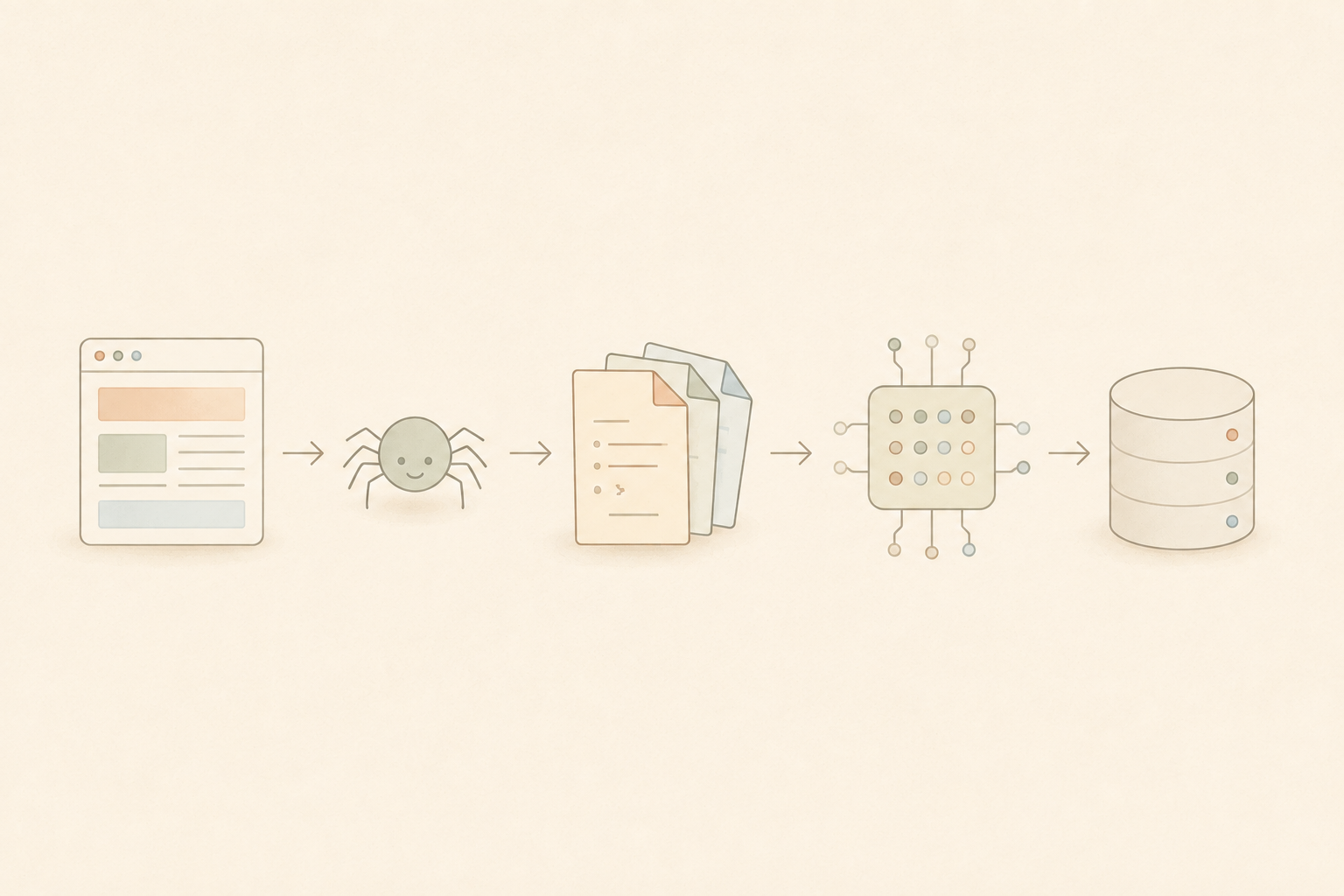
The flow is: website -> crawl -> chunk -> embed -> store in Postgres (pgvector) -> semantic search.
Many tutorials start at "I have some text". Ingestion is what breaks first once you leave a demo. Pages are rendered with JavaScript, crawl depth needs a limit, PDFs are mixed in with HTML, and raw HTML full of nav bars and cookie banners ends up in your chunks and hurts search quality.
WebCrawlerAPI turns a site into clean markdown ready to chunk, so you do not write a scraper, a JS renderer and a retry loop for every source.
Set Up Postgres With pgvector (Docker)
The fastest way to get pgvector running locally is the official pgvector/pgvector Docker image. It is the regular Postgres image with the extension already installed. Here is the docker-compose.yml I used:
services:
  db:
    image: pgvector/pgvector:pg17
    container_name: pgvector-tutorial
    environment:
      POSTGRES_USER: postgres
      POSTGRES_PASSWORD: postgres
      POSTGRES_DB: kb
    ports:
      - "5432:5432"
    shm_size: 1g
    volumes:
      - pgdata:/var/lib/postgresql/data

volumes:
  pgdata:
The tag is the Postgres major version (pg17, pg18, and so on). shm_size: 1g matters later: parallel HNSW index builds need shared memory, and the default 64MB in Docker can make a bigger build fail.
Start it and enable the extension:
docker compose up -d
docker exec pgvector-tutorial psql -U postgres -d kb \
  -c "CREATE EXTENSION IF NOT EXISTS vector;" \
  -c "SELECT extname, extversion FROM pg_extension WHERE extname='vector';"
CREATE EXTENSION
 extname | extversion
---------+------------
 vector  | 0.8.7
(1 row)
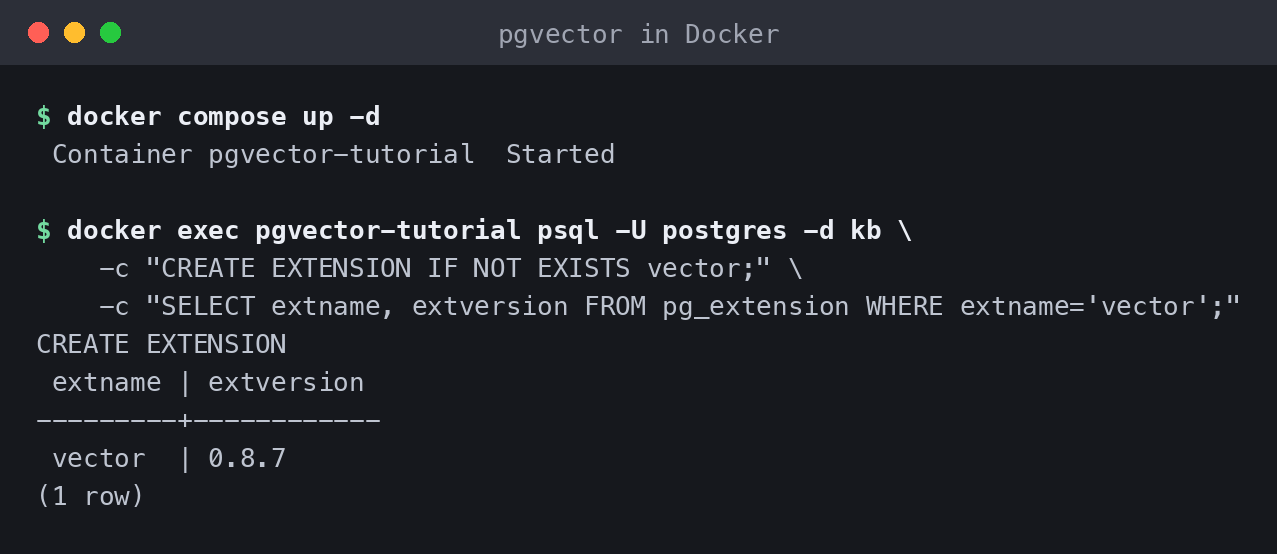
That is the entire install. On hosted Postgres (Supabase, Neon, RDS and others) it is the same CREATE EXTENSION vector; statement, with no Docker involved.
Step 1: Crawl the Site to Markdown
A single requests.get() does not cut it for ingestion. You need JS rendering for sites that build content in the browser, a limit so a crawl does not run away, and clean markdown instead of raw HTML so chunking is not fighting nav links and footer text.
Here is the script I ran against the WebCrawlerAPI docs, using the Python SDK:
import os
import re
import json
from pathlib import Path

from webcrawlerapi import WebCrawlerAPI

OUT_DIR = Path(__file__).parent / "crawled_docs"
SEED_URL = "https://webcrawlerapi.com/docs"
ITEMS_LIMIT = 20


def file_name(url: str) -> str:
    return re.sub(r"[^a-zA-Z0-9]+", "-", re.sub(r"^https?://", "", url)).strip("-") + ".md"


def main():
    client = WebCrawlerAPI(api_key=os.environ["WEBCRAWLER_API_KEY"])

    job = client.crawl(
        url=SEED_URL,
        output_formats=["markdown"],
        items_limit=ITEMS_LIMIT,
        main_content_only=True,
        max_depth=2,
    )

    if job.status != "done":
        raise SystemExit(f"Job did not complete successfully: {job.status}")

    OUT_DIR.mkdir(exist_ok=True)
    manifest = []
    for item in job.job_items:
        if not item.markdown_content_url:
            continue
        content = item.get_markdown()
        fname = file_name(item.original_url)
        (OUT_DIR / fname).write_text(content, encoding="utf-8")
        manifest.append({"url": item.original_url, "file": fname, "chars": len(content)})

    (OUT_DIR / "manifest.json").write_text(json.dumps(manifest, indent=2))
main_content_only=True strips navigation and footer noise before you ever see the markdown. The run returned 20 pages from one job:
Starting crawl: https://webcrawlerapi.com/docs (items_limit=20)
Job 71e130d4-c315-4196-88e7-92b4470a2012 finished with status: done
  saved webcrawlerapi-com-docs-markdown-cleaning.md  (2474 chars)  <- https://webcrawlerapi.com/docs/markdown-cleaning
  saved webcrawlerapi-com-docs-job.md  (5440 chars)  <- https://webcrawlerapi.com/docs/job
  saved webcrawlerapi-com-docs-structured-outputs.md  (8821 chars)  <- https://webcrawlerapi.com/docs/structured-outputs
  ...
Done. 20 pages saved to crawled_docs/
With max_depth=2 the crawl also followed links out of /docs to the blog and changelog pages. For a real knowledge base you would scope it with URL filters. The crawl API docs cover that, and the getting started guide takes you from an API key to a first crawl in a few minutes.
If junk HTML is a problem on your source, the LLM-cleaned markdown option strips even more. Dirty chunks are one of the fastest ways to hurt search quality later.
Step 2: Chunk and Embed
Chunk size is a tradeoff. Too big and unrelated context bleeds into every match. Too small and you lose the sentence that gave the chunk meaning. A good starting point for long pages is 500-800 tokens with some overlap. These docs pages are short, so I used 220 words with 40 words of overlap.
For the embedding model, a hosted API like OpenAI's text-embedding-3-small (1536 dimensions) is the obvious choice. For this run I used sentence-transformers with all-MiniLM-L6-v2 instead: open source, runs locally, no key needed, 384 dimensions. Smaller vectors mean less storage and faster index builds, at the cost of somewhat lower accuracy than a large hosted model. Swap the model if your accuracy bar is higher.
A dimension note that catches people out: pgvector stores vector columns of up to 16,000 dimensions, but it can only index up to 2,000. A 3072-dimension model like text-embedding-3-large needs either its dimensions shortened (OpenAI supports that) or the halfvec type, which can be indexed up to 4,000 dimensions.
import hashlib
import json
from pathlib import Path

from sentence_transformers import SentenceTransformer

CRAWLED_DIR = Path(__file__).parent / "crawled_docs"
OUT_FILE = Path(__file__).parent / "chunks.jsonl"

CHUNK_WORDS = 220
OVERLAP_WORDS = 40


def chunk_text(text: str, chunk_words: int, overlap_words: int):
    words = text.split()
    chunks, start = [], 0
    while start < len(words):
        end = min(start + chunk_words, len(words))
        chunks.append(" ".join(words[start:end]))
        if end == len(words):
            break
        start = end - overlap_words
    return chunks


def main():
    manifest = json.loads((CRAWLED_DIR / "manifest.json").read_text())
    model = SentenceTransformer("all-MiniLM-L6-v2")

    rows = []
    for entry in manifest:
        text = (CRAWLED_DIR / entry["file"]).read_text(encoding="utf-8")
        content_hash = hashlib.sha256(text.encode()).hexdigest()
        for i, piece in enumerate(chunk_text(text, CHUNK_WORDS, OVERLAP_WORDS)):
            rows.append({"url": entry["url"], "content_hash": content_hash, "chunk_index": i, "text": piece})

    embeddings = model.encode([r["text"] for r in rows], show_progress_bar=False, normalize_embeddings=True)
    for row, emb in zip(rows, embeddings):
        row["embedding"] = emb.tolist()

    with OUT_FILE.open("w") as f:
        for row in rows:
            f.write(json.dumps(row) + "\n")
The content_hash on each row is the SHA-256 of the whole page. It is used for the freshness check later. Real output:
https://webcrawlerapi.com/docs/markdown-cleaning: 313 words -> 2 chunks
https://webcrawlerapi.com/docs/job: 673 words -> 4 chunks
https://webcrawlerapi.com/docs/guides/filters: 656 words -> 4 chunks
https://webcrawlerapi.com/docs/structured-outputs: 974 words -> 6 chunks
https://webcrawlerapi.com/changelog: 3808 words -> 21 chunks
...

Embedding 90 chunks...
Wrote 90 embedded chunks to chunks.jsonl
Embedding dimension: 384
Step 3: Create Tables and Load the Vectors
Two tables: documents (one row per source page, so a chunk can be traced back to its URL) and chunks (one row per chunk, holding the vector column).
CREATE EXTENSION IF NOT EXISTS vector;

CREATE TABLE IF NOT EXISTS documents (
    id SERIAL PRIMARY KEY,
    url TEXT UNIQUE NOT NULL,
    content_hash TEXT NOT NULL,
    crawled_at TIMESTAMPTZ NOT NULL DEFAULT now()
);

CREATE TABLE IF NOT EXISTS chunks (
    id SERIAL PRIMARY KEY,
    document_id INTEGER NOT NULL REFERENCES documents(id) ON DELETE CASCADE,
    chunk_index INTEGER NOT NULL,
    content TEXT NOT NULL,
    embedding vector(384) NOT NULL
);
vector(384) matches the MiniLM output. If you switch embedding models, that number changes and everything has to be re-embedded, because vectors from different models are not comparable.
Loading is a plain insert loop with psycopg2:
import json
import os
from pathlib import Path

import psycopg2

CHUNKS_FILE = Path(__file__).parent / "chunks.jsonl"
SCHEMA_FILE = Path(__file__).parent / "schema.sql"


def main():
    conn = psycopg2.connect(os.environ["DATABASE_URL"])
    conn.autocommit = True
    cur = conn.cursor()
    cur.execute(SCHEMA_FILE.read_text())

    rows = [json.loads(line) for line in CHUNKS_FILE.read_text().splitlines()]
    by_url = {}
    for row in rows:
        by_url.setdefault(row["url"], []).append(row)

    for url, url_rows in by_url.items():
        cur.execute(
            """INSERT INTO documents (url, content_hash) VALUES (%s, %s)
               ON CONFLICT (url) DO UPDATE SET content_hash = EXCLUDED.content_hash, crawled_at = now()
               RETURNING id""",
            (url, url_rows[0]["content_hash"]),
        )
        doc_id = cur.fetchone()[0]

        cur.execute("DELETE FROM chunks WHERE document_id = %s", (doc_id,))
        for r in url_rows:
            cur.execute(
                "INSERT INTO chunks (document_id, chunk_index, content, embedding) VALUES (%s, %s, %s, %s)",
                (doc_id, r["chunk_index"], r["text"], r["embedding"]),
            )
psycopg2 sends the Python list as a Postgres array, and Postgres casts it to vector on insert. Real output:
Applying schema...
Inserted/updated 20 documents, 90 chunks.
documents table now has 20 rows
chunks table now has 90 rows
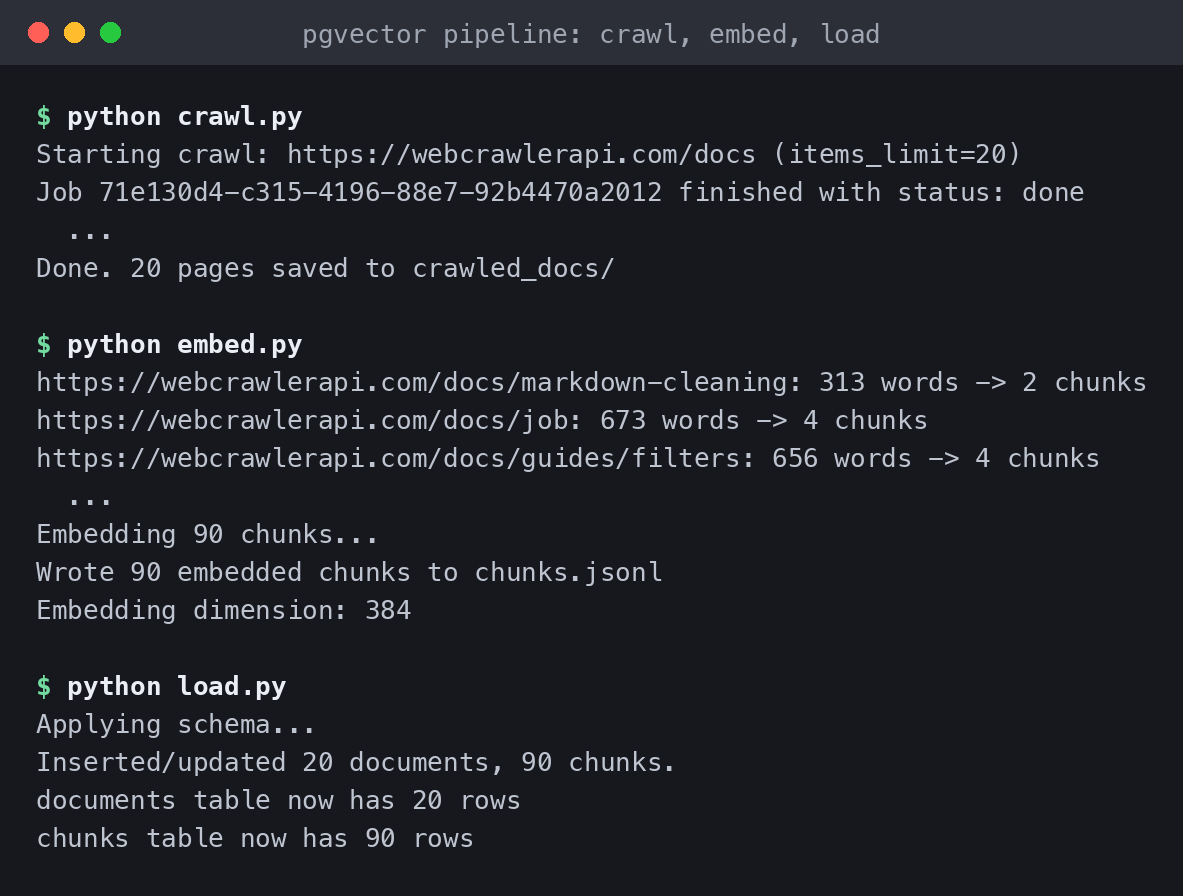
The whole sequence, back to back:
HNSW vs IVFFlat: Which pgvector Index to Use
This is the decision most "getting started with pgvector" posts skip, and it matters once the table stops being tiny. Without an index, pgvector does an exact scan: it compares the query against every row. That is perfect recall and slow on big tables. Both index types trade a little recall for a lot of speed.
- IVFFlat groups vectors into lists clusters and only searches the nearest few at query time (probes). It builds fast and uses less memory, but the clusters are fixed when the index is built. It also needs a sensible lists value (roughly sqrt(rows) is a common start) and the default probes = 1 is low.
- HNSW builds a layered graph. It needs no training step, builds slower and uses more memory, and keeps working as rows are added.
Both indexes look like this:
-- HNSW: no training step, better recall as the table grows, slower and heavier to build.
CREATE INDEX ON chunks USING hnsw (embedding vector_cosine_ops)
    WITH (m = 16, ef_construction = 64);

-- IVFFlat: faster and cheaper to build, needs `lists` tuned to the table size.
CREATE INDEX ON chunks USING ivfflat (embedding vector_cosine_ops)
    WITH (lists = 316);
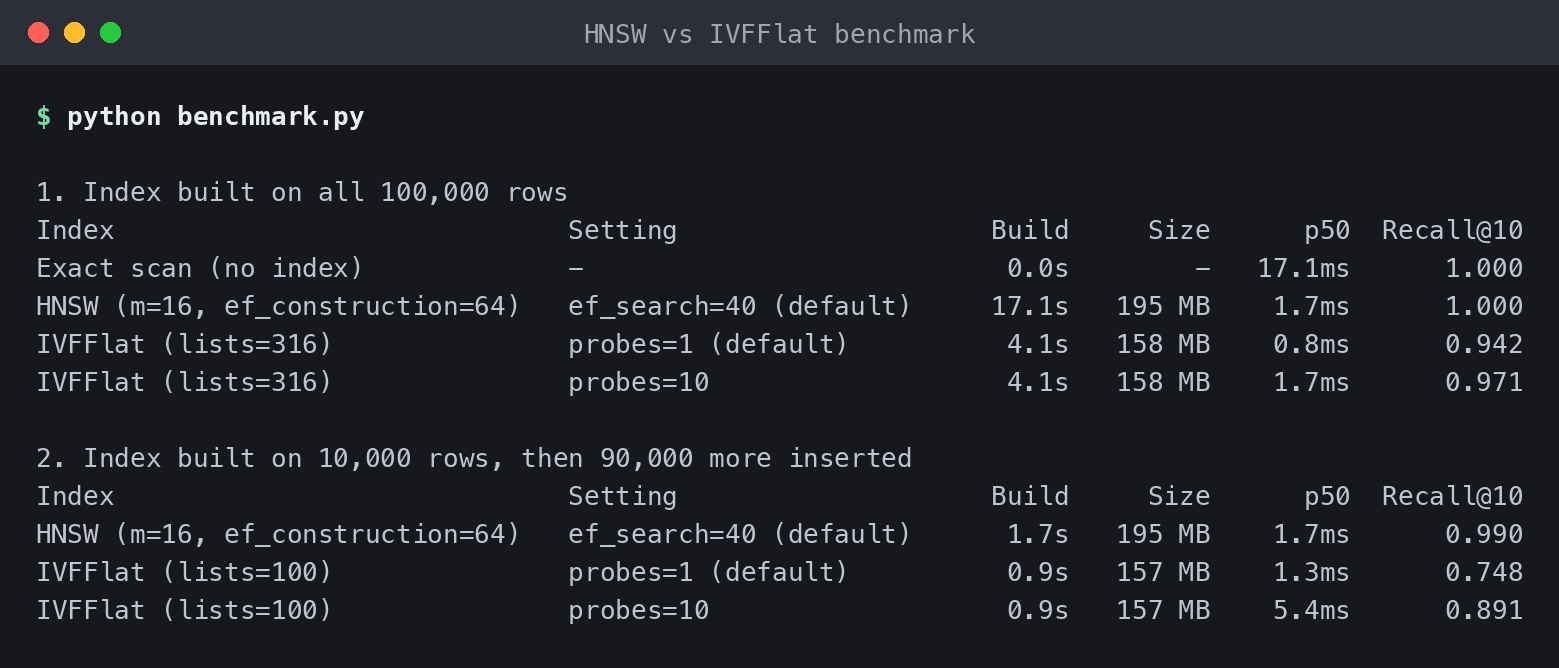
On 90 chunks both build instantly and the difference is invisible, so I measured it properly. The benchmark below uses 100,000 synthetic 384-dimension vectors with 1,000 clusters, 100 queries, and recall@10 measured against an exact scan. It is synthetic data, not a real corpus, and a single run on my machine with Docker, so read the pattern, not the exact numbers.
Experiment 1: index built on all 100k rows
| Index | Setting | Build | Size | p50 query | Recall@10 |
|---|---|---|---|---|---|
| No index (exact scan) | - | - | - | 17.1ms | 1.000 |
| HNSW (m=16, ef_construction=64) | ef_search=40 (default) | 17.1s | 195 MB | 1.7ms | 1.000 |
| IVFFlat (lists=316) | probes=1 (default) | 4.1s | 158 MB | 0.8ms | 0.942 |
| IVFFlat (lists=316) | probes=10 | 4.1s | 158 MB | 1.7ms | 0.971 |
When the index is built on the final data, both are fast and the gap is small. IVFFlat builds about 4x faster and is smaller. HNSW has the better recall.
Experiment 2: index built on 10k rows, then 90k more inserted
This is the common real-world case: the table grows after the index exists.
| Index | Setting | Build (10k rows) | Size | p50 query | Recall@10 |
|---|---|---|---|---|---|
| HNSW (m=16, ef_construction=64) | ef_search=40 (default) | 1.7s | 195 MB | 1.7ms | 0.990 |
| IVFFlat (lists=100) | probes=1 (default) | 0.9s | 157 MB | 1.3ms | 0.748 |
| IVFFlat (lists=100) | probes=10 | 0.9s | 157 MB | 5.4ms | 0.891 |
This is where the choice shows up. HNSW kept recall at 0.990 while the table grew 10x. IVFFlat kept the 100 clusters it learned on 10k rows. After the growth, default settings returned only 75% of the true top 10, and raising probes to 10 got back to 89% at 3x the latency. You can rebuild an IVFFlat index on the larger table to fix it, but you have to know to do that.
My rule of thumb: start with HNSW unless build time or memory is the real constraint. IVFFlat makes sense for a bulk one-time load of millions of rows on tight memory, where you are fine rebuilding as the table grows. For most knowledge bases, from a few thousand to a few hundred thousand chunks that keep changing, HNSW's steady recall is worth the slower build.

Run a Similarity Search in Postgres
The query is short. Embed the question with the same model used for the chunks, then order by distance:
import os
import sys
import time

import psycopg2
from sentence_transformers import SentenceTransformer


def main():
    question = sys.argv[1] if len(sys.argv) > 1 else "how do I check the status of a crawl job"
    model = SentenceTransformer("all-MiniLM-L6-v2")
    model.encode("warm up")  # first call pays one-time setup cost

    t0 = time.time()
    query_embedding = model.encode(question, normalize_embeddings=True).tolist()
    embed_ms = (time.time() - t0) * 1000

    conn = psycopg2.connect(os.environ["DATABASE_URL"])
    cur = conn.cursor()

    t0 = time.time()
    cur.execute(
        """
        SELECT d.url, c.chunk_index, c.content, 1 - (c.embedding <=> %s::vector) AS similarity
        FROM chunks c
        JOIN documents d ON d.id = c.document_id
        ORDER BY c.embedding <=> %s::vector
        LIMIT 3
        """,
        (query_embedding, query_embedding),
    )
    rows = cur.fetchall()
    query_ms = (time.time() - t0) * 1000
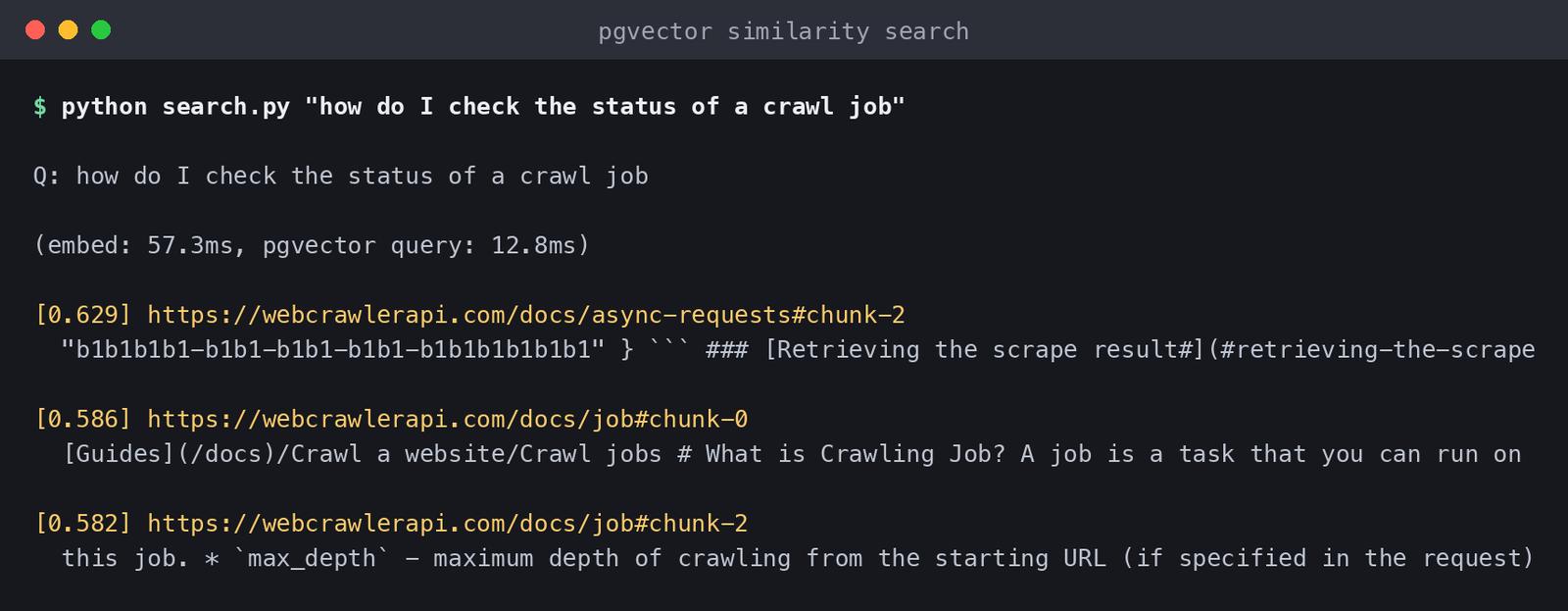
<=> is cosine distance, so 1 - distance gives a similarity score that is easy to reason about. Real output for "how do I check the status of a crawl job":
Q: how do I check the status of a crawl job

(embed: 57.3ms, pgvector query: 12.8ms)

[0.629] https://webcrawlerapi.com/docs/async-requests#chunk-2
  "b1b1b1b1-b1b1-b1b1-b1b1-b1b1b1b1b1b1" } ``` ### [Retrieving the scrape result#](#retrieving-the-scrape...

[0.586] https://webcrawlerapi.com/docs/job#chunk-0
  [Guides](/docs)/Crawl a website/Crawl jobs # What is Crawling Job? A job is a task that you can run on...

[0.582] https://webcrawlerapi.com/docs/job#chunk-2
  this job. * `max_depth` - maximum depth of crawling from the starting URL (if specified in the request)...
The top hit is the section on retrieving a job result by ID. The next two come from the crawl jobs page. The question says "check the status", and none of these chunks use that phrase. The match is on meaning, not keywords.
About the timings: the 12.8ms is the first query on a fresh connection against 90 rows, so it mostly measures connection and planning overhead, not the vector math. For real latency at a real size, use the benchmark above: 1.7ms p50 on 100k rows with HNSW. The embedding step took 57.3ms after warm-up. On a cold start the same call took 875ms in my earlier run, because it includes loading the model. Keep the model in memory, or call a hosted embedding API, and vector search is almost never your bottleneck.
pgvector distance operators
The operator you use has to match the operator class of your index (vector_cosine_ops goes with <=>):
| Operator | Distance | Index operator class |
|---|---|---|
| <-> | Euclidean (L2) | vector_l2_ops |
| <=> | Cosine | vector_cosine_ops |
| <#> | Negative inner product | vector_ip_ops |
| <+> | Taxicab (L1) | vector_l1_ops |
For normalized embeddings, which most embedding models return, cosine and inner product give the same ranking. Cosine is the safe default for text.
Combine vector search with a filter
Pure vector search over the whole table is rarely what production needs. Scope it with a normal WHERE clause first:
cur.execute("SET hnsw.iterative_scan = strict_order")
cur.execute(
    """
    SELECT d.url, c.chunk_index, 1 - (c.embedding <=> %s::vector) AS similarity
    FROM chunks c
    JOIN documents d ON d.id = c.document_id
    WHERE d.url LIKE %s
    ORDER BY c.embedding <=> %s::vector
    LIMIT 3
    """,
    (emb, "https://webcrawlerapi.com/docs/guides/%", emb),
)
[0.421] https://webcrawlerapi.com/docs/guides/filters#chunk-1
[0.420] https://webcrawlerapi.com/docs/guides/filters#chunk-0
[0.309] https://webcrawlerapi.com/docs/guides/filters#chunk-3
The SET hnsw.iterative_scan line is the important one. An approximate index returns candidates first (40 by default with hnsw.ef_search), and the WHERE filter is applied afterwards. If the filter matches 10% of rows, you only get about 4 results back instead of the 10 you asked for. Since pgvector 0.8, iterative index scans keep scanning the index until enough rows pass the filter. If you filter on a few fixed values, a partial index or partitioning is another option.
Also keep in mind that an index gives approximate nearest neighbors, not guaranteed exact top-k. For a knowledge base that is a fine trade. If you need exact results, query without the index and pay for it in latency.
Keeping the Index Fresh at Scale
Most tutorials stop at "it works". Then the source pages change and the index does not. A stale embedding returns an old answer with full confidence, which is worse than returning nothing.
Two options: re-crawl and re-embed everything on a schedule (simple, wasteful once the site is not small), or change detection. Hash each page, re-crawl on a schedule, and only re-chunk and re-embed the pages whose hash changed.
I ran that against the same 20 pages. The script re-crawls, hashes each page, and compares it to the content_hash stored in documents. To see the changed path without waiting for a real edit, I told it to treat the pricing page as modified:
def content_hash(text: str) -> str:
    return hashlib.sha256(text.encode()).hexdigest()

# after re-crawling: hash each page and compare with what is stored in Postgres
cur.execute("SELECT url, content_hash FROM documents ORDER BY id")
for url, old_hash in cur.fetchall():
    if latest[url] != old_hash:
        print(f"{url}  CHANGED  -> re-embed")
    else:
        print(f"{url}  unchanged  -> skip")
URL                                                     STATUS
----------------------------------------------------------------------
https://webcrawlerapi.com/docs/markdown-cleaning        unchanged    -> skip
https://webcrawlerapi.com/docs/job                      unchanged    -> skip
https://webcrawlerapi.com/docs/guides/filters           unchanged    -> skip
...
https://webcrawlerapi.com/docs/pricing                  CHANGED      -> re-embed
...
https://webcrawlerapi.com/docs/errors                   unchanged    -> skip

1/20 pages changed. Only those get re-chunked and re-embedded.
19 of 20 pages were skipped. At 20 pages that saves almost nothing. At 10,000 pages, where maybe 200 change on a given day, hashing is the difference between re-embedding 200 pages and re-embedding the whole knowledge base for no reason. Because the chunks table has ON DELETE CASCADE and the loader deletes a page's old chunks before inserting new ones, re-embedding one page is a single transaction.
For how often to run that re-crawl, I wrote a full cadence framework in how often should you re-crawl a website for an AI knowledge base. The short version: it depends on how fast each source changes, not on one schedule for everything. WebCrawlerAPI's scheduled crawl jobs feed this pipeline without a hand-rolled cron job and hashing script.

pgvector vs a Dedicated Vector Database
pgvector is cheap to start with and stops being free at real scale. Worth knowing going in.
Storage first. A 384-dimension vector takes about 1.5KB (4 bytes per float x 384, plus a small header). At 1536 dimensions that is about 6KB per chunk. In the benchmark, 100k rows of 384 dimensions produced a 158MB IVFFlat index and a 195MB HNSW index, on top of the table itself, so indexes are roughly the size of the raw vectors or bigger. The chunks table can quietly become the biggest table in your database. Storing halfvec (half precision) cuts that roughly in half.
Then build time. It grows with row count and with m and ef_construction. 17 seconds for 100k rows is fine. Millions of rows can take minutes to hours, and a build eats CPU and memory while it runs. Plan rebuilds like a migration, not like a background job you forget about. Raising maintenance_work_mem helps a lot when the graph fits in memory.
For many teams pgvector never stops being the right answer. Postgres is probably already your database, so vector search next to your relational data means one less service, no sync problem, and transactions that cover both your app data and your embeddings. Pinecone and similar services cannot give you that, and I would not give it up lightly.
It starts to strain at very large scale (tens of millions of vectors and up), when you need multi-region replication of the vector index specifically, or when you need sub-millisecond latency at high concurrency that a general-purpose Postgres instance cannot hold. Most teams asking "pgvector or a dedicated vector database" are nowhere near that line, and add the extra infrastructure before they need it.
FAQ
Is pgvector good enough for production? Yes, for most knowledge base workloads. It is a mature extension, offered by most hosted Postgres providers. Use an HNSW index, filter with WHERE plus iterative scans, and plan index rebuilds. Look at a dedicated vector database only when you reach tens of millions of vectors or very high concurrency.
What is the pgvector dimension limit? A vector column can hold up to 16,000 dimensions, but an index only supports up to 2,000. halfvec can be indexed up to 4,000 dimensions. For a model with more dimensions, shorten them or use halfvec.
Should I use HNSW or IVFFlat? HNSW by default. In the benchmark above it kept 0.990 recall after the table grew 10x, while IVFFlat dropped to 0.748 at default settings. Pick IVFFlat when build time and memory matter more than steady recall.
Do I need a separate vector database? Usually not. If your data already lives in Postgres and you have fewer than a few million vectors, pgvector keeps your stack simpler. Move later if you outgrow it.
Wrapping Up
That is the whole pipeline: crawl to markdown, chunk and embed, store in Postgres, index with HNSW, query with SQL. On the 100k-row benchmark a query takes under 2ms.
pgvector itself was the easy part. With clean data and the right index, the search works. What costs time in production is getting clean content in reliably and keeping it correct as the source changes. That is the job WebCrawlerAPI does in this pipeline, instead of hand-rolled scrapers and cron jobs.
To try it yourself, the crawl API and getting started guide take you from an API key to clean markdown in a few minutes, ready to drop into Step 2. And if a local, single-machine version of this search problem suits you better than running Postgres, I wrote up how I made 1,000+ pages of Kubernetes docs searchable on my laptop with a different tool for the indexing side.
