
How I Made 1,000+ Pages of Kubernetes Docs Searchable on My Laptop
I read the Kubernetes docs a lot. Not the same page twice, which is the problem. Every time I need something I half-remember, I'm back on kubernetes.io searching a site search that gives me release notes from 2021, or I'm asking an agent that either hallucinates a flag or burns half a context window loading pages it didn't need.
So I built myself a local index of the whole thing. One folder of markdown on my disk, one search command, no cloud calls. This is what I actually did, in the order I did it, including the part where I broke it.
Two problems to solve. Get the docs into local markdown files. Then make them searchable without shoving every page into an LLM each time I ask a question. The same crawl-to-markdown step feeds any knowledge base, as laid out in turning a website into a markdown knowledge base.
Disclosure: I build WebCrawlerAPI, and I use its CLI for the "get docs into a folder" step because it's mine and it's already installed. Any crawler that outputs clean markdown does the same job. qmd is the actual subject here.
What qmd Is
qmd is an open-source CLI by Tobi Lutke (tobi/qmd on GitHub, @tobilu/qmd on npm, MIT license). The README calls it a "mini search engine for your docs, knowledge bases, meeting notes". That's a fair description, and it's why I picked it over standing up anything heavier.
It gives you 3 search modes in one tool:
- qmd search is BM25 full-text search. Classic keyword matching, instant, no model needed.
- qmd vsearch is vector search. Finds documents that mean the same thing even when the words are different.
- qmd query is hybrid. Runs both, then reranks the candidates with a small local LLM. Best quality, and the one I ended up wiring into my agent.
Everything runs on-device through node-llama-cpp and GGUF models. No API key, no cloud calls. Models download once on first use and live in your cache after that.
It also ships an MCP server (qmd mcp), so Claude Code, Claude Desktop, or any MCP client can call it directly as a tool. I get to that at the end.
I used qmd 2.8.3. The tool moves fast, so check qmd --version after install and trust qmd --help over anything I write here if they disagree.
Why I Bothered
I tried the lazy version first: point an agent at the docs site and let it fetch pages. It works until it doesn't. Every question re-fetches, every fetch costs tokens, and the model gets worse at finding the one relevant paragraph as the pile of fetched pages grows.
A local semantic index flips that. I ask a targeted question and get back the 3 to 5 chunks that matter. A few hundred tokens instead of a few hundred thousand.
Running it on-device added two things I cared about: zero per-query cost, and the same setup works later for internal docs that I don't want leaving my machine just to be searched.
This is the same problem WebCrawlerAPI customers solve with hosted AI search over crawled content. qmd is the local, single-machine flavor of the same idea, and for my own use that's all I need.
Step 1: Getting the Docs Into Markdown
qmd indexes markdown files in a folder. That's the precondition. The Kubernetes docs are a live website, so I had to crawl them down first.
I started with a 100-page slice rather than the full site, because I wanted to see whether the search quality was worth it before committing to a long crawl. All the numbers below come from that slice. Scaling to the full docs is the exact same commands with a bigger -l.
Here's what I ran:
webcr https://kubernetes.io/docs/ -l 100 -d 4 -w '/docs/' -m -o ./k8s-docs
# Saved 100 file(s) to ./k8s-docs
The flags:
- -l 100 caps the crawl at 100 pages. I bumped this to 5000 later for the full run.
- -d 4 follows links 4 levels deep from the seed URL.
- -w '/docs/' is a whitelist regex. Only matching URLs get crawled, so the crawler doesn't wander into the blog or community pages.
- -m keeps main content only. Nav, sidebars, footers, and cookie banners get stripped, and that matters a lot for search quality. (More on why in cleaned text vs. markdown.)
- -o ./k8s-docs writes one markdown file per page into that directory.
Under the hood it's a multi-page crawl job, the same thing the crawl endpoint does, wrapped in a CLI.
If you'd rather use something else, these open-source crawlers get you to the same folder of markdown, and if you already have the HTML, converting it to markdown in JavaScript is a short script.
Where I broke it. My whitelist /docs/ also matched Kubernetes' localized doc trees, /bn/docs/ and /de/docs/. A handful of my 100 files came back in Bengali and German. I didn't notice until I opened the folder, which is the lesson: open the folder. If the site has i18n subpaths, anchor the pattern (^https://kubernetes\.io/docs/) instead of assuming the loose match does what you think. The filters guide covers whitelist and blacklist patterns properly.
End state: a local k8s-docs/ directory, 100 .md files, about 1.2 MB.
Step 2: Installing qmd
Install globally with npm (bun works too):
npm install -g @tobilu/qmd
qmd --version
# qmd 2.8.3 (facd35e)
On macOS you also need sqlite. I already had it; if you don't, brew install sqlite.
Then I created a project-local index, from the parent directory of k8s-docs/:
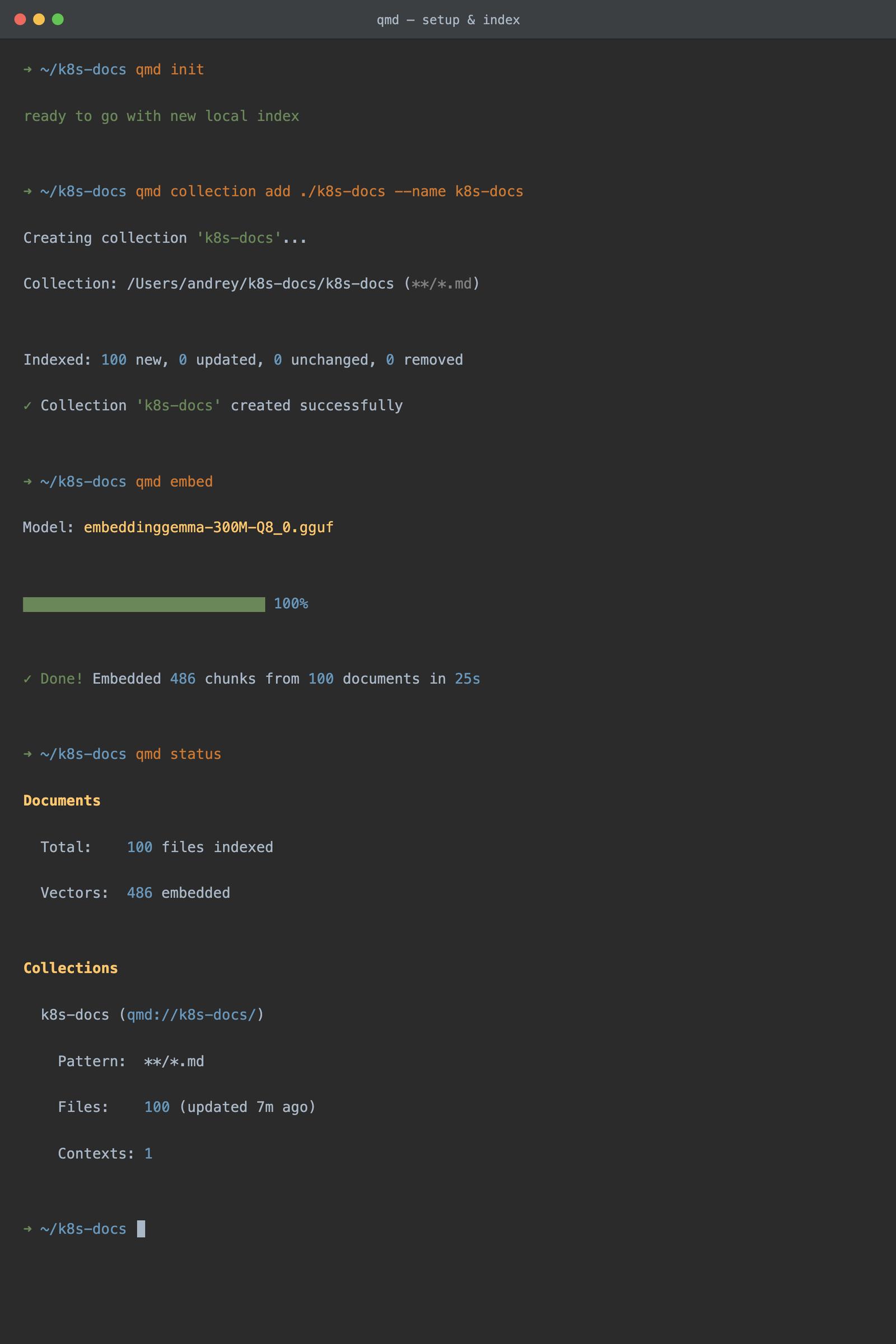
qmd init
# ready to go with new local index
That writes config to .qmd/index.yml and keeps the sqlite index next to it, inside the project. I went local because I wanted this index to live with the folder. If you'd rather have one global index across several doc sets, skip qmd init and qmd falls back to ~/.config/qmd/index.yml. Either way the commands below are identical.
Step 3: Indexing the Docs
Add the crawled folder as a named collection:
qmd collection add ./k8s-docs --name k8s-docs
# Indexed: 100 new, 0 updated, 0 unchanged, 0 removed
That's the BM25 index built. No model download, no waiting. It was faster than I expected.
I also attached a short description to the collection. qmd shows it next to search results, and it helps an agent pick the right collection once you have more than one:
qmd context add qmd://k8s-docs "Kubernetes official documentation, crawled from kubernetes.io/docs"
# Added context for: qmd://k8s-docs/ (collection root)
qmd status shows what's indexed, what's embedded, and which models are configured. I ran it a lot while figuring things out.
Step 4: Keyword Search, Before Any Embeddings
I almost skipped straight to embeddings. Glad I didn't. qmd search is plain BM25, it works the moment the collection is added, and it costs nothing.
qmd search "how to configure a liveness probe" -c k8s-docs
-c scopes the search to one collection.
Top hit: kubernetes.io_docs_concepts_workloads_pods_probes.md at 90%. Right page, first try. For queries where I already know the terminology, keyword search alone is often good enough, especially on well-named docs like these.
Where it falls apart is paraphrasing. When I asked it something closer to how I actually think about the problem, "why does my container keep dying", it didn't find the doc titled "Liveness, Readiness, and Startup Probes". That's the whole reason for the next step.
Step 5: Embeddings
One command:
qmd embed
# Model: embeddinggemma-300M-Q8_0.gguf
# Done! Embedded 486 chunks from 100 documents in 25s
First run downloads the embedding model (embeddinggemma-300M, roughly 300 MB) from Hugging Face. After that it chunks every document and embeds each chunk locally.
The numbers from my laptop: 486 chunks from 100 documents, embedded in 25 seconds, on CPU. No GPU. That's what convinced me the full docs run was fine to do; a few minutes for something I do once is nothing.
It's a one-time cost per collection. When I re-crawl later, qmd embed only touches what changed. (How often to re-crawl is its own question, and I wrote about it in how often to re-crawl for an AI knowledge base.)
Step 6: Semantic and Hybrid Search
Back to the paraphrase test. qmd vsearch is pure vector similarity, so it's what I reach for when my query shares no keywords with the doc:
qmd vsearch "why does my pod keep restarting" -c k8s-docs -n 3
This surfaced pod lifecycle and restart-policy content even though "restarting" isn't a term those pages lean on. BM25 ranked them lower or missed them entirely.
Then the mode I ended up keeping, qmd query. It runs BM25 and vector search together, expands the query if it thinks that helps, and reranks the candidates with a local LLM reranker:
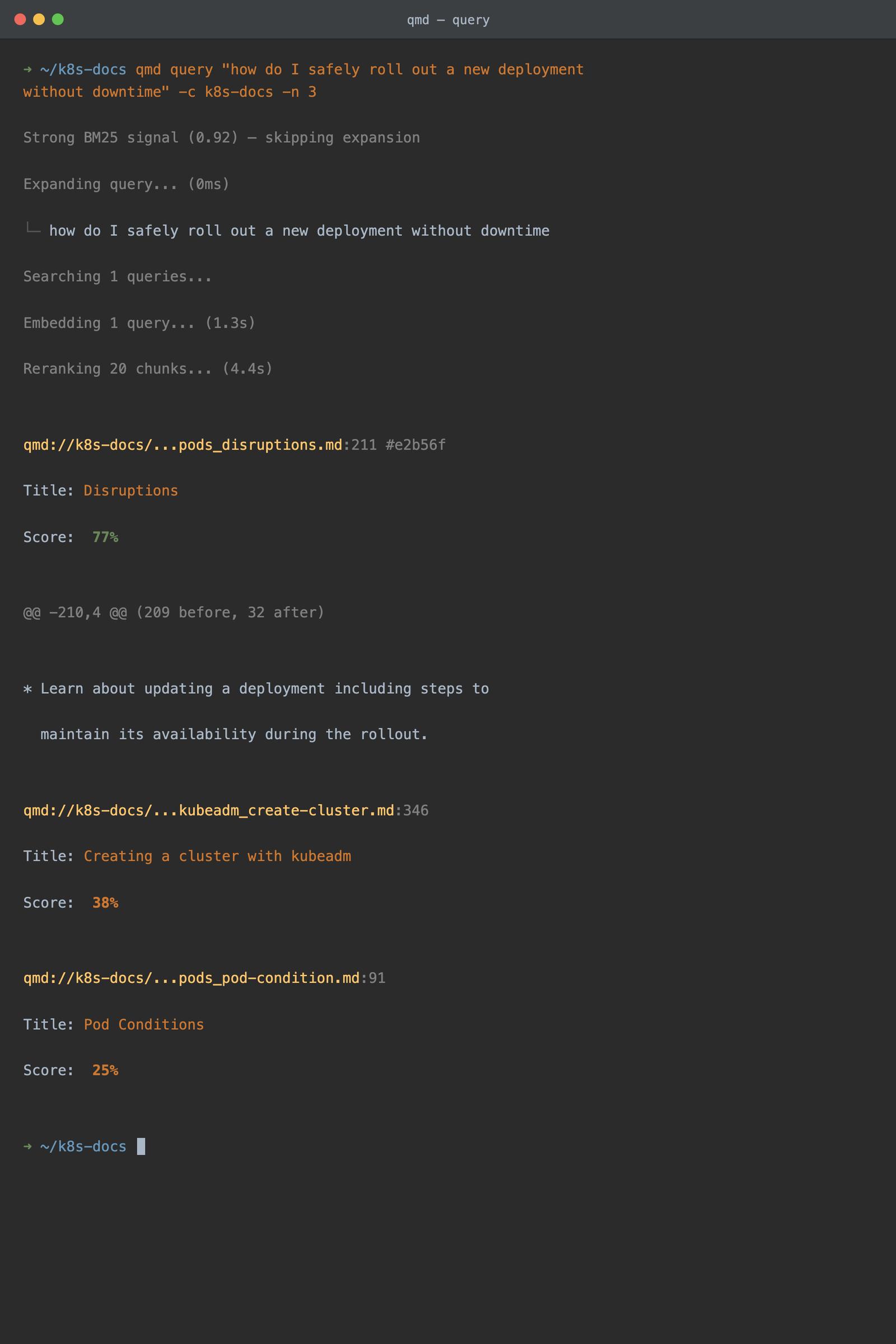
qmd query "how do I safely roll out a new deployment without downtime" -c k8s-docs -n 3
The output is worth reading once, because it shows its work. In my run it detected a strong BM25 signal, applied query expansion, pulled 20 candidate chunks, reranked them, and returned the "Disruptions" doc at 77% as the top result. That's the PodDisruptionBudgets page, which is exactly what "without downtime" means. -n 3 limits it to 3 results.
Once I know which file I want, qmd get <path> returns the full document and qmd multi-get <glob> pulls several at once. Search finds the chunk, get fetches the context around it.
Wiring It Into My Agent
You can tell an agent to shell out to qmd query and it works fine. I did that for a day. Then I switched to the MCP server:
qmd mcp
Any MCP client (Claude Code, Claude Desktop, and the rest) can then call query, get, multi_get, and status as native tools instead of parsing CLI output. The qmd README has config snippets for each client.
By default the MCP server runs over stdio, so each client spawns its own process and loads the models fresh. That got slow once I had two sessions open, so now I run one persistent server:
qmd mcp --http --daemon
Background HTTP server on localhost, models loaded once, shared by everyone. qmd mcp stop shuts it down. The README covers the rest.
What It Cost
Concrete numbers from the run:
- 100 pages crawled into 1.2 MB of markdown
- 486 chunks embedded in 25 seconds on a laptop CPU
- 5.9 MB sqlite index, embeddings included
- 0 cloud API calls after the initial model download
Compared to what I was doing before: stuffing pages into a context window on every question cost tokens every single time and gave worse answers. And standing up a hosted vector database for something only I use would have been a lot of infrastructure for a problem a 6 MB sqlite file solves.
The limitation is scale and tenancy. This is great for one machine, or a small team sharing a repo. qmd isn't a hosted, multi-tenant search backend for a product serving external customers. That's a different problem with different requirements (uptime, per-customer isolation, scheduled re-crawls), and it's where WebCrawlerAPI's hosted crawling plus AI search customers usually sit. Worth knowing which problem you have before picking a tool.
What I'd Tell Myself Before Starting
The whole thing fits in one line: crawl the docs into a folder of markdown, qmd collection add, qmd embed, search 3 ways.
The crawl step is replaceable. Anything that gives you clean markdown files works. qmd is the part worth learning, and it took me about twenty minutes end to end, most of which was the model download. Now any folder of markdown on my disk is one collection add away from being searchable.
The one thing I'd do differently: anchor the whitelist regex before starting the crawl, not after finding German docs in my index.
If the docs you want aren't a clean crawl (JavaScript-heavy sites, auth-gated pages, content that changes weekly and needs recrawling on a schedule), that's what WebCrawlerAPI's crawl API is for. The getting started guide gets you from API key to markdown in a few minutes, and the output drops straight into Step 3 above.
