Chroma DB in Docker: Load a Crawled Website and Query It in 15 Lines
This Chroma DB tutorial goes from a file of embedded website chunks to a persistent, filterable collection in a Docker container. I ran every command on November 5, 2026, against Chroma server 1.5.9 and chromadb 1.5.9. The output below is real.
The input is 304 chunks from 52 pages of the WebCrawlerAPI docs, embedded with Ollama nomic-embed-text (768 dimensions). The chunks come from a WebCrawlerAPI crawl, and a script further down builds that file for your own site. This is the store step of the website to markdown knowledge base guide. Embedded (in-process) mode and Chroma Cloud are not covered. For how Chroma compares to other stores, see the vector database comparison.
One use case shaped the example. If you build a support bot or in-product search on your docs, you often want to scope answers to one product area. The section metadata field below (api, sdk, guides) is how that works.
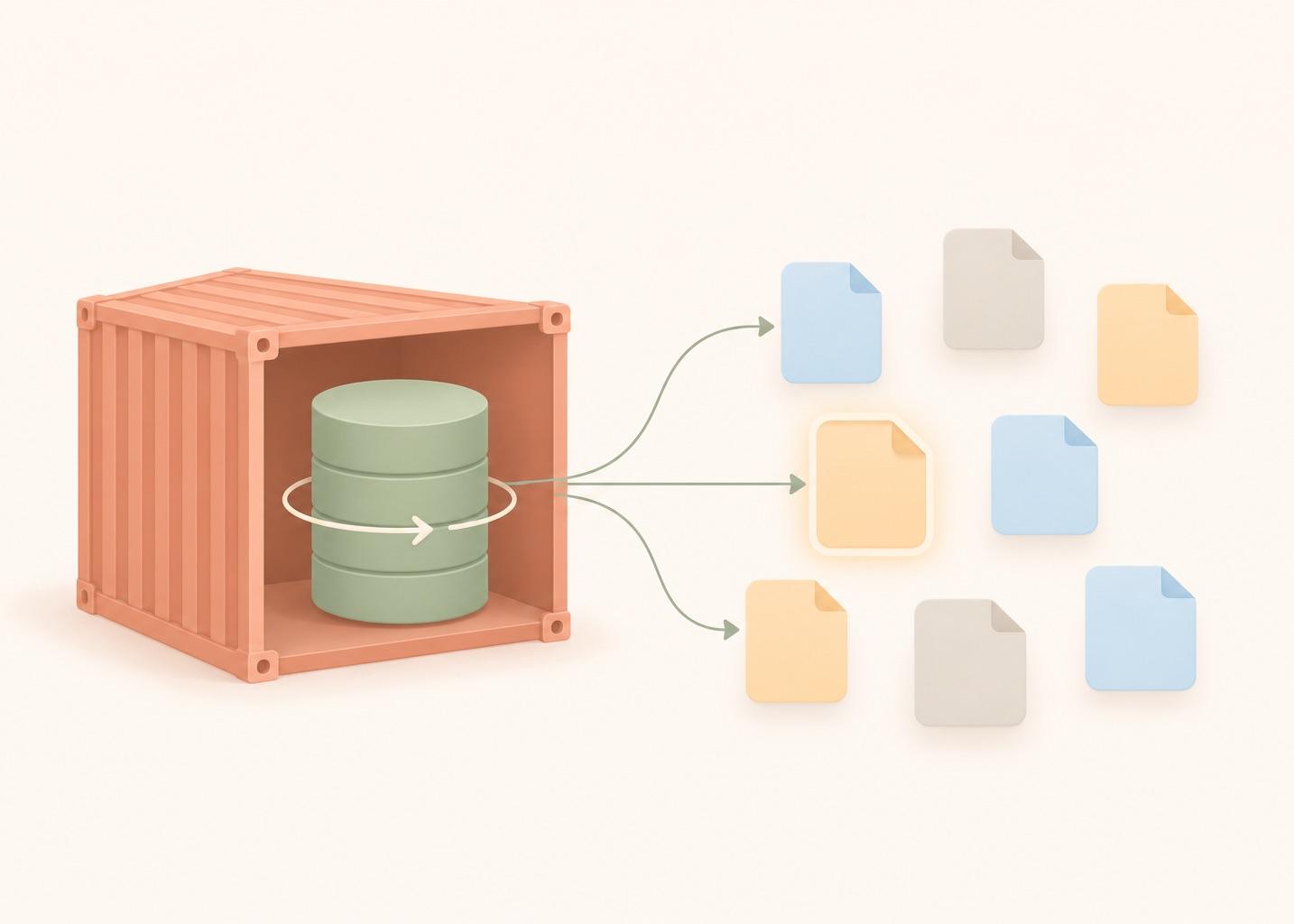
What Chroma DB is
Chroma (also written Chroma DB or ChromaDB) is an open source vector database, licensed Apache-2.0 per its GitHub repo. You create a collection, and each record in it holds an id, a document (the text), an embedding and a metadata dict. You query a collection by vector, by a metadata filter, by a text match on the document, or by a mix of these.
It can run in-process in your Python or JavaScript program or as a server, and it ships built-in embedding functions that compute vectors for you if you do not pass any (this matters later). It fits a docs-based support bot or in-product search over a few hundred to a few thousand pages, where you want one container and no index setup. This post uses the server in Docker.
I found no dashboard: GET / on the container returns 404 (run_chroma.out), so everything below goes through the client or curl. There is also no payload-index step. You filter on metadata directly.
Chroma DB in 15 lines
The caveat first: the 15 lines need a running Chroma server (the docker run command is two sections down) and a chunks.jsonl that already holds embeddings (the next section builds one). Batching, metadata, checks and the persistence test are in the longer scripts further down.
minimal.py has 15 non-empty lines, imports included, no comments and no semicolons:
import json
import chromadb
import requests

rows = [json.loads(line) for line in open("chunks.jsonl")]
client = chromadb.HttpClient(host="localhost", port=8010)
col = client.get_or_create_collection("docs", configuration={"hnsw": {"space": "cosine"}})
col.upsert(ids=[r["id"] for r in rows], documents=[r["text"] for r in rows],
           embeddings=[r["embedding"] for r in rows], metadatas=[{"url": r["url"]} for r in rows])
print("count:", col.count())
q = "search_query: How do I limit how many pages a crawl fetches?"
body = {"model": "nomic-embed-text", "input": q}
vec = requests.post("http://localhost:11434/api/embed", json=body).json()["embeddings"][0]
res = col.query(query_embeddings=[vec], n_results=3)
for m, d in zip(res["metadatas"][0], res["distances"][0]):
    print(round(d, 3), m["url"])
Output:
count: 304
0.244 https://webcrawlerapi.com/docs/api/crawl
0.263 https://webcrawlerapi.com/docs/api/feed/feed-create
0.264 https://webcrawlerapi.com/docs/guides/batch-scrape
The crawl endpoint page comes first, which is the right answer for that question. The script uses upsert, so you can run it twice and still get 304.
Crawl your own site
The chunks in this post came from a crawl of the WebCrawlerAPI docs. To get the same input for your site, register on the dashboard and create an API key at dash.webcrawlerapi.com/access. Then run build_chunks.py. It sends POST https://api.webcrawlerapi.com/v1/crawl, polls GET /v1/job/<id> until the job is done, downloads each item's markdown_content_url, splits the markdown by headers, embeds the chunks with Ollama nomic-embed-text and writes chunks.jsonl with the fields id, url, heading, text, embedding, model and dim.
ollama pull nomic-embed-text
WEBCRAWLERAPI_API_KEY=YOUR_API_KEY python build_chunks.py https://webcrawlerapi.com/docs \
  --items-limit 50 --whitelist 'https://webcrawlerapi\.com/docs.*'
The request body is url, items_limit, output_formats: ["markdown"], respect_robots_txt: true and the whitelist regexp. Options are in the crawl endpoint docs and pricing is on the crawl API page.
I ran it on November 5, 2026, against the docs site above. The job returned 50 items, all with markdown, and the script made 304 chunks from 50 pages. The file used in the rest of this post came from an earlier crawl of 52 pages, so the chunk count matches but the page set differs a little. The job items reported a summed cost of 0.1, which the job docs describe as dollars, so about $0.10. The whole run took 59.7 seconds. The result has the same shape as the file used in this post, so load.py loaded it unchanged: count: 304, 19 sections, 0.23 seconds (build_load.out). The expected page was in the top 5 for all 6 test questions again, though two ranks differ from the first file: 1, 3, 1, 1, 1, 1 now against 1, 2, 1, 1, 1, 2 before. I did not dig into why.
Run chromadb in Docker
What you need: Docker, Python 3.10 or newer (I used 3.11.2), chromadb==1.5.9, a chunks.jsonl (the file I used for the rest of this post has 304 lines, sha256 7c62db92...e145) and Ollama on localhost:11434 to embed questions. I do not ship chunks.jsonl because the embeddings make it 3.4 MB. The chunking is also covered in chunking by headers, the Python walkthrough and an embedding model comparison.
The script is run_chroma.sh:
docker run -d --name kb-chroma \
  -p 127.0.0.1:8010:8000 \
  -v kb-chroma-data:/data \
  -e ANONYMIZED_TELEMETRY=False \
  chromadb/chroma:1.5.9
I pinned 1.5.9, the newest stable tag on Docker Hub that day. Chroma's own docs example uses the untagged image, which moves under you. The container listens on 8000. I mapped it to 8010 on the host because 8000 was busy. The 127.0.0.1 bind keeps a server with no authentication off the network. If the server is reachable from outside, put auth or a private network in front of it.
ANONYMIZED_TELEMETRY=False is my choice, not a requirement.
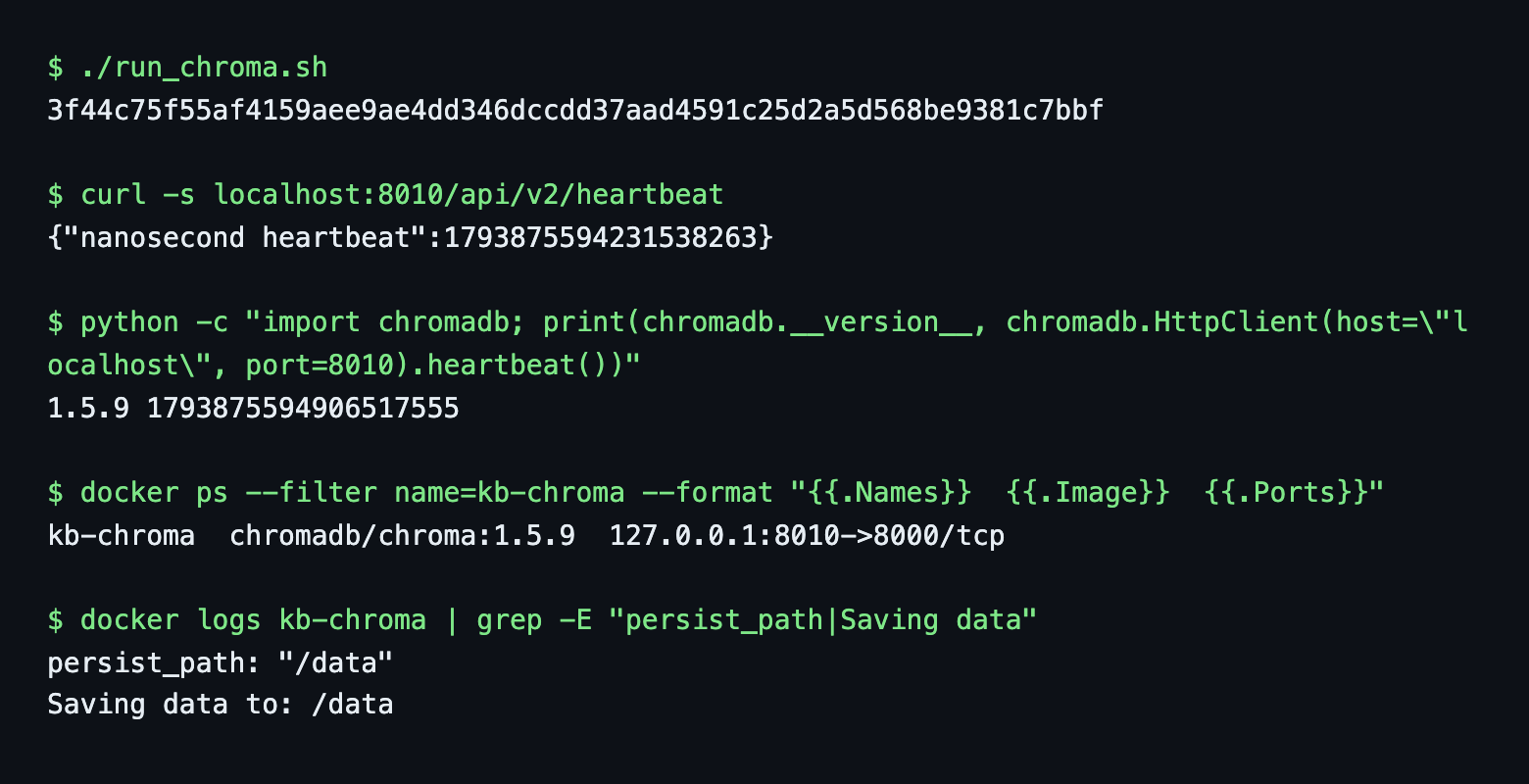
The data directory is /data: the log prints persist_path: "/data" and Saving data to: /data, and no other environment variable was needed.
Client package: Chroma publishes the full chromadb package and a smaller chromadb-client. Both connected to the 1.5.9 server and returned the same top result. A chromadb 1.4.1 client also worked against the 1.5.9 server for heartbeat, count and query (version_check.out). It is one test, so I still pin the same version on both sides.
Docker Compose version
services:
  chroma:
    image: chromadb/chroma:1.5.9
    container_name: kb-chroma
    ports:
      - "127.0.0.1:8010:8000"
    environment:
      - ANONYMIZED_TELEMETRY=False
    volumes:
      - kb-chroma-data:/data
    restart: unless-stopped

volumes:
  kb-chroma-data:
    external: true   # the volume created by run_chroma.sh; drop 'external' for a fresh one
I removed the docker run container, ran docker compose up -d and the same collection answered with count = 304. docker compose down kept the volume.
Chroma can also run inside your Python process (PersistentClient) and as Chroma Cloud. I use the server because the data and the process then live outside the script.
Create a collection and pass your own embeddings
Two choices at creation time: the distance function and who computes embeddings.
The default space is l2. I checked: a collection created with no setting reported space = l2. For text embeddings I use cosine. Both forms of the setting worked on 1.5.9:
col = client.create_collection("docs", configuration={"hnsw": {"space": "cosine"}})
col = client.create_collection("docs", metadata={"hnsw:space": "cosine"})
The first is what the current docs show. The second is the older form and still gave space = cosine. After creation the space is fixed: modify(configuration={"hnsw": {"space": "l2"}}) failed with unknown field space. Cosine distance is 1 - cosine similarity, so smaller is closer.
I checked the vector lengths in my file: all between 0.9999994 and 1.0000006. My notes said they were not normalized. They are normalized. I only know because I checked and did not trust the notes. Check yours.
The second choice is where people get caught. Chroma's default embedding function is all-MiniLM-L6-v2, which gives 384 numbers. My vectors are 768. I created the collection with embedding_function=None, then called query(query_texts=[...]). This is default_ef_gotcha.py:
collection embedding function: None
[progress bar elided: Chroma downloaded all-MiniLM-L6-v2 (onnx.tar.gz, 79.3 MB) into ~/.cache/chroma]

InvalidArgumentError: Collection expecting embedding with dimension of 768, got 384
Two surprises. The client still fell back to the default model although the collection said None, and it downloaded 79.3 MB into ~/.cache/chroma to do it. With the thin chromadb-client the same call failed earlier, with The onnxruntime python package is not installed.
The rule is simple. Pass embeddings= on upsert and query_embeddings= on query, and use the same model on both sides. Queries to nomic-embed-text need the search_query: prefix and the stored documents were embedded with search_document: .
Load the chunks with metadata
load.py reads the file, checks that it holds one model and one dimension, builds the metadata and upserts in batches. client.get_max_batch_size() returned 5461, so 304 rows fit in one call. I batch by 128 anyway because it is two extra lines and survives a bigger corpus.
col.upsert(
    ids=[r["id"] for r in part],
    documents=[r["text"] for r in part],
    embeddings=[r["embedding"] for r in part],
    metadatas=[{"url": r["url"], "heading": r["heading"], "section": section_of(r["url"])}
               for r in part],
)
The section is the second URL path segment (/docs/guides/filters gives guides, the /docs landing page gives root). The ids are the 16-character hex ids from the pipeline. Chroma ids are plain strings, so unlike in the Qdrant post there was no conversion.
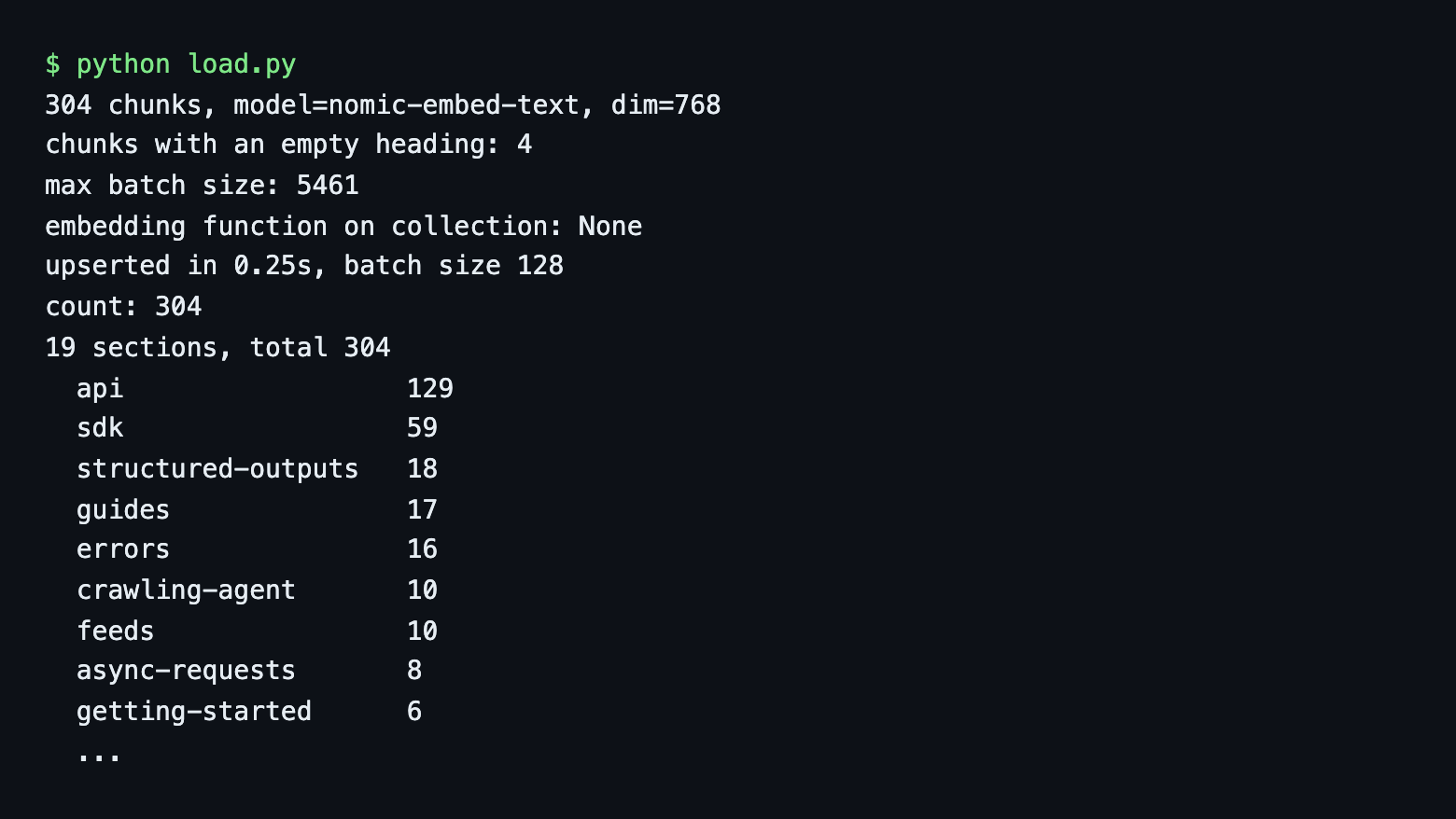
The load took 0.25 seconds and count() returned 304, the number of lines in the file. The chunks fall into 19 sections (api 129, sdk 59, structured-outputs 18, guides 17, errors 16, the rest under 11).
Four chunks have an empty heading (the landing pages of /docs, /docs/api, /docs/integrations and /docs/sdks). I expected Chroma to reject them. gotchas.py shows it stores an empty string, accepts a list as a value and rejects a nested dict (Expected metadata value to be a str, int, float, bool, SparseVector, list, or None). A None value was accepted on write, but get then returned None instead of the metadata dict for that record, so I would not use it.
Query it and read the distances
res = col.query(query_embeddings=[vec], n_results=5,
                include=["documents", "metadatas", "distances"])
Every field in the result is a list of lists, one inner list per query vector. For one query you read res["distances"][0]. With cosine, 0 is identical and smaller is closer.
I ran the 6 shared test questions. This is a smoke test of 6 questions, not a benchmark:
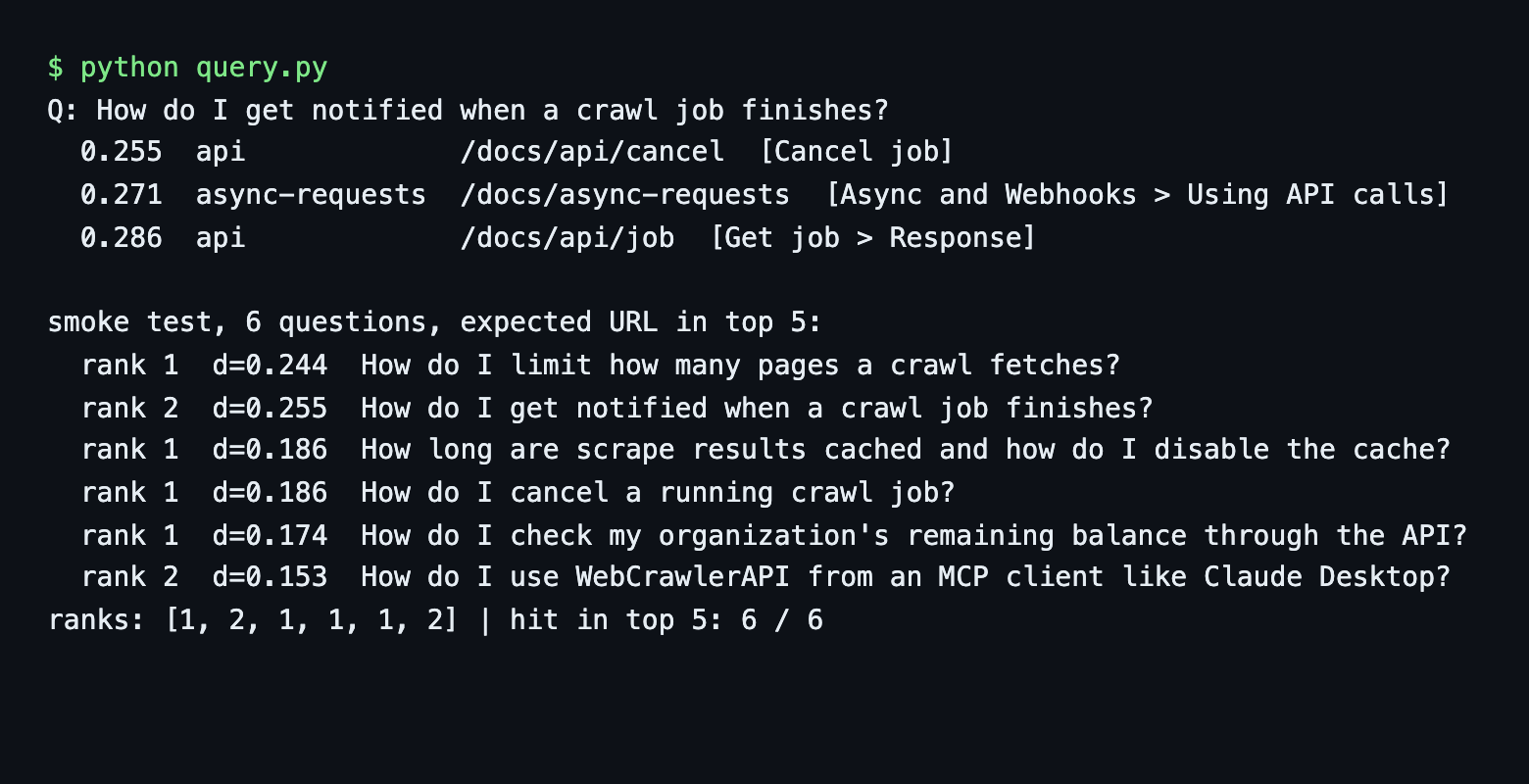
All 6 expected pages were in the top 5, at ranks 1, 2, 1, 1, 1 and 2. That equals the brute-force numpy result of the shared pipeline. The index is approximate (HNSW), but at 304 points I saw no difference. For the question about job notifications, the unfiltered top hit is Cancel job (0.255) and the page I wanted, Async and Webhooks, is second (0.271). One run on one question says little about the model, but it shows why the next section is useful.
Filter by metadata: where and where_document
The same question, unfiltered and then with where={"section": "sdk"}:
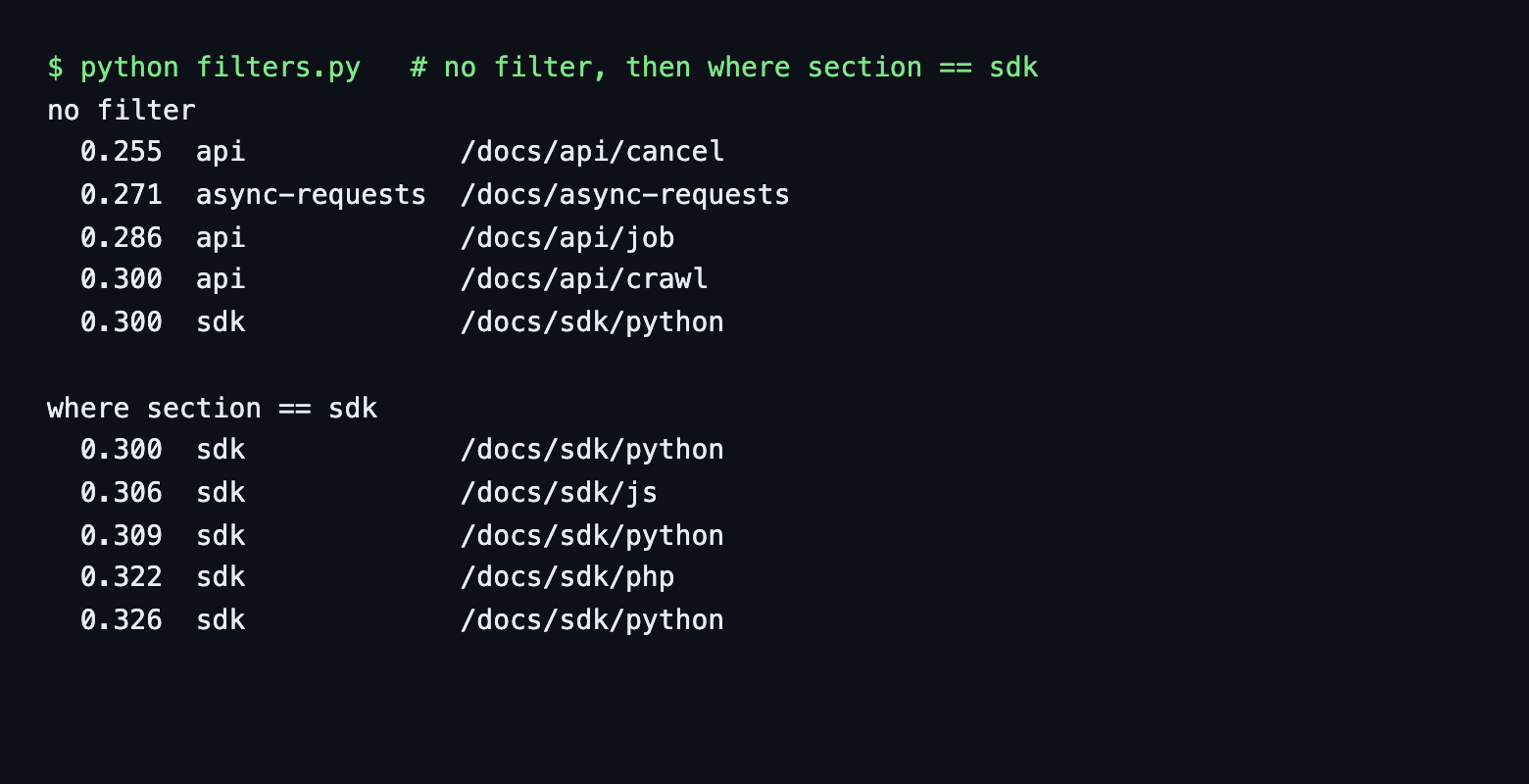
Every filtered result had the requested section (the script asserts it). With section == guides I got the batch scrape and URL filter pages. A filter narrows where to look. It does not fix the ranking inside the section.
Chroma's where takes a dict. A plain {"field": value} means equality, and operators are $-prefixed keys. I counted hits with get(where=..., include=[]) (total 304):
| where | Hits |
|---|---|
| {"section": "api"} (equality shorthand) | 129 |
| {"section": {"$in": ["guides", "errors"]}} | 33 |
| {"section": {"$ne": "api"}} | 175 |
| {"$and": [{"section": "api"}, {"url": {"$ne": ".../docs/api/crawl"}}]} | 125 |
$or combines conditions the same way as $and, and $nin is the opposite of $in. Chroma also has $gt, $gte, $lt and $lte, but they work on numbers and my metadata has none, so I did not run them.
where_document filters on the chunk text instead of metadata:
res = col.query(query_embeddings=[vec], n_results=5,
                where_document={"$contains": "max_depth"})
It is case-sensitive: $contains "max_depth" matched 12 chunks and "Max_Depth" matched 0. The top 5 results all contained the string. It is a guard, not keyword ranking, because the order is still by vector distance. For real hybrid search on a crawled docs site, see the Weaviate tutorial.
To list a section without a query use get(where={"section": "errors"}, limit=3, offset=3).
Does the data survive a restart?
persist_check.sh counts, removes the container, starts a new one on the same volume and counts again. Then it starts a second container without the volume:
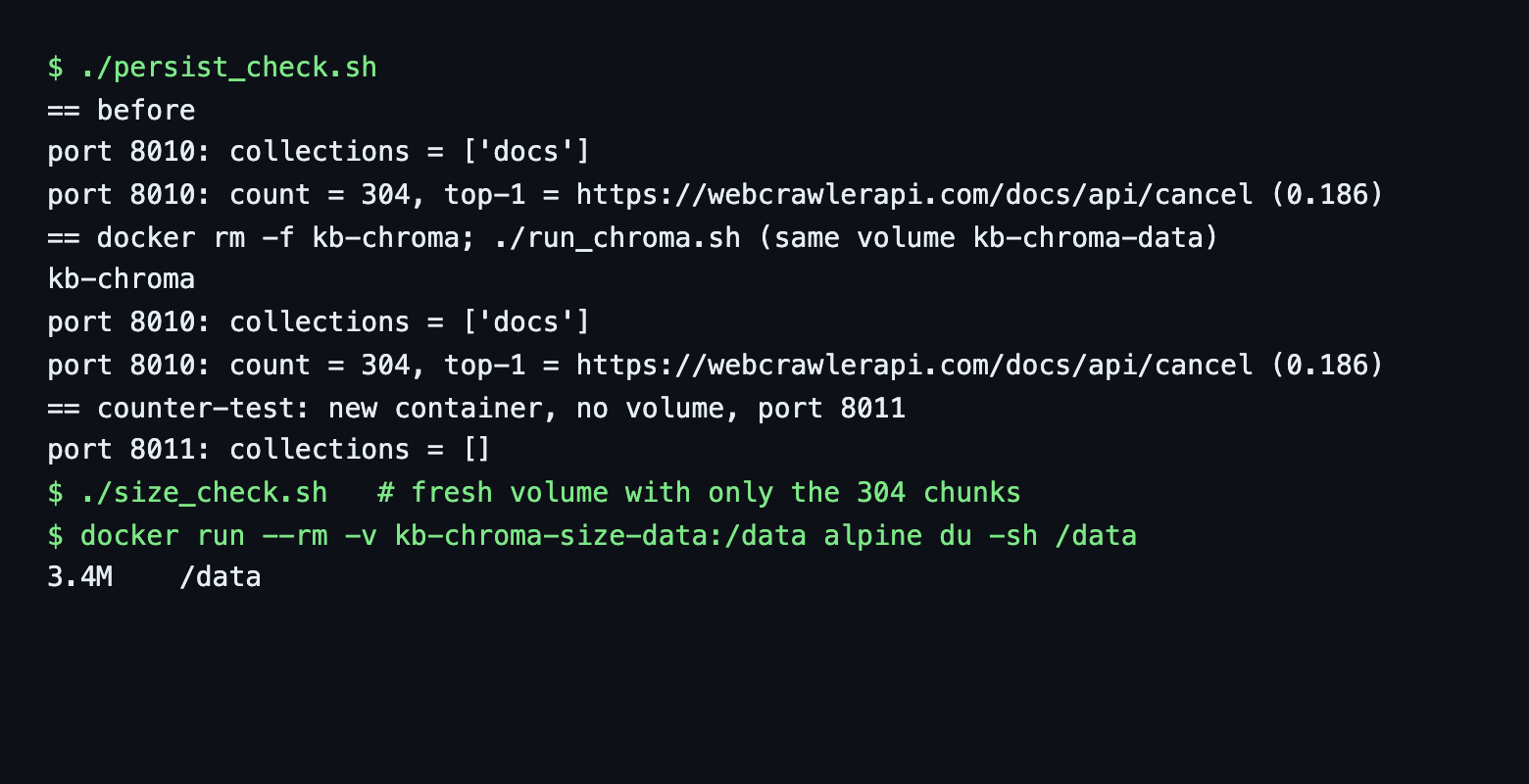
The count was 304 before and 304 after docker rm -f kb-chroma and a new docker run, and the top result for the test question was the same (/docs/api/cancel, 0.186). The container without a volume listed collections = []. So the volume holds the data, not the container.
I used a named volume and did not hit a permissions problem. One GitHub issue (chroma-core/chroma #6132) reports data not persisting with a bind mount on a Jetson. I did not test a bind mount.
Size: a fresh volume with only the 304-chunk collection was 3.4 MB (du -sh /data, of which chroma.sqlite3 was 3,192 KB). My test volume read 6.9 MB because it held leftovers from scratch collections, so measure on a clean volume. This is one corpus with 768-dimension vectors in server mode. It is not comparable to the in-process numbers in the hub, which used 2,159 chunks.
Re-ingesting: add vs upsert, and deleting a page
reingest.py runs on a copy of the collection. On the /docs/api/crawl page, which has 4 chunks:
1. add() with an existing id and new text
   count: 304 | text unchanged: True
2. upsert() with the same id and new text
   count: 304 | text now: CHANGED BY UPSERT
3. upsert() with a smaller metadata dict (url only)
   before: {'heading': 'Crawl a website', 'section': 'api', 'url': '.../docs/api/crawl'}
   after:  {'section': 'api', 'heading': 'Crawl a website', 'note': 'new', 'url': '.../docs/api/crawl'}
The docs say add ignores existing ids without an error. That is what happened. It is an easy way to lose an update and never notice. Use upsert for re-runs. Step 3 surprised me: upsert merged the metadata, so keys I left out stayed. If you remove a metadata key from your pipeline, the old value remains on records that already exist.
The harder problem is a page that shrinks. Upserting only 2 chunks of a page that had 4 left the count at 304 and 4 chunks for that URL. The fix is to delete by URL first:
upsert only: count 304 | chunks for page: 4 (stale chunks remain)
delete(where url):    count 300 | chunks for page: 0
re-upsert 2 chunks:   count 302 | chunks for page: 2
collection.delete(where={"url": url}) is the call. Choosing which pages to re-crawl is covered in how often to re-crawl and keeping a support bot in sync.
Gotchas I hit
- Default embedding function. query_texts embeds with a 384-dimension model and downloads 79.3 MB, even when the collection says embedding_function=None. Pass vectors.
- add ignores existing ids. No error, no change.
- upsert merges metadata. Stale keys stay.
- Stale chunks. A shrinking page leaves old chunks until you delete by where.
- Distance is fixed. space cannot be modified after creation. It defaults to l2.
I did not hit a client and server version error. A 1.4.1 client worked against the 1.5.9 server for the three calls I tried.
Why not just FAISS?
FAISS describes itself as a library for similarity search and clustering of dense vectors, with GPU implementations and support for sets that do not fit in RAM. It is an index, so you keep ids, page text and metadata in your own structure and manage saving the index yourself. Chroma stores vectors, documents and metadata together and serves them over HTTP. FAISS is the better call for very large vector sets, GPUs or an index library inside your own service. I did not run FAISS here.
For Chroma against Qdrant, see the Qdrant tutorial and the Weaviate tutorial. For Chroma vs Pinecone, the vector database comparison lines them up, including Chroma Cloud.
Use the same Chroma server from LangChain
The collection is a normal Chroma collection, so langchain-chroma 1.1.0 can read it. The Chroma class takes the existing client and collection name. It needs an embeddings object for queries, so I wrote a tiny one around Ollama (langchain_query.py):
store = Chroma(client=chromadb.HttpClient(host=HOST, port=PORT), collection_name="docs",
               embedding_function=OllamaQuery())
for doc, score in store.similarity_search_with_score(q, k=3, filter={"section": "guides"}):
    print(f"{score:.3f}  {doc.metadata['url']}")
OllamaQuery is a small Embeddings subclass (two methods) that adds the search_query: prefix. The scores were 0.310, 0.366 and 0.373, identical to the native where query on guides. To crawl straight into LangChain documents instead, see the LangChain website loaders post.
Clean up
docker stop kb-chroma && docker rm kb-chroma
docker volume rm kb-chroma-data   # deletes the data
Removing the container is not enough, as the restart test showed. The volume holds the data. To drop only the data, call client.delete_collection("docs").
Keep it fresh and next steps
To refresh the store, re-crawl the pages, delete by url and upsert.
This is the store step of the website to markdown knowledge base guide. The same chunks are loaded into Supabase in the pgvector tutorial, into Qdrant in the Qdrant tutorial and into Weaviate in the Weaviate tutorial. Every store is listed in the vector database comparison.
Scripts: run_chroma.sh, docker-compose.yml, minimal.py, build_chunks.py, common.py, load.py, query.py, filters.py, default_ef_gotcha.py, reingest.py, persist_check.sh, langchain_query.py, cleanup.sh, the saved outputs such as build_load.out and filters.out and the README. chunks.jsonl is not included, build_chunks.py makes it.