Scrapling is an open-source Python scraping library (BSD-3-Clause) with one parser, HTTP and browser fetchers, spiders, a CLI and an MCP server. The feature that sets it apart is adaptive. It saves what an element looked like and finds it again after a page redesign.

pip install "scrapling[fetchers]"
scrapling install   # downloads the browser; only the browser fetchers need it
from scrapling.fetchers import Fetcher

page = Fetcher.get("https://quotes.toscrape.com/")
quotes = page.css(".quote .text::text").getall()
print(len(quotes), quotes[0])  # 10 quotes
I ran a version of that with my own User-Agent header. Adaptive found a moved element on my test page. It also returned a wrong element when I deleted the target.
Version 0.5 shipped on October 17, 2026 and removed classes that older tutorials still teach, DynamicFetcher among them. Everything here ran on 0.5.
Last updated: November 2, 2026. I run WebCrawlerAPI, so I sell a product in the same area.
What Scrapling Is (and What It Is Not)
Scrapling has a parser (Selector), Fetcher and AsyncFetcher for plain HTTP, StealthyFetcher and StealthySession for a real browser (Chromium through Patchright), Spider classes, a CLI and an MCP server. The code lives on GitHub and PyPI lists one author, Karim Shoair (D4Vinci). The metadata says Python 3.10 or newer and a BSD 3-Clause license. This post is for sites you are allowed to scrape (read web scraping ethics first).
The 0.5 migration guide lists what broke. DynamicFetcher, DynamicSession, AsyncDynamicSession and PlayWrightFetcher are gone, so use StealthyFetcher or StealthySession instead. I checked a full 0.5 install, and scrapling.fetchers really has none of the three old names. capture_xhr became record_requests=True, and the browser CLI command is now scrapling extract fetch.
The README also advertises Cloudflare challenge solving (solve_cloudflare=True). I only tried it on Cloudflare's own test keys on a local page, not on a real protected site (see below).
For other Python options, see best Python web scraping libraries. For a Firefox-based alternative, see the Camoufox tutorial.
How I Tested This
Scrapling 0.5, Python 3.12.16, Chrome for Testing 156.0.8078.4 and Docker 24.0.6 on an Apple M2 Max Mac, in a native linux/arm64 container with nothing emulated. Everything ran in Docker, and I installed nothing on the Mac. Local tests used hand-written pages on 127.0.0.1 with the container network off. The Mac was busy, with a host load average of 12.02 / 11.86 / 9.36 when I captured the environment and 2 to 4 inside the Docker VM. Treat every timing as one machine on one afternoon.
I fetched robots.txt on quotes.toscrape.com and books.toscrape.com with webcr first. Both returned 404, so there were no rules to follow. In total I made 23 logged requests to the two practice sites: 2 robots checks, 12 plain HTTP requests (3 through the rotator, 1 through the MCP server) and 9 browser requests (3 pages and 6 stylesheets). My hook logs a request before disable_resources can drop it, so it counts those. Three attempts with a wrong password stopped at the proxy. The rotator test made 2 calls to the proxy provider's own IP test endpoint. The comparison near the end made 10 WebCrawlerAPI calls. The Cloudflare test loaded a local page 8 times, and the test widget made 16 requests to challenges.cloudflare.com. The impersonation, ContentSpider and spider tests ran against local servers only.
What I skipped: spider pause and resume, an x86_64 host, a Playwright baseline and any real site with bot protection, Cloudflare included.
Install Scrapling in Python (in Docker)
The base image is pinned by digest:
FROM python:3.12-slim-bookworm@sha256:e697c81897302a4c4333bade000d98038fbb21eb064f8ee1fd42d02ebcd9d337
ENV PLAYWRIGHT_BROWSERS_PATH=/opt/browsers
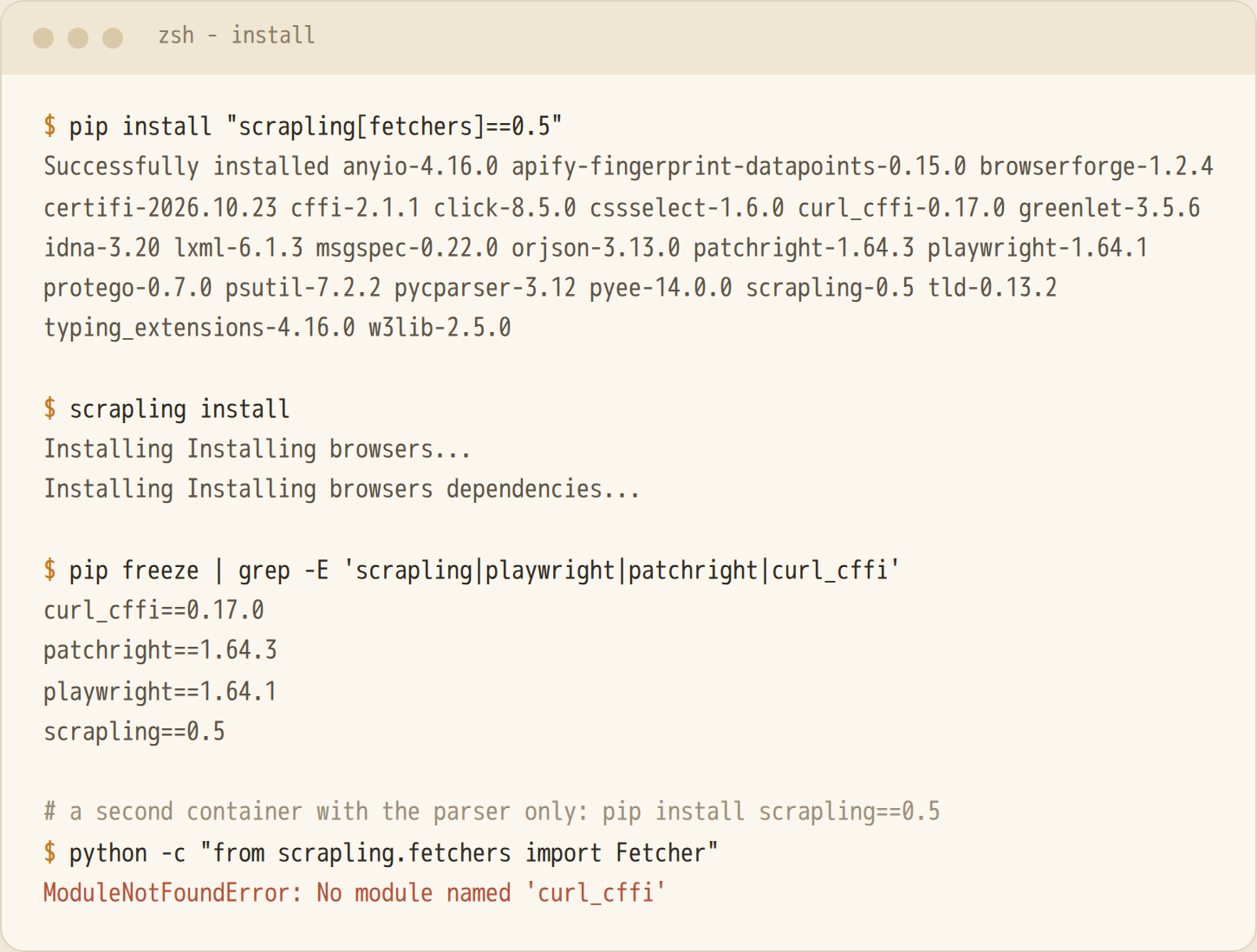
RUN pip install --no-cache-dir "scrapling[fetchers]==0.5"
RUN scrapling install && chmod -R a+rX /opt/browsers
scrapling install downloads the browser and its system libraries into the root user's cache by default, so a non-root user cannot see it. Setting PLAYWRIGHT_BROWSERS_PATH fixed that.
| Install | What it adds | Needed for |
|---|---|---|
| pip install scrapling | Parser only (17 MB) | Selector, adaptive parsing of HTML you already have |
| scrapling[fetchers] | HTTP and browser fetchers, spiders | Fetcher, StealthyFetcher, Spider |
| scrapling[ai] | MCP server (377 MB with the fetchers, no browser) | scrapling mcp |
| scrapling[shell] | Interactive shell and CLI helpers | scrapling shell, scrapling extract |
| scrapling[all] | Fetchers, ai and shell | Everything |
One more extra exists for AI-pipeline helpers, and this post does not cover it.
pip install scrapling alone is a trap. import scrapling.fetchers succeeds because it loads lazily, but from scrapling.fetchers import Fetcher raises ModuleNotFoundError: No module named 'curl_cffi' (I ran it). HTTP-only use needs no browser. With the fetchers, the packages take 354 MB and the browser 680 MB, and the whole image is 1,474 MB.
Your First Scrape: Fetcher and the Selector API
Fetcher.get returned status 200 and 10 quotes from quotes.toscrape.com. The selector API reads like Scrapy and Parsel:
page.css(".quote .author::text").getall()      # ['Albert Einstein', 'J.K. Rowling', ...]
page.css("a.tag::attr(href)").get()            # '/tag/change/page/1/'
page.xpath("//title/text()").get()             # 'Quotes to Scrape'
page.find_by_text("Next", first_match=True)    # first element that contains the text
page.css(".quote").first.find_similar()        # 9 elements shaped like the first quote
page.css(".quote .text").first.parent          # the element one level up
The async version has the same shape:
import asyncio
from scrapling.fetchers import AsyncFetcher

async def main():
    page = await AsyncFetcher.get("https://quotes.toscrape.com/")
    print(page.status, len(page.css(".quote .text::text").getall()))  # 200 10

asyncio.run(main())
By default Fetcher sends browser-like headers, including a Google referer (referer: https://www.google.com/ in my local logs). For the public pages I passed stealthy_headers=False and my own User-Agent. For parser background, see Python HTML parsers.
Adaptive Scraping: Selectors That Survive a Redesign
Adaptive works in two steps. With auto_save=True, Scrapling stores the matched element in SQLite: tag, text, attributes, path, parent and siblings. Later, adaptive=True makes a selector that matches nothing fall back to a similarity search over the new page. No AI model is involved (see the adaptive docs). Storage is keyed by domain and an identifier, which defaults to the selector string. The feature was called auto_match in older versions.
from scrapling.fetchers import Fetcher

Fetcher.configure(adaptive=True, storage_args={"storage_file": "/tmp/adaptive.db"})

old = Fetcher.get(f"{base}/v1")
old.css("#p1", auto_save=True)                      # remember the element

new = Fetcher.get(f"{base}/v2")                     # after the redesign
new.css("#p1")                                      # plain CSS: empty
new.css("#p1", adaptive=True, percentage=30)        # relocated
Break it on purpose
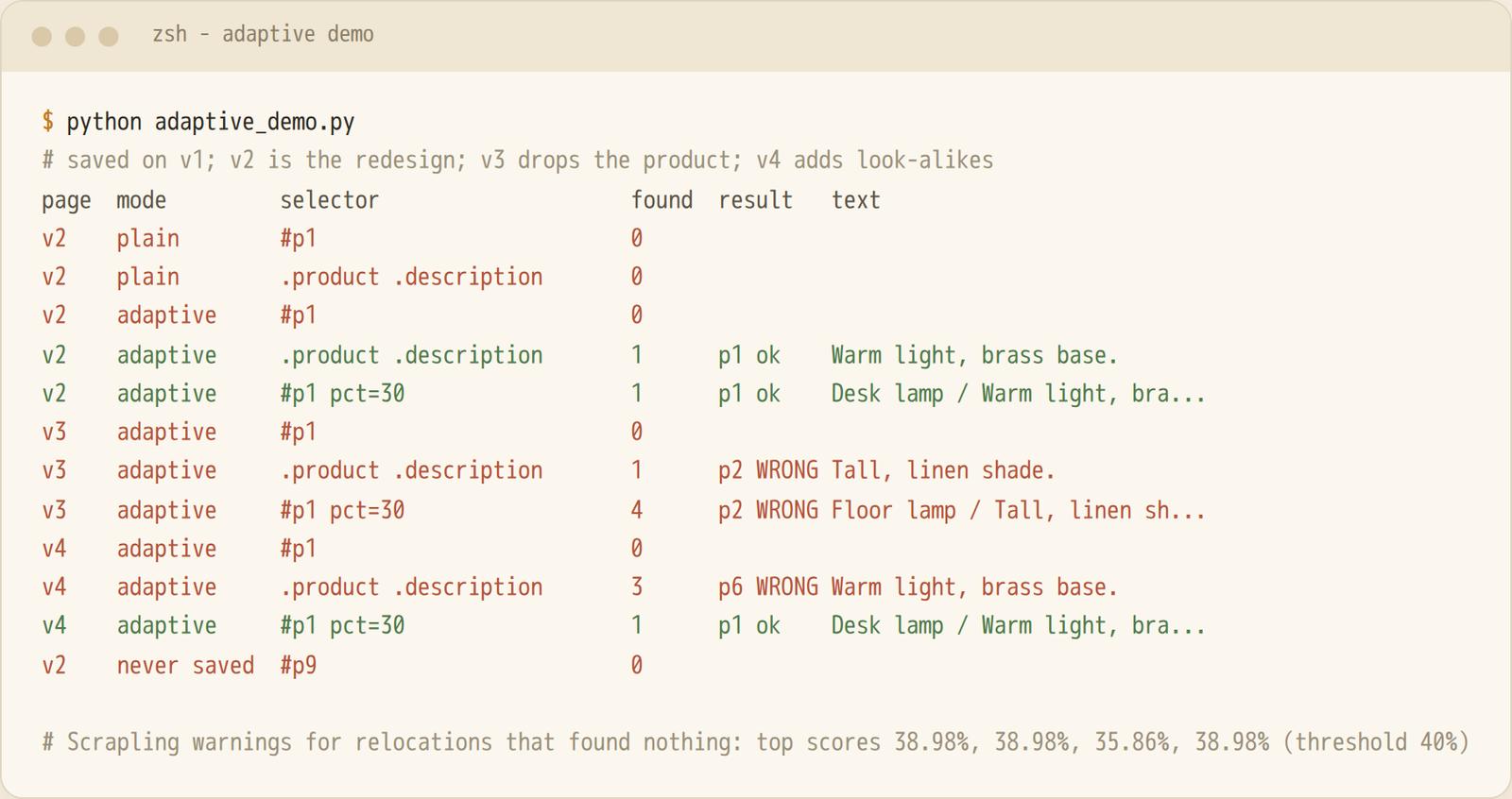
I wrote one product page (/v1) and three variants, served from 127.0.0.1 inside the container. The page has 5 products, so N is tiny, and real redesigns are messier. v2 is a redesign: id became data-id, the class gained product-card, description became desc-text, and wrapper divs appeared. I saved two selectors on v1: #p1 (the first product card) and .product .description.
What happened on v2:
- Plain #p1 and .product .description both returned 0 elements.
- adaptive=True with .product .description returned the right element.
- adaptive=True with #p1 still returned 0. Scrapling logged Adaptive relocation found no element above the 40% threshold (top score: 38.98%). The default percentage is 40. With percentage=30 it returned the right card.
The wrapper divs I added pushed the best match just below the default. So adaptive will not rescue every redesign.
The manual route and identifiers
You can also save and look up elements yourself with page.save(element, "name"), page.retrieve("name") and page.relocate(data). Use identifier="..." on css() to name an element, and adaptive_domain= when the domain changes. On my run, page.save(el, "first_product") on the Response from Fetcher.get raised AttributeError: 'Selector' object has no attribute 'getparent'. The same call worked on a plain Selector(html, url=..., adaptive=True).
The saved record is a SQLite row (url, identifier, and element_data as JSON with tag, attributes and path). For 127.0.0.1 the url column held default.
Where it fails
- The element was removed (v3). I deleted the first product. #p1 returned 0. .product .description returned 1 element, the description of the second product ("Tall, linen shade."), with no error or warning. With #p1 at percentage=30 it returned 4 elements, starting with the wrong product.
- Look-alikes (v4). I added two near-identical products ahead of the original ("Desk lamp mini" and "Desk lamp XL", same description). .product .description returned 3 elements, and the first belonged to the "mini". #p1 at percentage=30 happened to return only the right card.
- Never saved. #p9 with adaptive=True returned 0. Without a saved record there is nothing to compare.
I would treat adaptive as a safety net. Keep a saved HTML fixture per target and a test that checks the extracted values (a price is a number, a title is not empty). A wrong match looks exactly like a right one.
Scrapling to Markdown for an AI Knowledge Base
page.markdown() converts a response to markdown. It needs the markdownify package, which comes with the ai and shell extras (I installed it directly, markdownify==1.2.3). Three variants on the same 5 pages (quotes.toscrape.com, pages 1 to 5):
| Call | Characters, pages 1 to 5 | Login link, tag cloud, "Next" |
|---|---|---|
| page.markdown() | 3,019 / 5,009 / 2,792 / 2,635 / 2,548 | present |
| markdown(main_content_only=True) | 3,001 / 4,991 / 2,774 / 2,617 / 2,530 | present |
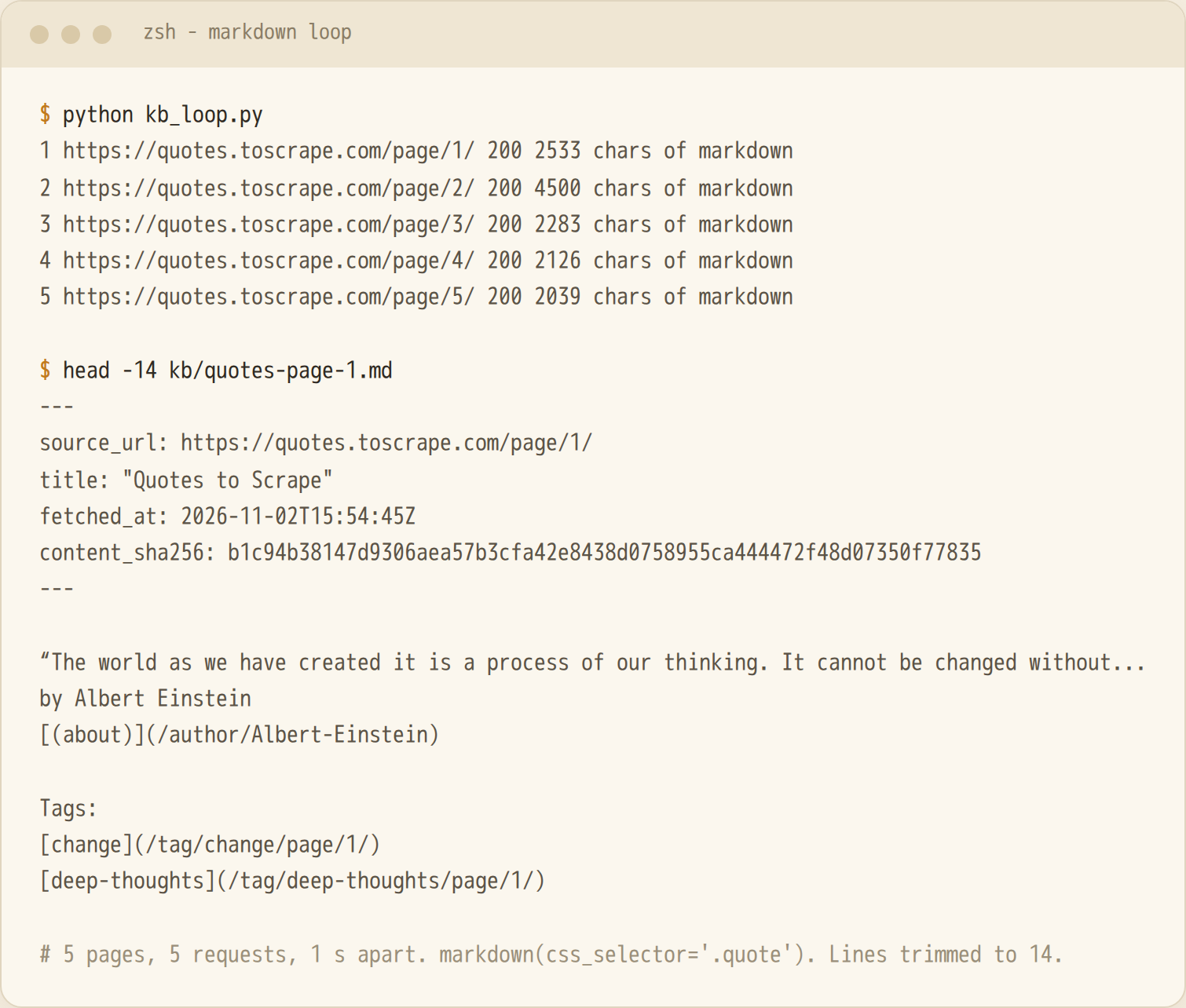
| markdown(css_selector=".quote") | 2,533 / 4,500 / 2,283 / 2,126 / 2,039 | absent |
main_content_only=True removed 18 characters on every page, so it found nothing to strip here. A selector you choose does the real work. This is the loop I ran:
import datetime, hashlib, pathlib, time
from scrapling.fetchers import Fetcher

urls = [f"https://quotes.toscrape.com/page/{n}/" for n in range(1, 6)]
out = pathlib.Path("kb"); out.mkdir(exist_ok=True)
seen = set()

for n, url in enumerate(urls, 1):
    for attempt in range(3):                       # 3 tries, backoff 1 s, 2 s
        page = Fetcher.get(url, stealthy_headers=False,
                           headers={"User-Agent": "my-kb-crawler/1.0"})
        if page.status == 200:
            break
        time.sleep(2 ** attempt)
    else:
        continue
    body = page.markdown(css_selector=".quote")
    digest = hashlib.sha256(body.encode()).hexdigest()
    if digest in seen:                             # skip duplicate content
        continue
    seen.add(digest)
    fetched = datetime.datetime.now(datetime.timezone.utc).strftime("%Y-%m-%dT%H:%M:%SZ")
    (out / f"quotes-page-{n}.md").write_text(
        f'---\nsource_url: {url}\ntitle: "{page.css("title::text").get().strip()}"\n'
        f"fetched_at: {fetched}\ncontent_sha256: {digest}\n---\n\n{body.strip()}\n")
    time.sleep(1)                                  # one request per second
All 5 pages returned 200, no retries fired and no duplicates were skipped.
A ContentSpider template crawls a whole site into markdown files. I ran it on my 3-page local site and got 3 items, 3 requests, 0 offsite and one .md file per page. allowed_domains is required, and on the local site I had to include the port ({"127.0.0.1:8000"}). If you would rather not own this loop and the browsers behind it, see the comparison near the end.
Scrapling Fetchers: Fetcher, AsyncFetcher and StealthyFetcher
I measured the fetchers against a local page on 127.0.0.1 with the container network off. The page has 100 list items and one block that JavaScript inserts after 50 ms. Each row is N=15, run twice (run 1, run 2). Memory is the peak summed RSS of the Python process and its browser, so shared pages count more than once.
| Fetcher | Median ms, run 1 / run 2 | Range, run 2 | Peak memory | JS block present |
|---|---|---|---|---|
| Fetcher | 1.4 / 1.8 | 1.3 to 4.2 | 52 MB (Python only) | 0 of 15 |
| StealthyFetcher.fetch (one-shot) | 608 / 576 | 471 to 947 | 1,205 to 1,242 MB | 3 of 15 |
| StealthySession.fetch (warm) | 34 / 49 | 34 to 119 | 1,267 to 1,306 MB | 0 of 15 / 3 of 15 |
AsyncFetcher was 1.1 / 1.3 ms per request in sequence. The first one-shot StealthyFetcher call took 683 ms in run 1 and 2,012 ms in run 2, and starting a StealthySession took 380 to 478 ms. The Fetcher rows measure library overhead on loopback, so they say nothing about real sites.
- The browser costs about 1.2 GB and 0.6 s per one-shot fetch. An open session cut a fetch to 34 to 49 ms (median per run) after a one-time start.
- By default the browser fetchers return once the DOM has loaded. My 50 ms script block showed up in only 3 of 15 one-shot fetches. With wait_selector=".late-block" it appeared in 5 of 5 (median 681 / 745 ms, N=5).
This is the form I benchmarked:
from scrapling.fetchers import StealthyFetcher, StealthySession

URL = "http://127.0.0.1:8000/bench"   # my local test page (the port varied per run)

# one-shot: starts and closes a browser on every call
page = StealthyFetcher.fetch(URL, headless=True, wait_selector=".late-block")

# session: start once, fetch many times
session = StealthySession(headless=True)
session.start()
page = session.fetch(URL)
session.close()
Impersonation
FetcherSession(impersonate="chrome") makes the HTTP client send a browser-like TLS handshake and headers. I checked it against my own TLS server in the container. It reads the raw ClientHello and computes the JA3 hash. No outside request was made, so I claim nothing about any real site.
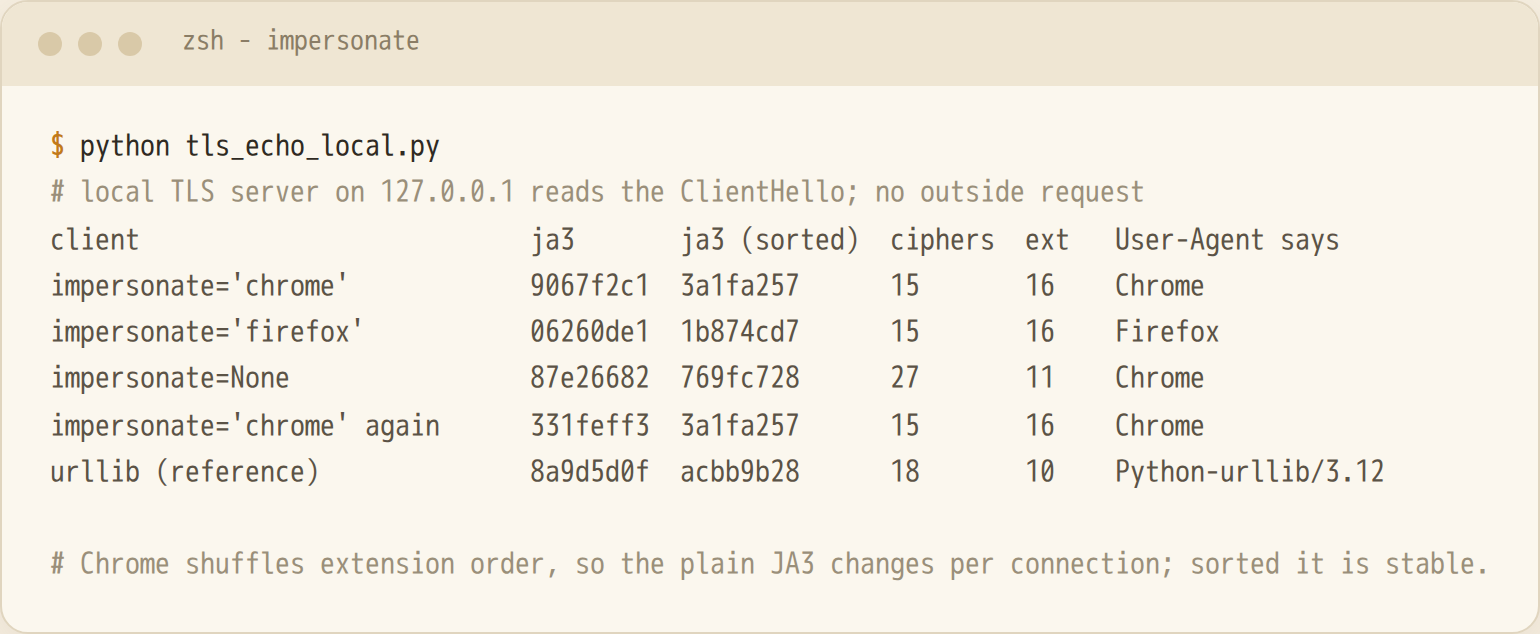
Each setting produced a different handshake. chrome and firefox both sent 15 ciphers and 16 extensions, but with different hashes. impersonate=None sent 27 ciphers and 11 extensions while its User-Agent still said Chrome, so the headers and the handshake disagreed. Chrome also shuffles its extension order. The plain JA3 hash changed between two connections (9067f2c1, 331feff3), and the hash with sorted extensions stayed 3a1fa257. I did not test whether a site treats any of this as a signal.
Proxies
I ran Fetcher and StealthyFetcher through a datacenter proxy zone from Bright Data. I already had an account there. It is not a recommendation, and I did not compare providers or prices. The credentials below are placeholders. Port 33335 is the one my zone used, so copy host, port and username from your provider's access details:
from scrapling.fetchers import Fetcher, StealthyFetcher

PROXY = "http://brd-customer-YOUR_ACCOUNT_ID-zone-YOUR_ZONE:[email protected]:33335"

page = Fetcher.get("https://quotes.toscrape.com/page/1/", proxy=PROXY, timeout=30)
page = StealthyFetcher.fetch("https://quotes.toscrape.com/page/2/", proxy=PROXY,
                             headless=True, disable_resources=True)
Results, one sample each. This is not a benchmark:
- Fetcher.get through the proxy returned 200 and 10 quotes in 1.21 s.
- StealthyFetcher.fetch through the proxy returned 200 and 10 quotes in 2.84 s.
- With a deliberately wrong password, Fetcher failed three times (its default retries) with curl: (7) CONNECT tunnel failed, response 407 after 5.43 s, and never reached the site. A 407 means the proxy rejected the login. See HTTP 407 proxy authentication required.
ProxyRotator takes a list of proxies. I gave it two entries from the same zone with different sticky session ids and passed it to FetcherSession(proxy_rotator=rotator, impersonate="chrome"). Pages 4, 5 and 6 all returned 200 with 10 quotes (1.72, 0.50 and 0.35 s). A logging wrapper showed the entries used in the order 0, 1, 0, 1, 0 across five requests. So rotation between entries works. I did not show different exit IPs, because my zone had one allocated IP.
Proxy quality is not something the library controls. See proxies for web scraping and residential vs datacenter proxies. For the browser side, what is a headless browser. Looking like a real browser does not mean a site will let you in. If you get blocked, start with what a 403 means, not with more settings.
solve_cloudflare on Cloudflare's Test Keys
Cloudflare publishes test sitekeys for Turnstile for testing automation. They protect no real site and return a dummy token. I put the Turnstile widget on a local page in Docker and loaded it with StealthyFetcher, 2 loads per setting. The browser could reach only 127.0.0.1 and Cloudflare's own hosts.
from scrapling.fetchers import StealthyFetcher

# page_setup only lets the browser reach 127.0.0.1 and *.cloudflare.com
# page_action polls the hidden cf-turnstile-response input for up to 15 s
page = StealthyFetcher.fetch("http://127.0.0.1:8765/?key=3x00000000000000000000FF", headless=True,
                             solve_cloudflare=True, page_setup=page_setup, page_action=page_action)
| Test sitekey | Without solve_cloudflare | With solve_cloudflare=True |
|---|---|---|
| 1x00000000000000000000AA (always passes) | token on 2 of 2 loads (3.10 s, 2.27 s) | token on 2 of 2 loads (10.88 s, 10.77 s) |
| 3x00000000000000000000FF (forces an interactive challenge) | no token on 2 loads (stopped waiting at 15 s) | token on 2 of 2 loads (1.22 s, 1.08 s) |
The solver found the widget (its log said embedded) and cleared the forced interactive test challenge, which a plain load never finished. That is all this shows. These are test keys on a local page. No real site was protected and no bot detection was involved, so it is not evidence that Scrapling gets past a real Cloudflare-protected site. I did not try one.
Scrapling Spiders, CLI and MCP Server
Spiders. A Spider subclass sets start_urls and an async parse. This is the class I ran against my local paginated page. The file also starts the fixture server, and start_urls uses its port:
from scrapling.spiders import Spider, Response

class RowSpider(Spider):
    name = "rows"
    start_urls = [f"http://127.0.0.1:{port}/pager/1"]
    concurrent_requests = 2

    async def parse(self, response: Response):
        for row in response.css("li.row::text").getall():
            yield {"row": row, "page": response.url}
        nxt = response.css("a.next::attr(href)").get()
        if nxt:
            yield response.follow(nxt)

result = RowSpider().start()
result.items.to_json("rows.json")   # 15 items from 3 requests
Spider also has an optional robots_txt_obey flag, so check its default before a public crawl. It has pause and resume through a crawldir, and retries too.
CLI. scrapling extract get URL file.md --css-selector ".catalog" fetched my local page and wrote markdown with a Lamps heading and 5 product blocks.
MCP server. Install it with pip install "scrapling[ai]", then scrapling mcp lets an agent fetch pages. The default is stdio. --http refuses to start without a token or an explicit --no-auth. I drove it over stdio with the Python mcp client. The server lists 16 tools, including make_request, browser_fetch_once and browser_screenshot. One make_request call on a quotes.toscrape.com page (extraction_type: "markdown", css_selector: ".quote") returned status 200 and 2,759 characters. I did not call the browser tools.
For how Scrapling's MCP server fits next to other MCP servers an agent can use, see MCP servers for web scraping and search, where I measured tool-definition cost for 13 servers. For a model-driven browser instead of selectors, see the Stagehand tutorial.
When to Run Scrapling Yourself, and When Not To
You own everything around it: browser installs (680 MB here), versions (0.5 broke 0.4 code), proxies, retries, a place for the adaptive SQLite file, and monitoring for matches that look right and are wrong. A browser worker is about 1.2 GB by my measure, and PyPI lists one author. For a handful of sites with Python code you maintain, I would still pick Scrapling over hand-written selectors that break every month.
If the goal is clean markdown per page for an AI knowledge base or support bot, without running browsers yourself, the WebCrawlerAPI scrape endpoint covers that part (see the web scraping API page and the scrape docs). The comparison below uses the same 5 pages on a practice site with no protection, so it says nothing about blocked sites for either tool.
Scrapling markdown vs POST /v2/scrape on the same 5 pages
I fetched the 5 pages with POST /v2/scrape (output_formats: ["markdown"], main_content_only at its default). The first 5 calls used max_age: 0 for a fresh fetch, and the next 5 used the default cache. This is an excerpt, with a placeholder key:
import json, urllib.request

req = urllib.request.Request(
    "https://api.webcrawlerapi.com/v2/scrape",
    data=json.dumps({"url": "https://quotes.toscrape.com/page/1/",
                     "output_formats": ["markdown"], "max_age": 0}).encode(),
    headers={"Authorization": "Bearer YOUR_API_KEY",
             "Content-Type": "application/json",
             "User-Agent": "my-kb-crawler/1.0"},
)
with urllib.request.urlopen(req, timeout=120) as resp:
    page = json.load(resp)   # success, markdown, page_title
| Scrapling Fetcher + markdown() | Scrape endpoint | |
|---|---|---|
| Latency, fresh | Not timed on these pages | Median 2.67 s (2.44 to 3.47), 5 of 5 ok |
| Latency, cached | No built-in cache | Median 0.65 s (0.51 to 1.16) |
| Markdown length | 2,039 to 4,500 chars (css_selector); 2,548 to 5,009 (whole page) | 2,341 to 4,802 chars |
| Boilerplate | Absent with the selector; login link, tag cloud, GoodReads link and "Next" in the whole page | Login link and tag cloud on all 5; GoodReads link and "Next" absent |
| Setup | Python packages, 680 MB browser if needed | An API key |
| Cost | Your machine, proxies and time | Per crawled page, successful requests only ($0.002 on Pay as you go, per the pricing docs) |
The X-Cache and Age response headers (MISS on the fresh calls, HIT with Age 11 to 19 s on the cached ones) are what I observed in this run. They are not in the docs. The cached calls were about four times faster and returned the same content, and they appear to have been served from the entry the fresh calls had just created.
My loop fetched one HTML document and cut out the quotes with a selector I chose. The API returned a cleaner page than Scrapling's whole-page markdown, but it still kept the login link and the tag sidebar. I cannot see the API's own CSS and script requests, and I never ran either tool against bot protection.
The API caches results for 7 days by default (caching docs), so repeats are fast and can be stale. Send max_age: 0 when a page changes.
Rule I would use: Scrapling when you write and maintain Python extraction code for sites you are allowed to scrape and want selectors that survive layout changes. An HTTP client plus a parser when the data is already in the HTML. An API when you want page content as markdown for an AI knowledge base and do not want to own browsers.
FAQ
What is Scrapling used for? HTTP and browser scraping in Python, HTML parsing with CSS and XPath, spiders, markdown conversion through a CLI, and an MCP server for agents. The adaptive element relocation is its main draw.
Is Scrapling free and open source? Yes. It is BSD 3-Clause licensed, published on PyPI as scrapling, and needs Python 3.10 or newer.
How does adaptive scraping work in Scrapling? It saves the properties of an element when you pass auto_save=True. With adaptive=True it searches the new page for the most similar element when your selector matches nothing. No AI model is involved. See the adaptive section for the cases where it returned nothing or the wrong element.
Is Scrapling better than BeautifulSoup or Scrapy? They do different jobs. BeautifulSoup parses HTML you already have, and Scrapy is a crawling framework. Scrapling combines a parser, fetchers and spiders in one package. See Python HTML parsers for parsers.
Can Scrapling get around Cloudflare? On Cloudflare's own test keys, solve_cloudflare=True cleared the forced interactive challenge on 2 of 2 loads, where a plain load got no token. I did not try a real Cloudflare-protected site, so I can't say how it does there. Only use it on sites you are allowed to scrape, see web scraping ethics. For the general picture, see how to avoid getting blocked when scraping.