
Camoufox is an open-source Firefox build that generates a device identity (OS, screen, GPU, fonts) on every launch. You drive it with the normal Playwright API, and the Python package makes it a drop-in: change the launch line, keep the rest of your code. "Stealth" in the title means fingerprint consistency. It is no guarantee, and this post is for sites you are allowed to scrape (read web scraping ethics first).

Camoufox Quick Start
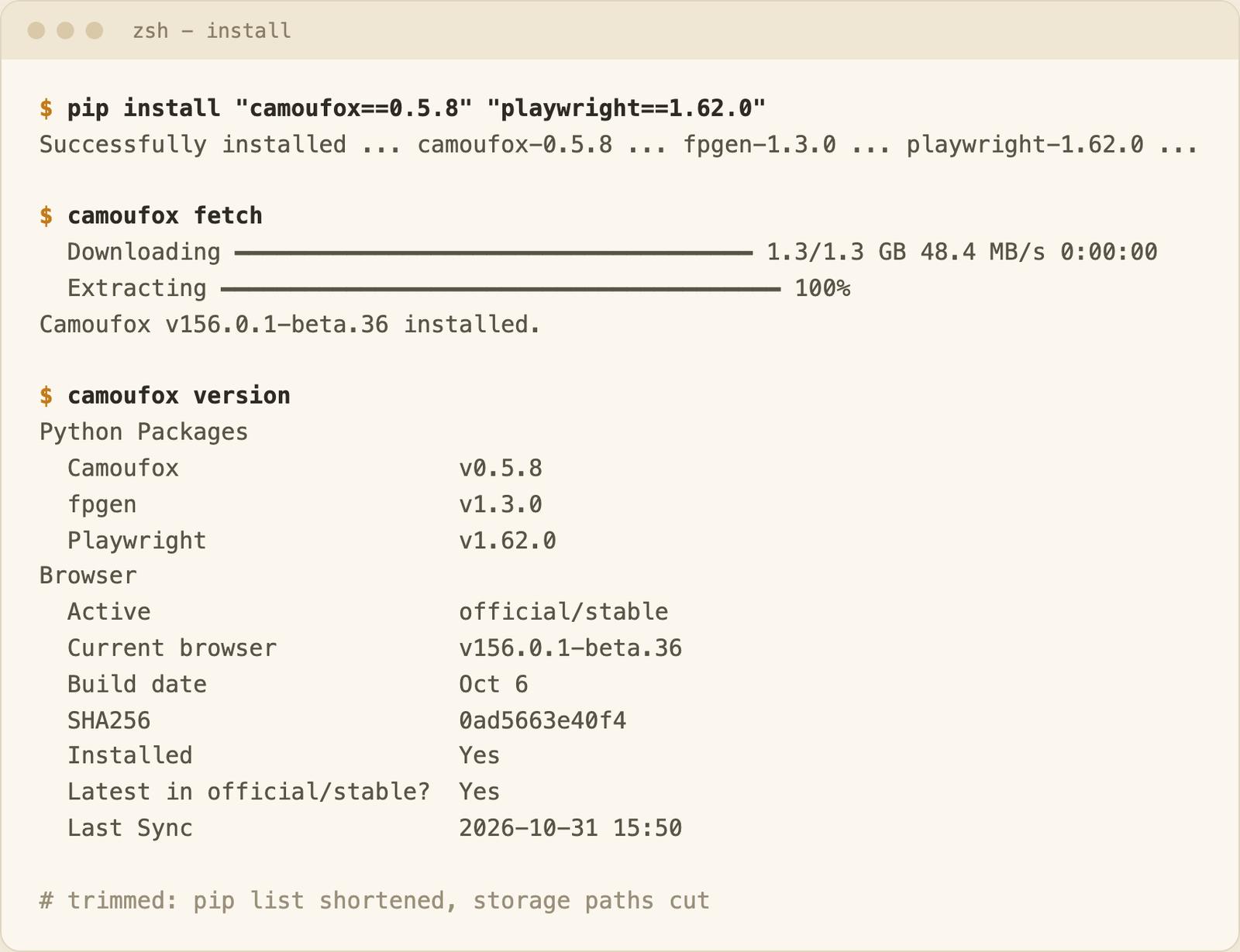
pip install "camoufox==0.5.8" "playwright==1.62.0"
camoufox fetch
from camoufox.sync_api import Camoufox

with Camoufox(headless=True) as browser:
    page = browser.new_page()
    page.goto("https://quotes.toscrape.com/")
    print(page.title())  # Quotes to Scrape
I ran both. The catch is cost: the browser is a 1.3 GB download and 2.3 GB on disk, and on my Mac a launch took about 1.4 s with os="macos" and about 11.7 s with os="windows" (medians; not on Linux in Docker, see below). With no os argument the OS is random, and most of my launches took 10 s or more (11 of 15 in one run, 13 of 15 in the other).
Last updated: October 31, 2026. I run WebCrawlerAPI, so I sell a product in the same area.
What Is Camoufox?
Camoufox is a custom Firefox build that Playwright talks to. The browser is MPL-2.0, the Python and TypeScript packages are MIT, and the cursor movement component is LGPLv3-or-later (per the GitHub README). PyPI lists one maintainer (daijro), and builds ship as betas.
The README says "This project is under development. It may not be suitable for stable production use." and "Camoufox can still be detected." I ran no bot-detection site, so I make no claim about being undetectable.
For other Python options, see best Python web scraping libraries.
How I Tested This
Versions: camoufox 0.5.8, Playwright 1.62.0, Camoufox browser v156.0.1-beta.36, Python 3.11.2, macOS 15.6.1 on an Apple M2 Max. Everything ran in an isolated folder, against local pages on 127.0.0.1 and two practice sites (quotes.toscrape.com and books.toscrape.com, 28 public requests from my side in total, all logged, plus 35 calls to the WebCrawlerAPI scrape endpoint in the comparison below, 5 of them rejected with HTTP 403). Timing tests used a local page with 100 ms of simulated latency, os="macos" and headless mode, on a laptop busy with other work (load average 3 to 14). Treat every number as one machine on one afternoon.
The Docker tests ran in a container on the same Mac (native linux/arm64, no network). Not run: real proxies, geoip, add-ons, an x86_64 Linux host, and any site with bot protection.
Install Camoufox in Python
Use a virtual environment and pin both packages. Camoufox pulls Playwright in, and an unpinned Playwright has broken installs before: issue #653 (opened June 29, 2026, now closed) reports that a fresh install picked up Playwright 1.61, which broke browser launch. The workaround was playwright==1.60.0.
Same two commands as the quick start. camoufox fetch downloads the paired Firefox build from GitHub releases, and camoufox version prints what you got.
The PyPI page suggests camoufox[geoip]. I installed without the extra because I never use geoip.
Two things surprised me. camoufox fetch installed v156.0.1-beta.36 (the build paired with 0.5.8), not the v158.0.1-beta.41 on GitHub. And the browser took 1.3 GB to download and 2.3 GB on disk (du -sk: 2,396 MB, of which 2,202 MB is the app's Resources folder). Run camoufox remove to uninstall.
| Problem | What you see | Fix | Source |
|---|---|---|---|
| Unpinned Playwright | Browser launch fails (Playwright 1.61, per the issue) | Pin camoufox and playwright | Issue #653, not reproduced |
| headless="virtual" on macOS | VirtualDisplayNotSupported: Virtual display is only supported on Linux. | Use headless=True | I ran it |
| Python older than 3.10 | pip refuses the install | Use Python 3.10 or newer | PyPI metadata, not run |
Your First Camoufox Script: Sync, Async and a Real Scrape
The quick start used the sync API. Without headless=True Camoufox opens a visible window (the docs say headless defaults to False). It printed Quotes to Scrape.
The async variant uses AsyncCamoufox from camoufox.async_api:
import asyncio
from camoufox.async_api import AsyncCamoufox

async def main():
    async with AsyncCamoufox(headless=True) as browser:
        page = await browser.new_page()
        await page.goto("https://quotes.toscrape.com/")
        print(await page.title())

asyncio.run(main())
It printed the same title. Camoufox accepts all Playwright Firefox launch options, and everything after new_page() is the plain Playwright API, so the Playwright scraping guide applies unchanged.
A small scrape: 3 pages of quotes, clicking "Next" between pages.
import json
import time
from camoufox.sync_api import Camoufox

quotes = []
with Camoufox(headless=True) as browser:
    page = browser.new_page()
    page.goto("https://quotes.toscrape.com/")
    for i in range(3):  # 3 pages in total
        for q in page.locator("div.quote").all():
            quotes.append({
                "text": q.locator("span.text").inner_text(),
                "author": q.locator("small.author").inner_text(),
                "tags": q.locator("a.tag").all_inner_texts(),
            })
        if i < 2:
            time.sleep(1)  # one load per second at most
            page.locator("li.next a").click()
            page.wait_for_load_state()

print(len(quotes), "quotes")
It returned 30 quotes. I fetched robots.txt on quotes.toscrape.com and books.toscrape.com with webcr first. Both returned 404, so there were no rules to follow.
Fingerprints: What Actually Changes
A local page on 127.0.0.1 reads a dozen navigator, screen, WebGL and Intl values and posts them back. No third-party fingerprint site was involved. I loaded it in Playwright Chromium, Playwright Firefox and Camoufox (3 default launches, 2 with os="windows"), all headless on the same Mac.
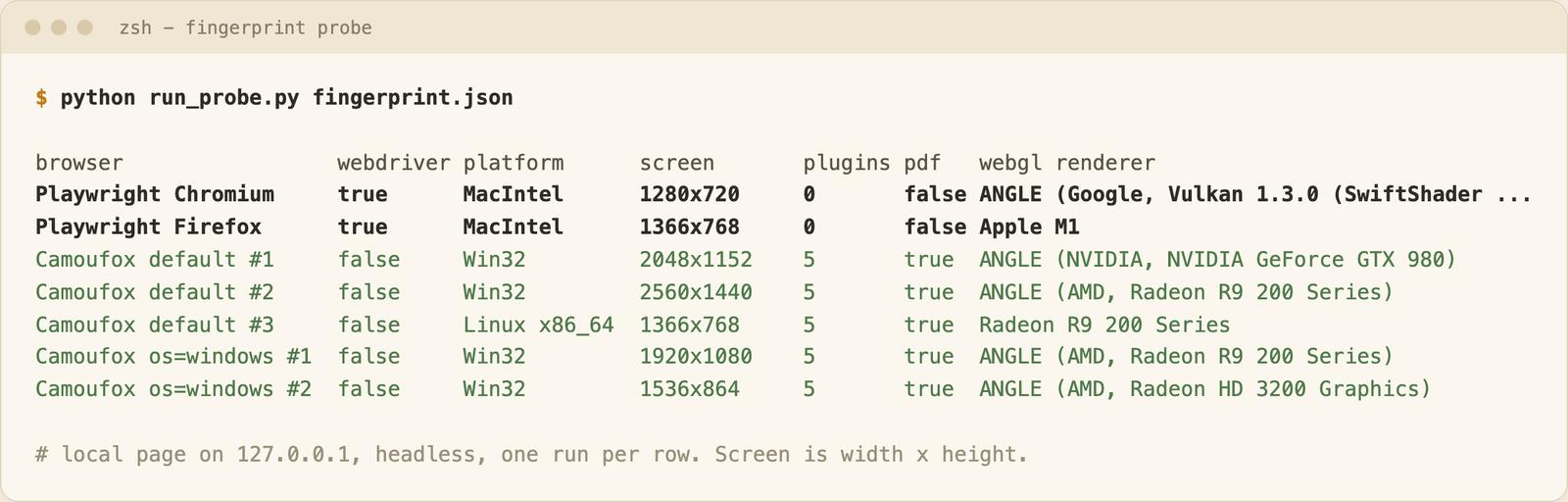
What differed:
- navigator.webdriver was true in both stock Playwright browsers and false in all 5 Camoufox launches.
- The platform changed per launch although the host is a Mac (Win32, Win32, Linux x86_64). With os="windows" both launches reported Win32.
- Screen size changed in every launch and the GPU in most, even with os fixed.
- Stock Playwright reported 0 plugins and pdfViewerEnabled: false. Camoufox reported 5 plugins and true.
hardwareConcurrency (12, the real value here), languages and the timezone stayed the same.
So Camoufox presents a different, plausible-looking device on each launch. "Plausible" and "undetectable" are different claims, and I tested no detector.
Camoufox Options: Headless, Proxy, Locale and Humanize
The parameters come from the Camoufox usage reference. (The /python/parameters/ page the docs link to returns 404.)
| Option | What it does | Status |
|---|---|---|
| headless=True | Headless Firefox. Docs default is False (visible window) | Ran |
| headless="virtual" | Runs headful in Xvfb. Linux only | Raises VirtualDisplayNotSupported on macOS. Worked in Docker on Linux (see below) |
| os="windows" / "macos" / "linux" or a list | Picks the OS for the generated fingerprint. Random by default | Ran. Changes launch time a lot, see the cost section |
| locale="fr-FR" | Sets locale for the Intl API and navigator.language | Ran: navigator.language was fr-FR |
| block_images=True | Blocks all image requests | Ran: 10 local images, 10 requests and 2.7 MB down to 0. Pass i_know_what_im_doing=True to silence the warning |
| humanize=True | Moves the cursor along a curve before a click. A float sets the max seconds | Ran: median 0.6 s per click instead of 0.03 s (15 clicks each) |
| proxy={...} | Playwright proxy dict | Not run |
| geoip="IP" or True | Derives timezone, locale and coordinates from an IP | Not run |
| addons=[...] | Extra Firefox add-ons, as paths to extracted folders | Not run |
block_images. With block_images=True the package prints a LeakWarning: "Blocking image requests has been reported to cause detection issues on major WAFs. If this is intentional, pass i_know_what_im_doing=True." (WAF means web application firewall.) The flag only silences the warning. On a local page with 10 noise PNGs, blocking cut the median load from 110 ms to 72 ms (ranges overlap) and the image requests from 10 to 0 (2.7 MB).
humanize. Plan for about 0.6 s per action.
geoip. I never launched with geoip: the package's camoufox/ip.py queries public IP services such as api.ipify.org.
Proxy and add-ons. These configs are shown only, with placeholder values, and I syntax-checked them without launching:
from camoufox.sync_api import Camoufox

proxy = {
    "server": "http://proxy.example.com:8000",
    "username": "USER",
    "password": "PASS",
}

with Camoufox(proxy=proxy, geoip="203.0.113.0") as browser:  # not run
    ...
IP quality is not Camoufox's job. Proxies for web scraping and residential vs datacenter proxies cover that part. For the headless question, see what is a headless browser.
How Much Does Camoufox Cost Compared to Playwright?
I measured launch time and memory on one laptop: 15 rounds, each round launching every browser once (interleaved, after one warm-up launch each). Launch time runs from starting the Playwright driver until a 200-row local page has loaded. Memory is the summed RSS (the memory a process holds in RAM) of the browser processes after load, excluding the Playwright driver. macOS RSS counts shared pages more than once, so compare rows, not absolutes.
| Browser (headless) | Launch, median (min to max) | Memory, median | Install size |
|---|---|---|---|
| Playwright Chromium | 521 ms (447 to 1,291) | 245 MB | 196 MB |
| Playwright Firefox | 1,519 ms (1,276 to 5,161) | 1,078 MB | 282 MB |
| Camoufox, os="macos" | 1,441 ms (1,287 to 6,055) | 1,386 MB | 2.3 GB |
| Camoufox, os="windows" | 11,719 ms (10,271 to 40,708) | 2,951 MB | 2.3 GB |
The laptop was busy during this run, and the maximums show it (the default-OS series, not in the table, had a 46 s launch).
Read the table this way:
- Camoufox with a matching OS launches in about the same time as Playwright Firefox. The 78 ms gap is inside the noise. It uses about 300 MB more memory.
- Chromium launches about 3x faster and uses about a quarter of the memory.
- Spoofing a different OS made each launch about 10 s slower and used about 1.5 GB more memory. os="linux" was as slow as os="windows" in a separate 6-launch test.
Why a spoofed OS is slow on a Mac. With os="windows" the Python side was cheap (launch_options() 0.1 s, driver 0.15 s) and the time went into the browser: 10.4 to 11.1 s in total across two runs, against 1.4 to 2.0 s for os="macos". It is not a first-run cache (the second run matched), and os="linux" matched "windows". custom_fonts_only=True with fonts=["Arial"] (and i_know_what_im_doing=True) brought os="windows" down to 1.5 s, while config={"fonts": []} changed nothing. The package warns that this makes the fingerprint inconsistent, so it is a diagnosis, not a fix. My best reading is bundled-font handling when a Mac spoofs another OS. I did not isolate the exact step. On a Mac, launch once and reuse the browser.
Camoufox Docker Setup on Linux with a Virtual Display
I built this Camoufox Docker image on the same Mac. It worked, and the slow-launch penalty did not appear. The base image is pinned by digest and the browser is the native lin.arm64 build of the same release (beta.36), so nothing was emulated. The Camoufox virtual-display docs mention only xvfb for Linux, so I added the Firefox runtime libraries with Playwright's own install-deps firefox step.
# Test image for the Camoufox tutorial. Native linux/arm64 on an Apple Silicon Docker Desktop VM.
FROM python:3.11-slim-bookworm@sha256:94a8fee35252d06ab75856f15f12c7bae67b10e8a6da93c7fded82b2610926cd
RUN apt-get update \
 && apt-get install -y --no-install-recommends xvfb \
 && rm -rf /var/lib/apt/lists/*
RUN pip install --no-cache-dir "camoufox==0.5.8" "playwright==1.62.0" psutil==7.2.2 \
 && python -m playwright install-deps firefox \
 && rm -rf /var/lib/apt/lists/*
RUN camoufox fetch
WORKDIR /app
COPY fixture.py memory.py probe.html server.py run_all.py /app/
ENTRYPOINT ["python", "/app/run_all.py", "/out"]
The last three lines are my test harness. It serves a local page inside the container:
docker run --rm --network none --shm-size=1g -v "$PWD/out:/out" camoufox-tutorial-test:local
I set --shm-size=1g and did not test the default, so I can't say what it prevents. The virtual display is one argument (Linux only):
with Camoufox(headless="virtual") as browser:  # starts Xvfb
    page = browser.new_page()
- headless=True and headless="virtual" both loaded the page (1.2 s with "virtual", Xvfb seen running). The image is 3.4 GB.
- Launch medians over 10 runs were 1,212 to 1,232 ms for all four os values, inside each other's ranges (1,156 to 1,294 ms).
- Caveat: this is a Docker Desktop VM on Apple Silicon, not an x86_64 server, and I did not measure memory under load.
Which mode I would pick: start with headless=True. It needs no xvfb and behaved the same in my local test. Use "virtual" only if a site needs a headful browser (I tested no such site).
Camoufox for an AI Knowledge Base: Reuse, Concurrency and Markdown
If the pages feed an AI knowledge base, you fetch many pages and want clean markdown. I ran two local tests (on the Mac) and a small real loop for that.
Reuse one browser
I fetched 30 local pages (100 ms of simulated server latency each) three ways, with os="macos", 3 repeats after a warm-up:
| Approach | Per page, median | Pages per second (pages / total time) | Peak memory, median (range over 3 repeats) |
|---|---|---|---|
| One browser, one context (30 pages) | 270 ms | 2.8 | 1,818 MB (1,657 to 2,248) |
| One browser, new context per page (30 pages) | 273 ms | 2.7 | 2,104 MB (1,938 to 2,161) |
| New launch per page (10 pages) | 1,619 ms | 0.6 | 1,218 MB (1,213 to 1,231) |
Launching per page is about 5x slower. A fresh context per page costs nothing measurable. A browser that served 30 pages peaked 600 to 900 MB above a fresh launch. I would restart it periodically and watch memory, but that interval is a guess (I measured 30 pages).
Rule I would use: launch once per worker, open a new context per page, and restart on a schedule.
Run pages in parallel
I used the async API with one browser and one context per worker, 60 pages per run, 5 repeats:
| Parallel workers | Pages per second, median | Peak memory, median |
|---|---|---|
| 1 | 2.8 | 2,520 MB |
| 3 | 5.3 | 2,900 MB |
| 5 | 5.4 | 3,822 MB |
Three workers nearly doubled throughput. Five bought nothing here and cost about 900 MB more. The plateau may be partly my busy laptop.
Sizing rule I would use: start with 3 workers per machine, then add machines instead of workers. This is one laptop, so treat it as a starting point.
Turn pages into markdown files
The loop: fetch with Camoufox, convert with markdownify 1.2.2, write one .md file per page with frontmatter. I ran it on 5 pages of quotes.toscrape.com (robots.txt returned 404 again). It aborts stylesheets and fonts, so 5 pages cost 5 requests.
import datetime, pathlib, time
from camoufox.sync_api import Camoufox
from markdownify import markdownify as md

urls = [f"https://quotes.toscrape.com/page/{n}/" for n in range(1, 6)]
out = pathlib.Path("kb")
out.mkdir(exist_ok=True)

def only_documents(route):
    route.fallback() if route.request.resource_type == "document" else route.abort()

with Camoufox(headless=True, os="macos") as browser:
    page = browser.new_page()
    page.route("**/*", only_documents)
    for n, url in enumerate(urls, 1):
        page.goto(url)
        title = page.title()
        html = page.locator("div.col-md-8:has(div.quote)").inner_html()
        body = md(html, heading_style="ATX").strip()
        fetched = datetime.datetime.now(datetime.timezone.utc).strftime("%Y-%m-%dT%H:%M:%SZ")
        (out / f"quotes-page-{n}.md").write_text(
            f'---\nsource_url: {url}\ntitle: "{title}"\nfetched_at: {fetched}\n---\n\n{body}\n')
        time.sleep(1)  # one load per second at most
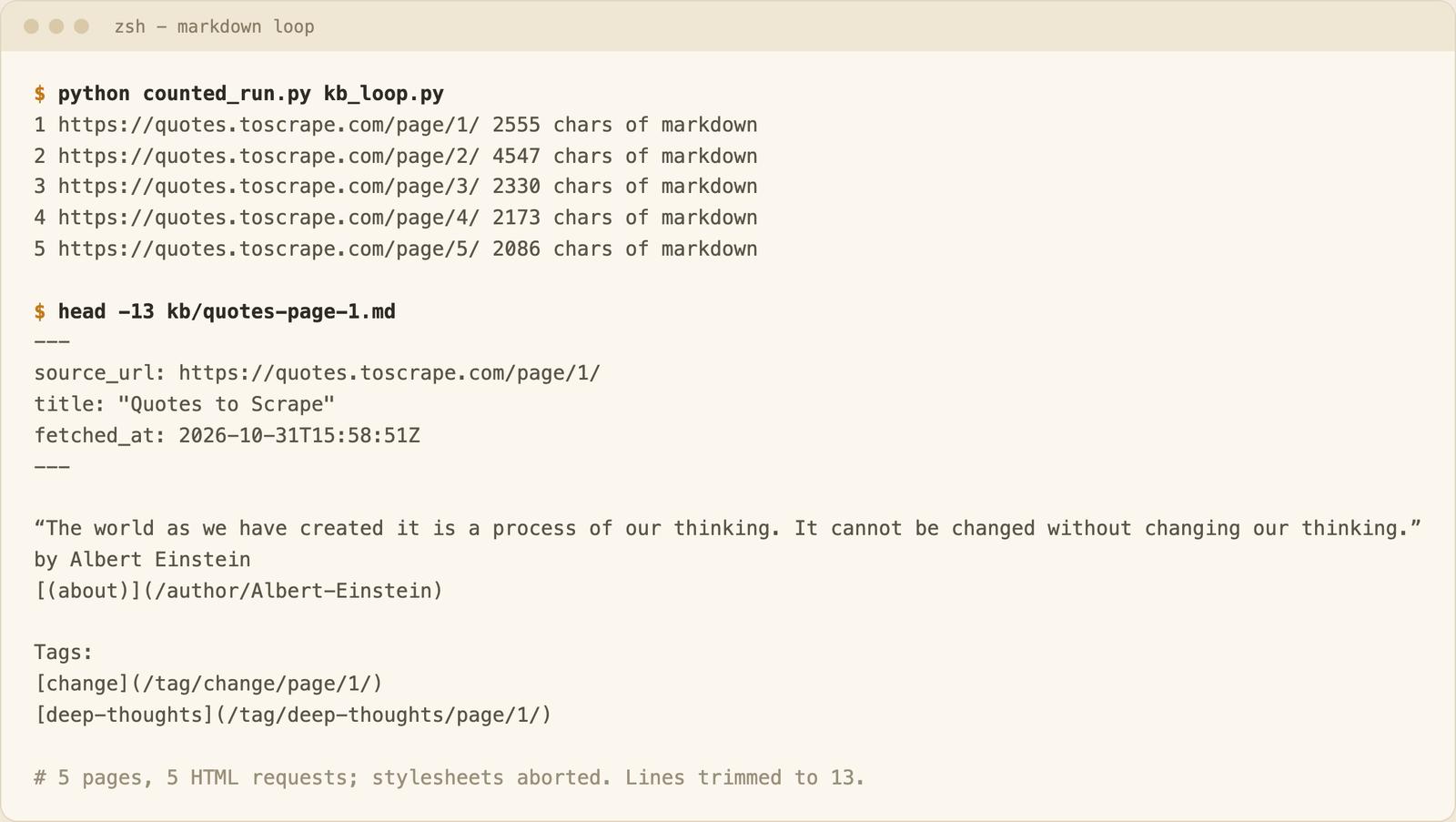
It produced 5 files with markdown bodies of 2,086 to 4,547 characters (the outputs folder keeps 3 samples). The first lines of quotes-page-1.md, with the curly quotes straightened:
---
source_url: https://quotes.toscrape.com/page/1/
title: "Quotes to Scrape"
fetched_at: 2026-10-31T15:58:51Z
---

"The world as we have created it is a process of our thinking. It cannot be changed without changing our thinking."
by Albert Einstein
[(about)](/author/Albert-Einstein)

Tags:
[change](/tag/change/page/1/)
The result is usable, and the work that is still yours shows: I picked the selector by hand, links stay relative, and every site needs its own selector. The loop in the post has no retries, deduplication, change detection or re-fetch schedule.
Rule: budget your time for per-site selectors and cleanup. The fetching is the small part.
My take: for an AI knowledge base I would not start with Camoufox. I would start with an HTTP client, move to a plain Playwright browser when the page needs JavaScript, and reach for Camoufox only when I have a site I am allowed to scrape and stock browsers fail on it. Each step costs more memory, install size and version drift.
When Not to Run Camoufox Yourself
- No CAPTCHA solving. Camoufox does not do it.
- Blocking is an ops job, and proxy quality, retries and rate limits are yours. See 403 Forbidden in web scraping and how to avoid getting blocked when scraping.
Camoufox vs the WebCrawlerAPI Scrape Endpoint on the Same 5 Pages
I run WebCrawlerAPI, so weigh this accordingly. I fetched the same 5 pages as the markdown loop (quotes.toscrape.com, pages 1 to 5) once each with POST /v2/scrape (output_formats: ["markdown"], main_content_only left at its default), in the same session as the Camoufox loop. The API does not use Camoufox. I did not test either tool's anti-bot ability, since the site has no protection.
An excerpt of snippets/api_compare.py, the script I ran:
import json, urllib.request

url = "https://quotes.toscrape.com/page/1/"
req = urllib.request.Request(
    "https://api.webcrawlerapi.com/v2/scrape",
    data=json.dumps({"url": url, "output_formats": ["markdown"]}).encode(),
    headers={"Authorization": "Bearer YOUR_API_KEY",
             "Content-Type": "application/json",
             "User-Agent": "camoufox-tutorial-compare/1.0"},
)
with urllib.request.urlopen(req, timeout=120) as resp:
    page = json.load(resp)  # fields used here: success, markdown, page_title
| Camoufox loop | Scrape endpoint | |
|---|---|---|
| Latency per page | 0.14 to 0.15 s after a 1.2 s launch and a 1.14 s first page (1.7 s total) | Fresh fetch (max_age=0, 20 calls): median 2.33 s, range 2.16 to 2.87 s |
| Latency, repeat of an unchanged page | No built-in cache; you add your own | Cached (5 calls): median 0.39 s, range 0.37 to 0.51 s |
| Setup | Python packages, a 2.3 GB browser, your machine | An API key |
| Output | 10 quotes per page, 2,086 to 4,547 characters; pager links, no header or sidebar | 10 quotes per page, 2,341 to 4,802 characters; Login link and "Top Ten tags" sidebar on all 5 pages, no pager links |
| Failure handling | Yours: my script retries twice with backoff and skips duplicate content (neither fired) | success: false with a documented error_code |
| Cost | Your machine, proxies and time | Per crawled page on the pricing page ($0.002 on Pay as you go, $0.001 on Business); the response reports no cost |
Once the browser was running, Camoufox was much faster per page. The API call includes the network round trip and whatever the service does server-side (I did not look inside). My first session (default cache setting) also had a 15.75 s and an 8.53 s call that did not reproduce in 20 later fresh calls, and it did not record cache headers, so I can't say why. The Camoufox loop fetched only the HTML document and pulled out the quotes with a selector I wrote. The API returned the whole page. In a retest, main_content_only: true returned the same markdown length on all 5 pages. The fresh and cached figures come from a retest of 25 calls (snippets/api_latency.py, results in outputs/api_runs/). The API caches responses for 7 days by default (caching docs), so repeats are fast but can be stale. Set max_age=0 when pages change. A Camoufox loop could cache too. This was 5 pages on a busy laptop.
The API has real downsides. It costs money (the pricing page lists $0.002 per crawled page on Pay as you go, so about $0.01 for these 5 if a scrape counts as a crawled page; the docs do not say, and I did not check my bill). It adds a network round trip, and your pages go through a third party. One catch: my first 5 calls returned HTTP 403 with a non-JSON body in about 0.1 s. I did not dig into which layer returned it. An explicit User-Agent header fixed it, so set one when you call it with urllib. For many pages, the docs describe a separate crawl job.
Rule I would use: run Camoufox yourself for a few sites you know and are allowed to scrape, where you want browser control. Use an API when you want markdown from many sites and do not want to own browsers and upgrades.
FAQ
How do I install Camoufox? Run pip install "camoufox==0.5.8" "playwright==1.62.0", then camoufox fetch to download the browser (1.3 GB).
Is Camoufox undetectable? I don't claim that, and I did not test it against any detector. The README says "Camoufox can still be detected." What I measured is that it presents a different, plausible-looking device on each launch. Use it only on sites you are allowed to scrape (web scraping ethics).
Does Camoufox work in Docker on Linux? Yes, in my test: a python:3.11-slim-bookworm image ran both headless=True and headless="virtual" (native arm64, Dockerfile above).
Camoufox or Playwright? Playwright Chromium is the cheapest option I measured. Camoufox is for when you need a Firefox-based browser with generated device values.
