Last updated: November 2, 2026. I run WebCrawlerAPI, which is one of the servers here, so I am not neutral, and I say where it falls short. I have no vendor deals. One scripted run per call (three for latency), public pages, basic configuration, no tuning.
A web search MCP and an MCP server for web scraping do different jobs: search, read one page, crawl a site, or drive a browser. Most "best MCP servers" lists mix them and measure none. I connected 14 servers to one harness (the WebCrawlerAPI local and remote servers count separately). Twelve returned page or search content. Browserbase returned no page content, and Jina answered every call with HTTP 402, so neither has results beyond tool definitions.
Short answer: for search, Exa (Tavily is compact too, but I did not score its relevance). For a page you have a URL for, WebCrawlerAPI, Exa's fetch tool or Fetch. For a browser, Playwright MCP. For importing a whole site into a knowledge base, MCP is the wrong layer, and the last test in this post shows by how much.

Quick answer: which MCP server for which job
| Job | My pick | Why, from the runs |
|---|---|---|
| Search the web | Exa, or Tavily | Five results per query. Exa returned 2,808 to 3,410 tokens, Tavily 1,343 to 1,545 (relevance not scored). Definitions cost 1,121 and 1,651 tokens, against 8,282 for Brave. |
| Read one page as markdown | WebCrawlerAPI, Exa fetch or Fetch | On the MCP docs page they returned 484 to 663 tokens, against 11,000 to 12,800 for Firecrawl, Bright Data and Crawl4AI. |
| Page behind JavaScript | WebCrawlerAPI, Firecrawl or Crawl4AI | All three passed the quotes JS page, and so did Exa. Fetch cannot run JavaScript. |
| Crawl a few pages live | Firecrawl or Tavily | Both have a crawl tool. Firecrawl returned full pages, Tavily returned short excerpts. |
| Click, type, log in | Playwright MCP | A real browser. The cost is 25 tools and a large snapshot per page. |
| Import a site into a knowledge base | An API or SDK | 50 docs pages cost 8,882 tokens of agent context through a crawl API and 54,121 to 91,978 through MCP. |
No server wins every row. Fetch is free and good enough for many cases, so I would start there before paying for anything.
How I tested
The harness
Everything ran inside Docker on a Mac (linux/arm64, Node 22). A script drives each server with the official MCP TypeScript SDK client (1.32.2): one tools/list call, then a fixed list of tool calls. Keys came from the environment and were redacted from saved output. I set a spend cap for each paid provider before round two.
I tested in two rounds on the same day. Versions:
- Round one: Playwright MCP 0.0.84, Bright Data MCP 4.3.0, Brave Search MCP 2.1.4, Firecrawl MCP 3.36.0, Fetch 2026.10.28, Exa's hosted server 3.5.0, and the WebCrawlerAPI local server built from our source (1.0.0).
- Round two: Crawl4AI (Docker image unclecode/crawl4ai:0.8.6, MCP over SSE), Tavily MCP 0.2.22, Apify actors-mcp-server 0.20.0, Puppeteer MCP 2025.5.12, Browserbase MCP 3.0.0, and Jina's hosted server 1.9.0.
- Round three, same day: the WebCrawlerAPI remote server (webcrawlerapi 0.1.0, over OAuth) and Bright Data's search with a SERP zone created. Single runs.
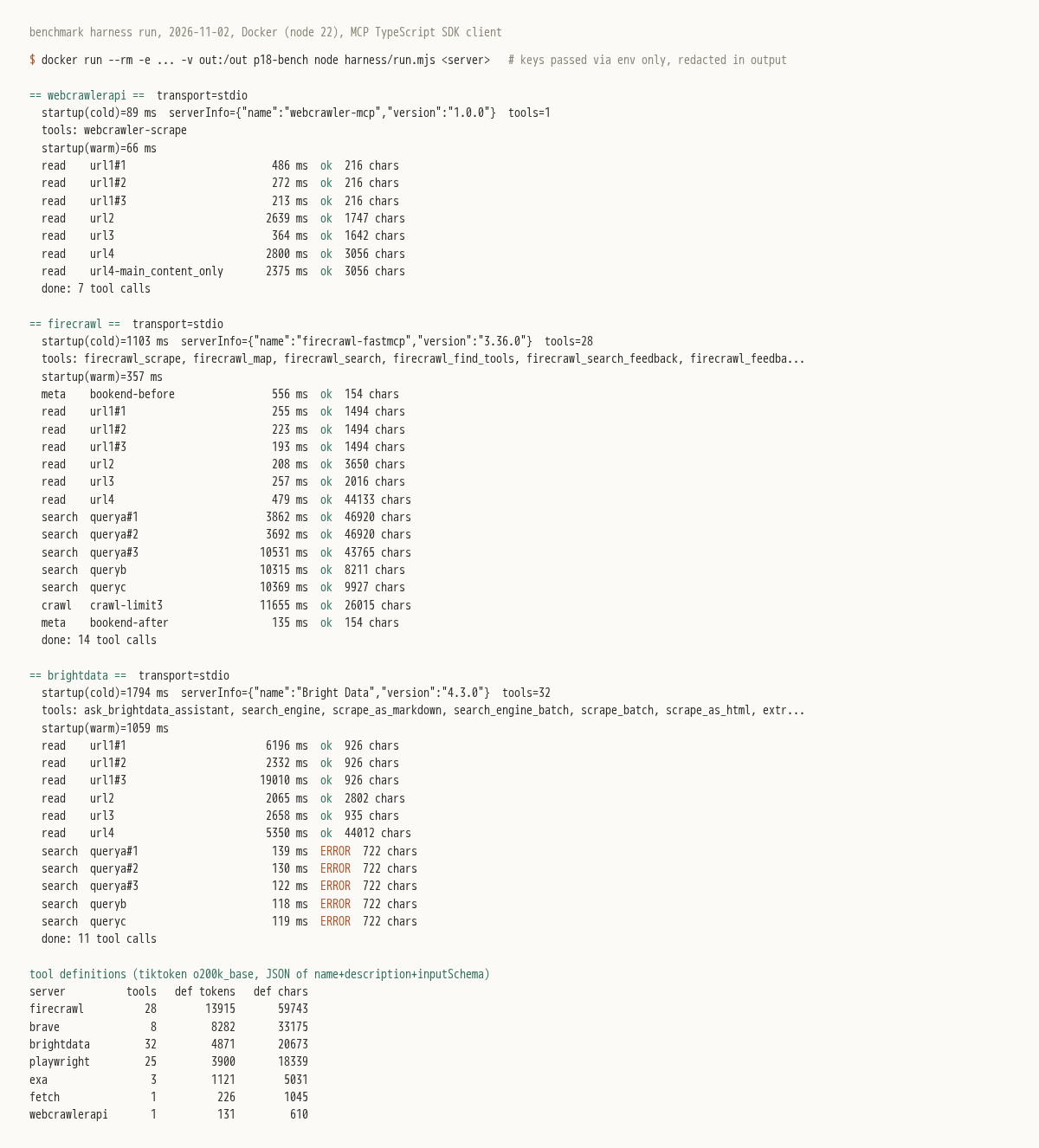
The test set
Four URLs for read tools, all public and allowed by robots.txt (I checked from inside the container):
- https://example.com, fetched 3 times for a median.
- A static product page on books.toscrape.com.
- https://quotes.toscrape.com/js/, a page that builds its content with JavaScript.
- The MCP intro page on modelcontextprotocol.io, a real docs page with navigation.
Three queries for search tools: model context protocol specification, how to rate limit a web crawler and firecrawl vs crawl4ai, chosen before running anything. The third favors Firecrawl's competitors on purpose.
Round two added three harder pages (the Python built-in functions page, the Swagger Petstore JavaScript app and a Wikipedia article), fetched 3 times each, and a 50-page import of our own docs.
For each call I recorded success, wall-clock time, output tokens (tiktoken o200k_base) and a scripted "clean markdown" check: a # heading, no raw HTML tags, and a sentinel string such as "Albert Einstein" on the JS page.
What this test does not show
- Result quality for search. I read the top result by eye, and I did not score Tavily's.
- Anti-bot performance. These pages are easy by design.
- Exact Claude token costs. o200k_base is an approximation.
Not run: Serper (I found no official MCP server, only community packages). Jina's hosted server listed 12 tools (1,926 definition tokens), but every read and search call returned HTTP 402 ("Account balance not enough to run this query") on our account, so I have no results for it.
First calls were often much slower than repeats on hosted servers, and Firecrawl's responses carried cacheState: hit on 4 calls. So I show first-run time next to the median and treat latency as indicative.
The tool-definition tax: what each server costs before it does anything
Every tool an MCP server exposes sends its name, description and input schema to the model, and most clients resend that on every turn. I counted the JSON of those three fields for each tool in the default tools/list result.
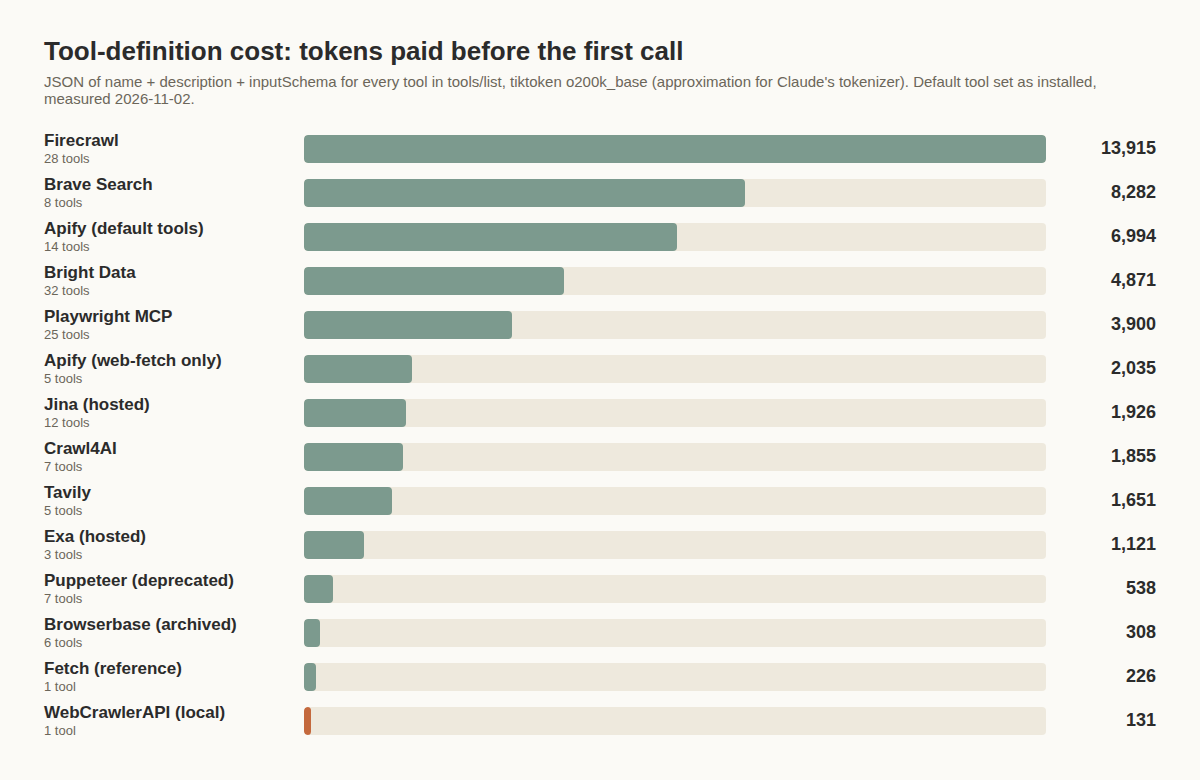
| Server | Tools | Definition tokens |
|---|---|---|
| Firecrawl MCP 3.36.0 | 28 | 13,915 |
| Brave Search MCP 2.1.4 | 8 | 8,282 |
| Apify, default tools | 14 | 6,994 |
| Bright Data MCP 4.3.0 | 32 | 4,871 |
| Playwright MCP 0.0.84 | 25 | 3,900 |
| Apify, --tools apify/web-fetch | 5 | 2,035 |
| Jina (hosted) | 12 | 1,926 |
| Crawl4AI | 7 | 1,855 |
| Tavily | 5 | 1,651 |
| Exa (hosted) | 3 | 1,121 |
| Puppeteer MCP (deprecated) | 7 | 538 |
| Browserbase MCP | 6 | 308 |
| Fetch | 1 | 226 |
| WebCrawlerAPI (local) | 1 | 131 |
| WebCrawlerAPI (remote, approximate) | 1 | about 135 |
The chart shows the first 14 rows; the remote row came later. Tool count does not predict cost. Brave has 8 tools and costs more than Bright Data's 32, because its descriptions and schemas are longer (its largest tool is 1,731 tokens). That cost lands on every turn, even when the agent only wants one scrape call.
Apify shows what you control: restricting its 14 default tools to the web-fetch actor with --tools cut 6,994 tokens to 2,035. For what a browser server costs per page on top of this, see Playwright MCP setup and token cost.
Web search MCP servers (find URLs)
Search servers answer "where is the page", not "what does the page say". WebCrawlerAPI's MCP server has no search tool, so it is absent here.
| Server | Search tool | First run | Median of 3 | Tokens per query (a / b / c) | Top result relevant (my read) |
|---|---|---|---|---|---|
| Brave | brave_web_search | 1,022 ms | 218 ms | 1,262 / 1,971 / 1,706 | yes, yes, yes |
| Tavily | tavily_search | 1,217 ms | 151 ms | 1,343 / 1,545 / 1,506 | not scored |
| Exa | web_search_exa | 1,194 ms | 239 ms | 2,808 / 3,082 / 3,410 | yes, yes, yes |
| Firecrawl | firecrawl_search | 3,862 ms | 3,862 ms | 12,833 / 2,127 / 2,621 | yes (older spec revision), partial, yes |
| Bright Data | search_engine | 51,859 ms | 51,859 ms | 769 / 508 / 863 | (a) yes, no, yes across 3 runs; (b) partial; (c) no |
Latency columns are for query (a), run 3 times. Firecrawl's three runs were 3.9, 3.7 and 10.5 seconds, and queries (b) and (c) each took about 10.3 seconds. Brave, Tavily and Exa answered in 1.0 to 1.3 seconds on the first call and about 110 to 240 ms on repeats. Bright Data's calls took 2.2 to 52.9 seconds.
Brave Search MCP
@brave/brave-search-mcp-server 2.1.4 runs over stdio with BRAVE_API_KEY. It exposes 8 tools: web, local, video, image and news search, a summarizer, brave_llm_context and brave_place_search.
Definitions cost 8,282 tokens, the second highest of all. Each search returned 5 results in 1,262 to 1,971 tokens, and the top result was relevant for all three queries. It suits compact result lists, paired with a separate read tool. Key required; I did not check the free tier.
{
  "mcpServers": {
    "brave-search": {
      "command": "npx",
      "args": ["-y", "@brave/brave-search-mcp-server"],
      "env": { "BRAVE_API_KEY": "YOUR_API_KEY" }
    }
  }
}
Exa MCP
Exa is a hosted server at https://mcp.exa.ai/mcp over streamable HTTP, reporting version 3.5.0. It has 3 tools (web_search_exa, web_fetch_exa and agent_run) and costs 1,121 definition tokens.
Each search returned 5 results and 2,808 to 3,410 tokens, about twice Brave's text per query. The first call took 1,194 ms and repeats about 230 ms, probably caching. Top results were relevant for all three queries, including a Crawlee throttling page for the rate-limit query. The same server also fetches pages (see the read section). My run used an x-api-key header. Exa's docs also describe keyless use at a free rate limit and an OAuth option, and I did not measure spend.
{
  "mcpServers": {
    "exa": {
      "url": "https://mcp.exa.ai/mcp",
      "headers": { "x-api-key": "YOUR_API_KEY" }
    }
  }
}
Tavily MCP
tavily-mcp 0.2.22 needs TAVILY_API_KEY and runs over stdio. Its 5 tools are tavily_search, tavily_extract, tavily_crawl, tavily_map and tavily_research, and the definitions cost 1,651 tokens.
Search was about as light as Brave's. 5 results of roughly 1,300 to 1,400 characters each came to 1,343 to 1,545 tokens, with a 151 ms median. Extract worked on the books, docs and Swagger pages but came back empty on the quotes JS page (3 tokens). The read table below has the numbers.
{
  "mcpServers": {
    "tavily": {
      "command": "npx",
      "args": ["-y", "tavily-mcp"],
      "env": { "TAVILY_API_KEY": "YOUR_API_KEY" }
    }
  }
}
Firecrawl search and Bright Data search
Firecrawl's search returned full page content with each hit: 12,833 tokens for five results on my first query (about 9,400 characters each), and 2,127 and 2,621 on the other two, so the size swings with the query. That helps if you want content and costs if you wanted links. It was also the slowest, at 3.7 to 10.5 seconds, and the top result for the rate-limit query was a Drupal module page, which I scored "partial".
Bright Data's search_engine needs a SERP zone named mcp_serp (or one set through SERP_ZONE). All 5 calls worked, on the default engine (Bing). Query (a) took 51.9, 52.9 and 5.5 seconds, and identical runs returned different result sets (10, 10 and 2 results); run 2 had an unrelated top result, a 3D-models page. Query (b) took 2.2 seconds with 5 results (partial). Query (c) took 46.9 seconds, led by job-listing pages, so I scored it "no". Output is titles, links and short snippets inside an untrusted-content notice. Cost is not visible in MCP responses, so I do not know what the calls cost.
MCP servers for web scraping: read one page
Read servers take a URL and return its content. Here is what each returned, with first-run time next to the median for example.com.
| Server | Tool | example.com first / median | Books page tokens | JS page (quotes) | Docs page tokens (time) |
|---|---|---|---|---|---|
| Exa | web_fetch_exa | 288 / 262 ms | 403 | 280, passed | 495 (226 ms) |
| Fetch | fetch | 5,629 / 939 ms | 416 | 29, content missing | 484 (1,770 ms) |
| Firecrawl | firecrawl_scrape | 255 / 223 ms | 968 | 558, passed | 12,689 (479 ms) |
| Bright Data | scrape_as_markdown | 6,196 / 6,196 ms | 718 | 288, failed my check | 12,754 (5,350 ms) |
| WebCrawlerAPI | webcrawler-scrape | 486 / 272 ms | 391 | 425, passed | 663 (2,800 ms) |
| Tavily | tavily_extract | 365 / 137 ms | 501 | 3, empty | 10,400 (248 ms) |
| Crawl4AI | md | 4,774 / 549 ms | 461 | 444, passed | 11,099 (1,505 ms) |
| Apify (web-fetch, 2 steps) | actor + get-dataset-items | 6,977 (1 run) | 528 | 90, failed my check | 987 (3,713 ms) |
| Playwright | browser_navigate + browser_snapshot | 867 / 84 ms | 1,156 | 1,069, sentinel found | 4,185 |
| Puppeteer | puppeteer_navigate + puppeteer_evaluate | 1,314 / 26 ms | 373 | 379, sentinel found | 571 |
"Passed" means the markdown check passed, including the sentinel text. Playwright returns an accessibility snapshot and Puppeteer returns document.body.innerText, so for those two I only note that the sentinel text was found and compare size.
The size column is the one that matters for cost. On the docs page, Firecrawl and Bright Data returned about 44,000 characters, a full page with navigation, and Tavily and Crawl4AI returned between 36,000 and 39,000. WebCrawlerAPI, Exa and Fetch returned 2,263 to 3,056. That is not truncation: Fetch returned the same 2,263 characters with its limit raised to 50,000, and Exa's 2,460 is under its default cap of about 3,000. I did not dig into why the others keep the navigation. On larger pages the picture changes, as the harder-pages table shows.
WebCrawlerAPI MCP
The local server runs over stdio with WEBCRAWLER_API_KEY. I tested a build from our sdk/mcp source (1.0.0), not the published npm package. It has 1 tool, webcrawler-scrape, with url, an optional prompt and an optional main_content_only flag.
Definitions cost 131 tokens, the lowest of all. All four pages passed the markdown check, including the JS-rendered quotes page (425 tokens, 364 ms). The docs page came back at 663 tokens in 2.8 seconds (on the larger pages in the harder-pages table, its output is in line with the others). main_content_only=true produced byte-identical output to the default on the docs page, so on that page the flag changed nothing.
What I did not like: on the books page the product description appeared twice, which wastes tokens. There is no search tool and no crawl tool, so crawling means our API or SDKs. The main_content_only flag is in the source but not yet in the docs page.
Per the pricing docs, pay as you go is $0.002 per crawled page, successful requests only (read November 2, 2026). There is also a hosted server at https://mcp.webcrawlerapi.com/mcp with OAuth and a get_markdown tool, described in the remote MCP docs. I measured it too, below.
The remote server got a single run over OAuth 2.1 with dynamic client registration, PKCE and scope markdown:read (I revoked the tokens afterwards). It reports as webcrawlerapi 0.1.0 with 1 tool, get_markdown, at about 135 definition tokens (approximate, reconstructed from the source). Initialize took 0.30 s. example.com returned 167 characters in 0.27 s, and books.toscrape.com returned 4,895 in 3.19 s. The other URLs differ from the standard set, so only those two compare directly: quotes.toscrape.com (the root, not /js/) returned 2,560 characters in 4.41 s. webcrawlerapi.com/docs returned 411 characters, only the H1 and the intro paragraph, and I did not investigate why. Gotcha: my first registration attempts got HTTP 403 until the client sent a User-Agent header (Python urllib's default was rejected).
{
  "mcpServers": {
    "webcrawlerapi": {
      "command": "npx",
      "args": ["webcrawler-mcp"],
      "env": { "WEBCRAWLER_API_KEY": "YOUR_API_KEY" }
    }
  }
}
Firecrawl MCP
firecrawl-mcp 3.36.0 runs over stdio with FIRECRAWL_API_KEY. It has 28 tools, including firecrawl_scrape, firecrawl_map, firecrawl_search, firecrawl_crawl, firecrawl_check_crawl_status and firecrawl_credit_usage. Definitions cost 13,915 tokens, the highest.
Scrapes were fast (193 to 479 ms), but I saw cacheState: hit on 4 of the 14 round-one calls, so some of that speed is cached results. The books page and the JS page both passed. example.com failed my check: 1,494 characters with no # heading and no sentinel text, against about 216 for the markdown-clean servers.
My 14 round-one calls used 19 credits, read from firecrawl_credit_usage before and after (698 to 679 remaining). It suits an agent that needs search, scrape and a small crawl on one connection, if 14,000 tokens of definitions is acceptable. See Firecrawl pricing, Firecrawl alternatives and Apify vs Firecrawl.
{
  "mcpServers": {
    "firecrawl": {
      "command": "npx",
      "args": ["-y", "firecrawl-mcp"],
      "env": { "FIRECRAWL_API_KEY": "YOUR_API_KEY" }
    }
  }
}
Bright Data MCP
@brightdata/mcp 4.3.0 runs over stdio with API_TOKEN. It has 32 tools, including scrape_as_markdown, scrape_batch and a family of scraping_browser_* tools. Definitions cost 4,871 tokens.
All six round-one read calls succeeded. Output arrives as page text wrapped in a security notice that tells the model the content is untrusted data. That guard adds tokens. example.com took 6.2, 2.3 and 19 seconds across three identical calls, the widest spread I saw. The JS quotes page came back without the sentinel text, so it failed my check. I did not use its batch or browser tools.
{
  "mcpServers": {
    "brightdata": {
      "command": "npx",
      "args": ["-y", "@brightdata/mcp"],
      "env": { "API_TOKEN": "YOUR_API_KEY" }
    }
  }
}
Fetch MCP server (reference)
mcp-server-fetch 2026.10.28 is the reference server from the MCP project. It needs no key, is open source and runs over stdio. It has 1 tool, fetch(url, max_length, start_index, raw), and 226 definition tokens.
It returned readable text for the books and docs pages in 416 and 484 tokens. On the JS quotes page it returned 83 characters (a login link and a "Next" link), because it does not run JavaScript. Its example.com output had no # heading, so it failed my markdown check.
{
  "mcpServers": {
    "fetch": {
      "command": "uvx",
      "args": ["mcp-server-fetch"]
    }
  }
}
Crawl4AI MCP
Crawl4AI is self-hosted. I ran the official Docker image (unclecode/crawl4ai:0.8.6) in a container next to the harness, where it serves MCP over SSE at /mcp/sse. There is no key and no fee beyond running the container. 7 tools (md, html, screenshot, pdf, execute_js, crawl and ask) add up to 1,855 definition tokens.
With its defaults, the md tool passed the books page (461 tokens), the JS quotes page (444 tokens) and the docs page (11,099 tokens). example.com was the miss: 2,774 characters, including translated copies of the page text, so it failed my check. The crawl tool is covered below. My Crawl4AI walkthrough covers the library itself.
Apify MCP
@apify/actors-mcp-server 0.20.0 turns Apify's actors into tools. It runs over stdio with APIFY_TOKEN. I started it with --tools apify/web-fetch (5 tools, 2,035 tokens) instead of the 14-tool default.
Reading a page takes two calls. The first runs the web-fetch actor (3.4 to 7.5 seconds) and hands back a reference to a dataset. The second, get-dataset-items, returns the markdown in 0.3 seconds. Both calls together cost 726 to 2,521 tokens per page. The books page (528 tokens of content) and the docs page (987) passed. The example.com and JS pages came back short (87 and 90 tokens) and failed my check. Each page ran once, and I did not measure actor cost.
Harder pages
Round two used three heavier pages, 3 runs each. The table shows content tokens, with first-run and median time in milliseconds. "Fail" means the sentinel text was missing.
| Server | Python docs (large static page) | Swagger Petstore (JS app) | Wikipedia, web crawler |
|---|---|---|---|
| WebCrawlerAPI | 28,441 (787 / 665) | 288 (4,470 / 738) | 22,187 (2,764 / 537) |
| Firecrawl | 36,659 (757 / 419) | 1,180 (266 / 266) | 23,833 (822 / 599) |
| Tavily | 27,077 (1,386 / 473) | 993 (239 / 249) | 25,181 (206 / 254) |
| Crawl4AI | 32,589 (2,091 / 2,051) | 852 (1,498 / 954) | 19,713 (846 / 722) |
| Bright Data | 30,844 (2,764 / 4,770) | empty page error | 30,239 (5,338 / 5,338) |
| Apify (1 run) | 35,084 (6,502) | fail, 59 tokens (10,161) | 25,189 (7,143) |
| Exa, default | 810 (223 / 249) | 457 (250 / 250) | 640 (261 / 255) |
| Fetch, default | 1,597 (3,661 / 1,545) | fail, 23 tokens | 1,193 (936 / 960) |
| Playwright | 70,062 (1,415 / 517) | fail, 157 tokens (my harness, no wait) | 50,320 (482 / 285) |
| Puppeteer | 19,989 (441 / 132) | fail, 9 tokens (my harness, no wait) | 10,795 (251 / 104) |
The Playwright and Puppeteer failures on the Swagger page are my harness's fault. I took the snapshot right after navigate without waiting for the app to render, so the page looked empty. Neither server has this limit, and I did not rerun them.
Exa and Fetch truncate by default, at about 3,000 and 5,000 characters, which is why their Python docs numbers are small. Both can be raised. With a 200,000 character limit, Exa returned 18,502 tokens for the Python page and 10,092 for Wikipedia, and Fetch 29,297 and 19,223. On these large pages WebCrawlerAPI (28,441 and 22,187 tokens) is in line with Firecrawl, Tavily and Crawl4AI, so its small output on the MCP docs page is not a general pattern.
WebCrawlerAPI, Firecrawl, Tavily, Crawl4AI and Exa all returned the Swagger app's content (Tavily was empty on the quotes JS page, though). Bright Data returned an empty-page error, and Fetch cannot run JavaScript.
Browser MCP servers (click, log in, interact)
Playwright MCP
@playwright/mcp 0.0.84 exposed 25 tools (3,900 definition tokens) and ran headless in the container. The model reads an accessibility snapshot, not markdown. Snapshots were 323 tokens for example.com, 1,156 for the books page, 1,069 for the JS quotes page and 4,185 for the docs page. On the large Python docs page the snapshot reached 70,062 tokens.
No key needed. Use it when the agent must interact. For plain reading it costs more: 4,185 tokens for the docs page, against 484 to 663 for the small read servers. Setup for Claude Code, Cursor and VS Code is in the Playwright MCP guide. If it will not start, see Playwright MCP not installed in npx cache. If it loses the page, see target page, context or browser has been closed.
Puppeteer MCP (deprecated, do not use for new work)
The npm package @modelcontextprotocol/server-puppeteer is deprecated ("package no longer supported", last release 2025.5.12). It has 7 tools and 538 definition tokens, and depends on Puppeteer 23.11.1, which npm flags as no longer supported (below 24.15.0).
It also refused to start in my root container until I set ALLOW_DANGEROUS=true and passed --no-sandbox through PUPPETEER_LAUNCH_OPTIONS. After that, puppeteer_navigate followed by puppeteer_evaluate with document.body.innerText returned 228 to 571 tokens per page, and the JS quotes page passed. It is fast, but the output is a plain text dump, not markdown. For a browser server in new work, use Playwright MCP.
Browserbase MCP (archived)
@browserbasehq/mcp 3.0.0 printed "This package is no longer maintained" at install, and its GitHub repo is archived (July 20, 2026). Its 6 tools (start, end, navigate, act, observe and extract) cost only 308 definition tokens. Starting and ending a cloud session worked, and I confirmed no sessions were left running. navigate gave back only the URL, not the page. extract needs the server operator's own model key (the server asks for a Gemini key), and with none supplied it failed with "API key not valid". So I have no page content from it. If you want Browserbase's act, observe and extract calls from code instead of through this server, see the Stagehand tutorial.
Scrapling also ships an MCP server (scrapling mcp). I did not put it through this harness. I drove it separately and wrote up what it listed and returned in the Scrapling tutorial.
Crawl a whole site
Three servers have a crawl tool: Firecrawl, Tavily and Crawl4AI. Bright Data has batch scraping, which takes a list of URLs, not a site. I ran one crawl call limited to 3 pages on books.toscrape.com for each of the three.
- Firecrawl returned inline after 11.7 seconds, with 3 pages and 8,686 tokens.
- Tavily returned 3 pages in 805 ms, but only 851 characters, truncated excerpts of each page. That is a list of what it found, not the content.
- Crawl4AI's crawl takes a list of URLs, not a seed. I gave it one URL and it returned the full result object including raw HTML: 179,556 characters, 46,479 tokens, in 2.35 seconds.
Importing 50 docs pages: MCP against a crawl API
A team building an AI knowledge base or support bot needs to get a whole site in, and that is where MCP gets expensive. So I imported our own docs (webcrawlerapi.com/docs, 50 of the 52 URLs in the sitemap) four ways and measured what passed through the agent's context. It is our own site and our own product, and it is a single run, so weigh it accordingly.
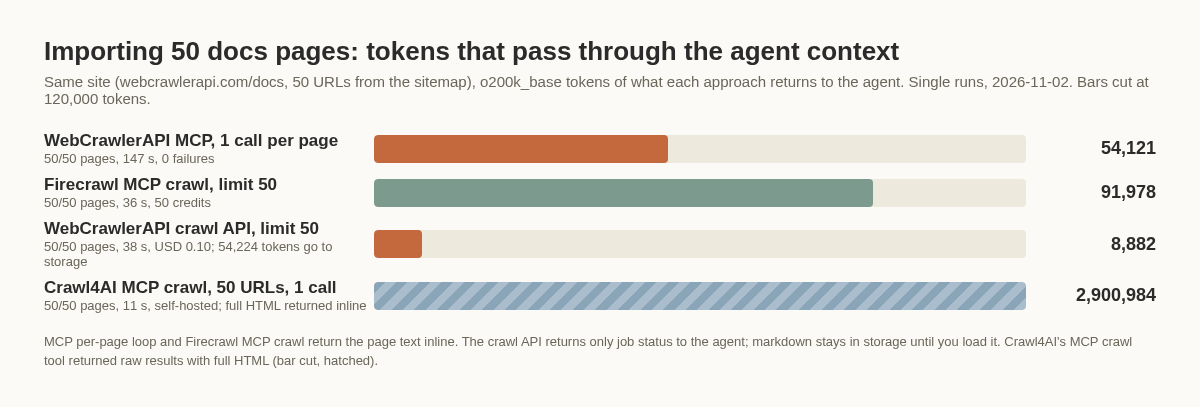
| Approach | Pages | Wall time | Tokens through agent context | Cost |
|---|---|---|---|---|
| WebCrawlerAPI crawl API, limit 50 | 50 of 50 | 38 s (12 polls) | 8,882 (final status response) | USD 0.10 |
| WebCrawlerAPI MCP, one call per page | 50 of 50 | 147 s | 54,121 | not measured |
| Firecrawl MCP, firecrawl_crawl limit 50 | 50 of 50 | 36 s | 91,978 | 50 credits |
| Crawl4AI MCP, one call with 50 URLs | 50 of 50 | 11 s | 2,900,984 | self-hosted |
The crawl API kept the markdown in storage (about 54,000 tokens of it). The final status response was 8,882 tokens. I did not count the 11 earlier polls, so the real figure depends on how the agent polls (status checks without items, then fetching content outside the context, keeps it low). The per-page MCP loop pushed all 54,121 tokens through the model and took four times as long, since the calls ran one at a time. I did not measure what that loop costs. Firecrawl's MCP crawl matched the API on speed but returned all 50 pages inline, 91,978 tokens. Crawl4AI's tool sent back raw HTML for every page, 2.9 million tokens, more than any context window could hold.
All four got 50 of 50 pages. What differs is where the content goes. Inline suits an agent answering one question, but for an import it is a cost.
The crawl API call I measured looked like this (placeholder host and key), per the crawl endpoint docs:
curl --request POST \
  --url https://api.webcrawlerapi.com/v1/crawl \
  --header 'Authorization: Bearer YOUR_API_KEY' \
  --header 'Content-Type: application/json' \
  --data '{
    "url": "https://example.com/docs",
    "items_limit": 50,
    "output_formats": ["markdown"],
    "whitelist_regexp": ".*example\\.com/docs.*",
    "respect_robots_txt": true
  }'
It returns a job id right away. You poll GET /v1/job/:id, or set a webhook_url. Each finished item carries a markdown_content_url, so your ingestion code downloads the content instead of the model reading it. The web scraping API page covers the same flow. For crawl API and self-hosted comparisons, see best web crawler API and best open-source web crawlers.
How to choose: search, read, crawl or browser
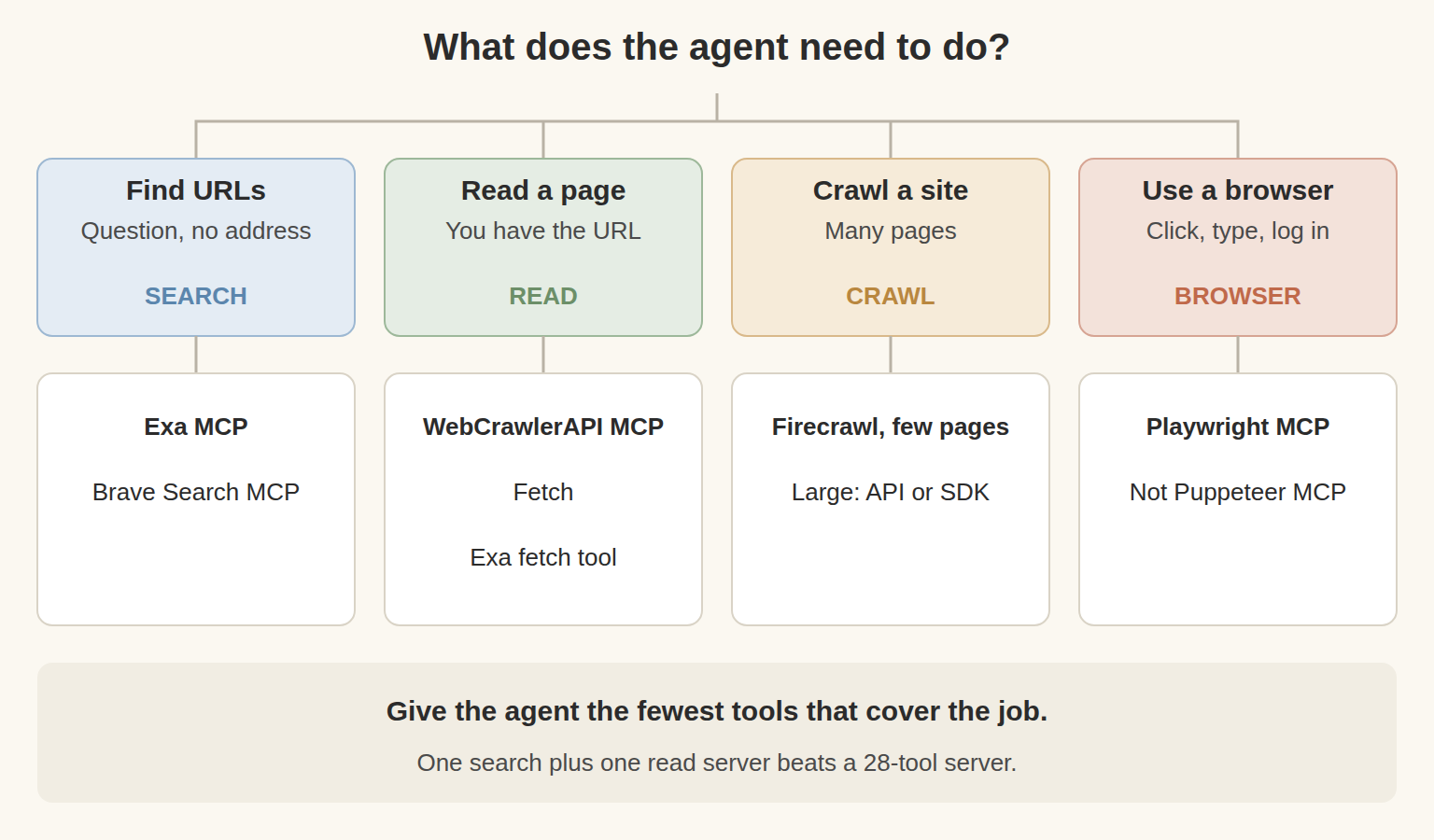
An agent browsing the web live in a chat. MCP is fine here. Pair one search server with one read server and keep the total tool count small. Exa alone covers both search and fetch with 1,121 definition tokens. Tavily plus WebCrawlerAPI costs 1,782. Brave plus Fetch costs 8,508. Add Playwright MCP only if the agent has to click or log in.
Production ingestion into an AI knowledge base or support bot. Use an API or SDK. A chat session gives you no retries, scheduling or change detection, and the import test above shows the token side. See what an AI crawl agent is and where it fits.
WebCrawlerAPI's MCP server reads one page as markdown. It has no search and no crawl tool.
FAQ
What is the best MCP server for web scraping? For one page with a URL in hand, WebCrawlerAPI, Exa's fetch tool and Fetch returned 484 to 663 tokens for the MCP docs page, against 11,000 to 12,800 for Firecrawl, Bright Data and Crawl4AI. On large pages the others return tens of thousands of tokens too, and Exa and Fetch truncate by default. Fetch cannot run JavaScript.
Which web search MCP is free? Exa's docs describe keyless search at a free rate limit, though my run used a key. Bright Data's README lists 5,000 free requests per month. Fetch needs no key but only reads a URL.
What are the best MCP servers for Claude Code? For web access, I would add one search server and one read server, and Playwright MCP only when you need interaction. A free start with a read server:
claude mcp add fetch -- uvx mcp-server-fetch
claude mcp add webcrawlerapi -e WEBCRAWLER_API_KEY=YOUR_API_KEY -- npx webcrawler-mcp
The Playwright MCP guide has the command for the browser server.
Is the Puppeteer MCP server still maintained? No. The npm package is deprecated, and it needed ALLOW_DANGEROUS=true to run in my root container. Use Playwright MCP.
Can an MCP server crawl a whole website? Firecrawl, Tavily and Crawl4AI each have a crawl tool: full pages inline, short excerpts, and raw HTML. None suits a 500-page import. Use an API.
How many tokens do MCP tool definitions use? From 131 (WebCrawlerAPI local, 1 tool) to 13,915 (Firecrawl, 28 tools) in my run, counted with o200k_base. Claude's tokenizer will give different numbers.
Next step
To try the server I tested, set up the local WebCrawlerAPI MCP server with an API key. The hosted OAuth version (get_markdown) also ran in my tests, and its setup is in the remote MCP docs. For a bulk import, start with the crawl endpoint.