
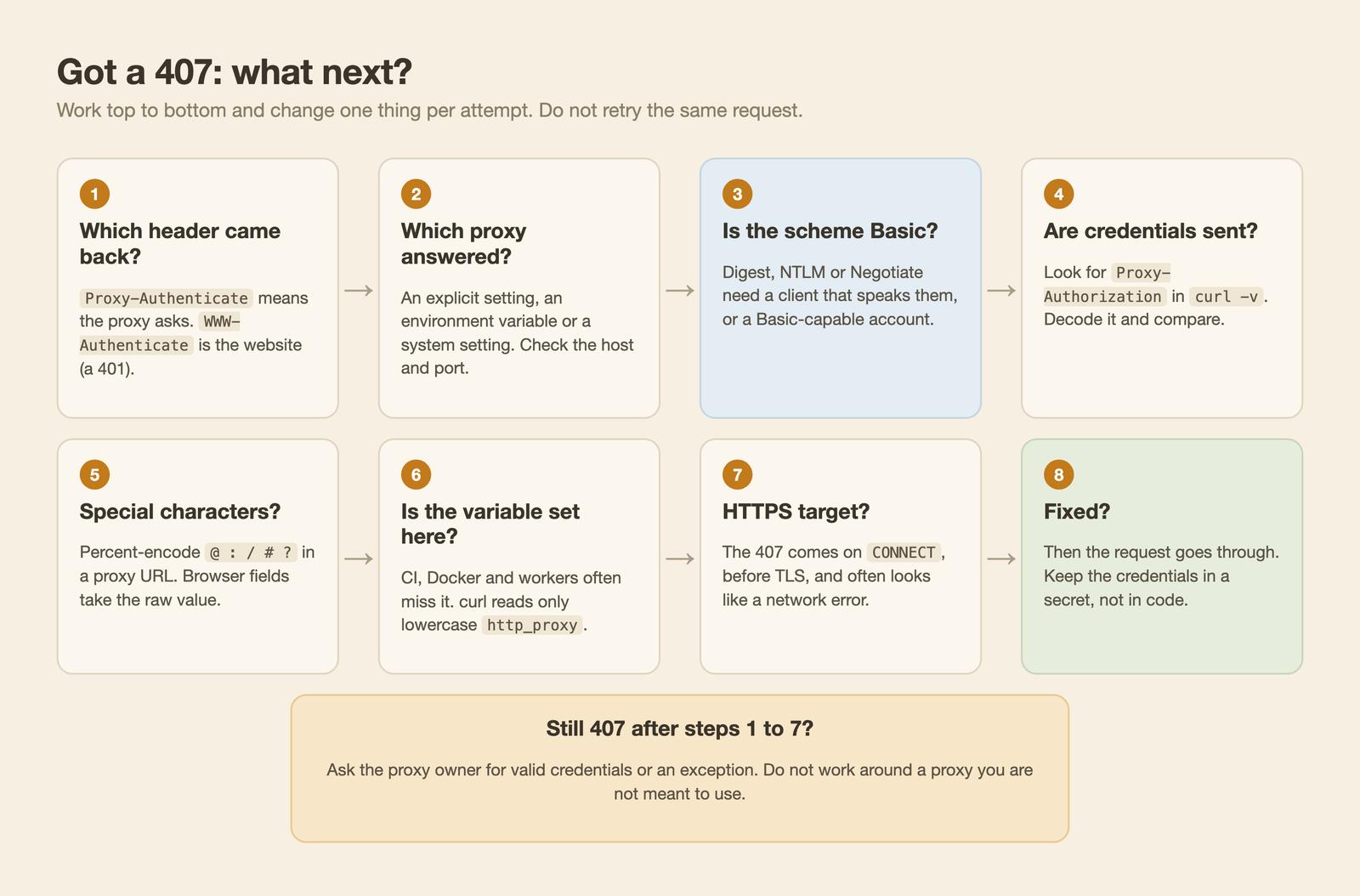
An HTTP 407 comes from the proxy, not from the website. The proxy is asking for the credentials you were issued, so the one-line fix is: send a valid Proxy-Authorization header (in practice, user and password in the proxy setting, with special characters percent-encoded), and check that the proxy you are hitting is the one you meant. Repeating the same request will not help. Jump to the per-client fixes if you already know the cause.
Last updated: October 25, 2026. I tested every fix against a proxy and an origin I wrote, both bound to 127.0.0.1 (curl 8.7.1, Python 3.11.2, requests 2.32.3, httpx 0.27.2, Node v26.12.1 with undici 7.25.0, Playwright 1.64.1, Puppeteer 25.14.0, macOS). The proxy simulates common behavior and is not any real vendor or corporate proxy. I did not run Digest, NTLM or Kerberos handshakes. Credentials in this post are placeholders.

What the 407 Status Code Means
RFC 9110 says the 407 status code "is similar to 401 (Unauthorized), but it indicates that the client needs to authenticate itself in order to use a proxy for this request." The proxy must send a Proxy-Authenticate header with a challenge, and the client "MAY repeat the request with a new or replaced Proxy-Authorization header field" (RFC 9110, section 15.5.8, read October 25, 2026). MDN says the same in simpler words. An authentication proxy is just a proxy that refuses to forward anything until the client proves who it is.
The rule I use to tell it from a 401: look at the header name. Proxy-* belongs to the proxy, WWW-Authenticate belongs to the website.
| Status | Issued by | Challenge header | Client answers with | Typical fix |
|---|---|---|---|---|
| 401 Unauthorized | The website (origin server) | WWW-Authenticate | Authorization | Send valid credentials for the site |
| 407 Proxy Authentication Required | The proxy | Proxy-Authenticate | Proxy-Authorization | Send valid credentials for the proxy |
| 403 Forbidden | The website | None required | Credentials alone usually do not change it | See 403 Forbidden |
I checked the first two rows on my local servers with curl. Same client, no credentials:
curl -sS -i -x http://127.0.0.1:PROXYPORT http://origin.test:ORIGINPORT/ok
curl -sS -i http://origin.test:ORIGINPORT/secret   # origin reached directly
HTTP/1.0 407 Proxy Authentication Required
Proxy-Authenticate: Basic realm="local-proxy"

HTTP/1.0 401 Unauthorized
WWW-Authenticate: Basic realm="origin"
Adding Authorization to the proxy request still gave a 407, and adding Proxy-Authorization to the origin request still gave a 401 (I tested both). When I sent valid proxy credentials to the /secret route, the proxy let the request through and the origin answered its own 401. A request can meet both challenges, one after the other.
To see what your client really sends, read the outgoing header with curl -v and decode it:
> Proxy-Authorization: Basic dXNlcjpwQHNzOndvcmQ=
decoded: user:p@ss:word
Base64 is encoding, not encryption. MDN notes that Base64-encoded Basic credentials "can be considered equivalent to sending the credentials in clear text" (MDN, Proxy-Authorization). Decoding the header is the fastest way to find a wrong password, a stray space or a double-encoded value.
Why You Get a 407: Common Causes
Most causes are in the table. The right column says how I know, or that I did not test it.
| Cause | Symptom | Check |
|---|---|---|
| No credentials sent | 407 with Proxy-Authenticate | Proxy log or curl -v shows no Proxy-Authorization (I tested: 407 in all six clients) |
| Wrong user or password | 407 again, after a retry | Decode the header and compare (tested) |
| Special characters not encoded | Invalid URL, or the wrong password is sent | Percent-encode (see below, tested) |
| Variable unset or empty in CI or Docker | 407, or no proxy used at all | Print the variable inside the process (tested) |
| HTTPS target, 407 on CONNECT | Looks like a network error | Read the full error text (tested) |
| Proxy offers Digest, NTLM or Negotiate, client sends Basic | 407 after you sent credentials | Read Proxy-Authenticate (Digest header tested, handshake not run) |
| Wrong proxy host or port | A different proxy answers | Print the effective proxy setting (not run) |
| Plan expired or credentials bound to another IP | 407 with correct credentials | Ask the vendor (not run) |
When the HTTP call itself is an HTTPS request, the 407 happens on the CONNECT request, before TLS starts, so the client never sees the website. The client first asks the proxy for a tunnel, and that request is the one refused. The symptom misleads: requests raised ProxyError ... Tunnel connection failed: 407 Proxy Authentication Required, curl exited with curl: (56) CONNECT tunnel failed, response 407, and Playwright timed out (I set a 12 second limit). None of those say "wrong password" first.
Works on my laptop, 407 in Docker or CI
This is the most common version in crawl jobs. A short checklist:
- The proxy variable is set on your laptop but not passed into the container or worker. Print it inside the process.
- The variable exists but one part is empty: http://:@host:port produced a 407 in requests, httpx and Node.
- Internal hosts go through the proxy because NO_PROXY is missing. The reverse also happens: NO_PROXY matched, the proxy was skipped, and the host did not resolve (tested).
- IT rotated the credentials, or the proxy sits behind single sign-on (NTLM or Kerberos) and your script has no way to answer.
- The system proxy setting and the application setting differ.
Ask the proxy owner for credentials or an exception. A 407 is the proxy doing its job, so I do not treat it as something to work around.
Special Characters and Environment Variables
A proxy URL has the shape scheme://user:password@host:port. If the password contains @, :, /, # or ?, the parser has to guess where the password ends. I used two placeholder passwords on the local proxy, p@ss:word and p#ss/w?rd, once raw and once percent-encoded in the URL:
| Password in the proxy URL | curl | requests | httpx | Node fetch (undici) |
|---|---|---|---|---|
| p@ss:word raw | curl: (5) Unsupported proxy syntax | 200 | 200 | 200 |
| p#ss/w?rd raw | curl: (5) Unsupported proxy syntax | InvalidURL | InvalidURL | Invalid URL |
| Both, percent-encoded | 200 | 200 | 200 | 200 |
The first raw password worked in three clients, but curl refused it. The second never reached the proxy in any of the four. Do not rely on raw characters: encode them.
from urllib.parse import quote

password = quote("p@ss:word", safe="")   # p%40ss%3Aword
proxy = f"http://user:{password}@proxy.example.com:8000"
In Node, encodeURIComponent("p@ss:word") gives the same p%40ss%3Aword. Two exceptions: curl's -U user:password option takes the raw value, and Playwright and Puppeteer take user and password as separate fields, where the raw value is correct and an encoded one is wrong (more below).
Which clients read proxy environment variables?
Environment variables are the usual way a proxy gets into a worker. I ran each client with only the listed variables set, against a local proxy that required credentials:
| Setup | curl | requests | httpx | Node, NODE_USE_ENV_PROXY=1 | Node, no flag |
|---|---|---|---|---|---|
| HTTP_PROXY (upper), http target | not used | proxied | proxied | proxied | not used |
| http_proxy (lower), http target | proxied | proxied | proxied | proxied | not used |
| Only HTTPS_PROXY, http target | not used | not used | not used | not used | not used |
| HTTPS_PROXY or https_proxy, https target | proxied | proxied | proxied | proxied | not used |
| HTTP_PROXY with empty user:pass | not used | 407 | 407 | throws (407) | not used |
| NO_PROXY matching the host | skipped | skipped | skipped | skipped | n/a |
"Not used" means the proxy log showed no request and the host failed to resolve. On macOS, curl read the lowercase http_proxy and ignored the uppercase HTTP_PROXY, which matches the curl man page: "http_proxy is an exception as it is only available in lower case" (curl man page, read October 25, 2026). The empty-credentials row has no curl result because curl never used the uppercase variable.
Node's built-in fetch ignored all of them until I set NODE_USE_ENV_PROXY=1. Per the Node docs that support was added in v24.5.0 and v22.21.0 and is marked "Stability: 1.1 - Active development" (Node.js docs, built-in proxy support). I ran Node v26.12.1 and did not test Node 18, 22 or 24. On older versions, use undici's ProxyAgent (next section).
Basic, Digest and NTLM: Check the Scheme
The Proxy-Authenticate header names the scheme. Basic is a Base64 user and password. Digest, NTLM and Negotiate (Kerberos) are other schemes, common on corporate proxies tied to single sign-on. I pointed a second local proxy at the clients and made it answer Proxy-Authenticate: Digest and never accept anything. That is header text only: I did not implement a Digest, NTLM or Kerberos handshake, so I cannot tell you a fix works for them.
What the run showed: curl, requests, httpx and fetch sent Basic credentials once and got a 407 back. Playwright and Puppeteer (Chromium) sent a second request with a Digest authorization header, so Chromium answered the challenge on its own. My test proxy never accepts it, so that is not a working Digest test. For the other clients, the plain options are a Basic-capable service account from the proxy owner, or a local forwarding proxy that speaks the scheme for your script.
Fixing 407 in curl, Python, Node and Playwright
For each client: the failing call, then the fixed call. proxy.example.com:8000 stands for my local proxy, and the full setup for each client is in proxies for web scraping. Replace the hosts with a proxy you are allowed to use.
curl
# Fails: 407, or "CONNECT tunnel failed, response 407" for https:// targets
curl -sS -i -x http://proxy.example.com:8000 https://example.com/

# Fixed: -U takes the raw password
curl -sS -x http://proxy.example.com:8000 -U 'user:p@ss:word' https://example.com/
With -U, curl sent one request with Basic credentials. Adding --proxy-anyauth made it send the first request without credentials and retry after the 407: my proxy log showed two requests instead of one. The man page says it "might cause an extra request/response round-trip". Use it when you do not know the scheme.
Python requests and httpx
import requests
from urllib.parse import quote

pw = quote("p@ss:word", safe="")
proxy = f"http://user:{pw}@proxy.example.com:8000"

r = requests.get("https://example.com/", proxies={"http": proxy, "https": proxy}, timeout=15)
print(r.status_code)
Without credentials, requests returned the 407 as a normal response over plain HTTP. For an HTTPS target it raised the ProxyError ... Tunnel connection failed: 407 seen above. httpx raised ProxyError: 407 Proxy Authentication Required on HTTPS. In httpx 0.27.2 the argument is httpx.Client(proxy=proxy), and older versions used proxies=.
Node fetch (undici)
import { ProxyAgent } from "undici";

const pw = encodeURIComponent("p@ss:word");
const dispatcher = new ProxyAgent(`http://user:${pw}@proxy.example.com:8000`);

// Without credentials this throws instead of returning a 407 response
const res = await fetch("https://example.com/", { dispatcher });
console.log(res.status);
Node's fetch did not return a 407 response. It threw TypeError: fetch failed, and the real reason sat two levels down in cause: Proxy response (407) !== 200 when HTTP Tunneling. Even for an http:// target, ProxyAgent opened a CONNECT tunnel (my proxy log shows CONNECT), so a 407 always looks like this. Print err.cause and its cause when you debug.
Playwright
import { chromium } from "playwright";

const browser = await chromium.launch({
  proxy: { server: "http://proxy.example.com:8000", username: "user", password: "p@ss:word" },
});
const page = await browser.newPage();
const res = await page.goto("https://example.com/");
console.log(res.status());
Credentials go in username and password, raw, as the Playwright docs show. Without them, page.goto resolved with status 407 for an HTTP target and timed out for an HTTPS one. Putting the encoded credentials in the server URL did not work (407), and neither did passing the encoded value as the password (407, my proxy log showed p%40ss%3Aword arriving). Chromium skips the proxy for loopback by default, so test with a non-loopback hostname.
Puppeteer
import puppeteer from "puppeteer";

const browser = await puppeteer.launch({
  args: ["--proxy-server=http://proxy.example.com:8000"],
});
const page = await browser.newPage();
await page.authenticate({ username: "user", password: "p@ss:word" }); // before goto
const res = await page.goto("https://example.com/");
console.log(res.status());
Without page.authenticate, goto failed with net::ERR_INVALID_AUTH_CREDENTIALS, and credentials in the --proxy-server URL gave net::ERR_NO_SUPPORTED_PROXIES. A wrong password produced status 407 and Chrome's own error page. The Puppeteer docs note that request interception is switched on behind the scenes to do this.
The client matrix
The table is my full run. Each row is a case, each cell is the status the client reported or how it failed. In rows 3 and 4 the browser columns got the raw value in the password field, not in a URL.
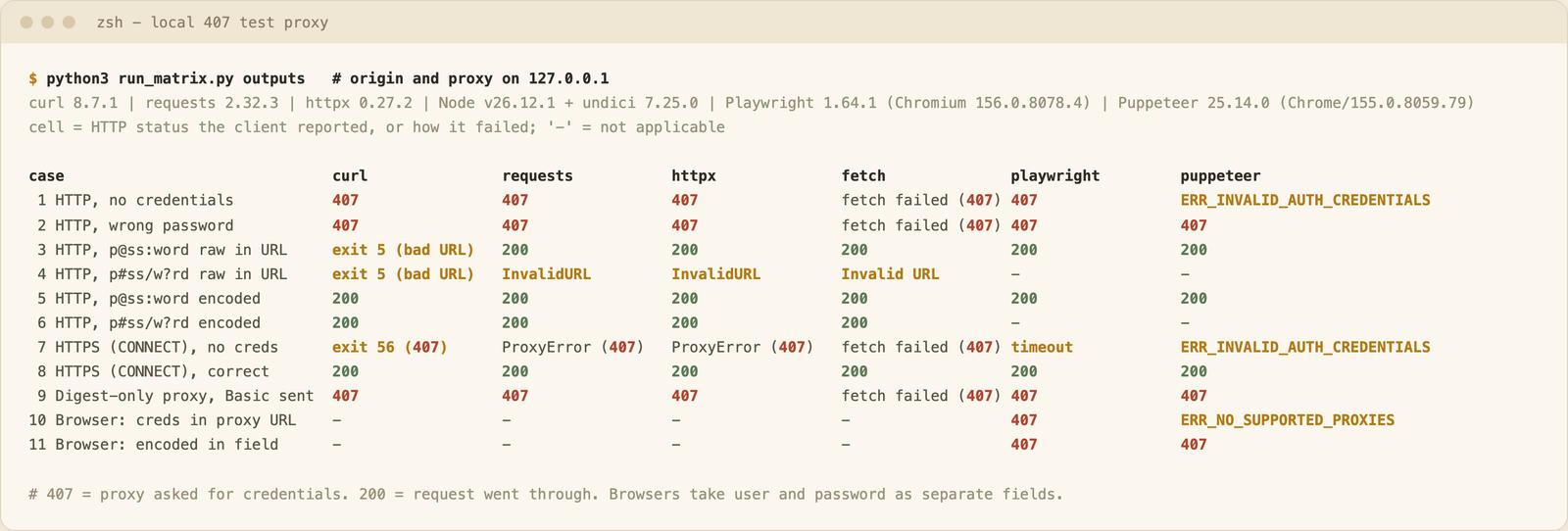
Two rows to remember. Row 7 shows the same HTTPS failure worded differently in every client. Row 8 shows that once the credentials are right, all six reach the origin through the tunnel.
Why Scrapers and Crawlers Hit 407
For a crawler the causes are the ones above, only more often: vendor credentials copied with a trailing space or an unencoded character, a session-style username typed in the wrong format, the variable set on a laptop but not in the worker, and a crawl that runs behind a corporate proxy. A tunnel 407 also hides behind network-error wording, so logs rarely say 407.
A retry does not fix it. Same credentials, same answer, and the RFC only says the client may repeat the request with a new or replaced header. If your crawl code retries every error, give a 407 a stop condition and alert someone. A 403 from the website is a different problem: see 403 Forbidden. For proxy types, pricing and the full setup, see proxies for web scraping.
I run WebCrawlerAPI, so this is the vendor view. The web scraping API page says the page "is rendered in a browser on our side, with retries, proxies and anti-bot handling, then converted and returned in the same response", and results differ by target site. The error docs list no 407-specific code, so I do not claim how a proxy problem would show up there. Test it on your own URLs.
Once the proxy accepts your credentials, residential vs datacenter proxies helps you pick the IP type, and exponential backoff and retries for HTTP clients covers what to do when requests still fail.
FAQ
What does the proxy status code 407 mean?
The proxy needs the client to authenticate before it forwards the request. It sends a Proxy-Authenticate header with the scheme, and the client can repeat the request with a Proxy-Authorization header.
What is an authentication proxy?
A proxy that only forwards requests from clients that send valid credentials. Corporate proxies and paid proxy services work this way.
Why do I keep getting a proxy authentication error?
Usually one of five things: no credentials, a wrong password, an unencoded special character, an empty variable in CI or Docker, or a scheme (Digest, NTLM) your client does not send. Decode the Proxy-Authorization header and read Proxy-Authenticate.
How do I fix error 407?
Send the right credentials to the right proxy, percent-encode them in a URL, and do not retry unchanged. If it still fails, ask the proxy owner.
What is the difference between 407 and 401?
A 401 comes from the website and asks for Authorization. A 407 comes from the proxy and asks for Proxy-Authorization.
Look at the header name first, fix the credentials or the scheme, and never retry the same request with the same credentials.
