
Residential vs datacenter proxies comes down to where the IP address lives. Datacenter proxies use addresses from cloud and hosting providers. Residential proxies usually use addresses that a consumer ISP assigned to a home connection. Webshare points datacenter at less restrictive sites, and residential matters when a site blocks datacenter ranges or needs an address that looks local.
I run WebCrawlerAPI, so I sell a product that sits next to this topic. That is why I kept this post to sourcing, detection and consent, and left the speed and price comparison to the proxies for web scraping guide, which this post builds on.
Last updated: October 25, 2026. I did not test any proxy provider and I have no block-rate numbers. What I did run is a small local script on public cloud IP range files (Python 3.11.2, macOS).
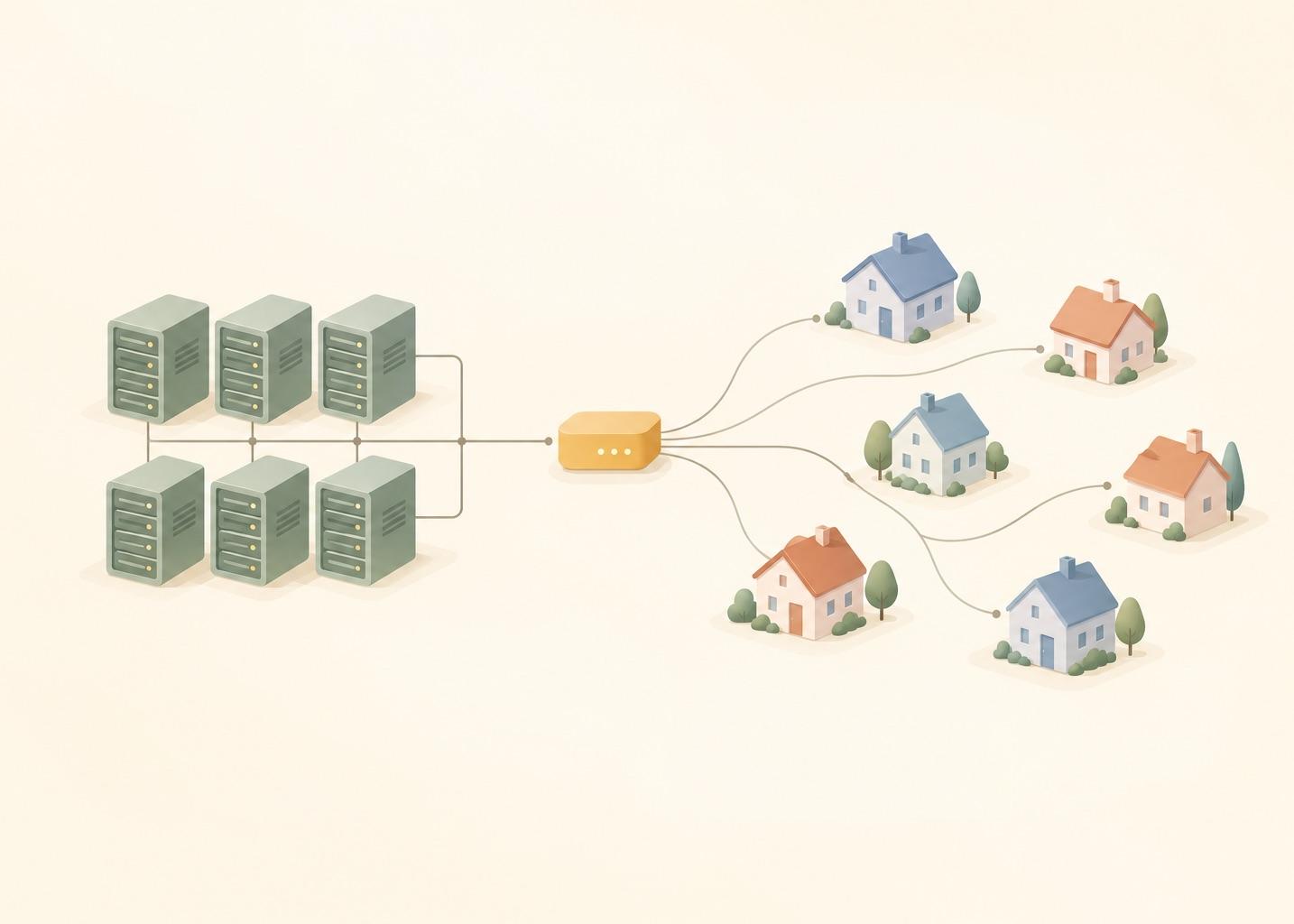
Residential vs Datacenter Proxies: The Short Version
In the datacenter vs residential proxies comparison, the hub already has a table with speed, price and best use for each type. This table covers what it leaves out: where the address comes from, what can flag it, and what risk you take on.
| Type | How the IP is sourced | What can flag it | Consent and legal risk |
|---|---|---|---|
| Datacenter | Rented from a hosting or cloud provider | The network owner is a hosting company. Webshare says the datacenter ASN "is easily identifiable" | Low. The provider owns the servers |
| Residential (rotating) | Real home devices: Webshare names phones, computers and routers | Per-IP request rate, reputation, location that does not match the rest of the traffic | Highest. Depends on whether device owners agreed |
| ISP (static residential) | Address assigned by a consumer ISP, machine hosted on a server | Webshare says some checker tools may still flag the hosting environment as datacenter | Lower than rotating residential, since the hardware is a server, not a home device |
The consent column is my own assessment, not a vendor claim. Mobile proxies are not covered here.
What this means for a crawl:
- Datacenter and ISP addresses sit on servers. Their owner is known, which makes them easy to label.
- Rotating residential addresses sit in other people's homes. That is what makes them harder to flag and what creates the consent question below.
- A flagged address is not always a blocked address. Every site decides for itself.
What are datacenter proxies?
Datacenter proxies exit from addresses owned by hosting or cloud providers. Webshare says they come "entirely from datacenter infrastructure, with no association with residential ISPs". It calls them the fastest and cheapest of its types, and the easiest for websites to spot as proxy traffic. Are ISP proxies datacenter proxies? Partly: the machine is a server, but a residential ISP assigned the address (see below).
What Are Residential Proxies?
A residential proxy sends your request out through an address that is usually assigned by a consumer ISP to a home connection. The site sees a household, not a server rack. Webshare describes its rotating residential proxies as routing "through real home devices: actual phones, computers, and routers that belong to everyday people" (Webshare help center, page dated August 11, 2026, read October 25, 2026).
Rotating residential changes the exit address automatically, every few hours per Webshare. ISP proxies (also sold as static residential) keep one address. Per the Webshare comparison page (read October 25, 2026), the ISP kind uses addresses assigned by residential ISPs, but runs on servers, not on home devices. So an ISP proxy is a server that uses an address assigned by a residential ISP.
Where the IPs come from
Someone has to run the exit node. Vendors and researchers describe the same thing from two sides.
Google's Threat Intelligence Group published a write-up on January 28, 2026 about one residential proxy network, IPIDEA. It says operators need code running on consumer devices to enroll them as exit nodes, and that these devices "are either pre-loaded with proxy software or are joined to the proxy network when users unknowingly download trojanized applications with embedded proxy code." It adds that some users install such software knowingly, lured by the promise of "monetizing" spare bandwidth. It also describes SDKs that app developers embed and get paid for (Google Cloud blog, read October 25, 2026).
The vendor side is a one-liner. Webshare's rotating residential page says: "Ethically sourced: Every IP comes from carefully selected, compliant partners." That is Webshare's own statement. It names no partner and no consent flow, and I could not check it. GTIG says that, in its analysis, provider claims of ethical sourcing "are often incorrect or overstated", while allowing that some providers may enroll devices with clear consent.
That is one network, so I would not say every residential network works like that. You cannot tell from a pricing page.
Are Residential Proxies Legal? Consent and Legal Risk
Whether residential proxies are legal depends on how the provider sourced the addresses and what you scrape with them. For a company crawling at scale, the risk is a supply-chain risk. If your traffic leaves from a device whose owner never agreed, you are using it without consent, and you depend on a vendor you cannot audit. Terms of service of the target site are a separate matter.
Ask a vendor how exit nodes are recruited, whether users opt in and what happens when they opt out. If the answers are vague, I would treat that as the answer. This is not legal advice. Check the target's terms and the law that applies to you. The is web scraping legal glossary entry covers the scraping side.
How Websites Flag Datacenter IPs
A site can look at several signals:
- Network owner. Is the address announced by a hosting company or by a consumer ISP? Webshare's own verification tip is to check whether the ASN is a "Hosting" or an "ISP" one, and to cross-check several ASN databases because they disagree.
- Published cloud ranges. AWS and Google Cloud list their address blocks in public files. Anyone can download them.
- Reputation and history. Has this address sent abuse before? Only the site knows.
- Request rate per address. A hundred requests a minute from one address looks different from a hundred addresses with one request each.
- Location consistency. An address in one country with a browser set to another language is a small red flag.
Anyone can check signal 2. The others live inside each site or in commercial IP-intelligence data, which I cannot see.
A 20-line check against published cloud ranges
To show how little work signal 2 is, I wrote a script that loads the AWS and Google Cloud range files and answers "is this address inside a published cloud block?". I fetched both files with webcr on October 25, 2026: AWS ip-ranges.json (createDate 2026-10-25-09-47-05) and Google Cloud cloud.json (creationTime 2026-10-25T01:05:43). The core is this:
import ipaddress, json

aws = json.load(open("ip-ranges.json"))
gcp = json.load(open("cloud.json"))

ranges = []  # (network, provider, service, region)
for p in aws["prefixes"]:
    ranges.append((ipaddress.ip_network(p["ip_prefix"]), "AWS", p["service"], p["region"]))
for p in gcp["prefixes"]:
    if "ipv4Prefix" in p:
        ranges.append((ipaddress.ip_network(p["ipv4Prefix"]), "GCP", p["service"], p["scope"]))

def classify(ip):
    addr = ipaddress.ip_address(ip)
    hits = [r for r in ranges if addr in r[0]]
    if not hits:
        return "no match"
    net, provider, service, region = max(hits, key=lambda r: r[0].prefixlen)  # most specific block
    return f"{provider} {service} {region} ({net})"

print(classify("192.0.2.10"))
The full script, classify_ips.py, adds the counts below. It uses the standard library only.
This is a synthetic demonstration of one signal, not a result about blocking. The sample addresses are four controls (the three documentation ranges from RFC 5737, plus loopback) and two addresses I picked from inside an AWS and a Google Cloud block. The picked ones match by construction.
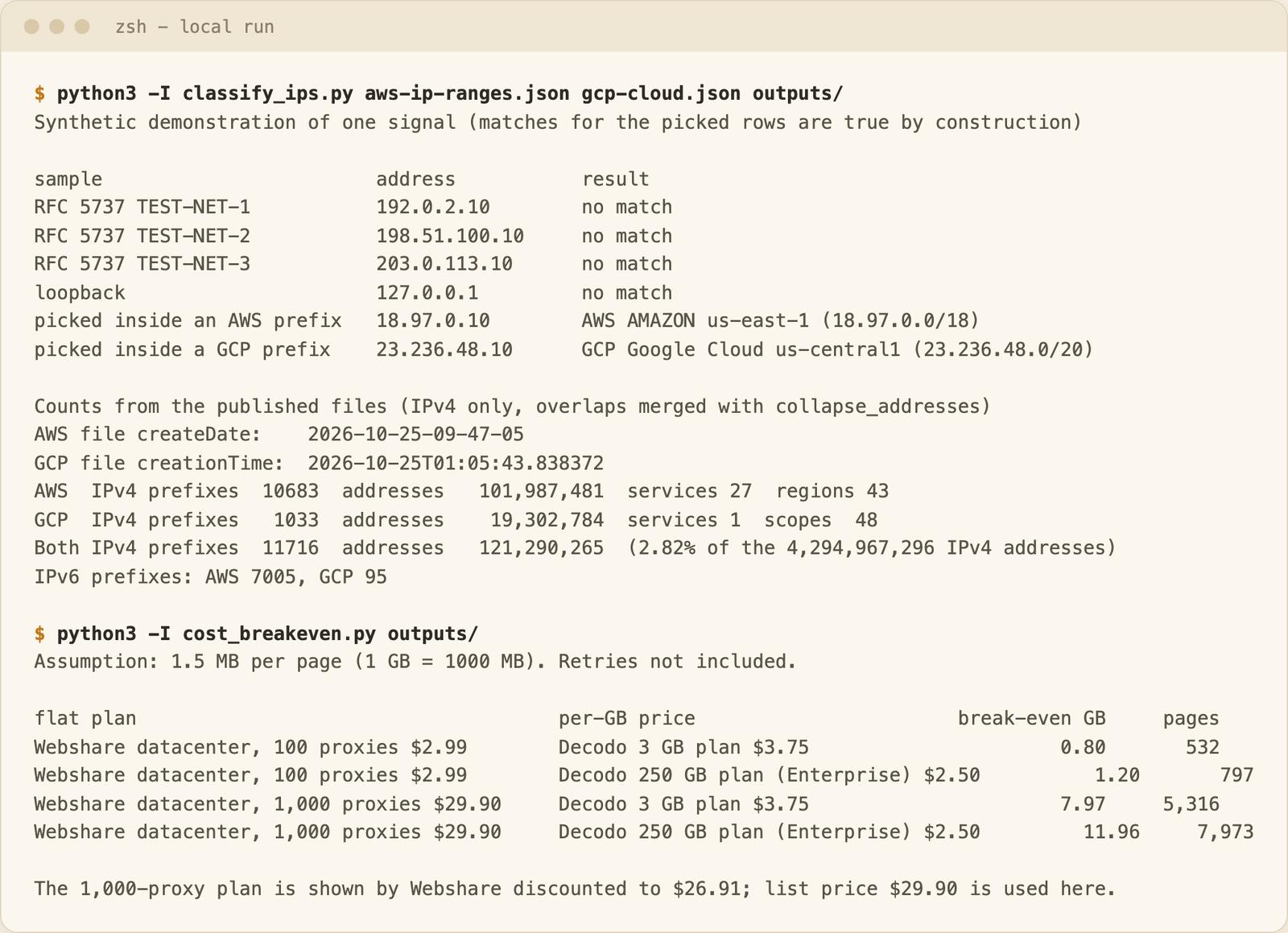
The part that is not circular is the size of the lists. On October 25, 2026 the files held 10,683 AWS and 1,033 Google Cloud IPv4 prefixes. After merging overlaps, that is 121,290,265 addresses, or 2.82% of the whole IPv4 space (4,294,967,296 addresses, reserved ranges included). Two providers only, and that much space is public and labelled.
Limits, plainly:
- No match says nothing about being residential. Other hosts (OVH, Hetzner and many more) are not in these files.
- A match says nothing about being blocked. Plenty of sites accept cloud addresses.
- ISP proxies would probably not match. Webshare lists an ISP ASN for them, not a hosting one. I did not test that.
- Real sites use more. I do not know what their IP-intelligence data contains.
Cost in One Paragraph
Prices are in the hub's pricing section, so I do not repeat the table. I reused its prices (read October 25, 2026) for a break-even between a flat datacenter plan and per-GB residential, assuming 1.5 MB per page (my assumption, measure your own), 1 GB = 1000 MB and no retries:
- Webshare datacenter, 100 proxies, $2.99 a month, equals 0.80 GB of Decodo residential on its 3 GB plan ($3.75/GB), or 532 pages. At $2.50/GB (the 250 GB Enterprise plan) it is 1.20 GB, or 797 pages.
- Webshare datacenter, 1,000 proxies, $29.90 list price (shown discounted to $26.91), equals 7.97 GB at $3.75/GB (5,316 pages) or 11.96 GB at $2.50/GB (7,973 pages).
The two are not like for like, since the datacenter plan buys IPs and the residential one buys bandwidth. Decodo prices exclude VAT; Webshare does not state it on the page I read. Retries multiply GB on per-GB plans. The script is cost_breakeven.py; change mb_per_page to your own number.
When Datacenter Is Enough for an AI Knowledge Base Crawl
Webshare lists datacenter as best for "high-volume tasks on less restrictive websites". My working rule is that most public documentation falls into that group, but I have no measurement behind it.
The targets of a typical AI knowledge base crawl are docs sites, help centers, public marketing pages, sitemaps and your customers' own sites (with their permission). For those:
- Start with the cheap address. Let blocked requests in your logs make the case for spending more.
- Check robots.txt and keep the rate polite. That often avoids blocks a new proxy would not fix.
- Re-crawl frequency changes GB, not IP type. Refreshing a knowledge base weekly multiplies bandwidth, which matters on per-GB residential plans.
- Most JavaScript-heavy pages need a real browser, not a different address.
This is my working judgment for typical knowledge base sources, not a measurement:
| Source | First try | Escalate when |
|---|---|---|
| Public docs sites | Datacenter | Blocks follow the IP even at a low request rate |
| Help centers | Datacenter | Same, and check JavaScript rendering first |
| Sitemaps and changelogs | Datacenter | Fetches fail only from cloud addresses |
| Community forums | Datacenter, low rate | Per-IP limits hit. A login wall needs credentials, not a new address |
| E-commerce pages | Datacenter, expect to escalate | Prices or content change by country, or blocks follow the IP. Check terms first |
Residential is worth the extra cost when your logs show blocks that follow the IP, when content is locked to a country, or when a consumer site has strict address rules. Check consent and terms first.
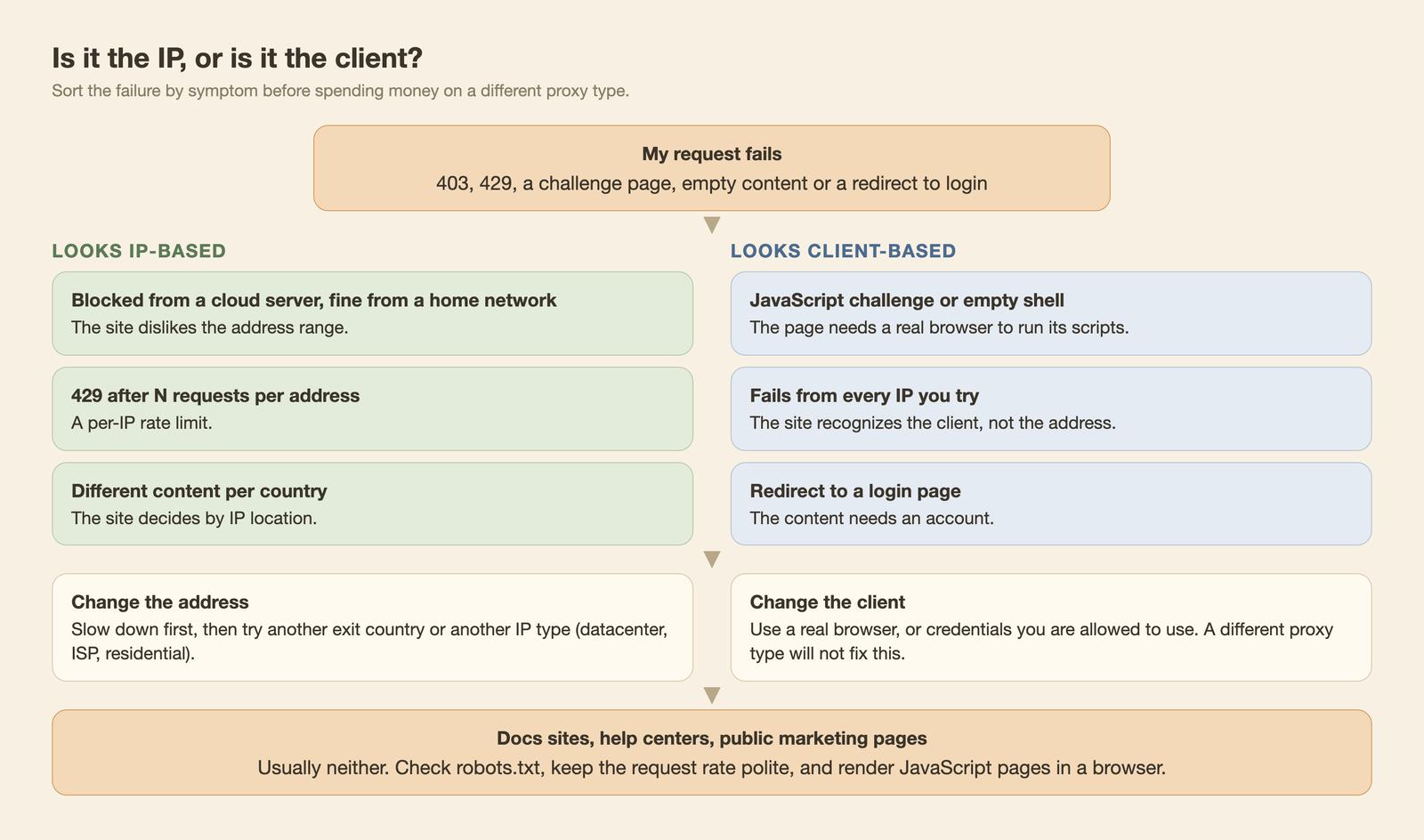
The diagram sorts the symptom first (the general checklist is in how to avoid getting blocked when scraping). If the same request fails from every address, a new proxy type will not help.
If all you need is pages as markdown for an AI knowledge base, the web scraping API handles the browser part. It loads each page in a real browser, runs the JavaScript and sends back markdown, HTML, links or structured data. Start with the scrape docs or the crawl docs.
If you already have proxies and requests still fail, check the status code first: 403 Forbidden usually means the site refused the request, while 407 means your proxy rejected your credentials.
Skip the Proxy Layer?
If you only need page content, you can skip the proxy decision. Our web scraping API page says pages are rendered "with retries, proxies and anti-bot handling". The hub's section on buying proxies or using a scraping API has the trade-offs, and best web crawler API compares options.
FAQ
Is a residential proxy the same as a VPN?
No. A VPN routes all of a device's traffic through the VPN company's servers, usually for privacy. A residential proxy forwards requests from your client through a home-connection address. The products are sold for different jobs.
Are ISP proxies residential or datacenter?
In an ISP proxies vs residential comparison, the ISP kind is the odd one out. Per Webshare, the address is assigned by a residential ISP but the machine is a server, and some checker tools may flag it as datacenter.
Do residential proxies get blocked less?
Vendors say so. Webshare's page lists "Fewer blocks and CAPTCHAs". I did not measure it, so I make no claim.
Can a site tell a residential proxy from a real home user?
Webshare rates the detection risk of rotating residential as lowest ("appears as genuine home user traffic"). Rate per address and location consistency still apply.
Are residential proxies legal?
See the section above. It is mostly a sourcing and terms question, and this is not legal advice.
Conclusion
The difference between residential and datacenter proxies is mostly about where the address lives and who agreed to it. Keep datacenter until your logs show an IP or geo block, then move up, and ask the vendor hard questions about sourcing before you do.
