
Proxies for web scraping send your requests from another IP address, so a web scraping proxy fixes IP-based blocks, per-IP rate limits and geo restrictions. It does not fix JavaScript challenges, browser fingerprinting or a login wall. This post covers the proxy types, rotation, how to wire a proxy into six clients, and what proxies cost per IP and per GB.
I run WebCrawlerAPI, so I have a stake in the last section, where I compare buying proxies with calling a scraping API. It is short and near the end. I tried to keep the rest neutral. This post is the hub of a series on getting blocked while scraping. Series order: this overview, then residential vs datacenter proxies, 403 errors, Cloudflare blocks, proxy login errors, retry delays and stealth browsers. I name them in plain text where they come up.
Last updated: October 25, 2026. I tested proxy configuration against a local proxy on 127.0.0.1 with Python 3.11.2, Node v26.12.1, Playwright 1.64.1, Puppeteer 25.14.0 and curl 8.7.1 on macOS (library versions are in the snippets section). I did not test real proxy providers, real sites or anti-bot systems. Prices are list prices read on October 25, 2026.
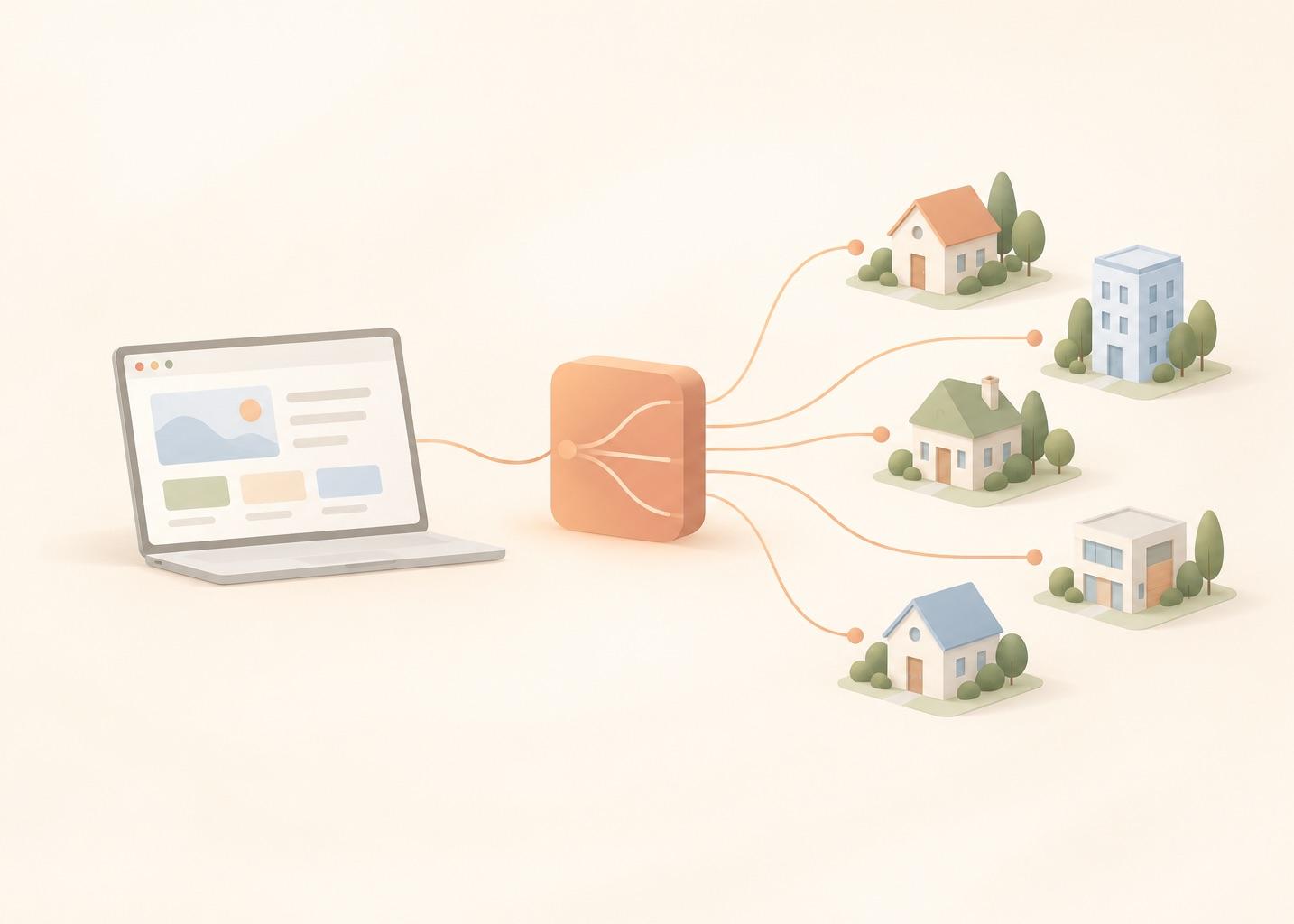
What a Web Scraping Proxy Does (and Does Not Do)
The flow is simple: client, then proxy, then site. The site sees the proxy's IP, not yours. MDN describes a forward proxy the same way: it acts on behalf of clients and can hide the client's IP address (MDN, Proxy servers and tunneling, read October 25, 2026).
The useful question is "what is blocking me", not "which proxy is best". A proxy only helps with some causes:
| What blocks you | Does a proxy help? |
|---|---|
| IP reputation or an IP ban | Yes. A different address starts with a different reputation. |
| Per-IP rate limit (HTTP 429) | Yes, by spreading the same load over more addresses. See what a 429 error is. |
| Geo-restricted content | Yes, if the exit IP is in the right country. |
| Login or session wall | Only with a sticky session, so the IP stays the same during the flow. |
| JavaScript challenge | No. You need a real browser, a proxy does not run scripts. |
| Browser or TLS fingerprinting | No. The site recognizes the client, whatever the IP. |
| CAPTCHA | No. A new IP can make it appear less often, it does not solve it. |
If the block is not about the IP, none of the proxy types below will help. Separate posts in this series cover 403 responses, Cloudflare blocks and stealth browsers. The general checklist is in how to avoid getting blocked when scraping. Scrape only what you are allowed to scrape. A proxy is a routing tool, not permission. See is web scraping legal.
Types of Proxies for Web Scraping
Four types come up in provider pricing pages. They differ in where the IP comes from, and that tends to decide price and block risk. The speed and block risk columns are general industry impressions, not something I measured or sourced.
| Type | IP source | Speed (typical) | Block risk (typical) | Price model | Best for |
|---|---|---|---|---|---|
| Datacenter | Servers in a data center | Fast | Often higher | Per IP | Simple pages, high volume |
| Residential (rotating) | Home connections | Often slower | Often lower | Per GB | Sites that block datacenter ranges |
| ISP (static residential) | ISP-assigned IPs hosted on servers | Fast | In between | Per IP | Long sessions on one address |
| Mobile | Mobile carrier networks | Often slower | Often lowest | Varies by provider | Last resort |
- Datacenter. IPs from cloud and hosting providers. Cheap, and many sites accept them. Some sites block known datacenter ranges, which is the usual reason to move up. Webshare lists datacenter "Proxy Server" plans from $2.99 per month for 100 proxies (see the pricing section).
- Residential. IPs from home connections, usually sold per GB, so retries and heavy pages cost real money. Webshare's wording: rotating residential suits workflows that need a large rotating IP pool, static residential suits workflows that need the same IP over a long session.
- ISP (static residential). A residential-style IP that is not rotated. You keep the same address while you hold the plan, which fits logins and long sessions. Priced per IP.
- Mobile. Carrier IPs. I would look at them only after everything else failed, and I found no mobile price I could cite today.
A deeper residential vs datacenter comparison is planned as its own post in this series. Public free proxy lists are shared, go offline without warning and can alter your traffic, so I tested none.
For a deeper look at the two big types, read residential vs datacenter proxies: how residential IPs are sourced, how sites flag datacenter ranges, and the consent risks.
Rotating Proxies: Per Request vs Sticky Sessions
Rotating proxies change which IP serves which request. There are three common modes.
- Per-request rotation. Every request leaves from a different IP. This suits stateless crawls and spreads a per-IP rate limit.
- Sticky sessions. The same IP is kept for a set time or one session. This suits logins, carts and multi-step pages.
- Timed rotation. The IP changes every N minutes. I did not simulate this one.
Providers usually expose rotation as a single gateway address that picks the exit, or as a session id in the proxy username. Details differ, so read their docs. As one cited example, Decodo's residential pricing page lists "Rotating and sticky session options" (read October 25, 2026).
A local simulation of rotation
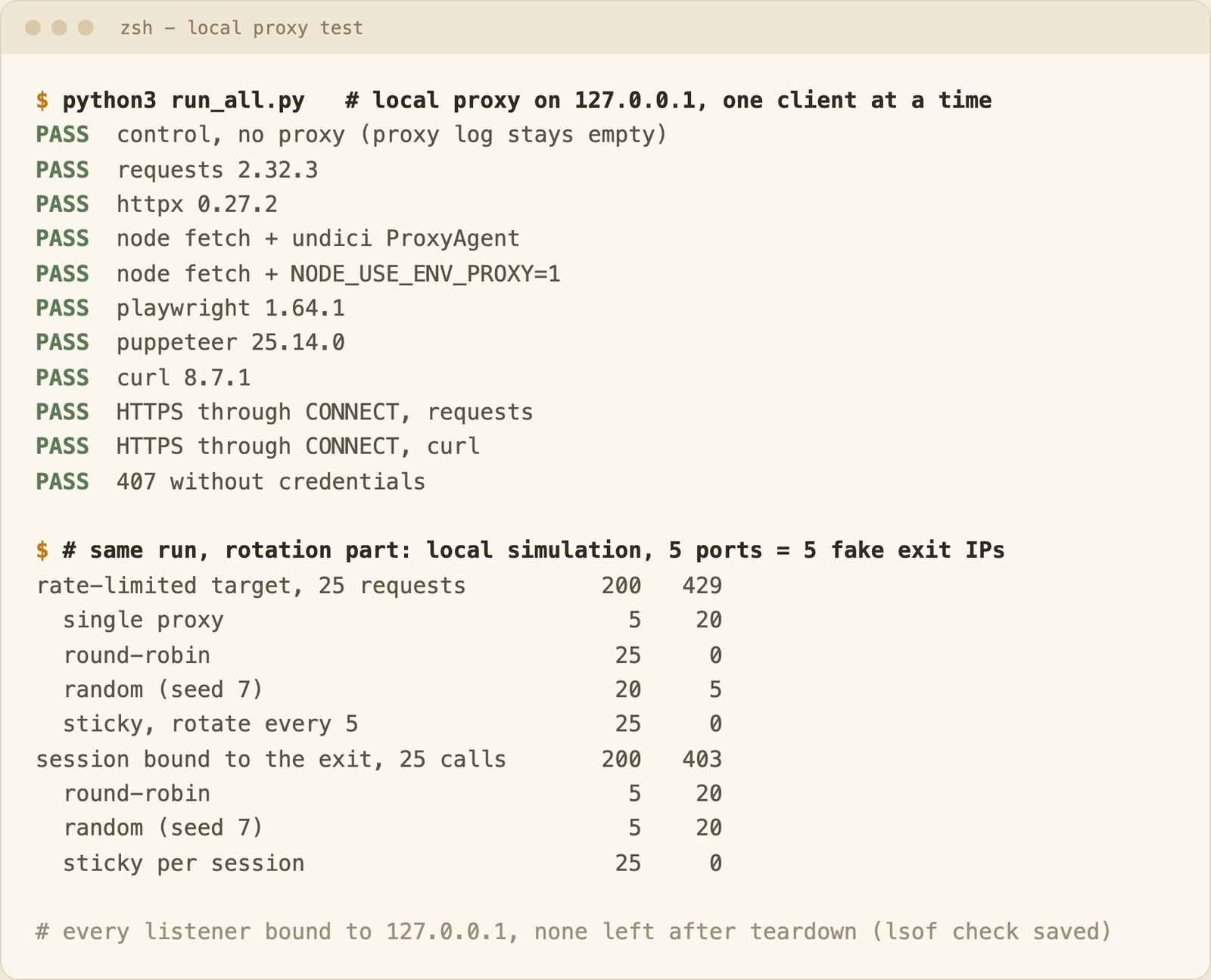
This is a local simulation. I started five proxy processes on loopback ports and let each tag requests with a fake exit label (exit-1 to exit-5). No real proxies and no real sites were involved. The toy target returns 429 after 5 requests per exit within 10 seconds, and it has a login whose session cookie is bound to the exit that served it. An account call from a different exit gets 403.
| Strategy | Rate-limited target, 25 requests (200 / 429) | Session-bound target, 25 calls (200 / 403) |
|---|---|---|
| Single proxy, no rotation | 5 / 20 | not run |
| Round-robin per request | 25 / 0 | 5 / 20 |
| Random per request (seed 7) | 20 / 5 | 5 / 20 |
| Sticky (every 5 requests, or per session) | 25 / 0 | 25 / 0 |
Rotation spreads load: one IP hit the limit after 5 requests, five IPs did not. Random choice did worse than round-robin because it happened to send 10 requests to exit-1. Per-request rotation broke most sessions, because the cookie belonged to another exit. Real sites are far more complex than a counter and a cookie, so this shows the mechanism only. The files are rotation_demo.py and outputs/rotation_demo.json.
Two pitfalls. Rotating mid-session breaks cookies, as above. On per-GB plans a retry costs bandwidth, so a rotated IP that still gets a 429 needs a retry delay, not an instant retry (a separate post covers retry delays).
How to Use a Proxy in Python, Node, Playwright, Puppeteer and curl
Each snippet is the code I ran. The tests replaced proxy.example.com:8000 with a loopback proxy port and example.com with a local echo host that reports which exit served the request. Credentials are the placeholder user:pass, and the local proxy required them. For each client I checked that the response was 200, that the echo server saw the proxy's exit header, and that the proxy log gained a line. A control request without a proxy left the proxy log unchanged. Versions: requests 2.32.3, httpx 0.27.2, undici 7.25.0.
Python requests
import requests

PROXY = "http://user:pass@proxy.example.com:8000"
proxies = {"http": PROXY, "https": PROXY}

r = requests.get("http://example.com/ip", proxies=proxies, timeout=15)
print(r.status_code, r.text)
Python httpx (0.27.2 takes proxy=; older versions used proxies=)
import httpx

PROXY = "http://user:pass@proxy.example.com:8000"

with httpx.Client(proxy=PROXY, timeout=15) as client:
    r = client.get("http://example.com/ip")
    print(r.status_code, r.text)
Node fetch with undici (npm i undici)
import { ProxyAgent } from "undici";

const dispatcher = new ProxyAgent("http://user:pass@proxy.example.com:8000");
const res = await fetch("http://example.com/ip", { dispatcher });
console.log(res.status, await res.text());
I ran this on Node 26 and did not test Node 18. ProxyAgent opened a CONNECT tunnel even for a plain http:// target, so the proxy only saw the tunnel. Recent Node versions can also read the proxy from the environment with no extra package: NODE_USE_ENV_PROXY=1 HTTP_PROXY=http://user:pass@proxy.example.com:8000 node script.mjs. Per the Node docs this needs v24.5.0+ or v22.21.0+ and is marked experimental (stability 1.1), so I would not rely on it in production.
Playwright (credentials go in separate username and password fields)
import { chromium } from "playwright";

const browser = await chromium.launch({
  proxy: { server: "http://proxy.example.com:8000", username: "user", password: "pass" },
});
const page = await browser.newPage();
const res = await page.goto("http://example.com/ip");
console.log(res.status(), await page.innerText("body"));
await browser.close();
Puppeteer
import puppeteer from "puppeteer";

const browser = await puppeteer.launch({
  args: ["--proxy-server=http://proxy.example.com:8000"],
});
const page = await browser.newPage();
await page.authenticate({ username: "user", password: "pass" }); // answers the proxy's 407 challenge
const res = await page.goto("http://example.com/ip");
console.log(res.status(), await page.evaluate(() => document.body.innerText));
await browser.close();
One page load added 13 lines to the proxy log, because Chrome also tried background connections to Google hosts. My proxy only allows local targets and answered 407 or 403 to those, so nothing was forwarded. A browser sends more than the page you asked for, which matters on per-GB plans.
curl
curl -sS -x "http://user:pass@proxy.example.com:8000" http://example.com/ip
All six clients passed, and so did the control. HTTP_PROXY and HTTPS_PROXY are read by many clients but support differs (see the Node note), so I prefer explicit settings in code.
HTTP and HTTPS through a proxy
A plain http:// request goes to the proxy as a normal request. For https:// the client sends CONNECT and the proxy opens a tunnel, so it sees the host and port but not the content. I tested this with requests and curl against a local TLS server with a self-signed certificate, trusted through a CA file with verification left on. The proxy log showed one CONNECT per request. Do not disable TLS verification in production to make a proxy work.
Proxy authentication errors
When credentials are missing or wrong, the proxy answers 407 Proxy Authentication Required with a Proxy-Authenticate header. In my test, requests over plain HTTP returned that 407. Over HTTPS the same mistake surfaced as ProxyError ... Tunnel connection failed: 407 Proxy Authentication Required, which looks like a network error but is an auth problem. Check the user and password and URL-encode special characters. A separate post in this series goes deeper on proxy login errors.
How Proxy Pricing Works: Per IP vs Per GB
There are two models. Per IP: you pay for a number of addresses per month, bandwidth is often bundled, and cost grows with the IP count. Per GB: you pay for traffic, so cost grows with page weight and with every retry.
These are list prices read on October 25, 2026. Tiers change, so check before you buy. This is not a recommendation.
| Provider (source) | Model | List price read October 25, 2026 |
|---|---|---|
| Webshare datacenter, webshare.io/pricing | Per IP, monthly, shared proxies | $2.99/month for 100 proxies ($0.0299 each); $26.91/month for 1,000 ($0.0269 each, shown discounted from $29.90); as low as $0.0179 each at 60,000+ |
| Webshare static residential (ISP), same page | Per IP, monthly | From $6/month for 20 proxies ($0.30 each) down to $0.225 each at 10,000 |
| Webshare rotating residential, same page | Per GB | $3.50/GB on the 1 GB plan down to $1.40/GB at 3,000 GB |
| Decodo residential, decodo.com/proxies/residential-proxies/pricing | Per GB, excl. VAT | $3.75/GB (3 GB, $11.25) to $2.75/GB (100 GB, $275); 250 GB plan $2.50/GB ($625); pay as you go $4/GB |
| Oxylabs residential, oxylabs.io/products/residential-proxy-pool | Per GB | Tiers from $6/GB at the entry level to $2.50/GB at 1K+ GB; Starter plan $30/month |
Webshare says Proxy Server and Static Residential plans include 250 GB of bandwidth, with an unlimited upgrade subject to its fair usage policy. I did not map Oxylabs tiers to plan sizes because the page does not make the mapping clear.
A worked example
Assume 100,000 pages a month at 1.5 MB each. The 1.5 MB is my assumption, not a measurement. Measure your own pages, because pages with images and scripts can weigh far more than their HTML. For the dollar figures I use only a provider that lists a plan covering this volume. Decodo does, so it is the only one in the example. Webshare's page showed no rotating residential plan size between 1 GB and 3,000 GB, and Oxylabs' listed tiers do not cover 150 GB clearly.
pages, mb_per_page, retry_factor = 100_000, 1.5, 1.0   # all assumptions
plans = {50: 150, 100: 275, 250: 625}                  # GB -> USD per month, Decodo, excl. VAT
payg_per_gb = 4.00

gb = pages * mb_per_page * retry_factor / 1000         # 1 GB = 1000 MB
fit = min(size for size in plans if size >= gb)
print(f"{gb:,.0f} GB: pay as you go ${gb * payg_per_gb:,.0f}, {fit} GB plan ${plans[fit]:,.2f}")
That is 150 GB: $600 pay as you go at $4/GB, or $625 for the 250 GB plan (the full script, cost_calc.py, uses all plan sizes). With 30% of traffic as retries (retry_factor 1.3) it is 195 GB, $780 pay as you go or still $625 on the 250 GB plan. Retries decide which option wins. All figures are excl. VAT.
This matters for AI knowledge base ingestion, because a knowledge base is re-crawled to stay fresh. Take 20,000 pages at 1.5 MB with the 1.3 factor: 39 GB per run, $156 pay as you go or $150 on the 50 GB plan. The refresh frequency is yours to multiply in.
The per-IP route looks different. One Webshare datacenter plan of 100 proxies at $2.99 a month includes 250 GB, so 150 GB would fit. Whether 100 datacenter IPs survive 100,000 requests against your target is the unknown, and a price table cannot tell you.
Choosing a Setup: A Decision Guide
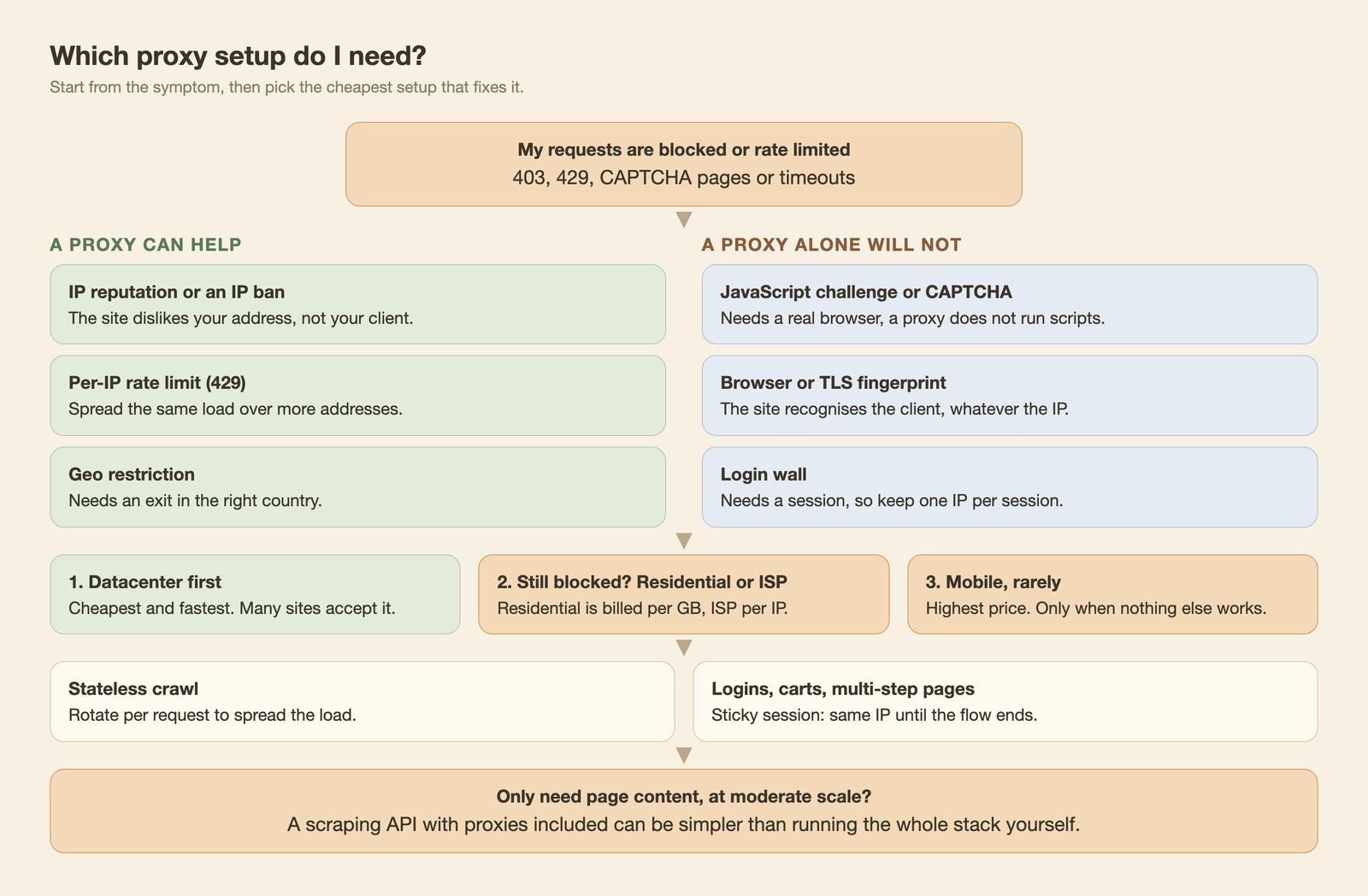
The rules I follow:
- Start with datacenter. It is the cheapest. Move to residential or ISP only when a site blocks datacenter ranges.
- Match rotation to state. Stateless crawl: rotate per request. Logins, carts and multi-step flows: sticky session.
- JavaScript-heavy page: add a browser. See what a headless browser is and JavaScript rendering in web crawling.
- Cap retries. On per-GB plans, set a limit before a bad run burns the month's bandwidth.
If a proxy setup returns errors, two pages cover the usual ones: 403 Forbidden when the site refuses you, and 407 Proxy Authentication Required when the proxy refuses you. For retry logic around both, see exponential backoff and retries for HTTP clients.
Buy Proxies or Use a Scraping API With Proxies Included?
A web scraping proxy service sells IPs, and you still run browsers, retries, parsing and monitoring. A scraping API sells page content. Buy proxies when you need custom client logic, non-web protocols, a specific exit country, or very high volume of simple pages. Use an API when you mostly need page content, for example markdown for an AI knowledge base, and do not want to run that infrastructure.
Our web scraping API page says the page "is rendered in a browser on our side, with retries, proxies and anti-bot handling, then converted and returned in the same response", and our pricing cards list "Unlimited proxy included" and "Pay only for successful requests". I make no claims about pool sizes, countries or success rates, because none are documented, and results differ by target site. The error docs show the limit: for timeout_error they say we "tried to reach the webpage several times with different proxies", and some sites have anti-bot protection that cannot be bypassed. Test on your own URLs.
On cost, the Pay as you go plan is $0.002 per page, so 100,000 pages are $200 (pricing docs: Professional $0.0015 per page at $99/month, Business $0.001 at $499/month). That is the most expensive tier. Some sites are priced separately, so treat $200 as a floor for those. Compare it with the $600 to $780 of residential bandwidth above, before browsers, retries and engineer time. The two are not like for like, since per-page pricing includes rendering and unblocking, and I do not claim one is cheaper in general.
A scrape call looks like this (see the scrape API docs; I did not run it for this post). Compare vendors in best web scraping APIs, ScrapingBee alternatives and best web crawler API.
curl --request POST \
  --url https://api.webcrawlerapi.com/v2/scrape \
  --header 'Authorization: Bearer YOUR_API_KEY' \
  --header 'Content-Type: application/json' \
  --data '{"url": "https://www.example.com", "output_formats": ["markdown"]}'
FAQ
What are the two types of proxies?
Forward proxies and reverse proxies (MDN). A forward proxy acts for clients, a reverse proxy sits in front of servers. In scraping, people usually mean datacenter and residential proxies, covered above.
Are residential proxies illegal?
Not in themselves. The questions are how the provider sourced the IPs and what you scrape with them. Terms of service and local law apply. This is not legal advice.
What are some cheap rotating proxies?
Use the pricing table. Per-IP datacenter on Webshare's page is about 2 to 3 cents per IP, and per-GB residential depends on plan size. The cheapest option on paper is not the cheapest after retries, so run the calculator with your own numbers.
Conclusion
Find the cause of the block first. If it is the IP, start with datacenter and rotate per request for stateless crawls. Use sticky sessions for logins. Move up only when a site forces you to.
