
Stagehand is Browserbase's open-source SDK for AI browser automation. You write a normal script, and for the steps that are hard to pin to a selector you hand the page to a language model. This tutorial uses v4. It changed the setup so much that most examples you will find (they call new Stagehand()) no longer run.
Tests run and numbers read November 2, 2026. I run WebCrawlerAPI, so I sell a product in a neighbouring area: reading web pages in bulk. I have no deal with Browserbase or Browser Use.
Below: working code against practice sites (TypeScript and Python), Stagehand on Browserbase with its cache, the same tasks in Browser Use and plain Playwright, a docs-navigation task of the kind teams building a knowledge base or support bot run, a case where selectors break, and a look at Playwright MCP. Every table has its limits right under it. This post is about interactive flows. Reading thousands of pages is a different job, covered near the end.
What Is Stagehand, and What Changed in v4?
Stagehand gives you three calls on a browser you launch yourself: act (do one thing on the page), extract (return typed data) and observe (list what can be done). The TypeScript, Python and Go SDKs share one core. It is MIT licensed, needs Node 22.18 or newer (npm @browserbasehq/stagehand 4.3.0) or Python 3.11 or newer (PyPI stagehand 4.3.0).
Per the Browserbase v4 announcement, the core moved into a browser extension that runs next to the page, and the SDKs became thin clients. For you that means one change in code: launch a browser first, then pass it in with Stagehand.create({ browser, model }).
v4 has no agent() call. The reference page lists act, extract and observe, and nothing that plans on its own. For an autonomous loop, use Browser Use or an MCP client. This matters for the comparison below.
What is a browser agent?
A browser agent is a loop: a model reads the page, picks the next action, and reads again until it decides it is done. Browser Use is that loop. In Stagehand you decide the order of steps and the model decides how to carry out each one.
How I Tested This
Versions: Stagehand 4.3.0 (TypeScript and Python), Browser Use 0.13.14, Playwright 1.64.1, @playwright/mcp 0.0.84, Node 24.22.1, Python 3.12, Chromium build 1248. Everything ran in Docker on an Apple Silicon Mac (linux/arm64), except the Browserbase runs, where the browser was a Browserbase cloud session. The model for every LLM-driven run was openai/gpt-4.1-mini through OpenRouter, at $0.40 per million input tokens and $1.60 per million output (read from OpenRouter on November 2, 2026).
Targets: books.toscrape.com and quotes.toscrape.com (practice sites, no robots.txt, both return 404), our own docs at webcrawlerapi.com/docs (robots.txt allows it), and a small local fixture served inside the container. Each run made a handful of page loads.
The tasks, with ground truth written by plain Playwright first:
- Task A: title and price of the first 5 books on the books.toscrape.com home page.
- Task B: log in at quotes.toscrape.com/login (the site accepts any pair, I used admin and admin), then return the first quote and its author.
- Task C: start at the WebCrawlerAPI docs, find the caching page, return the default cache duration in seconds and the name of the response header that shows a cache hit. The answer is 604800 and X-Cache.
A run succeeds when the answer matches exactly, ignoring whitespace, quote marks and the currency symbol. Tasks A and B ran 5 times per tool. Most later tests ran 3 times. The cache phases and the Browserbase self-heal ran once.
Stagehand Quick Start: Docker, OpenRouter, act, extract and observe
Set up in Docker
Local mode needs a real Chromium. The Playwright image ships one and has Node 24:
FROM mcr.microsoft.com/playwright:v1.64.1-resolute
WORKDIR /app
RUN npm init -y && npm pkg set type=module \
 && npm install --save-exact @browserbasehq/[email protected] [email protected] [email protected] [email protected]
COPY snippets/ /app/snippets/
Keep Zod on 4.4.x. The quickstart says newer minors cause type errors in extract(). Launching:
import { localBrowser } from "@browserbasehq/stagehand";
import { chromium } from "playwright-core";

const browser = await localBrowser.launch({
  headless: true,
  executablePath: chromium.executablePath(), // full Chromium from the Playwright image
  chromiumSandbox: false,                    // adds --no-sandbox, needed as root in a container
});
I pointed it at the full Chromium build, not the headless shell.
Wire in a model through OpenRouter
v4 takes a model name like openai/gpt-4.1-mini for its five first-class providers, and the docs say there is no base URL option. Any other endpoint goes through a generate callback. The docs recipe uses the Responses API. I used chat.completions against OpenRouter instead. This is the part that matters (error handling and counters trimmed):
import OpenAI from "openai";

const client = new OpenAI({
  baseURL: "https://openrouter.ai/api/v1",
  apiKey: process.env.OPENROUTER_API_KEY,
});

async function generate(params) {
  const res = await client.chat.completions.create({
    model: "openai/gpt-4.1-mini",
    messages: [
      ...(params.systemPrompt ? [{ role: "system", content: params.systemPrompt }] : []),
      ...params.messages.map((m) => ({ role: m.role, content: toParts(m.content) })),
    ],
    temperature: params.temperature,
    response_format: {
      type: "json_schema",
      json_schema: { name: params.responseFormat.name, schema: params.responseFormat.schema, strict: true },
    },
  });
  const text = res.choices[0].message.content ?? "";
  return {
    role: "assistant",
    content: { type: "text", text },
    outputFormat: "json_schema",
    structuredContent: JSON.parse(text),
    usage: { inputTokens: res.usage.prompt_tokens, outputTokens: res.usage.completion_tokens,
             totalTokens: res.usage.total_tokens },
  };
}

const stagehand = await Stagehand.create({ browser, model: { generate } });
toParts maps Stagehand's text and image blocks to OpenAI message parts. The usage field fills metadata.usage with the real counts.
Run act and extract on books.toscrape.com
A smoke test did one act and one extract:
await page.goto("https://books.toscrape.com/");
await stagehand.act("click the 'Travel' category link in the left sidebar");
const r = await stagehand.extract(
  "the title of the first book listed and the page heading",
  z.object({ heading: z.string(), first_title: z.string() }),
);
It returned heading Travel and first title It's Only the Himalayas, and the browser landed on the Travel category URL. That took 7.9 seconds and three model calls.
Task A is one extract with a zod schema:
const BookList = z.object({ books: z.array(z.object({ title: z.string(), price: z.string() })) });

await page.goto("https://books.toscrape.com/");
const r = await stagehand.extract(
  "the first 5 books on the page: full book title (not truncated) and price with currency symbol",
  BookList,
);
console.log(r.data, r.metadata.usage);
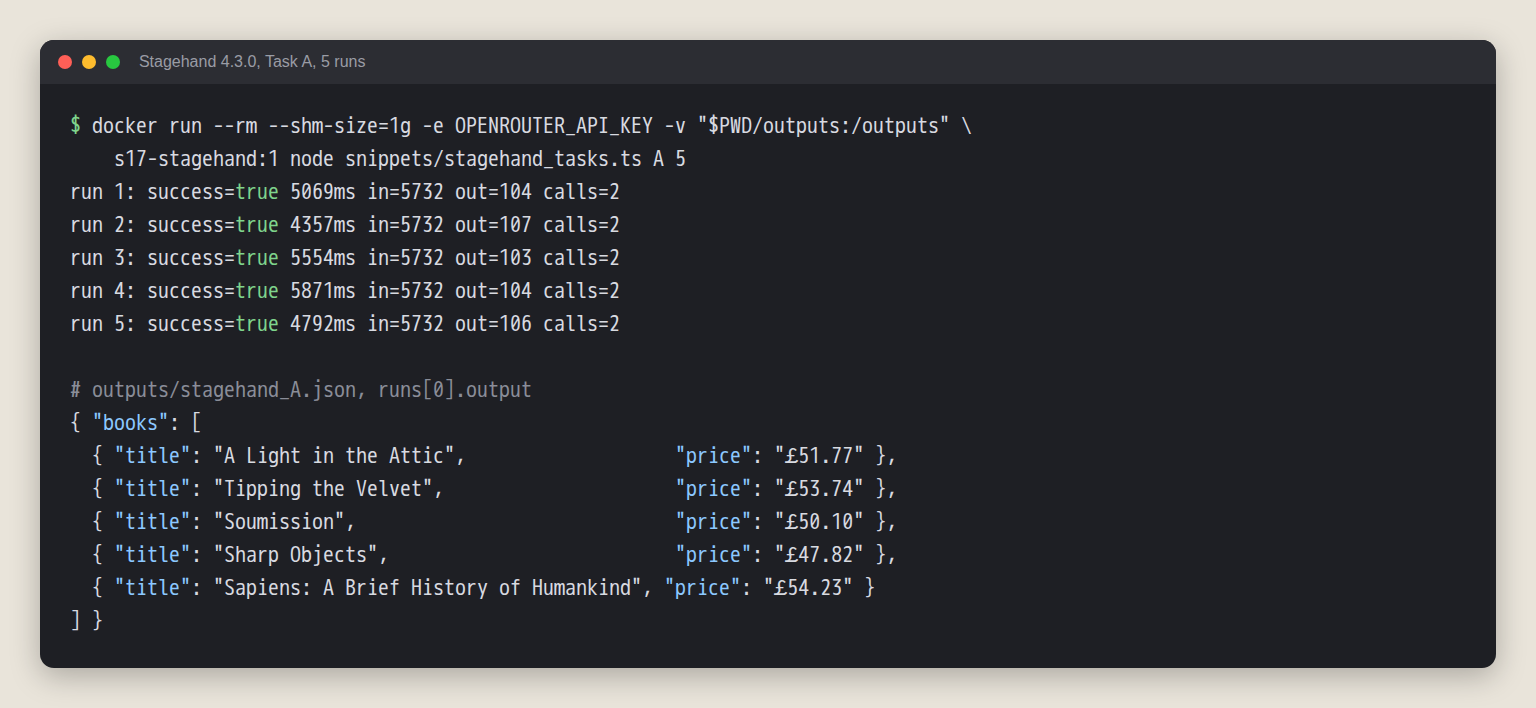
Rebuilt from the saved stagehand_A.json. I did not keep the original console text, so the run lines are rendered from the JSON in the script's own format.
The books page cuts long titles to "A Light in the ..." in the link text. The full title sits in the link's title attribute, which is why the prompt says "not truncated". All five runs returned full titles.
Use observe, then replay the result without another model call
observe returns candidate actions with a description, a method and a selector. You can hand one straight to act, and the docs say that replay skips inference. I ran it on the quotes login page, 3 times:
const obs = await stagehand.observe("find the username field, the password field and the Login button");
// obs.data: three actions, each with description, method ("fill" or "click") and an xpath selector
await stagehand.act({ ...obs.data[0], arguments: ["admin"] }); // username
await stagehand.act({ ...obs.data[1], arguments: ["admin"] }); // password
await stagehand.act(obs.data[2]);                              // Login button
All three runs logged in. observe cost one model call (706 input tokens, 75 to 89 output, about 1.6 seconds) and returned the three actions every time. The three replayed act calls added zero model calls and took about 2.6 seconds together, most of it the page load after the click. The model returned empty arguments for the fill actions, so I set the values myself at replay time. As with variables, the credentials never reach the model.
Log In and Read a Page With Stagehand
Task B needs a login before the first quote appears. act takes variables, so the model sees %username% and never the credentials:
await page.goto("https://quotes.toscrape.com/login");
await stagehand.act("type %username% into the username field", { variables: { username: "admin" }, cache: false });
await stagehand.act("type %password% into the password field", { variables: { password: "admin" }, cache: false });
await stagehand.act("click the Login button", { cache: false });
const r = await stagehand.extract(
  "the first quote on the page: its text and its author",
  z.object({ quote: z.string(), author: z.string() }),
);
The docs say server-side caching sends variable values to the cache service, so credential calls set cache: false. All five runs returned the right quote and author.
In Browser Use I put the practice credentials in the task prompt, so the model saw them. It also has a sensitive_data option with placeholders, which I did not use. That is a design difference, and I do not score it.
Stagehand in Python
The Python SDK takes the same callback: pass an async function as model. This ran 3 of 3 against books.toscrape.com, close to the TypeScript run (median 5,208 ms against 5,069 ms, 5,753 input tokens against 5,732, 2 model calls each).
async def generate(params):  # calls OpenRouter via AsyncOpenAI, returns LLMStructuredGenerateResult
    ...                      # same shape as the TypeScript callback, with "strict": False

browser = await local_browser.launch(headless=True, chromium_sandbox=False)
stagehand = await Stagehand.create(browser=browser, model=generate)
One gotcha cost me a rerun. With "strict": True, as in my TypeScript callback, OpenRouter answered every Python call with a 400, Invalid schema for response_format 'Extraction', and the first batch went 0 of 3. Switching to "strict": False fixed it. I did not find which keyword in the Python SDK's schema the endpoint rejects.
Stagehand on Browserbase: Timing, Caching and Self-Heal
Switching to a Browserbase browser changes one line. v4 needed only the API key, with no project id (per the docs, the cache and the Model Gateway work only with Browserbase browsers):
import { browserbase, Stagehand } from "@browserbasehq/stagehand";

const browser = await browserbase.launch({ apiKey: process.env.BROWSERBASE_API_KEY });
const stagehand = await Stagehand.create({ browser, model: { generate }, cache: { threshold: 1 } });
const page = await browser.context.activePage();
Tasks A and B passed 3 of 3 each on Browserbase, with the cache switched off so every run did real inference. I used 10 sessions in all: 3 for A, 3 for B, 3 for the cache phases and 1 for self-heal.
| Task | Local Chromium (N=5) | Browserbase (N=3) | Browserbase launch |
|---|---|---|---|
| A | 5,069 ms (from the comparison below) | 10,776 ms | 3,100 ms median |
| B | 10,287 ms | 17,262 ms | about 3,000 ms |
Token counts barely moved (5,732 in for A both ways). The extra 5 to 7 seconds is session start plus a remote browser in the default us-west-2 region. The two columns come from different batches, so treat this as rough.
Cache: miss, hit and changed page
Per the caching docs, the cache is server-side and keyed on the instruction, the page content and your options. I ran one sequence (an extract, an act that clicks the Travel category, a second extract) in three separate sessions:
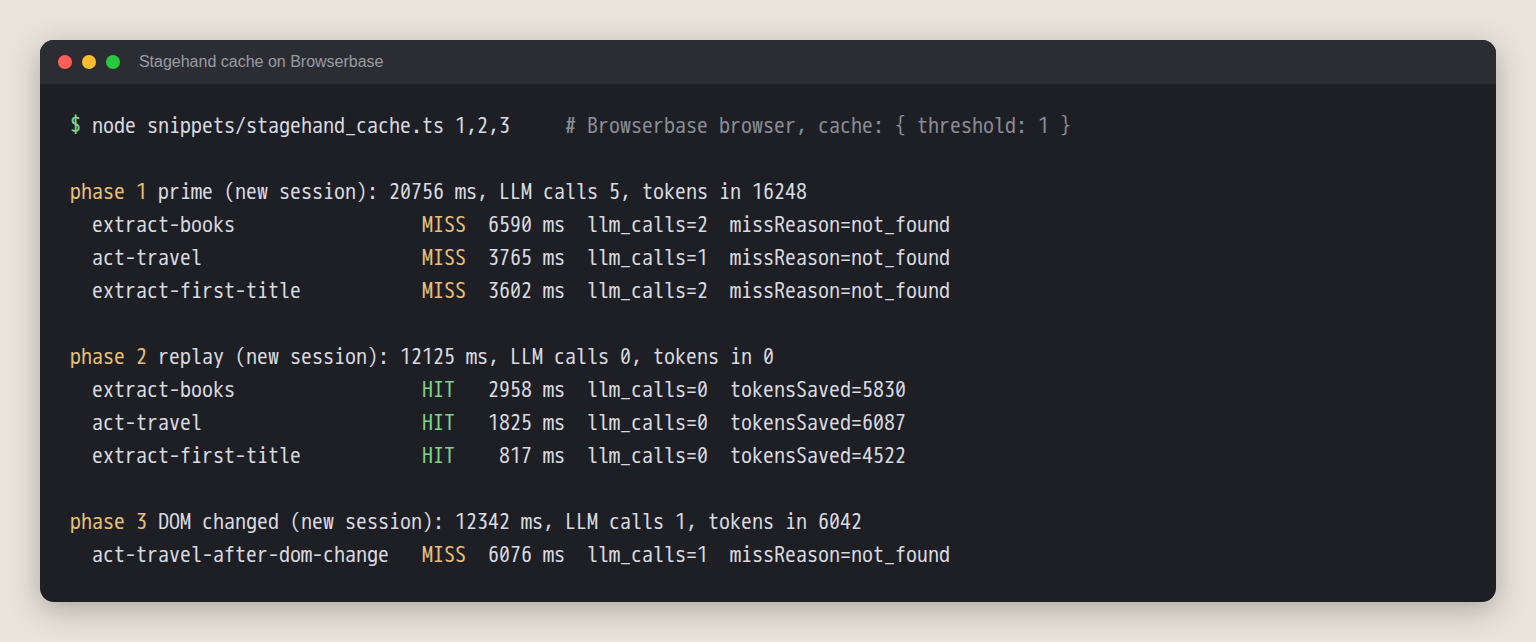
Rendered from stagehand_bb_cache.json. One run per phase.
- Phase 1: every step was a MISS (not_found), 5 model calls and 16,248 input tokens.
- Phase 2, new session, same steps: every step was a HIT, 0 model calls. Stagehand reported 16,439 tokens saved. The custom generate callback did not get in the way.
- Phase 3, new session: only the act step. Before it I wrapped the Travel link in a new element and changed its id and class, keeping the text. That was a MISS, and Stagehand made 1 model call (6,042 in, 6.1 s) and still clicked the right link.
A hit is not fast. Phase 2 took 12.1 seconds against 20.8 for phase 1, and 3.1 seconds of that was starting the session. The cache mostly saves tokens, not clock time. The changed page gave a plain miss, so I did not trigger the documented case where a hit's recorded selector stops resolving.
Self-heal after the page changes
Self-heal is a Stagehand.create option (selfHeal: true). The docs say a replayed action re-infers once if its selector no longer resolves. I replayed an observe result before and after a DOM change that wraps the username input in a new element and changes its id, name and class.
const stagehand = await Stagehand.create({ browser, model: { generate }, selfHeal: true });
await stagehand.act({ ...obs.data[0], arguments: ["admin"] }); // replay an observe() result after the DOM changed
Locally, 3 of 3 runs: the replay on the unchanged page took 23 to 334 ms with no model call. After the change it made 1 model call (about 1,170 input tokens, 1 to 1.3 seconds) and filled the field. One Browserbase run did the same. I did not run the broken replay with selfHeal off, so I have not shown the failure it prevents.
Stagehand vs Browser Use vs Playwright: What I Measured
I ran Tasks A and B five times per tool. The tools do different kinds of work:
- Stagehand ran scripted act and extract steps, because v4 has no agent.
- Browser Use got only a goal prompt and planned its own steps.
- Playwright used selectors I wrote after reading the pages.
# trimmed: browser setup and the Books pydantic schema (a list of title and price) omitted
agent = Agent(
    task="Go to https://books.toscrape.com/ and return the full title (not truncated) and the price "
         "with currency symbol of the first 5 books on the page.",
    llm=ChatOpenAI(model="openai/gpt-4.1-mini", base_url="https://openrouter.ai/api/v1",
                   api_key=os.environ["OPENROUTER_API_KEY"], temperature=0.0),
    browser=browser, output_model_schema=Books, use_judge=False,
)
history = await agent.run(max_steps=15)
Browser Use 0.13.14 has no ChatOpenRouter class, even though I had read that its docs list one, so I used ChatOpenAI with OpenRouter's base URL. I turned the built-in judge off so it would not add model calls.
| Tool | Task | Success | Median wall time | Median tokens in / out | Median cost |
|---|---|---|---|---|---|
| Playwright 1.64.1 | A (books) | 5/5 | 893 ms | 0 / 0 | $0 |
| Playwright 1.64.1 | B (login) | 5/5 | 1,054 ms | 0 / 0 | $0 |
| Stagehand 4.3.0 | A | 5/5 | 5,069 ms | 5,732 / 104 | $0.0025 |
| Stagehand 4.3.0 | B | 5/5 | 10,287 ms | 6,419 / 154 | $0.0028 |
| Browser Use 0.13.14 | A | 5/5 | 36,454 ms | 43,629 / 1,340 | $0.0196 |
| Browser Use 0.13.14 | B | 5/5 | 20,107 ms | 34,142 / 767 | $0.0149 |
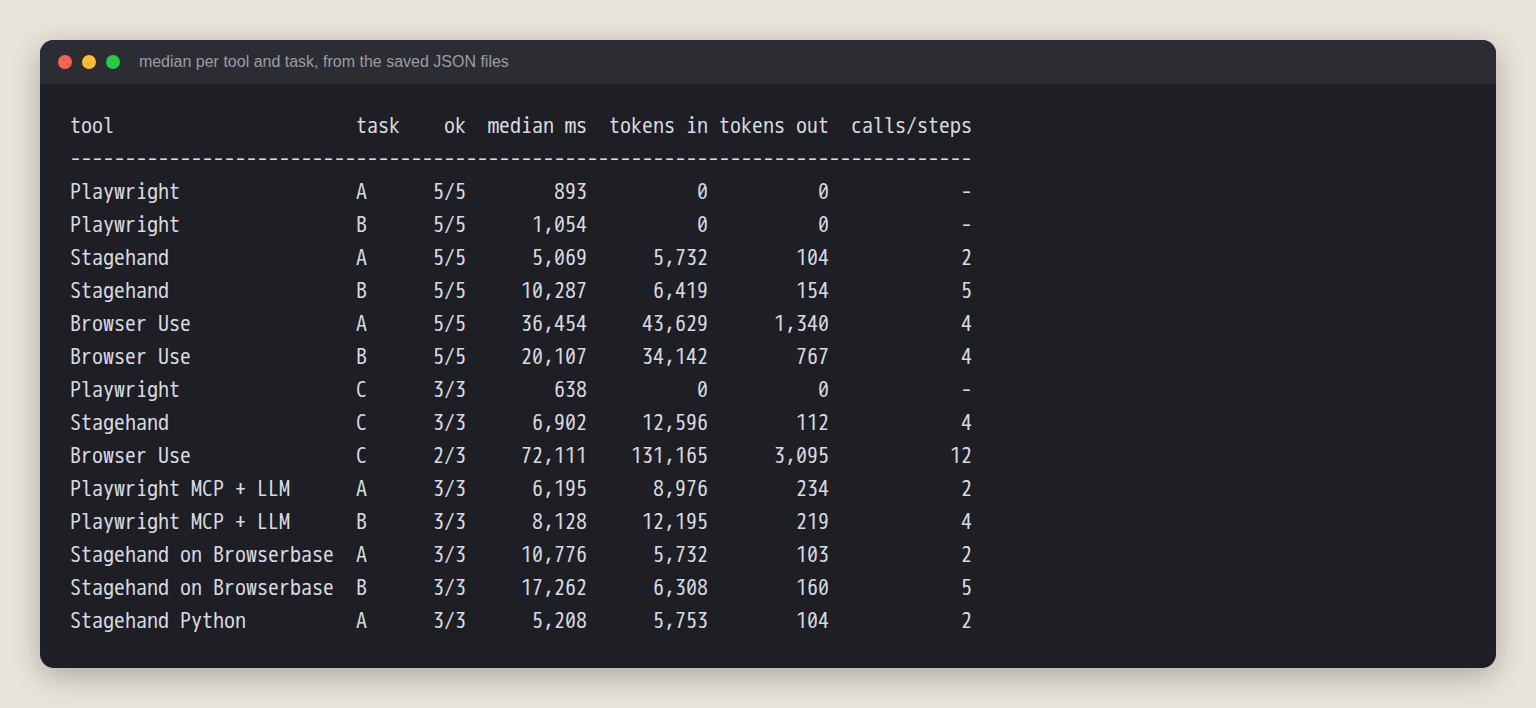
The image lists every run in this post. Playwright MCP, Browserbase and Python rows are covered in their own sections.
Read the table with these limits in mind:
- One model only. Browser Use promotes its own bu-2-0 model in its README, and it needs their key, so these numbers may understate the tool.
- N=5 on two easy practice sites. Every row passed 5 of 5, so this says nothing about reliability on a messy site.
- The timers do not cover the same work. Playwright times start after one shared browser is already running. Stagehand times include launching Chromium and starting Stagehand. Browser Use times cover the agent run, which starts its browser inside. Do not read 893 ms against 5,069 ms as pure model overhead.
- Cost is counted tokens times the list price above. OpenRouter's own reported cost for the five Stagehand Task B runs was $0.0077, against $0.0141 at list price, and I did not check why.
- The first Playwright run of each task created the ground truth, so it scored itself.
- Not tested: Browserbase Model Gateway, proxies and stealth, Browser Use cloud and sensitive_data, Stagehand with Playwright's headless shell, and any site with real bot protection. I make no claim that any of these tools gets past it.
Stagehand made 2 model calls in Task A and 5 in Task B (three act calls and the two inside extract). Browser Use took 3 to 5 steps per run, each one a model call, and its input was 5 to 8 times larger. I am not picking a winner on speed or tokens, because the tools had different jobs.
Task C: find a docs page and read two facts
Task C is closer to what a knowledge-base team does: land on a docs home page, navigate, read facts. My scripted route goes through the Batch scrape guide, which links to the Caching page. Playwright clicks a[href="/docs/guides/batch-scrape"], then the Caching link. Stagehand got the same two clicks as act instructions ("click the 'Batch scrape' link in the left sidebar", then "click the 'Caching' link in the page content") and an extract. Browser Use got only the goal.
| Tool | Success | Wall time (per run) | Tokens in, median | Calls or steps |
|---|---|---|---|---|
| Playwright | 3/3 | median 638 ms | 0 | none |
| Stagehand | 3/3 | median 6,902 ms | 12,596 | 4 model calls |
| Browser Use | 2/3 | 52 s, 72 s, 101 s | 131,165 | 7, 12 and 15 steps |
N=3, one model, one page. Stagehand knew the route and Browser Use did not, so this is not like-for-like.
Browser Use run 3 used all 15 steps and returned its empty defaults (0 seconds, no header name). I did not trace why it never reached the page. Its three runs took 72,002, 131,165 and 168,334 input tokens. Stagehand used 12,596 every time.
Selector Change: Where Playwright Breaks and Stagehand Does Not
I built a small product page and a second version of it. In v2 the classes and ids are renamed, and the markup moves: the price sits in a <data> element, the button is in a different section, the title is a different tag. Both pages are served from inside the container, so this made no public requests. The job: read the name and price, click "Add to cart", read the cart count.
// Playwright, written against v1
await page.textContent(".product-title");
await page.textContent(".price");
await page.click("#add-to-cart");
await page.textContent("#cart-count");

// Stagehand, same instructions on v1 and v2
await stagehand.extract("the product name and its price with currency symbol", Product);
await stagehand.act("click the Add to cart button");
await stagehand.extract("the number of items in the cart", Cart);
| Script | Page | Success | Median time |
|---|---|---|---|
| Playwright, v1 selectors | v1 | 3/3 | 61 ms |
| Playwright, v1 selectors | v2 | 0/3 | 3,012 ms (my 3 s timeout) |
| Playwright, v2 selectors | v2 | 3/3 | 60 ms |
| Stagehand, no selectors | v1 | 3/3 | 6,268 ms |
| Stagehand, no selectors | v2 | 3/3 | 6,159 ms |
The v1 script failed all three times on v2 with page.textContent: Timeout 3000ms exceeded. Stagehand needed no edit. It used 5 model calls and about 2,200 input tokens per run, against 60 milliseconds and no model for Playwright after I rewrote the selectors.
Stagehand saves you the selector rewrite. The price is about 100 times the wall time and a model bill on every run. I wrote v2 to break selectors, with one product and 3 runs each, and real redesigns are messier.
Where Playwright MCP Fits
Playwright MCP is a server that exposes browser tools to an LLM client, reading pages as accessibility snapshots. You do not write the script. The client model calls the tools. Install and config are in my Playwright MCP guide. Scripted without a model, the server exposes 25 tools, and a snapshot of the books home page is 31,777 characters.
I wrote a small client (the MCP TypeScript SDK) with an OpenAI-style tool-calling loop over OpenRouter, capped at 15 tool steps, and ran Tasks A and B 3 times each:
| Task | Success | Median wall time | Median tokens in / out | Tool calls |
|---|---|---|---|---|
| A (books) | 3/3 | 6,195 ms | 8,976 / 234 | 2 (browser_navigate, browser_evaluate) |
| B (login) | 3/3 | 8,128 ms | 12,195 / 219 | 4 (navigate, browser_fill_form, click, evaluate) |
The first request, with the task and all 25 tool definitions, billed 2,752 prompt tokens. The model never needed more than 4 tool calls, so the 15-step cap did not matter. As with Browser Use, the practice credentials were in the prompt. N=3, one model, two easy tasks.
For how Playwright MCP compares with search and read MCP servers on tool-definition cost, see my test of web-access MCP servers. If you want a Python library with no model in the loop, the Scrapling tutorial covers one.
When an Agent Is the Wrong Tool: Reading Pages in Bulk
Agents suit logins, forms and multi-step flows. They also spend tokens at every step. Multiply my median Task A cost by 1,000 pages: about $2.46 in model fees for Stagehand and $19.60 for Browser Use, before browsers and retries. That is an extrapolation from five runs on one page, not a quote.
When the job is reading many pages into an AI knowledge base, a page-content API is steadier. I sent the Task C page, the caching docs, to the WebCrawlerAPI /v2/scrape endpoint:
curl --request POST \
  --url https://api.webcrawlerapi.com/v2/scrape \
  --header 'Authorization: Bearer YOUR_API_KEY' \
  --header 'Content-Type: application/json' \
  --data '{
    "url": "https://webcrawlerapi.com/docs/api/caching",
    "output_formats": ["markdown"]
  }'
One call returned HTTP 200 and 6,423 characters of markdown in 635 ms. The markdown contains the answers to Task C, including the 7 days (604800 seconds) default and the X-Cache header table. The response headers I saved show X-Cache: HIT, Age: 1145 and Cache-Control: max-age=603655. It was a cache hit on an entry about 19 minutes old, and I did not trace which earlier request created it, so 635 ms is not an uncached time.
You get the whole page as markdown, not "the cache duration as a number", so you parse fields afterwards or use the prompt parameter with a schema (structured outputs), which I did not run. Page prices are on the pricing page.
For whole sites, see website to markdown knowledge base, best web scraping tools and agents that crawl for you.
Which One to Pick
- You want code you control, with the model on the hard steps: Stagehand. It also survives a markup change that breaks selectors, at a few seconds and a few thousand tokens per run.
- You want a Python agent that plans on its own: Browser Use. Expect more steps and tokens.
- The page is stable and you can write selectors: plain Playwright, and no model bill. See web scraping with Playwright and Puppeteer vs Playwright.
- You want ad hoc browsing from a coding agent: Playwright MCP.
- You need to read many pages: a page-content API. For other scraping tools, see that comparison.
FAQ
What is Stagehand?
Stagehand is Browserbase's open-source SDK for AI browser automation, with act, extract and observe on top of a browser you launch. It is not the theatre job. The current major version is v4.
Is Stagehand free and open source?
The SDK is MIT licensed. Model calls cost money, and Browserbase hosted browsers are a paid service. A page cost me a fraction of a cent in model fees.
Does Stagehand work in Python?
Yes. PyPI stagehand 4.3.0 needs Python 3.11 or newer and uses pydantic models for extract. I ran Task A in Python 3 times with numbers close to TypeScript. If OpenRouter returns a 400 about response_format, set strict to false.
Stagehand vs Browser Use: which should I use?
Use Stagehand to script the flow and let a model handle single steps. Use Browser Use to give a goal and let it plan. In my small tests Stagehand passed every run. Browser Use passed 12 of 13 and used several times the input tokens.
Do I need Browserbase to use Stagehand?
No. Local Chromium works, as in most of this post. Per the docs, the Model Gateway and server-side caching need a Browserbase browser and key, and the cache option has no effect with a local browser.
Can Stagehand use OpenRouter or a custom model?
Yes, through the generate callback in TypeScript or an async function in Python. v4 has no base URL option, so the callback is the route to OpenRouter, Azure or a self-hosted model. The code is in the quick start above.
The scrape endpoint docs show the request shape for the bulk case.