
An HTTP 403 Forbidden response means the server understood your request and refuses to serve it, so reloading rarely changes anything. If you are writing code, first check that you are allowed to fetch the page, then read the response body and headers, find which part of the request the server dislikes (identity, headers, credentials, rate or address), and change that one thing. Just browsing? Jump to the quick checks. Site owner? Go to the server-side causes.
Quick answers
- What does 403 Forbidden mean? The server understood the request and refuses it. Sending it again unchanged will fail the same way.
- 401 vs 403: 401 means missing or invalid credentials. 403 means the server knows what you asked for and the answer is no, even with valid credentials.
- nginx 403 Forbidden: read error.log. It logs "<path>" is forbidden for a file it cannot read and access forbidden by rule for a deny rule.
- Crawling many pages? Sort every 403 into one of three buckets: fix (your URL list or pace), ask the owner (an allowlist, a login you should have) or skip (a stated policy). Review the "ask" list by hand.
Last updated: October 25, 2026. I tested every code fix against a local server on 127.0.0.1 (Python 3.11.2, requests 2.32.3, httpx 0.27.2, Node v26.12.1, curl 8.7.1, Playwright 1.64.1, macOS). I did not test any real website, CDN or anti-bot system, and my server rules are simplified simulations.
What 403 Forbidden Means
RFC 9110 defines it in one line: the server "understood the request but refuses to fulfill it" (RFC 9110, section 15.5.4, read October 25, 2026). MDN adds that repeating the request without changing it "will fail with the same error" (MDN, 403).
Does it mean you are blocked? Sometimes, but often it is a rule about one header, path or permission. The RFC says "a request might be forbidden for reasons unrelated to the credentials."
Four status codes get mixed up all the time:
| Status | Meaning | Whose move | Typical fix |
|---|---|---|---|
| 401 Unauthorized | No valid credentials. The server must send a WWW-Authenticate header | Client | Send a valid token or key |
| 403 Forbidden | Understood, refused. Sending the same credentials again will not change it | Client or site owner | Fix the permission, the request, or stop |
| 404 Not Found | No resource, or the server is "not willing to disclose that one exists" | Client | Check the URL. A site may use 404 to hide a forbidden page |
| 429 Too Many Requests | Too many requests in a given time, Retry-After may be sent | Client | Slow down. See what a 429 error is |
Sources: RFC 9110 sections 15.5.2 to 15.5.5, RFC 6585 section 4, and the MDN pages for each code (all read October 25, 2026).
401 vs 403: Which Is It?
A 401 says "I do not accept your credentials". A 403 says "I know what you asked for, and the answer is no". An invalid or expired token is a 401. A valid token without the right role is a 403.
I checked this on the local server, which follows that rule on one route:
# 401: no token, then an invalid token. 403: a valid token without the admin role.
curl -sS -i https://example.com/auth/admin | sed -n '1p;/^[Ww][Ww][Ww]-/p'
curl -sS -i https://example.com/auth/admin -H "Authorization: Bearer expired-demo-token" | sed -n '1p;/^[Ww][Ww][Ww]-/p'
curl -sS -i https://example.com/auth/admin -H "Authorization: Bearer readonly-demo-token" | sed -n '1p'
curl -sS -i https://example.com/auth/admin -H "Authorization: Bearer admin-demo-token" | sed -n '1p'
In every snippet, example.com stands for my local 127.0.0.1 test server. Replace it with a URL you are allowed to fetch.
Real output from my run (the tokens are fake, example.com stood for the local server):
HTTP/1.1 401 Unauthorized
WWW-Authenticate: Bearer realm="demo"
HTTP/1.1 401 Unauthorized
WWW-Authenticate: Bearer realm="demo", error="invalid_token"
HTTP/1.1 403 Forbidden
HTTP/1.1 200 OK
Many real APIs do not follow the RFC this tidily. The RFC itself lets a server answer 404 instead of 403 to hide a resource, and in my experience some APIs return 403 for a bad key. Treat the status as a hint and read the body.
Common Causes of a 403
| Cause | How to check |
|---|---|
| Default client User-Agent blocked | Compare your User-Agent with a browser's |
| Missing Accept or Accept-Language | Print the headers your client really sends |
| Valid login, missing permission | Read the body. Check the role or scope of your token |
| IP not allowlisted, or bad reputation | Does the page load from another network? |
| Directory listing disabled, or file permission | Request a real file, not a folder |
| Too many requests in a short window | Does it fail only after a burst? |
| Firewall or bot rule | Server or Via headers may name the layer that answered |
| robots.txt or terms say no | Read them first. It decides whether you should go on |
Some are a mistake in your client, others are the site working as intended.
How to Fix 403 Forbidden: Quick Checks
As a browser user
Reload once, check the URL, sign in again, clear the site's cookies, and turn off a VPN or extension. Still stuck? The owner decided so, or your account lacks access, so contact them.
As a site owner
Most server-side 403s come from a short list:
| Cause | What to look at |
|---|---|
| File or folder permissions | The web server user cannot read the file |
| No index file and directory listing off | Add an index file, or allow listing on purpose |
| deny or allow rules | Your nginx or Apache config blocks the address |
| Firewall, CDN or WAF rule | Check the rule log for the blocked request |
| Hotlink protection | The Referer does not match the allowed sites |
For an nginx 403 Forbidden, read error.log first, because nginx writes the reason there. In the nginx source, a file or folder it cannot read is logged as "<path>" is forbidden, and a deny rule is logged as access forbidden by rule (nginx source, ngx_http_index_module.c and ngx_http_access_module.c, read October 25, 2026).
Diagnose and Fix a 403 From Code
I change one variable at a time: read the response, compare with a browser, then try the smallest legitimate fix.
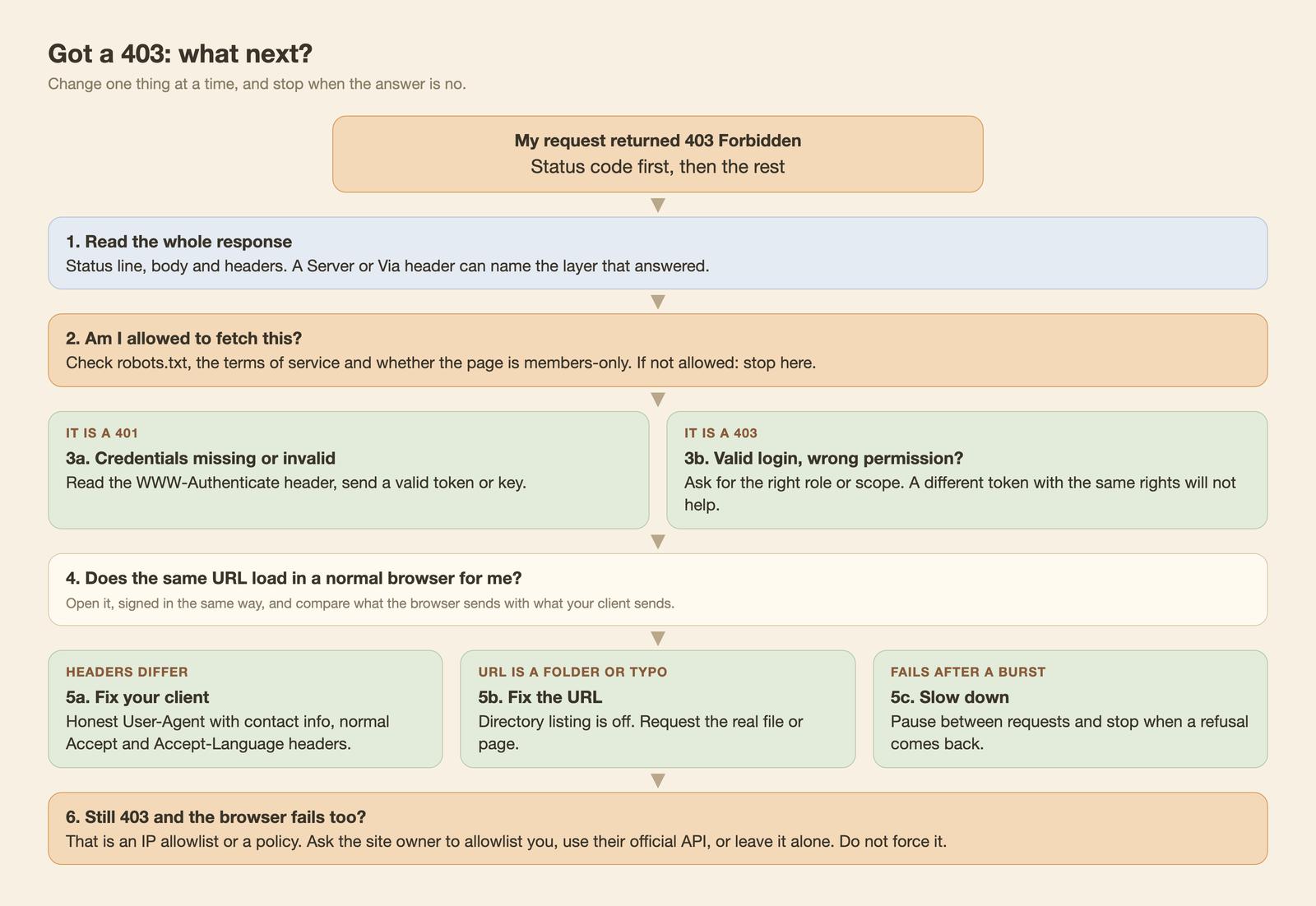
Fine to change: an honest, descriptive User-Agent with a contact link, the normal Accept headers, a key you were issued, and a slower pace. Not fine: pretending to be someone else, or forcing access to content you are not allowed to see. If a site wants only browsers or only allowlisted addresses, that is a stated policy, and I stop there. See how to avoid getting blocked when scraping and is web scraping legal.
First, check robots.txt. A 403 on robots.txt itself is handled differently by different tools. RFC 9309 says a 4xx answer means the file is "unavailable", and then a crawler "MAY access any resources on the server" (RFC 9309, section 2.3.1.3, read October 25, 2026). Python's urllib.robotparser is stricter: in my run it treated a 403 robots.txt as disallow-all.
from urllib.robotparser import RobotFileParser

BOT = "acme-kb-crawler"
for robots in ("https://example.com/robots.txt", "https://example.com/locked/robots.txt"):
    rp = RobotFileParser(robots)
    rp.read()
    print(robots, "->", "docs allowed:", rp.can_fetch(BOT, "https://example.com/docs"),
          "| private allowed:", rp.can_fetch(BOT, "https://example.com/private/x"))
Output: the normal file gave "docs allowed: True, private allowed: False", and the file that returned 403 gave False for both. The RFC permits crawling in that case, but I would still stop and ask the site owner, because a 403 on robots.txt is a refusal, not an invitation.
curl
# 1. Read the status line first (drop "| head -n 1" to see all headers)
curl -sS -i https://example.com/ua | head -n 1
# 2. Same URL, identified honestly
curl -sS -i https://example.com/ua -A "acme-kb-crawler/1.0 (+https://example.com/bot)" | head -n 1
# 3. A page that wants normal Accept headers
curl -sS -i https://example.com/headers | head -n 1
curl -sS -i https://example.com/headers \
  -H "Accept: text/html,application/xhtml+xml;q=0.9,*/*;q=0.8" \
  -H "Accept-Language: en-US,en;q=0.9" | head -n 1
Status lines: 403, 200, 403, 200. Default curl sent curl/8.7.1 and Accept: */*.
Python requests and httpx
import requests

UA = "acme-kb-crawler/1.0 (+https://example.com/bot)"
HEADERS = {
    "User-Agent": UA,
    "Accept": "text/html,application/xhtml+xml;q=0.9,*/*;q=0.8",
    "Accept-Language": "en-US,en;q=0.9",
}

r = requests.get("https://example.com/ua")
print(r.status_code, r.request.headers["User-Agent"])
try:
    r.raise_for_status()
except requests.HTTPError as e:
    print(e)  # 403 Client Error: Forbidden for url: ...

r = requests.get("https://example.com/ua", headers=HEADERS)
print(r.status_code, r.request.headers["User-Agent"])
Output: 403 with python-requests/2.32.3, the 403 Client Error: Forbidden for url message, then 200 with the honest User-Agent. On my server the default User-Agent alone caused the 403, and it is a common trigger on real sites. httpx behaves the same (default python-httpx/0.27.2; httpx.Client(headers=HEADERS) applies headers to every call).
Node fetch
const HEADERS = {
  "User-Agent": "acme-kb-crawler/1.0 (+https://example.com/bot)",
  Accept: "text/html,application/xhtml+xml;q=0.9,*/*;q=0.8",
  "Accept-Language": "en-US,en;q=0.9",
};

// fetch does not throw on 403: check res.ok or res.status yourself
let res = await fetch("https://example.com/ua");
console.log(res.status, res.ok);

res = await fetch("https://example.com/ua", { headers: HEADERS });
console.log(res.status, res.ok);
Output: 403 false, then 200 true. Node v26.12.1 sent the User-Agent node and Accept-Language: *. I did not test Node 18.
Playwright
import { chromium } from "playwright";

const browser = await chromium.launch();
const page = await browser.newPage();

// page.goto resolves with the response even for 403, so read the status yourself
const res = await page.goto("https://example.com/ip");
console.log(res.status(), await page.innerText("body"));
// A browser sends its own User-Agent and Accept headers, so those checks pass.
// An IP allowlist or a rate rule does not care, and the 403 stays.

await browser.close();
Output: 403 {"rule": "ip-allowlist", ...}. I launched Chromium with --host-resolver-rules="MAP * ~NOTFOUND, EXCLUDE 127.0.0.1", and the server log shows 170 requests, all from 127.0.0.1. A browser passing a header check is not advice to impersonate one; it only shows which 403s a browser does not fix.
The client matrix
The image shows the status before and after each fix (a dash means no legitimate client-side fix). Four cases (default User-Agent, Accept headers, directory URL, burst) went from 403 to 200 in all five clients. The browser-only policy and the IP allowlist stayed 403. The table below sorts them.
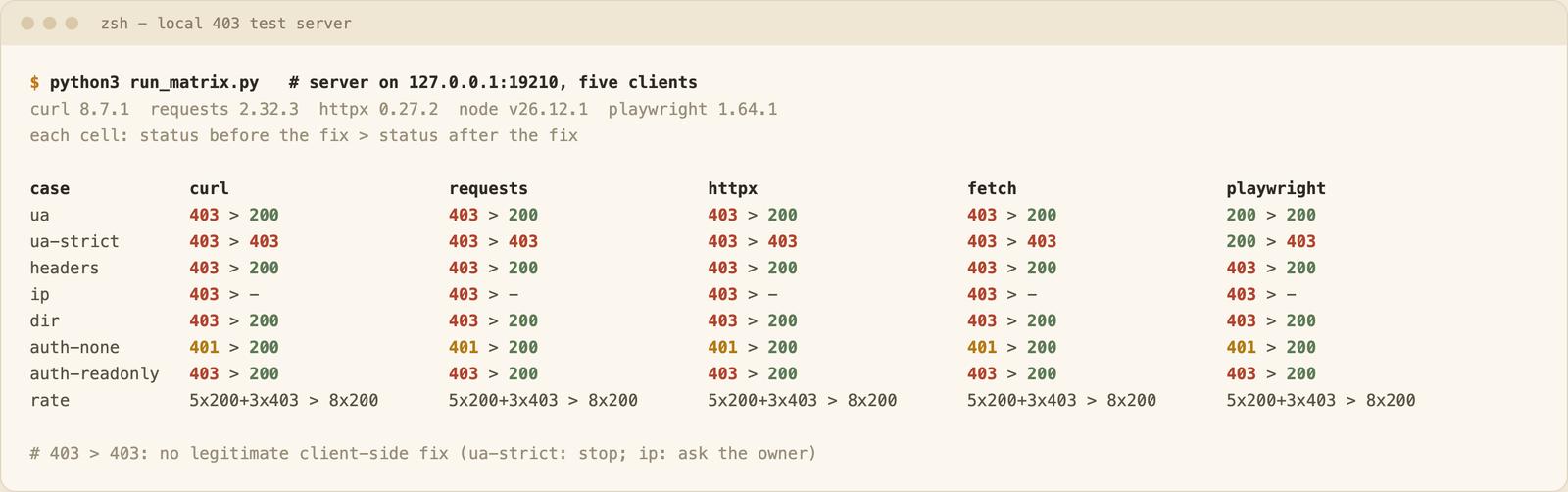
In my run, headless Chromium sent no Accept-Language and got a 403 on the headers route like the scripts, and it passed the browser-only rule only because it looks like a browser. With the honest User-Agent it got the same 403 as curl.
The rate rule allowed 5 requests per 10 seconds. A burst of 8 got 5 successes and 3 refusals in all five clients, and 3 seconds between requests gave 8 of 8. Real sites often use 429 for this, some use 403:
import time
import requests

HEADERS = {"User-Agent": "acme-kb-crawler/1.0 (+https://example.com/bot)"}
urls = ["https://example.com/rate?k=paced"] * 8

with requests.Session() as s:
    for url in urls:
        r = s.get(url, headers=HEADERS)
        print(r.status_code)
        if r.status_code in (403, 429):
            break          # stop, do not hammer a refusal
        time.sleep(3)      # stay under the site's rate
Eight 200s printed.
Crawling a Docs Site? Triage 403s in a Crawl Job
A crawl of a docs site or help center for an AI knowledge base rarely fails evenly. Most pages work, and a few come back refused. The job response documents the fields you need per item: status, original_url, page_status_code and last_error (job docs), and the error codes are listed in the error docs. The docs show a 403 as error_code website_access_denied, other non-2xx answers as host_returned_error, and a robots.txt refusal as blocked_by_robots_txt.
Here is an example. The URLs and the mix are made up, and I did not run this against a real crawl. The error codes and the 403 message are the documented ones. I found no documented 401 example, so a 401 is listed under host_returned_error, which the docs use for every non-2xx answer except 403.
| Page (illustrative) | What the job item shows | Likely cause | Triage |
|---|---|---|---|
| /docs/getting-started | website_access_denied, "Webpage returned access denied status code: 403" | One page refused while its neighbors load | Open it in a browser. If it loads there and you are allowed, retry later and slower. If not, ask the owner |
| /docs/internal/runbook | website_access_denied | Members-only or staff page | Skip. It is not meant for a public crawl |
| /admin/export | blocked_by_robots_txt | respect_robots_txt is true and the site's robots.txt disallows it | Skip. Respect the rule |
| /docs/api/private | host_returned_error, a 401 status | The page needs a login | Skip, or ask the owner for access you are entitled to |
| /docs/old-page | host_returned_error, a 404 status | Page was removed | Fix the URL list |
Which 403s a client change cannot fix
Most rows come from my local matrix, not from real sites. The token and login rows are general rules.
| 403 case | Fixed by a client change? | What to do instead |
|---|---|---|
| Default client User-Agent blocked | Yes: honest User-Agent | Done |
| Missing Accept or Accept-Language | Yes: send normal headers | Done |
| Directory listing disabled | Yes: request a real file | Fix the URL list |
| Burst of requests | Yes: pause between requests | Slow down |
| Valid token, wrong role | Only with a token that has the role | Ask for the right role |
| Browser-only User-Agent policy | No, stayed 403 in all five clients | Stop. It is a stated policy |
| IP allowlist | No, no client-side fix tried | Ask the owner to allowlist your address |
| Page behind a login | Only with access you were granted | Skip otherwise |
Why Scrapers and Crawlers Hit 403
The causes are the ones in the table above, only more often: a default client identity, missing headers, bursts of requests, datacenter address reputation, firewall rules, JavaScript-only pages and pages behind a login. Members-only pages in a docs site will legitimately return 403 and are out of scope for a public crawl.
If you have a legitimate need to spread load or reach a region the site serves, proxies for web scraping explains what a proxy can and cannot do. If the site refused you, a new address is not permission. Cloudflare-specific 403s and error 1020 are a separate topic I do not cover here, and a 407 is a proxy login problem, not a 403. For bare clients on JavaScript pages see web scraping with JavaScript and Node.js and web scraping with Python. Some 403s are the site working as intended, and then the right answer is not to fetch.
If the 403 is tied to the IP address, residential vs datacenter proxies explains which IP type fits which target. A 407 looks similar but comes from the proxy, see 407 Proxy Authentication Required. Before you retry, read exponential backoff and retries for HTTP clients.
What WebCrawlerAPI Returns When a Site Answers 403
I run WebCrawlerAPI, so take this section as the vendor view. Our error docs describe website_access_denied as a special case of host_returned_error. It means that the website returned a 403 status code. The job item looks like this (sample response from the docs, trimmed there with //...):
{
  "status": "done",
  "job_items": [
    {
      "error_code": "website_access_denied",
      "status": "error",
      "last_error": "Webpage returned access denied status code: 403"
    }
  ]
}
What I would check: open the URL in a browser and confirm you are allowed to fetch it. blocked_by_robots_txt is a separate error code. Our web scraping API page says the page "is rendered in a browser on our side, with retries, proxies and anti-bot handling, then converted and returned in the same response", and that results differ by target site. See the error docs and try the web scraping API on your own URLs. I make no claim that any particular site will stop returning 403.
Two calls start a crawl and list the items that came back as website_access_denied. The endpoints, Authorization header and request fields come from the crawl and job docs, and the per-item error_code field is shown in the error docs. I did not run this one. The jq filter is my own choice, not part of the docs.
# 1. Start a crawl (the response contains the job id)
curl --request POST \
  --url https://api.webcrawlerapi.com/v1/crawl \
  --header 'Authorization: Bearer YOUR_API_KEY' \
  --header 'Content-Type: application/json' \
  --data '{"url": "https://www.example.com/docs/", "items_limit": 10}'

# 2. When the job is done, read it and keep the refused items
curl --request GET \
  --url https://api.webcrawlerapi.com/v1/job/JOB_ID \
  --header 'Authorization: Bearer YOUR_API_KEY' \
  | jq '.job_items[] | select(.error_code == "website_access_denied") | {original_url, last_error}'
Each item left in that list is one URL for the triage table: confirm in a browser, then fix, ask the owner or skip.
FAQ
What does it mean if a website is forbidden?
The server received your request, understood it, and refuses to serve it. The cause can be your permissions, a rule about your address or headers, or a server setting. Reloading does not change that.
Does 403 Forbidden mean I'm blocked?
Not necessarily. It can be one rule about a header, a path or a missing role. It can also be a block on your address. Try the page from another network and read the response body.
How do I fix 403 Forbidden in an API?
A 401 means send valid credentials. A 403 with a valid token means the token lacks permission, so ask for the right role or scope. If it fails only for scripts, compare your headers with what the API documentation asks for.
How do 403, 401 and 429 differ in a crawl job?
A 403 is a refusal, a 401 asks for valid credentials, and a 429 asks you to slow down. The docs list a 403 as website_access_denied and other non-2xx answers, which covers 401 and 429, as host_returned_error. I did not find a documented 401 or 429 example.
Why does a web page say 403 Forbidden when scraping?
Your client sends something the site does not expect, it sent requests too fast, or the page is not meant for you. Check robots.txt and the terms, identify your client honestly, slow down, and stop when the answer stays no.
The short version: read the status, change one thing, and respect a real refusal.
