
A headless browser is a real web browser that runs without a visible window and is controlled by code. It loads pages, runs their JavaScript and builds the DOM like Chrome on your desktop, but nothing is drawn on a screen. You need one when the content you want only exists after JavaScript has run.
I measured that on a small test. A plain HTTP fetch of a JavaScript-rendered page found 0 of 10 quotes. Headless Chrome found all 10, at roughly 2.4x the time and 7x the memory.
Last updated: October 25, 2026. I run WebCrawlerAPI. Everything measured here was run by me in Node 26.12.1 on one MacBook (Apple M2 Max, 32 GB) with Playwright 1.64.1 and Chrome Headless Shell 156.0.8078.4. Not run: Windows, Linux, CI, Firefox, WebKit, Lightpanda, and the WebCrawlerAPI snippet.
What Is a Headless Browser?
A normal browser does two jobs. It loads and understands web pages, and it shows them to a person. A headless browser keeps the first job and drops the second.
It still makes network requests, stores cookies, parses HTML, runs JavaScript and calculates layout. It skips the window and the address bar, and it draws nothing on a display. Because a program is in charge, you can ask it for the final HTML, a screenshot, or the text of one element.
What is headless mode?
"Headless mode" is the setting that starts a browser this way. Chrome documents it as running the browser "in an unattended environment, without any visible UI", started with the --headless flag. If you work in Playwright and want the setting itself, see how to run Playwright in headless mode.
How a Headless Browser Works
You do not click anything. A script sends commands, and the browser answers.
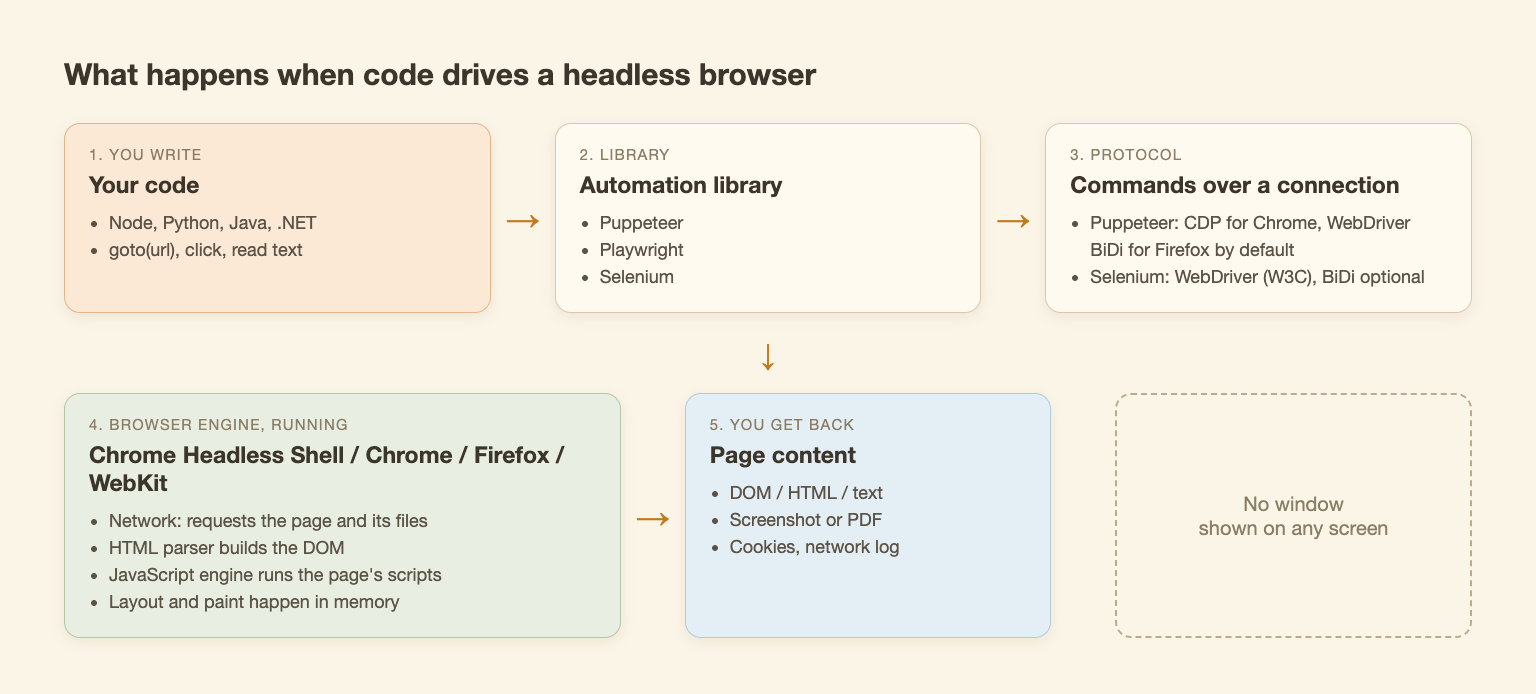
Labels follow the Puppeteer and Selenium docs. I did not verify Playwright's internal protocol, so it is not described in the diagram.
A typical page load goes like this:
- The script tells the browser to open a URL.
- The browser requests the HTML and every file it points to.
- The parser builds the DOM and the JavaScript engine runs the page's scripts.
- Scripts fetch more data and change the DOM. This is where client-rendered content appears.
- Your script waits for something it cares about, then reads the DOM, text or a screenshot.
The three common libraries look alike. This is Playwright, copied from the run:
import { chromium } from "playwright";

const browser = await chromium.launch(); // headless by default
const page = await browser.newPage();
await page.goto("https://quotes.toscrape.com/js/");
console.log(await page.locator(".quote .text").first().innerText());
await browser.close();
Puppeteer is almost the same (puppeteer.launch() is headless by default, per its docs). In Selenium I passed --headless=new on the Chrome options, as the Selenium docs do (Chrome's own docs now show plain --headless). I ran all three against the same page and each printed the same quote. For picking a library, see Puppeteer vs Playwright and Playwright vs Selenium.
Headless Chrome
Is Chrome a headless browser? It can be. The same Chrome you browse with can start with no window.
There are two kinds, and the names confuse people:
- Headless mode in Chrome. The real Chrome, run without a UI. Chrome's docs say it now has unified headless and headful modes.
- chrome-headless-shell. The old headless mode. Since Chrome 132.0.6793.0 it is only available as a separate binary. Chrome's docs describe the old mode as a separate implementation that did not share the regular browser code. Puppeteer docs say it does not match regular Chrome completely, but is currently more performant for automation that does not need every Chrome feature.
Playwright uses the shell build for headless runs by default, and the full new mode if you pick the chromium channel (Playwright docs). My benchmark below used the shell: Playwright downloaded Chrome Headless Shell 156.0.8078.4.
| Option | What it is | Driven by | Notes |
|---|---|---|---|
| Chrome, headless mode | Real Chrome, no UI | Puppeteer, Playwright, Selenium | Puppeteer's default |
| chrome-headless-shell | Old headless mode, separate binary | Puppeteer (headless: 'shell'), Playwright default | Lighter, not identical to Chrome |
| Firefox, WebKit | Other engines | Playwright (Puppeteer also drives Firefox) | Not run |
| Lightpanda | New headless browser written in Zig, not a Chromium fork | CDP, so Puppeteer or Playwright clients | Not run; its speed claims are the vendor's |
Sources: Chrome headless docs, Puppeteer headless modes, Playwright browsers, Lightpanda, all read October 25, 2026. I do not rank them: the best headless browser is the one with the engine and language you need.
When You Need a Headless Browser (and When You Don't)
Start with a plain HTTP request. It is cheaper. Use a headless browser only if the data you want is not in the HTML the server sends.
I tested that on three public pages, with the same identifying user agent for both methods (headless-bench/1.0 (+https://webcrawlerapi.com)). robots.txt returned 404 on all three hosts, so there were no rules to follow. Each configuration ran 5 times, each run in a fresh Node process, 1 second apart.
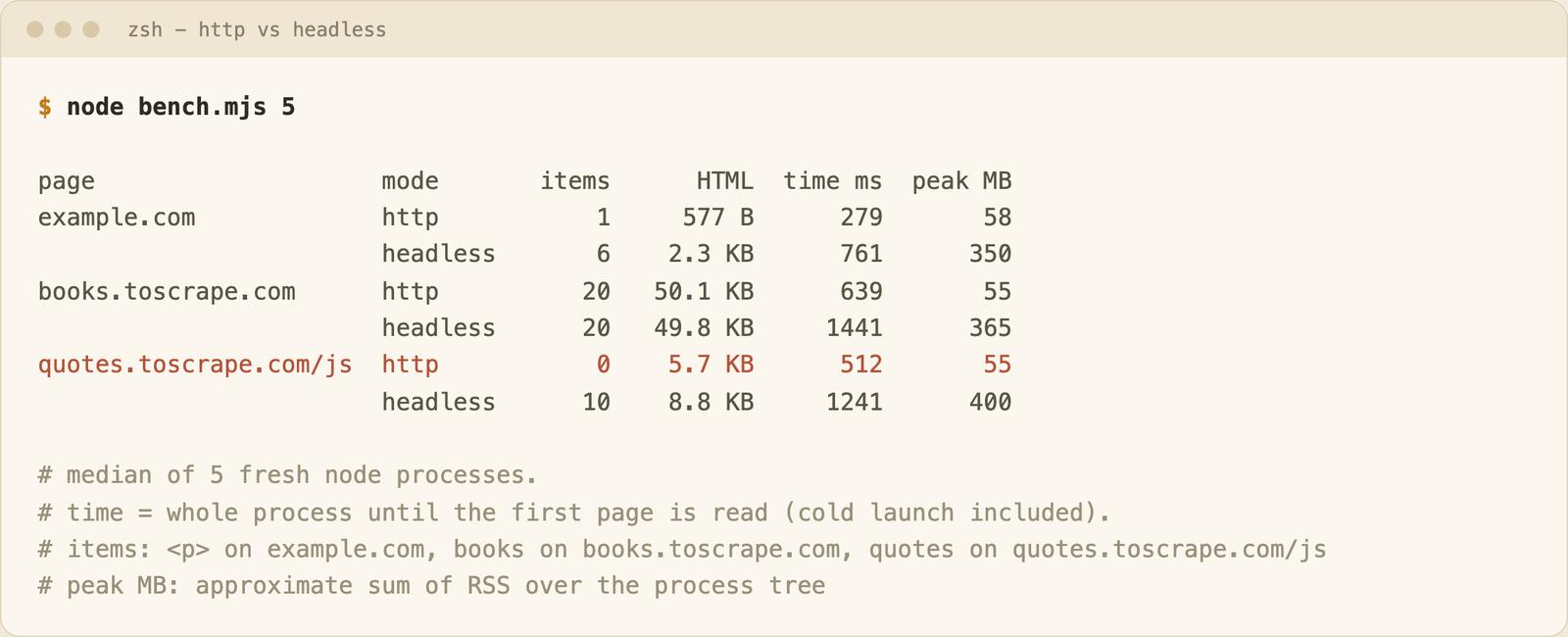
Medians of 5 runs. Time is the whole Node process until the first page is read, with a cold browser launch each time. Memory is the whole process tree, Node included.
| Page | HTTP finds | Headless finds | HTTP time | Headless time | HTTP memory | Headless memory |
|---|---|---|---|---|---|---|
| quotes.toscrape.com/js | 0 quotes | 10 quotes | 512 ms | 1241 ms | 55 MB | 400 MB |
| books.toscrape.com | 20 books | 20 books | 639 ms | 1441 ms | 55 MB | 365 MB |
| example.com | 1 paragraph | 6 paragraphs | 279 ms | 761 ms | 58 MB | 350 MB |
What I take from it:
- A static page needs no browser. Books were all in the plain HTML. HTTP was about 2.3x faster and used far less memory.
- A JavaScript page returns an empty shell over HTTP. The quotes page sent 5.7 KB with no quotes in it. Headless returned all 10.
- Pages change. On the day I ran it, example.com no longer sent its heading in HTML. A script added extra paragraphs, and headless saw 6 where HTTP saw 1. I first wrote the benchmark expecting one static control and had to fix it. These sites are live, so rerunning may give different results.
Once the browser was running, loading a second page was cheaper. In the same process, a repeat load took 53 ms on books and 257 ms on quotes, against 899 ms and 853 ms for the first one. So the cold launch (about 250 to 400 ms here) matters when you start a browser for each page, and matters less when you keep it open. This was one machine, not CI, and I make no significance claims. Memory is a sum of resident memory over the browser's processes, so it double-counts shared pages. Compare it only with the HTTP row. About 55 MB of it is Node itself, so the browser adds roughly 300 to 350 MB.
A short rule:
- Need a headless browser: client-rendered pages, clicks, logins, infinite scroll, screenshots, PDFs, end-to-end tests.
- Do not need one: static HTML, JSON APIs, sitemaps and feeds.
If you build an AI knowledge base from documentation sites, this is the check that matters. A docs site built as a single-page app can come back from a plain fetch with an empty shell, and your search or support bot then indexes nothing. Open "view source" first, and look for your text. If it is missing, you need a browser, or an API that returns the rendered page as markdown, which is what you would index. For the full picture on rendering, see JavaScript rendering in web crawling and how to scrape JavaScript-heavy sites.
Headless Browser for Scraping, and Detection
Headless browsers are the usual tool for scraping JavaScript pages: the browser does the rendering and you read the result.
Can a website detect a headless browser? Sometimes, yes. I checked what mine says about itself, locally on a blank page, with no site contacted. Playwright's headless Chromium reported navigator.webdriver as true, and its user agent contained HeadlessChrome/156.0.8078.4. That is two signals a site could read. I did not test any detection service, so I cannot tell you what a given site does. If a script works headed but fails headless, start with Playwright headless-only failures.
What It Costs to Run Headless Browsers Yourself
The first cost is setup. On a clean cache, playwright install chromium took 29 seconds and downloaded 99 MiB for the headless shell. All browser files Playwright put on disk (Chromium, headless shell and ffmpeg) came to 586 MB. Puppeteer's cache for its Chrome and headless shell was 581 MB.
The second is memory: about 400 MB for the whole process tree (Node plus one browser) in my runs, against about 55 MB for a plain fetch. One instance is nothing. Hundreds in parallel is a server bill.
The rest comes from running it for months:
- Browser processes that outlive your script and eat memory.
- Sandbox and shared-memory flags once you move into Docker.
- Missing fonts and system libraries on a slim image.
- Browser and library versions drifting apart.
- Retries and timeouts for pages that hang.
Many of these are covered in how to fix "Playwright executable doesn't exist" and in my comparison of a managed cloud browser and self-hosted Puppeteer. For a few pages or a test suite, running it yourself is fine.
Headless Browser API: When a Request Replaces the Browser
A headless browser API runs the browser for you. With WebCrawlerAPI one POST to /v2/scrape fetches a single URL and returns markdown, HTML or links in the same response, with no browser for you to run. The product page describes it rendering JavaScript pages; the API docs themselves only list the request options. The scrape endpoint takes a URL and output options, with no click or login steps, so multi-step logged-in flows still need your own browser automation. Here is the request shape from the docs:
// Not run for this post (needs a real API key)
const res = await fetch("https://api.webcrawlerapi.com/v2/scrape", {
  method: "POST",
  headers: {
    Authorization: "Bearer YOUR_API_KEY",
    "Content-Type": "application/json",
  },
  body: JSON.stringify({
    url: "https://quotes.toscrape.com/js/",
    output_formats: ["markdown"],
  }),
});
const data = await res.json();
console.log(data.markdown);
Pricing, read from the pricing docs on October 25, 2026, is per page: $0.002 on pay as you go, $0.0015 on Professional and $0.001 on Business, and you only pay for successful requests. Some sites, such as TikTok and LinkedIn public pages, are priced separately. Requests with a prompt use the agent and are billed per token on top.
If you want a browser driven by an AI agent instead, see Playwright MCP.
Which One: HTTP, Your Own Browser, or an API
| Plain HTTP fetch | Headless browser you run | Scraping API | |
|---|---|---|---|
| Runs page JavaScript | No | Yes | Yes |
| Measured memory (mine, whole process tree) | about 55 MB | about 400 MB | Not on your machine |
| Setup | None | Browser download, 99 MiB for the shell | An API key |
| You maintain | Nothing | Browser, flags, retries | Nothing |
| Cost model | Your server | Your server | Per successful page |
Where to go next: Playwright CLI for driving a browser from shell commands, web scraping with Selenium in Python for a full tutorial, HTML to PDF with Playwright and Puppeteer for printing pages, and proxies for web scraping when your IP gets blocked.
FAQ
Is Chrome a headless browser?
Chrome can run headless. Start it with --headless and it runs without a window. It is also a normal desktop browser, so "headless Chrome vs Chrome" means the same engine with and without the UI. The old mode ships separately as chrome-headless-shell.
Can a website detect a headless browser?
It can look for signals. In my local check, navigator.webdriver was true and the user agent said HeadlessChrome. Whether a site acts on that depends on the site, and I did not test any.
Can I use a headless browser in Python?
Yes. Selenium has Python bindings, and I ran a Selenium 4.51.0 Python script with --headless=new against Chrome 156.0.8078.47. Playwright also has a Python version, which I did not run.
Do I need a headless browser for an AI knowledge base?
Only for pages that render client-side. Check "view source" first. If your text is in the HTML, a plain fetch is cheaper. If it is not, you need a browser or an API.
Conclusion
Try plain HTTP first. Reach for a headless browser when the content needs JavaScript, or for an API if you would rather not run the browser yourself. If you go the browser route, Puppeteer vs Playwright is the next read.
