

Every "Python web scraping libraries" article lists the same names. Few say which one to install first, and almost none measure anything.
So I ran 12 setups on the same job: fetch 10 pages, count 100 quotes. Same laptop, same day (October 17, 2026), Python 3.11.2, 5 runs each, medians below. The code is saved next to this post, so the numbers can be reproduced.
If you want the step-by-step workflow (requests, BeautifulSoup, retries, saving data), read Web Scraping with Python. This post is about choosing between the libraries.
Which Python Web Scraping Library Should You Pick?
All of these are free and open source. Here is the short answer.
| Your situation | Start with | Why |
|---|---|---|
| A few static pages | requests + BeautifulSoup | Smallest install, fastest to write. Details |
| Many static pages | httpx or aiohttp | Async, about 2x faster than requests on this job. Details |
| Page is empty without JavaScript | Playwright | 536 MB, but reliable and well documented. Details |
| Whole-site crawl with pipelines | Scrapy | Concurrency, retries and export built in. Details |
| Site blocks plain HTTP clients | curl_cffi, then a scraping API | Browser-like TLS first, outsourcing second. Details |
| Pages for an AI knowledge base | Crawl4AI | Markdown output out of the box. Details |
The rule I use: start with requests or httpx plus a parser. Add a browser only after you get an empty result. Add a framework when the project becomes a crawl pipeline, not before.
How the Libraries Were Tested
The job is the same everywhere: 10 pages of quotes.toscrape.com, 10 quotes per page, 100 in total. HTTP clients and Scrapy read the static version (/page/1/ to /page/10/). Browser tools read the JavaScript version (/js/page/1/ to /js/page/10/), because a plain HTTP client sees an empty page there.
Each run starts in a fresh Python process. Peak memory is the sum of RSS over the Python process and all its children (so Chromium is included), sampled every 20 ms. A run counts as successful only when it finds exactly 100 quotes. All 60 runs did.
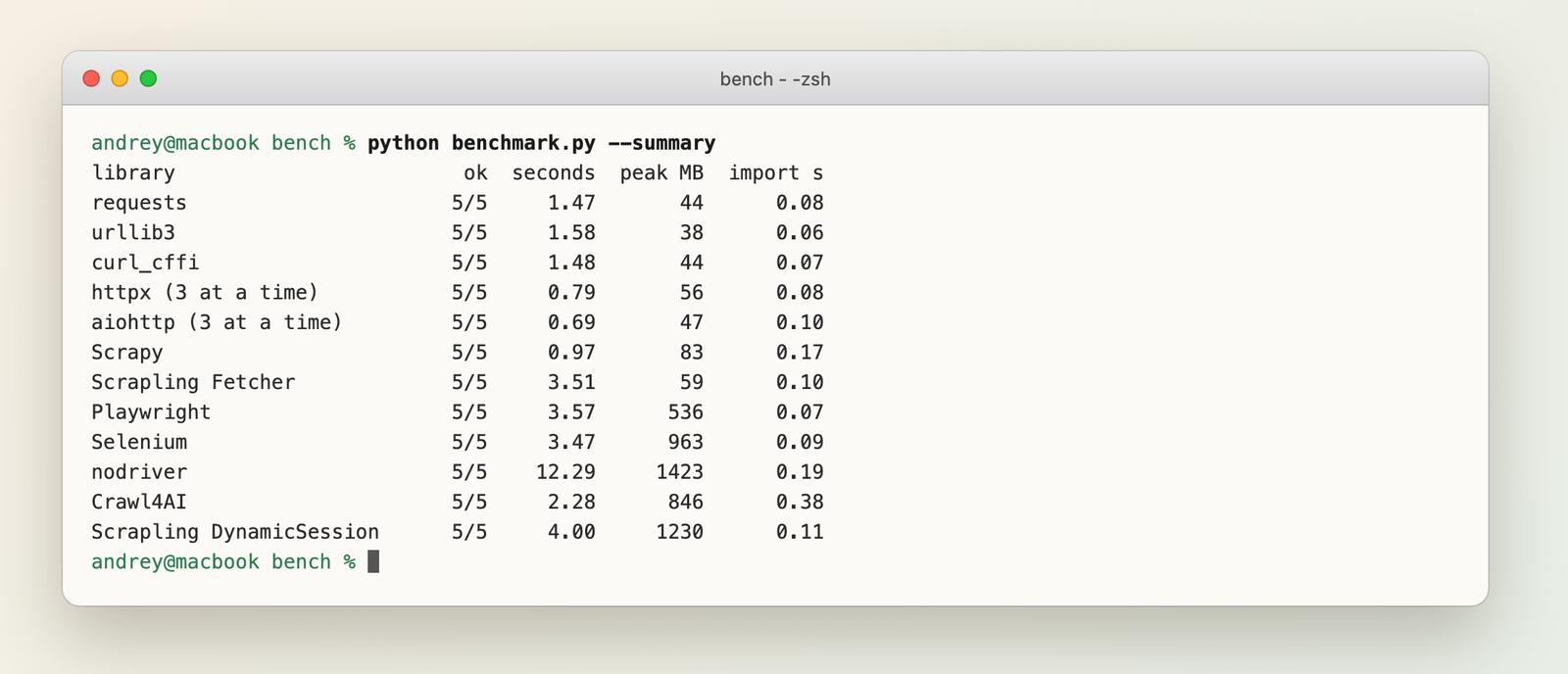
And the same data as a chart:
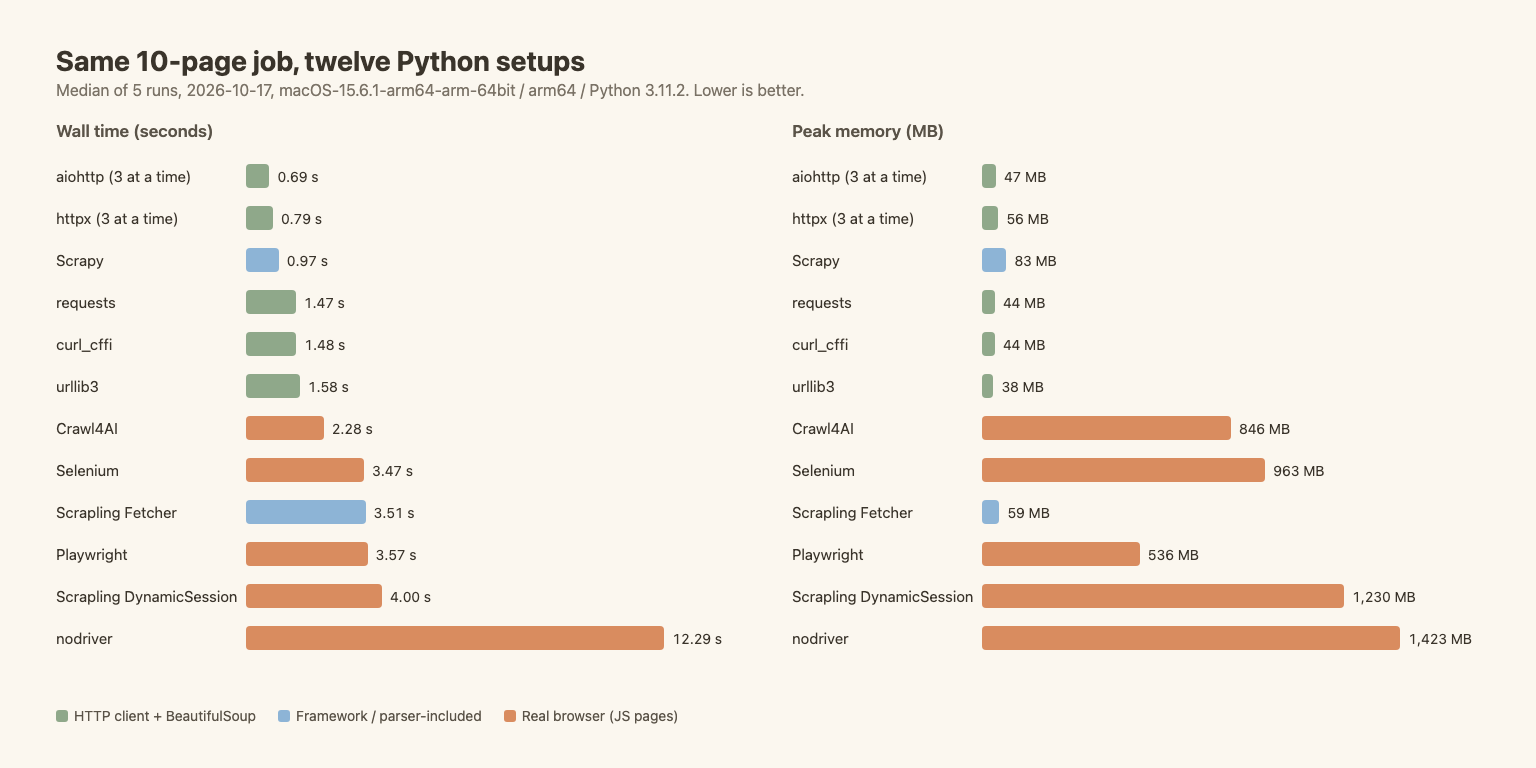
Here is the full table. Install size is the growth of site-packages in a clean venv after pip install <library> with its dependencies (browser binaries not included). Lines of code count non-blank lines in the job script. Stars were pulled from GitHub on publish day.
| Library | Version | Time (s) | Peak memory | Install | Import (s) | Lines | JS pages | GitHub stars |
|---|---|---|---|---|---|---|---|---|
| urllib3 | 2.8.0 | 1.58 | 38 MB | 1 MB | 0.06 | 13 | No | 4.1k |
| requests | 2.34.2 | 1.47 | 44 MB | 4 MB | 0.08 | 14 | No | 54.5k |
| curl_cffi | 0.16.3 | 1.48 | 44 MB | 9 MB | 0.07 | 13 | No | 6.7k |
| httpx (3 at a time) | 0.28.1 | 0.79 | 56 MB | 5 MB | 0.08 | 17 | No | 15.6k |
| aiohttp (3 at a time) | 3.14.5 | 0.69 | 47 MB | 7 MB | 0.10 | 18 | No | 16.6k |
| Scrapy | 2.19.0 | 0.97 | 83 MB | 97 MB | 0.17 | 17 | No | 64.9k |
| Scrapling Fetcher | 0.4.15 | 3.51 | 59 MB | 318 MB | 0.10 | 11 | No | 88.2k |
| Playwright | 1.64.0 | 3.57 | 536 MB | 141 MB | 0.07 | 16 | Yes | 15.0k |
| Selenium | 4.51.0 | 3.47 | 963 MB | 45 MB | 0.09 | 20 | Yes | 34.6k |
| nodriver | 0.50.6 | 12.29 | 1,423 MB | 8 MB | 0.19 | 17 | Yes | 4.8k |
| Crawl4AI | 0.9.5 | 2.28 | 846 MB | 726 MB | 0.38 | 13 | Yes | 85.7k |
| Scrapling DynamicSession | 0.4.15 | 4.00 | 1,230 MB | 318 MB | 0.11 | 11 | Yes | 88.2k |
The HTTP rows use BeautifulSoup with lxml for parsing, so parse time is the same for all of them. Scrapy and Scrapling use their own selectors.
What these numbers do not show. The practice site is friendly. It never blocks, never throttles, and answers fast. So the gaps measure client overhead, not how well a library survives a hostile site. Read the table as a best case, not a promise.
Also, the settings differ on purpose. httpx and aiohttp ran 3 requests at a time, requests and urllib3 ran one at a time, Scrapy used its default concurrency (16), and Crawl4AI's arun_many runs pages in parallel on one browser. Those are the defaults you'd likely start with. A fair comparison of concurrency alone needs a separate test.
For reference, the Python scraping guide measured on a different day: requests 1.77 s / 45 MB, httpx 0.88 s / 47 MB, Playwright 3.86 s / 532 MB, Playwright with 10 tabs 1.39 s / 1,309 MB. Those line up with the table above (small differences come from counting Python import time there).
HTTP Clients: Fetching the Page
An HTTP client downloads HTML. It doesn't run JavaScript. For most static pages that's all you need, and it's the cheapest layer by far: every client here stayed under 60 MB.
requests: the default
requests is what most people learn first, and it's still a fine start. It's blocking (one request at a time), has no HTTP/2, and, a classic trap, no default timeout. Always pass timeout=10.
import requests

session = requests.Session()
session.headers.update({"User-Agent": "my-scraper/1.0 (me@example.com)"})
html = session.get("https://quotes.toscrape.com/page/1/", timeout=10).text
Result: 1.47 s for 10 pages, 44 MB. Pick it for scripts, notebooks, and anything under about 50 pages.
httpx (and httpx vs requests)
httpx has nearly the same API as requests, plus async support and HTTP/2. In my run, 3 concurrent requests brought the job from 1.47 s to 0.79 s, at a cost of 12 MB more memory.
The short version of httpx vs requests: if your script fetches pages one at a time, there's little reason to switch. If it fetches many pages, httpx with asyncio and a semaphore is the smoothest upgrade, because you keep the same mental model. Don't forget to cap concurrency. 3 to 10 at a time is polite for most sites.
import asyncio
import httpx

async def fetch(client, sem, url):
    async with sem:
        return (await client.get(url, timeout=10)).text

async def main(urls):
    sem = asyncio.Semaphore(3)
    async with httpx.AsyncClient() as client:
        return await asyncio.gather(*(fetch(client, sem, u) for u in urls))
aiohttp
aiohttp is async only. There's no sync client. It was the fastest in my run (0.69 s, 47 MB), a bit faster than httpx and a bit lighter. The API is less like requests, so the learning cost is real.
I'd pick it when the project is already async, or when raw throughput on a big URL list matters. Otherwise httpx is easier to live with. No HTTP/2 support in the client.
curl_cffi
curl_cffi copies the requests API but sends the TLS and HTTP/2 fingerprint of a real browser (impersonate="chrome"). Some sites reject Python's default fingerprint before they look at anything else. This is the library for that case.
On the practice site it ran at the same speed as requests (1.48 s, 44 MB). This site doesn't block anyone, so this benchmark can't say anything about whether it gets past a block. Be careful with it: looking like a browser doesn't make a scrape allowed. See web scraping ethics before pointing it at a site that said no.
urllib3
urllib3 is the low-level library requests is built on. It was the lightest here (38 MB, 1 MB install) and about as fast as requests. You get connection pooling and retries, but you write more yourself. It makes sense inside tools and containers where size matters. For a normal scraper, use requests.
Parsers: Reading the HTML
Fetching gives you a string. A parser turns it into something you can query. I didn't benchmark parsers here; that's a topic of its own and a separate comparison is planned.
| Parser | One-line trade-off |
|---|---|
| BeautifulSoup | Forgiving and easy, the standard choice, slowest of the group |
| lxml | Fast C library, XPath and CSS, a bit stricter |
| selectolax | Very fast HTML5 parser, smaller feature set |
| parsel | The selector engine Scrapy uses, works standalone, CSS and XPath |
If you're unsure, take BeautifulSoup with lxml as the backend. That's what all the HTTP rows above used.
Browser Libraries: When the Page Needs JavaScript
If requests returns the page but the data is missing, the data is probably built by JavaScript after load. Then a real browser is needed. The price is visible in the table: 500 to 1,400 MB instead of 40 to 60 MB, and 2 to 12 seconds instead of 1 to 1.5. More in JavaScript rendering for web crawling.
Playwright
Playwright is the default for JavaScript pages. Good waits (wait_for_selector), solid docs, and it manages its own Chromium. In my run: 3.57 s, 536 MB for one browser visiting 10 pages in sequence. Open 10 tabs at once and memory goes past 1.3 GB (see the hub's measurement above).
Common first-day errors have their own fixes: TimeoutError on actions and the "executable doesn't exist" error.
from playwright.sync_api import sync_playwright

with sync_playwright() as p:
    browser = p.chromium.launch(headless=True)
    page = browser.new_page()
    page.goto("https://quotes.toscrape.com/js/page/1/")
    page.wait_for_selector("div.quote")
    html = page.content()
    browser.close()
Selenium
Selenium is the old standard, and it's fine for existing test suites. On this job it matched Playwright on time (3.47 s vs 3.57 s) but used about 80% more memory (963 MB vs 536 MB), probably because it drove full Chrome here, while Playwright used its slim headless shell (I didn't test that guess). For a new scraper I'd pick Playwright. For one that already exists in Selenium, I wouldn't rewrite it.
nodriver
nodriver drives Chrome without the usual automation markers, so it's often mentioned for protected sites. It was the slowest in my run (12.29 s, 1,423 MB). I used the default wait_for and didn't tune anything, so some of that gap may be my setup. I'd try it only after Playwright fails on a page you're allowed to scrape. Don't count on it as a free pass, and read the ethics note first.
Frameworks and Higher-Level Tools
Scrapy
Scrapy is a full crawling framework: scheduling, concurrency, retries, throttling, pipelines, and export. On this job it was the second fastest (0.97 s) at 83 MB, using default concurrency and its own CSS selectors. It also has the biggest learning curve of the HTTP-only tools, and a 97 MB install.
Use Scrapy when the project is a crawl pipeline: thousands of URLs, follow-up links, scheduled runs. For 20 pages it's too much. It doesn't run JavaScript by itself; scrapy-playwright adds that. Deep dives: build a crawler with Scrapy and how to crawl a website with Python.
Crawl4AI
Crawl4AI is built for feeding pages to language models. It drives a browser and returns clean Markdown, which suits an AI knowledge base. In my run it finished 10 JavaScript pages in 2.28 s, the fastest browser result, but arun_many runs pages in parallel on a shared browser, so it isn't a like-for-like with sequential Playwright. It also has the heaviest install (726 MB), and the slowest import (0.38 s).
I only measured raw HTML here, not the Markdown output. For a full project, see web crawling with Crawl4AI.
Scrapling
Scrapling pitches adaptive selectors (it tries to find an element again after the page changes) and has a plain HTTP fetcher and browser fetchers. It's the shortest code in the table: 11 lines.
With default settings, the plain Fetcher took 3.51 s, more than twice requests, and I didn't find out why. The browser version (DynamicSession) took 4.00 s and 1,230 MB. The install is 318 MB with the fetcher extras. It's an interesting library, but I couldn't show a speed or memory reason to pick it. Its selling point is resilience to page changes, which this test doesn't cover.
For crawler frameworks in other languages, see best open source web crawlers.
Libraries That Look Outdated
Old lists still recommend these. I checked PyPI and GitHub on October 17, 2026.
- Requests-HTML. Last PyPI release is 0.10.0 from February 2019. The last GitHub commit was in April 2024.
- Pyppeteer. Last release 2.0.0 in February 2024, and the GitHub repository is archived. Use Playwright.
- Splash. The last commit in the repo is from August 2024. It's tied to the Scrapy ecosystem (scrapy-splash), and I wouldn't start new work on it.
- MechanicalSoup. Still alive: version 1.4.0 came out in May 2025 and the repo saw commits this month. It's a niche tool for form-driven sites.
"Not updated" doesn't always mean "broken". But a scraper lives and dies by compatibility with changing sites and browsers, so I prefer libraries with recent releases.
When Libraries Stop Being Enough (and an API Starts to Make Sense)
Libraries cost nothing to install, but your time does cost something. Watch for these signs:
- constant 403 and 429 responses
- a growing proxy bill
- browser RAM becoming your hosting cost
- selectors breaking every other week
When you see two or three of them, writing more code is probably the wrong fix. A scraping API takes on rendering, retries, proxies and blocks. It's a trade-off, not a free win. In the Python scraping guide, the same 10 JavaScript pages took 23.7 s sequentially through an API against 3.57 s with a local browser. What you buy is that the browser, the proxies and the blocks are someone else's problem.
WebCrawlerAPI does that, and returns Markdown, HTML or structured data. Here's the Python SDK (SDK docs, scrape endpoint):
pip install webcrawlerapi
import os
from webcrawlerapi import WebCrawlerAPI

client = WebCrawlerAPI(api_key=os.environ["WEBCRAWLERAPI_KEY"])

result = client.scrape(
    url="https://quotes.toscrape.com/js/",
    output_formats=["markdown"],
)

print(result.markdown[:300])
When not to use an API: one-off scripts, a few static pages, and anything where a 1.5 s requests loop already works.
If you want to try it, sign up and run the example on the page that gave you trouble.
Common Mistakes When Picking a Library
- Starting with a browser. It costs 10 to 30 times the memory. Try requests first, and open DevTools to check whether the data is in the HTML.
- Using Scrapy for 20 pages. You'll spend more time on project setup than on scraping.
- Judging a library on one run. The first curl_cffi run was 2.22 s and the next four were 1.42 to 1.48 s. Run it five times and take the median.
- Trusting a friendly-site benchmark. Speed on an easy site says little about a protected one. Including mine.
- Ignoring robots.txt and rate limits. Slow down and identify yourself. See web scraping ethics.
FAQ
What is the best Python library for web scraping?
For most people, requests (or httpx) plus BeautifulSoup. Add Playwright for JavaScript pages and Scrapy for large crawls. There's no single best one, because each handles a different layer.
Can Python do web scraping?
Yes. Python has libraries for fetching pages, parsing HTML, driving browsers and running crawls. The Python scraping guide walks through a first scraper.
Is web scraping illegal?
It depends on what you scrape, how, and where. Public pages are often fine, but terms of service, personal data and copyright all matter. I wrote about it in web scraping ethics. That's not legal advice.
Which is the best tool for web scraping?
The smallest one that works for your page. Static page: an HTTP client and a parser. JavaScript page: Playwright. Blocked site or large scale: a scraping API. See common web scraping tools.
httpx or requests for scraping?
requests for simple sequential scripts. httpx when you need concurrency or HTTP/2. In this test, httpx was about 1.9x faster on 10 pages with 3 at a time.
Which library handles JavaScript pages?
Playwright, Selenium, nodriver, Crawl4AI and Scrapling's browser fetchers all run a real browser. Pick Playwright first. More on scraping JavaScript-heavy sites.
Can ChatGPT scrape a website?
Not on its own. It can write the scraper or parse HTML you paste in, but something else has to fetch the pages. The hub guide covers it.
Scrapy or Playwright?
They solve different problems. Scrapy manages a crawl (queue, concurrency, export). Playwright renders one page. Many projects use both through scrapy-playwright.
What to Do Next
The table at the top is the whole decision: requests or httpx plus a parser for static pages, Playwright for JavaScript, Scrapy for pipelines, an API when blocks take over your week.
Next steps:
- Learn the full workflow in Web Scraping with Python.
- Follow links across a site with how to crawl a website with Python.
- Prefer JavaScript? Read web scraping with Node.js.
- Compare hosted options in best web scraping APIs.
Start with the smallest library that returns your data. Measure before you upgrade.
