

Every list of Python HTML parsers says the same thing: lxml is fast, BeautifulSoup is easy, html5lib is slow. Few of them show numbers, and almost none show what happens when the markup is broken.
So I ran nine parser setups on the same files. The job was identical for all: parse the page, collect every link, and pull the text of one repeated element. Same laptop, October 17, 2026, Python 3.11.2, medians of 7 runs. If you want the full scraping workflow (fetching, retries, saving data), read Web Scraping with Python. This post is only about choosing a parser.
Which Python HTML Parser Should You Use?
Here is the short answer. The measured details follow.
| Your situation | Pick | Why |
|---|---|---|
| First scraper, learning | BeautifulSoup + lxml | Friendly API, decent speed. Details |
| Speed on many pages | selectolax (Lexbor) | Fastest and lightest in this test. Details |
| XPath needed | lxml.html or parsel | Full XPath plus CSS. Details |
| Already using Scrapy | parsel | It is the same selector layer. Details |
| Messy, broken HTML | BeautifulSoup + html5lib, selectolax or JustHTML | They matched a real browser. Details |
| No dependencies allowed | html.parser from the standard library | Ships with Python. Details |
My rule: start with BeautifulSoup and lxml. Move to selectolax or lxml.html only when parse time shows up in a profile. Use the standard-library html.parser for zero-dependency scripts.
How Parsing Works in 60 Seconds
An HTML parser turns a string of markup into something you can query. Most parsers build a tree (the DOM): you ask for div.quote or //a/@href and get elements back. The standard-library html.parser is different. It is event-based: it calls your handler for every start tag, end tag and piece of text, and you keep the state yourself.
You select elements with CSS selectors or XPath. CSS is shorter for most jobs. XPath can also walk up the tree and match on text. If you are new to it, see what is XPath.
One common confusion: BeautifulSoup is not a parser. It is a friendly API on top of a backend (html.parser, lxml or html5lib). The backend you pick decides the speed and how broken markup is repaired. That is why "BeautifulSoup vs lxml" is really "BeautifulSoup with which backend".
How the Parsers Were Tested
Network time is noise, so every page was saved to disk once and parsed from the file. Each run started a fresh Python process, so memory numbers are not polluted by earlier runs. I sampled the process memory (RSS) while it ran and took the median of 7 runs for each parser and file.
Four files were used: an 11 KB clean page (quotes.toscrape.com), a 231 KB Wikipedia article, a 997 KB Wikipedia article, and a 1.9 MB Wikipedia list page. The headline numbers below are for the 997 KB article. Before timing, I checked that every parser extracted the same counts (2,241 links and 73 elements), with one exception covered below.
Setup:
- macOS 15.6.1, arm64, Python 3.11.2
- beautifulsoup4 4.15.0, lxml 6.1.3, html5lib 1.1, selectolax 1.0.0, parsel 1.12.1, pyquery 2.1.0, justhtml 3.13.1
- Run date: 2026-10-17 (selectolax 1.0.1 came out later that day; I tested 1.0.0)
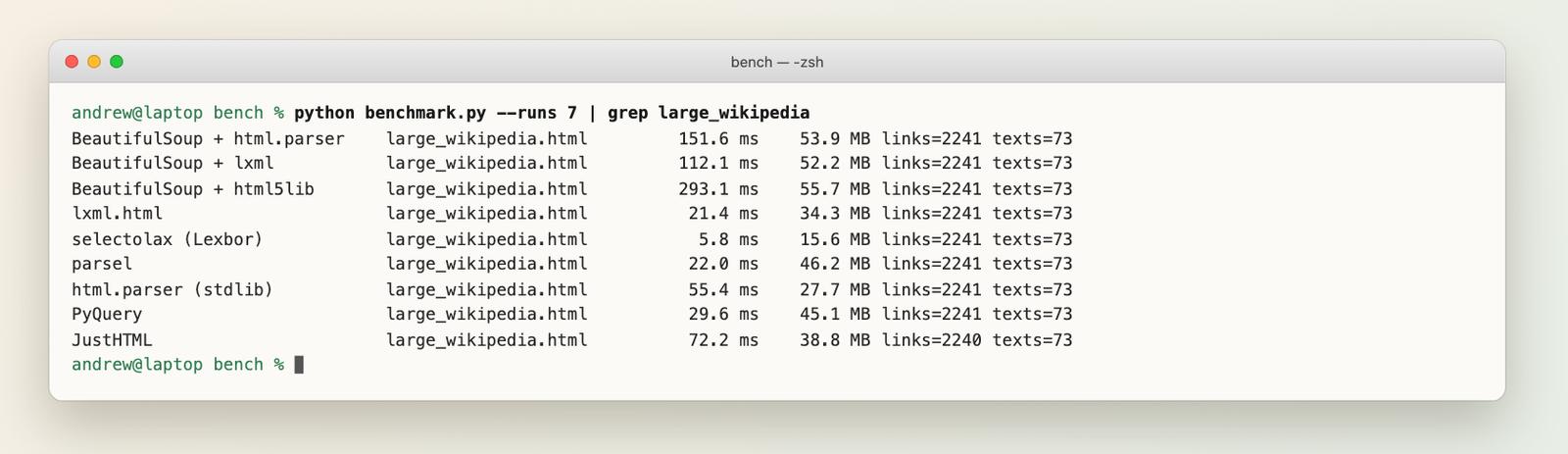
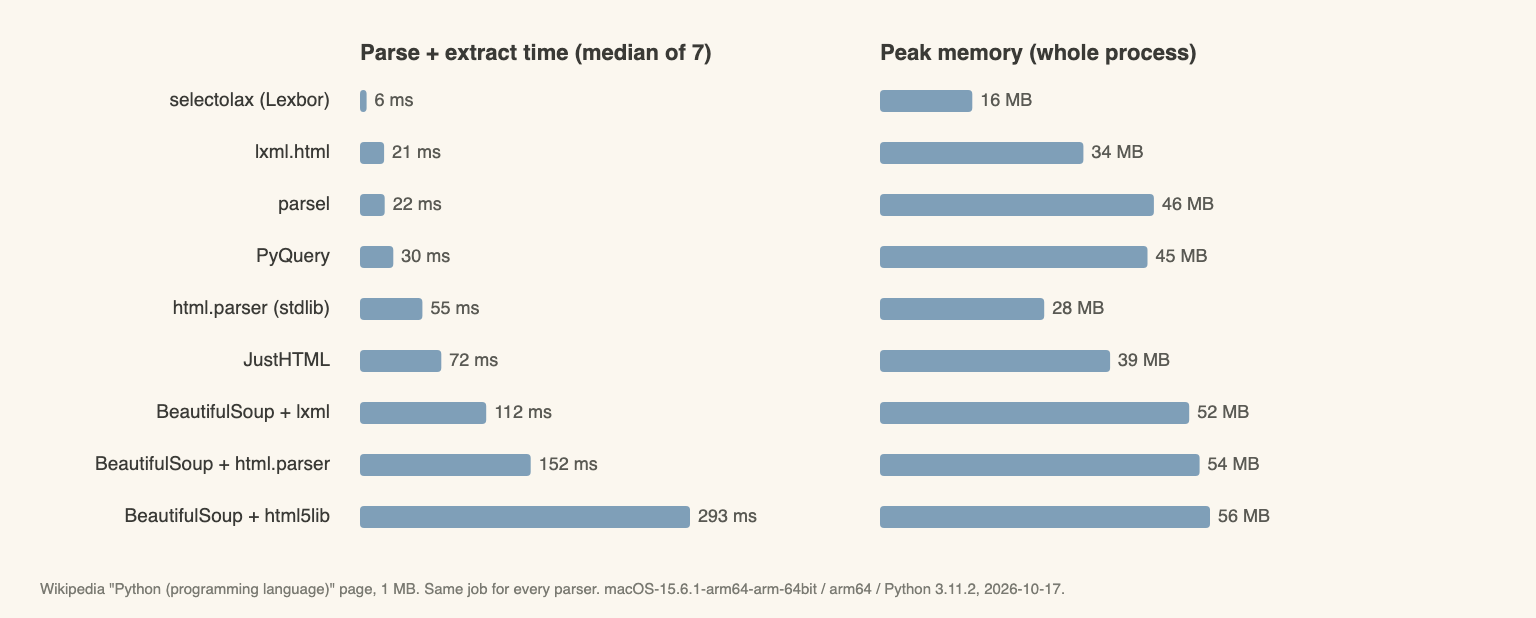
Here is the 1 MB Wikipedia page, parse plus extract:
| Parser | Median time | Peak memory |
|---|---|---|
| selectolax (Lexbor) | 6 ms | 16 MB |
| lxml.html | 21 ms | 34 MB |
| parsel | 22 ms | 46 MB |
| PyQuery | 30 ms | 45 MB |
| html.parser (stdlib) | 55 ms | 28 MB |
| JustHTML | 72 ms | 39 MB |
| BeautifulSoup + lxml | 112 ms | 52 MB |
| BeautifulSoup + html.parser | 152 ms | 54 MB |
| BeautifulSoup + html5lib | 293 ms | 56 MB |
What the numbers do not show:
- One machine, one day, warm file cache. Your ratios will differ a little.
- Peak memory is the whole process (RSS), so the Python interpreter itself is included. That is why even the lightest parser shows about 16 MB.
- All pages are Wikipedia or a simple demo site. Pages with a different shape (many small nodes, huge inline scripts) can behave differently.
- selectolax 1.0.0 removed its older Modest backend, so only Lexbor was measured.
- JustHTML found 1 link fewer than the others on two of the pages (2,240 instead of 2,241 on the 1 MB one). I did not dig into why.
I am not publishing the benchmark script. The idea is simple: fresh process, read the file, parse, collect hrefs and the text of one element, print the time. The snippets below show that job for each parser.
The Parsers, One by One
BeautifulSoup with html.parser
The default if you give BeautifulSoup no backend. It needs no extra install and has the most forgiving API.
from bs4 import BeautifulSoup

soup = BeautifulSoup(html, "html.parser")
links = [a["href"] for a in soup.find_all("a", href=True)]
quotes = [d.get_text() for d in soup.select("div.quote")]
Measured: 152 ms and 54 MB on the 1 MB page. It is about 26 times slower than selectolax. Fine for a few hundred pages, and it repairs broken markup in its own way (in my test it missed the re-opened anchors, see below).
BeautifulSoup with lxml
The usual answer to "BeautifulSoup vs lxml" is to use both. Change one argument:
soup = BeautifulSoup(html, "lxml")
Measured: 112 ms and 52 MB. That is about 1.35 times faster than html.parser for no code change. It is still about 5 times slower than using lxml.html directly, because BeautifulSoup builds its own Python objects on top of the lxml tree. After parsing, cleaning the content with BeautifulSoup works the same on either backend.
BeautifulSoup with html5lib
html5lib is a pure-Python parser that follows the HTML5 spec the way a browser does.
soup = BeautifulSoup(html, "html5lib")
Measured: 293 ms and 56 MB, the slowest here, about 50 times slower than selectolax. In exchange it repaired my broken test file exactly like Chromium (see below). One more thing to know: html5lib's last release on PyPI was 1.1 in June 2020. It works, but it is not actively developed.
lxml directly
lxml.html is a C parser (libxml2). It gives you XPath, and CSS selectors through cssselect.
import lxml.html

tree = lxml.html.fromstring(html)
links = tree.xpath("//a/@href")
quotes = [e.text_content() for e in tree.cssselect("div.quote")]
Measured: 21 ms and 34 MB. That is roughly 5 times faster than BeautifulSoup with the same lxml backend. Use lxml.html, not lxml.etree, for real-world pages: it is built for HTML. The catch is the API, which is less friendly than BeautifulSoup's.
selectolax
selectolax wraps the Lexbor HTML5 engine. It supports CSS selectors only, with no XPath, and the API is smaller.
from selectolax.lexbor import LexborHTMLParser

tree = LexborHTMLParser(html)
links = [a.attributes["href"] for a in tree.css("a[href]")]
quotes = [e.text() for e in tree.css("div.quote")]
Measured: 6 ms and 16 MB on the 1 MB page, the best on both counts. That is about 26 times faster than BeautifulSoup with html.parser and about 3.7 times faster than lxml.html. The "selectolax vs BeautifulSoup" answer is: the same job, far less time, but you give up XPath and some convenience methods. It also matched Chromium on my broken-HTML test.
parsel
parsel is the selector layer Scrapy uses, built on lxml. It gives you CSS, XPath and regex in one API.
from parsel import Selector

sel = Selector(text=html)
links = sel.css("a::attr(href)").getall()
quotes = ["".join(e.css("*::text").getall()) for e in sel.css("div.quote")]
Measured: 22 ms and 46 MB, close to raw lxml.html on speed with higher memory. Use it standalone when you want both XPath and CSS in one tidy API, or when your code may later move into a Scrapy project.
html.parser from the standard library
The event-based parser. You subclass HTMLParser and track state in the handlers.
from html.parser import HTMLParser

class LinkParser(HTMLParser):
    def __init__(self):
        super().__init__()
        self.links = []

    def handle_starttag(self, tag, attrs):
        if tag == "a":
            self.links.append(dict(attrs).get("href"))
Measured: 55 ms and 28 MB for my handler. It uses little memory because it never builds a tree. It is the right tool for tiny scripts with no dependencies. Anything that needs "the text of this nested element" gets verbose fast, and it does not repair broken markup for you.
PyQuery and JustHTML
PyQuery gives you a jQuery-style API on top of lxml. It took 30 ms and 45 MB, which is lxml-class speed. JustHTML is a pure-Python HTML5 parser: 72 ms and 39 MB, it matched Chromium on broken HTML, and it has no C dependency. Remember the note above about one missing link on two pages.
BeautifulSoup vs lxml vs selectolax: Does Speed Even Matter?
Often it does not. Parse time is small next to network time. In my Python scraping guide benchmark, fetching 10 pages with sequential requests took 1.77 seconds, about 177 ms per page. Now compare the parse time on small pages (the 11 KB demo page):
- BeautifulSoup + html.parser: 12.3 ms
- selectolax: 0.14 ms
For 100,000 small pages, that is about 20 minutes against 14 seconds of parse time. The sequential fetch of those pages would be about 4.9 hours. So on small pages, the network dominates and the parser choice barely matters. On the 1 MB page, BeautifulSoup + html.parser costs 152 ms, the same order as a typical fetch, and there the parser becomes a real part of your runtime.
Parser choice matters when:
- documents are large (hundreds of KB to MB)
- you process millions of pages, or the work is CPU-bound in a worker
- you parse the same page many times
It does not matter for a few hundred static pages over a network. For libraries beyond parsers, see best Python web scraping libraries.
CSS selectors vs XPath
CSS selectors are shorter and every parser here supports them. XPath is available in lxml.html and parsel (and through lxml-backed tools), but not in selectolax or BeautifulSoup. Reach for XPath when you need to match on text or walk up to a parent element. Otherwise CSS is enough.
What Happens With Broken HTML
Speed means nothing if the parser silently drops content. I wrote a small file with problems found in real pages: a link nested inside another link, unclosed <div> and <p> tags, a table without a <tbody>, a list with no closing <li>, and mismatched <b> and <i>. Then I asked Chromium for the answer.
The test file has three div.item blocks. The second one holds <a href="/two"> and sits inside the broken link, so a browser re-opens that anchor when the markup continues, giving /two three times.
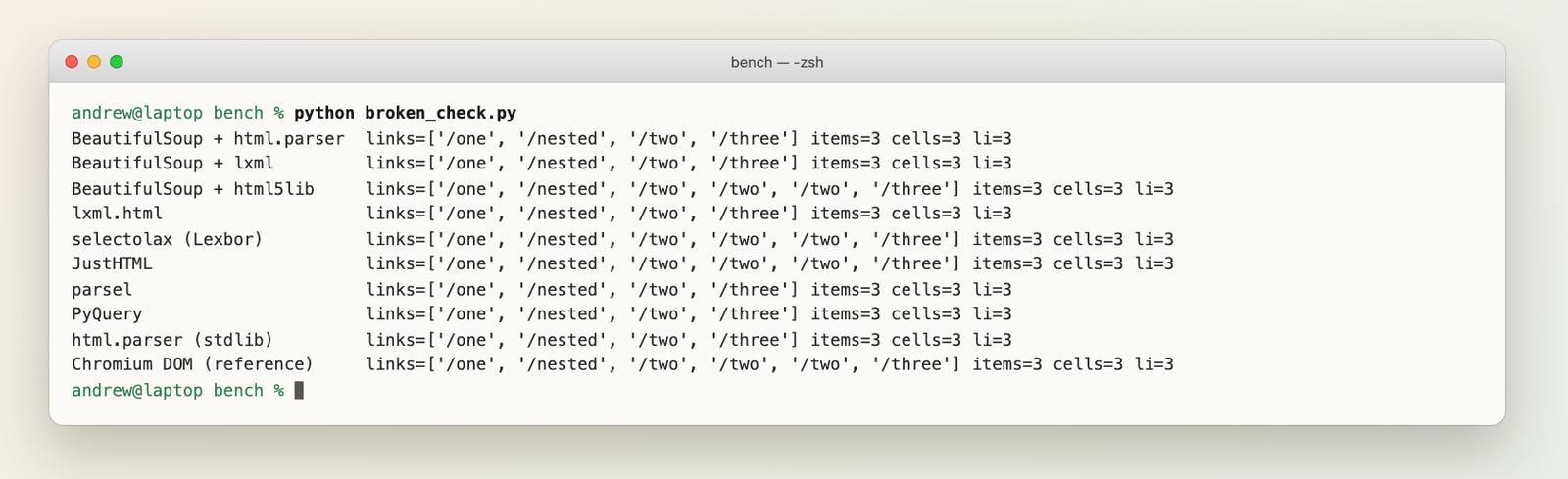
| Parser | Links found | Matches Chromium |
|---|---|---|
| Chromium DOM (reference) | /one, /nested, /two, /two, /two, /three | - |
| BeautifulSoup + html5lib | same as Chromium | Yes |
| selectolax (Lexbor) | same as Chromium | Yes |
| JustHTML | same as Chromium | Yes |
| BeautifulSoup + html.parser | /one, /nested, /two, /three | No |
| BeautifulSoup + lxml | /one, /nested, /two, /three | No |
| lxml.html | /one, /nested, /two, /three | No |
| parsel | /one, /nested, /two, /three | No |
| PyQuery | /one, /nested, /two, /three | No |
| html.parser (stdlib handler) | /one, /nested, /two, /three | No |
BeautifulSoup with html.parser, BeautifulSoup with lxml, lxml.html, parsel, PyQuery and the stdlib html.parser all miss the re-opened /two anchors. (parsel and PyQuery sit on top of lxml, so the same result is expected.) All nine parsers found the same number of items, table cells and list entries, so the difference is limited to this nested-anchor case. It is one fixture, not a proof, but it shows the pattern: the parsers that follow the HTML5 algorithm (html5lib, Lexbor, JustHTML) agree with a browser, and the older ones repair markup in their own way.
If you scrape messy, user-generated HTML and need "what a browser sees", pick one of those three.
Common Mistakes
- Parsing HTML with regex. It works until the first nested tag. Use a parser.
- Choosing a parser before measuring. On small pages the network dominates, so profile first.
- Blaming the parser for an empty result. If the data is added by JavaScript, no parser will see it. That is a fetch problem. See scraping JavaScript-heavy pages.
- Parsing the whole page for one section. BeautifulSoup's SoupStrainer can limit what is parsed.
- Ignoring encoding. Pass bytes or the right encoding. A wrong guess produces garbled text that looks like a parser bug.
When Parsing Is Not the Problem
In practice the parser is rarely what breaks. Pages that need JavaScript, blocks, and selectors that rot after a redesign cost far more time than 100 ms of parsing. I have lost more hours to a changed class name than to a slow parser.
If your goal is clean text for an AI knowledge base, you may not need a parser at all. WebCrawlerAPI returns Markdown directly (SDK docs, scrape endpoint):
pip install webcrawlerapi
import os
from webcrawlerapi import WebCrawlerAPI

client = WebCrawlerAPI(api_key=os.environ["WEBCRAWLERAPI_KEY"])

result = client.scrape(
    url="https://quotes.toscrape.com/js/",
    output_formats=["markdown"],
)

if result.success:
    print(result.markdown[:300])
else:
    print(result.error_code, result.error_message)
This snippet was not run for this post (it needs an API key). I checked it against the Python SDK source (v2.1.5): scrape() takes output_formats and returns either a result with markdown or an error object with error_code and error_message. When not to use an API: one-off scripts and a few static pages, where a parser and requests are enough. For output formats, see HTML vs Markdown and extracting article content.
FAQ
Which Python library is best for parsing HTML?
For most people, BeautifulSoup with the lxml backend. For speed, selectolax was the fastest in my test (6 ms on a 1 MB page), then lxml.html.
What is the best HTML parser?
It depends on the job. Fastest: selectolax. Most features (XPath and CSS): lxml.html or parsel. Most browser-like on broken HTML: html5lib, selectolax or JustHTML. Easiest API: BeautifulSoup.
How can I read an HTML file in Python?
from pathlib import Path
from bs4 import BeautifulSoup

html = Path("page.html").read_text(encoding="utf-8")
soup = BeautifulSoup(html, "lxml")
What is an HTML parser?
An HTML parser reads markup and turns it into a structure you can query, usually a tree. See how parsing works.
Is BeautifulSoup outdated?
No. The latest release on PyPI is 4.15.0, from June 7, 2026 (checked October 17, 2026). It is just not the fastest option.
Is BeautifulSoup faster than Selenium?
They do different jobs. BeautifulSoup parses HTML you already have. Selenium drives a real browser, so it is much heavier. See the Python scraping guide.
Which is better, Scrapy or BeautifulSoup?
Scrapy is a crawling framework (queue, concurrency, export). BeautifulSoup only parses. Many projects use parsel inside Scrapy. More in best Python web scraping libraries.
What to Do Next
The table at the top is the whole decision: BeautifulSoup with lxml to start, selectolax or lxml.html when speed matters, html5lib or selectolax when the HTML is a mess.
- Learn the workflow in Web Scraping with Python.
- Compare fetching and browser tools in best Python web scraping libraries.
- Follow links across a site with how to crawl a website with Python.
- Read the basics: what is web scraping, common web scraping tools and cleaning and validating scraped data.
Measure on your own pages before switching. A parser that is 26 times faster changes nothing if parsing was never your bottleneck.
