

Crawl a Website to Markdown Files: Frontmatter, Folders and Resumable Jobs
To crawl a website to markdown files, start one crawl job, wait for it to finish, and write one .md file per page into a folder tree that mirrors the URL paths. Each file gets url, title and crawled_at in its frontmatter. A small state file holds the job id, so a rerun picks up the same job instead of paying for a second crawl.
For a one-off conversion of up to 100 pages with no code and no signup, use the website to markdown tool. The rest of this post is for sites that will be crawled again, committed to git or fed into an AI knowledge base. Crawling a docs site or help center this way is the usual first step for a support bot or a product knowledge base. The same method works to scrape a website to markdown for an editor, Obsidian or a static site.
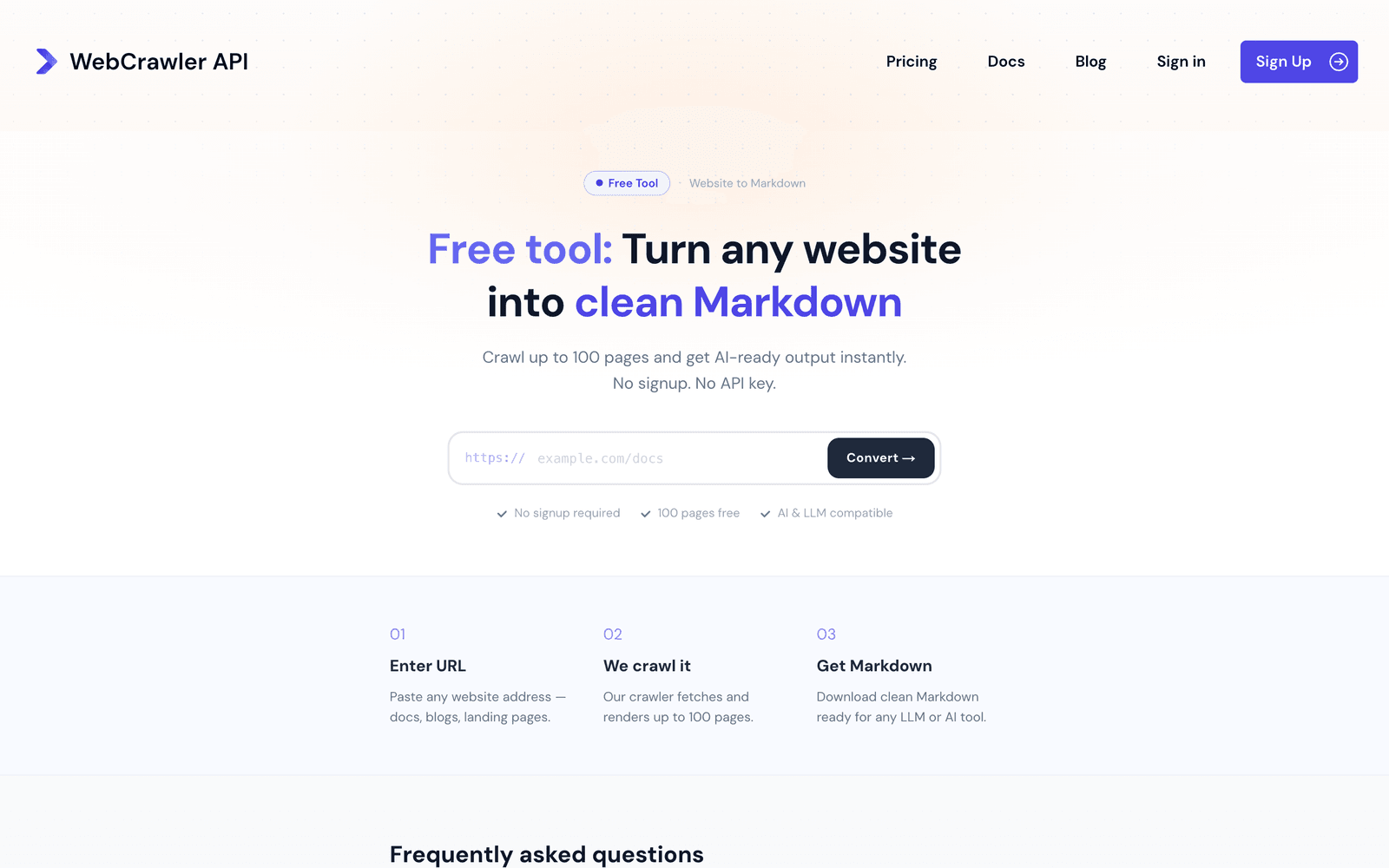
Convert a website to markdown: what the output looks like
The demo site is the htmx documentation, limited to /examples/ and /attributes/ so the tree has some depth. Every number below comes from real runs on October 26. The robots.txt of htmx.org was read the same day and allows everything (User-agent: *, empty Disallow, Allow: /). The requests still send respect_robots_txt: true.
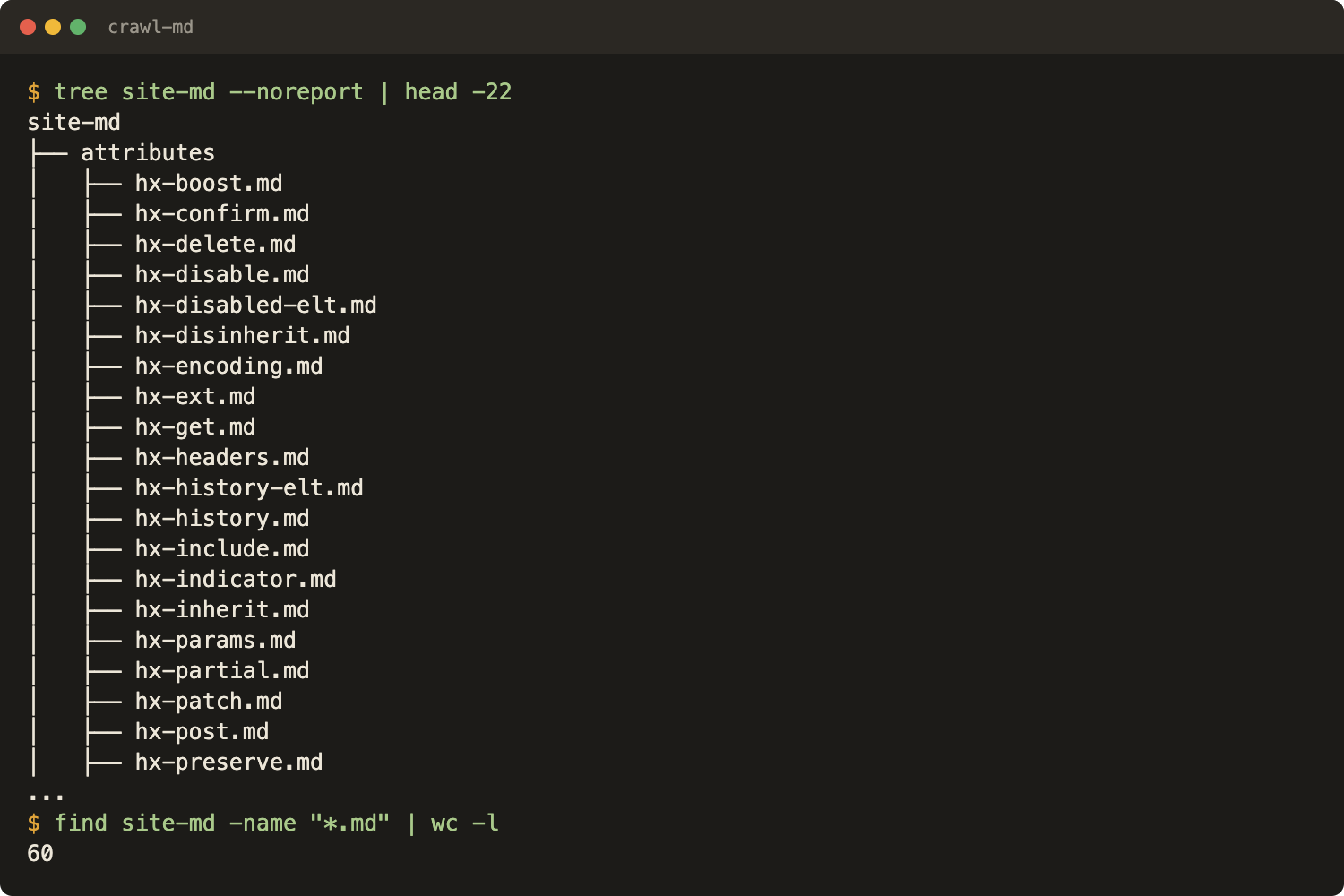
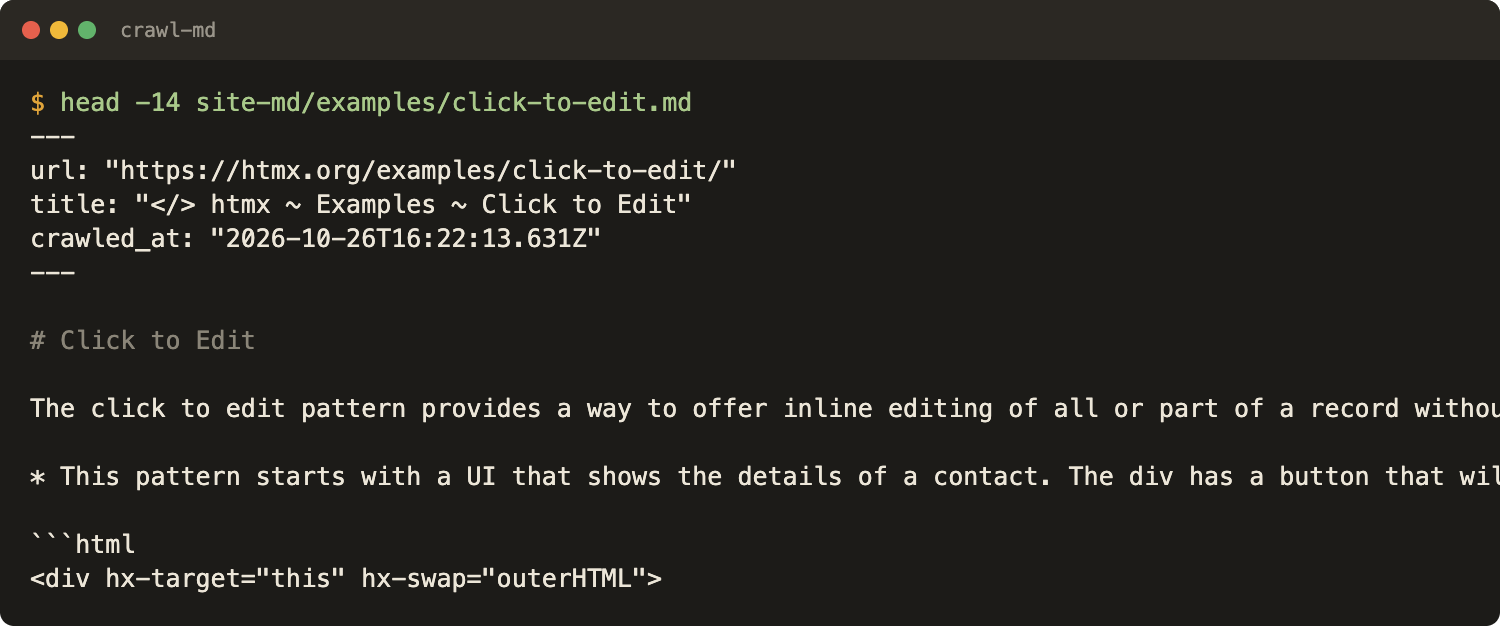
Sixty pages came back, 31 under /attributes/ and 29 under /examples/. One file, opened:
The pillar post, Website to Markdown for Knowledge Bases, explains why markdown and shows the whole pipeline. It and the FastAPI project in How to Build a Knowledge Base for AI From a Website write a flat pages/ folder from a one-shot SDK script. This version covers the crawl step in more detail and differs in four ways:
| Flat SDK script | This post | |
|---|---|---|
| Folder | one folder, flattened names | tree that mirrors URL paths |
| Name clashes | not handled | detected, resolved with a short hash |
| Rerun | starts a new crawl | reuses the saved job, skips existing files |
| HTTP client | SDK | plain requests against the documented endpoint |
Setup
Python 3.11 or newer and one dependency. The runs used Python 3.11.2.
# requirements.txt
requests==2.34.2
python -m venv venv && source venv/bin/activate
pip install -r requirements.txt
export WEBCRAWLERAPI_API_KEY=YOUR_API_KEY
An API key comes from a WebCrawlerAPI account: create one here. Plain requests is used instead of the SDK because every parameter in the crawl endpoint docs is then available with no SDK version in between. The Python SDK wraps the same endpoint and works too.
What parameters does the crawl request take?
The request is a single POST https://api.webcrawlerapi.com/v1/crawl. The parameters used here:
| Parameter | Used value | Purpose |
|---|---|---|
| url | https://htmx.org/examples/ | Seed URL where the crawl starts |
| items_limit | 60 | Stops the job after this many pages. Always pass it explicitly |
| whitelist_regexp | ^https://htmx\.org/(examples|attributes)/ | Only matching URLs are crawled |
| blacklist_regexp | /attributes/hx-on | Matching URLs are skipped |
| respect_robots_txt | true | Skip pages the site's robots.txt disallows (default false) |
| main_content_only | true | Strip navigation and sidebars |
| max_age | 0 | Skip the 7-day cache and fetch fresh |
output_formats defaults to ["markdown"], which is what this post needs. max_depth and webhook_url also exist and are covered below. The same request in curl:
curl --request POST \
  --url https://api.webcrawlerapi.com/v1/crawl \
  --header 'Authorization: Bearer YOUR_API_KEY' \
  --header 'Content-Type: application/json' \
  --data '{
    "url": "https://htmx.org/examples/",
    "items_limit": 60,
    "whitelist_regexp": "^https://htmx\\.org/(examples|attributes)/",
    "blacklist_regexp": "/attributes/hx-on",
    "respect_robots_txt": true,
    "main_content_only": true,
    "max_age": 0
  }'
The response is {"id": "<job id>"}. items_limit is sent explicitly on every request.
Crawling sends traffic to someone else's site. Read its robots.txt first and keep items_limit small until the filters are right. See what is robots.txt and web scraping ethics.
How do I crawl only some pages: whitelist, blacklist, depth and limit?
Use whitelist_regexp for the sections to keep and blacklist_regexp for exceptions inside them. max_depth limits how many link hops from the seed are followed (0 is the start page only). items_limit is the hard stop.
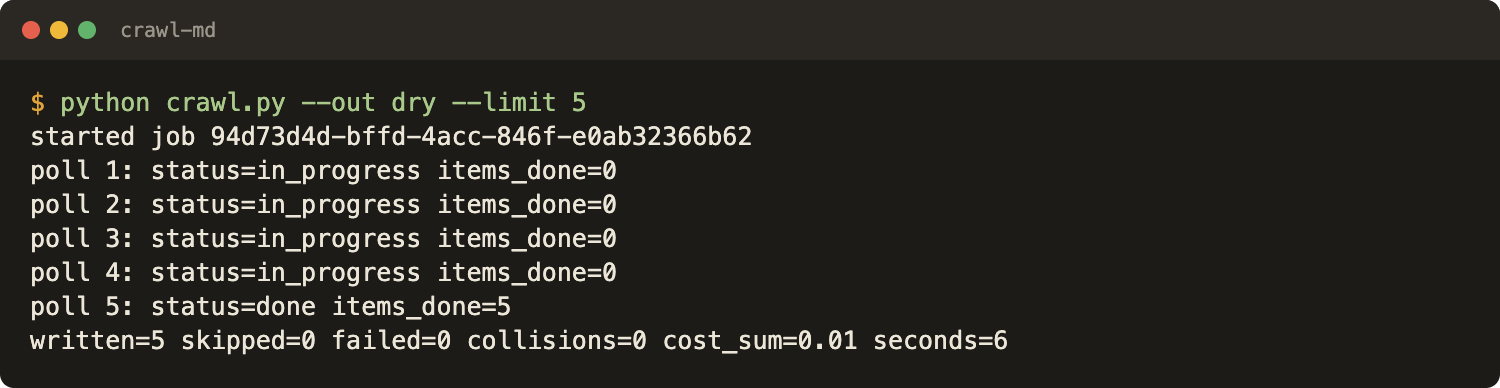
The dry run used items_limit: 5, the whitelist ^https://htmx\.org/(examples|attributes)/ and a placeholder blacklist, /(events|headers)/, that matches nothing in those two folders. It finished in 6 seconds, returned 5 pages, all under /examples/, and cost $0.01. That is enough to see that the seed and the whitelist agree.
The main run used the same whitelist, the blacklist /attributes/hx-on and items_limit: 60. The GET /v1/job/:id/urls endpoint lists the URLs of a finished job grouped by path:
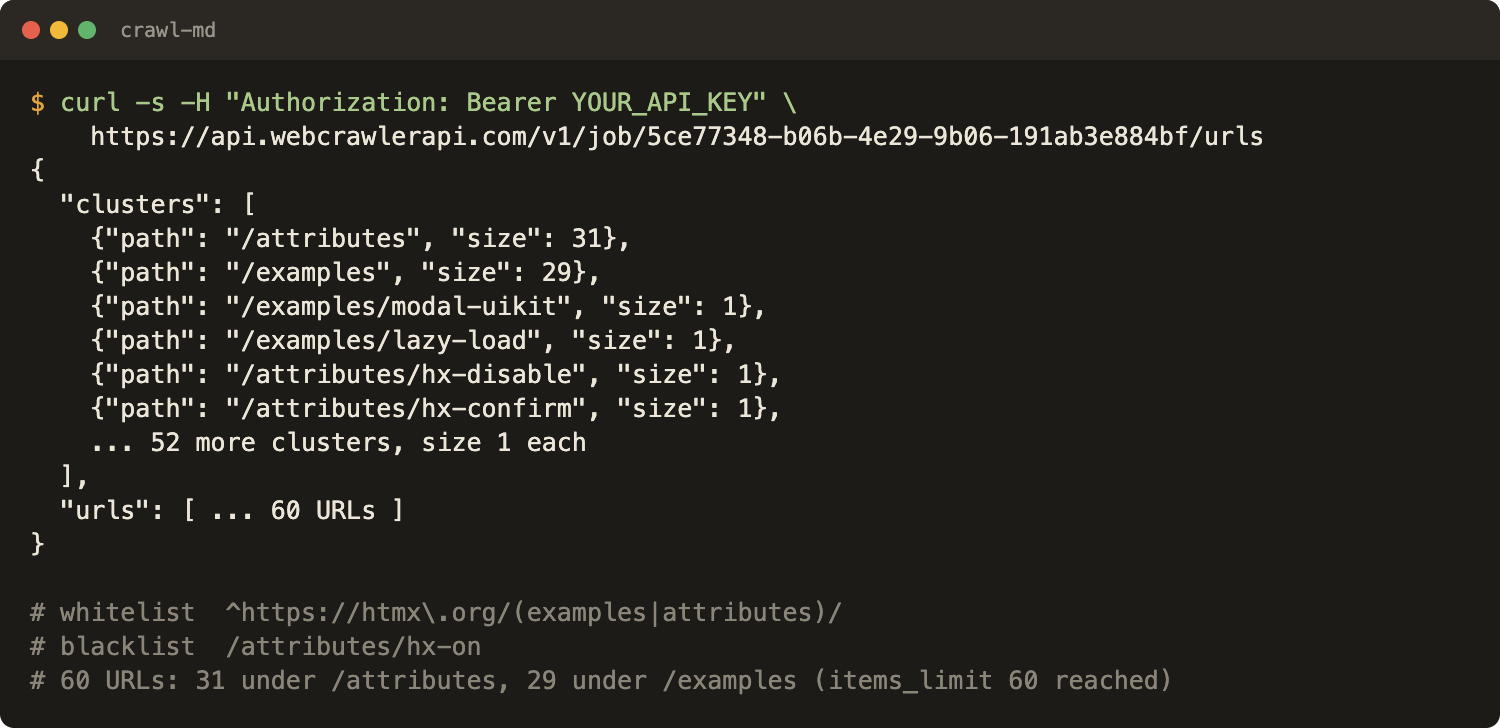
The job stopped at the limit, not at the end of the site. Pages such as hx-target and hx-trigger are not in the folder. Raise items_limit to get them. Per the URLs endpoint docs, filtered-out URLs are not shown there, so this endpoint tells what was crawled, not what the filter dropped.
A second test checked that both filters work together: whitelist ^https://htmx\.org/examples/, blacklist /examples/(bulk|click), items_limit: 10. The job returned 10 pages in 4 seconds for $0.02. None of them was bulk-update or a click-to-* example, although those pages are inside the whitelist, so a blacklist match wins. Test your own pair of regexes the same way with a small limit before a large crawl, and check single patterns on regex101. The filters guide covers the rules.
Step 1: Start the job and save its id
The full script is 84 lines and the only file that talks to the API.
# crawl.py
import argparse, json, os, pathlib, sys, time
import requests
from url_to_path import plan_paths

API = "https://api.webcrawlerapi.com/v1"
PARAMS = {
    "url": "https://htmx.org/examples/",
    "whitelist_regexp": r"^https://htmx\.org/(examples|attributes)/",
    "blacklist_regexp": r"/attributes/hx-on",
    "respect_robots_txt": True,
    "main_content_only": True,
    "max_age": 0,
}
MAX_POLLS, DEADLINE = 120, 600  # stop after 120 checks or 10 minutes

ap = argparse.ArgumentParser()
ap.add_argument("--out", default="site-md")
ap.add_argument("--limit", type=int, default=50)
ap.add_argument("--force", action="store_true", help="rewrite files that already exist")
args = ap.parse_args()

out = pathlib.Path(args.out)
state_file = out / ".crawl" / "state.json"
state_file.parent.mkdir(parents=True, exist_ok=True)
http = requests.Session()
http.headers["Authorization"] = f"Bearer {os.environ['WEBCRAWLERAPI_API_KEY']}"

# 1. Reuse the saved job if there is one, otherwise start a new one and save its id right away.
if state_file.exists():
    job_id = json.loads(state_file.read_text())["job_id"]
    print(f"resuming job {job_id}")
else:
    body = {**PARAMS, "items_limit": args.limit}
    r = http.post(f"{API}/crawl", json=body, timeout=30)
    r.raise_for_status()
    job_id = r.json()["id"]
    state_file.write_text(json.dumps({"job_id": job_id, "params": body}, indent=2))
    print(f"started job {job_id}")

# 2. Poll. A fresh job can be "new", so both "new" and "in_progress" mean keep waiting.
t0 = time.time()
for n in range(MAX_POLLS):
    r = http.get(f"{API}/job/{job_id}", timeout=30)
    r.raise_for_status()
    job = r.json()
    done = sum(1 for i in job.get("job_items", []) if i["status"] == "done")
    print(f"poll {n + 1}: status={job['status']} items_done={done}")
    if job["status"] not in ("new", "in_progress"):
        break
    if time.time() - t0 > DEADLINE:
        sys.exit("deadline hit, rerun to resume the same job")
    time.sleep(job.get("recommended_pull_delay_ms", 5000) / 1000)
else:
    sys.exit("too many polls, rerun to resume the same job")
if job["status"] != "done":
    sys.exit(f"job ended with status {job['status']}")

# 3. Write one file per finished item.
items = [i for i in job["job_items"] if i["status"] == "done" and i.get("markdown_content_url")]
failed = [{"url": i["original_url"], "status": i["status"], "last_error": i.get("last_error")}
          for i in job["job_items"] if i not in items]
paths, collisions = plan_paths([i["original_url"] for i in items])
written = skipped = 0
cost = round(sum(i.get("cost") or 0 for i in job["job_items"]), 4)
for item in items:
    url = item["original_url"]
    target = out / paths[url]
    if target.exists() and not args.force and f"url: {json.dumps(url, ensure_ascii=False)}" in target.read_text()[:600]:
        skipped += 1
        continue
    body = requests.get(item["markdown_content_url"], timeout=60).text  # no API key sent to the content host
    # json.dumps gives a quoted YAML scalar, so colons and quotes in titles are escaped
    front = (f"---\nurl: {json.dumps(url, ensure_ascii=False)}\ntitle: {json.dumps(item.get('title') or '', ensure_ascii=False)}\n"
             f"crawled_at: {json.dumps(job['finished_at'], ensure_ascii=False)}\n---\n\n")
    target.parent.mkdir(parents=True, exist_ok=True)
    tmp = target.with_suffix(".tmp")
    tmp.write_text(front + body)
    tmp.replace(target)  # atomic: a killed run never leaves half a file
    written += 1
(out / ".crawl" / "failed.json").write_text(json.dumps(failed, indent=2))
(out / ".crawl" / "collisions.json").write_text(json.dumps(collisions, indent=2))
print(f"written={written} skipped={skipped} failed={len(failed)} collisions={len(collisions)} "
      f"cost_sum={cost} seconds={time.time() - t0:.0f}")
The job id is written to .crawl/state.json right after the POST and before any waiting. If the script dies, the job keeps running on the server, and the id is the only handle to it. The state file also keeps the request parameters:
{
  "job_id": "5ce77348-b06b-4e29-9b06-191ab3e884bf",
  "params": { "url": "https://htmx.org/examples/", "items_limit": 60, "...": "..." }
}
A rerun with the state file present never creates a job. To start a fresh crawl, delete .crawl/state.json. A changed --limit with an old state file is ignored for the same reason.
Step 2: Wait for the job, by polling or by webhook
The loop calls GET /v1/job/:id and waits while the status is new or in_progress. A fresh job can report new, and a loop that only checks in_progress would stop too early. The status values are new, in_progress, done and error.
The job JSON carries a recommended_pull_delay_ms field, which the Python SDK docs describe as the recommended delay between status checks. The script sleeps for that long and falls back to 5 seconds when the field is missing. A cap of 120 polls and a 10 minute deadline keep it from waiting forever. Hitting either one exits with a message to rerun.
The 60 page job took 33 seconds from creation to finished_at. The counter sat at 59 of 60 for about 20 polls before the last page finished, so a loop must wait for the status, not for a number of items.
Webhook. webhook_url makes the API send a POST when the job completes (see async requests). The webhook was not run for this post. The docs show a payload with only id and no signature or secret, so a receiver should read the id, call GET /v1/job/:id and trust that response, not the body of the request. webhook_status and webhook_error on the job show whether delivery worked.
Poll in scripts and CI. Use a webhook for long jobs on a server.
Step 3: Map URLs to a folder tree
Files are named from the URL path: the host is dropped, each path segment becomes a folder, and the last one becomes name.md. The query string, the fragment and a trailing slash are ignored, and everything is lowercased with unsafe characters replaced by -. The root page and any page that has child pages become index.md inside their folder.
# url_to_path.py
import hashlib, re
from urllib.parse import urlsplit, unquote


def segments(url):
    """Path segments of one URL. Host, query, fragment, trailing slash and index.html are dropped."""
    parts = [p for p in unquote(urlsplit(url).path).lower().split("/") if p]
    if parts and parts[-1] in ("index.html", "index.htm"):
        parts.pop()
    elif parts and parts[-1].endswith((".html", ".htm")):
        parts[-1] = parts[-1].rsplit(".", 1)[0]
    return [re.sub(r"[^a-z0-9._-]+", "-", p).strip("-")[:80] or "page" for p in parts]


def plan_paths(urls):
    """Map every URL to a relative .md path. Returns (paths, collisions)."""
    seg = {u: segments(u) for u in urls}
    folders = set()  # paths that have children: a page with children becomes name/index.md
    for parts in seg.values():
        for i in range(1, len(parts)):
            folders.add(tuple(parts[:i]))
    paths, owner, collisions = {}, {}, []
    for url in sorted(urls):
        parts = seg[url]
        if not parts or tuple(parts) in folders:
            parts = parts + ["index"]
        rel = "/".join(parts) + ".md"
        if rel in owner:  # different URL, same file: add a short hash of the full URL
            new = "/".join(parts) + "-" + hashlib.sha1(url.encode()).hexdigest()[:6] + ".md"
            collisions.append({"url": url, "wanted": rel, "used": new, "taken_by": owner[rel]})
            rel = new
        owner[rel] = url
        paths[url] = rel
    return paths, collisions
A tree opens in any editor or Obsidian, and git diffs stay per page.
What happens when two URLs map to the same file
A flat script skips collisions, and they do happen. /docs, /docs/ and /docs/index.html are one page by the rules above, and /Guide?x=1 and /guide#top also land on one name. A page and a folder can share a name too: /api is a page and /api/foo needs the api/ folder, so /api moves to api/index.md.
For two different URLs on the same file, URLs are processed in sorted order. The first keeps the plain name, and later ones get a six character SHA-1 prefix of the full URL. Every case lands in a collision list that the script saves as .crawl/collisions.json.
The htmx crawl produced zero collisions. The unit test below uses made-up URLs and is a synthetic check, not crawl output:
# test_url_to_path.py
from url_to_path import plan_paths

urls = [
    "https://htmx.org/docs", "https://htmx.org/docs/", "https://htmx.org/docs/index.html",
    "https://htmx.org/api", "https://htmx.org/api/foo", "https://htmx.org/Guide?x=1",
    "https://htmx.org/guide#top", "https://htmx.org/",
]
paths, collisions = plan_paths(urls)
for u in urls:
    print(f"{u:38} -> {paths[u]}")
print(f"collisions: {len(collisions)}")
for c in collisions:
    print(f"  {c['url']} wanted {c['wanted']}, got {c['used']}")
assert len(set(paths.values())) == len(urls)  # no two URLs share a file
https://htmx.org/docs                  -> docs.md
https://htmx.org/docs/                 -> docs-24440b.md
https://htmx.org/docs/index.html       -> docs-5b299d.md
https://htmx.org/api                   -> api/index.md
https://htmx.org/api/foo               -> api/foo.md
https://htmx.org/Guide?x=1             -> guide.md
https://htmx.org/guide#top             -> guide-b02986.md
https://htmx.org/                      -> index.md
collisions: 3
  https://htmx.org/docs/ wanted docs.md, got docs-24440b.md
  https://htmx.org/docs/index.html wanted docs.md, got docs-5b299d.md
  https://htmx.org/guide#top wanted guide.md, got guide-b02986.md
The hash suffix is a fallback. Query strings deserve a look on a real site: ?page=2 and ?page=3 are different pages and get different hashes here.
Step 4: Write frontmatter that survives YAML
Each file starts with three keys:
---
url: "https://htmx.org/examples/click-to-edit/"
title: "</> htmx ~ Examples ~ Click to Edit"
crawled_at: "2026-10-26T16:22:13.631Z"
---
Every value goes through json.dumps. A JSON string is a valid YAML double-quoted scalar, so a title like Intro: "quoted" text is written as "Intro: \"quoted\" text" and cannot break the block. No title in this crawl had a colon, but one in the wild is enough to make a hand-built title: {title} line invalid.
crawled_at is the job's finished_at, which is documented. The same value is stamped on every file of one job, and the script does not record the time of each individual fetch. The job example in the docs shows an updated_at per item that is not in the field list, so the script does not use it.
The markdown comes from each item's markdown_content_url. These URLs are on data.webcrawlerapi.com, and a plain requests.get without any Authorization header returned 200. The script does not send the API key there.
Files are written to a .tmp name and renamed, so an interrupted run never leaves a half-written page. Items whose status is not done are collected in .crawl/failed.json with last_error. All 60 items were done in this run. For error meanings, see errors.
Step 5: Make the crawl resumable
The API has no resume call. Resume here is client-side bookkeeping, and it has five parts:
- The job id is saved before polling.
- A rerun calls GET /v1/job/:id instead of POST /v1/crawl.
- A file is skipped when it exists and its frontmatter has the same url.
- --force rewrites existing files.
- Failed items go to failed.json, not into the folder.
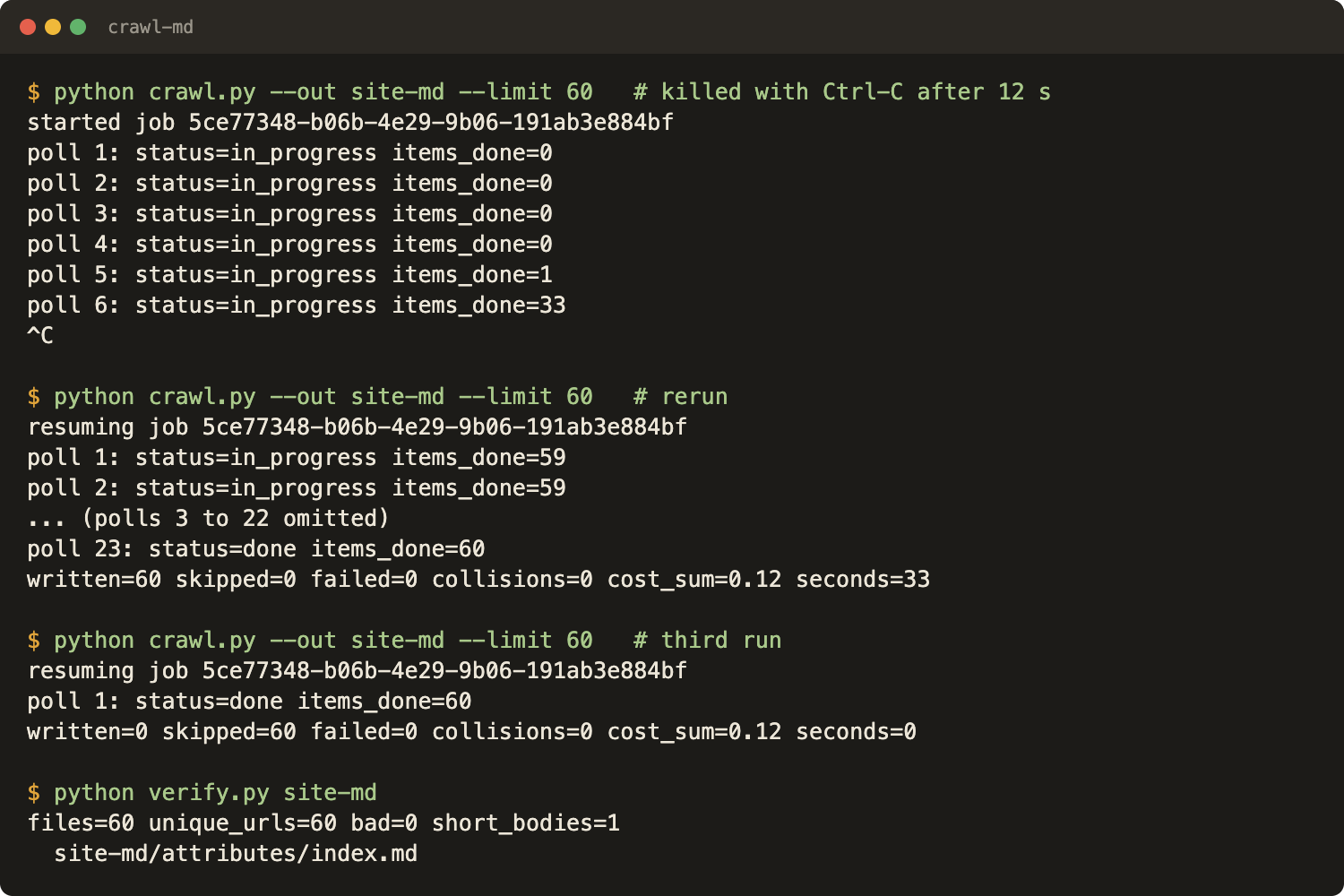
The script was killed with Ctrl-C after 12 seconds, while the job was still running. A rerun found .crawl/state.json, printed the same job id and wrote 60 files. A third run wrote 0 and skipped 60.
If the wrong filter was used, PUT /v1/job/:id/cancel stops the job. Items not yet started are marked canceled and are not charged, per the cancel docs. Then delete the state file and start over.
max_age matters for repeated crawls. The caching docs say requests are cached for 7 days by default, and max_age: 0 forces fresh content. The script sets it to 0. Whether cached pages are billed was not tested here.
Check the output
verify.py counts the files, checks that every file has the three keys and a title that parses, flags duplicate URLs, and lists bodies shorter than 200 characters:
# verify.py
import json, pathlib, re, sys

root = pathlib.Path(sys.argv[1])
files = sorted(p for p in root.rglob("*.md") if ".crawl" not in p.parts)
bad, seen, empty = [], {}, []
for f in files:
    text = f.read_text()
    m = re.match(r"---\n(.*?)\n---\n(.*)", text, re.S)
    if not m:
        bad.append(f"{f}: no frontmatter")
        continue
    keys = dict(l.split(": ", 1) for l in m.group(1).splitlines() if ": " in l)
    miss = {"url", "title", "crawled_at"} - keys.keys()
    if miss:
        bad.append(f"{f}: missing {sorted(miss)}")
        continue
    json.loads(keys["title"])  # title must be a valid quoted scalar
    if len(m.group(2).strip()) < 200:
        empty.append(str(f))
    if keys["url"] in seen:
        bad.append(f"{f}: duplicate url, also {seen[keys['url']]}")
    seen[keys["url"]] = str(f)
print(f"files={len(files)} unique_urls={len(seen)} bad={len(bad)} short_bodies={len(empty)}")
for line in bad + empty:
    print(" ", line)
sys.exit(1 if bad else 0)
On the htmx folder it reported 60 files, 60 unique URLs, 0 bad files and 1 short body: attributes/index.md. The markdown content URL for that page returned a single # and nothing else, and the script wrote it unmodified. So a job with 60 of 60 items done still held one empty page. That is why the check exists.
Other ways to get a site into files
- The combined file endpoint. GET /v1/job/:id/markdown/content returns every page as one markdown file with url separators (docs). It needs the job to be done. One file is harder to diff than a tree.
- Your own crawler. How to crawl a website with Python builds one from scratch, and how to build a web crawler and best open source web crawlers cover the trade-offs. This post leaves the crawling to an API and works on the files.
- wget --mirror. Fits static sites, produces HTML and no frontmatter. A full comparison is planned and not published yet.
For one page, the URL to markdown tool is the shorter route.
What does the crawl cost?
WebCrawlerAPI charges per crawled page, and pay as you go is $0.002 per page (pricing). The job's items carried cost: 0.002 each, and their sum for the 60 page run was 0.12, which is $0.12 (the docs list cost as dollars).
For 1,000 pages at that rate the arithmetic is 1,000 x $0.002 = $2.00. Higher plans have a lower per-page rate, listed on the pricing page, and failed requests are not charged. To try it, create an API key and run crawl.py with --limit 5.
Next steps
- Split the files into chunks and embed them. How to Build a Knowledge Base for AI From a Website covers the full path from crawl to search, and a chunking tutorial is planned. Chunking strategies for a knowledge base is live.
- Query the folder locally: put 1000 pages of documentation into QMD.
- Keep it fresh: how often to recrawl a website for an AI knowledge base, keeping a support bot in sync with docs and the glossary entry on how to keep a crawled knowledge base in sync.
- LangChain users can load the same crawl through document loaders.
Get an API key at webcrawlerapi.com/crawl-api and read the crawl endpoint docs. The web scraping API page covers single pages.
