
Most "best web scraping tools" pages are written by a scraping vendor, and the vendor ranks first. Many say "tested". Few print a number.
So I ran what could be run. Twelve tools are covered below. Seven of them were run on the same job: fetch 10 pages, find 100 quotes, once on a static site and once on a JavaScript version of it. The other five were not run, and each says so. One of the seven, Jina Reader, gave unstable results on the JavaScript pages (80/100 on October 17, 20/100 on October 18), so read its row as a range. Same laptop, same day (October 17, 2026), 5 runs each, medians. The code is saved next to this post, so the numbers can be reproduced.
One disclosure. I work on WebCrawlerAPI, and it is on the list. Where it loses in the table, it loses in the table.
Which Web Scraping Tool Should You Pick?
Short answer first. Start at the top, and move down only when the first answer stops working.
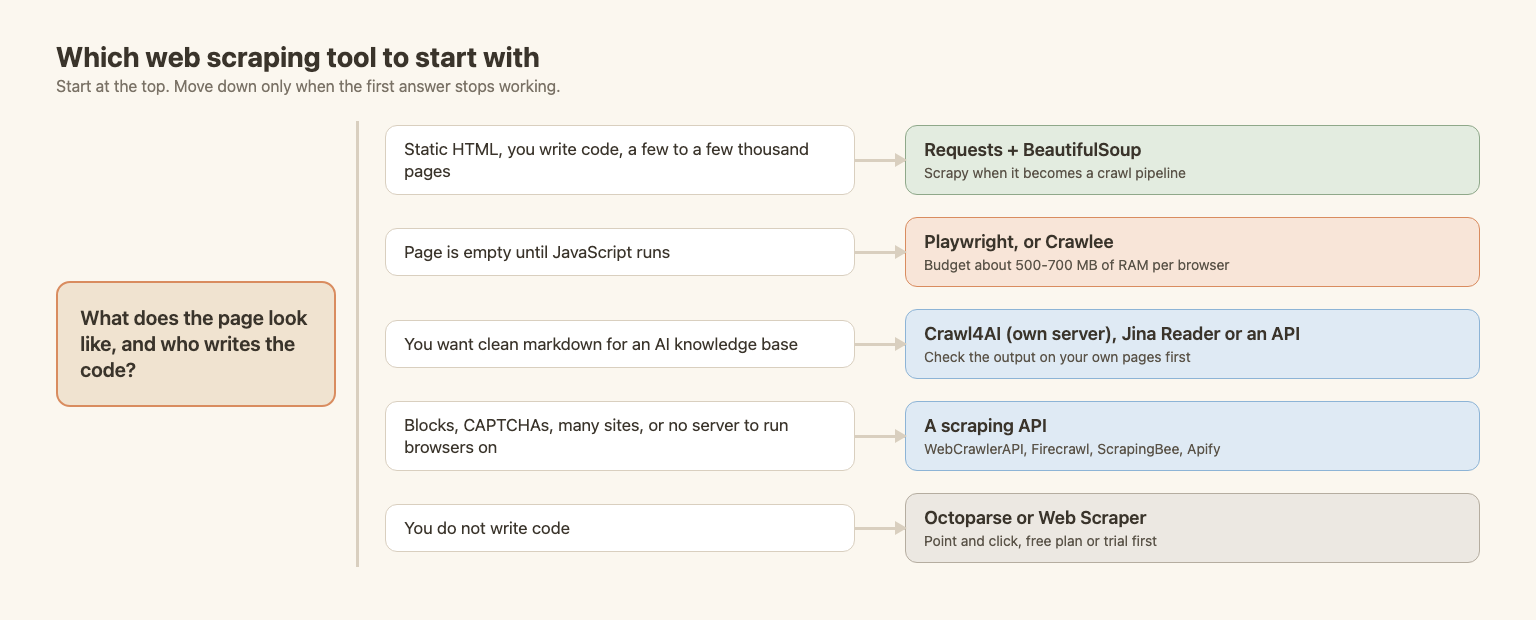
| Your situation | Start with | Why |
|---|---|---|
| A few static pages, you write code | Requests + BeautifulSoup | Smallest install, 11 lines. Details |
| A crawl with many pages and pipelines | Scrapy | Concurrency, retries and export built in. Details |
| Page is empty until JavaScript runs | Playwright | Reliable, but about 530 MB per browser. Details |
| You write JavaScript or TypeScript | Crawlee | One framework for HTTP and browser crawling. Details |
| Markdown for an AI knowledge base | Crawl4AI or an API | Markdown comes out directly. Details |
| Blocks, CAPTCHAs, no server for browsers | A scraping API | Someone else runs browsers and proxies. Details |
| You do not write code | Octoparse or Web Scraper | Point and click, free plan or trial. Details |
| Free and open source only | Requests, Scrapy, Playwright, Crawlee, Crawl4AI | All five run on your own machine at no cost |
The rule I use: start with requests and a parser. Add a browser only after you get an empty result. Pay for an API when blocks and RAM bills start to cost more than the API does.
What Kind of Web Scraping Tool Do You Need?
"Web scraping tool" covers five different kinds of product. Comparing a Python library with a no-code app is like comparing a hammer with a contractor. The question to ask is who does which part of the work.
| Kind | You write code? | Who runs the browser? | Who handles blocks? | Cost shape |
|---|---|---|---|---|
| Libraries and frameworks (Requests, Scrapy, Crawlee) | Yes | You | You | Free, plus your server |
| Browser automation (Playwright) | Yes | You | You | Free, plus RAM |
| AI-native tools (Crawl4AI, Jina Reader, Firecrawl) | A little | You or them | Depends | Free tier, then per page |
| Scraping APIs (WebCrawlerAPI, ScrapingBee, Apify) | A little | Them | Them | Per page or per credit |
| No-code apps (Octoparse, Web Scraper) | No | Them or your PC | Partly | Monthly plan |
Two older posts go deeper on the background: web crawling vs web scraping and JavaScript rendering in web crawling.
How the Tools Were Tested
The job is the same for every tool: 10 pages of quotes.toscrape.com, 10 quotes per page, 100 in total. There are two versions of the job:
- Static: /page/1/ to /page/10/. The quotes are in the HTML.
- JavaScript: /js/page/1/ to /js/page/10/. The same quotes, drawn by JavaScript after the page loads. A plain HTTP client sees an empty page.
Success is counted the same way for every tool. I know the 100 quotes. After each run, the tool's output is searched for them (case and punctuation ignored). That works for tools that return HTML selectors and for tools that return markdown. A tool scores 100/100 when all quotes are found.
Each run starts in a fresh process. Peak memory is the sum of RSS over the process and all its children, Chromium and Node included, sampled every 20 ms. The API rows only measure the small client on my machine. Their work happens elsewhere.
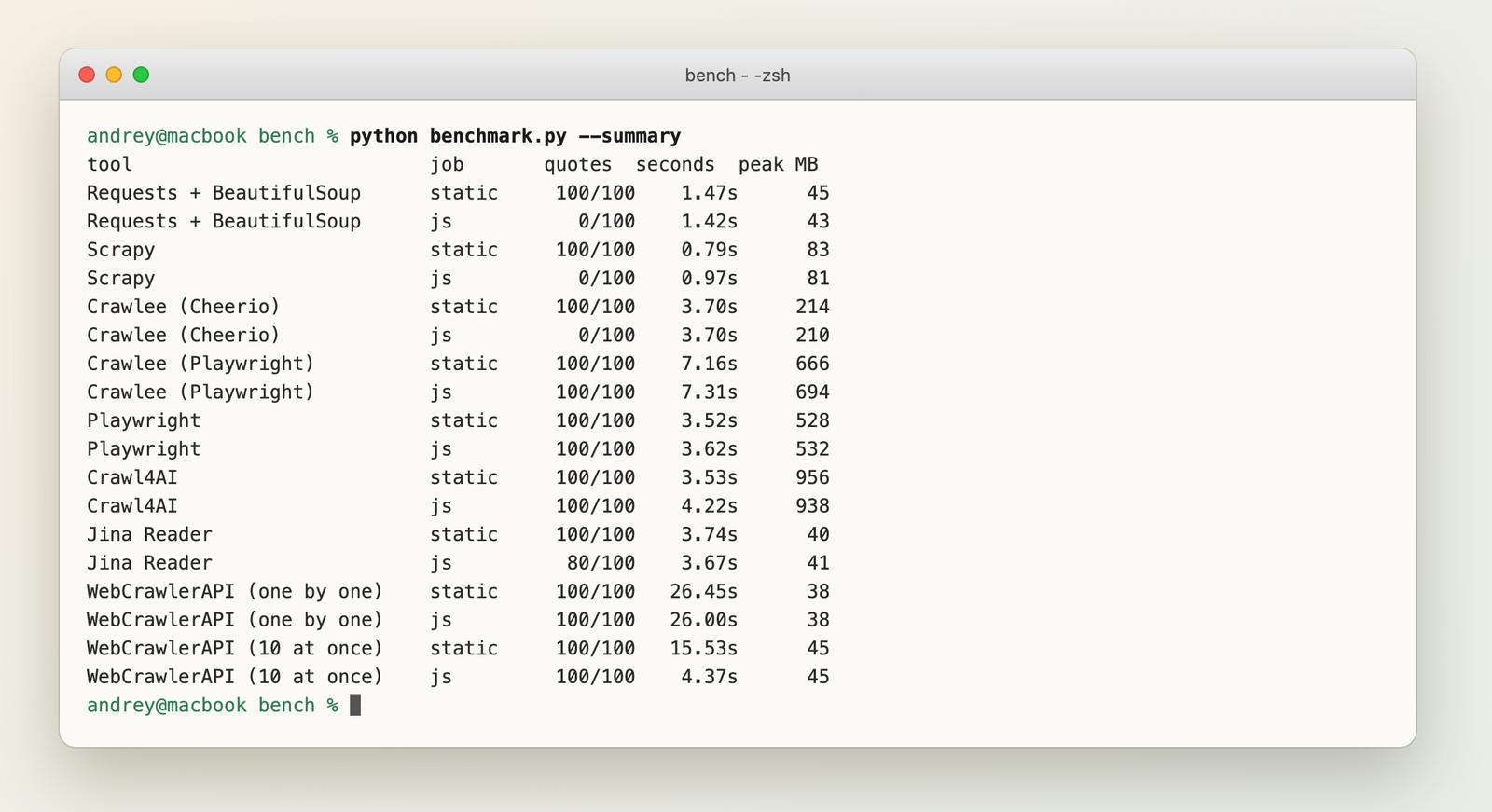
Versions: Requests 2.34.2, BeautifulSoup 4.15.0, Scrapy 2.19.0, Playwright 1.64.0, Crawlee 3.18.2, Crawl4AI 0.9.5, WebCrawlerAPI Python SDK 2.1.5. Python 3.11.2, Node 24.15.0, macOS 15.6.1 on an arm64 laptop.
Here is the table. Time is the median for the static job. Lines count the non-blank, non-comment lines of the job script.
| Tool | Static | JS version | Time (s) | Peak memory | Lines | Output |
|---|---|---|---|---|---|---|
| Scrapy | 100/100 | 0/100 | 0.79 | 83 MB | 14 | Selectors |
| Requests + BeautifulSoup | 100/100 | 0/100 | 1.47 | 45 MB | 11 | Selectors |
| Playwright | 100/100 | 100/100 | 3.52 | 528 MB | 15 | Selectors |
| Crawl4AI | 100/100 | 100/100 | 3.53 | 956 MB | 9 | Markdown |
| Crawlee (Cheerio) | 100/100 | 0/100 | 3.70 | 214 MB | 14 | Selectors |
| Jina Reader | 100/100 | 80/100 on Oct 17, 20/100 on Oct 18 | 3.74 | 40 MB | 7 | Markdown |
| Crawlee (Playwright) | 100/100 | 100/100 | 7.16 | 666 MB | 16 | Selectors |
| WebCrawlerAPI, 10 at once | 100/100 | 100/100 | 15.5 | 45 MB | 11 | Markdown |
| WebCrawlerAPI, one by one | 100/100 | 100/100 | 26.5 | 38 MB | 11 | Markdown |
And the same data as a chart:
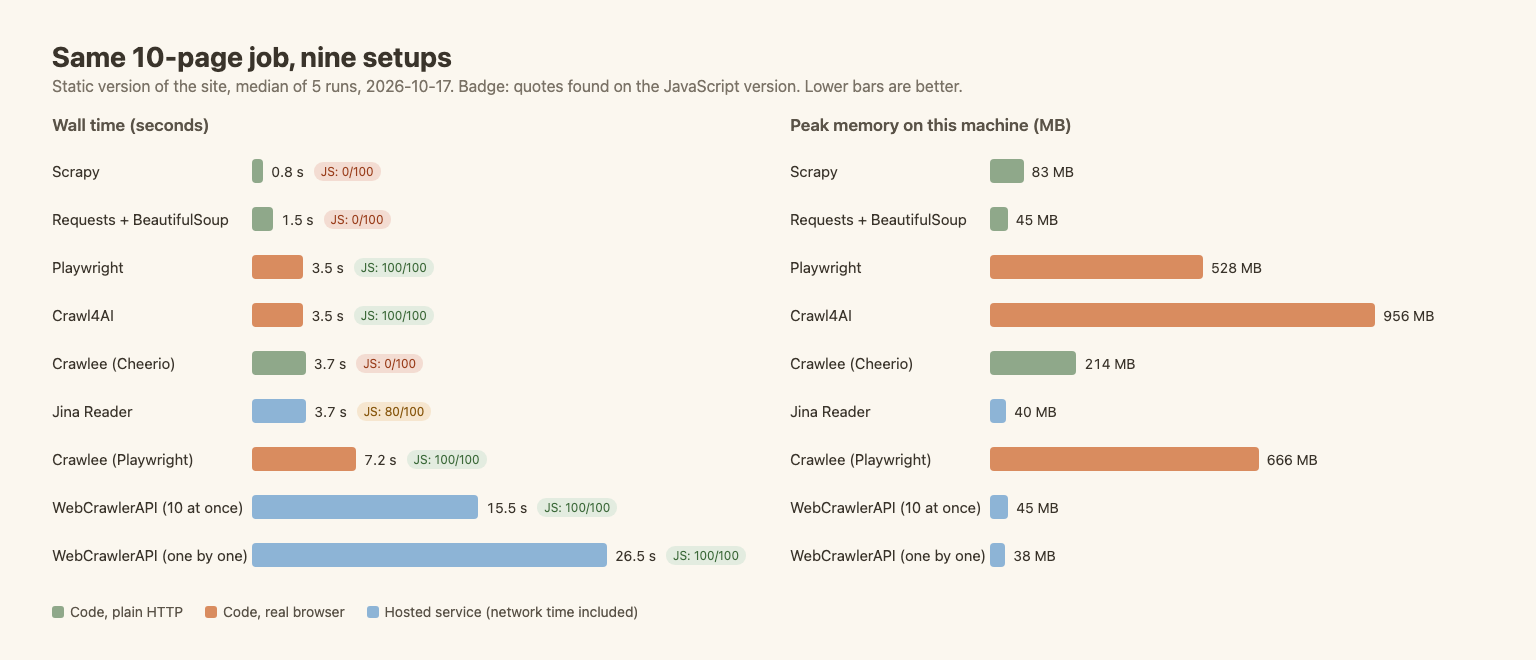
What the numbers say:
- Plain HTTP tools fail on the JavaScript version, every time. Requests, Scrapy and Crawlee's Cheerio crawler all returned 0 of 100. This is the most useful fact in the table, and it is not a bug. These tools never run the page's JavaScript.
- Browsers cost memory. Playwright needed about 530 MB, Crawlee with Playwright about 670 MB, Crawl4AI about 950 MB. Requests needed 45 MB.
- Scrapy was fastest, but the comparison is not fair to Requests. Scrapy fetches several pages at the same time by default. My Requests loop fetches them one by one. Crawlee was set to one page at a time, and its 3.7 s is mostly startup. These are default-style setups, not tuned ones.
- The API is the slowest here. 26.5 s for 10 pages one by one, about 2.6 s per page. That is the price of someone else running a browser. Sending 10 requests at once brought the JavaScript job down to 4.4 s. The static job with 10 at once took between 8.8 and 22.5 s, and it got slower from one run to the next. I did not find out why, so treat that row as a range.
- Jina Reader missed 20 quotes on the JavaScript pages. More on that below.
This test has limits. The site is friendly. Nobody blocks anything, so the speed gaps show client overhead and not block resistance. The job is also small: 10 pages says little about 100,000. And "found 100 quotes" says nothing about how clean the markdown is. Check that on your own pages.
For 12 more Python libraries on the same style of job, see Best Python Web Scraping Libraries. Its Requests and Playwright numbers match these closely (1.47 s and 3.57 s). Scrapy and Crawl4AI differ a little there because of different settings.
Libraries and Frameworks: Code It Yourself
Requests and BeautifulSoup
The default start. requests fetches the page, BeautifulSoup reads the HTML. Eleven lines, 45 MB, 1.47 s for 10 pages.
import requests
from bs4 import BeautifulSoup

session = requests.Session()
session.headers["User-Agent"] = "my-scraper/1.0 (me@example.com)"

quotes = []
for n in range(1, 11):
    html = session.get(f"https://quotes.toscrape.com/page/{n}/", timeout=15).text
    quotes += [q.get_text() for q in BeautifulSoup(html, "lxml").select("div.quote span.text")]

print(len(quotes))  # 100
It found 0 of 100 on the JavaScript version. That is how you know you need a browser. The full workflow (retries, saving data, pagination) is in Web Scraping with Python.
Good at: simple pages, small jobs, learning. Bad at: JavaScript pages, blocks, big crawls without extra code. Free.
Scrapy
A framework for crawl pipelines: request queue, concurrency, retries, item pipelines, export. In the table it was the fastest tool at 0.79 s, mostly because it requests pages in parallel without being asked. It needs 83 MB.
import scrapy

class QuotesSpider(scrapy.Spider):
    name = "quotes"
    start_urls = [f"https://quotes.toscrape.com/page/{n}/" for n in range(1, 11)]

    def parse(self, response):
        for text in response.css("div.quote span.text::text").getall():
            yield {"text": text}
Scrapy does not run JavaScript by itself (0/100 on the JS version). There are plugins that add a browser, but then you carry both setups. For 20 pages it is too much structure. For 20,000 it saves a lot of code. A step-by-step setup is in How to Build a Web Crawler with Scrapy. Free and open source.
Crawlee
Crawlee is the JavaScript and TypeScript answer to Scrapy. It has a Cheerio crawler for plain HTTP and a Playwright crawler for real browsers, with a request queue, retries and storage in both. It is made by Apify.
I ran both. The Cheerio crawler read the static pages (100/100, 214 MB) and returned nothing on the JS version, as expected. The Playwright crawler read both (100/100 each) in about 7 s and 670 MB. Startup of Node and Crawlee is part of those times, and I limited it to one page at a time. If your stack is JavaScript, it is the natural pick. The Node version of the workflow is in Web Scraping with JavaScript and Node.js. Free and open source.
Playwright
Playwright drives a real Chromium browser, so JavaScript runs and the page looks like it does for a visitor. It found 100 of 100 quotes on both versions in 3.5 s.
The cost is memory: about 530 MB for one browser in this test. Ten browsers in parallel mean ten times 530 MB. If Playwright errors are what brought you here, the glossary has fixes for the most common ones, like executable does not exist and action timeout. Free and open source.
For Selenium, Puppeteer and a dozen smaller libraries, the Python libraries post has the numbers.
AI-Native Tools: Markdown for LLMs
These tools return markdown instead of selectors, which is what a knowledge base or an LLM pipeline wants.
Crawl4AI
An open-source crawler that renders the page in Chromium and returns markdown. Nine lines, 100/100 on both versions, 3.5 s. It is also the heaviest tool in the test: 956 MB for 10 pages, because it starts a full browser. Its markdown for the 10 static pages was 43,000 characters, against 12,300 for the bare quote text, because it keeps links and layout. (I made it wait one extra second before returning the HTML, so the JavaScript pages finish drawing. That is part of its 3.5 s.) The docs now also advertise a hosted version with a free tier. I did not test that. There is a Crawl4AI tutorial on this blog. Free and open source for self-hosting.
Jina Reader
Put https://r.jina.ai/ in front of any URL and markdown comes back. No key, no install, seven lines. Without a key the limit is 20 requests per minute. With a free key it is 500, as listed on Jina's Reader page on October 17, 2026. I added a pause of 45 seconds between runs for that reason.
It found all 100 quotes on the static pages and 80 of 100 on the JavaScript pages. A re-run on October 18, 2026 (3 runs, default settings, no key) found only 20 of 100 each time, so treat this row as unstable. Two pages (2 and 3) came back as a cached snapshot with no quotes in it. Jina says so in the output ("This is a cached snapshot of the original page, consider retry with caching opt-out"). I sent the same two requests again with the header X-No-Cache: true, and both came back with all 10 quotes. So the tool can do it, but the default can hand you a stale or empty page without an error. Check for that in a pipeline.
The markdown also lost something. For the first quote on page 1, the author name was missing in Jina's output and the tags were gone:
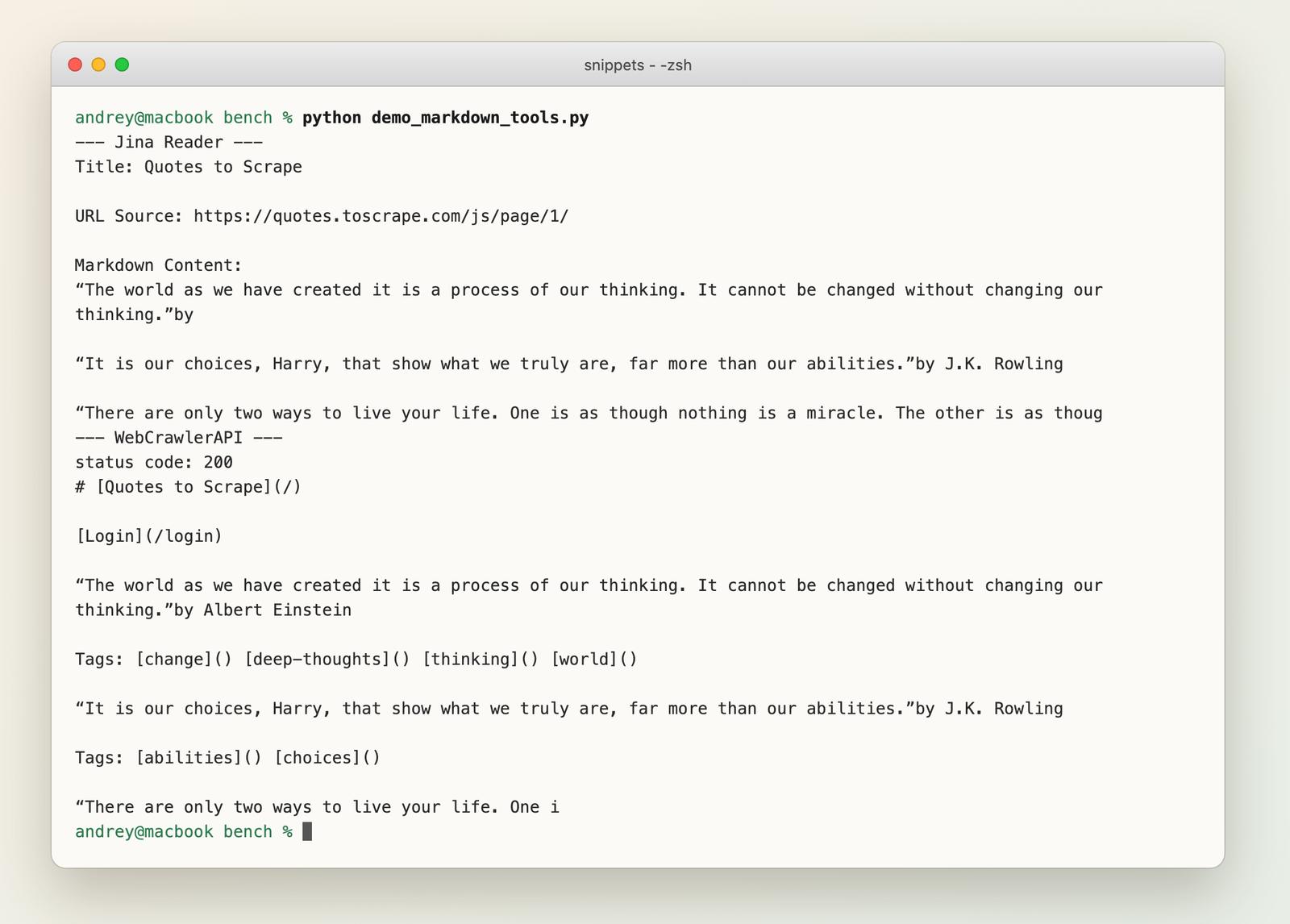
My success check only looks for the quote text, so it does not count that. Whether it matters depends on your data.
import requests

markdown = requests.get("https://r.jina.ai/https://quotes.toscrape.com/js/page/1/", timeout=60).text
Good at: quick one-off pages, prototypes. Bad at: production pipelines without a key and without checks for cached snapshots.
Firecrawl
Not tested. I did not use an account. Firecrawl is a scraping and crawling API with markdown output as the main product. Its pricing page (read October 17, 2026, prices effective September 4, 2026) lists a free plan with 1,000 credits per month and no card, and Hobby at $16 per month billed yearly ($19 monthly) for 5,000 credits. One credit is one page on a basic scrape or crawl. Extra formats such as JSON add 4 credits per page. Failed requests that return no result are not charged. If you are weighing it against others, see Firecrawl alternatives.
Scraping APIs
You send a URL, you get the page back. The provider runs browsers, proxies and retries. You pay per page or per credit.
WebCrawlerAPI
The one I work on, so read this with that in mind. It returns markdown, HTML or text for a URL. In the test it found 100 of 100 on both versions, using about 38 MB of local memory.
pip install webcrawlerapi
import os
from webcrawlerapi import WebCrawlerAPI

client = WebCrawlerAPI(api_key=os.environ["WEBCRAWLER_API_KEY"])
result = client.scrape(url="https://quotes.toscrape.com/js/page/1/", output_formats=["markdown"])

print(result.page_status_code)  # 200
print(result.markdown[:200])
It is the slowest tool in the table for a small job: 26.5 s one by one, 4.4 s for the JavaScript job with 10 requests at once, and 8.8 to 22.5 s for the static job with 10 at once. That is the trade. You do not run a browser, you wait for someone else's. The same pattern showed up in the Python scraping guide, where 10 JavaScript pages took 23.7 s one by one. It has no point-and-click interface. Use it when pages block plain clients, when you do not want to run browsers, or when markdown is the goal. Do not use it for 20 static pages.
Pricing from the homepage (read October 17, 2026): a $0 per month plan with pay-per-request from $0.002 per page, $99 per month from $0.0015 per page, $499 per month from $0.001 per page. Cleaned markdown through an LLM step costs more ($0.006 per page on the free plan). Docs: scrape endpoint, Python SDK.
ScrapingBee
Not tested. ScrapingBee is an older proxy-and-browser API. See also ScrapingBee alternatives. Its pricing page (read October 18, 2026) starts at Hobby, $19 per month for 75,000 API credits and 25 concurrent requests, and mentions 1,000 free credits without a card. Credits are not pages: JavaScript rendering and proxy options change what one request costs, and I did not check those multipliers. Work out the cost for your own page type before you compare it with per-page prices.
Apify
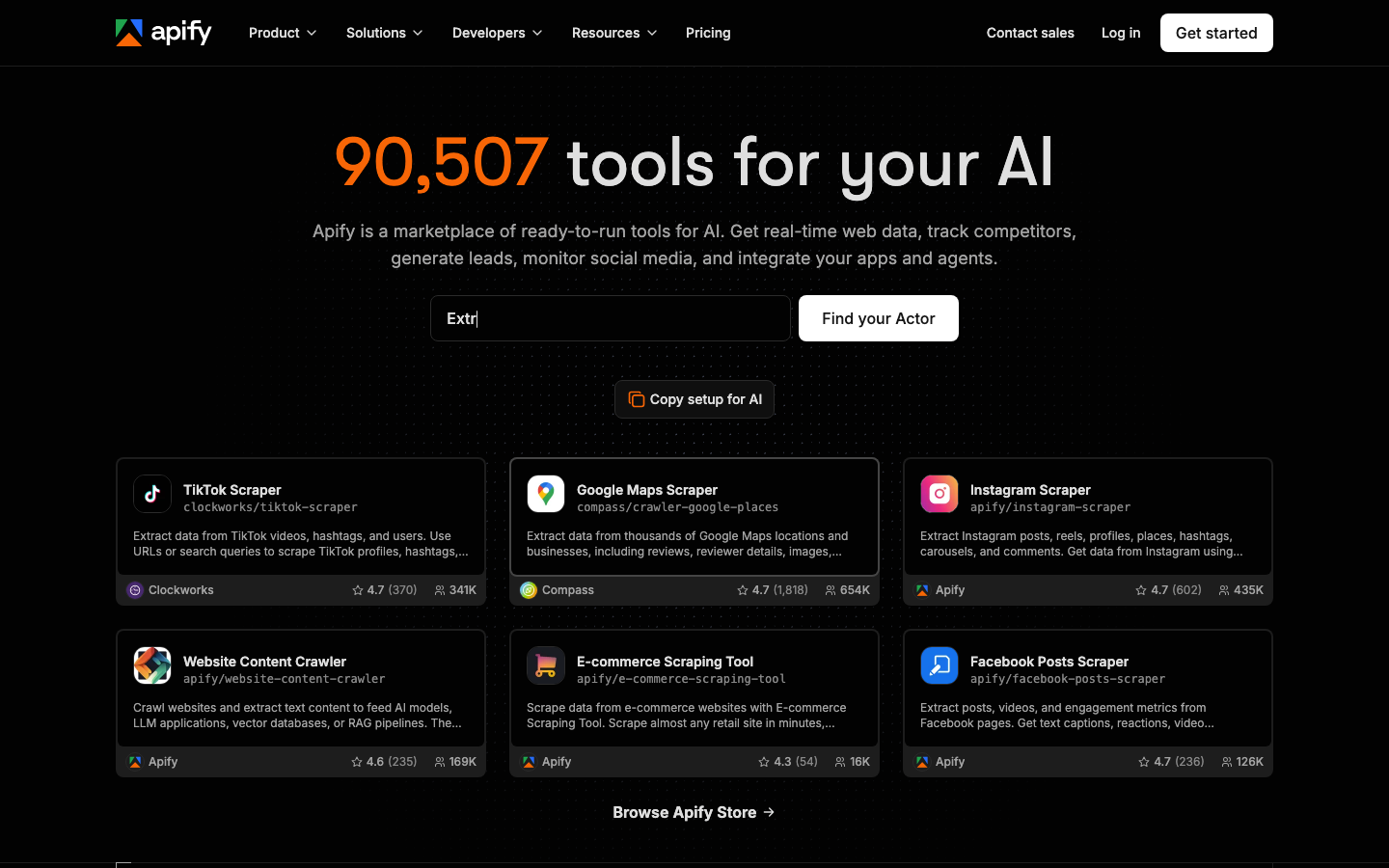
Not tested. Apify is a platform with a store of ready-made scrapers (called Actors) next to a place to run your own code. Its homepage (read October 20, 2026) advertises thousands of pre-built Actors. The pricing page lists a free plan with $5 of prepaid usage per month, Starter at $19 per month plus pay as you go, and a compute unit price of $0.20 on those two. Cost depends on which Actor runs and for how long, so "per page" is not a fixed number. It is the closest thing to a marketplace on this list. Crawlee, above, comes from the same company. See also Apify alternatives.
For a longer vendor list, including proxy networks I left out here, read Best Web Scraping APIs.
No-Code Tools
For people who do not write code. These were not tested on the job, because they need an account or a desktop app and a point-and-click setup that does not fit a script. What follows comes from their public pages on October 17, 2026.
Octoparse
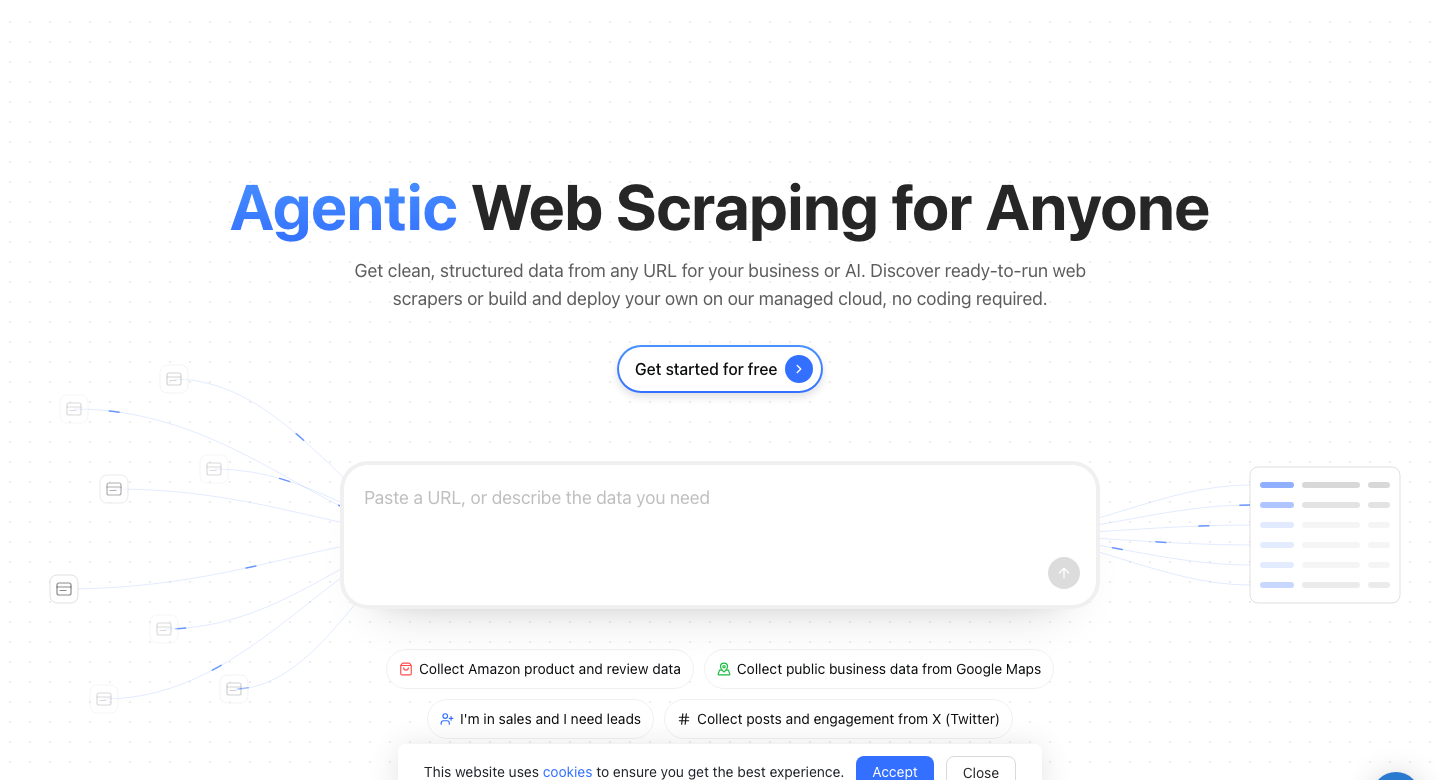
A visual scraper: paste a URL, describe or click the data you want, run it locally or in their cloud. The pricing page (read October 20, 2026) lists a free plan with 10 tasks, 1 device, 2 concurrent local runs and 50,000 rows of export per month, and paid plans of Standard at $69 per month and Professional at $249 per month, both billed annually. Add-ons are listed: residential proxies at $3 per GB and CAPTCHA solving at $1 to $1.50 per thousand. Their site now leads with an "agentic" description box where you type what data you need. I did not test how well that works.
Good at: non-developers, one-time exports. Bad at: anything you want to run from code or keep in version control.
Web Scraper
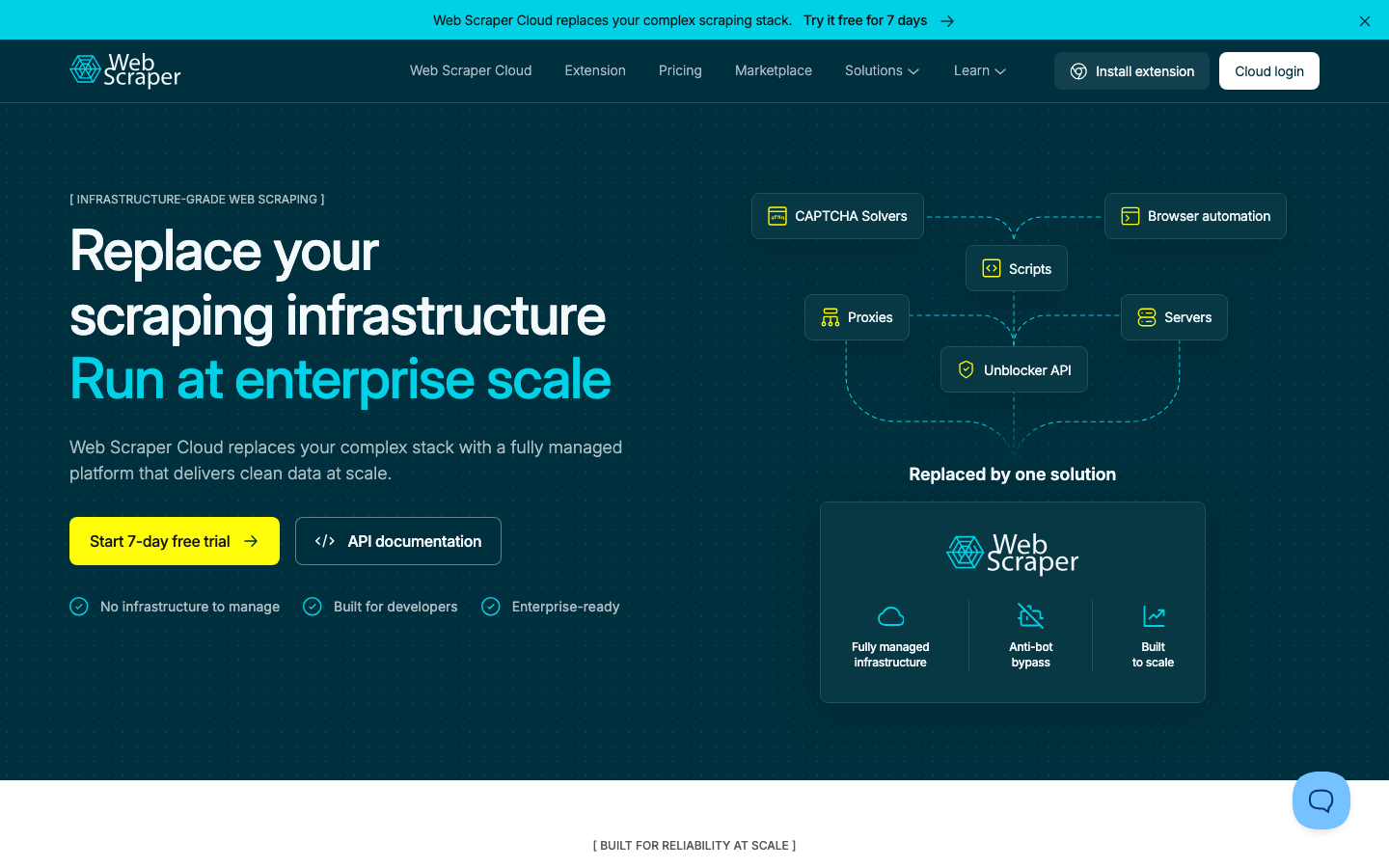
Web Scraper (webscraper.io) started as a Chrome extension and has a cloud product next to it. The pricing page lists Project at $50 per month (5,000 URL credits), Professional at $100 per month (20,000) and Scale from $200 per month, all billed annually, with a 7-day free trial and no card. One URL credit is one page load, however many records you take from it. The page also says that sites with heavy bot protection may not work, and that you should test on your own targets during the trial. That is fair, and it applies to every tool in this post.
Both no-code tools drive a page the way a person does, so screen scraping is a close cousin.
Comparison Table
| Tool | Kind | Code needed | Runs JavaScript | Free option | Entry price (Oct 17, 2026) | Run here |
|---|---|---|---|---|---|---|
| Requests + BeautifulSoup | Library | Yes | No | Open source | Free | Yes |
| Scrapy | Framework | Yes | No (plugin) | Open source | Free | Yes |
| Crawlee | Framework | Yes | With Playwright crawler | Open source | Free | Yes |
| Playwright | Browser | Yes | Yes | Open source | Free | Yes |
| Crawl4AI | AI-native | Yes | Yes | Open source | Free | Yes |
| Jina Reader | AI-native API | No | Yes (see notes) | 20 req/min, no key | Free key: 500 req/min | Yes |
| WebCrawlerAPI | Scraping API | A little | Yes | $0 plan | $0.002 per page | Yes |
| Firecrawl | Scraping API | A little | Yes | 1,000 credits/month | $16/month yearly | No |
| ScrapingBee | Scraping API | A little | Yes | 1,000 credits | $19/month | No |
| Apify | Platform | Optional | Yes | $5 usage/month | $19/month | No |
| Octoparse | No-code | No | Yes | Free plan | $69/month yearly | No |
| Web Scraper | No-code | No | Yes | 7-day trial | $50/month yearly | No |
Left out on purpose: Selenium and Puppeteer (covered by Playwright and the Python libraries post), proxy networks such as Bright Data, Oxylabs and Zyte (see the API list linked above), and several no-code names like ParseHub and Browse AI that I did not test either.
Common Mistakes When Choosing a Scraping Tool
- Starting with a browser. Most pages do not need one. Start with requests and see if the data is in the HTML.
- Buying an API for 20 pages. A 1.5 s loop does the job. APIs pay off when blocks, browsers or scale hurt.
- Trusting a vendor list. Including this one. Run your own 10 pages through two tools before you commit.
- Reading the headline price. Credits, compute units, URL credits and pages are different things. Convert everything to cost per 1,000 of your own pages.
- Ignoring the rules of the site. Check robots.txt and the terms first. See web scraping ethics and the law.
- Measuring once. One run says little. Jina's cached pages and the API's range on the static job both only show up on repeated runs.
FAQ
Which tool is best for web scraping?
It depends on the page. For static HTML, Requests with BeautifulSoup. For pages that need JavaScript, Playwright. For a large crawl, Scrapy. For markdown for an AI knowledge base, Crawl4AI or an API. For no code, Octoparse or Web Scraper. The table at the top has one line for each case.
Is web scraping illegal?
Scraping public pages is not illegal by itself, but the details depend on the data, the site's terms and your country. Personal data and logged-in areas carry the most risk. The long version is in Is Web Scraping Legal?.
Can ChatGPT do web scraping?
It can write a scraper for you, and with browsing it can read single pages. It is not a tool for fetching thousands of pages on a schedule. For that, use a library or an API from this list. The Python guide has a longer answer.
Which AI tool is the best for web scraping?
In this test I ran three tools that return markdown for LLMs: Crawl4AI, Jina Reader and WebCrawlerAPI. All three found the quotes on the static pages. Only Crawl4AI and WebCrawlerAPI found all of them on the JavaScript pages. I did not test LLM-based extraction, where a model turns a page into JSON. WebCrawlerAPI offers it through a prompt and a response_schema option, which I did not run here. Treat any claim about "best AI scraper" with care until you have tried it on your own pages.
What is web scraping good for?
Price monitoring, lead lists, research datasets, job listings, news and content collection for a knowledge base, and keeping an internal copy of public documentation up to date.
How can I extract data from a website?
Three routes. If the site has an API or a download, use that first. If not, a no-code tool is fastest for one-time exports. If you need it repeatedly, write a small script with Requests and BeautifulSoup, and add a browser or an API when the page needs JavaScript or starts blocking you.
What to Do Next
Pick one row from the table at the top and run it on the page you actually need. Ten pages is enough to learn most of what matters.
- Python code route: Web Scraping with Python and Best Python Web Scraping Libraries.
- JavaScript route: Web Scraping with JavaScript and Node.js.
- API route: Best Web Scraping APIs and the web scraping API page.
- Beginner route: How to Scrape Data from a Website.
If you want to try an API on a page that gave you trouble, you can sign up for the free plan and run the example above. No card is needed.
For AI extraction instead of selectors, see AI web scraping.
