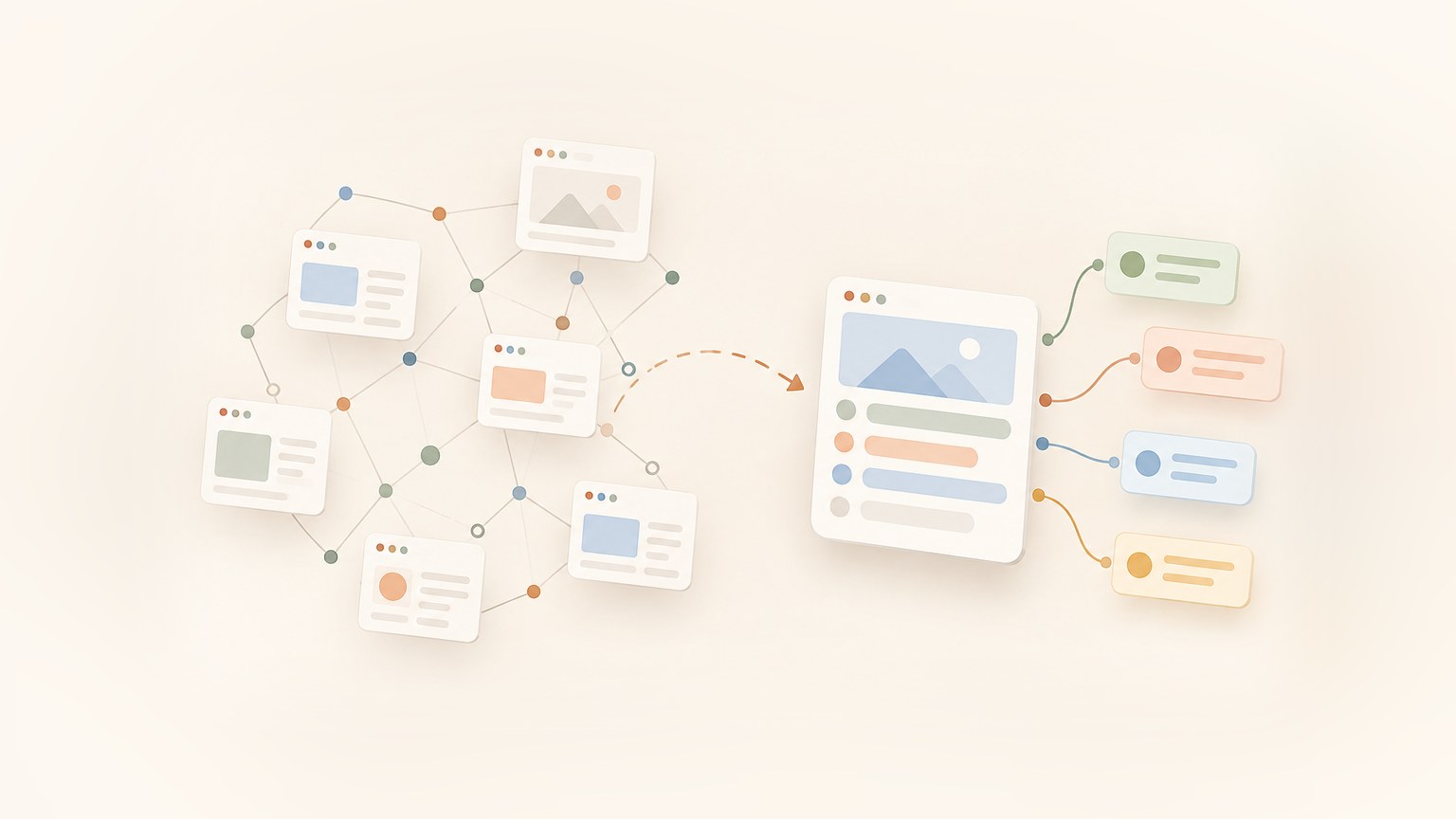
A web crawler finds pages by following links. A web scraper pulls data out of a page. That's the whole difference between web scraping vs web crawling: crawling finds pages, scraping reads them.
If you're comparing a web scraper vs a web crawler to pick a tool, here's the short version:
- Crawler: starts from one URL, follows links, and returns a list of pages.
- Scraper: starts from a URL you already know, and returns fields (price, title, date) or the page content.
- Most real projects need both. Below I run each one on the same site so you can see it.
Web scraping vs web crawling at a glance
| Web crawling | Web scraping | |
|---|---|---|
| Question it answers | Which pages exist? | What is on this page? |
| Input | A seed URL plus rules (depth, limit, allowed paths) | One known URL, or a list of them |
| Output | A list of URLs and their pages | Fields or clean content |
| Scope | A whole site or a section | One page at a time |
| Unit of work | A page visited | A page parsed |
| Main thing that breaks | Scope, loops, duplicates | Selectors, JavaScript rendering |
| Cost driver | Number of pages visited | Number of pages parsed and how the data is extracted |
| Typical example | Googlebot, link checker, sitemap builder | Price monitor, lead list, job board feed |
What is web crawling?
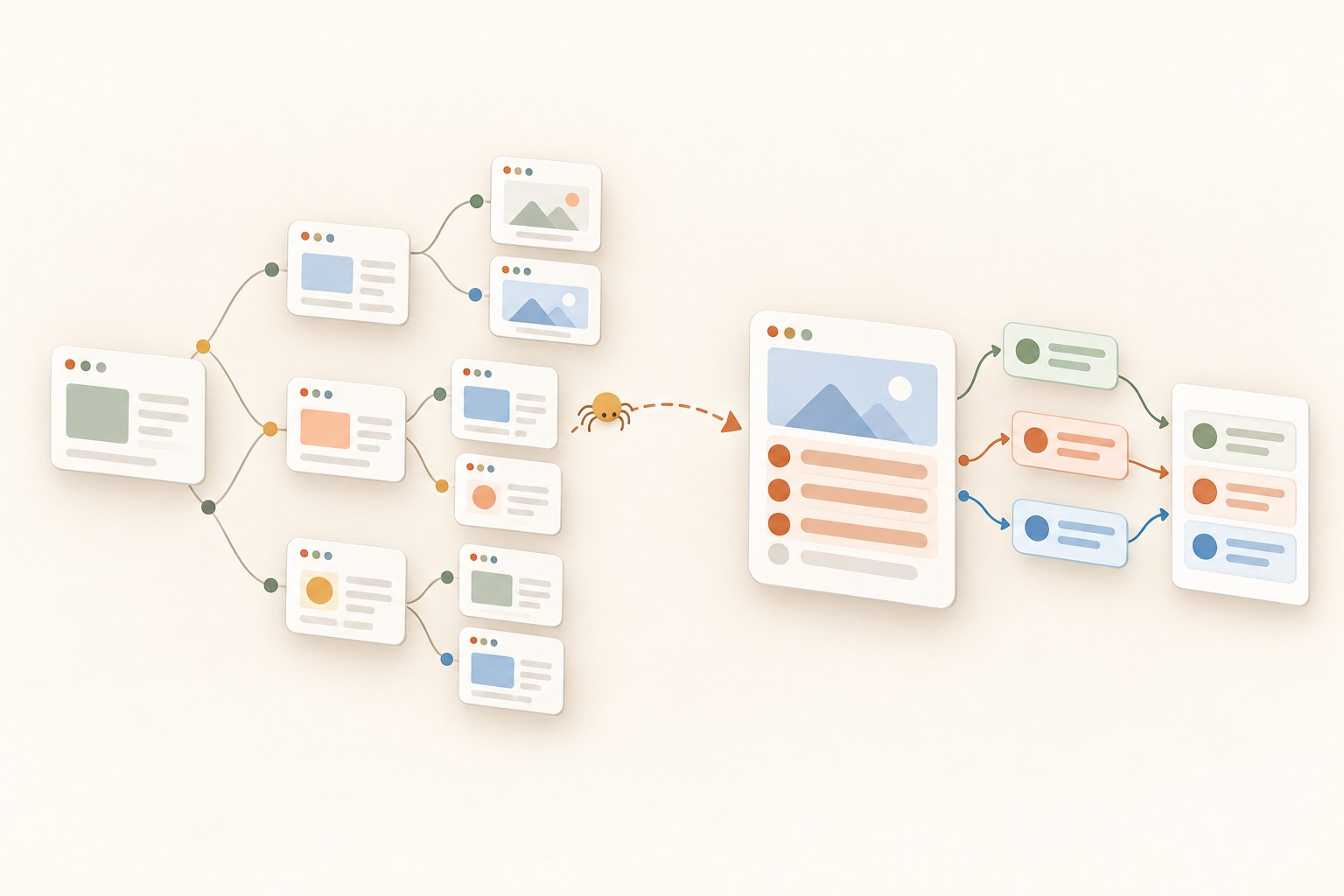
Web crawling is the process of discovering and fetching pages by following links. You give the crawler a seed URL. It downloads that page, finds the links on it, and visits those. Then it repeats.
Doing this on a whole site means you need limits. In real life a crawler needs:
- a scope (stay on this domain, or only under /docs)
- a depth or page limit, so it stops
- deduplication, so the same page isn't visited 40 times with different query strings
- politeness: rate limits and a look at robots.txt
Search engines are the famous example. Googlebot crawls the web, and a separate system indexes what it found. But crawling is also used for smaller things: checking a site for broken links, building a sitemap, or collecting every page of a docs site.
If you want the deeper version, read what is web crawling and how a web crawler works. That page has an interactive demo, so you can watch a crawler take a URL from the queue, scrape it, and follow its links, step by step. If you want the scraping side first, see what is web scraping.
What is web scraping?
Web scraping is the process of extracting specific data from a web page. It's targeted. You want the price, the title, the date, the email, not "everything".
A scraper works on one URL. It doesn't need to follow links at all. It fetches the page (with a browser if the page needs JavaScript), then pulls out the fields. That can be done with CSS selectors, XPath, or by asking an LLM for a JSON schema.
Typical jobs: price monitoring, lead lists, job posts, product catalogs.
One small note. People also use "scraping" loosely for "get me the content of this page". That's fine, but the useful meaning is: the page goes in, structured data comes out. If you write Node.js, I covered this in web scraping with JavaScript and Node.js. If the data only exists on a screen, see what is screen scraping.
The same site, crawled and scraped
Talk is cheap, so let's run both on one site. I'm using books.toscrape.com, a practice site built for scraping, so there are no terms-of-service worries.
All snippets are Node 18+ and read the key from WEBCRAWLER_API_KEY. I ran each one before pasting the output here.
Crawling it
The crawler starts at the home page, follows links, and stops after 10 pages or 2 levels deep:
import webcrawlerapi from "webcrawlerapi-js";

const client = new webcrawlerapi.WebcrawlerClient(process.env.WEBCRAWLER_API_KEY);

// Start at the home page, follow links, stop after 10 pages
const job = await client.crawl({
  url: "https://books.toscrape.com/",
  output_formats: ["markdown"],
  items_limit: 10,
  max_depth: 2,
});

console.log(`Status: ${job.status}, pages found: ${job.job_items.length}`);
for (const item of job.job_items.slice(0, 5)) {
  console.log(item.original_url);
}
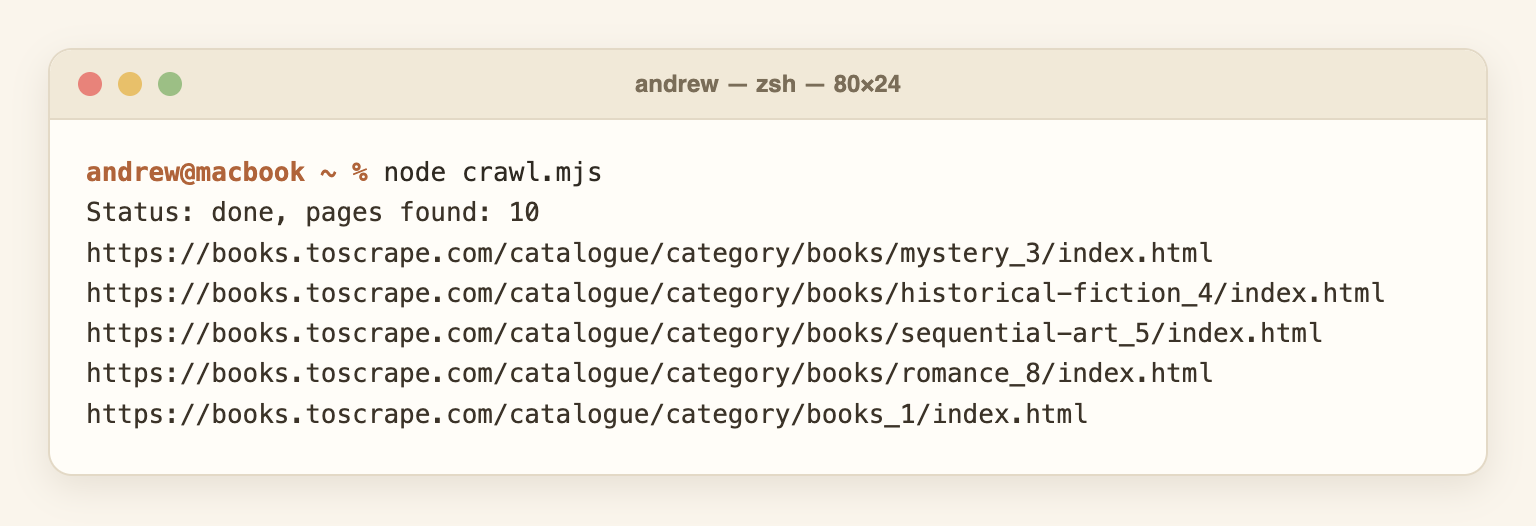
Real output:
Status: done, pages found: 10
https://books.toscrape.com/catalogue/category/books/mystery_3/index.html
https://books.toscrape.com/catalogue/category/books/historical-fiction_4/index.html
https://books.toscrape.com/catalogue/category/books/sequential-art_5/index.html
https://books.toscrape.com/catalogue/category/books/romance_8/index.html
https://books.toscrape.com/catalogue/category/books_1/index.html
See what we got? A list of pages. Category pages, mostly. The crawler found them, and each page also came back as markdown. But we don't have a single price or title as a field yet.
Scraping one page
Now the opposite. We already know the URL, so there's nothing to discover. We just want fields:
// Scrape ONE known page and get fields back, not text
const res = await fetch("https://api.webcrawlerapi.com/v2/scrape", {
  method: "POST",
  headers: {
    Authorization: `Bearer ${process.env.WEBCRAWLER_API_KEY}`,
    "Content-Type": "application/json",
  },
  body: JSON.stringify({
    url: "https://books.toscrape.com/catalogue/a-light-in-the-attic_1000/index.html",
    prompt: "Extract the book title, price and availability",
    response_schema: {
      type: "object",
      properties: {
        title: { type: "string" },
        price: { type: "string" },
        availability: { type: "string" },
      },
      required: ["title", "price", "availability"],
      additionalProperties: false,
    },
  }),
});

const data = await res.json();
if (!data.success) throw new Error(`${data.error_code}: ${data.error_message}`);

console.log(JSON.stringify(data.structured_data, null, 2));
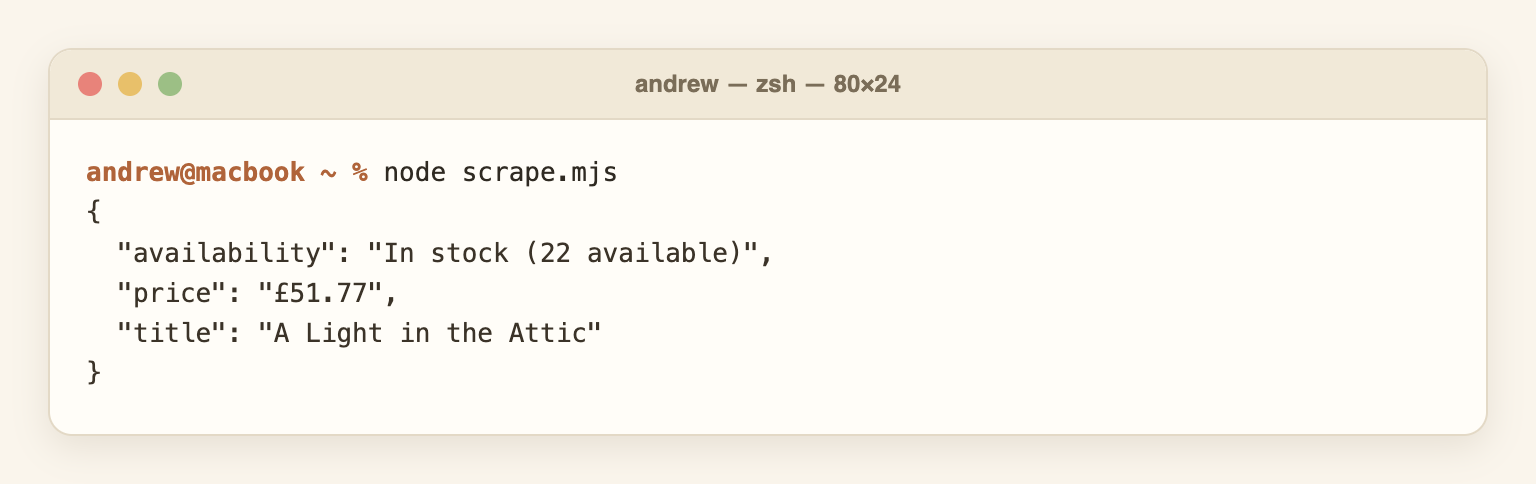
Real output:
{
  "availability": "In stock (22 available)",
  "price": "£51.77",
  "title": "A Light in the Attic"
}
That's scraping. One page in, three fields out. The response_schema keeps the shape fixed, and it only works together with a prompt. More in the structured outputs docs. Note that a prompt costs extra per request; check the pricing docs before you run it on thousands of pages.
Putting them together
Here's the pattern most projects end up with. Crawl to get the product URLs, then scrape each one:
import webcrawlerapi from "webcrawlerapi-js";

const key = process.env.WEBCRAWLER_API_KEY;
const client = new webcrawlerapi.WebcrawlerClient(key);

// Step 1: crawl finds the pages (only product pages, thanks to the regexp)
const job = await client.crawl({
  url: "https://books.toscrape.com/",
  output_formats: ["markdown"],
  items_limit: 20,
  whitelist_regexp: "/catalogue/[^/]+_\\d+/index\\.html",
});
const urls = job.job_items.map((i) => i.original_url).slice(0, 3);

// Step 2: scrape reads each page. The URL list is the only link between the steps.
for (const url of urls) {
  const res = await fetch("https://api.webcrawlerapi.com/v2/scrape", {
    method: "POST",
    headers: { Authorization: `Bearer ${key}`, "Content-Type": "application/json" },
    body: JSON.stringify({
      url,
      prompt: "Extract the book title and price",
      response_schema: {
        type: "object",
        properties: { title: { type: "string" }, price: { type: "string" } },
        required: ["title", "price"],
        additionalProperties: false,
      },
    }),
  });
  const data = await res.json();
  console.log(data.structured_data);
}
Real output:
{ price: '£51.77', title: 'A Light in the Attic' }
{ price: '£23.88', title: 'Olio' }
{
  price: '£37.59',
  title: 'Mesaerion: The Best Science Fiction Stories 1800-1849'
}
The crawler never looks at prices. The scraper never follows links. The list of URLs is the interface between them. That's the main idea of this post.
Want to try both calls yourself? Create an account and grab an API key, the snippets above run as they are.
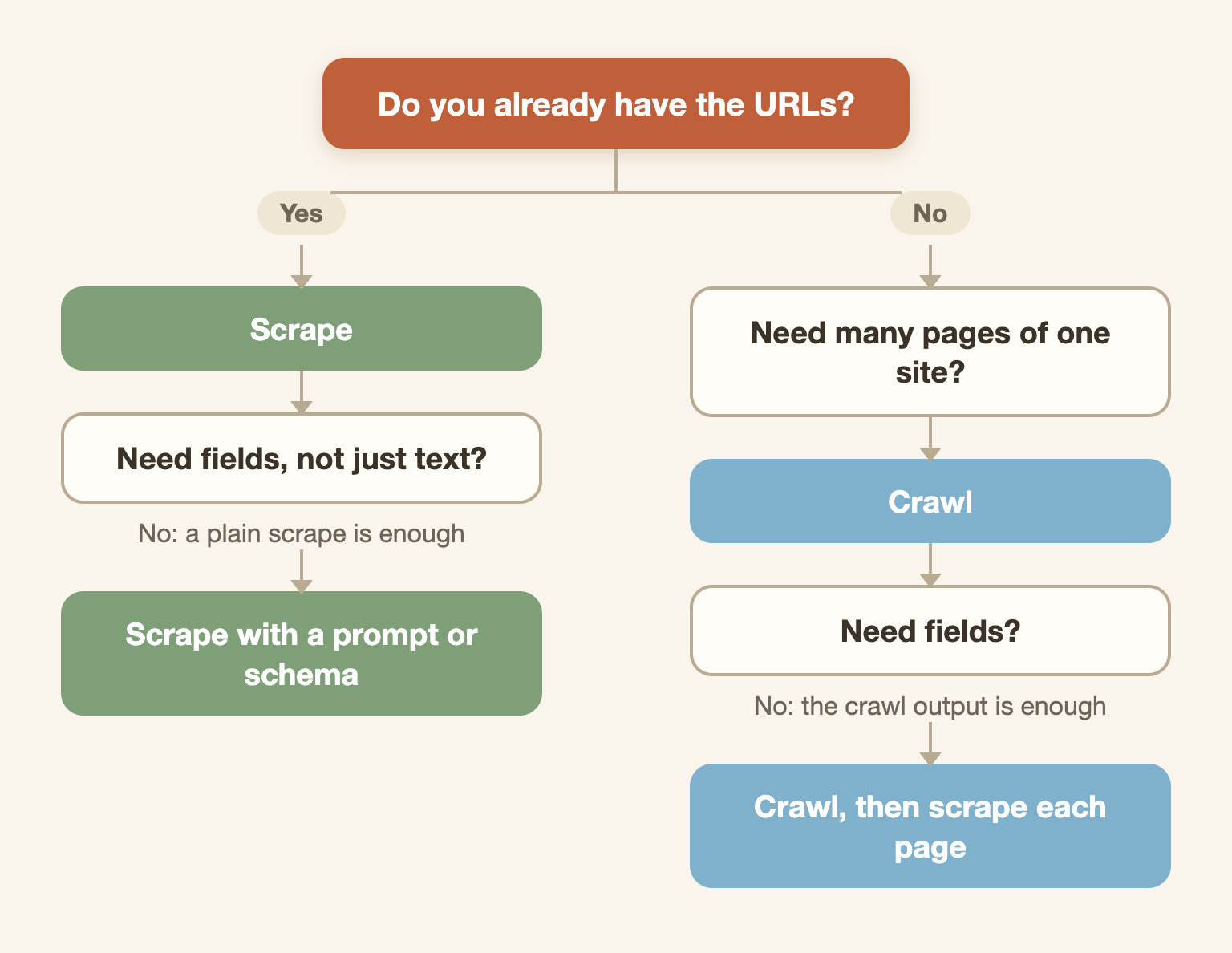
Do I need a crawler, a scraper, or both?
Ask two questions:
- Do you already have the URLs? If yes, you need a scraper.
- Do you need fields from the pages, not just the text? If yes, add scraping on top.
If you don't have the URLs, you need a crawler first.
Some real scenarios:
- Price monitor for 20 known product URLs: scraper only.
- Index a docs site for an AI knowledge base: crawler only (the page content as markdown is enough).
- Catalog of every product in a shop, with prices: both.
- Your own search engine: crawler, plus an indexer.
- One article you want as clean text: scraper only.
Can one tool do both?
Yes. Most tools do. A Reddit question I see a lot is "can a program be both a crawler and a scraper?" The answer is yes, and plenty of libraries ship both.
The trouble starts when both jobs live in one function: fetch a page, parse it, find links, recurse. It works for a weekend project. Then one selector changes and your crawl dies halfway. The short glossary version of this topic is how is web scraping different from web crawling.
Keep the stages separate. Save the URL list, then scrape from it.
Also: if the site has a complete sitemap.xml, you can skip crawling. The sitemap is already a URL list. In real life sitemaps are often stale or missing pages, so check it before you trust it.
What breaks in each stage
Crawling breaks on:
- infinite pagination and calendar pages (a crawler can click "next month" forever)
- duplicate pages with different URLs
- scope creep (the crawler wanders off to another domain)
- rate limits and robots.txt rules
Scraping breaks on:
- JavaScript-rendered pages where the HTML is empty until a browser runs (JavaScript rendering explained)
- changed selectors after a site redesign
- bot blocks and empty responses
Blocking hits both stages. Proxies and user agents belong to crawling and scraping alike, they don't define either one.
Building your own is fine for a small job. At scale it eats time. I went through that in how to build a web crawler.
Crawling and scraping with an API
I run WebCrawlerAPI, so take this section with that in mind. It has a scrape endpoint for one URL and a crawl job for many. Both return the same formats (markdown, cleaned text, HTML, links), and you don't manage a headless browser.
A common use is an AI knowledge base: crawl a docs site to markdown in one call, and feed that into your own pipeline. Here crawling and scraping are one step, because the page content is the output.
If you're comparing options, see best web crawler APIs, best web scraping APIs and what is a web crawling API. The crawl API page and the docs show the full parameters.
Is web scraping or web crawling legal?
Neither is illegal by itself. It depends on what you collect, how you do it, and the site's terms. Public data is different from data behind a login, and personal data brings privacy law into it.
Respect robots.txt, don't hammer servers, and talk to a lawyer for anything commercial. I wrote more in web scraping ethics and in the short answer to is web scraping legal.
FAQ
What is the main difference between web crawling and web scraping?
Crawling discovers pages by following links. Scraping extracts data from a page. A crawler returns a list of pages, a scraper returns fields or content.
Is a web crawler the same as a web scraper?
No, but the words overlap and many tools do both. The crawler's job is finding pages. The scraper's job is reading them.
Can a web scraper work without crawling?
Yes. If you already have a list of URLs, you can scrape them directly with no crawling at all.
Can one program be both a crawler and a scraper?
Yes. Most tools are. It's still cleaner to keep the two stages separate and pass a URL list between them.
Do I need a crawler if I already have a list of URLs?
No. A URL list means the discovery work is done. Go straight to scraping.
Does a web crawler need a headless browser?
Only when the pages are rendered with JavaScript. For plain HTML sites, a normal HTTP request is enough and much cheaper.
Is Google a web crawler or a web scraper?
Googlebot is a crawler. It finds pages and a separate system indexes them. It doesn't extract custom fields the way a scraper does.
What does each cost?
Crawling cost grows with the number of pages visited. Scraping cost grows with the pages parsed and the extraction method (an LLM prompt costs more than a CSS selector). For WebCrawlerAPI numbers, see the pricing docs.
Which is faster, scraping or crawling?
It depends on scope. One scrape is a single request. A crawl visits many pages, so it takes longer by design. Compare them per page, not as a rule.
Summary
Crawling finds pages. Scraping reads them. Keep a URL list between the two and your pipeline stays easy to debug.
Next reads:
- Web scraping with JavaScript and Node.js
- How to crawl a website with Python
- Python vs Node.js for web crawling
- How to build a web crawler
- Best web crawler APIs
Want to run both calls on your own site? Get an API key and check the docs.