
Screen scraping is extracting data from what an application displays, instead of from an API or a database. It is the method of last resort. It is used when nothing better exists.
The term is confusing because people use it for three different things: reading pixels and terminal screens, plain web scraping, and bank-login access in fintech. (And no, this isn't about the retro-game ScreenScraper site.) I'll sort that out below, show three working examples, and run one small test: the same 10 quotes read through OCR, the DOM and an API. For the full web scraping workflow, see Web Scraping with Python.
What Is Screen Scraping?
Screen scraping means collecting data from the output of a program, the way a person would see it, rather than from the program's data layer.
The word comes from the mainframe days. Companies had "green screen" terminal applications with no API, so software was written to read the text on the terminal screen and type keystrokes back. The same idea now covers desktop apps, web pages and even bank dashboards.
Here are the three meanings you will meet:
| Meaning | What is read | Where you see it |
|---|---|---|
| Pixel and terminal scraping | Screenshots, terminal text buffers | Legacy systems, RPA tools, desktop apps |
| Web scraping, used loosely | A rendered web page | Blog posts, scraping vendors |
| Bank credential scraping | A bank's website, behind the customer's login | Fintech, open banking articles |
This post uses the first meaning as the strict one, and treats the browser case as the middle ground. Banking gets its own short section.
How Does Screen Scraping Work?
Every screen scraper runs the same four steps:
- Capture. Get what is on the screen: a screenshot, the terminal buffer, or the rendered page.
- Locate. Find the data. By coordinates, by OCR (optical character recognition), or by a selector.
- Extract. Pull out the text or numbers.
- Structure. Turn them into rows, JSON or CSV.
What changes between methods is how much structure survives step 1. An API hands you structure. A rendered page keeps the DOM. A screenshot keeps nothing but colored dots, so the program has to guess every letter.
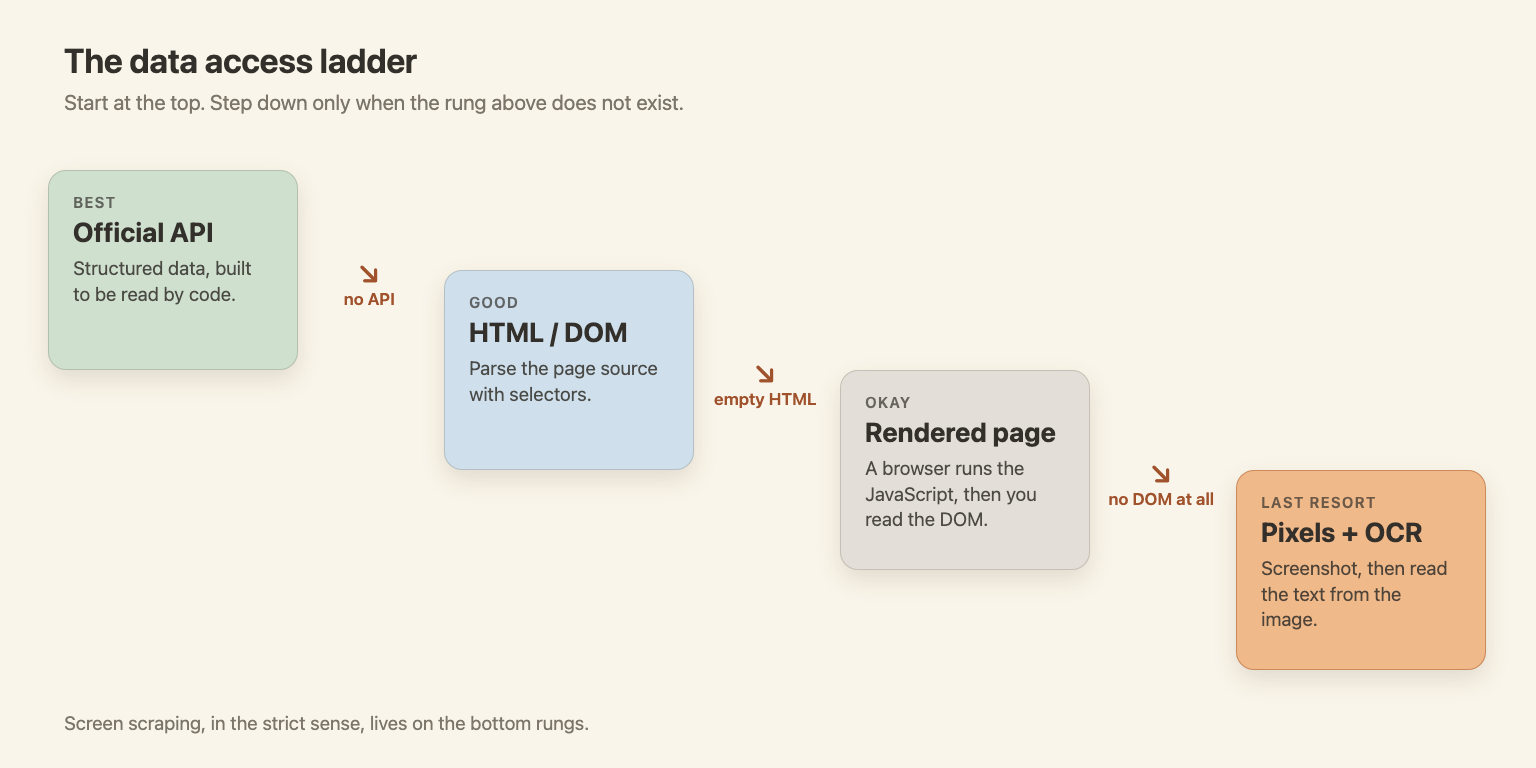
That gives a ladder. Start at the top and step down only when the rung above does not exist.
Screen Scraping vs Web Scraping
Web scraping reads a page's source or DOM. Screen scraping, in the strict sense, reads what is displayed. The first is about structure you can query. The second is about output made for human eyes.
| Web scraping | Screen scraping (pixels, terminal) | |
|---|---|---|
| Data source | HTML, DOM, JSON behind the page | Screenshot or terminal text |
| Typical tools | requests, BeautifulSoup, Playwright | OCR, pyautogui, pexpect, RPA tools |
| Reliability | Good until the markup changes | Breaks when fonts, scaling or layout change |
| Speed | Fast | Slow (a screenshot plus OCR) |
| Typical use | Websites | Desktop apps, terminals, anything without a DOM |
In practice, the two overlap. When a site needs JavaScript, a headless browser renders it and you read the DOM. Many people call that screen scraping too, and I won't argue. For the basics of web scraping itself, see the glossary entry. Crawling (finding pages by following links) is a separate job, covered in crawling vs scraping.
Types of Screen Scraping (with Examples)
All examples ran on Python 3.11 in October 2026. The code is saved next to this post. Each one reads from quotes.toscrape.com, a practice site made for scrapers.
Web Screen Scraping (Rendered Page)
This is the browser case. A headless browser loads the page, runs its JavaScript, and you read the result.
from playwright.sync_api import sync_playwright

with sync_playwright() as p:
    browser = p.chromium.launch()
    page = browser.new_page()
    page.goto("https://quotes.toscrape.com/js/")  # quotes are drawn by JavaScript
    page.wait_for_selector(".quote")
    for q in page.locator(".quote").all()[:3]:
        print(q.locator(".text").inner_text(), "-", q.locator(".author").inner_text())
    browser.close()
Output:
“The world as we have created it is a process of our thinking. It cannot be changed without changing our thinking.” - Albert Einstein
“It is our choices, Harry, that show what we truly are, far more than our abilities.” - J.K. Rowling
“There are only two ways to live your life. One is as though nothing is a miracle. The other is as though everything is a miracle.” - Albert Einstein
A plain HTTP client would see an empty page here. More on that in JavaScript rendering in web crawling.
GUI Screen Scraping (Pixels and OCR)
Some data only exists on screen: a desktop app, a remote desktop session, a PDF viewer. There is no DOM, so you take a screenshot and run OCR on it. Here I screenshot the quotes page and read it with Tesseract (5.5.3) through pytesseract.
import pytesseract
from PIL import Image
from playwright.sync_api import sync_playwright

with sync_playwright() as p:
    browser = p.chromium.launch()
    page = browser.new_page(viewport={"width": 1280, "height": 900}, device_scale_factor=2)
    page.goto("https://quotes.toscrape.com/")
    page.screenshot(path="page.png", full_page=True)  # we only keep the pixels
    browser.close()

text = pytesseract.image_to_string(Image.open("page.png"))
print(text[:400])
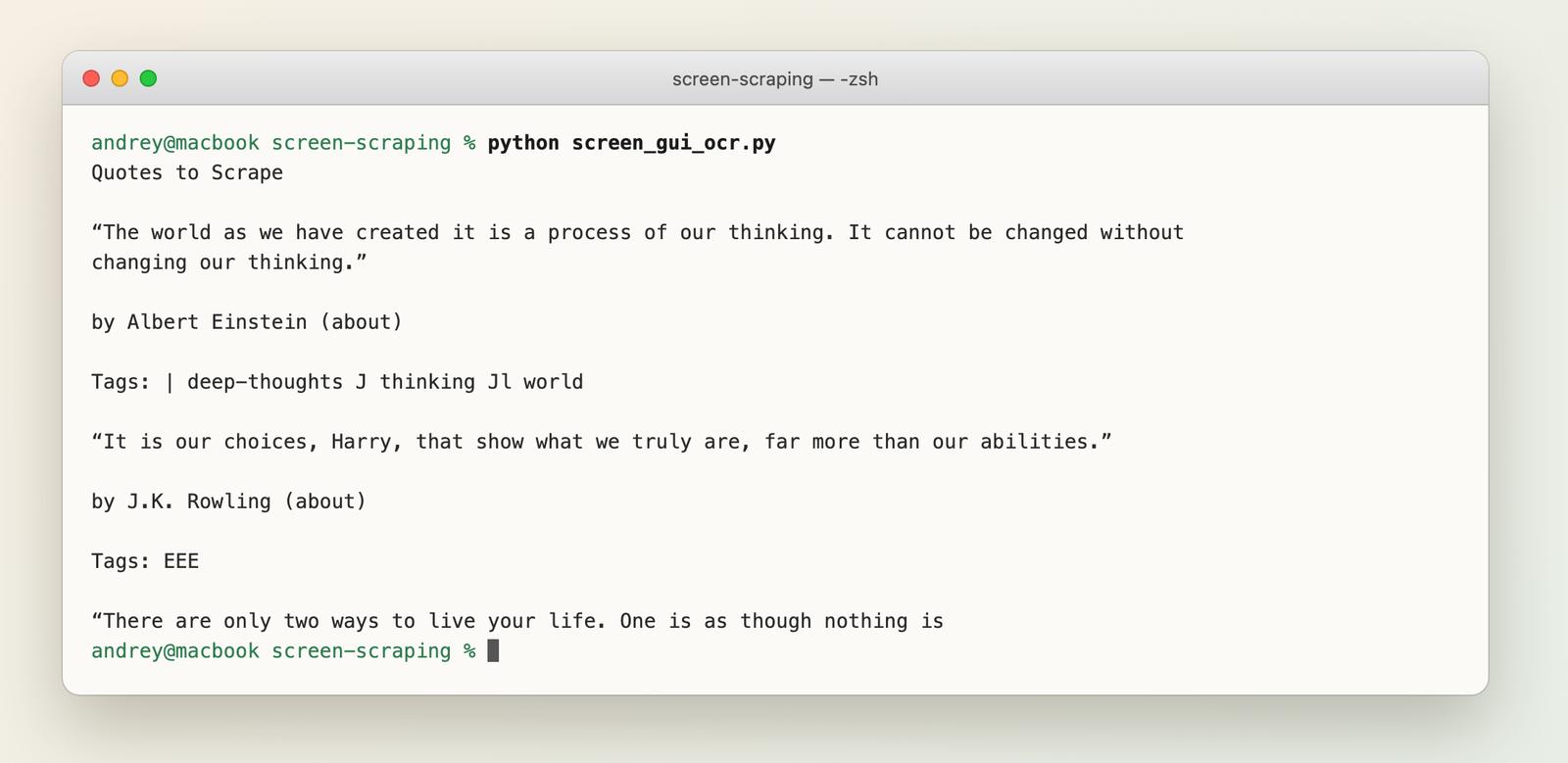
The quote text came out clean. The Tags: lines came out as junk such as EEE and J thinking Jl, because the tags sit in small boxes and Tesseract reads boxes badly. Fonts, dark mode, scaling and language all change the result. To click through an app as well, add pyautogui.
Terminal Screen Scraping
Mainframes and SSH sessions are where the term started. You run a program in a pseudo-terminal, read the text a person would see, and parse it by position.
import pexpect

# Run a command in a pseudo-terminal and read what a person would see
child = pexpect.spawn("df -h /", encoding="utf-8", timeout=10)
child.expect(pexpect.EOF)
screen = child.before.replace("\r", "")

header, row = [line.split() for line in screen.strip().splitlines()[:2]]
# Parse by column position: Filesystem Size Used Avail Capacity ...
print({"filesystem": row[0], "size": row[1], "used": row[2], "avail": row[3], "capacity": row[4]})
Output (my laptop, so your values will differ):
{'filesystem': '/dev/disk3s1s1', 'size': '926Gi', 'used': '14Gi', 'avail': '119Gi', 'capacity': '11%'}
For a real legacy system, pexpect can also log in, send keystrokes and wait for prompts. Parsing by column position is fragile: one added column and everything shifts.
Same Data, Three Ways: Pixels vs DOM vs API
The task: read the 10 quotes and authors from the first page of quotes.toscrape.com. 1,012 characters in total. I compared three methods against the DOM as ground truth, and counted a quote as correct only when text and author matched exactly. Each time is the median of 5 runs.
- Pixels: Playwright screenshot, Tesseract OCR, regex.
- DOM: Playwright and CSS selectors.
- API: the WebCrawlerAPI scrape endpoint returning Markdown, parsed with a regex.
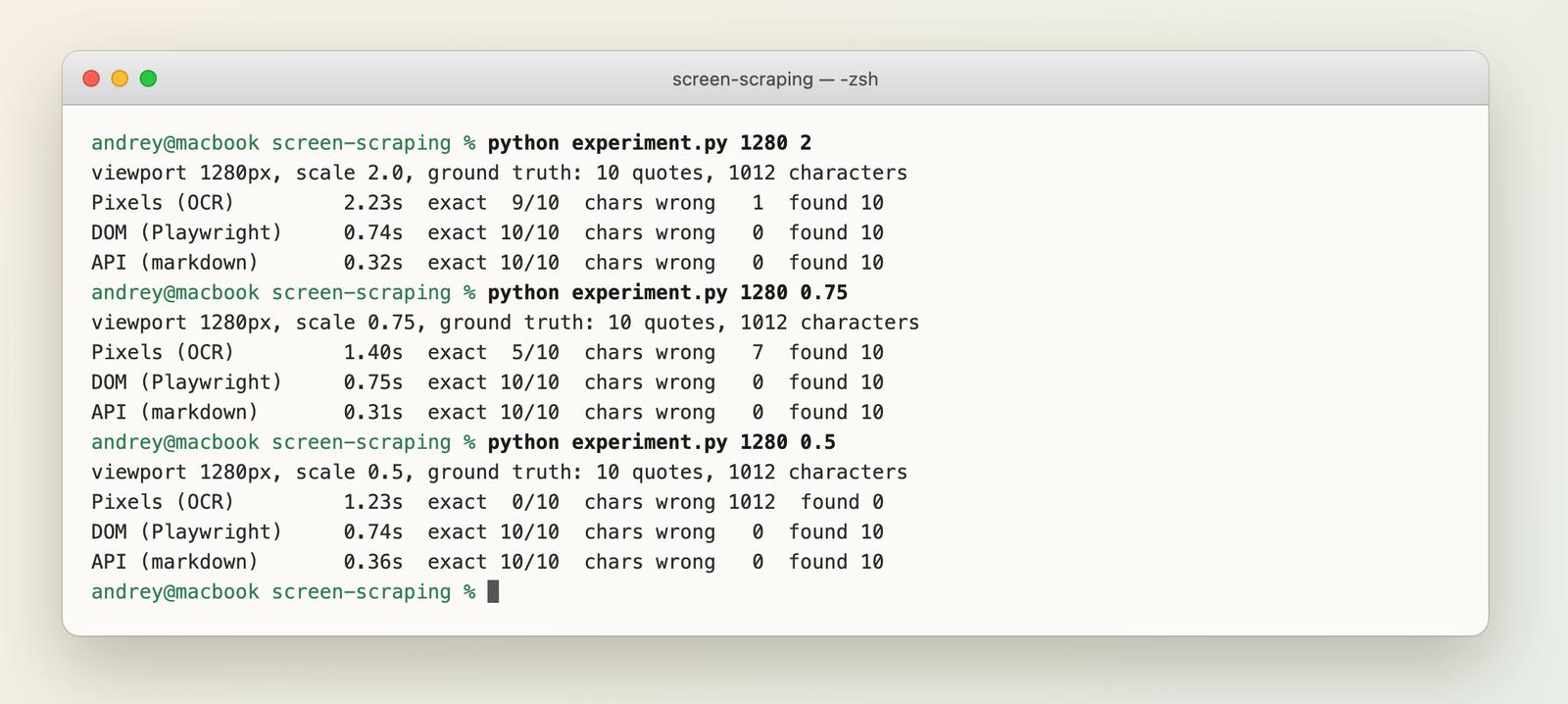
| Method | Time | Quotes exact | Characters wrong | Lines of code |
|---|---|---|---|---|
| Pixels (OCR), scale 2 | 2.23 s | 9 of 10 | 1 | 10 |
| Pixels (OCR), scale 0.75 | 1.40 s | 5 of 10 | 7 | 10 |
| Pixels (OCR), scale 0.5 | 1.23 s | 0 of 10 (nothing matched) | 1,012 | 10 |
| DOM (Playwright) | 0.74 s | 10 of 10 | 0 | 7 |
| API (Markdown) | 0.32 s | 10 of 10 | 0 | 5 |
Caveats, so you don't over-read this. Browser startup is not counted for the pixel and DOM rows (they reuse one browser). The API time includes the network round trip. Lines of code are non-blank lines in each function. Tesseract 5.5.3, Playwright 1.64.0, one machine, one clean page.
What I take from it:
- OCR is better than I expected on a clean page. At 2x resolution it got 1,011 of 1,012 characters right. The one error: a capital "I" read as a pipe, so "I have not failed" came out as "| have not failed".
- It is fragile in a way the others are not. Dropping the screenshot scale to 0.75 (smaller text) cut exact matches from 9 to 5. At 0.5 the output was unusable.
- The DOM and the API never moved. Same answer at every scale, because they never look at pixels.
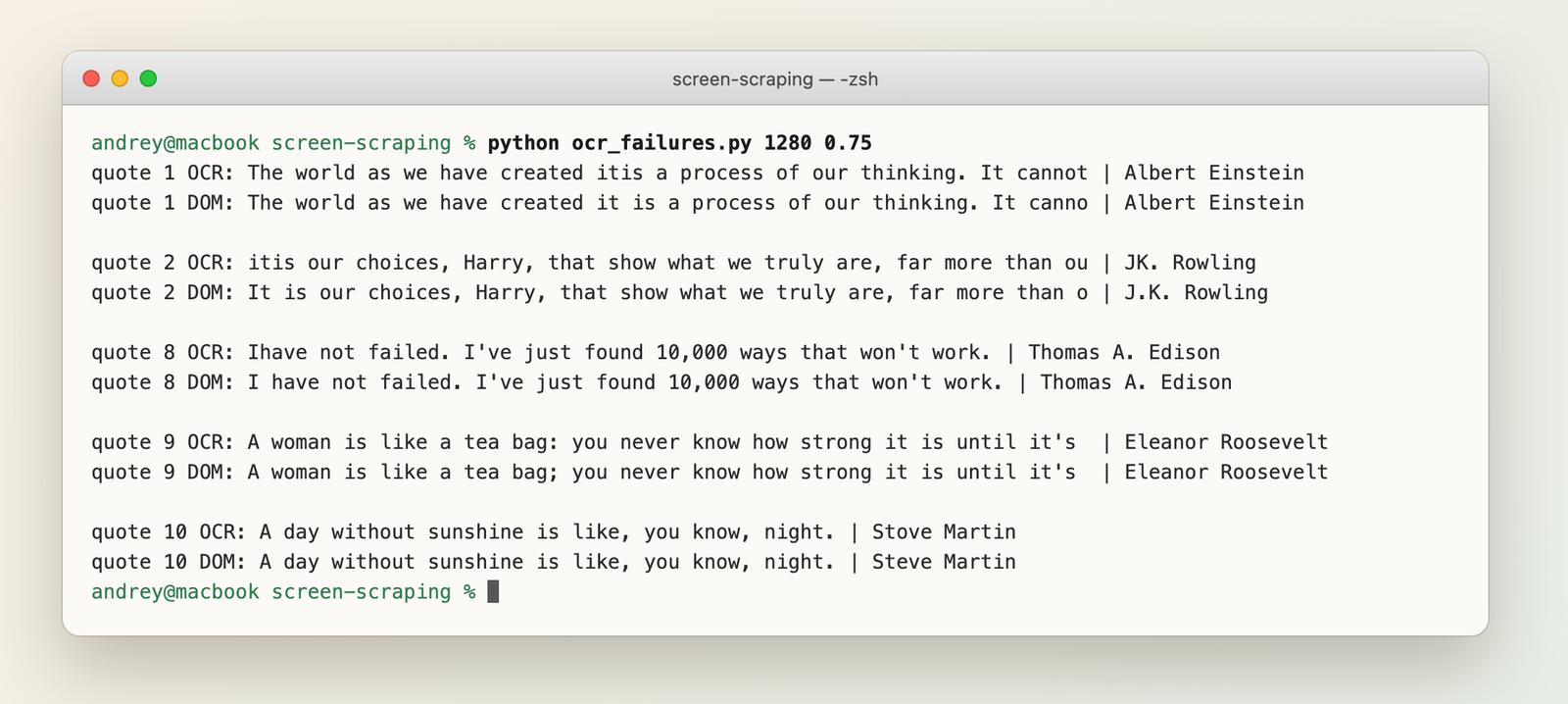
The errors above are the nasty kind: "Stove Martin" looks plausible, and a dropped space or a swapped ; and : passes any quick check. And this is a clean page with big text and no ads. On a busy interface it would be worse.
Common Use Cases
- Legacy systems with no API. Mainframe terminals, old desktop software, vendor tools nobody can modify.
- RPA workflows. Robotic process automation tools click through apps the way an employee would.
- Price and competitor monitoring. Usually done on web pages, so the DOM route works. See Web Scraping with Python or how to extract SaaS pricing from any website.
- Account aggregation. Apps that show a user's balances from several banks.
- AI agents that use a computer. They look at screenshots and click. It works, but it sits at the bottom of the ladder, with the same fragility.
Screen Scraping in Banking
In fintech, "screen scraping" usually means an app logging into your bank's website with your username and password and reading the pages. That requires the customer to hand over a credential, which is why regulators pushed for proper APIs instead. The next section covers what I could check.
Is Screen Scraping Legal?
The honest answer is: sometimes. It depends on what is scraped, how, and under which terms.
The points specific to screen scraping:
- Credentials. Logging in as a user means acting under someone's authorization. Sharing a login with a third party may breach your agreement with the bank or service.
- Terms of service. Many sites forbid automated access. A contract breach is a different thing from a crime, but it can still cost you an account or a lawsuit. Some scrapers have lost in court, see 5 famous web scraping court cases where scrapers lost.
- Personal data. Screens show names, balances and messages. Privacy law applies to what you collect, however you collected it.
- Open banking rules. In the EU, Commission Delegated Regulation (EU) 2018/389 requires banks to offer an access interface for third-party providers (Article 30). Providers may fall back to the bank's customer-facing interface only as a contingency, when the dedicated interface fails, and only if they identify themselves, rely on the bank's authentication, use the data only for the requested service, log what they access and justify it to their authority on request (Article 33). Read the regulation text. In the US, the CFPB issued a final personal financial data rights rule (section 1033) in October 2024, then opened a reconsideration in August 2025. In October 2025 a federal court in Kentucky stayed the compliance deadlines and preliminarily enjoined enforcement of the rule, and in March 2026 the Sixth Circuit put the appeals in abeyance while the CFPB rewrites it (docket). As of the May 2026 status report the rulemaking was still ongoing, so check the CFPB's rule page and the docket for the current state.
I'm not a lawyer, and this is not legal advice. For the court cases and the wider picture, read Is Web Scraping Legal? and the glossary answer.
Challenges and Limits
- It breaks when the UI changes. A moved button or new font can ruin pixel-based extraction. Selectors break too, but they fail loudly more often.
- OCR makes quiet errors. In my test, 5 of 10 quotes were wrong at a smaller scale, and nothing raised an exception.
- It is slow. A screenshot plus OCR took 1.2 to 2.2 s here, against 0.3 to 0.7 s for the other two.
- Hard to scale. Each session needs a screen, a browser or a terminal. Hundreds in parallel means real infrastructure.
- Anti-bot defenses still apply. A real browser does not make you invisible. For the usual fixes, see how to avoid getting blocked when scraping.
When to Use an API Instead
Go down this list and stop at the first match:
- An official API exists. Use it.
- The page serves HTML or JSON. Parse it. See Web Scraping with Python and Best Python Web Scraping Libraries.
- The page needs a browser. Use headless Playwright, or a scraping API that renders it for you (see how to scrape JavaScript-heavy sites).
- Only pixels or a terminal exist. Now you screen scrape.
Where does WebCrawlerAPI fit? For web pages: one URL in, the rendered page back as Markdown or HTML, with no browsers to run and no OCR. That was the 5-line row in the table above. For a side-by-side look at the other options, see best web scraping APIs.
import os

from webcrawlerapi import WebCrawlerAPI

client = WebCrawlerAPI(api_key=os.environ["WEBCRAWLERAPI_KEY"])

result = client.scrape(
    url="https://quotes.toscrape.com/",
    output_formats=["markdown"],
)

print("status code:", result.page_status_code)
print(result.markdown[:330])
Output (first lines):
status code: 200
# [Quotes to Scrape](/)

[Login](/login)

“The world as we have created it is a process of our thinking. It cannot be changed without changing our thinking.” by Albert Einstein [(about)](/author/Albert-Einstein)

Tags: [change](/tag/change/page/1/) [deep-thoughts](/tag/deep-thoughts/page/1/) [thinking](/tag/thinking/page/1/) [wo
See the scrape docs and the Python SDK. To compare Markdown with HTML output, read HTML vs Markdown.
It won't help with desktop apps, terminal sessions, or anything that is not on the web. For those, you need the tools above.
FAQ
How do you do a screen scrape?
Capture the screen (a screenshot, terminal buffer or rendered page), locate the data with OCR, coordinates or selectors, extract it, and save it as structured rows. For a web page, skip the screenshot and read the DOM. It's faster and more accurate, as the test above shows.
How does screen scraping work?
A program reads what an application displays instead of calling an API. It captures the output, finds the data and turns it into structure. The less structure the source keeps, the more guessing the program does. See How Does Screen Scraping Work?.
What are some good screen scraping apps?
For web pages: Playwright and a parser, or a scraping API. For desktop apps: RPA suites and OCR libraries like Tesseract. For terminals: pexpect. I plan a separate tools comparison, so check the blog.
What is screen scraping used for?
Reading legacy systems with no API, automating desktop workflows, monitoring prices on web pages, and aggregating bank data. See Common Use Cases.
Is screen scraping allowed?
Sometimes. It depends on the target's terms, the data collected and local law. Logging in with a customer's credentials is the riskiest form. See Is Screen Scraping Legal?.
Is AI scraping illegal?
Using AI to read a page does not change the legal analysis. The same questions apply: what data, which terms, which jurisdiction. The details are in Is Web Scraping Legal?.
What to Do Next
Screen scraping reads what is displayed, and it works, but every step down the ladder costs accuracy, speed and maintenance. In my test, OCR matched the DOM on a clean page at high resolution and fell apart at a small one.
Next steps:
- Read the full web scraping workflow in Python.
- Pick a library with Best Python Web Scraping Libraries.
- For web pages, try the WebCrawlerAPI Python scraper and skip the screenshots.
Use the highest rung of the ladder that exists for your data.
