
Last updated: October 18, 2026. I run WebCrawlerAPI, which has an extraction feature and is mentioned below. Where it loses, I say so.
AI web scraping means fetching a page the normal way, then asking an LLM for fields instead of writing selectors. It costs tokens, it may buy some resilience, and it is not always the right tool.
I tested 10 product pages: CSS selectors, token counts for four page formats, and the WebCrawlerAPI prompt call (20 real calls). I did not test an LLM reading raw HTML or Markdown. Those rows say "not tested", with only token counts and list-price input cost. If you need the basics first, start with how to scrape data from a website.
What Is AI Web Scraping?
An LLM reads page content and returns structured data, based on a prompt and a schema. People mean three different things by it:
- LLM extraction from a page you already fetched. Page text goes in, JSON comes out. This post is about this one.
- AI agents that browse. An agent decides which links to open and what to do next. That is a different job, covered in what is an AI crawl agent.
- AI-ready Markdown. Converting pages to clean text for an AI knowledge base. No extraction, no LLM call. See HTML vs Markdown.
AI does not replace fetching. Rendering JavaScript, handling blocks and retrying are still on you or your scraping API. If the content never arrives, the model has nothing to read. See web scraping with JavaScript and Node.js for that part.
How LLM Web Scraping Works
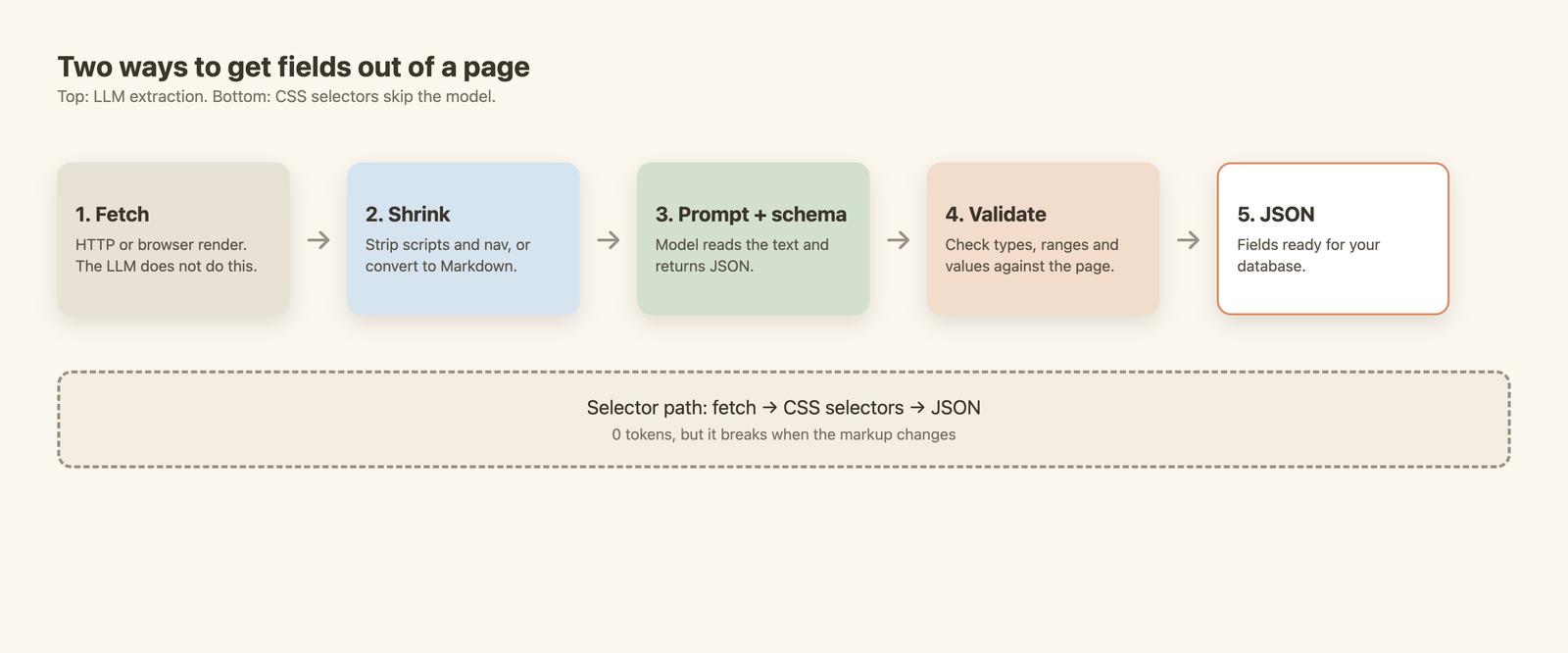
The pipeline in four steps
- Fetch. Get the HTML, with a browser if the page needs JavaScript.
- Shrink. Remove scripts, styles and navigation, or convert to Markdown. This is where most of the token cost is decided.
- Prompt plus schema. Send the text, an instruction and a JSON Schema. The model returns JSON.
- Validate. Check the result before it touches your database.
Structured output and schemas
LLM structured output means you give the model a JSON Schema and it answers in that shape. A schema for a book page looks like this:
schema = {
    "type": "object",
    "properties": {
        "title": {"type": "string"},
        "price_gbp": {"type": "number"},
        "rating": {"type": ["integer", "null"]},  # null allowed when the page has no rating
    },
    "required": ["title", "price_gbp", "rating"],
    "additionalProperties": False,
}
A valid shape does not mean a correct value. A model can return a perfectly typed null or a plausible wrong price. I hit a real case of this below, so validate numbers against the page text.
Why the input format matters
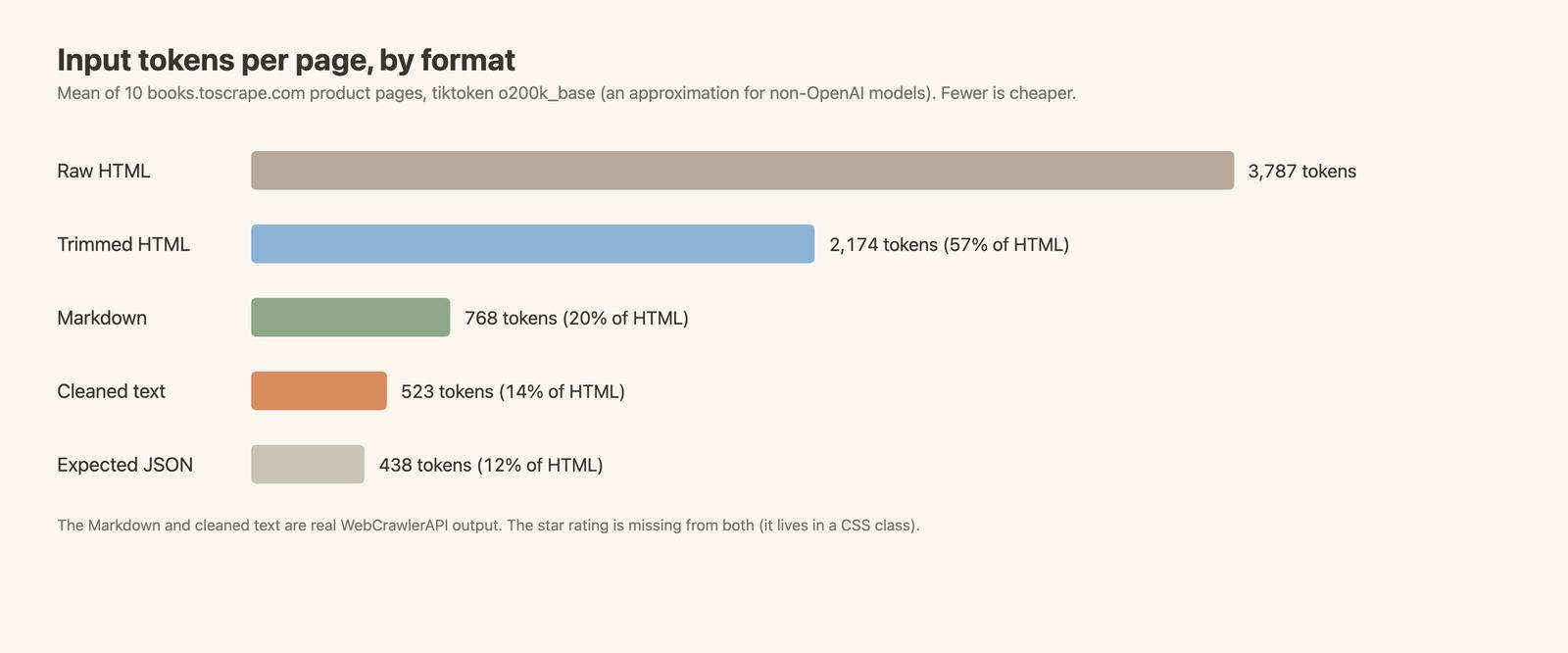
You pay for every token you send. The same book page is about 3,800 tokens as raw HTML and about 770 as Markdown. Format is also a quality question, not only a cost one, as the experiment shows.
CSS Selectors vs LLM Extraction
| CSS selectors | LLM extraction | |
|---|---|---|
| Setup per site | Write and test selectors | Write a prompt and a schema once |
| Cost per page | No tokens, compute only | Tokens in and out |
| Speed (measured here) | 3.3 ms per page, parsing a saved file | 12 to 15 s per call, including the fetch (the prompt call below) |
| Layout change | Breaks | Expected to survive, not tested here |
| Failure mode | Empty or missing field, loud | Valid-looking wrong value, quiet |
| Many different sites | One set of selectors per site | One prompt for all |
| Fields that need reading (category, sentiment) | Not possible | Possible |
For the selector side, see what is XPath, Python HTML parsers and web scraping with Python.
The Experiment: Same 10 Pages, Selectors vs Tokens vs the prompt Call
Setup
- Pages: the first 10 product pages on books.toscrape.com, a practice site built for scraping. I fetched each page once, 1 request per second, with a User-Agent that has a contact address. Everything after that read the saved files.
- Fields (6): title, price in GBP, availability text, star rating (1 to 5), UPC, description. That is 60 values.
- Ground truth: CSS selectors, checked a second way with independent regexes on all 10 pages and read by me. Zero mismatches. So the selector arm scores 60/60 by construction. That is the baseline, not a result.
- Not run: no LLM on raw HTML, no LLM on Markdown, no third-party LLM key. Those rows say "not tested".
The API key came from the WEBCRAWLER_API_KEY environment variable and was never printed. All code is in the post's snippets/ folder.
Token counts and cost
I counted tokens offline with tiktoken o200k_base. That is an OpenAI tokenizer, so for other model families the numbers are an approximation. "Markdown" and "cleaned text" are real WebCrawlerAPI output (output_formats: ["markdown", "cleaned"]). "Trimmed HTML" is my own cleanup: head, scripts, styles, nav and comments removed.
| Format | Mean tokens per page | % of raw HTML | Input cost per 1,000 pages at $0.10 / $2 / $10 per 1M tokens |
|---|---|---|---|
| Raw HTML | 3,787 | 100% | $0.38 / $7.57 / $37.87 |
| Trimmed HTML | 2,174 | 57% | $0.22 / $4.35 / $21.74 |
| Markdown | 768 | 20% | $0.08 / $1.54 / $7.68 |
| Cleaned text | about 520 | 14% | $0.05 / $1.04 / $5.22 |
| Expected JSON (output) | 438 | 12% | not priced |
Those three prices are list input prices I read on October 18, 2026 from the OpenAI and Anthropic pricing pages: $0.10 (the small tier of both), $2 (the mid tier) and $10 (OpenAI's flagship tier). This is input cost only. No LLM was run. Output tokens cost more per token and are not included.
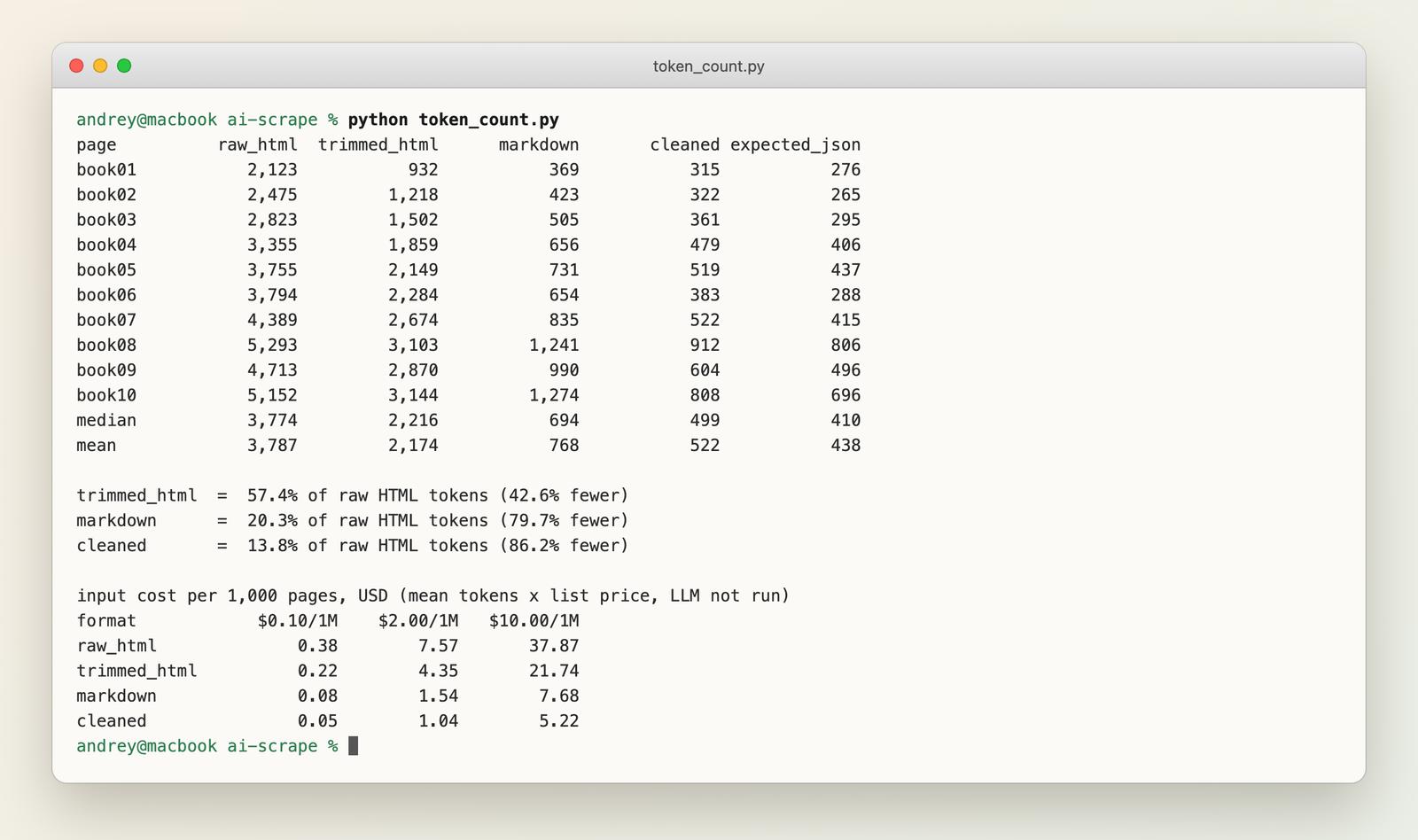
At the mid price, raw HTML is about $7.57 per 1,000 pages and Markdown about $1.54. At a million pages that is $7,570 against $1,540, before output tokens. The input format is the cost lever, more than the model name.
Accuracy of the prompt call
I called WebCrawlerAPI POST /v2/scrape with a prompt and a response_schema (docs) on all 10 pages, twice, with max_age: 0 so run 2 was not served from the 7-day cache. 20 calls in total.
| Arm | Fields correct | Schema-valid | Avg time per call |
|---|---|---|---|
| CSS selectors (ground truth) | 60/60 | 10/10 | 3.3 ms |
| prompt call, run 1 | 50/60 | 10/10 | 15.1 s |
| prompt call, run 2 | 50/60 | 10/10 | 12.3 s |
| LLM on raw HTML | not tested | ||
| LLM on Markdown | not tested |
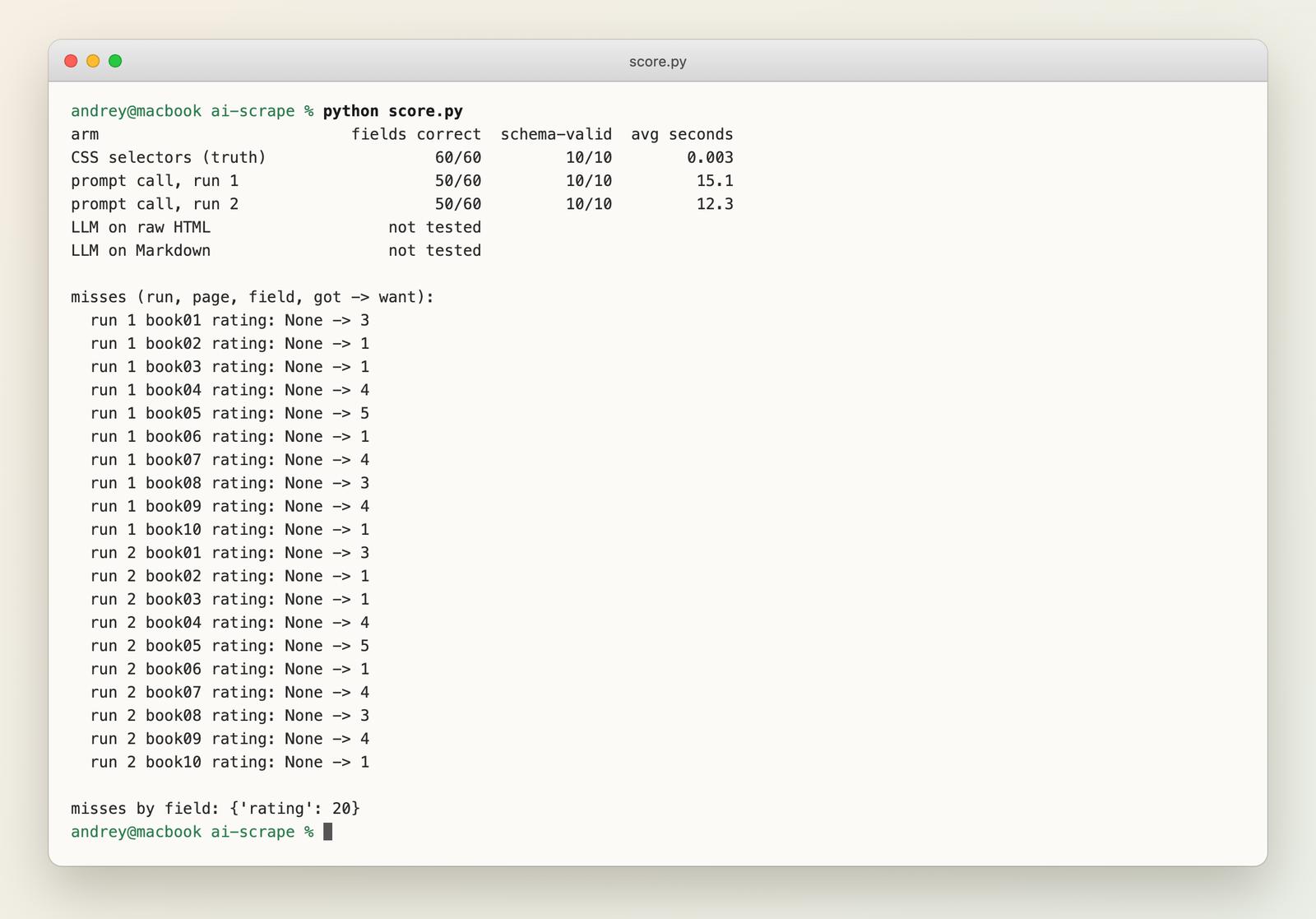
Five of six fields were right on all 20 pages: title, price, availability, UPC and description, copied exactly. The star rating came back null all 20 times. Valid shape, wrong value.
Why? On this site the rating is only a CSS class (star-rating Three), not text. The Markdown and cleaned output I got from the API for these pages has no rating either. I think the model never saw it, but I did not verify what the prompt call sends to the model, so treat that as my guess. Two takeaways:
- The schema allowed null, so nothing failed. That is how silent errors happen. A non-nullable field would have failed loudly, or forced a guess.
- Text-only input can lose information that lives in attributes and classes. Selectors read it fine.
After a redesign
I simulated a redesign by renaming classes and wrapping a block on copies of the 10 saved pages (price_color became p-2xl, product_main became pm-wrap, and so on). Then I ran the same selectors.
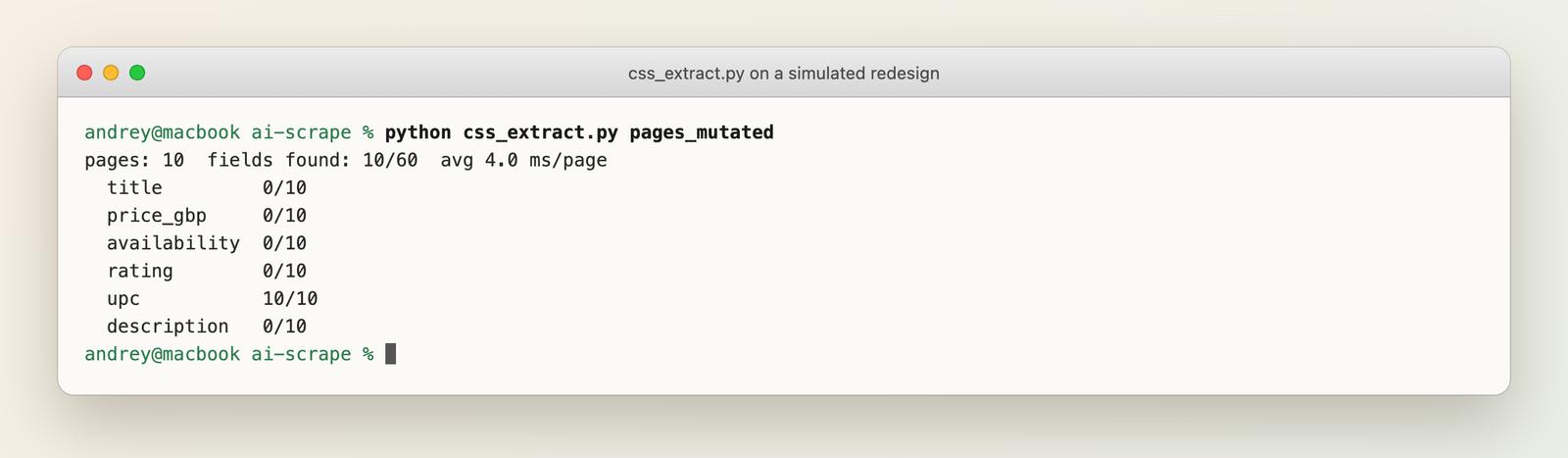
10 of 60 fields were found. Only the UPC survived, because it is found by the label text in a table, not by a class. I wrote this mutation myself and it is harsh. A real redesign may touch less. It still shows the failure mode: five fields went to zero at once.
Whether the prompt call survives a redesign is not tested. I expect it to, because it reads text, not class names. That is an expectation, not a result.
What this does not show
This is 10 pages of one clean practice site, one prompt, and one vendor API whose docs do not name the model. It is not a vendor benchmark. For our separate Markdown quality numbers, see the scrape quality benchmark.
When Selectors Still Win (and When an LLM Does)
Selectors win on one stable site at high volume. At 3.3 ms per page and zero tokens, an LLM only adds cost if you run thousands of pages a day on the same layout.
An LLM wins with many different sites, a long tail of layouts, frequent redesigns, messy text, or fields that need reading (a category, a tone, "is this in stock").
Combine them. Run selectors first. If validation fails (empty field, price not a number), send that page to the LLM. You pay tokens only for the pages that broke.
Doing It With WebCrawlerAPI
One request, the prompt and response_schema fields, and the answer in structured_data. This is the Python version I ran:
import os
import requests

schema = {
    "type": "object",
    "properties": {
        "title": {"type": "string"},
        "price_gbp": {"type": "number"},
        "rating": {"type": ["integer", "null"]},
    },
    "required": ["title", "price_gbp", "rating"],
    "additionalProperties": False,
}

r = requests.post(
    "https://api.webcrawlerapi.com/v2/scrape",
    headers={"Authorization": f"Bearer {os.environ['WEBCRAWLER_API_KEY']}"},
    json={
        "url": "https://books.toscrape.com/catalogue/a-light-in-the-attic_1000/index.html",
        "prompt": "Extract the book details from this product page.",
        "response_schema": schema,
        "max_age": 0,  # skip the 7-day cache
    },
    timeout=120,
).json()

data = r["structured_data"]
assert data["price_gbp"] > 0  # validate anyway
print(data)
A Node 18+ version using fetch is in snippets/webcrawler_prompt.mjs. Its syntax was checked, but I did not run it against the live API: the 20-call budget went to the Python script.
What it cost. My balance went from $1.66 to $1.29 for the 20 prompt calls, which is $0.37, or about $0.018 per call. The balance shows only cents, so treat that as plus or minus a cent or so overall. The docs now say a prompt request is billed per page plus LLM tokens, with no flat per-request fee (structured outputs, pricing). The tokens depend on page size and model, so the cost varies. Check the billing page and run your own 10 URLs before you plan a budget.
Limits I hit or saw in the docs:
- Output is model-dependent. The docs do not say which model runs it.
- The docs say the response follows your schema. I still validated, and you should too: a valid shape can hold a wrong value, as the rating shows.
- The schema must follow the strict OpenAI-style format (all fields in required, additionalProperties: false).
For tasks across many pages, there is the agent. More in the scrape API docs.
Other Ways to Do It
| Approach | Notes | Tested here |
|---|---|---|
| Your own LLM call on saved pages | Most control, you manage prompts and retries | No |
| Crawl4AI | Open source, see web crawler with Crawl4AI | No |
| ScrapeGraphAI, llm-scraper | Open source libraries that wrap an LLM call | No |
| Firecrawl extract | Vendor feature, see Firecrawl alternatives | No |
| WebCrawlerAPI prompt | Documented above | Yes, 20 calls |
For tool lists, see best web scraping tools, best web scraping APIs, ScrapingBee alternatives and open source web crawlers. For article body text specifically, see extract article content from any web page.
Risks: Cost, Hallucinations, Legal
- Wrong but plausible values. Check numbers against the page text, and make required fields non-nullable when the page should always have them.
- Token cost on long pages. Shrink the input first. The table above shows how much that matters.
- Prompt injection. Text on a page is sent to the model, so instructions hidden in a page can reach it. Do not let extracted text trigger actions without a check.
- Legal. AI does not change scraping law. Terms of service, personal data and robots.txt still apply. See web scraping ethics and legality.
FAQ
Does AI do web scraping?
For extraction, yes: an LLM can turn page text into fields. For fetching, rendering and getting past blocks, no. That is still a normal scraper or scraping API. My test showed both sides: 5 of 6 fields right with one prompt, and a quiet failure (the rating came back null).
How much does AI web scraping cost?
Tokens decide it. On my 10 pages: about 3,800 input tokens as raw HTML, about 770 as Markdown. At $2 per 1M input tokens that is $7.57 and $1.54 per 1,000 pages, input only. With WebCrawlerAPI prompt, I paid about $0.018 per call. The docs bill prompt per page plus LLM tokens, see the cost section above.
Is AI scraping illegal?
Scraping public data is generally allowed, but terms of service, personal data and robots.txt still matter. Read web scraping ethics and ask a lawyer about your case.
Can ChatGPT do web scraping?
Not reliably, as a chat window. What works is saving the HTML or Markdown yourself and sending it to a model through an API. This is general knowledge; I did not test ChatGPT.
Which AI model is best for web scraping?
I do not know. I did not test models against each other, and the docs do not name the one behind WebCrawlerAPI prompt. Pick by input price and a test on your own pages.
What is API scraping?
Calling a service that fetches and returns page content for you, instead of running a browser yourself. See the web scraping API page.
Are there free options?
Open source libraries like Crawl4AI and local models cost no per-token fees, but you run and maintain them. See web crawler with Crawl4AI.
Which One Should You Pick?
- One stable site, high volume: CSS selectors.
- Many sites or frequent redesigns: an LLM with a strict schema, plus validation.
- Both: selectors first, LLM fallback when validation fails.
Try the prompt parameter on 10 of your own URLs and read the structured outputs docs. The web scraping API page has a quick start.
