

For most pages, web scraping with JavaScript needs two things: fetch and Cheerio. You download the HTML, pick out the elements you want, and save them. That covers a surprising share of the web.
When the HTML is empty until JavaScript runs, you need a browser like Playwright. When sites start blocking you, or you need thousands of pages, you hand the job to a scraping API.
This guide walks up that ladder with working code. Every snippet ran on Node 24 against two practice sites (books.toscrape.com and quotes.toscrape.com), and the output you see is the real output. I also timed all the options on the same pages, so you get numbers instead of opinions.
Which tool should you use?
Pick the cheapest tool that works. Here is the rule I use:
| Situation | Tool | Why |
|---|---|---|
| Data is in the HTML source | fetch + Cheerio | Fastest, smallest, no browser |
| Data loads from a JSON request you can see in DevTools | Call that endpoint directly | Cleaner data than any HTML |
| Data only appears after JavaScript runs | Playwright | Real browser, real DOM |
| Blocked, many pages, or no infra to babysit | A scraping API | Someone else runs the browsers and proxies |
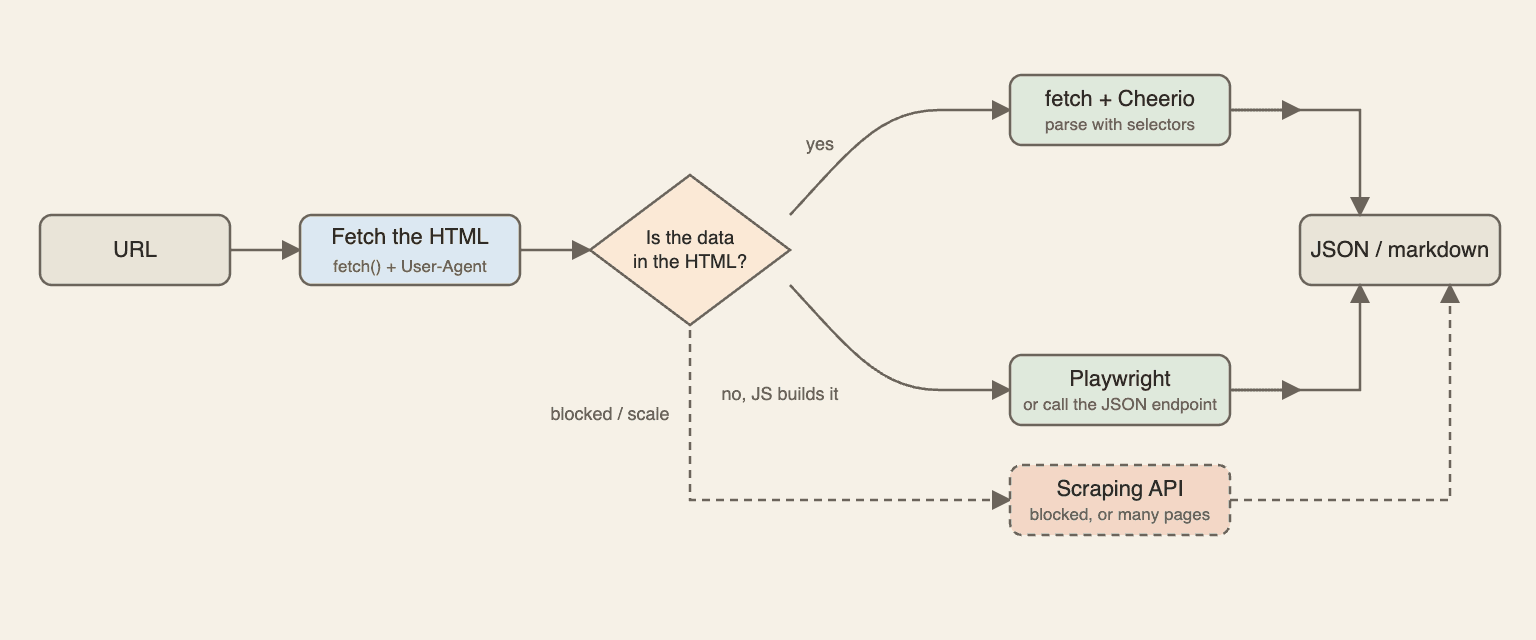
Quick test: open the page, view source (not DevTools, the real source), and search for a piece of text you want. If it is there, you don't need a browser. If it isn't, something runs JavaScript to put it on the page.
What you need before you start
You need Node 20 or newer. I ran everything on Node 24; the code uses native fetch and AbortSignal.timeout, so older versions from 18 should work too, but I didn't test them.
mkdir scraper && cd scraper
npm init -y
npm pkg set type=module
npm i cheerio playwright
npx playwright install chromium
The practice sites exist so people can scrape them. books.toscrape.com is static and paginated (1,000 books over 50 pages). quotes.toscrape.com/js/ draws its quotes with JavaScript, which makes it a good failure to learn from.
On real sites, read the robots.txt and the terms of service first. I wrote more about what is legal and what is not and the court cases scrapers won if you need that background. Short version: be polite, don't touch logins or personal data, and ask if you're unsure.
Is JavaScript a good choice for scraping, or should you use Python? If your team already writes JavaScript, stay in it. The libraries are just as good, and you can share code with your app. I compared them in Python vs Node.js for web crawling, and there is a Python version of this scraper too.
Scrape a static page with fetch and Cheerio
Fetch the HTML
Node 18+ has fetch built in. You don't need Axios or node-fetch.
Three habits save you pain later: send a User-Agent that says who you are, check response.ok, and set a timeout. Without a timeout, one stuck request freezes the whole script.
Pick selectors with DevTools
Open the page, right-click the thing you want, choose Inspect. Look for a class or attribute that describes the data, not the layout. article.product_pod is a good one. div:nth-child(3) > div > div is a bad one, because it breaks the day someone adds a banner.
DevTools can copy a selector for you, but I usually shorten what it gives me. If you're unsure between CSS and XPath, I wrote about CSS selector vs XPath.
Parse with Cheerio and follow pagination
Cheerio gives you a jQuery-style API over the HTML string. It doesn't run a browser, so it's fast.
The script below reads every page of books.toscrape.com, follows the "next" link until there isn't one, converts the price to a number, and saves JSON. The MAX_PAGES cap stops a bug from turning into an infinite loop. More on that in the pagination glossary entry.
import * as cheerio from "cheerio";
import { writeFile } from "node:fs/promises";

const BASE = "https://books.toscrape.com/catalogue/";
const MAX_PAGES = 60; // safety cap, the site has 50
const RATINGS = { One: 1, Two: 2, Three: 3, Four: 4, Five: 5 };

const sleep = (ms) => new Promise((r) => setTimeout(r, ms));

async function fetchHtml(url) {
  const res = await fetch(url, {
    headers: { "User-Agent": "my-scraper/1.0 (contact: you@example.com)" },
    signal: AbortSignal.timeout(15_000), // never wait forever
  });
  if (!res.ok) throw new Error(`HTTP ${res.status} for ${url}`);
  return res.text();
}

function parseBooks(html, pageUrl) {
  const $ = cheerio.load(html);
  const books = $("article.product_pod")
    .map((_, el) => {
      const card = $(el);
      const ratingWord = card.find("p.star-rating").attr("class").split(" ")[1];
      return {
        title: card.find("h3 a").attr("title"),
        price: Number(card.find(".price_color").text().replace(/[^0-9.]/g, "")),
        rating: RATINGS[ratingWord],
        url: new URL(card.find("h3 a").attr("href"), pageUrl).href,
      };
    })
    .get();
  const next = $("li.next a").attr("href");
  return { books, nextUrl: next ? new URL(next, pageUrl).href : null };
}

const all = [];
let url = `${BASE}page-1.html`;
let pages = 0;

while (url && pages < MAX_PAGES) {
  console.log(`Fetching ${url}`);
  const { books, nextUrl } = parseBooks(await fetchHtml(url), url);
  all.push(...books);
  url = nextUrl;
  pages++;
  await sleep(200); // be polite
}

console.log(`Fetched ${pages} pages`);
console.log(`Scraped ${all.length} books`);
await writeFile("books.json", JSON.stringify(all));
console.log("Saved books.json");
Here is the real run:
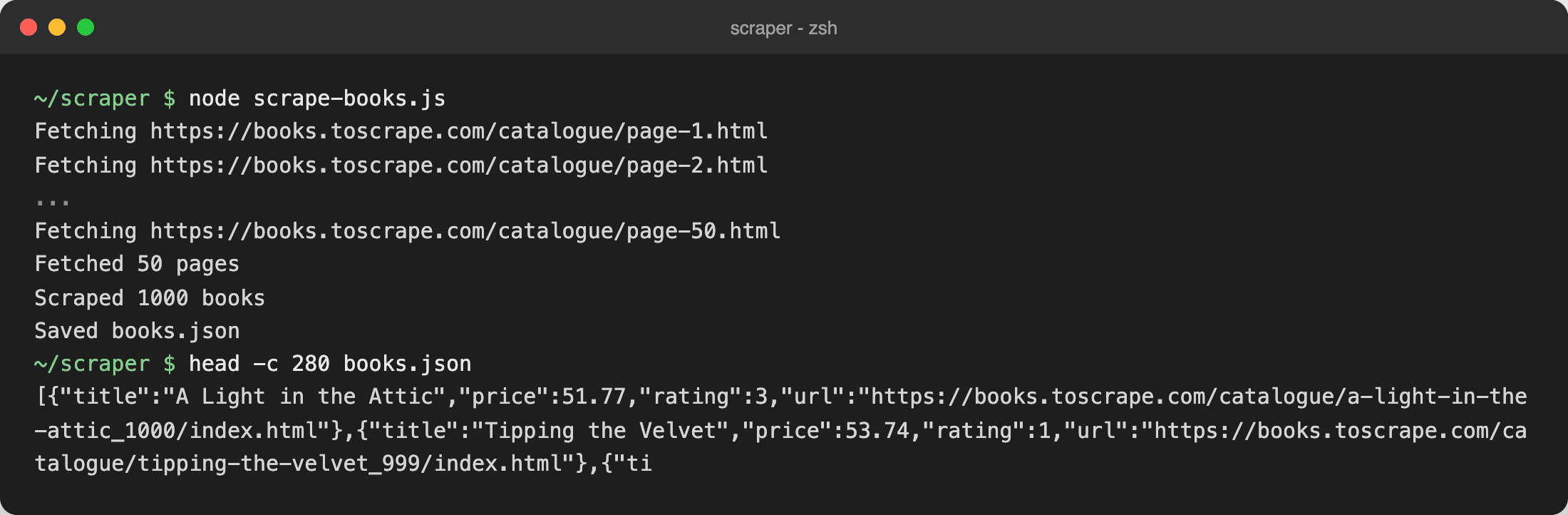
50 pages, 1,000 books, about 21 seconds on my connection, including the 200 ms pause between requests. If you want CSV instead, loop over the array and join the fields with commas. For anything messy, validate before saving (more in cleaning and validating scraped data).
Why fetch and Cheerio returns nothing on some sites
Same approach, different site:
import * as cheerio from "cheerio";

const url = "https://quotes.toscrape.com/js/";
const res = await fetch(url);
const $ = cheerio.load(await res.text());

console.log(`Fetched ${url} (${res.status})`);
console.log(`Quotes found: ${$("div.quote").length}`);
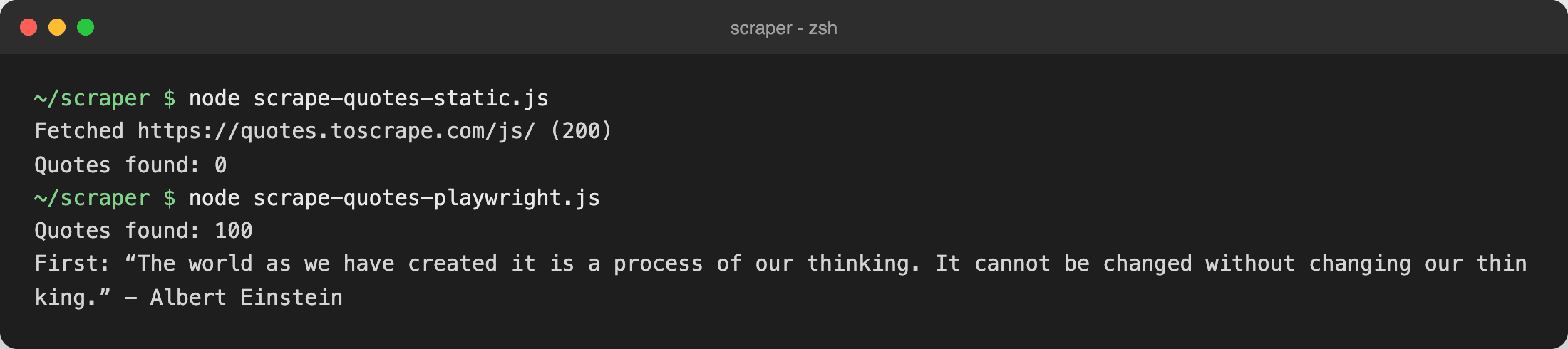
200 OK, zero quotes. The server sent a page without the quotes in it. JavaScript builds them in the browser, and fetch doesn't run JavaScript. This is the most common reason a first scraper "doesn't work". I covered the background in JavaScript rendering in web crawling and the glossary answer on JavaScript-heavy sites.
Before you reach for a browser, check two cheaper options:
- Look at the Network tab. Filter by Fetch/XHR and reload. Many pages load their data from a JSON endpoint. Calling it directly is faster and gives you clean fields. The infinite-scroll version of the quotes site does exactly this:
// quotes.toscrape.com/scroll loads its data from a JSON endpoint.
// Found in DevTools > Network > Fetch/XHR.
const quotes = [];
for (let page = 1; ; page++) {
  const res = await fetch(`https://quotes.toscrape.com/api/quotes?page=${page}`);
  const data = await res.json();
  quotes.push(...data.quotes);
  if (!data.has_next) break;
}
console.log(`Quotes found: ${quotes.length}`);
console.log(`First author: ${quotes[0].author.name}`);
That printed Quotes found: 100 and First author: Albert Einstein.
- Search the page source for a script tag. Some pages ship their data as JSON inside a <script>. The /js/ quotes page does this (it has a var data = [...] line). You can pull it out with a regex and JSON.parse. It's a bit hacky, but it works without a browser.
If neither works, render the page.
Scrape a JavaScript-rendered page with Playwright
Install and launch
npm i playwright and npx playwright install chromium are the two commands, as shown above. If you later see "Executable doesn't exist", the second command was skipped; see this fix.
Wait for the content, not for time
The big rule: wait for a selector that proves the data is there. Don't use waitForTimeout (too short means flaky, too long means slow) and don't rely on networkidle. Both have their own glossary pages: overusing waitForTimeout and networkidle misuse.
This scraper walks all 10 pages of quotes.toscrape.com/js/, skips images, fonts and media, and always closes the browser in finally:
import { chromium } from "playwright";

const browser = await chromium.launch();
const context = await browser.newContext();
const quotes = [];

try {
  const page = await context.newPage();

  // Skip images, fonts and media: we only need text
  await page.route("**/*", (route) =>
    ["image", "font", "media"].includes(route.request().resourceType())
      ? route.abort()
      : route.continue()
  );

  let url = "https://quotes.toscrape.com/js/";
  while (url) {
    await page.goto(url);
    // Wait for the thing we need, not for a fixed time
    await page.waitForSelector("div.quote");

    quotes.push(
      ...(await page.$$eval("div.quote", (nodes) =>
        nodes.map((n) => ({
          text: n.querySelector(".text").textContent,
          author: n.querySelector(".author").textContent,
        }))
      ))
    );

    const next = await page.$("li.next a");
    url = next ? new URL(await next.getAttribute("href"), page.url()).href : null;
  }
} finally {
  await context.close(); // always release the browser
  await browser.close();
}

console.log(`Quotes found: ${quotes.length}`);
console.log(`First: ${quotes[0].text} - ${quotes[0].author}`);
The output (the bottom half of the screenshot above):
Quotes found: 100
First: "The world as we have created it is a process of our thinking. It cannot be changed without changing our thinking." - Albert Einstein
Block images and fonts
The page.route call aborts requests for images, fonts and media. On a heavy site this can cut load time a lot. On the practice site the gain is small, as you'll see in the benchmark below. Test it on your target, don't assume.
Puppeteer, Playwright, or Selenium?
Short version:
- Playwright is what I'd start with in 2026. Auto-waiting, good locators, Chromium, Firefox and WebKit.
- Puppeteer is fine if you only need Chrome and already have code in it.
- Selenium makes sense for legacy test suites. I wouldn't pick it for a new scraper.
- Older tools like Nightmare are dead. Skip them.
Errors, timeouts and retries
Scrapers fail in boring ways: timeouts, 429s, 5xx errors, and selectors that suddenly match nothing. The fix is a small retry helper that only retries what can succeed later. A 404 won't get better on attempt three, so don't hammer the site.
// Retry only things that can succeed later: network errors, 429, 5xx, timeouts.
export async function withRetry(fn, { retries = 3, baseMs = 500 } = {}) {
  for (let attempt = 0; ; attempt++) {
    try {
      return await fn();
    } catch (err) {
      const retryable = err.retryable ?? true; // network errors, timeouts
      if (!retryable || attempt >= retries) throw err;
      const wait = baseMs * 2 ** attempt + Math.random() * 100; // 0.5s, 1s, 2s...
      console.log(`Attempt ${attempt + 1} failed (${err.message}), retrying in ${Math.round(wait)}ms`);
      await new Promise((r) => setTimeout(r, wait));
    }
  }
}

export async function fetchText(url) {
  const res = await fetch(url, { signal: AbortSignal.timeout(10_000) });
  if (!res.ok) {
    const err = new Error(`HTTP ${res.status}`);
    // 4xx (except 408/429) will not fix itself, do not hammer the site
    err.retryable = res.status >= 500 || res.status === 429 || res.status === 408;
    throw err;
  }
  return res.text();
}
I pointed it at three test URLs on crawllab.dev that return a fixed status: 200, 503 and 403:
Trying https://crawllab.dev/200
OK
Trying https://crawllab.dev/503
Attempt 1 failed (HTTP 503), retrying in 520ms
Attempt 2 failed (HTTP 503), retrying in 1056ms
Gave up: HTTP 503
Trying https://crawllab.dev/403
Gave up: HTTP 403
The 200 went through. The 503 got retried with growing waits. The 403 was dropped right away, because hitting a block again will not fix it.
Here is what the common failures usually mean:
| What you see | Likely cause | Where to look |
|---|---|---|
| TimeoutError waiting for a selector | Selector is wrong, or the page never rendered it | Action timeout |
| net::ERR_ABORTED on page.goto | Navigation was interrupted, often by a redirect or download | ERR_ABORTED |
| "Target closed" | Browser crashed or was closed too early | Target closed |
| "Execution context was destroyed" | Page navigated while you were reading it | Context destroyed |
| HTTP 429 | You're going too fast | 429 errors |
One more thing: validate what you extract. If a selector breaks silently, you get 1,000 records with an empty title and no error. A simple check (title is not empty, price is a number) catches it on the first run.
Concurrency and rate limits
Looping one page at a time is slow. Running Promise.all over 500 URLs is rude and will get you blocked. The middle is a small worker pool:
async function mapLimit(items, limit, fn) {
  const results = [];
  let next = 0;
  const workers = Array.from({ length: limit }, async () => {
    while (next < items.length) {
      const i = next++;
      results[i] = await fn(items[i]);
    }
  });
  await Promise.all(workers);
  return results;
}
Use 3 to 5 workers per site to start, and add a small delay. The p-limit package does the same thing if you prefer a library. I ran it on 10 book pages with 3 workers: all 10 returned 200, never more than 3 requests were in flight, and it took 1.0 s.
Identify yourself in the User-Agent, respect robots.txt, and slow down when the site slows down. More in ethical scraping practices.
Fetch vs Playwright: a quick benchmark
I ran the same job four ways: 5 pages of books.toscrape.com (100 books), counting the books found. Each method ran 3 times in a fresh process, and I took the median. Memory is the peak RSS of the process and its children, sampled with ps every 50 ms. Machine: MacBook with an M2 Max, Node 24.15, 2026-10-15, home internet.
| Method | Time (5 pages) | Peak memory | Books found |
|---|---|---|---|
| fetch + Cheerio | 1.1 s | 125 MB | 100 of 100 |
| Playwright (default) | 2.4 s | 500 MB | 100 of 100 |
| Playwright (images, fonts, CSS blocked) | 2.4 s | 468 MB | 100 of 100 |
| WebCrawlerAPI /v2/scrape | 2.1 s | 125 MB | 100 of 100 |
What I take from it:
- fetch + Cheerio is the fastest and lightest, as expected.
- Playwright costs about 4x the memory. That matters when you run 20 browsers in parallel.
- Blocking assets barely helped on this tiny site. Don't expect miracles on pages that are already light.
- The API call is a network round trip, so it's not faster than fetch for one page. The 125 MB is just my Node client. The browser, if any, runs on the other side. In an earlier warm-up batch one API call took 13.5 s, so expect some variance.
One sample, one site, one machine. Treat it as a feel for the ratios, not a spec sheet. The scripts are benchmark.js and bench-worker.js in the snippets folder if you want to rerun them.
What breaks at scale
A scraper that works on 100 pages tends to fall apart on 100,000. Here is what I've seen go wrong:
- IP blocks and CAPTCHAs. Datacenter IPs get flagged fast. Proxies fix some of it and add their own cost.
- Browser memory and crashes. Chromium leaks, tabs hang, containers get killed.
- Selector drift. The site changes a class name and your data goes empty.
- Plumbing. Queues, retries, storage, monitoring. None of it is the scraping you set out to do.
No tool gets past everything. Some sites will block anything automated, and DIY scrapers hit that wall earlier. There is a longer list in how to avoid getting blocked when scraping, and I broke down the trade-off in build a crawler or use a crawling API and how to build a web crawler.
If you're feeding an AI knowledge base, you also have to turn pages into clean text. That's another thing the API does for you, below.
The WebCrawlerAPI way: one request instead of a browser
WebCrawlerAPI is what I built to avoid running this stack myself. You send one POST request with a URL and get the page back as markdown, HTML, or links. No browser to install.
Get an API key as described in the docs, then:
const res = await fetch("https://api.webcrawlerapi.com/v2/scrape", {
  method: "POST",
  headers: {
    Authorization: `Bearer ${process.env.WEBCRAWLER_API_KEY}`,
    "Content-Type": "application/json",
  },
  body: JSON.stringify({
    url: "https://books.toscrape.com/catalogue/page-1.html",
    output_formats: ["markdown"],
  }),
});

const data = await res.json();

// A failed scrape still returns HTTP 200, so check `success`
if (!data.success) {
  throw new Error(`${data.error_code}: ${data.error_message}`);
}

console.log("success:", data.success);
console.log("status:", data.status);
console.log("page_status_code:", data.page_status_code);
console.log("markdown (first 200 chars):");
console.log(data.markdown.slice(0, 200));
The real output:
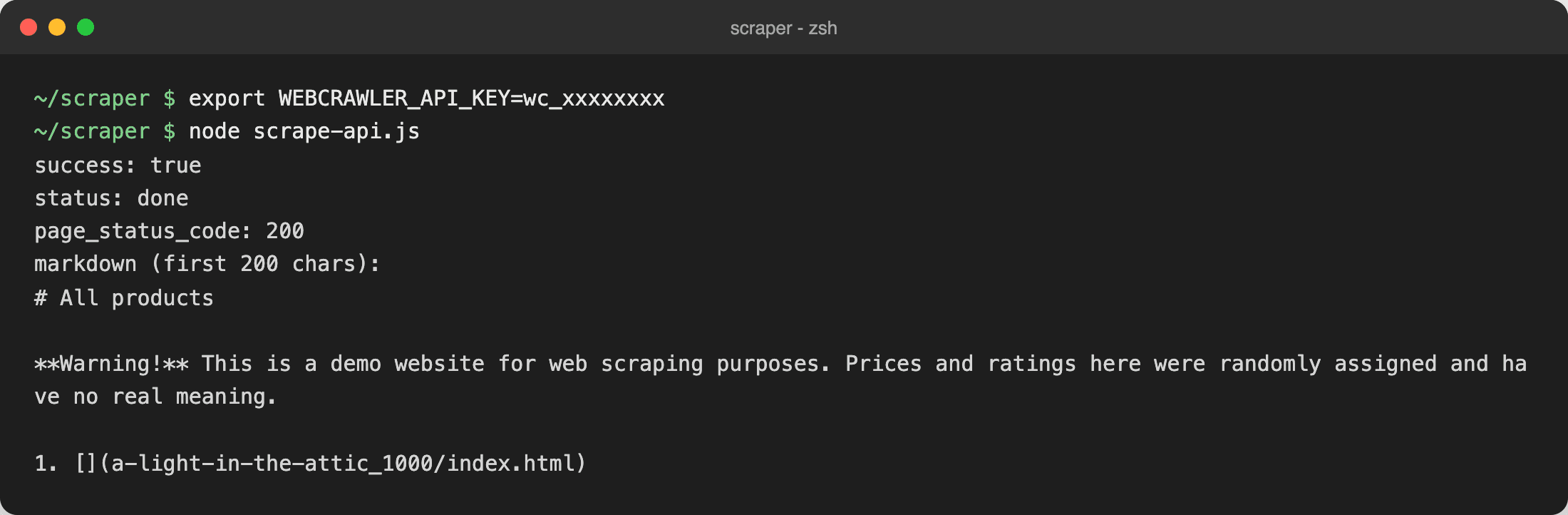
Two details from the scrape docs. A failed scrape still returns HTTP 200 with success: false and an error_code, so check success like the script does. You can also ask for output_formats like ["markdown", "links"] or set main_content_only: true to drop menus and footers.
One caveat from my own testing. I ran the same call on quotes.toscrape.com/js/ and the markdown came back with just the site header and no quotes. That page draws its quotes after load, and the default scrape didn't wait for it. So I wouldn't say "an API renders everything". Test your target page first, and if the content is missing from the markdown, try the other output formats or ask support about the page.
Get fields instead of text
If you want fields, pass a prompt and a response_schema. The API returns structured_data that follows your schema (structured outputs docs). This one worked on the same JS quotes page, because the quote data is in the page source:
const res = await fetch("https://api.webcrawlerapi.com/v2/scrape", {
  method: "POST",
  headers: {
    Authorization: `Bearer ${process.env.WEBCRAWLER_API_KEY}`,
    "Content-Type": "application/json",
  },
  body: JSON.stringify({
    url: "https://quotes.toscrape.com/js/",
    prompt: "Extract every quote on the page with its author and tags",
    response_schema: {
      type: "object",
      properties: {
        quotes: {
          type: "array",
          items: {
            type: "object",
            properties: {
              text: { type: "string" },
              author: { type: "string" },
              tags: { type: "array", items: { type: "string" } },
            },
            required: ["text", "author", "tags"],
            additionalProperties: false,
          },
        },
      },
      required: ["quotes"],
      additionalProperties: false,
    },
  }),
});

const data = await res.json();
if (!data.success) throw new Error(`${data.error_code}: ${data.error_message}`);

console.log(`Got ${data.structured_data.quotes.length} quotes`);
console.log(JSON.stringify(data.structured_data.quotes[0], null, 2));
It returned 10 quotes, and the first one looked like this:
{
  "author": "Albert Einstein",
  "tags": ["change", "deep-thoughts", "thinking", "world"],
  "text": "The world as we have created it is a process of our thinking. It cannot be changed without changing our thinking."
}
(The real response includes curly quotes around the text; I trimmed them here.) Requests with a prompt are charged per token on top of the page cost. Check the pricing page for the current numbers before you plan a big run.
Crawl a whole site
When one page becomes hundreds, use a crawl job. The JavaScript SDK (npm i webcrawlerapi-js) does it in a few lines; see the SDK docs:
import webcrawlerapi from "webcrawlerapi-js";

const client = new webcrawlerapi.WebcrawlerClient(process.env.WEBCRAWLER_API_KEY);

// Waits for the whole crawl to finish
const result = await client.crawl({
  url: "https://books.toscrape.com/",
  output_formats: ["markdown"],
  items_limit: 5,
});

console.log(`Status: ${result.status}, pages: ${result.job_items.length}`);
for (const item of result.job_items) {
  console.log(item.original_url);
}
I ran it with items_limit: 5 against books.toscrape.com and got Status: done, pages: 5. If you want the details for JavaScript users, there is a JavaScript web scraper page too.
Common mistakes
- Scraping a JavaScript page with fetch and wondering why the list is empty.
- Using waitForTimeout(5000) instead of waiting for a selector.
- No timeout on fetch, so one hung request stops everything.
- Brittle selectors like div > div:nth-child(4).
- Running unbounded Promise.all over hundreds of URLs.
- Ignoring robots.txt and the terms of service.
- Saving only raw HTML and never checking the extracted fields.
Which approach should you pick?
- Data is in the page source: fetch + Cheerio.
- Data comes from a JSON request: call the endpoint.
- Data needs JavaScript to appear: Playwright, waiting for a selector.
- Blocked, or too many pages to babysit: an API.
Start at the top and move down only when something breaks. If you'd rather skip the browser part, try WebCrawlerAPI and send your first request from the snippet above.
FAQ
Can you use JavaScript for web scraping?
Yes. Node.js has native fetch, and libraries like Cheerio and Playwright cover static and JavaScript-heavy pages. It's a solid choice if your team already writes JavaScript.
What is the best JavaScript library for web scraping?
For static pages, Cheerio with fetch. For pages that need JavaScript, Playwright. There is no single best one, it depends on whether the data is in the HTML.
Cheerio vs Puppeteer vs Playwright: what is the difference?
Cheerio parses HTML and doesn't run JavaScript. Puppeteer and Playwright control a real browser, so they run JavaScript. Playwright supports more browsers and has better auto-waiting.
How do I scrape a JavaScript-rendered website with Node.js?
First check the Network tab for a JSON endpoint and call it directly. If there isn't one, use Playwright and wait for a selector with waitForSelector.
Can I scrape a website without a browser in Node.js?
Yes, when the data is in the HTML or a JSON endpoint. Use fetch plus Cheerio. A scraping API also removes the browser from your side.
Is web scraping legal?
Scraping public pages is often fine, but it depends on the site's terms, the data and your country. This isn't legal advice. Read Is web scraping legal? and web scraping ethics.
How do I avoid getting blocked when scraping with Node.js?
Send a real User-Agent, slow down, limit concurrency, and retry with backoff. If you still get blocked, you probably need proxies or an API. See avoid getting blocked.
What is the difference between web scraping and web crawling?
Scraping pulls data out of pages. Crawling finds and visits the pages. I explain it in crawling vs scraping.
