Meilisearch and Typesense: Add Hybrid Search to Your Docs From a Crawl
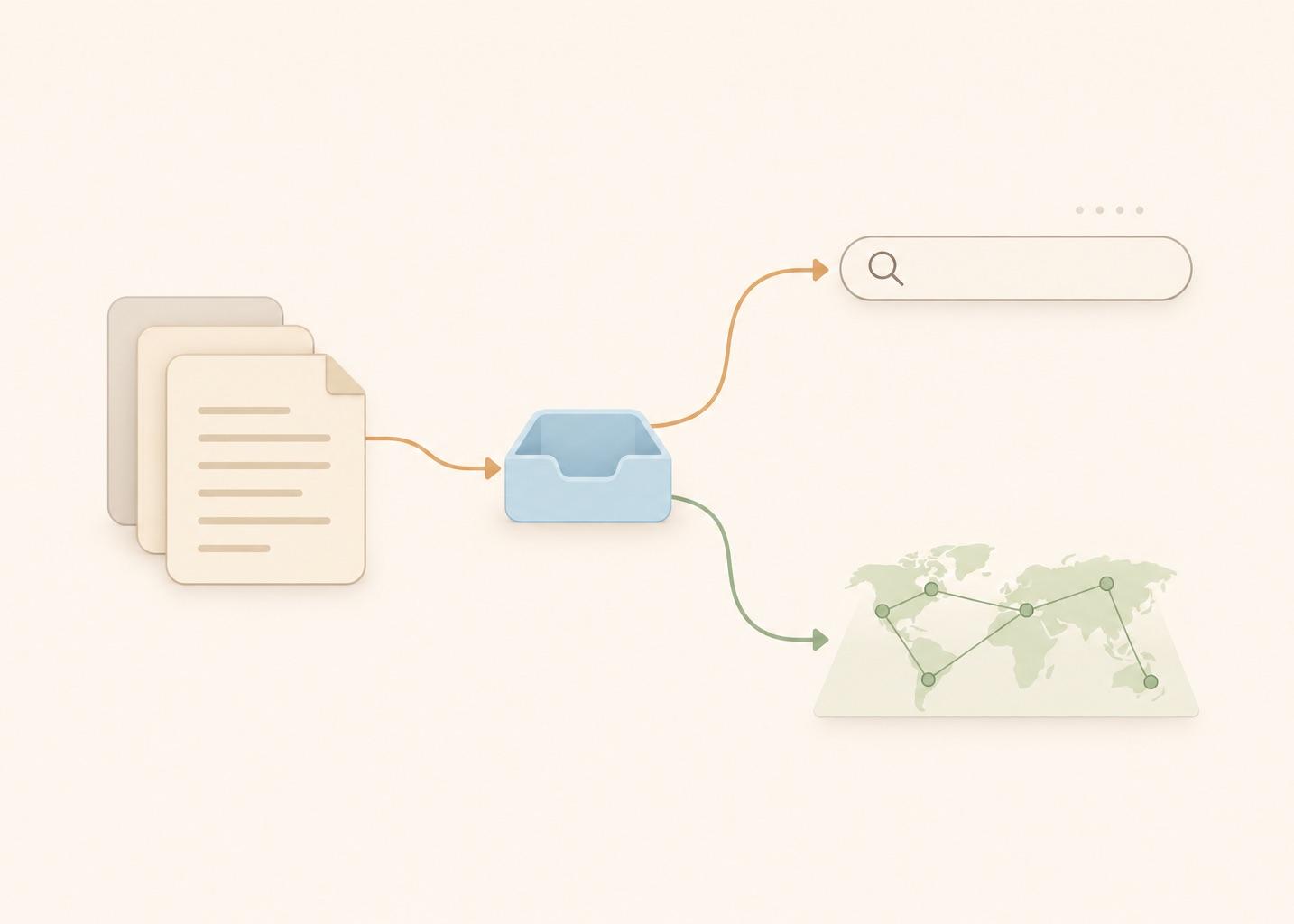
One crawl of your docs can feed two jobs: the typo-tolerant search box your readers use, and the hybrid retrieval behind your support bot. This post builds both on the same 304 chunks with Meilisearch and Typesense in Docker, so the documentation search is yours and runs on your own servers. I ran every command on November 10, 2026 (Meilisearch v1.56.2, Typesense 30.2). The tests covered keyword, vector and hybrid search, typos, filters, scoped keys, an instant-search page and a re-crawl update.
This is the search-engine option for the store step of the website to markdown knowledge base guide. Other stores are in the vector database comparison. 304 chunks and 6 questions make this a smoke test, not a benchmark. All code and outputs are in the code folder.
What I found:
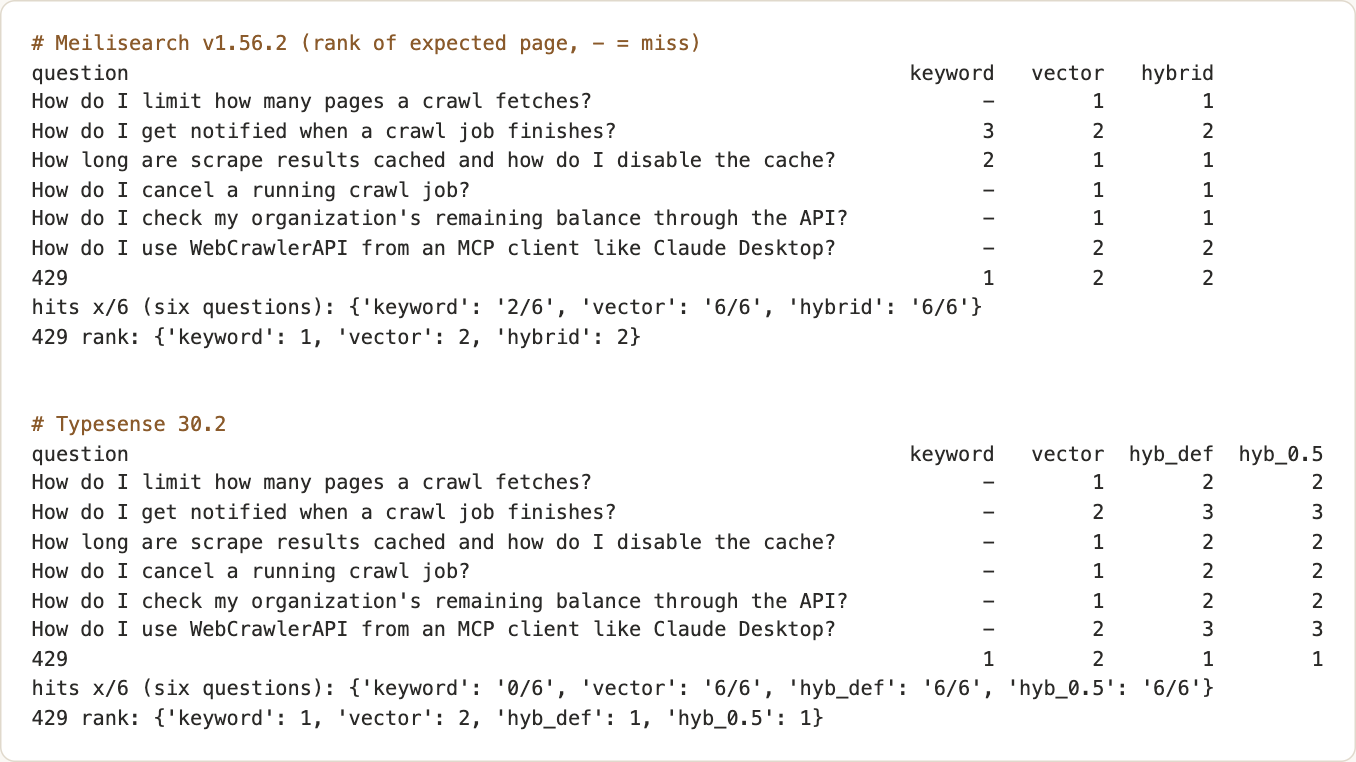
- Vector-only search found the expected page for 6 of 6 questions on both engines. Hybrid did not beat it. It helped only on the exact token 429, and only on Typesense. Meilisearch hybrid at 0.5 was vector-only in effect (limit 50 on 304 chunks).
- Keyword search on long natural questions was weak at default settings: 2 of 6 on Meilisearch and 0 of 6 on Typesense. That is a defaults effect: Typesense reached 3 of 6 with one setting changed. Typo tolerance worked on both.
- Both pinned InstantSearch adapters worked with the search-only keys.
- The crawl step is one API call. A fresh crawl of the same docs on November 10 returned 54 pages, all with status 200, in 19 seconds ("Crawl your docs site").
Quickstart, with the section of this post for each step:
- Crawl the docs with POST /v1/crawl and download the Markdown ("Crawl your docs site").
- Split it into chunks, add a vector to each and save chunks.jsonl.
- Start one engine with Docker, pinned and bound to 127.0.0.1 ("Meilisearch and Typesense in Docker").
- Create the index or collection and import the chunks.
- Create a search-only key and put it in the instant-search page ("Search-only API keys", "An instant-search page").
- For a bot, call the hybrid endpoint from your server ("Hybrid search").
Algolia alternative for documentation search
If you look for an Algolia alternative, the trade is plain. WebCrawlerAPI is the crawler and you run the index, so you take on the operations and keep the data and the ranking settings. I did not run Algolia, so I make no claim against it. One index serves the search box and a support bot if every chunk carries text fields and a vector. The Elasticsearch route, DocSearch included, is in the Elasticsearch and OpenSearch post.
Crawl your docs site
The chunks came from a crawl of the WebCrawlerAPI docs. For your site, send POST https://api.webcrawlerapi.com/v1/crawl with url, items_limit and output_formats, then poll GET /v1/job/<id> and download each job_items[].markdown_content_url (crawl docs, job docs). Use the crawl API with a key from the dashboard (YOUR_API_KEY).
curl --request POST \
  --url https://api.webcrawlerapi.com/v1/crawl \
  --header 'Authorization: Bearer YOUR_API_KEY' \
  --header 'Content-Type: application/json' \
  --data '{"url": "https://yoursite.com/docs", "items_limit": 50, "output_formats": ["markdown"]}'
To check that the crawl step still works, I ran it again on November 10, 2026 with the script crawl_docs.py (items_limit 60, main_content_only on, whitelist_regexp set to ^https://webcrawlerapi\.com/docs). The first run finished with 54 items, all done with page status 200, 19.2 seconds after the job was created. The same script a minute later took 2.6 seconds, probably from cached results (not verified), so the 19 seconds is the number to plan with (crawl_docs.out). The 304 chunks below come from the earlier crawl of 52 pages, since the docs had grown by two pages. I did not re-chunk the new crawl, so the counts in this post still refer to the 304 chunks. For a quick look without writing code, the webcr command line tool does the same crawl and saves one Markdown file per page:
webcr https://yoursite.com/docs -l 60 -w '/docs' -m -o ./pages
build_chunks.py in the code folder splits the markdown by headers and embeds with nomic-embed-text. The method is in build a knowledge base from a website in Python, crawl a website to Markdown files, chunk markdown by headers and the embedding model comparison. The file is chunks.jsonl: 304 chunks from 52 pages, 768-dimension vectors, 19 sections (the second URL segment).
Meilisearch and Typesense in Docker: keyword search first
I ran the engines one after the other with a 2 GB memory limit, ports bound to 127.0.0.1, and a random key generated for each run. Key values never appear in the files, only YOUR_MASTER_KEY and YOUR_API_KEY. Neither container was OOM-killed.
For Meilisearch with Docker, I pinned getmeili/meilisearch:v1.56.2:
services:
  meili:
    image: getmeili/meilisearch:v1.56.2
    environment:
      MEILI_MASTER_KEY: ${MEILI_MASTER_KEY}   # YOUR_MASTER_KEY
      MEILI_ENV: development                  # the search preview is served at /
      MEILI_NO_ANALYTICS: "true"
    mem_limit: 2g
    ports: ["127.0.0.1:7700:7700"]
Settings and documents go in as tasks. The index uses heading and text as searchable fields and section and url as filterable fields:
meili("PATCH", "/indexes/docs/settings", {
    "searchableAttributes": ["heading", "text"],
    "filterableAttributes": ["section", "url"],
    "embedders": {"nomic": {"source": "userProvided", "dimensions": 768}},
})
meili("POST", "/indexes/docs/documents", docs)   # each doc has _vectors: {"nomic": [...]}
The document task succeeded in 0.19 seconds (task duration) with numberOfDocuments 304. The vectors ride in the reserved _vectors field, keyed by embedder name.
For Typesense with Docker I used typesense/typesense:30.2, started with --api-key YOUR_API_KEY --enable-cors. The collection has a float[] field with num_dim 768:
ts("POST", "/collections", {"name": "docs", "fields": [
    {"name": "url", "type": "string", "facet": True},
    {"name": "section", "type": "string", "facet": True},
    {"name": "heading", "type": "string"}, {"name": "text", "type": "string"},
    {"name": "embedding", "type": "float[]", "num_dim": 768}]})
The import endpoint answers with one JSON object per line, not one JSON document. All 304 lines said success, and the import took 0.29 seconds.
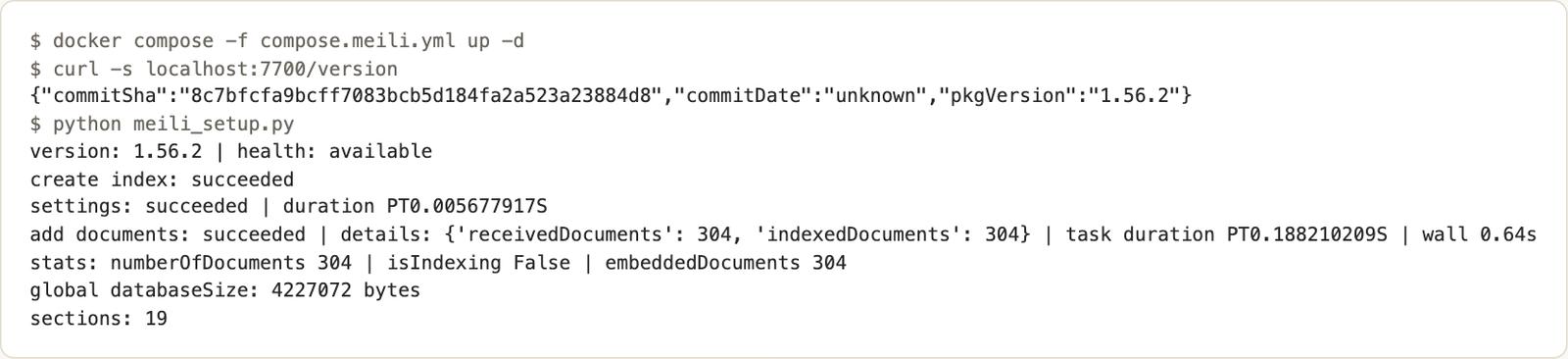
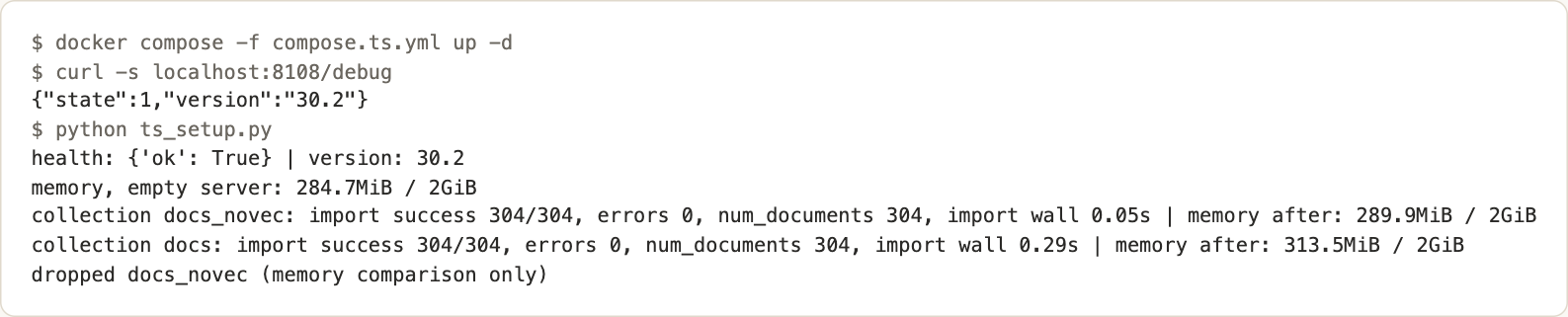
Memory differed. Meilisearch stayed between 140 and 162 MiB in docker stats after startup. Typesense kept the index in memory: about 285 MiB idle, about 5 MiB more for the 304 chunks without vectors, and about 24 MiB more with the 768-dimension vectors (313 MiB). Those figures include page cache, and they cover 304 chunks only.
I left keyword mode at defaults. Meilisearch: matchingStrategy last, typo tolerance on, prefix search on. Typesense: num_typos 2, prefix true, drop_tokens_threshold 1, query_by heading,text. Both fetch 50 chunks, collapse them to pages and count a hit if the expected page is in the top 5. Long natural questions are a hard case for keyword engines, so this measures defaults, not what either engine can do when tuned.
Afterwards I ran a diagnostic on the same pinned images (meili_keyword_diag.py, ts_keyword_diag.py). The keyword counts matched the main run. Typesense found one chunk per question at drop_tokens_threshold 1. With 50 it found 27 to 123 chunks and 3 of 6 hits. For "cancel crawl job" the single chunk came from a batch-scrape guide. My reading is that one chunk containing every word stops token dropping, so the right page never entered the results. I did not trace the ranking.
Meilisearch returned 27 chunks for every question, and the query How do I alone also returns 27. My reading is that the opening words match and last drops the content words first. Stricter strategies did not help: matchingStrategy all returned 0 chunks, and frequency found 0 of 6. So 2 of 6 against 0 of 6 is a defaults effect, not a verdict on either engine. I kept the table at defaults, since changing settings until keyword wins would be tuning.
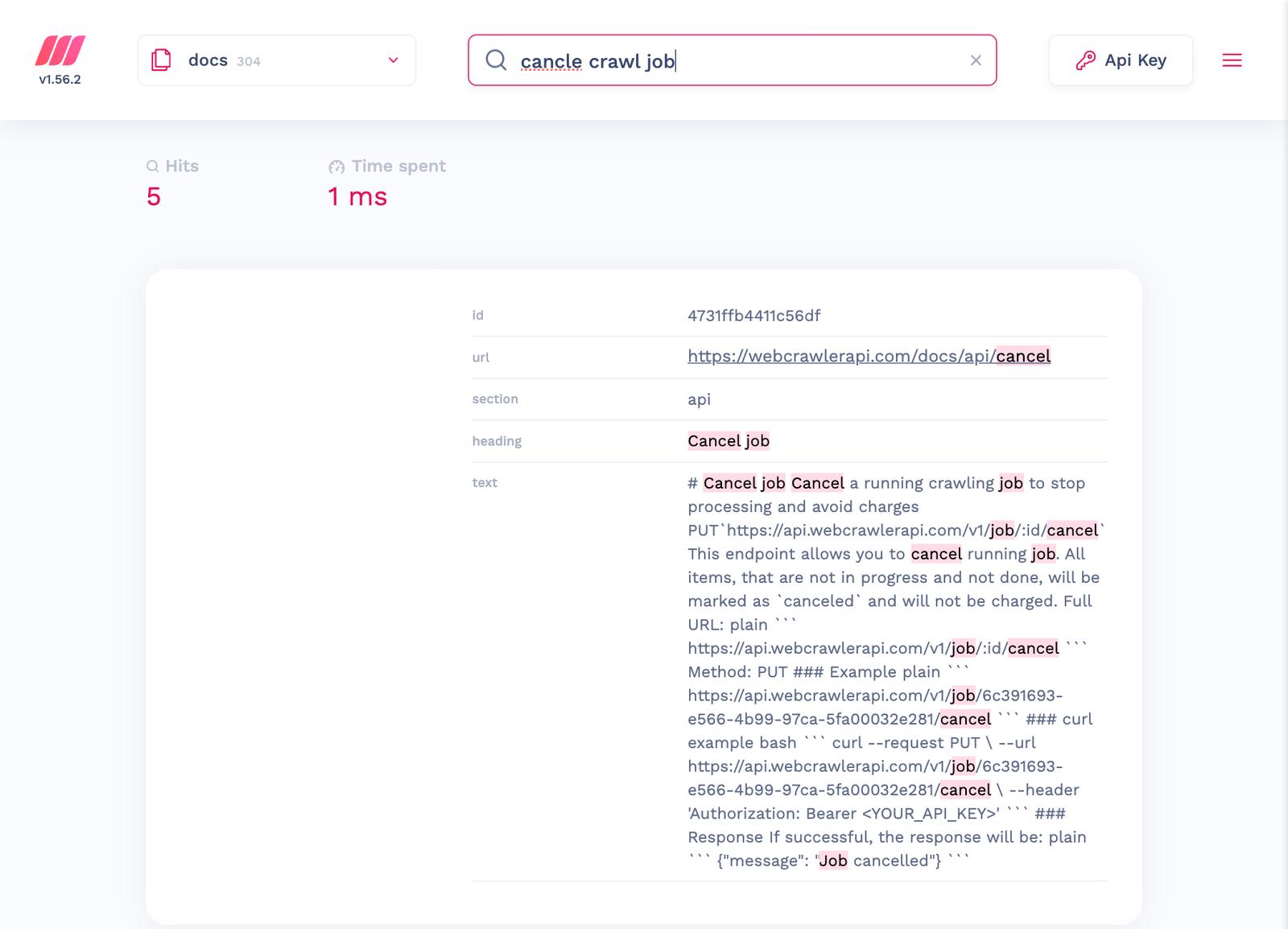
The Meilisearch mini dashboard (development mode, localhost:7700) is a quick way to check relevance. For the screenshot I used a scratch key with a few more actions than search. It never went into the repo.
Hybrid search: your vectors, then a built-in embedder
Meilisearch calls it hybrid. You pass embedder and semanticRatio, and for a userProvided embedder you also pass the query vector:
body = {"q": question, "limit": 50,
        "hybrid": {"embedder": "nomic", "semanticRatio": 0.5},
        "vector": query_vector}
meili("POST", "/indexes/docs/search", body)
Typesense takes vector_query in a multi_search POST (a 768-float vector is too long for a GET URL), with alpha inside it:
s = {"collection": "docs", "q": question, "query_by": "heading,text",
     "vector_query": f"embedding:({json.dumps(vector)}, k:50, alpha:0.5)", "per_page": 50}
ts("POST", "/multi_search", {"searches": [s]})
Per the docs (read November 10, 2026), semanticRatio 0 is keyword only and 1 is vector only, with 0.5 as the default. In Typesense alpha is the weight of vector rank, default 0.3, and the fused score is 0.7 * K + 0.3 * S with K the keyword rank and S the semantic rank. The merge methods differ, so the same number on both engines is not the same setting. I used each engine's own default plus 0.5. The sweeps are in meili_query.py and ts_query.py (outputs meili_query.out, ts_query.out).
Two behaviors surprised me. On Meilisearch, semanticHitCount was 50 of 50 for every query at 0.5, so the semantic side filled the whole result list and 0.5 gave the same ranks as vector-only. That comes from limit 50 on 304 chunks (16% of the index), and I did not test a smaller limit. Read the Meilisearch hybrid row below as vector-only. On Typesense, alpha 0.0 was not keyword-only: the vector side still filled in pages that keyword search missed. Alpha 0.0 to 0.5 gave identical ranks, and 0.75 gave the vector ranks.
For the weighting idea itself, see the Weaviate hybrid search post.
The built-in embedders are a separate test, because the vectors differ and the numbers do not belong in the comparable table. Meilisearch ollama source needs a URL and a model. From Docker, host Ollama is host.docker.internal:11434, and I did not change Ollama's bind address.
meili("PATCH", "/indexes/docs_ollama/settings", {"embedders": {"ollama": {
    "source": "ollama", "url": "http://host.docker.internal:11434/api/embed",
    "model": "nomic-embed-text",
    "documentTemplate": "search_document: {{doc.heading}}\n{{doc.text}}"}}})
That did not work at first. Meilisearch blocks internal IPs for embedder URLs, so the task logged bad uri: Rejected URI and retried with growing waits instead of failing. I allowed the Docker Desktop host address with an experimental option (MEILI_EXPERIMENTAL_ALLOWED_IP_NETWORKS: "192.168.65.254/32" in the compose file). After that, 304 chunks embedded in 3.4 seconds. Queries embedded by Meilisearch carry no search_query: prefix, so I read the result as "works", not as "equals my file". It found 6 of 6 in vector and hybrid modes, with 429 ranked third.
Typesense embeds on its own. The field gets an embed block with from and a ts/ model, here ts/all-MiniLM-L12-v2 (384 dimensions), in its own collection. First use downloaded the model from the internet: 7.6 seconds to create the collection, then 56.8 seconds to embed 304 chunks. Memory rose to about 866 MiB. Results: 5 of 6 in vector and hybrid modes (it missed the crawl-limit question) and 429 first in hybrid.
Hits table: keyword vs vector vs hybrid
The six questions come from the WebCrawlerAPI docs, for example "How do I cancel a running crawl job?" (expected page /docs/api/cancel) and "How do I use WebCrawlerAPI from an MCP client like Claude Desktop?" (expected /docs/sdk/mcp). The expected page must appear in the top 5 pages after collapsing 50 fetched chunks. The table shows hits out of 6 questions, and the rank of the exact-term query 429 separately (expected page /docs/api/markdown-clean).
| Engine and mode | Hits x/6 | 429 rank |
|---|---|---|
| Meilisearch keyword | 2/6 | 1 |
| Meilisearch vector (semanticRatio 1.0) | 6/6 | 2 |
| Meilisearch hybrid (0.5, the default; vector-only in effect) | 6/6 | 2 |
| Typesense keyword | 0/6 | 1 |
| Typesense vector | 6/6 | 2 |
| Typesense hybrid (alpha default 0.3) | 6/6 | 1 |
| Typesense hybrid (alpha 0.5) | 6/6 | 1 |
Vector ranks on the six questions were 1, 2, 1, 1, 1, 2 on both engines, the same as in the series. Hybrid at the Typesense default put the expected page one place lower on every question (2, 3, 2, 2, 2, 3) but still inside the top 5. For question 1, found was 51, which is 1 keyword match plus 50 vector neighbours. A likely cause is that the single keyword match takes first place. I did not confirm it. So hybrid did not beat vector-only on hit count. It won one exact-term query on one engine.
I also compared each engine's vector-only top-5 pages with exact brute-force cosine search over the same vectors. Both matched in page set and order on 7 of 7 queries (overlap.out). On 304 chunks the approximate index matched exact search. That says nothing about a larger corpus.
Typo tolerance, filters and facets
Six misspelled queries, each run in keyword mode next to the correct spelling (the rank is that of the expected page):
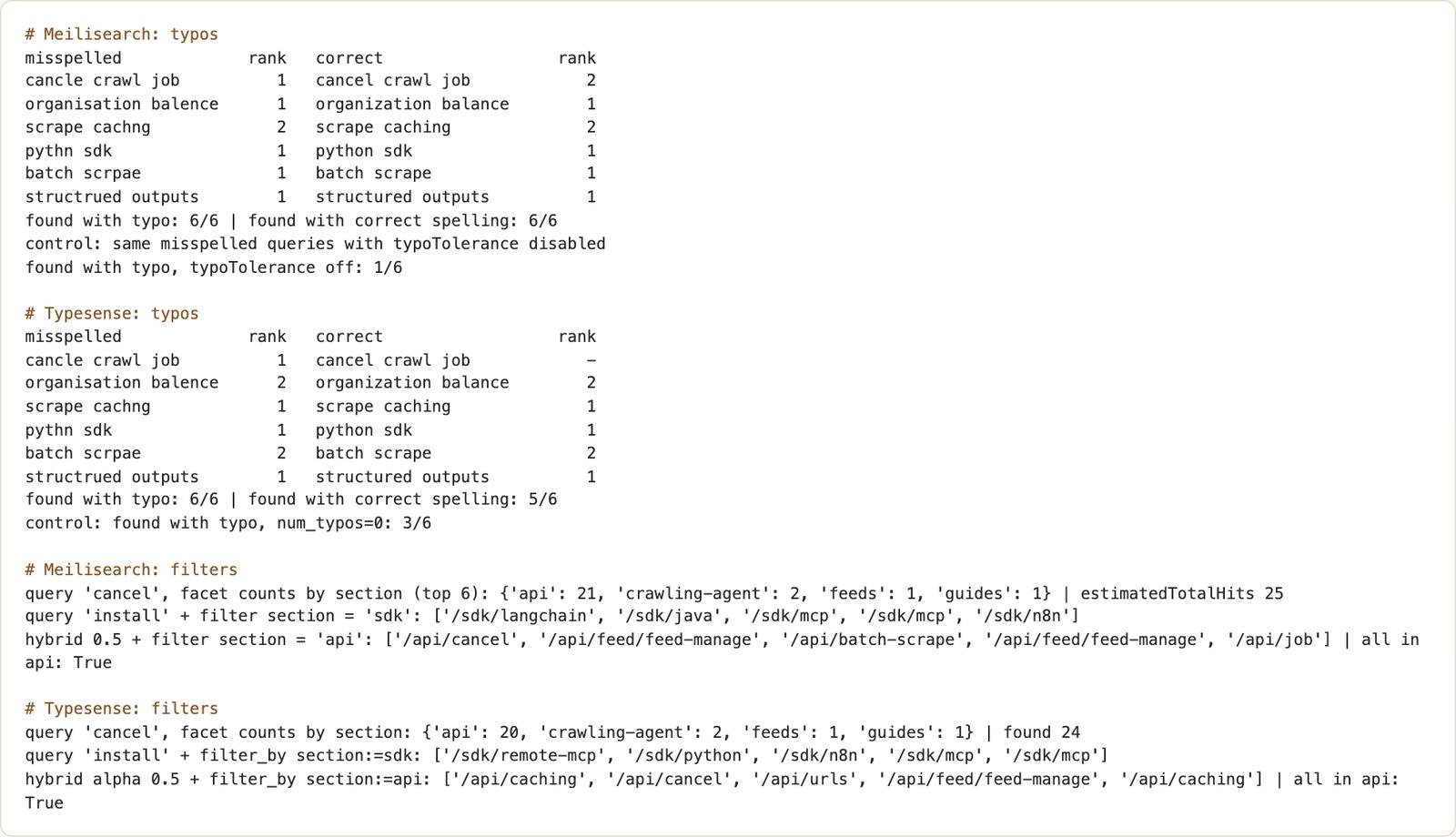
- Meilisearch found the page for 6 of 6 misspelled queries and 6 of 6 correct ones. With typoTolerance disabled, the misspelled queries found 1 of 6. The defaults are one typo from 5 letters and two from 9.
- Typesense found 6 of 6 misspelled queries and 5 of 6 correct ones. With num_typos 0 it found 3 of 6.
The Typesense oddity is real: "cancle crawl job" found /docs/api/cancel at rank 1, while "cancel crawl job" did not. In ts_keyword_diag.out the correct spelling matched 1 chunk (a batch-scrape guide) and the misspelling matched 4. I did not trace why. Six queries only hint at how multi-word keyword queries differ between the engines.
Filters and facets use the section field. Meilisearch takes filter and facets, Typesense filter_by and facet_by. A query for cancel returned 21 of 25 hits in api on Meilisearch and 20 of 24 on Typesense. A hybrid query with a section filter returned only api pages on both. This is the pattern for a customer-scoped bot, with a docs section standing in for a customer id.
Search-only API keys for the front end
Never ship the master or admin key to a browser. Meilisearch: create a key with actions: ["search"] and indexes: ["docs"]. Typesense: create a key with documents:search on the docs collection, then generate a scoped key from it on your server.
params = json.dumps({"filter_by": "section:=api"}, separators=(",", ":"))
digest = base64.b64encode(hmac.new(parent.encode(), params.encode(), hashlib.sha256).digest()).decode()
scoped = base64.b64encode((digest + parent[:4] + params).encode()).decode()
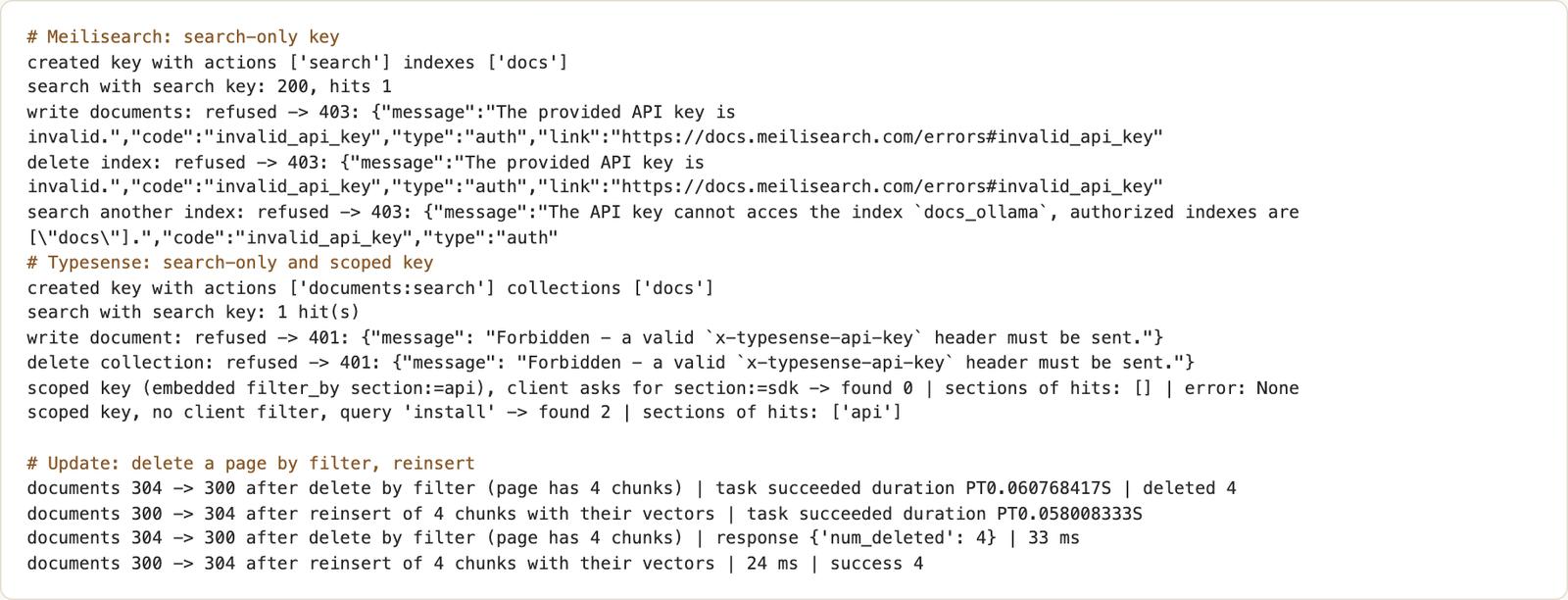
I tested writes with each key. Meilisearch refused a document write, an index delete, a settings read, a key creation and a search on a second index (docs_ollama) with HTTP 403 invalid_api_key. Typesense refused a document write, a collection delete, a key creation and a key listing with HTTP 401. The scoped key had a filter of section:=api embedded. When the client asked for section:=sdk in the request, it got 0 hits, so the embedded filter held next to the client's filter.
Meilisearch has its own version of this: tenant tokens are signed from an API key and carry filters that apply to every search (docs, read November 10, 2026). I did not test them.
An instant-search page
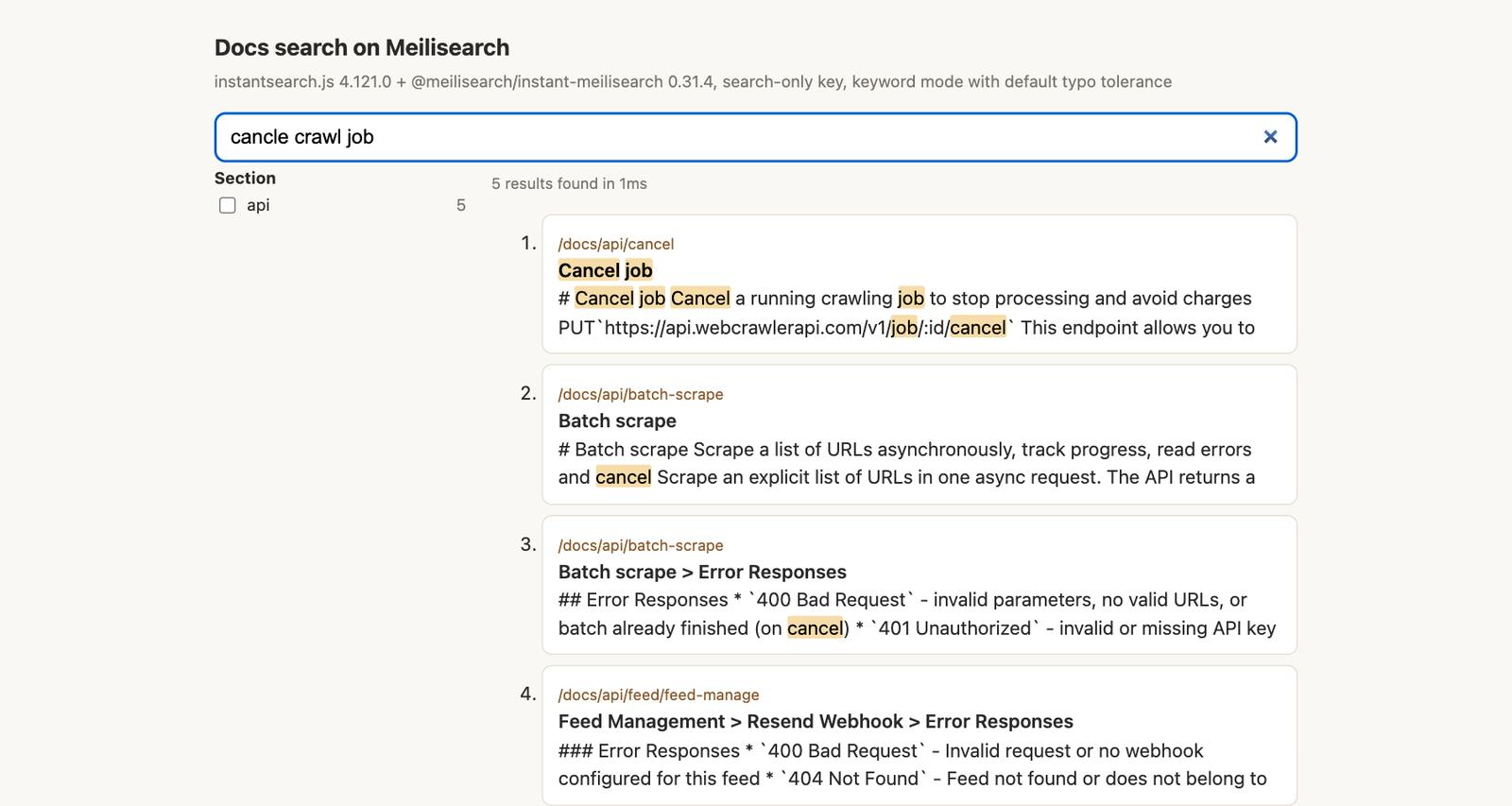
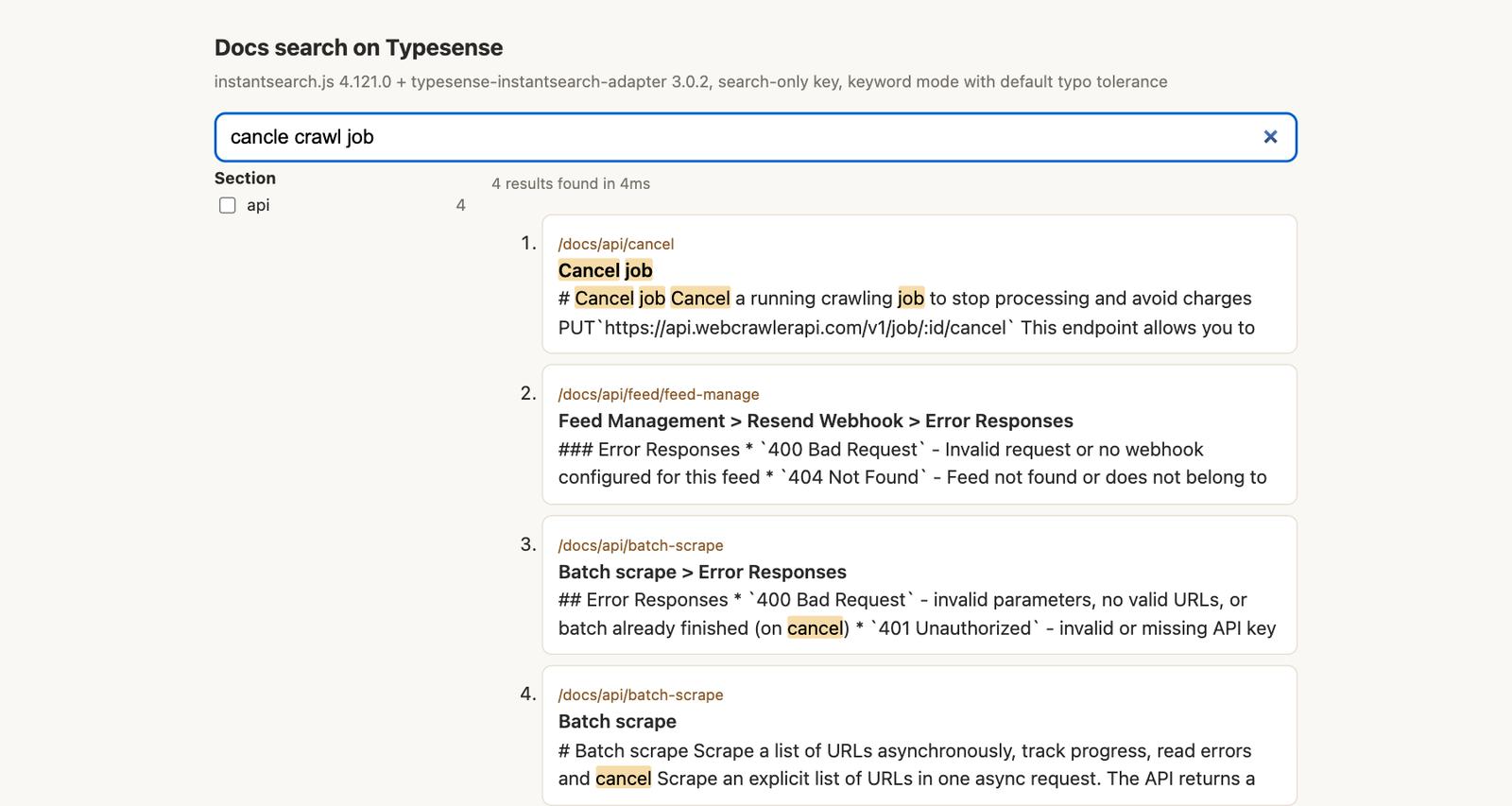
Each page is one HTML file served from python -m http.server, with InstantSearch.js 4.121.0 from jsDelivr. Meilisearch uses @meilisearch/instant-meilisearch 0.31.4. It ships no UMD build, so I loaded it as an ES module through +esm. Typesense uses typesense-instantsearch-adapter 3.0.2 (3.0.3 was only a day old).
const { searchClient } = instantMeiliSearch("http://127.0.0.1:7700", "YOUR_SEARCH_KEY");
// Typesense: new TypesenseInstantSearchAdapter({ server: { apiKey: "YOUR_SEARCH_KEY",
//   nodes: [{ host: "127.0.0.1", port: 8108, protocol: "http" }] },
//   additionalSearchParameters: { query_by: "heading,text", exclude_fields: "embedding" } })
Both adapters worked with the pinned engines, with no workaround on the Typesense side. To get hybrid results in the browser, send the query to your own endpoint, embed it there with the model you used for the chunks and call the engine with a vector. I did not build that endpoint. The pages run keyword mode only, because a browser has no query vectors when the embedder is userProvided. A typed "cancle crawl job" returned /docs/api/cancel first on both.
Keep it fresh: re-crawl and update
When a page changes, delete its chunks by url and insert the new ones. For /docs/api/crawl, which has 4 chunks:
meili("POST", "/indexes/docs/documents/delete", {"filter": f"url = '{page}'"})   # needs url filterable
ts("DELETE", "/collections/docs/documents", params={"filter_by": f"url:=`{page}`"})
Counts went 304, 300, 304 on both. The Meilisearch delete task took 0.06 seconds and the reinsert 0.06 seconds. The Typesense calls took 33 ms and 24 ms. I reinserted the same chunks with their stored vectors, so this tests the update path, not re-embedding. Unchanged pages need no work, and the WebCrawlerAPI cache is described in the caching docs.
Meilisearch or Typesense: which one to pick
Relevance was a tie on this corpus, so the choice is operational. Facts read on November 10, 2026 are from the repos and docs; the rest is from my run.
| Meilisearch v1.56.2 | Typesense 30.2 | |
|---|---|---|
| License | MIT for the community engine, enterprise files under LICENSE-EE | GPL-3.0 (server), Apache for client libraries |
| Memory in this run | 140 to 162 MiB | about 310 MiB, 866 MiB with the ts/ model |
| Hybrid control | semanticRatio per query, default 0.5 | alpha in vector_query, default 0.3 |
| Built-in embedder tried | ollama (host Ollama) | ts/all-MiniLM-L12-v2 |
| Scoped access | search-only key per index; tenant tokens with embedded filters (from docs, not tested here) | search-only key plus scoped key with embedded filter (tested) |
| Keyword default on questions | 2/6 | 0/6 (3/6 with drop_tokens_threshold 50) |
| Managed offering | Meilisearch Cloud, not run | Typesense Cloud, not run |
Pick Meilisearch if you want the smaller footprint and a ratio you can change per request. Keyword mode on long questions was weak on both at defaults (2 of 6 against 0 of 6), so I would not choose on that. Per-user filters inside a key exist on both: Typesense scoped keys held in my test, and Meilisearch tenant tokens are documented but untested here. If you already run Elasticsearch, OpenSearch or MongoDB, a second engine adds little. The Elasticsearch post covers BM25 and kNN together, and the MongoDB Atlas post covers $rankFusion.
Gotchas, limits of this test and clean up
What went wrong, in order:
- Meilisearch rejected host.docker.internal for the Ollama embedder until I allowed the IP network.
- Keyword mode on long questions was weak at defaults on both engines.
- Meilisearch hybrid at 0.5 was vector-only because of limit 50 on 304 chunks.
- Typesense alpha 0.0 was not keyword-only.
- The built-in model download made Typesense jump to 866 MiB and made the import 56.8 seconds.
What I did not test: scale, latency across engines, clustering or high availability, either vendor's cloud, Algolia, reranking, click analytics, multiple languages, or any production-mode dashboard behavior. Six questions and 304 chunks cannot rank two engines.
To clean up:
docker compose -f compose.meili.yml down -v
docker compose -f compose.ts.yml down -v
For the store and freshness steps, see the website to markdown knowledge base guide and the vector database comparison. If your data already lives in MongoDB, read the MongoDB Atlas Vector Search post. The same chunks.jsonl feeds the search box and the hybrid call for a bot, so you crawl once. WebCrawlerAPI produces the Markdown that both engines index, and a docs site of about 50 pages took 19 seconds in my run. To try it on your docs, create an API key on the dashboard, start with a low items_limit such as 50, then feed the Markdown into Meilisearch or Typesense with the steps above. The crawl endpoint docs and the crawl API list every option.