
Tests run and numbers read October 24, 2026. I run WebCrawlerAPI, so I am a competitor to browser vendors in an adjacent space. This was one run per test, with Kernel in a basic configuration (no proxy, no stealth). I did not tune either side, I have no deal or sponsorship with Kernel, and I did not measure cost. Results may change as the vendor updates its product. If Kernel has a better configuration for this kind of test, I will happily rerun it and update the post.
We run Puppeteer ourselves. Browser fleets, memory leaks and restarts are our job, and they are not the product. So I wondered whether we should hand that part to a managed cloud browser vendor.
We already know Kernel. WebCrawlerAPI uses Kernel headful browsers as one of its browser sources. So this was not a cold start. The question was bigger: can Kernel replace our self-hosted Puppeteer, without sacrificing quality, and win on speed?
Speed was one of the main reasons to look. Kernel advertises very fast browsers, and I hoped that moving browsers out of our own infrastructure would cut latency. It turned out the opposite.
Before changing anything, I ran a test. I took 200 real URLs and sent them through our self-hosted Puppeteer and through the Kernel cloud browser. Then I compared success rate and latency. One detail: the test used Kernel in headless mode, which is not the headful mode we run in production for that browser source.
This is a small, focused test, not a full benchmark. If you want larger comparisons of scraping and crawling APIs, run on the same inputs for every tool and with our own numbers included, see our open benchmarks.
The short answer
- Can Kernel replace Puppeteer? Not without losing something. I wanted to keep quality and gain speed. On easy sites I lost on both: lower success rate and higher latency.
- Latency: this was a main reason to try it, and the result went the other way. Kernel was slower in every comparison I ran, in both packs.
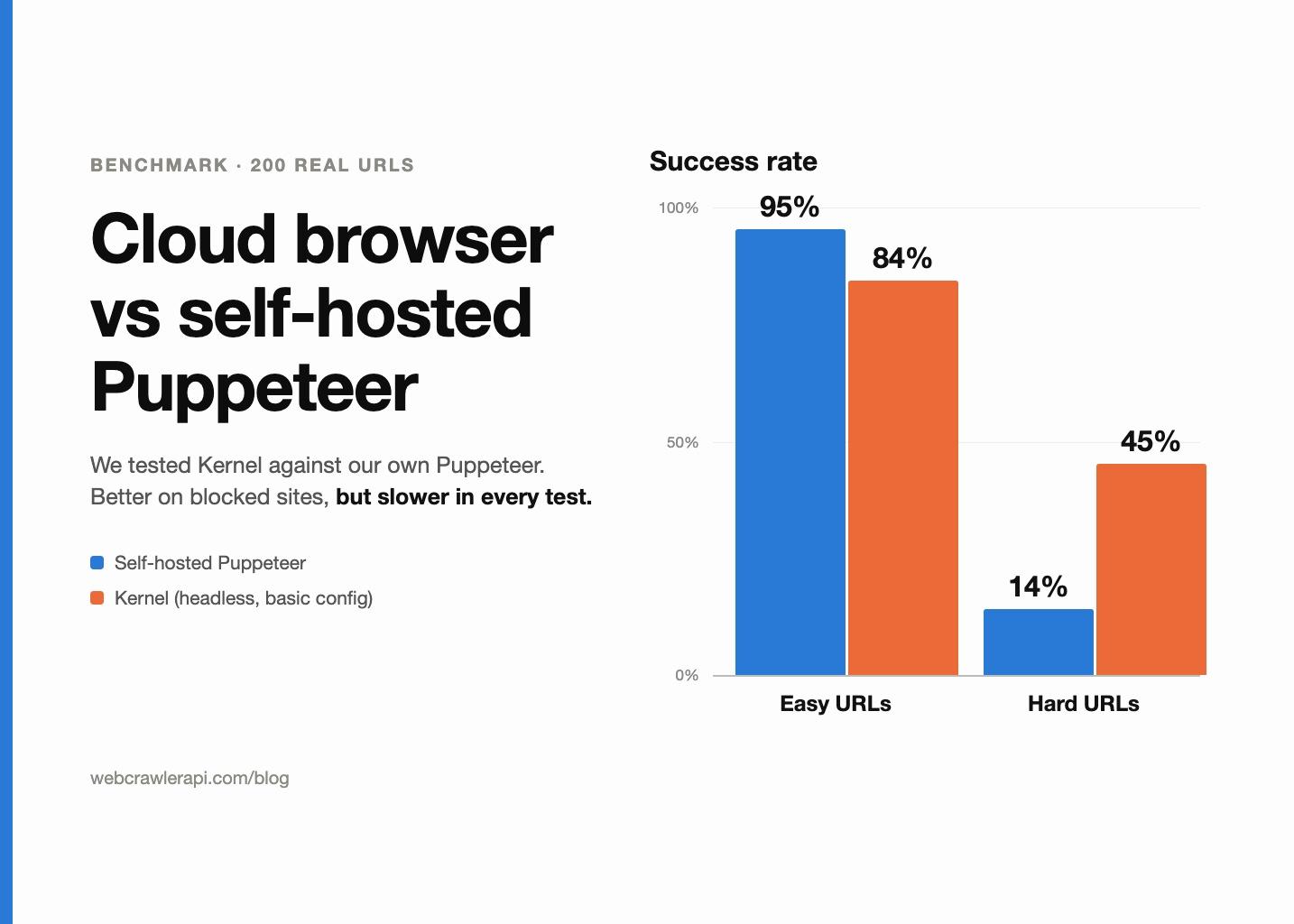
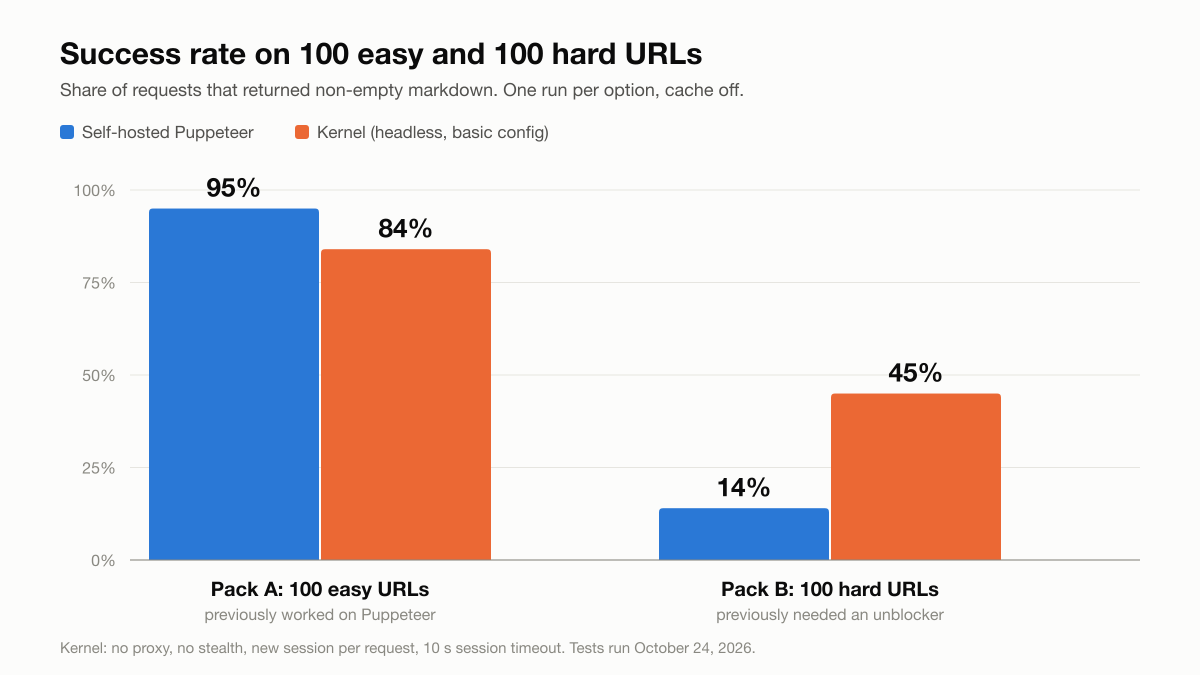
- Easy sites: warm self-hosted Puppeteer won. It got 95% of pages, against 84% for Kernel. It was about 3 seconds faster on the pages both handled.
- Hard sites: the managed browser won on success. It got 45% of pages, against 14% for plain Puppeteer. That is about 3.2x more pages recovered. But it took about 1.8x to 1.9x longer on successful requests, and it still failed on more than half of the pages.
- Where the time goes: a fresh managed browser session has a fixed cost of about 1.6 seconds before any page work starts. A warm browser that stays open does not pay it.
- What I take from it: a managed browser looks like a fallback tier for sites that block plain Puppeteer. It does not look like a full replacement.
- Who should buy: teams that do not want to run browsers at all, or that have a lot of blocked sites. Who should build: teams with mostly easy sites and a latency budget.
| Scenario | Self-hosted Puppeteer | Kernel (basic config) |
|---|---|---|
| 100 easy URLs | 95% success | 84% success |
| 100 hard URLs | 14% success | 45% success |
| Speed on successful requests | Faster in both packs | Slower in both packs |
The full numbers are in the tables below. Please read the caveats section before you quote any of them.
Why we looked at outsourcing our browsers
Running headless browsers is real work. Chrome eats memory. Pages hang. Processes need to be restarted and pools need to be sized. None of it is what customers pay us for.
Managed browser vendors promise to remove that. You ask for a browser over an API, you drive it, and you close it. Someone else keeps the fleet healthy.
I picked Kernel for the test. We already use its headful browsers as one of our browser sources, so I know the product. Their docs describe "extremely fast cloud browsers" and publish a browser-create time of 30 ms at p50. Lower latency was one of the most important reasons for me to consider it. I wanted to learn three things:
- Would we lose anything in quality on the sites we already handle well?
- Would we win in speed?
- Would it help on the sites that block plain Puppeteer?
One honest note. The vendor did not get a chance to tune this test. Neither did our own setup. Both ran the way they run by default.
How I benchmarked
What I compared
- Option A: self-hosted Puppeteer. The browser is already running and warm. Each request opens a tab in it.
- Option B: the Kernel cloud browser. Headless, no proxy, no stealth mode. A fresh browser session for each request, with a 10 second session timeout.
That last point matters. Option B pays the cost of creating and connecting to a browser on every request. Option A does not. This is a real difference between the two models, and I come back to it later.
Equal conditions
Both options ran through the same test harness, in the same region, with cache off and markdown as the output. WebCrawlerAPI has its own proprietary logic to decide when a page has finished loading, and both setups used the same one.
Two URL packs
I wanted to see easy sites and hard sites separately, so I built two packs of 100 URLs each.
- Pack A, easy: 100 URLs that already worked on plain Puppeteer. They come from about 60 hosts, with at most 3 URLs per host, taken from the last 7 days of real customer traffic.
- Pack B, hard: 100 URLs that previously needed an unblocker service to load. 83 of them came from one unblocker service and 17 from another.
Both packs have a built-in bias. Pack A favors Puppeteer by design, because those URLs were picked for working on it. Pack B favors the unblockers by design, because those URLs were picked for needing them. So a 95% result on Pack A is not "Puppeteer is great". It is about what I expected.
Success and measurement
A request counted as a success if the job finished with non-empty markdown. I sent 5 requests at a time. Latency is client-side wall clock, with a 120 second timeout. Each pack ran once per option.
Table 1. Test setup
| Option A: Puppeteer | Option B: Kernel | |
|---|---|---|
| Browser | Self-hosted Chrome, warm | Managed cloud Chrome, headless |
| Session model | Reused browser, new tab per request | Fresh browser session per request |
| Proxy | None | None |
| Stealth | None | None |
| Scraper region | US Central cloud region | Kernel browsers run in us-east |
| Timeout | 120 s client timeout | 10 s session timeout, 120 s client timeout |
Results: easy sites (Pack A)
Table 2. Pack A results (100 easy URLs)
| Metric | Puppeteer | Kernel |
|---|---|---|
| Success rate | 95% | 84% |
| Average latency | 4,540 ms | 7,483 ms |
| p50 | 4,158 ms | 7,352 ms |
| p95 | 7,668 ms | 10,445 ms |
| p99 | 8,512 ms | 12,460 ms |
| Max | 9,429 ms | 13,533 ms |
| Failures | 4 timeouts, 1 non-success page | 15 timeouts, 1 host error |
Puppeteer got 95 of 100. Kernel got 84 of 100. On pages both handled, Kernel was slower.
Table 2b. Pack A, paired view
| Measure | Value |
|---|---|
| Both succeeded | 84 |
| Kernel only | 0 |
| Puppeteer only | 11 |
| Neither | 5 |
| Average difference (Kernel minus Puppeteer) | +3,141 ms |
| Median difference | +2,818 ms |
| Pages where Kernel was faster | 5 of 84 |
So Kernel did not win a single page that Puppeteer lost. Puppeteer won 11 pages that Kernel lost. And on the 84 pages both got, Kernel was about 3 seconds slower on average. It was faster on 5 of them.
The 15 Kernel timeouts
Most of the Kernel failures were timeouts. All 15 of them ended between 6.4 and 9.5 seconds. That is just under the 10 second session cap I had set. Several of them landed on two or three slow hosts.
It is tempting to say the cap caused them. I cannot say that. I did not raise the cap and rerun, so the cause is not confirmed. It is the first thing I would test next.
Also keep the bias in mind. Pack A was built from pages that worked on Puppeteer. A 95% against a perfect 100% is run-to-run noise plus a few flaky pages. It is not a flaw in Puppeteer.
Results: hard sites (Pack B)
Table 3. Pack B results (100 hard URLs)
| Metric | Puppeteer | Kernel |
|---|---|---|
| Success rate | 14% | 45% |
| Average latency (all requests) | 2,745 ms | 8,348 ms |
| p50 (all requests) | 1,328 ms | 6,790 ms |
| p95 (all requests) | 8,869 ms | 13,584 ms |
| p99 (all requests) | 9,234 ms | 31,190 ms |
| Max | 10,106 ms | 120,042 ms |
| Average, successful requests only | 5,169 ms | 9,090 ms |
| p50, successful requests only | 4,278 ms | 8,183 ms |
| p95, successful requests only | 8,736 ms | 14,812 ms |
Kernel recovered 45 pages. Plain Puppeteer recovered 14. That is about 3.2x more pages, and it is the reason a managed browser is interesting at all.
Do not trust the "fast" Puppeteer average
Look at the all-requests row. Puppeteer shows a 2.7 second average and a 1.3 second p50. That looks great. It is not.
Puppeteer fails fast on these sites. It gets blocked, and the block comes back quickly. Fast failures pull the average down. So for hard sites, compare latency on successful requests only.
On that basis, Kernel was slower:
- Average: 9,090 ms vs 5,169 ms, about 1.8x.
- p50: 8,183 ms vs 4,278 ms, about 1.9x.
So the honest summary is "about 3.2x more pages at about twice the time per successful page".
What failed
Table 4. Pack B failure types
| Failure type | Kernel | Puppeteer |
|---|---|---|
| Access denied | 24 | 61 |
| Timeout | 18 | 7 |
| Host returned an error | 12 | 10 |
| Non-success page | 0 | 8 |
| Other | 1 | 0 |
| Total failures | 55 | 86 |
Most of what stopped Puppeteer was access denied (61 of 86). Kernel got past many of those, but not all. It still had 24 access denied pages, and it had more timeouts (18 vs 7). One Kernel request hit the full 120 second client timeout.
Paired view and by origin
Table 4b. Pack B, paired view and by origin
| Segment | Kernel | Puppeteer |
|---|---|---|
| Both succeeded | 11 | 11 |
| Only this option succeeded | 34 | 3 |
| Neither succeeded | 52 | 52 |
| Pages from the first unblocker service (83 URLs) | 41 of 83 | 12 of 83 |
| Pages from the second unblocker service (17 URLs) | 4 of 17 | 2 of 17 |
Kernel won 34 pages that Puppeteer lost. Puppeteer won 3 pages that Kernel lost. And 52 pages failed on both.
Be careful with the second row of origins. 17 URLs from about 7 hosts is too small to say anything. I show it for completeness only.
What this tells me
Kernel in a basic configuration is not a drop-in replacement for a dedicated unblocker. More than half of these pages failed on it. But it did recover 34 pages that plain Puppeteer could not. That is worth something, and it is a different kind of value than "faster browsers".
Stage by stage: where the time goes
The batch numbers show a gap of about 3 seconds on easy pages. I wanted to see where it comes from. So I ran a controlled test on one simple page (our own site), 4 runs each.
Table 5b. Single-page repro, end-to-end API wall clock
| Run | Kernel | Puppeteer |
|---|---|---|
| 1 | 6,915 ms | 4,027 ms |
| 2 | 6,821 ms | 3,999 ms |
| 3 | 6,986 ms | 3,834 ms |
| 4 | 6,569 ms | 3,593 ms |
| Average | about 6.8 s | about 3.9 s |
The gap is steady, at about 2.9 seconds. It is not random noise.
Then I looked at the time spent inside the scraper, split into six generic stages. These numbers are scraper-side only. They are not end-to-end, so do not compare the totals with the table above.
Table 5. Stage timing (scraper-side, seconds)
| Stage | Kernel | Puppeteer | Difference |
|---|---|---|---|
| Get a browser ready | 0.89 | 0.31 | +0.58 |
| Navigate to the page | 0.54 | 0.35 | +0.19 |
| First page-state checks | 0.38 | 0.16 | +0.22 |
| Wait for the page to settle | 2.50 | 0.77 | +1.73 |
| Extract the content | 0.43 | 0.31 | +0.12 |
| Convert and return | 1.16 | about 1.0 | about +0.16 |
| Total | about 5.95 | about 2.92 | about +3.0 |

The largest gap by far is the "wait for the page to settle" stage. It took 2.50 seconds on Kernel and 0.77 seconds on Puppeteer. That is +1.7 seconds, more than half of the total difference.
I do not know why. I have not confirmed a cause, and it is under investigation. It could be the setup, the remote connection, the region, or something in how I drive the browser. I would be guessing, and I do not want to put a guess in a table. Keep that in mind: the numbers are solid, the explanation is not.
The browser-ready stage (+0.58 s) is easier to explain. It is the cost of creating and connecting to a remote session, which a warm local browser does not pay.
Where the time goes at a high level
Fixed cost per session
To understand the session cost, I ran a small separate micro-benchmark. It ran from a client in the Netherlands, not from our scraper.
Table 6. Fixed overhead per fresh session
| Step | Measured | Note |
|---|---|---|
| Create a browser | about 100 to 130 ms | Vendor docs claim 30 ms p50 |
| Connect to it | about 850 to 900 ms | |
| Open the first page | about 320 ms | |
| Navigate | about 700 ms | |
| Close the session | about 240 ms | |
| Fixed cost before page work | about 1.6 s |
Each fresh session costs roughly 1.6 seconds before any real work. That fits the "get a browser ready" gap I saw in the stage table. A warm browser skips most of it.
Geography
Treat the vendor's 30 ms figure with care. It comes from the vendor's docs, and as I understand it, it was measured colocated, from a client in the same place as the browsers (us-east). My micro-benchmark client was in the Netherlands. My scraper was in a US Central region. Kernel's browsers were in us-east.
So I did not reproduce their conditions, and I do not claim their number is wrong. I got about 100 to 130 ms from a different region. Connect time of 850 to 900 ms is also something I would expect to shrink if the client sat next to the browsers.
One fresh session per request vs a warm browser
This is a structural difference, not a quality difference. In my test Kernel got a new session each time. Puppeteer reused a warm browser.
A fairer comparison would be Kernel with a browser pool. According to Kernel's docs, pools skip start-up and are plan-gated, and they do not remove the connect cost. I did not test pools, so I will not say how much they help. It is the next test on my list.
Configuration knobs
From the vendor's docs and my own micro-benchmark:
- Stealth mode: about +120 ms on browser creation.
- Residential proxy: +100 to 150 ms on creation and roughly 2x slower navigation.
- Headless vs headful: no difference I could see.
- Custom viewport, extensions or kiosk mode: these trigger a Chromium restart that, per the vendor's docs, takes several seconds.
Check the current docs before you rely on these. They can change.
What I would try next
I stopped at a basic configuration on purpose. These are the experiments I would run next, and what each would tell me:
- A higher session timeout. If the 15 easy-site timeouts go away, the 10 second cap was the cause.
- Stealth mode. Does it lift the access denied count on Pack B?
- A residential proxy. Same question, with a latency cost.
- A browser pool. How much of the 1.6 second fixed cost does it remove?
- Running next to us-east. How much of the connect time and settle gap is distance?
Each one has a clear question and a clear yes or no. I will publish a follow-up if the results are interesting.
What we are doing with this
Based on this single test:
- Keep self-hosted Puppeteer for easy sites. It is faster and succeeds more.
- Evaluate a managed browser as a fallback tier, next to or ahead of an unblocker, for pages that plain Puppeteer cannot get.
- Do not replace anything until I have run the follow-up tests above on our own traffic.
Kernel did some things well. Creating and connecting to a browser is quick. And it recovered 34 hard pages that our Puppeteer lost. That is a real result.
How to evaluate a managed browser vendor yourself
You can copy this process. It works for any vendor, not just Kernel.
Sample design
- Use real URLs from your own traffic.
- Build an easy pack and a hard pack. Test them separately.
- Cap the number of URLs per host (I used 3) so a few slow hosts do not dominate.
- Write down the selection bias of each pack.
What to measure
- Success rate.
- p50, p95, p99 and max latency.
- Latency on successful requests only.
- Failure types: timeout, access denied, host returned an error, non-success page.
- A paired comparison: who won which URL.
- Cost per 1,000 successful pages.
A simple results table is enough:
| URL | Host | Outcome | Failure type | Latency by stage | Region |
|---|---|---|---|---|---|
Fair-test rules
- Same harness, same region, same page-completion logic.
- Cache off on both sides.
- Same timeout, or a note about why not.
- More than one run if you can.
Pitfalls
- A fast average that hides fast failures.
- A few hosts counting for many URLs.
- A session timeout that cuts off slow pages.
- A region mismatch between you, your code and the vendor.
- Vendor numbers that were measured somewhere else.
- A cold vendor session against your own warm browser.
- A single run.
Build vs buy
| Criterion | Lean build if | Lean buy if |
|---|---|---|
| Volume | High and steady, where per-session fees add up | Low or spiky, where idle servers waste money |
| Team time on browser ops | You already have people who handle it | Browser upkeep keeps pulling engineers off product work |
| Share of blocked sites | Most of your sites load fine on plain Puppeteer | A large share block plain browsers |
| Latency budget | Tight (a few seconds end to end) | Loose (you can afford 1.5 to 2 extra seconds) |
| Compliance and data residency | You need full control over where pages are fetched | The vendor offers regions and terms that fit |
| Lock-in | You want to avoid a vendor API | A thin, standard browser protocol makes switching easy |
| Cost per successful page | Your own cost is clearly lower | The vendor is cheaper once you count ops time |
Rules of thumb
These come from my test. They are not universal.
- Budget about 1.5 to 2 seconds of fixed cost for each fresh managed browser session.
- Judge latency on successful requests only.
- Cap the URLs per host in your sample.
- Test easy and hard packs separately.
- A vendor's published latency was measured where the vendor is, not where you are.
Questions to ask the vendor
- Can I reuse sessions, or use a pool? Which plan includes it?
- Which regions do you offer, and can I pick one near my servers?
- What are the session timeout limits?
- What proxy and stealth options exist, and what do they cost in latency?
- Is pricing per session, per minute, or per request? What does an idle session cost?
Caveats
This test cannot tell you everything. Here is what it cannot say.
- One run per pack. Run-to-run noise exists, and I did not measure it.
- Basic Kernel setup. No proxy and no stealth were tuned.
- The 10 second session timeout may explain some of the timeouts. I did not test that.
- Real customer URLs with per-host caps. Some hosts still appear more than once.
- Pack A is biased toward Puppeteer and Pack B toward the unblockers.
- The second unblocker group has only 17 URLs from about 7 hosts.
- Fresh session vs warm browser. It is a structural gap, not a pure browser comparison.
- Latencies are API wall clock, including our own pipeline overhead. The overhead is the same for both options.
- Kernel was called from a different region than where its browsers run.
- The stage-timing numbers (5.95 s vs 2.92 s) are scraper-side, and the single-page repro (6.8 s vs 3.9 s) is end-to-end. They measure different things.
- I did not measure cost.
Summary
Table 7. Summary
| Scenario | Winner | Success gap | Latency gap | Recommendation |
|---|---|---|---|---|
| 100 easy URLs | Self-hosted Puppeteer | 95% vs 84% | Kernel about 3 s slower on the 84 shared pages | Keep Puppeteer |
| 100 hard URLs | Kernel (basic config) | 45% vs 14% | Kernel about 1.8x to 1.9x slower on successful requests | Use as a fallback tier, not a replacement |
My takeaways:
- A warm browser you own beats a fresh managed session on easy pages.
- On blocked pages, a managed browser can recover pages that plain Puppeteer cannot, at the price of speed.
- It still failed on more than half of the hard pages, so it is not a substitute for a real unblocker.
- Measure on your own URLs. Mine are not yours.
Where WebCrawlerAPI fits
We built WebCrawlerAPI because we did not want to run browser infrastructure and fallback tiers for every project. You send a URL and get markdown back. We decide how to fetch it, and we move to a stronger tier when a page is blocked. That is the same problem this post is about, solved on our side.
If you scrape a handful of known, easy sites, you probably do not need us. A small Puppeteer setup will do the job, and this test says it will be fast. If you have many sites, some of them blocked, and you do not want to own the browser fleet, it is worth a look. The getting started guide takes a few minutes. We also publish open tests of scraping and crawling APIs, with wins and losses, on the benchmarks page.
For background, these posts may help: JavaScript rendering in web crawling, web scraping with Playwright, web scraping with JavaScript and Node.js and best web scraping APIs. If you build a knowledge base from websites, see website to markdown knowledge base.
FAQ
Is a managed browser faster than self-hosted Puppeteer?
Not in my test. A warm self-hosted browser was about 3 seconds faster on easy pages, because the managed setup paid about 1.6 seconds of session cost on every request. Browser pools or running next to the vendor's region might close some of the gap. I have not tested that.
Can a cloud browser bypass anti-bot protection?
Sometimes. In my test a basic Kernel setup got 45% of hard pages, against 14% for plain Puppeteer. That is a real gain, but it still failed on more than half. Stealth, proxies and tuning may help. A managed browser is not a guarantee.
How much does a managed browser cost compared with running your own?
I did not measure cost, so I will not give numbers. Check the vendor's pricing page and see whether it charges per session, per minute or per request. Then compare it with your own server cost plus engineering time, per 1,000 successful pages.
Should I use a browser pool?
Probably, if you pay the fixed cost on every request. According to the vendor's docs, pools skip browser start-up but are plan-gated and do not remove the connect cost. I have not tested one. Run your own pack with and without a pool before you commit.
Do I still need a proxy or unblocker with a cloud browser?
For hard sites, most likely yes. A basic cloud browser with no proxy still hit access denied on 24 of 100 hard pages and failed on 55 in total. If your sites block datacenter traffic, plan for a proxy or an unblocker tier. Test it on your own URLs first.
