
Last updated: October 23, 2026. I run WebCrawlerAPI, which gets one short section near the end, and I say where it falls short. I ran @playwright/mcp 0.0.83 on Node 26 against public pages only (example.com, Playwright's demo app, two docs pages, one Wikipedia article). I did not run the Docker image, Cursor or VS Code themselves, and I say so where it matters.
The Playwright MCP server (@playwright/mcp) lets an AI agent drive a real browser: open pages, click, type and read what is on screen. You add it to your client with one line (npx @playwright/mcp@latest), and the agent gets about 25 browser tools. It is the right tool for exploring, testing and debugging a site from a chat. It is the wrong tool for reading hundreds of pages, and I measured why.
This post covers setup in Claude Code, Cursor and VS Code, Docker, the options worth knowing, what a page costs in tokens, and where an API fits better. If you only need setup, jump to your client.

What Playwright MCP is (and what it is not)
@playwright/mcp is Microsoft's MCP server for Playwright. It is open source, and the package declares the Apache-2.0 license. Your MCP client (Claude Code, Cursor, VS Code) starts it as a local process. The model then calls tools such as browser_navigate, browser_click and browser_type.
The model does not look at screenshots by default. It reads an accessibility snapshot: a text tree of the page where every node gets a short ref like e8. To click something, the model passes that ref. The snapshots docs describe the same loop.
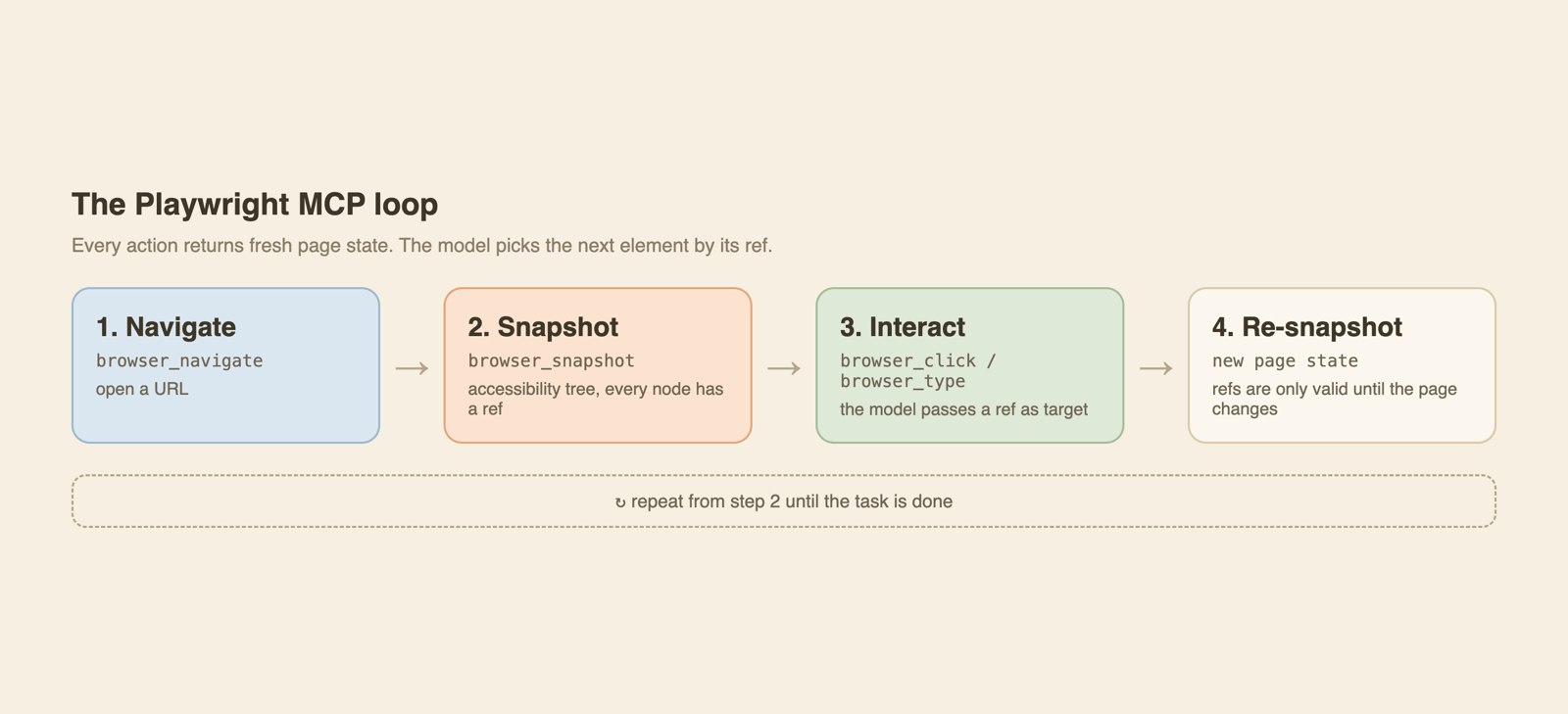
Two things it is not:
- Not a scraper. There is no queue, no retries, no proxy rotation and no concurrency control. It is one browser driven by one agent.
- Not the Playwright test runner. It reuses the same browser engine, but you never write a test file. If you want to write scripts yourself, read web scraping with Playwright.
Requirements
The installation page asks for Node.js 20 or newer and an MCP client. The package itself declares "node": ">=18" in its engines field, so I would trust the docs and stay on 20+. The browser downloads on first use, and the default mode is headed, meaning you see a window.
If npx complains that the package is not in the cache, see Playwright MCP not installed in npx cache.
Set up Playwright MCP in Claude Code
The official form from the Claude Code page:
claude mcp add playwright npx @playwright/mcp@latest
If you want to pass flags to the server, put -- before the command. I checked claude mcp add --help, and its own examples use that form for subprocess flags:
claude mcp add playwright -- npx @playwright/mcp@latest --headless
Two options from the help output are worth knowing:
- --scope takes local (the default), user or project. With project, the server goes into a .mcp.json file your team can commit.
- -e KEY=value sets environment variables for the server process. Playwright MCP also reads its options from PLAYWRIGHT_MCP_* variables (for example PLAYWRIGHT_MCP_HEADLESS), so -e is one way to set them.
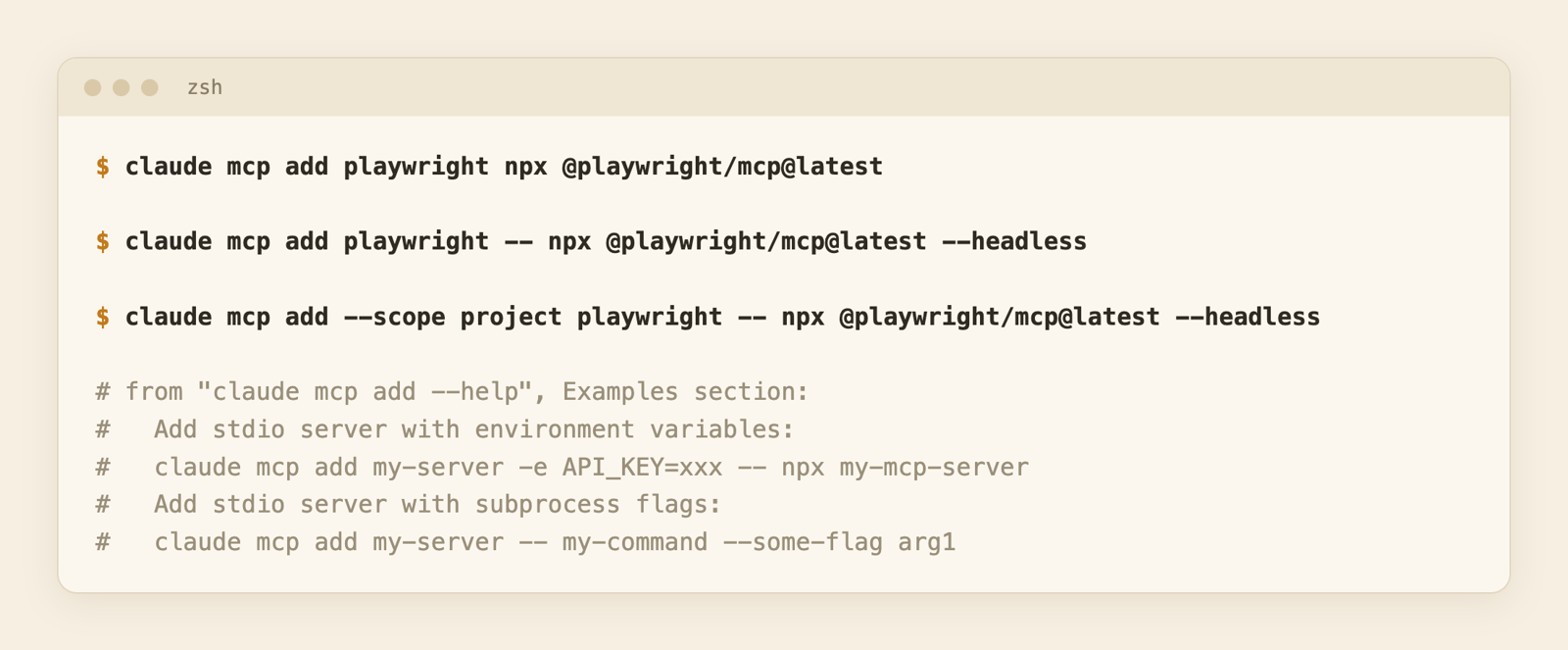
I did not run claude mcp add for real, because I did not want to change my own Claude Code config. The commands above are typed from the docs and the help text. I only ran --help.
Start a new session, run /mcp to see that playwright is listed, then try: "Open https://example.com and tell me what the page says."
Set up Playwright MCP in Cursor
The Cursor page gives two ways. A one-click install link, or the manual path: Cursor Settings, then MCP, then Add new MCP Server, with name playwright, type command and command npx @playwright/mcp@latest.
The "standard configuration" from the installation page is this JSON. You can put it in ~/.cursor/mcp.json:
{
  "mcpServers": {
    "playwright": {
      "command": "npx",
      "args": ["@playwright/mcp@latest"]
    }
  }
}
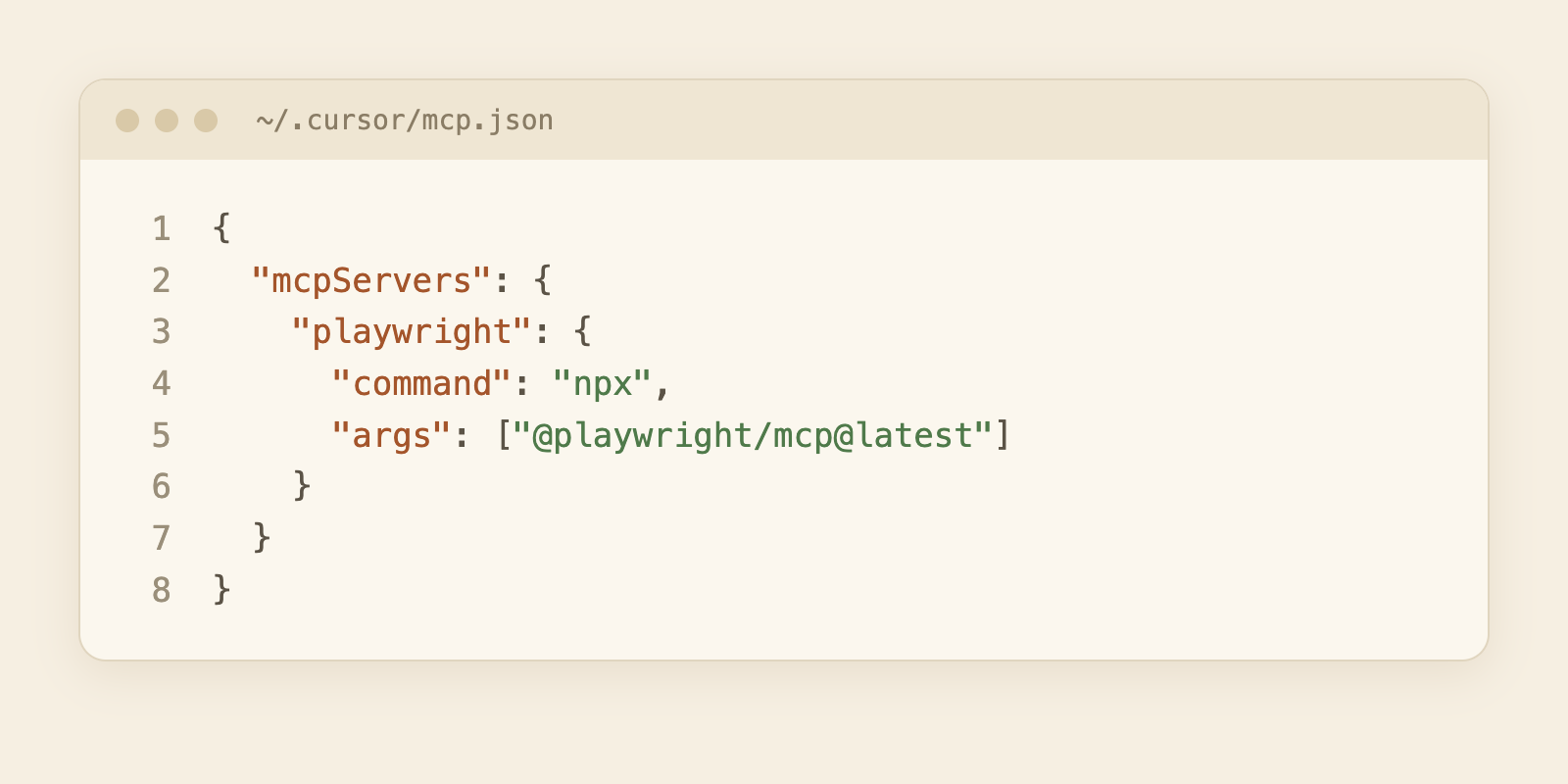
This image is a mock-up of the JSON above, not a screenshot of Cursor. I did not run Cursor. I did parse the JSON with Node (benchmark/json_parse_proof.txt), and the top-level key (mcpServers) matches the docs.
To add flags, append them to args, for example ["@playwright/mcp@latest", "--headless"].
Set up Playwright MCP in VS Code
VS Code has a CLI form, copied from the VS Code page:
code --add-mcp '{"name":"playwright","command":"npx","args":["@playwright/mcp@latest"]}'
You can also use the one-click buttons on that page, or run MCP: Add Server from the command palette and choose NPM Package, then enter @playwright/mcp. The server then works with GitHub Copilot's agent in VS Code.
For a manual file, VS Code uses a different root key than Cursor: servers, not mcpServers.
{
  "servers": {
    "playwright": {
      "command": "npx",
      "args": ["@playwright/mcp@latest"]
    }
  }
}
A caution on where that file goes. I read the current VS Code MCP docs today. They say workspace .vscode/mcp.json and the user-profile mcp.json "remain available for compatibility and are labeled deprecated in the guided flow". A workspace-root .mcp.json (which uses mcpServers) is offered behind an experimental setting. They also warn not to copy a config between the two formats without checking. So I won't tell you which file is "correct". Use the guided flow, and check what it writes.
Run it in Docker
The README has a Docker image, mcr.microsoft.com/playwright/mcp. Its note says the Docker version "only supports headless chromium at the moment". The README shows two ways.
Let your client start the container for each session:
{
  "mcpServers": {
    "playwright": {
      "command": "docker",
      "args": ["run", "-i", "--rm", "--init", "--pull=always", "mcr.microsoft.com/playwright/mcp"]
    }
  }
}
Or run one long-lived container and connect over HTTP:
docker run -d -i --rm --init --pull=always \
  --entrypoint node \
  --name playwright \
  -p 8931:8931 \
  mcr.microsoft.com/playwright/mcp \
  /app/cli.js --headless --browser chromium --no-sandbox --port 8931 --host 0.0.0.0
--no-sandbox is there because Chromium's sandbox does not work well inside a container. --host 0.0.0.0 makes the server listen on all interfaces, so anything that can reach port 8931 can drive your browser. Bind it to a private network or put auth in front.
I did not run Docker for this post. Both snippets are copied from the README of the version I installed.
Options worth knowing
The full list is long (the README table has about 50 flags). These are the ones I would reach for.
| Flag | What it does |
|---|---|
| --headless | No visible window. The default is headed. |
| --browser | chrome, firefox, webkit or msedge. |
| --viewport-size 1280x720 | Fixed window size. |
| --proxy-server | Send browser traffic through a proxy, e.g. http://myproxy:3128. |
| --caps | Turn on extra tool groups (below). |
| --port 8931 | Listen for HTTP at http://localhost:8931/mcp instead of stdio. |
| --host 0.0.0.0 | Bind to all interfaces. The default is localhost. |
| --shared-browser-context | Let all connected HTTP clients reuse one browser context. |
| --idle-timeout | Close the browser after N milliseconds without a tool call. The default is one hour for headless, never for headed. |
| --secrets ./.secrets | Load secrets from a dotenv file. The docs treat this as a convenience, not a security boundary. |
Capabilities and tool counts
By default the server exposes the core tools. --caps adds more groups. The capabilities page lists network, storage, testing, vision, pdf, devtools and config. The README table I installed only lists vision, pdf and devtools for --caps, so the docs and README disagree. I tested all seven, and they work.
I asked the server for its tool list over stdio. These are the counts I measured:
- Default: 25 tools.
- --caps=vision,pdf,devtools: 45 tools.
- All seven capabilities: 72 tools.
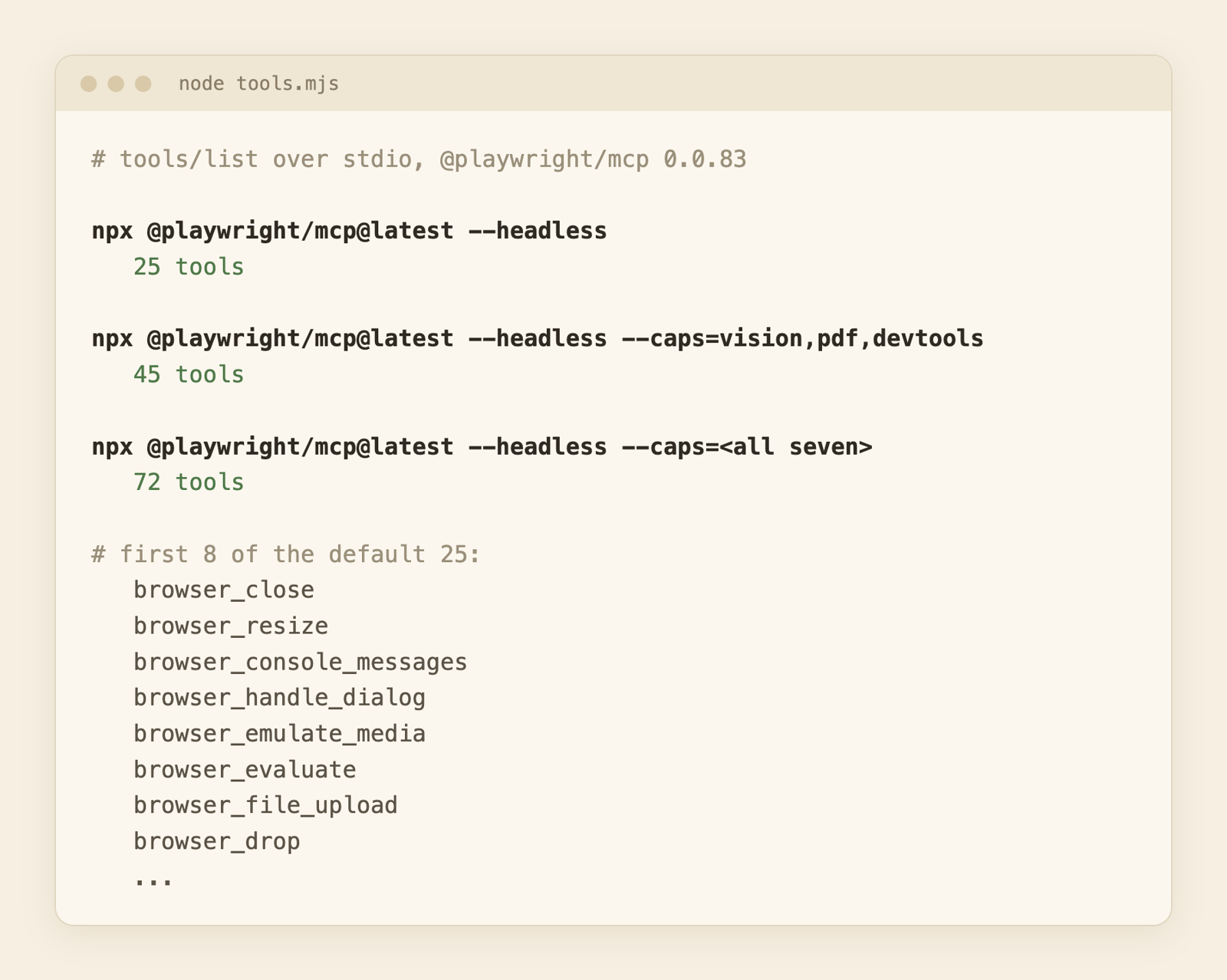
Why this matters: the model reads every tool definition in each session. More tools means more context before you type anything. I did not measure how many tokens the tool list takes, so I will not give a number. Enable only the groups you use.
HTTP mode
--port switches from stdio to HTTP. Use it when the browser runs somewhere else than your client, like in a container or on a server with no display:
npx @playwright/mcp@latest --headless --port 8931
Then point the client at http://localhost:8931/mcp. Cursor-style config: { "mcpServers": { "playwright": { "url": "http://localhost:8931/mcp" } } }. If several clients connect and should share one logged-in browser, add --shared-browser-context.
What it costs: snapshot vs markdown
The part I most wanted to measure: if an agent reads a page through Playwright MCP, how many tokens is that, compared with fetching the same page as markdown?
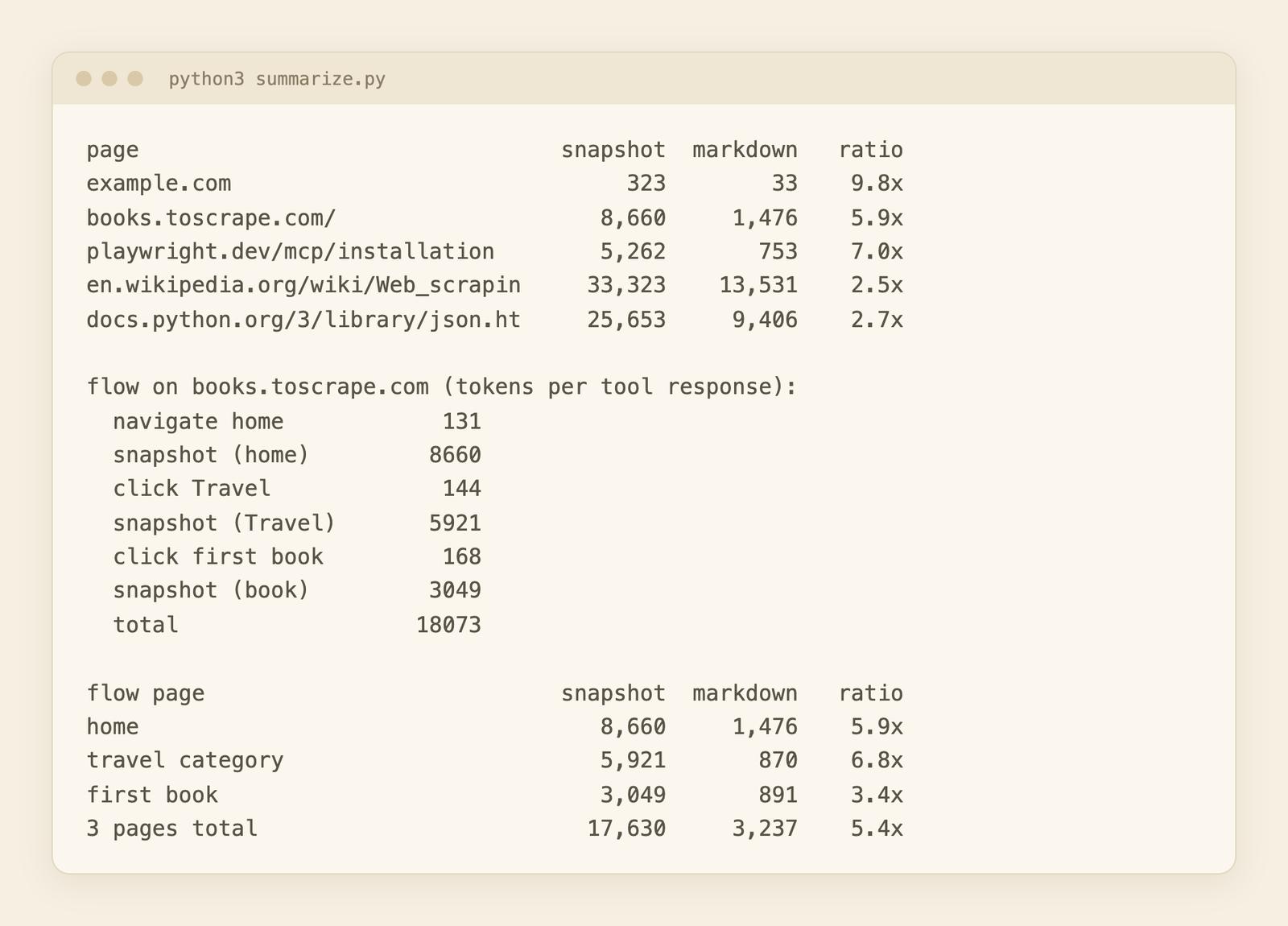
How I ran it: a small Node client (client.mjs, with the raw results) starts @playwright/mcp@latest --headless over stdio. For each page it calls browser_navigate, then browser_snapshot. For the markdown side I used webcr, which calls WebCrawlerAPI, my own product, so weigh that. One fetch per page, on October 23, 2026. Tokens are counted with the o200k_base tokenizer. That is an OpenAI tokenizer, so for Claude read them as approximate.
| Page | Snapshot tokens | Markdown tokens | Snapshot / markdown |
|---|---|---|---|
| example.com | 323 | 33 | 9.8x |
| books.toscrape.com | 8,660 | 1,476 | 5.9x |
| playwright.dev/mcp/installation | 5,262 | 753 | 7.0x |
| en.wikipedia.org/wiki/Web_scraping | 33,323 | 13,531 | 2.5x |
| docs.python.org/3/library/json.html | 25,653 | 9,406 | 2.7x |
What I read from it:
- The snapshot was bigger on every page. Between 2.5x and 9.8x. It lists every link and control with a ref and a /url line, and the model needs those to click. Markdown keeps the content and drops the structure.
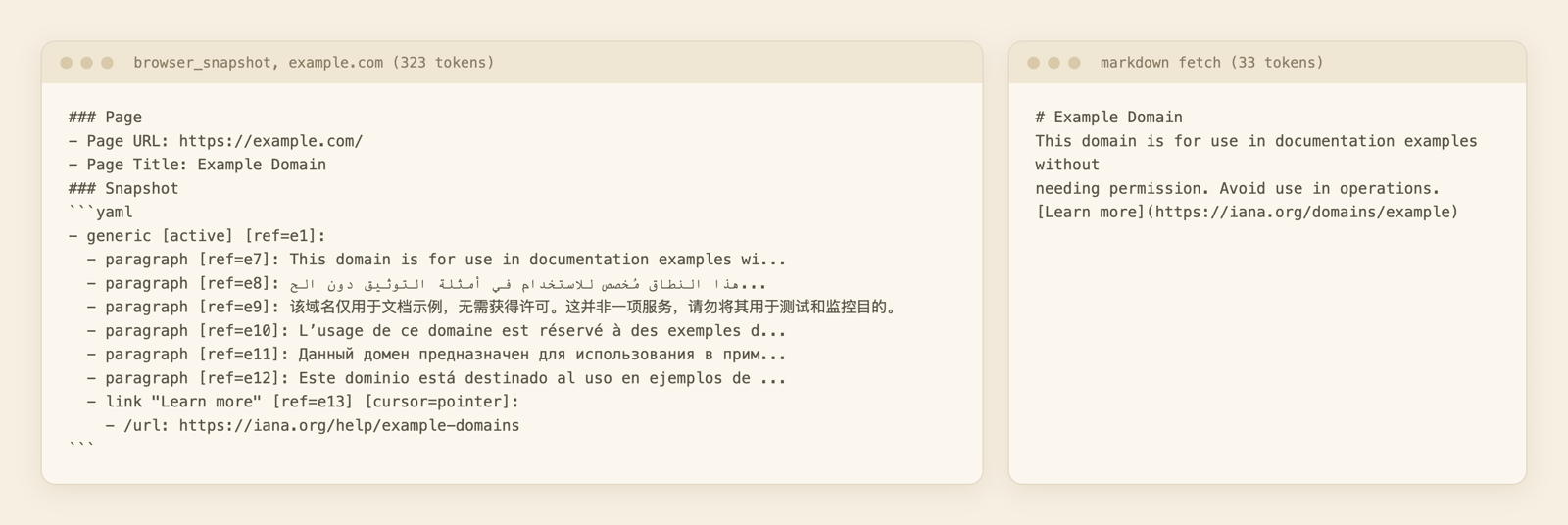
- example.com is a trap. The snapshot also carried the translated paragraphs (Arabic, Chinese, French and others) that the live page shows, while the markdown I got back was English only. So that ratio compares two different texts. Ignore the 9.8x.
What a multi-step flow costs
I also ran a three-page flow on books.toscrape.com, a public sandbox built for scraping practice: navigate to the home page, click the Travel category, click the first book ("It's Only the Himalayas"), plus a browser_snapshot after each step to read the page. I kept it to a handful of requests, no loops.
The docs say tools return a fresh snapshot after each action. In the version I ran, with a plain SDK client, the responses for navigate and click contained a link to a .yml snapshot file instead of the tree. Those responses were small (131 to 168 tokens each). The tree itself only came back when I called browser_snapshot. A real client such as Claude Code may handle this differently, and I could not check that. So I report both:
- Tool responses as returned: 443 tokens across three actions.
- Plus three browser_snapshot reads, so the agent can see the page: 18,073 tokens in total.
The three snapshots were 8,660, 5,921 and 3,049 tokens (17,630 together). I fetched the same three pages as markdown with webcr: 1,476, 870 and 891 tokens (3,237 together). That is 5.9x, 6.8x and 3.4x per page, and 5.4x for the whole flow. The home page costs the most because it lists twenty books, each with a link, image, rating and button. The book page is the cheapest to snapshot, but even there the markdown is about a third of it.
On speed: the first browser_navigate took 527 ms, and it also started the browser. Later pages took 68 to 320 ms. The markdown calls took 405 ms to 2.4 seconds each. Those are different kinds of work (a local browser against a hosted API), so don't read them as a race.
I did not measure whether the token difference changes answer quality or cost on your model. I only counted tokens.
Tricks that cut the cost
The options page has two that apply. --snapshot-mode none stops tools from attaching snapshots to their responses. browser_snapshot accepts depth and a target ref, so the agent can read one subtree. There is also browser_find, which searches the snapshot and returns only the matching nodes. The snapshots docs call it far cheaper on a large page. I did not measure these.
Troubleshooting
The fixes live in separate pages:
- npx says the package is not in the cache: Playwright MCP not installed in npx cache.
- A tool call fails with "target page, context or browser has been closed": Playwright MCP target page, context or browser closed.
- The browser binary is missing: Playwright executable doesn't exist.
One more from the README: a persistent profile can be used by one browser instance at a time. If you run several clients in the same workspace, start the extra ones with --isolated or a different --user-data-dir.
When to use an API instead
Both read web pages, but they answer different questions.
| Playwright MCP | A scraping API (WebCrawlerAPI) | |
|---|---|---|
| Best for | Exploring and testing a site, filling forms, logged-in flows | Reading many pages as markdown |
| Unit of work | One browser, one agent, one task | One URL in, one document out |
| Tokens per page | Snapshot, 2.5x to 7x markdown in my test | Markdown (13,531 tokens for the Wikipedia article) |
| Setup | Node, a browser, a client config | An HTTP call or a remote MCP server |
| Concurrency | You run more browsers yourself | The API handles it |
| Blocks, proxies, retries | Yours to handle (--proxy-server exists) | Handled by the API |
| Cost model | Your machine plus model tokens | Per page |
| Can click and fill | Yes | No |
I have not benchmarked blocked sites for either side, so the "blocks" row is about who owns the problem, not who wins.
Use Playwright MCP when:
- You want the agent to click, type or log in.
- You are debugging or testing your own site.
- It is a one-off, and you can watch the browser.
Use an API when:
- You fetch content at volume, such as feeding an AI knowledge base.
- You re-crawl on a schedule.
- You do not want to own browsers, memory limits and retries. I covered that cost in the Playwright scraping post.
Where the API loses: it cannot click through a checkout or fill a form. If the task needs interaction, MCP wins and that is not close.
You can also use both in the same client. WebCrawlerAPI has a hosted MCP server with one tool, get_markdown. In Claude Code:
claude mcp add --transport http webcrawlerapi https://mcp.webcrawlerapi.com/mcp
It signs in with OAuth, so there is no key to paste. Cursor takes { "mcpServers": { "webcrawlerapi": { "url": "https://mcp.webcrawlerapi.com/mcp" } } }. The steps for every client are in the remote MCP docs. Then the agent can read pages through the API and use Playwright only when it has to interact. If you need the same thing from your own code, see the web scraping API.
Security notes
A browser agent reads whatever the page says, and a hostile page can include text that tries to steer the model (prompt injection). Keep that in mind:
- Don't point it at a browser profile that is logged in to anything sensitive.
- --secrets keeps values out of the prompt, but the docs say it is not a security boundary.
- --allowed-origins and --blocked-origins help, yet the README says they do not serve as a security boundary and do not affect redirects.
- With --host 0.0.0.0, anyone who can reach the port controls the browser.
- By default the README limits file access to the workspace roots and blocks file:// URLs. Leave --allow-unrestricted-file-access off.
FAQ
What is the purpose of Playwright MCP?
It lets an AI model use a browser through tool calls, using the page's accessibility tree instead of pixels. People use it to test their own apps, fill forms and explore sites from a chat.
Is Playwright MCP free?
The package is open source and its package.json says Apache-2.0. You still pay for your model's tokens, and for any machine it runs on.
How do I use Playwright MCP with Claude Code?
Run claude mcp add playwright npx @playwright/mcp@latest, start a new session and check /mcp. Details are in the Claude Code section.
Can I use Playwright MCP from Python or with another client?
The server is a Node package, but MCP is a protocol. Any MCP client can talk to it, including your own code. The Playwright docs name VS Code, Cursor, Windsurf, Claude Code and Claude Desktop. For your own Python client, use the official mcp Python SDK against the stdio command or the HTTP URL. I only ran a Node client, so I did not test Python.
How do I run Playwright MCP headless?
Add --headless to the args. The default is headed.
Playwright MCP or Playwright CLI?
They solve nearby problems for agents, and I plan to compare them in a separate post. This one covers the MCP server only.
Which one to start with
If you want an agent that clicks, install Playwright MCP without --headless and watch it work. If you only need the text of pages, skip the browser and fetch markdown.
