
Pick Playwright for new work, and when you need Firefox or WebKit. Keep Puppeteer when you are Node-only, Chrome-only, or already have working Puppeteer code. That's my short answer to Puppeteer vs Playwright, or Playwright vs Puppeteer if you search it the other way round. I measured the rest.
The speed gap is small and does not point one way. On the same installed Chrome, Playwright had the faster cold start and faster pages, but used more memory (1103 vs 833 MB). I did not dig into the memory gap, and it may be partly a harness or measurement effect. On the slim headless builds, the two were close on per-page time and memory, and Puppeteer started faster. Waiting is where they really differ, and that is a default, not a capability.
Last updated: October 25, 2026. I run WebCrawlerAPI and run Puppeteer ourselves (see managed cloud browser vs self-hosted Puppeteer). I ran both libraries in Node 26.12.1 on one MacBook (Apple M2 Max, 32 GB): Puppeteer 25.14.0, Playwright 1.64.1, Chrome 156.0.8078.47. Pages were a local test server plus two public scraping sandboxes at tiny volume. I did not run Windows, Linux, CI or any test runner.

Puppeteer vs Playwright at a glance
| You need | Pick |
|---|---|
| A scraper in Node, Chrome only | Either. Puppeteer if you have code already, Playwright if you start fresh |
| Chrome, Firefox and WebKit from one API | Playwright |
| E2E tests with a runner, traces and parallel workers | Playwright (@playwright/test) |
| An existing Puppeteer codebase that works | Keep Puppeteer |
| A browser driven by an AI agent | Playwright, see Playwright MCP |
| Just page text for an AI knowledge base | Neither. A scraping API returns it without a browser (see the end) |
| Puppeteer | Playwright | |
|---|---|---|
| Languages | JavaScript/TypeScript | JavaScript/TypeScript, Python, Java, .NET |
| Browsers | Chrome, Firefox (WebDriver BiDi) | Chromium, Firefox, WebKit |
| Waiting | Locators wait, plain APIs don't | Locators auto-wait before actions |
| Test runner | None, you bring Jest or similar (not run) | @playwright/test (not run) |
| Browser contexts | browser.createBrowserContext() | browser.newContext() |
| Network interception | page.setRequestInterception(true) | page.route() |
| Install | npm i puppeteer downloads Chrome | npm i playwright + npx playwright install |
| Maintainer | Chrome Browser Automation team | Microsoft |
| License | Apache-2.0 | Apache-2.0 |
Sources: the Puppeteer docs, the Playwright docs, and the license field on npm for both packages, all read October 25, 2026. The context and interception rows are APIs that I ran in this post's harness.
How they differ
Both libraries drive a browser from Node, and the scripts look alike: open a page, find elements, read text. Puppeteer is Chrome-first and talks to the browser over the DevTools protocol, with Firefox through WebDriver BiDi. Playwright ships its own builds of Chromium, Firefox and WebKit.

The API map, for anyone moving code over:
| Task | Puppeteer | Playwright |
|---|---|---|
| Start a browser | puppeteer.launch() | chromium.launch() |
| Find an element | page.$("#more") (null if missing), page.locator() | page.locator("#more") |
| Run code in the page | page.$$eval(sel, fn) | locator.evaluateAll(fn) |
| Isolated session | browser.createBrowserContext() | browser.newContext() |
| Block requests | page.setRequestInterception(true) + req.abort() | page.route("**/*", route => route.abort()) |
Here is the same task in both: open a page that renders a table after a delay, click "Load more", read 40 rows. Both snippets are copied from the harness.
// Playwright
export async function scrapePlaywright(page, url) {
  await page.goto(url);
  await page.locator("#more").click();              // auto-waits for the button
  await page.locator("tbody tr").nth(39).waitFor(); // waits until a 40th row exists
  return page.locator("tbody tr").allTextContents();
}
// Puppeteer
export async function scrapePuppeteer(page, url) {
  await page.goto(url);
  await page.locator("#more").click();              // locator API waits for the button
  await page.waitForFunction(() => document.querySelectorAll("tbody tr").length === 40);
  return page.$$eval("tbody tr", (rows) => rows.map((r) => r.textContent));
}
Puppeteer's page.locator() waits for the button just like Playwright does. That detail matters in the waiting section below. Playwright's retrying expect lives in @playwright/test, which I did not install, so that snippet waits on the 40th row directly.
How I tested them
- Node only, one laptop. Same language, same machine, medians with min-max. These numbers are not comparable to the Python figures in my Playwright vs Selenium post.
- Same Chrome in the fair row. Puppeteer with executablePath and Playwright with channel: "chrome" both drove the installed Chrome 156. I also ran each library's default build: Puppeteer's chrome-headless-shell and bundled Chrome (155.0.8059.79), and Playwright's headless shell (156.0.8078.4). Those builds differ, so read them as separate rows.
- Fresh process per run. Peak memory is the RSS of the Node process plus every child, sampled with ps roughly every 20 ms.
- Local server plus two sandboxes. Speed tests hit 127.0.0.1. The scraping check used books.toscrape.com and quotes.toscrape.com/js, whose robots.txt files return 404. 12 page loads, honest User-Agent, 1.5 seconds between loads.
Speed, memory and install
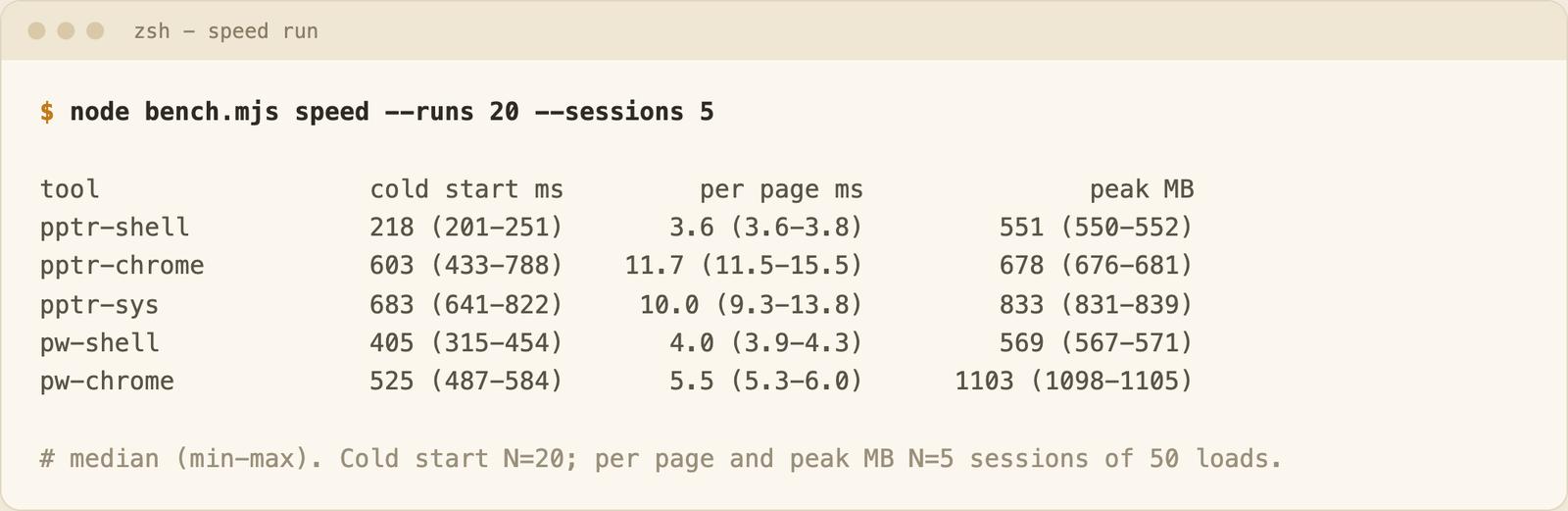
| Setup | Cold start (ms, N=20) | Per page (ms, N=5 sessions x 50 loads) | Peak memory (MB, N=5) |
|---|---|---|---|
| Puppeteer, headless shell | 218 (201-251) | 3.6 | 551 |
| Playwright, headless shell | 405 (315-454) | 4.0 | 569 |
| Puppeteer, bundled Chrome 155 | 603 (433-788) | 11.7 | 678 |
| Puppeteer, installed Chrome 156 | 683 (641-822) | 10.0 | 833 |
| Playwright, installed Chrome 156 | 525 (487-584) | 5.5 | 1103 |
Cold start is the time from process start (imports included) until the first page finished loading. Per page is the median of 5 sessions' medians (50 loads each) of a 200-item static page on localhost, so the network stays out of it.
What the table shows:
- On the same Chrome 156, Playwright started faster (525 vs 683 ms) and loaded pages faster (5.5 vs 10.0 ms). Both gaps vanish next to a real page load that takes hundreds of milliseconds.
- On the slim headless builds, the two were close on per-page time (3.6 vs 4.0 ms) and memory (551 vs 569 MB). Puppeteer started faster (218 vs 405 ms). The two shells are different Chromium builds, so this is not a clean library comparison.
- Memory goes the other way on full Chrome. Puppeteer used 833 MB, Playwright 1103 MB. I did not dig into why. RSS sums can double count shared pages, so part of the gap may be how I measured.
No row wins everything. If someone tells you one of them is simply faster, they likely measured one row.
Install
npm i puppeteer downloads Chrome itself (42 s and 573 MB of browsers plus 32 MB of node_modules in my empty-folder run), but modern package managers may block that script, so run npx puppeteer browsers install if it did not happen. npm i playwright took 1 s, then npx playwright install chromium took 41 s for 572 MB, plus 18 MB of node_modules. One run each, so treat it as indicative.
Auto-wait and reliability
Everyone says Playwright is less flaky. I tested it with the same page as before. A table renders after a random 100-1500 ms delay, a "Load more" button appears, and 20 more rows arrive after a second random delay. 200 runs per variant, same seeded delays, fresh browser context each run, installed Chrome.
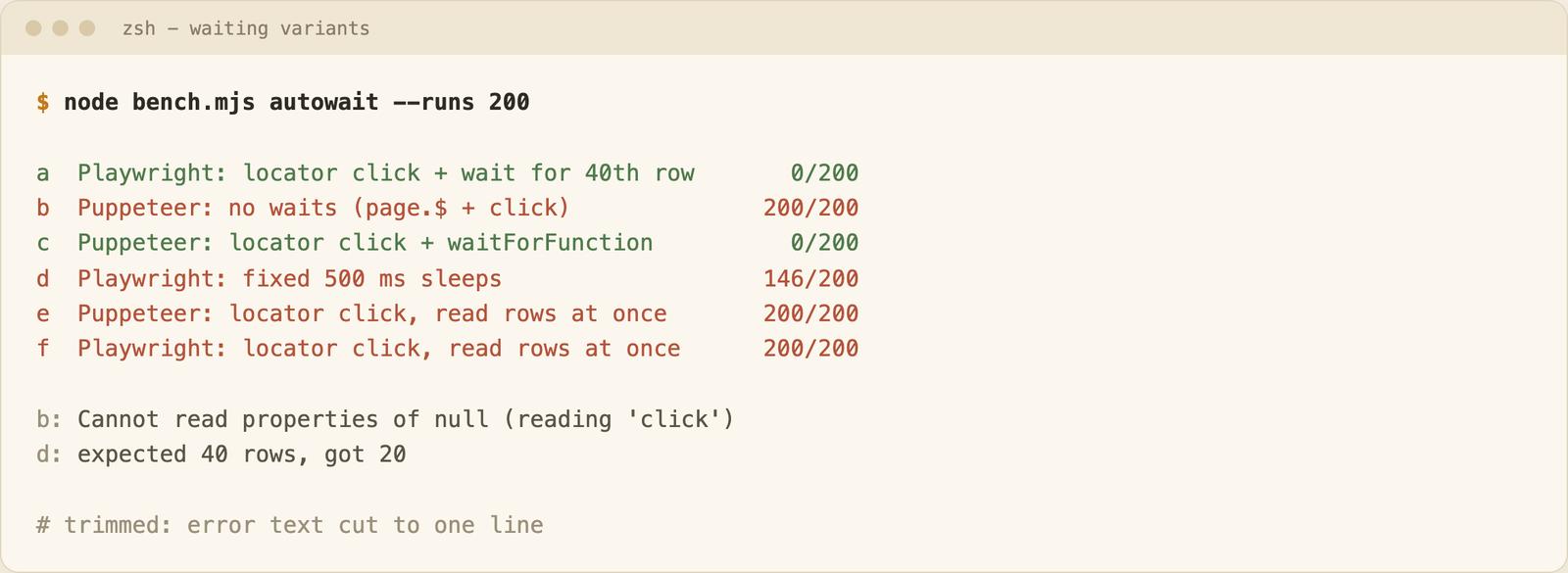
| Variant | Failures / 200 | Error |
|---|---|---|
| Playwright, locator click + wait for the 40th row | 0 | none |
| Puppeteer, locator click + waitForFunction | 0 | none |
| Puppeteer, no waits (page.$ + click) | 200 | Cannot read properties of null (reading 'click') |
| Playwright, fixed 500 ms sleeps | 146 | expected 40 rows, got 20 |
| Puppeteer, locator click, read rows at once | 200 | expected 40 rows, got 20 |
| Playwright, locator click, read rows at once | 200 | expected 40 rows, got 20 |
The first two are the result that matters: a correct Puppeteer script was as reliable as a correct Playwright script, 0 failures in 200 runs each. The difference is the default. Playwright locators wait without being asked, and Puppeteer's page.$ does not, so the naive script died every time.
The last two rows show the other half. Auto-wait covers the button, not the data the click triggers. Both libraries returned 20 rows when the script read right after the click. You still have to wait for what you want to read. The sleep variant is the same mistake with a clock; see overusing waitForTimeout.
These failures are deterministic because my delays are long on purpose. I did not test slow networks or real sites that change under you.
Chrome only, or three engines
I launched each non-Chrome browser 3 times and loaded the 200-item page. All of them worked every time:
| Library | Browser | Version | Result (N=3) |
|---|---|---|---|
| Puppeteer | Firefox | 158.0 | 3 of 3 loaded, 200 items |
| Playwright | Firefox | 157.0 | 3 of 3 loaded, 200 items |
| Playwright | WebKit | 27.2 | 3 of 3 loaded, 200 items |
Puppeteer's Firefox support works, and it runs on WebDriver BiDi. Puppeteer's docs list Chrome and Firefox, and I did not find WebKit there. If you must check Safari-like rendering, Playwright's WebKit is the option, though it is an engine build, not real Safari. For scraping, Chrome is almost always enough. I only checked that pages load, not Firefox-specific behavior.
Puppeteer vs Playwright for scraping
Both work, and Playwright is a common scraping choice. I ran the same job in both: 20 books (title and price) from books.toscrape.com and 10 quotes from the JavaScript version of quotes.toscrape.com, with images, fonts, media and stylesheets blocked. Fresh process per run, N=3 per tool.
| Tool | Books | Quotes | Same first items | Requests per run |
|---|---|---|---|---|
| Puppeteer | 20 / 20 | 10 / 10 | yes (all 3 runs) | 9 |
| Playwright | 20 / 20 | 10 / 10 | yes (all 3 runs) | 8 |
This is 12 page loads against sandboxes, so I only report counts, not a benchmark. Code size was a tie: 22 non-blank, non-comment lines each.
- Both announce themselves. On a local page, navigator.webdriver was true in every headless row I ran, and without a custom User-Agent each reported HeadlessChrome/<version>. Neither library gets you past bot detection by itself, and I did not test any detection site.
- If the data is in the HTML, skip the browser. An HTTP client is far cheaper than either library.
For full tutorials, read web scraping with Playwright and web scraping with JavaScript and Node.js.
Puppeteer vs Playwright for testing
Playwright ships @playwright/test with a runner, parallel workers, retries, a trace viewer and codegen, so a test suite works out of the box. Puppeteer is a browser library: you wire Jest or Mocha around it, and write your own setup, assertions and reporting. Puppeteer still fits Chrome-only checks, screenshots and PDFs. I did not benchmark any test runner, so I have no timing for either.
Playwright alternatives (and Puppeteer alternatives)
- Puppeteer. The closest alternative if you are on Node and need only Chrome.
- Selenium. Right for existing suites, other languages and grids. On selenium vs puppeteer: Puppeteer is Node-only and Chrome-first. Selenium covers many languages and browsers, and needs explicit waits. My numbers are in Playwright vs Selenium.
- No browser at all. For page content, a scraping API or a managed cloud browser takes the job. See managed cloud browser vs self-hosted Puppeteer.
When you only need page content
If your goal is page text for an AI knowledge base, driving any browser is more machinery than you need. Browser libraries make sense when you must click, log in or fill forms. To read pages, a web scraping API returns markdown per page (see the scrape endpoint docs). The catch: it does not run custom click-and-login flows. You can try it first with the free URL to markdown tool.
Related: what a headless browser is, and HTML to PDF with Playwright and Puppeteer for a worked example in both libraries.
FAQ
Playwright vs Puppeteer: which is faster?
Neither, clearly. On the same installed Chrome 156, Playwright had the faster cold start (525 vs 683 ms) and per-page time (5.5 vs 10.0 ms), but used more memory (1103 vs 833 MB), which I did not investigate. On the headless shells, per-page time and memory were close and Puppeteer started faster (218 vs 405 ms). Node numbers only, one laptop.
Should I pick Playwright or Puppeteer?
Playwright for new work, multi-browser needs and tests, mostly because of auto-wait defaults, three engines and the test runner. For scraping, either works: I got the same 20 books and 10 quotes with both. Keep an existing Puppeteer scraper.
Is Playwright free? Is it a licensed tool?
It is free and open source. The npm license field is Apache-2.0 for both Playwright and Puppeteer.
Does Puppeteer support Firefox?
Yes, through WebDriver BiDi. Firefox 158.0 loaded my test page 3 of 3 times.
Selenium vs Puppeteer: which one?
Puppeteer for Node and Chrome, Selenium for many languages, grids and legacy suites. Details in Playwright vs Selenium.
Does Puppeteer work with Python?
Puppeteer is a JavaScript library. I did not test any Python port, so I won't recommend one.
Conclusion
Start fresh with Playwright and wait for your data explicitly. If your Puppeteer scraper works, leave it. For the agent side, start with Playwright MCP.
