
"Playwright CLI" is two tools with one name. The new one, playwright-cli, lets a coding agent drive a browser from shell commands. The old one, npx playwright, runs tests, records code and opens reports. This post covers both and tells you which one you want.
If you want agents to browse, read the first half. If you run *.spec.ts files, jump to the test runner section.
Last updated: October 24, 2026. I run WebCrawlerAPI, which gets one short section near the end, and I say where it falls short. I ran @playwright/cli 0.1.22 on Node 26 and macOS, against public pages only (books.toscrape.com, example.com, Playwright's TodoMVC demo). I did not run Cursor, Codex, Firefox, WebKit, Docker or Linux, and I say so where it matters.

Two CLIs, one name

| Agent CLI | Test runner CLI | |
|---|---|---|
| Package | @playwright/cli | @playwright/test (or playwright) |
| Binary | playwright-cli | npx playwright |
| Made for | Coding agents (Claude Code, Copilot) | Developers and CI |
| Typical commands | open, snapshot, click, fill, eval | test, codegen, show-report, install |
| Output | Short text: page URL, title, a link to a snapshot file | Test results, HTML reports, traces |
| Default mode | Headless | Headless (--headed to see it) |
| Docs | playwright.dev/agent-cli | playwright.dev/docs/test-cli |
They share a binary in one place. npx playwright --help from the same install lists a cli command ("run playwright cli commands from terminal") and an mcp command, next to test, codegen and show-report. So npx playwright cli is the agent CLI living inside the test package.
One more trap: the npm package called playwright-cli (the old name) is deprecated. Its npm page says "This package is deprecated, use @playwright/cli instead." Install the scoped one.
Install the agent CLI (playwright-cli)
The installation page asks for Node.js 20 or newer. The package declares "node": ">=18" in engines, so I'd trust the docs and stay on 20+.
npm install -g @playwright/cli@latest
playwright-cli --version
# 0.1.22 in my run
If Playwright is already a dependency of your project, you don't need the global install. Run npx playwright cli --help instead.
Two more commands you'll meet:
- playwright-cli install initializes the workspace. It creates a .playwright folder (the docs say it also adds it to .gitignore; I didn't see a .gitignore appear in my empty test folder, so check yours).
- playwright-cli install-browser downloads a browser. It also happens on first use. Options from the docs: --with-deps (Linux system libraries), --dry-run, --list, --force, --only-shell.
I did not run --with-deps or Linux. If the install itself breaks, I wrote those fixes once, so I won't repeat them:
- Chromium fails on Ubuntu 26.04: fix, or the full Ubuntu walkthrough.
- "Executable doesn't exist": fix.
playwright: command not found? The agent CLI binary is playwright-cli, with a hyphen, not playwright. For the test runner, the binary sits in node_modules/.bin, so use npx or pnpm exec. More in the glossary page.
The commands you actually use
playwright-cli --help lists 100 commands (I counted the lines in the output). You'll use maybe 15. Here is a real run on books.toscrape.com, a public sandbox built for scraping practice:
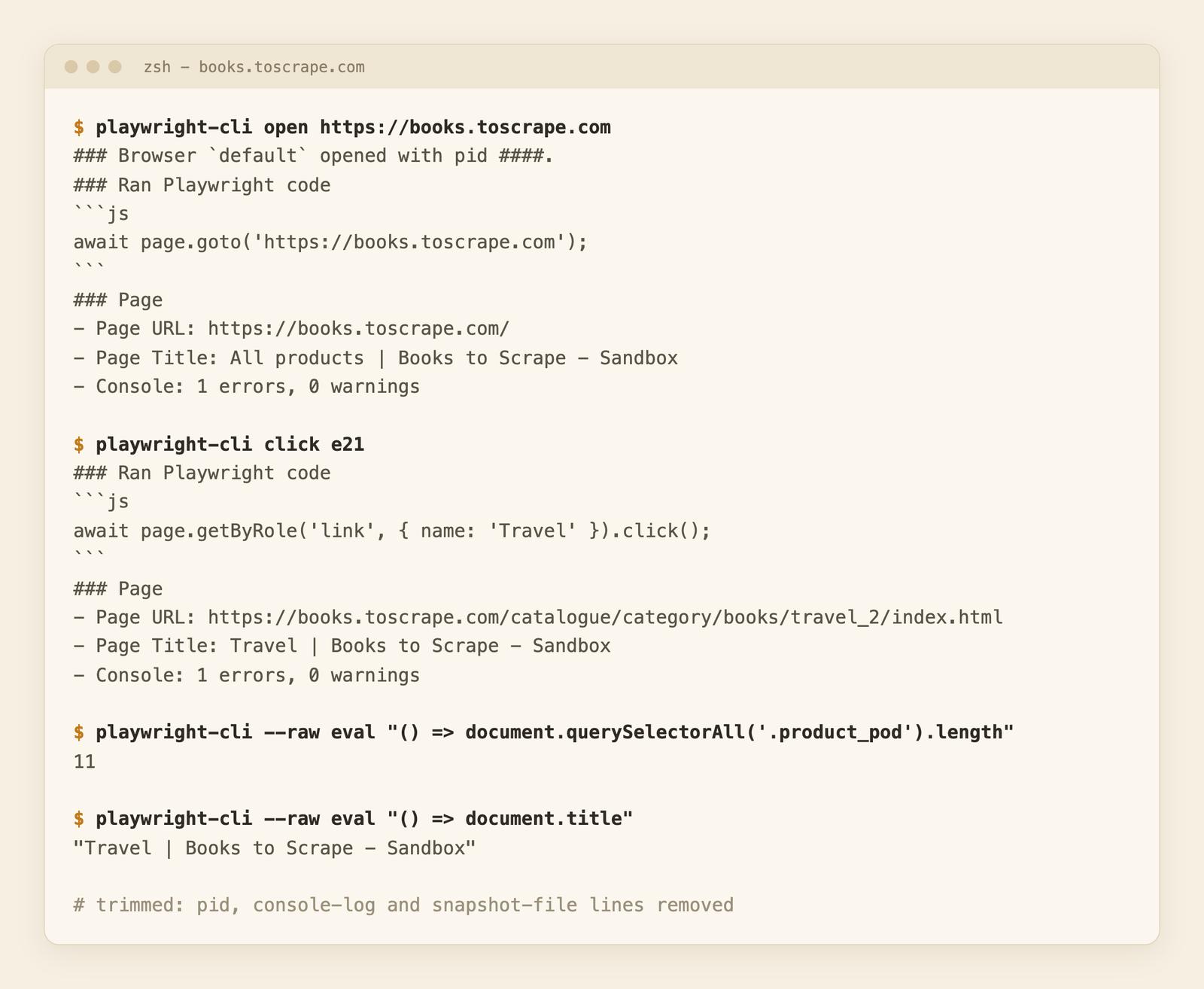
Real output, trimmed: I removed the pid, console-log and snapshot-file lines. The ref e21 (the Travel link) came from a snapshot I read earlier on the same page.
Notice that click prints the Playwright code it ran (getByRole('link', { name: 'Travel' }).click()). Useful if you later want to turn an agent's session into a test.
Open, navigate and read
- open [url] starts a browser. goto <url> navigates. go-back, go-forward, reload do what they say. close ends the session.
- snapshot prints the page as an accessibility tree, where every element has a ref like e21. snapshot [target] reads one element. find [text] searches the snapshot and returns matching nodes with context.
One detail that matters for tokens: open, click and the other action commands do not print the tree. They print the URL, the title, the console error count and a link to a snapshot file in .playwright-cli/. The agent decides if it wants to read that file. snapshot prints the tree inline.
Act on the page
- click, dblclick, hover, drag, check, uncheck, select, upload.
- fill <target> <text> sets an input. Add --submit to press Enter after.
- type <text> types into the focused element. press <key> sends a key.
A target is a ref (e8) or a selector. I ran this on Playwright's TodoMVC demo:
playwright-cli open https://demo.playwright.dev/todomvc
playwright-cli fill e8 "Buy milk"
playwright-cli press Enter
playwright-cli type "Write blog post"
playwright-cli press Enter
playwright-cli fill e8 "Third item" --submit
playwright-cli --raw eval "() => document.querySelectorAll('.todo-list li').length"
# 3
fill echoed getByRole('textbox', { name: 'What needs to be done?' }).fill('Buy milk'). type typed into the field that was already focused. With --submit, it echoed both the fill and a press('Enter').
Get data out
- eval <func> runs JavaScript on the page. Add --raw and you get only the result value, which is easy to parse. --json gives JSON.
- screenshot (add --filename=travel.png) and pdf save files.
- console, requests, request <n> and response-body <n> show console messages and network traffic.
On the Travel page, --raw eval with document.querySelectorAll('.product_pod').length returned 11. I did not run pdf, requests or response-body; I only read their help lines.
Sessions and state
The browser stays open between commands (a daemon process holds it), so later commands reuse the same page. You can run several at once:
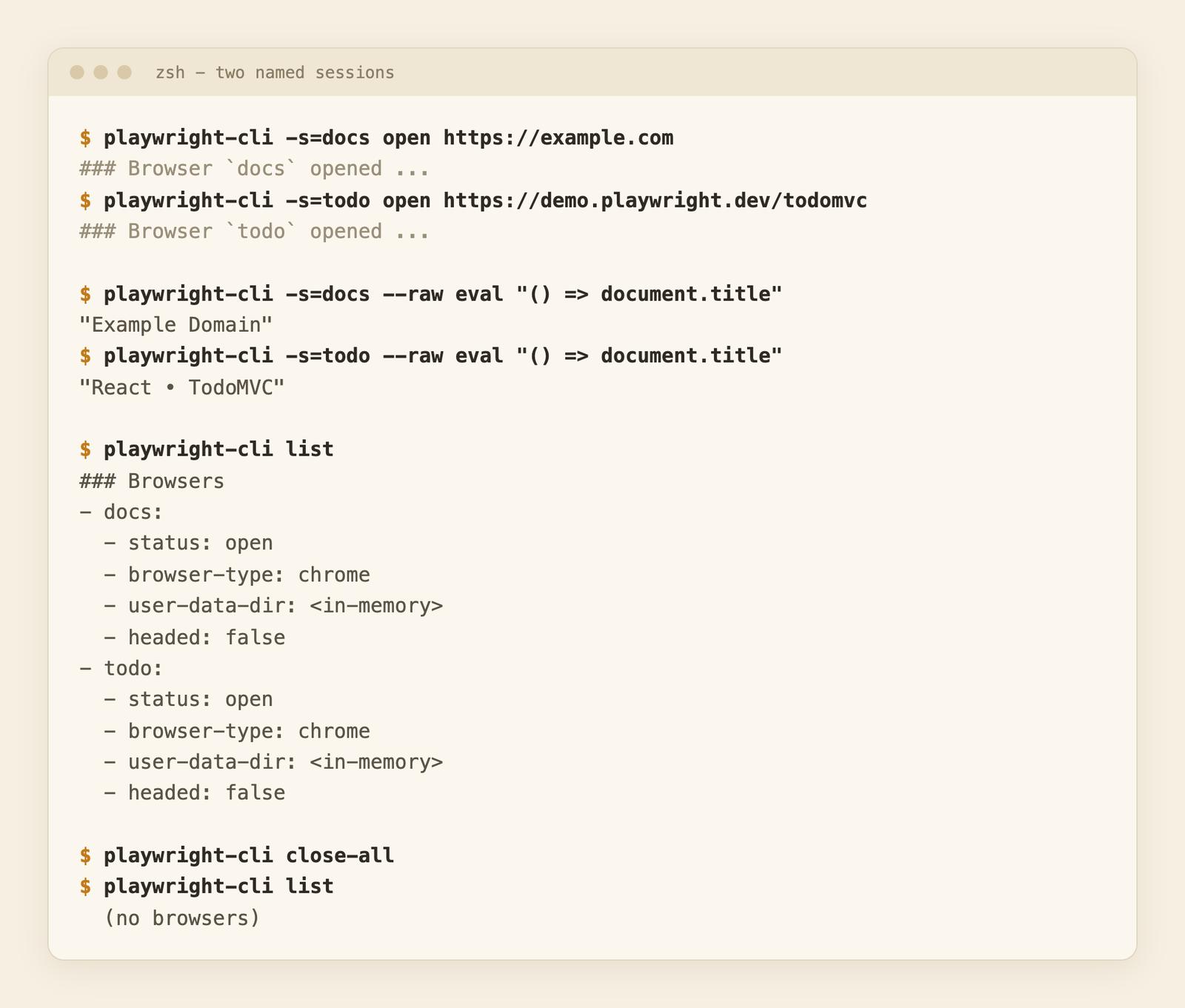
- -s=name picks a session. I opened docs and todo side by side. eval returned "Example Domain" in one and "React • TodoMVC" in the other.
- The env var PLAYWRIGHT_CLI_SESSION does the same. The docs use it as PLAYWRIGHT_CLI_SESSION=todo-app claude .. I tested it with docs and todo, and each pointed at its own page.
- list shows sessions, close-all closes them, and kill-all force-kills stale or zombie processes.
- open --persistent keeps a profile on disk (--profile <dir> picks the folder). I added a todo, closed the session, opened it again with --persistent, and the item was still there. Without the flag, the profile is <in-memory> and everything is gone on close.
- state-save and state-load store and restore cookies and local storage. There are also cookie-*, localstorage-* and sessionstorage-* commands. I did not run these.
- Headless sessions shut down after 1 hour of no commands. Headed ones never do (--idle-timeout changes it).
- show opens a dashboard of sessions. It needs a display, and I did not run it. Its help shows --port, --host, --annotate and --kill.
Debug and record
Listed in --help, and not run by me: tracing-start / tracing-stop, video-start / video-stop, recording-start / recording-stop (prints the actions as Playwright code), generate-locator, highlight, route (mock a request) and run-code.
Task to command
| I want to... | Command |
|---|---|
| Open a page | playwright-cli open <url> |
| See the page structure | playwright-cli snapshot |
| Find a word on the page | playwright-cli find "text" |
| Click or type | click e21, fill e8 "text" --submit |
| Get a value | --raw eval "() => ..." |
| Save a screenshot | screenshot --filename=x.png |
| Run two browsers | -s=name |
| Keep a login | open --persistent or state-save |
| Clean up | close-all, kill-all |
Use Playwright CLI with Claude Code (skills)
The docs recommend installing a skill, a folder of reference notes the agent loads when it needs them:
playwright-cli install --skills            # .claude/skills/playwright-cli (same as =claude)
playwright-cli install --skills=agents     # .agents/skills/playwright-cli
playwright-cli install --skills -g         # into your home directory
I ran install --skills in an empty folder. It reported Skill installed to .claude/skills/playwright-cli and wrote a SKILL.md (489 lines) plus 10 reference files: session management, storage state, request mocking, running code, tracing, video recording, test generation, running Playwright tests, element attributes and PR attachments. The skill's front matter allows Bash(playwright-cli:*), Bash(npx playwright:*) and Bash(npx --no-install playwright:*).
No skill? The skills page says you can point the agent at the CLI and let it find commands:
Test the "add todo" flow on https://demo.playwright.dev/todomvc using playwright-cli.
Check playwright-cli --help for available commands.
To give Claude Code one fixed session, start it as PLAYWRIGHT_CLI_SESSION=todo-app claude ..
The docs say skills work with Claude Code, GitHub Copilot, Cursor and any agent that loads local skills (.agents/skills is the other layout). I only ran the commands by hand and checked the files the installer writes. I did not run Claude Code, Cursor or Codex against it.
Playwright CLI vs Playwright MCP
My Playwright MCP post covers the MCP server. Here is the short comparison, based on the official table plus what I measured.
| Playwright CLI | Playwright MCP | |
|---|---|---|
| How it works | Agent runs shell commands | Model calls MCP tools |
| Tool schemas in context | No MCP tool definitions (the skill is loaded on demand) | Yes (25 tools by default, in my MCP post) |
| Snapshots | Written to a file, read on demand | Read through a tool call |
| Default mode | Headless | Headed |
| Setup | npm i -g @playwright/cli | JSON config in the client |
| Needs a shell | Yes | No |
| Best for | Coding agents in big codebases | Clients without a shell, exploratory loops |
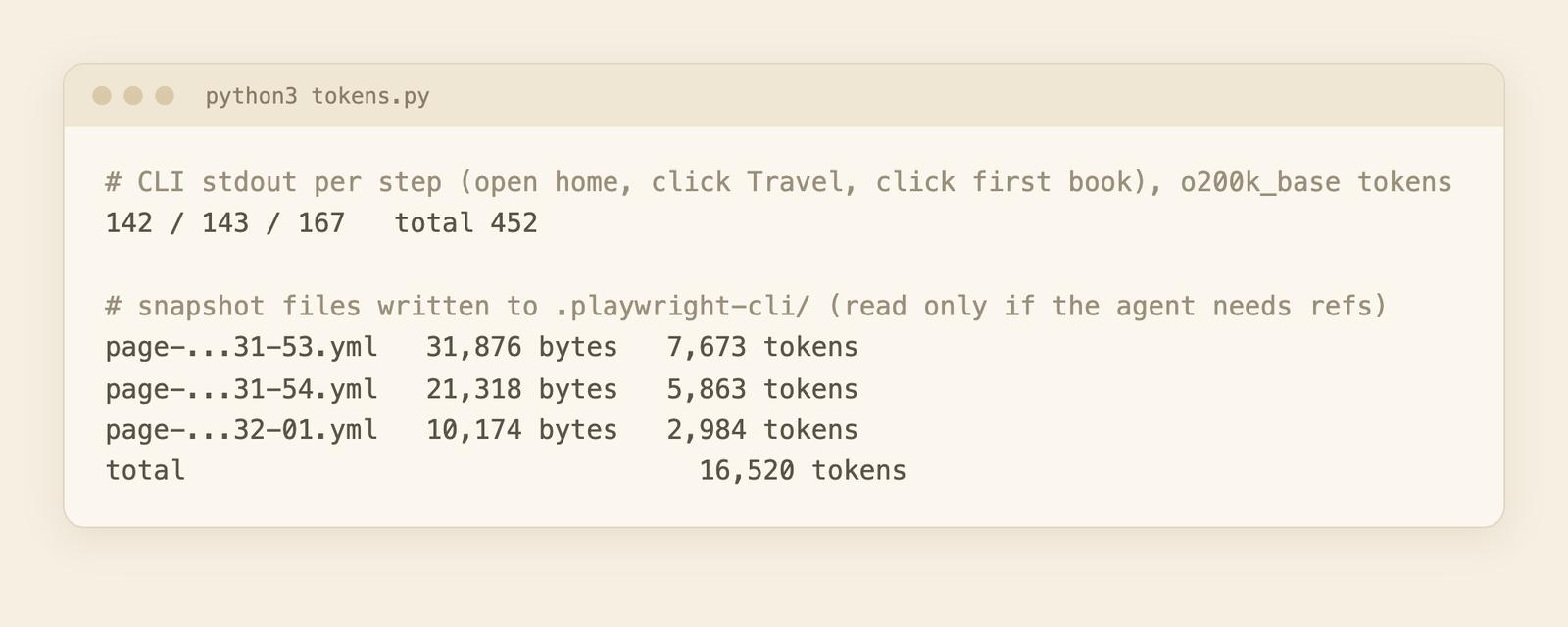
Measured. I ran a 3-step flow on books.toscrape.com: open the home page, click Travel, click the first book. Tokens counted with o200k_base (an OpenAI tokenizer, so approximate for Claude):
- CLI stdout per step: 142, 143 and 167 tokens. 452 in total.
- Snapshot files the CLI wrote: 7,673, 5,863 and 2,984 tokens (16,520 if the agent reads all three).
The MCP numbers are from my other post, a different run on the same three pages: 443 tokens of tool responses plus 17,630 tokens of snapshots.
The CLI doesn't make snapshots smaller: 16,520 against 17,630 is about the same. The saving is that the snapshot sits in a file, and the agent reads it only when it needs a ref. For a click on a link it already knows, it never reads it. If it reads every snapshot, you're back at MCP size. I didn't test answer quality.
Rule of thumb:
- CLI for coding agents with shell access, where context is precious.
- MCP for clients without a shell, or when you want a sandboxed tool loop.
- Neither for reading lots of pages. See the last section.
The test runner CLI (npx playwright)
This is the older meaning of the words. The test CLI docs have the full list. These are the ones people use:
| Command | What it does |
|---|---|
| npx playwright test | Run tests. Useful flags: -g "title", --project=chromium, --headed, --workers=1, --debug, --ui |
| npx playwright show-report | Open the last HTML report |
| npx playwright codegen [url] | Open a page and generate code from your clicks |
| npx playwright install [browser] | Download browsers. install-deps adds system libraries, uninstall removes them |
| npx playwright show-trace | Open the trace viewer |
| npx playwright merge-reports | Merge sharded blob reports into one |
| npx playwright clear-cache | Clear build and test caches |
| npx playwright screenshot <url> <file> | One-off screenshot (pdf works the same) |
npx playwright test -g "add a todo item" --project=chromium --headed
npx playwright codegen https://example.com
The docs say tests run headless by default. Not sure if headed or headless fits your case? See headless vs headed mode. I did not run the test runner on a real suite for this post; the table comes from the docs and from npx playwright --help in the same install.
If you want to script Playwright yourself instead of using a CLI, read web scraping with Playwright.
When you only need the page text
A browser CLI drives a page. If you're building an AI knowledge base or a support bot, you often don't need to drive anything. You need the text of many public pages, such as docs and help centers.
In my MCP post, the same three books.toscrape.com pages cost 3,237 tokens as markdown from webcr (my own product) against 17,630 as snapshots. It is a different tool for a different job. Still, running browsers yourself means owning memory, retries and blocks.
If your task is to drive a page step by step, use the CLI. If it only needs page content, a scrape API like WebCrawlerAPI takes a URL and returns the page content as markdown in one scrape request, or you can try the free URL to Markdown tool. Agents can also call it through the remote MCP server.
If the term headless is new, read what a headless browser is. To compare the libraries underneath, see Puppeteer vs Playwright.
FAQ
What is Playwright CLI for?
The agent CLI (playwright-cli) lets a coding agent drive a browser through shell commands. The test CLI (npx playwright) runs tests, generates code and shows reports.
Is Playwright CLI the same as npx playwright?
No. They share the Playwright package, and npx playwright cli calls the agent CLI, but they have different commands and users. See the comparison table.
How do I install playwright-cli?
npm install -g @playwright/cli@latest, then playwright-cli --version. It needs Node 20 or newer per the docs. Details in the install section.
How do I use Playwright CLI with Claude Code?
Run playwright-cli install --skills in your project. It writes .claude/skills/playwright-cli. Or just tell the agent to run playwright-cli --help. See the Claude Code section.
Playwright CLI or MCP: which one?
CLI if your agent has a shell and you care about context size. MCP if it has no shell. Details above.
Is Playwright open source?
Yes. The @playwright/cli package and the playwright package both declare Apache-2.0 in their package.json.
How do I fix "playwright: command not found"?
The agent CLI is playwright-cli. For the test runner, use npx playwright. The glossary page has the rest.
Does Playwright CLI run headless?
The agent CLI is headless by default (my list output showed headed: false). Add --headed to open to see the window.
Which one to pick
If you're deciding between Playwright and Selenium for the test runner side, I compared them in Playwright vs Selenium.
If an agent will use the browser, install @playwright/cli, add the skill and watch the first run with --headed. If you write tests, npx playwright is already in your project. And if you just need page text, skip the browser. That is the usual case for teams building an AI knowledge base or a support bot: they want clean text from many public pages, not a browser session. For the MCP side, see the Playwright MCP setup guide.
