
Pick Playwright for a new project. Keep Selenium if you already have a suite, need a language or a grid Playwright doesn't cover, or test on real Safari and real phones. That's my short answer to Selenium vs Playwright. I measured the rest.
Speed was close, and flaky runs came from how the script waits, not from the brand. With a proper wait, Selenium failed 0 times in 300 runs, same as Playwright.
Last updated: October 25, 2026. I run WebCrawlerAPI, which gets one short section near the end. I ran both tools in Python on one MacBook (Apple M2 Max, 32 GB): Playwright 1.64.1, Selenium 4.51.0, Chrome 156.0.8078.47, chromedriver 156.0.8078.47. Pages were a local test server plus two public scraping sandboxes at tiny volume. I did not run Firefox, WebKit, Safari, Java, Node, Selenium Grid or a CI machine.

Playwright vs Selenium at a glance
| Playwright | Selenium | |
|---|---|---|
| Languages | JavaScript/TypeScript, Python, Java, .NET | Java, Python, C#, Ruby, JavaScript, Kotlin |
| Browsers | Chromium, Firefox, WebKit | Chrome, Firefox, Edge, Safari (via safaridriver, not tested) |
| Waiting | Auto-waits before actions, retrying assertions | You write waits yourself |
| Install | pip install playwright + playwright install | pip install selenium, Selenium Manager fetches the driver |
| Parallel runs | Built-in workers in the test runner | Selenium Grid |
| Mobile | Emulation for Chrome (Android) and Mobile Safari | Real devices via Appium (not tested) |
| Debugging | Trace viewer, codegen | Bring your own tooling |
| License | Apache-2.0 | Apache-2.0 |
Sources: the Playwright docs, the Selenium docs, and both license files on GitHub, all read October 25, 2026. Selenium is moving from classic WebDriver to the W3C BiDi protocol, which you switch on with an option.
If you already run one of them, that usually decides it. The numbers below show how small the gap is.
Cypress and Puppeteer come up in the "Selenium vs Playwright vs Puppeteer" section further down. I didn't test Cypress at all.
How I tested them
- Same language. Both tools ran from Python, so the language can't skew the result.
- Same Chrome. Playwright with channel="chrome" and Selenium with --headless=new both drove the Chrome 156 installed on the laptop. I also ran Playwright's default headless shell (pw-shell) as a separate row.
- Fresh process per run. Peak memory is the RSS of the worker plus every child process (Chrome, chromedriver), sampled every 20 ms.
- Local test server on 127.0.0.1 for speed and flakiness: zero load on anyone else's site.
- Two public sandboxes for the scraping check, books.toscrape.com and quotes.toscrape.com/js. 12 page loads in total, 2 seconds apart, honest User-Agent with a contact URL.
- One laptop, not CI. Treat the numbers as a comparison, not as a promise for your hardware. I report medians and min-max, nothing fancier.
The whole harness, snippets and raw results are in the post folder (benchmark/, snippets/), so you can rerun it. Selenium Manager downloaded chromedriver on the first run, and I kept that download out of the timings.
Speed: cold start, per-page time and memory
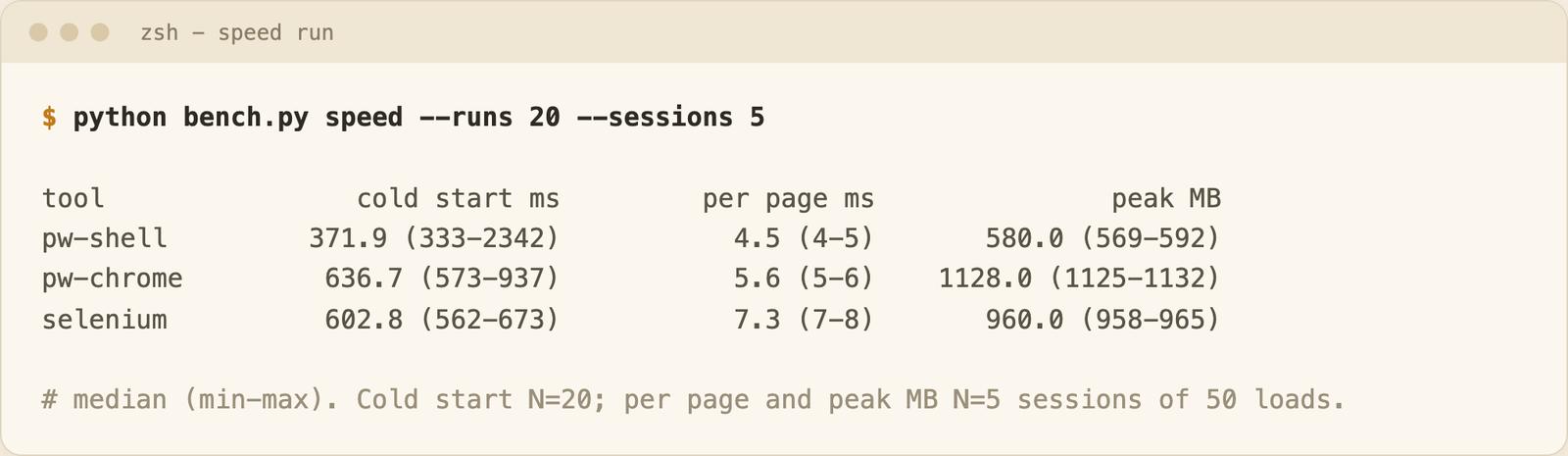
| Setup | Cold start (ms, N=20) | Per page (ms, N=5 sessions x 50 loads) | Peak memory (MB, N=5) |
|---|---|---|---|
| Playwright, headless shell | 372 (333-2342) | 4.5 | 580 |
| Playwright, Chrome | 637 (573-937) | 5.6 | 1128 |
| Selenium, Chrome | 603 (562-673) | 7.3 | 960 |
Cold start is the time from process start (imports included) until the first page finished loading. Per-page is the median of 5 sessions' medians (50 loads each) of a 200-item static page on localhost, so the network stays out of it.
What the table shows:
- On the same Chrome, startup is a tie. 637 ms vs 603 ms. That gap is too small to pick a tool on.
- Per page, Playwright is a bit faster (5.6 vs 7.3 ms). On a real site a page load takes hundreds of milliseconds, so a 2 ms difference vanishes. Even at thousands of pages, the network and the target site set your throughput, not that gap.
- Memory depends on the browser build more than on the library. Playwright's headless shell used 580 MB. On the same Chrome, Playwright used more memory than Selenium: 1128 MB vs 960 MB.
The headless shell vs Chrome comparison mixes two browser builds, so it says little about the libraries themselves. In my Python scraping libraries roundup Selenium used 963 MB and Playwright 536 MB. This run is close to that (960 and 580 MB), but the extra row shows the gap came from full Chrome vs the slim shell, not from Selenium itself. RSS sums can double count shared pages, N=5, one laptop. One shell cold start took 2342 ms (an outlier I kept in the range).
Install is where you feel the difference first:
# Playwright (Python)
pip install playwright
playwright install chromium          # downloads Chromium + headless shell (my Chrome rows used the system Chrome instead)

# Selenium (Python)
pip install selenium                 # Selenium Manager fetches chromedriver on first run
Selenium looked simpler here because it reuses the Chrome you already have. Playwright downloads its own browsers, which is also why its versions don't drift from your system Chrome. If the headless-versus-headed difference matters for your setup, I wrote it up in the glossary: Playwright headless vs headed mode.
Flakiness: it's the waits, not the brand
Everyone says Playwright is less flaky. I wanted to see it, so I tested it.
My test page renders a table with JavaScript after a random delay (100-1500 ms), shows a "Load more" button, and appends 20 more rows after a second random delay. The task: open the page, click the button, read 40 rows. 300 runs per variant, same seeded delays for every variant.
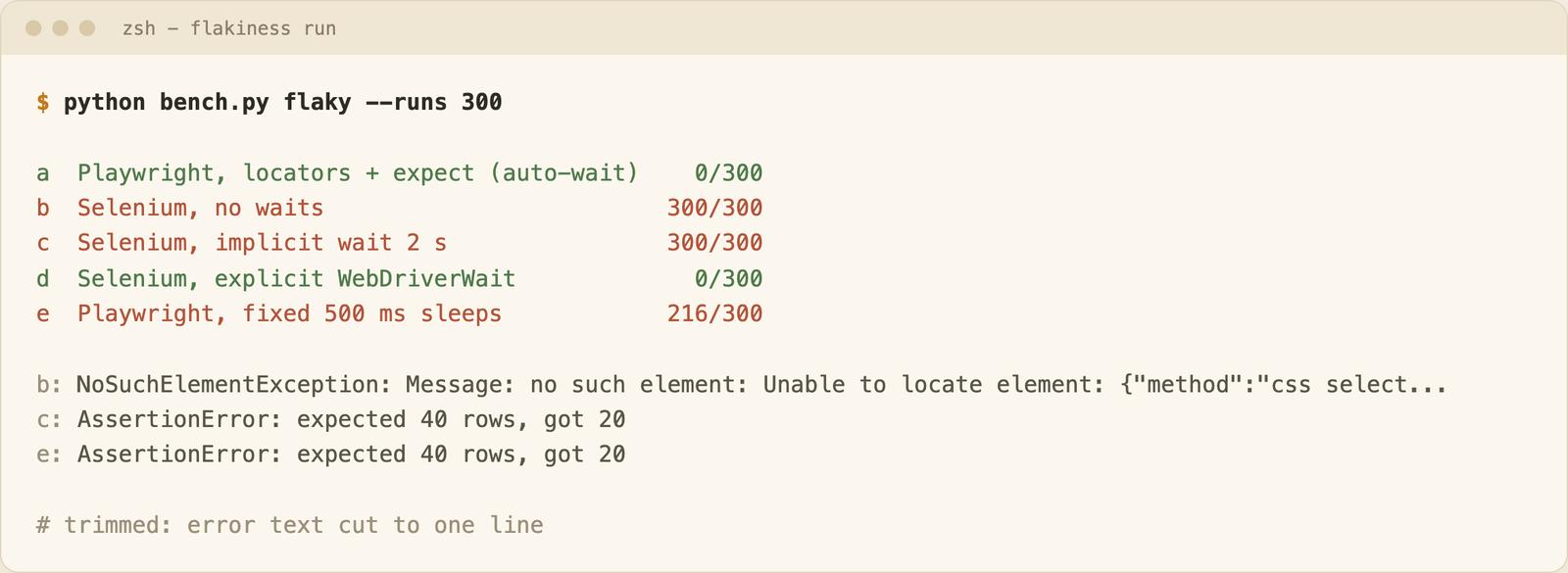
| Variant | Failures / 300 | Error |
|---|---|---|
| Playwright, locators + expect | 0 | none |
| Selenium, explicit WebDriverWait | 0 | none |
| Selenium, no waits (the beginner script) | 300 | NoSuchElementException on the button |
| Selenium, implicit wait 2 s | 300 | expected 40 rows, got 20 |
| Playwright, fixed 500 ms sleeps | 216 | expected 40 rows, got 20 |
These are deterministic failures, not random flakes. I picked delays that expose a missing wait. Playwright used a fresh context per run, Selenium one driver session.
The failing variants didn't fail "sometimes": they failed every time or most of the time, because my delays are long on purpose. The implicit wait fails because it only waits until at least one element exists. After the click, the first 20 rows already existed, so Selenium returned them right away.
The working versions, copied from the harness:
# Playwright
def scrape_playwright(page, url):
    page.goto(url)
    page.locator("#more").click()          # waits for the button to exist and be clickable
    expect(page.locator("tbody tr")).to_have_count(40)   # retries until 40 rows
    return page.locator("tbody tr").all_inner_texts()
# Selenium
def scrape_selenium(driver, url):
    driver.get(url)
    wait = WebDriverWait(driver, 5)
    wait.until(EC.element_to_be_clickable((By.ID, "more"))).click()
    wait.until(lambda d: len(d.find_elements(By.CSS_SELECTOR, "tbody tr")) == 40)
    return [r.text for r in driver.find_elements(By.CSS_SELECTOR, "tbody tr")]
Playwright waits for you by default. In Selenium you write the wait yourself, and once I wrote the right one it was just as reliable: 0 failures out of 300 for both. The difference is that Playwright gives you the right behavior without asking.
The Playwright fixed-sleep variant is the same mistake in a different tool. If you use wait_for_timeout, you'll get the same failures. The fixes are in the glossary: overusing waitForTimeout, networkidle misuse and flaky isVisible checks.
What I didn't test: slow or lossy networks, real sites that change under you, and parallel runs. Flaky suites in real life often come from those.
Scraping with each
I scraped 20 books (title and price) from books.toscrape.com and 10 quotes from the JavaScript version of quotes.toscrape.com. Each run is a fresh process, so the time includes launching the browser. N=3 per tool and site, to keep the load on the sandboxes tiny.
| Site | Playwright (Chrome) | Selenium (Chrome) | Items |
|---|---|---|---|
| books.toscrape.com | 1541 ms | 1572 ms | 20 / 20 |
| quotes.toscrape.com/js | 1489 ms | 1512 ms | 10 / 10 |
Median wall time, both tools returned the same first item. That's a tie, with N=3, so don't read more into it.
Code size is where I saw a difference: 13 non-blank lines for Playwright against 19 for Selenium for the two functions (the extra Selenium lines are mostly imports and the explicit wait). Both snippets are in snippets/.
Both tools run a full browser, so both pay the memory and startup cost above. If the data is already in the HTML, an HTTP client is much cheaper. For the full Playwright tutorial see web scraping with Playwright, and for the wider list of tools best Python web scraping libraries. If the page needs scripts to run before the data shows up, the JavaScript rendering guide covers the options.
If all you need is page content for an AI knowledge base, a web scraping API skips the browser setup entirely.
Neither tool gets you past bot detection by itself. That's a separate problem.
When Selenium is still the better choice
- You have a big existing suite. Rewriting 2,000 working tests to save a few milliseconds is a bad trade.
- Your team writes Ruby or Kotlin. Selenium's docs list both. Playwright's official languages are JavaScript/TypeScript, Python, Java and .NET.
- You need Selenium Grid or a cloud grid built around the WebDriver protocol. I didn't test any grid.
- You need real Safari or real devices. Selenium goes through safaridriver and Appium. Playwright offers WebKit and device emulation, which isn't the same thing. I didn't run either.
- Hiring and community. Selenium has been around longer, so there's more old advice to find. Some of it is stale, though.
When Playwright is the better choice
- New project, no legacy. Auto-wait removes the most common cause of flaky tests: you can see it in the table above.
- One API for Chromium, Firefox and WebKit. I only ran Chrome here.
- Better debugging tools. The trace viewer and codegen come with the package.
- AI agents. If an agent should drive the browser, Playwright has the tooling. I covered it in Playwright MCP and Playwright CLI.
Selenium vs Playwright vs Puppeteer
Puppeteer is a Node library that started Chrome-first, and it also supports Firefox through WebDriver BiDi. Its API looks closer to Playwright than to Selenium. It is maintained by the Chrome Browser Automation team and built around the DevTools protocol. I benchmarked it against Playwright in Puppeteer vs Playwright. Cypress is a JavaScript test framework, and I left it out too.
| Languages | Browsers | Waiting | |
|---|---|---|---|
| Selenium | Many | Chrome, Firefox, Edge, Safari | Manual |
| Playwright | JS/TS, Python, Java, .NET | Chromium, Firefox, WebKit | Auto |
| Puppeteer | JavaScript/TypeScript | Chrome, Firefox (via WebDriver BiDi) | Locators auto-wait, plain APIs don't (not tested) |
My pick: Puppeteer if you are Node-only and Chrome-only, otherwise Playwright. Selenium stays the choice when the constraints in the section above apply.
When you only need page content
If your goal is page text for an AI knowledge base or AI search, driving any browser is more machinery than you need. Browser tools make sense when you have to click, log in or fill forms. For plain reading of pages, a web scraping API returns markdown or cleaned markdown (see the scrape endpoint docs). The catch: it doesn't run custom click-and-login flows, so for those you still want Playwright or Selenium. There's also a free URL to markdown tool if you want to try it first.
For the Selenium side in depth, see web scraping with Selenium in Python. If you are new to the idea, start with what a headless browser is.
FAQ
Selenium vs Playwright: which is faster?
Slightly, on the same Chrome. Per-page time was 5.6 ms vs 7.3 ms, and cold start was 637 ms vs 603 ms (Selenium was faster there). On real sites the network time is much bigger than either number.
Selenium or Playwright for web scraping?
Playwright for a new scraper, mostly for auto-wait and shorter code (13 vs 19 lines in my test). An existing Selenium scraper isn't worth rewriting. See the Playwright scraping guide and the library roundup.
Is Playwright more reliable than Selenium?
By default, yes, because it waits for you. With explicit waits, both had 0 failures in 300 runs on my test. Sleeps break either tool.
Does Selenium use Python?
Yes. The official docs show Python next to Java, C#, Ruby, JavaScript and Kotlin.
Is Playwright free or paid?
Free. The license file in the Playwright repo is Apache-2.0, and Selenium's is too.
Can I use XPath in Playwright?
Yes, page.locator("xpath=//button") works. The docs recommend role and text locators because XPath breaks when the DOM changes.
What's the difference between Selenium, Playwright and Cypress?
Selenium and Playwright drive real browsers from many languages. Cypress is a JavaScript test framework I haven't tested. The table above covers Selenium and Playwright.
Conclusion
If you start fresh, take Playwright and let its waits do the work. If you have a Selenium suite, keep it and write explicit waits. For reading pages into an AI knowledge base, skip both and use a web scraping API. For the agent side of Playwright, start with Playwright MCP.
