

Last updated: October 18, 2026. I run WebCrawlerAPI, which is mentioned as one option below. Where it loses, I say so.
Playwright scrapes by driving a real browser. It can read pages that plain HTTP cannot, because the scripts run and the data loads before you read anything. The price is speed, memory and operations. A Playwright scraper is a small browser fleet that you have to keep alive.
This guide covers Playwright web scraping in Python and Node.js and points each problem (waiting, selectors, lazy loading, memory, blocks, Docker) to a fix. I ran the experiments for this post in October 2026 on practice sites built for scraping: waiting strategies, infinite scroll, resource blocking, memory growth, what a headless browser looks like to a page, and Playwright against plain HTTP and an API. No protected or anti-bot sites were tested, and nothing here is a recipe for getting around one.
New to scraping? Start with Web Scraping with Python or Web Scraping with JavaScript and Node.js. This post is the Playwright deep dive that comes after them.
Is Playwright a Good Choice for Web Scraping?
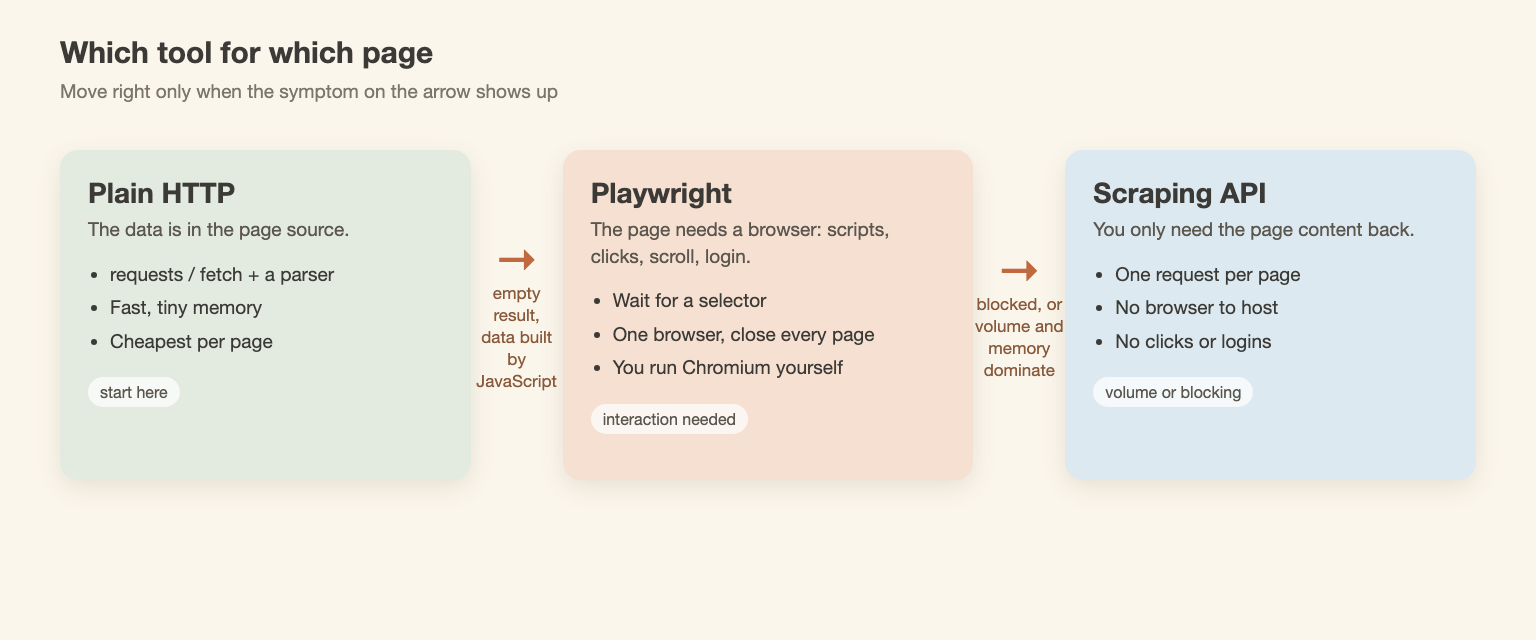
It is a good choice when the page needs a browser. It is a bad choice when it does not.
Use Playwright when:
- The data is written into the page by JavaScript (plain requests returns an empty list).
- You must click, type, log in, scroll or open a menu before the data appears.
- You need a screenshot or a PDF of the rendered page.
Skip Playwright when:
- The data is already in the HTML source. A plain HTTP request is faster and uses a fraction of the memory (numbers below).
- You need many thousands of pages and have no interaction. Running browsers at volume gets expensive and fragile.
Playwright is often compared with Selenium and Puppeteer. A short table, from the official docs, not from a benchmark:
| Playwright | Puppeteer | Selenium | |
|---|---|---|---|
| Languages | Python, Node.js, Java, .NET | Node.js | Many (Python, Java, C#, JS and more) |
| Browsers | Chromium, Firefox, WebKit | Chrome, Firefox | Chrome, Firefox, Edge, Safari |
| Waiting | Auto-waits before actions | Mostly manual waits | Explicit waits you write yourself |
| Install | One package plus playwright install | One package, downloads Chrome | Driver and browser setup |
For scraping, the practical gains are auto-waiting and the same API in Python and Node. The rest depends on your language and what your team already runs. More background is in the JavaScript rendering guide.
Install Playwright and Scrape a Page (Python and Node)
Python 3.8 or newer (I used 3.11):
pip install playwright
playwright install chromium
Node.js 22 or newer:
npm i playwright
npx playwright install chromium
On a Linux server, add --with-deps (playwright install --with-deps chromium) so the OS libraries come along.
The same job in both languages: open the JavaScript version of the practice site, wait for the quotes, and count them.
from playwright.sync_api import sync_playwright

URL = "https://quotes.toscrape.com/js/"

with sync_playwright() as p:
    browser = p.chromium.launch(headless=True)
    page = browser.new_page(user_agent="playwright-guide/1.0 (me@example.com)")
    page.goto(URL)
    page.wait_for_selector("div.quote")  # wait for the data, not for time
    quotes = page.locator("div.quote")
    print("quotes on page:", quotes.count())
    print("first author:", quotes.first.locator("small.author").inner_text())
    browser.close()
import { chromium } from "playwright";

const URL = "https://quotes.toscrape.com/js/";

const browser = await chromium.launch({ headless: true });
const page = await browser.newPage({
  userAgent: "playwright-guide/1.0 (me@example.com)",
});
await page.goto(URL);
await page.waitForSelector("div.quote"); // wait for the data, not for time
const quotes = page.locator("div.quote");
console.log("quotes on page:", await quotes.count());
console.log("first author:", await quotes.first().locator("small.author").innerText());
await browser.close();
Both print 10 quotes and "Albert Einstein":
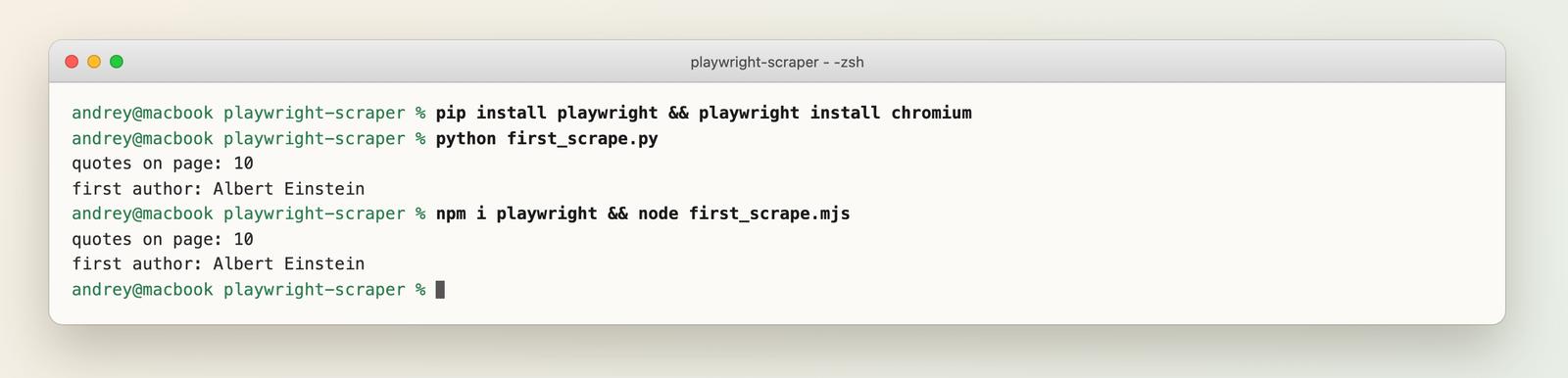
If the install fails, these pages cover the usual causes: Executable doesn't exist and Chromium install on Ubuntu 26.04.
Always send an honest User-Agent with a contact address, and keep the request rate low. That applies to every example here.
Wait for the Content, Not for Time
Playwright auto-waits before actions like click(). It does not know when your data has arrived. After page.goto() returns, the page has fired its load event, but a script may still be fetching or building the content.
The practice site quotes.toscrape.com/js-delayed/ writes its quotes 10 seconds after the page loads, which is a harsh version of a slow API. I tried five ways to wait, 10 runs each, and counted how many runs found all 10 quotes:
| Strategy | Runs with 10 quotes | Median time |
|---|---|---|
| No wait (load event) | 0/10 | 0.8 s |
| sleep 2 seconds | 0/10 | 2.8 s |
| wait_until="networkidle" | 0/10 | 1.3 s |
| sleep 12 seconds | 10/10 | 12.9 s |
| wait_for_selector("div.quote") | 10/10 | 11.2 s |
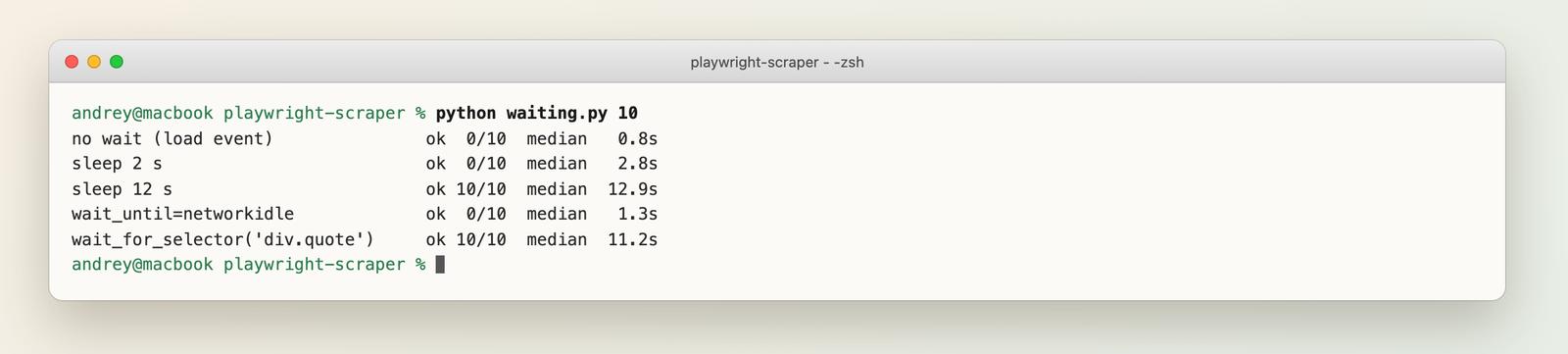
What this shows:
- A short sleep is a guess, and it was wrong. A long sleep works but costs more than waiting for the element, and it breaks the day the site gets slower.
- networkidle did not help here. No requests ran during the 10-second delay, so the page looked idle after about half a second and Playwright moved on. The Playwright docs themselves mark networkidle as DISCOURAGED. See networkidle misuse.
- The selector wait returned as soon as the data existed, the earliest point you could read it.
page.goto(URL)
page.wait_for_selector("div.quote", timeout=30_000)  # fails loudly if the data never comes
A failed selector wait raises a timeout, which is what you want. A silent empty result is much harder to notice. If your waits misbehave, these are the usual suspects: action timeouts, execution context was destroyed, frame was detached, click timeouts on hidden elements, and net::ERR_ABORTED on goto.
Pick Selectors and Extract Data
You have two options for reading data once the page is ready.
Locators. page.locator("div.quote") queries the live page. Good for clicking and for small reads. Every .inner_text() is a round trip to the browser.
Parse the HTML yourself. Wait for the content, call page.content() once, close the browser, and parse the string with BeautifulSoup (Python) or Cheerio (Node). Fewer round trips, and you can test the parser on a saved file without a browser.
from bs4 import BeautifulSoup
from playwright.sync_api import sync_playwright

with sync_playwright() as p:
    browser = p.chromium.launch()
    page = browser.new_page()
    page.goto("https://quotes.toscrape.com/js/")
    page.wait_for_selector("div.quote")
    html = page.content()  # one round trip, then the browser is not needed
    browser.close()

soup = BeautifulSoup(html, "lxml")
rows = [
    {
        "text": q.select_one("span.text").get_text(strip=True),
        "author": q.select_one("small.author").get_text(strip=True),
        "tags": [t.get_text(strip=True) for t in q.select("a.tag")],
    }
    for q in soup.select("div.quote")
]
print(len(rows), "quotes parsed")
print(rows[0]["author"], rows[0]["tags"])
Output: 10 quotes parsed and Albert Einstein ['change', 'deep-thoughts', 'thinking', 'world'].
I prefer the second style for scrapers and the first for flows with clicks. Three selector problems come up again and again: a locator that matches several elements (strict mode violation), content inside a shadow root (shadow DOM selectors), and generated class names that change every deploy (CSS class breakage). For choosing a parser see how to parse HTML in Python, and for XPath see what is XPath.
Scrape Infinite Scroll and Lazy-Loaded Pages
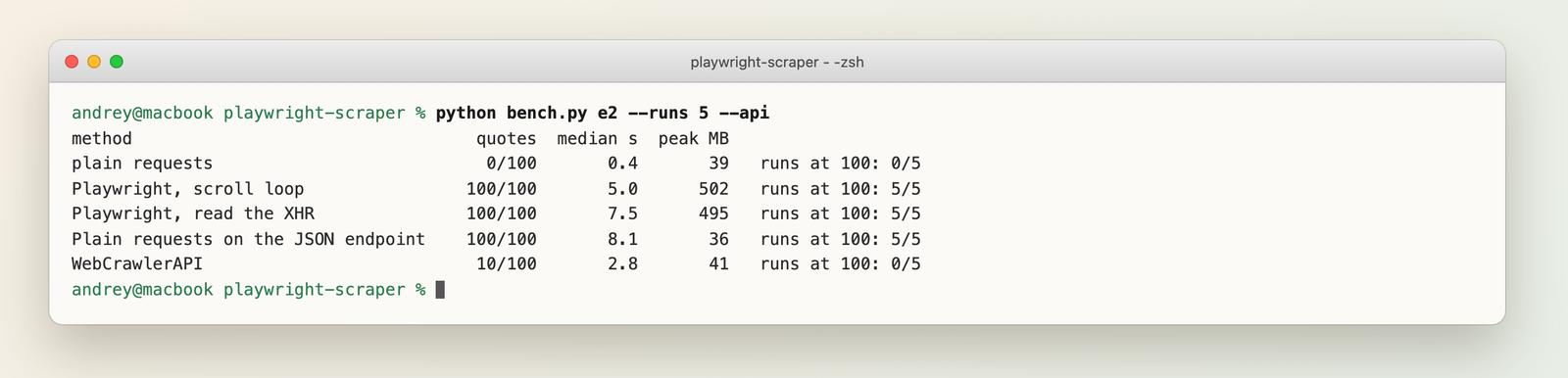
On quotes.toscrape.com/scroll, 10 quotes load first, and 10 more load each time you reach the bottom, up to 100. I compared five ways to get all of them (5 runs each, fresh process per run):
| Method | Quotes found | Median time | Peak memory |
|---|---|---|---|
| Plain requests | 0 of 100 | 0.4 s | 39 MB |
| Playwright, scroll until the count stops growing | 100 of 100 | 5.0 s | 502 MB |
| Playwright, read the page's own JSON responses | 100 of 100 | 7.5 s | 495 MB |
| Plain requests on that JSON endpoint | 100 of 100 | 8.1 s | 36 MB |
| WebCrawlerAPI /v2/scrape (one call) | 10 of 100 | 2.8 s | 41 MB |
The scroll loop:
import time

from playwright.sync_api import sync_playwright

with sync_playwright() as p:
    browser = p.chromium.launch()
    page = browser.new_page(user_agent="playwright-guide/1.0 (me@example.com)")
    page.goto("https://quotes.toscrape.com/scroll")
    page.wait_for_selector("div.quote")
    count, stable = 0, 0
    deadline = time.time() + 60
    while stable < 3 and time.time() < deadline:
        page.mouse.wheel(0, 20000)
        page.wait_for_timeout(600)  # give the next request a moment
        now = page.locator("div.quote").count()
        stable = stable + 1 if now == count else 0
        count = now
    print("quotes found:", count)
    browser.close()
The loop stops when the count has not grown for three checks in a row, with a hard 60-second deadline so it cannot spin forever. The other Playwright variant listens for the JSON the page requests:
quotes = []
# Collect every /api/quotes response the page makes while it scrolls itself
page.on("response", lambda r: quotes.extend(r.json()["quotes"]) if "/api/quotes" in r.url else None)
page.goto("https://quotes.toscrape.com/scroll")
page.wait_for_selector("div.quote")
for _ in range(12):
    page.mouse.wheel(0, 20000)
    page.wait_for_timeout(500)
print("quotes found:", len(quotes))
Reading the responses gives clean JSON instead of HTML. It was slower here only because my 12 fixed scroll steps pause half a second each. The fourth row is the one that matters. Once the Network tab in DevTools showed me the /api/quotes endpoint, a browser was not needed at all: ten plain requests returned the same 100 quotes at 36 MB. (That row includes a half-second pause between requests, to stay polite.) Always check for a JSON endpoint before you automate scrolling.
About the API row: a single /v2/scrape call returned the first 10 quotes and no more. It does not scroll for you, so a page that loads more content on scroll is a Playwright job (or a JSON-endpoint job). I ran it exactly like the others, and that is what it returned.
Make It Faster: Block Resources and Reuse the Browser
Many scrapers do not need images, fonts or stylesheets. Playwright can abort those requests:
BLOCKED = {"image", "font", "stylesheet"}
page.route("**/*", lambda r: r.abort() if r.request.resource_type in BLOCKED else r.continue_())
I scraped 10 catalogue pages of books.toscrape.com (an image-heavy practice shop) with and without blocking, 5 runs each. Both found all 200 titles.
| Body bytes loaded | Peak memory | Median time | |
|---|---|---|---|
| No blocking | 911 KB | 565 MB | 15.7 s |
| Block image, font, CSS | 564 KB | 497 MB | 15.5 s |
That is about 38% fewer bytes and roughly 70 MB less memory, with no real time gain. Ten of those 15 seconds are my one-second pauses between pages, so the pace was set by my delays, not the browser. On a light site blocking is a small win. It matters more when pages weigh megabytes or you pay for proxy bandwidth. Do not block stylesheets if your selectors depend on visibility or layout.
The other speed rule: start one browser and reuse it. Launching Chromium is the expensive part. Open and close pages (or contexts) inside one browser instead of launching a new browser per URL. The memory section shows the catch.
Why Playwright Runs Out of Memory
A browser holds on to whatever you leave open. To see how fast, I loaded one static page 100 times in a fresh process for each of three habits and sampled memory (worker plus Chromium) at 25, 50 and 100 loads:
- closed: one browser, a new page per load, closed after use
- context: one browser, a new context per load, closed after use
- leak: one browser, pages never closed
closed   load   1:     330 MB
closed   load  25:     317 MB
closed   load  50:     339 MB
closed   load  75:     343 MB
closed   load 100:     343 MB
context  load   1:     323 MB
context  load  25:     295 MB
context  load  50:     316 MB
context  load  75:     287 MB
context  load 100:     297 MB
leak     load   1:     421 MB
leak     load  25:    2253 MB
leak     load  50:    4506 MB
leak     load  74: over 6 GB, stopped
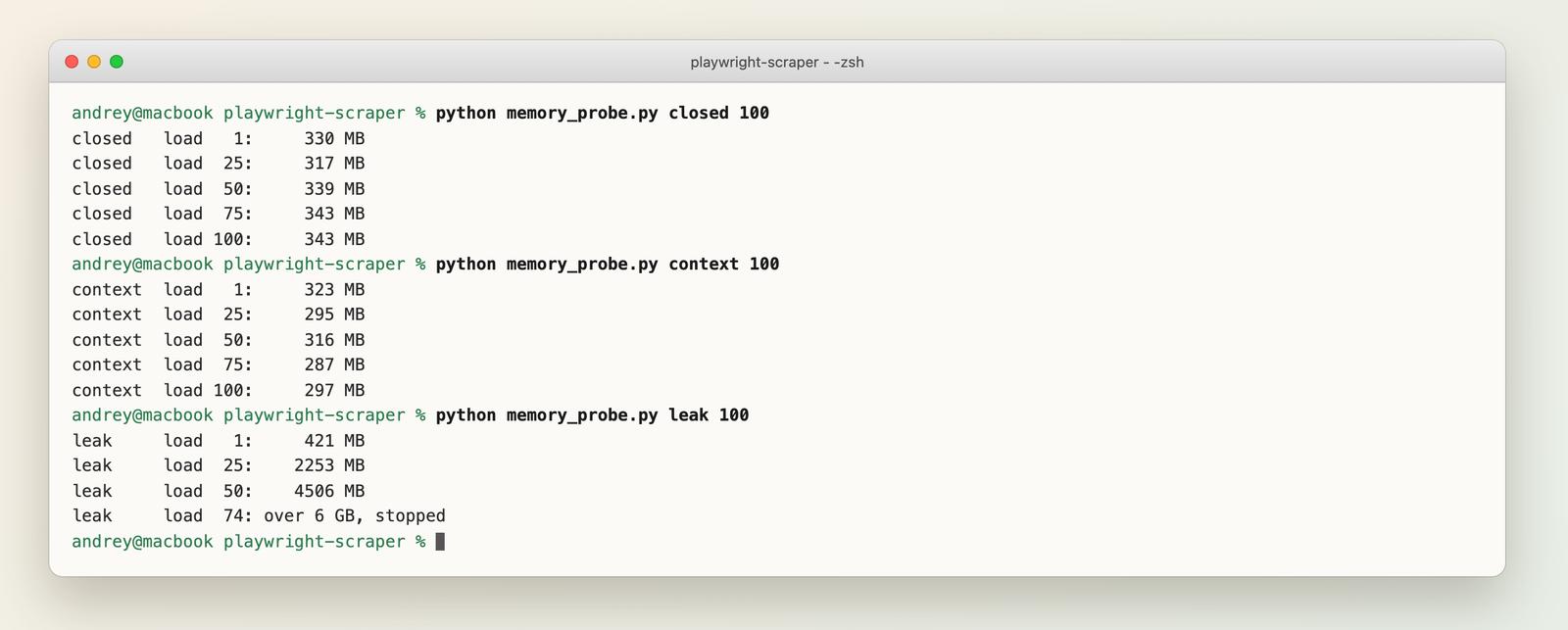
I stopped the leaking run at 74 loads with a safety limit of 6 GB. The numbers:
- Closing pages kept memory flat at roughly 300 to 340 MB. No growth showed up over 100 loads, in either the page or the context variant.
- Never closing pages grew about 80 MB per page on this machine and page. The page was light and static, so real pages can be heavier.
- This was one run each, on a Mac. Treat the exact megabytes as a rough guide, not a spec.
For capacity planning I start with about 300 MB for the browser plus about 80 MB per open page, then measure my own target pages. The Python guide ran 10 tabs at once on real JavaScript pages and measured 1.3 GB, so the per-tab figure is not fixed.
Rules that follow from this:
- Close every page, in a finally block if needed.
- Cap the number of pages open at once. Do not gather 500 URLs.
- Restart the browser every few hundred pages in long jobs.
In a Docker container, the shared-memory limit can also crash Chromium (see the Docker section). The fix pages: worker memory crashes, target page, context or browser has been closed, target closed crash and random browser crashes in CI.
Getting Blocked: What Headless Playwright Looks Like
Websites see what a browser sends and what the page can read about it. I printed the visible values in three launch modes against httpbin.org/headers, which just echoes your request:
| Mode | User-Agent says | navigator.webdriver | Plugins |
|---|---|---|---|
| Headless (default) | HeadlessChrome/156.0.8078.4 | true | 0 |
| Headless, channel="chromium" | HeadlessChrome/156.0.0.0 | true | 5 |
| Headed | Chrome/156.0.0.0 | true | 5 |
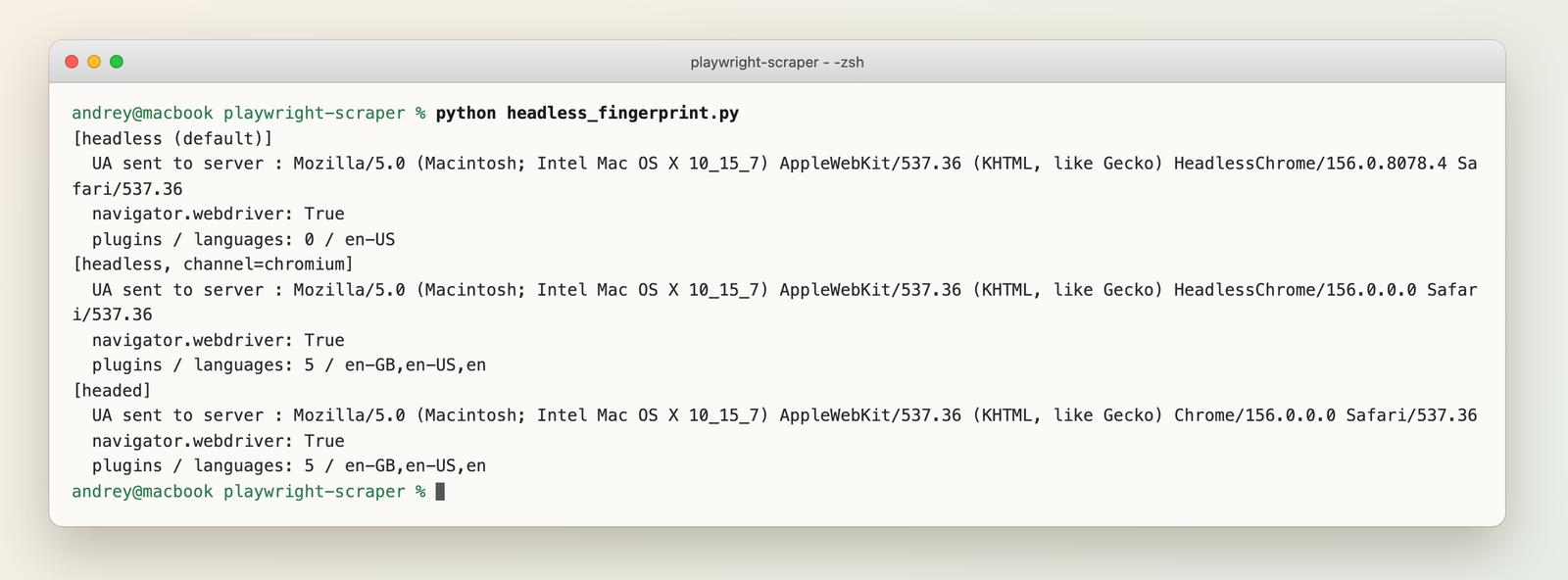
This shows only a few things: the headless modes announce themselves as HeadlessChrome in the User-Agent, and navigator.webdriver is true in all three modes because Playwright is driving the browser. The plugin count differs between the old and new headless modes. (The language list also differed in my run, en-US versus en-GB,en-US,en, which reflects my machine's locale as much as the mode.)
If a script works headed and fails headless, look at headless-only failures and the headless vs headed guide.
What about Playwright stealth? "Stealth" plugins and flags patch values like the ones above. They can hide the obvious tells, but not everything: sites also look at the reputation of your IP address (data center ranges are often flagged), TLS and network-level signals, and how the session behaves. None of that changes with a flag, and I did not test any protected site, so I cannot tell you what works against one. If you are getting blocked, first check that you are allowed to scrape the site at all. Is web scraping legal? covers that.
Proxies are a normal Playwright feature when you have a legitimate reason, such as geography or spreading load:
browser = p.chromium.launch(proxy={"server": "http://proxy.example.com:8000", "username": "user", "password": "pass"})
Proxy and navigation errors are covered here: proxy authentication failures, connection refused and name not resolved. A broader overview is in how to avoid getting blocked when scraping.
Run Playwright in Docker and CI
Browsers need OS libraries and fonts that a minimal image does not have. Two ways to handle that:
- Install them: playwright install --with-deps chromium in your Dockerfile.
- Use the official image and pin the tag to the same version as your package. For Python that is a tag like mcr.microsoft.com/playwright/python:v1.64.0-noble. I tested 1.64.0. The Docker docs pages can lag behind the latest release (the Python page listed v1.63.0 when I checked), so confirm the tag exists on the registry for your version and OS name. The Python image does not include the playwright package itself, so you still pip install playwright==1.64.0.
Per the Playwright docs, a few container settings matter:
- Run with --ipc=host, which the docs recommend for Chromium. Without it, Chromium can run out of shared memory and crash. If you cannot use it, launching Chromium with args=["--disable-dev-shm-usage"] is the common workaround.
- Run with --init so zombie processes are cleaned up.
- For scraping, the docs recommend a separate non-root user with their seccomp profile, not the default root, because root disables the Chromium sandbox.
CI has the same problems with less control. See missing OS dependencies and fonts in CI, random browser crashes in CI and, for downloads and popups, download waits that hang and popup and new-tab flakiness.
Playwright vs Plain HTTP vs a Scraping API
Same job, three approaches: fetch the 10 JavaScript pages of quotes.toscrape.com/js/ one after another and count the quotes (5 runs each; the API ran 2 runs of 10 pages).
| Plain requests | Playwright | WebCrawlerAPI | |
|---|---|---|---|
| Quotes found (of 100) | 0 | 100 | 100 |
| Time for 10 pages | 1.5 s | 3.7 s | 28.5 s |
| Peak memory | 41 MB | 539 MB | 44 MB |
| Failure mode | Empty result, no error | None seen | None seen |
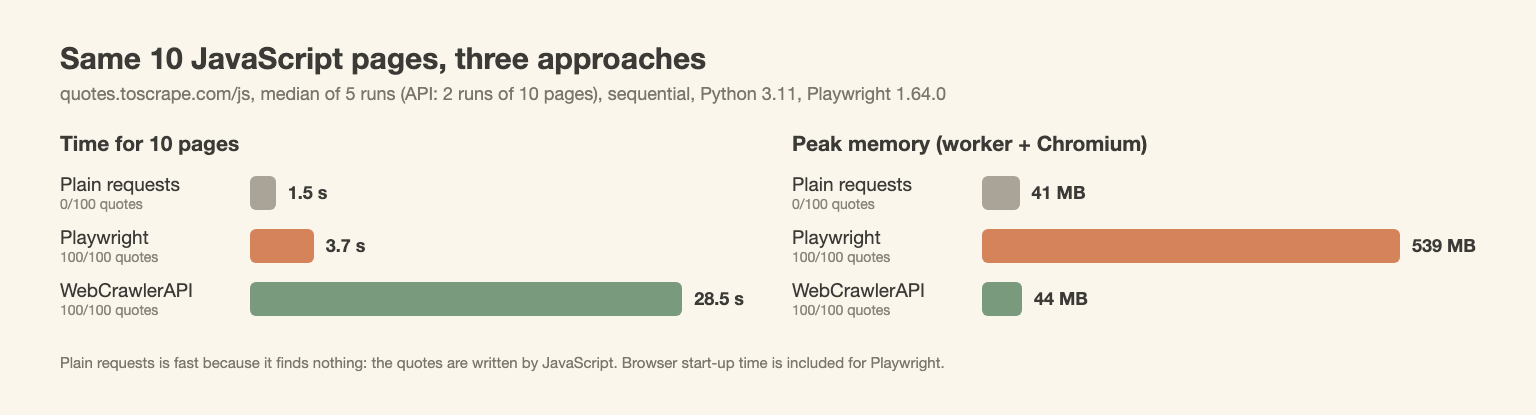
What the table says:
- Plain requests is fast and uses little memory, and finds nothing. The scraper does not fail with an error. It returns an empty list. That is the dangerous kind of failure.
- Playwright is fast here because the browser stays open and the site is quick. It pays in memory: more than 500 MB for a ten-line script.
- The API is the slowest one sequentially at about 2.9 seconds per page here, but it uses almost no memory on your side, because the browser runs somewhere else. Sequential calls understate it, since requests can be sent in parallel. I did not measure parallel runs here (the Python guide did).
- Operations (opinion, not measured): with Playwright you run, patch and monitor browsers; with the API you pay per page instead. Per-1,000-page costs for several APIs are in the scraping API comparison. I did not measure the cost of self-hosting.
The same job through the API, with the key read from the environment:
import os

import requests

r = requests.post(
    "https://api.webcrawlerapi.com/v2/scrape",
    headers={"Authorization": f"Bearer {os.environ['WEBCRAWLER_API_KEY']}"},
    json={"url": "https://quotes.toscrape.com/js/", "output_formats": ["html"], "max_age": 0},
    timeout=120,
)
r.raise_for_status()
print(r.json()["page_status_code"], len(r.json()["raw_content"]))
const res = await fetch("https://api.webcrawlerapi.com/v2/scrape", {
  method: "POST",
  headers: {
    Authorization: `Bearer ${process.env.WEBCRAWLER_API_KEY}`,
    "Content-Type": "application/json",
  },
  body: JSON.stringify({
    url: "https://quotes.toscrape.com/js/",
    output_formats: ["html"],
    max_age: 0, // skip the cache
  }),
});
const data = await res.json();
console.log(data.page_status_code, data.raw_content.length);
When I ran the Node version it returned status 200 and all 10 quotes on the page. Details are in the scrape endpoint docs, and the product pages are the Web Scraping API, the Python scraper and the JavaScript scraper.
The limit of an API is the same as in the scroll test: it returns the page as loaded. Anything that needs clicks, logins or scrolling through a session is a Playwright job.
Fix Playwright Errors: A Map by Problem
Most Playwright pain falls into a few groups. Find your symptom and go straight to the fix.
Install and setup. The browser binary is missing or the OS is too new.
Navigation errors. The page did not load at all.
- net::ERR_ABORTED on goto
- Connection refused
- Name not resolved
- Invalid auth credentials (proxy login)
Waiting and timing. The data was not there yet, or the page changed under you.
- networkidle misuse
- Action timeouts
- Execution context was destroyed
- Frame was detached
- Click timeout, element not visible
Selectors. Your locator found too much, too little or the wrong thing.
Crashes and memory. The browser closed or ran out of room.
- Target page, context or browser closed
- Target closed crash
- Random browser crashes in CI
- Worker memory crashes
Works headed, fails headless.
Downloads, uploads and popups.
Other Ways to Do It
Of the tools below, only Playwright and WebCrawlerAPI were run for this post.
| Option | Good for | Tested here |
|---|---|---|
| Puppeteer | Node.js only, Chromium-focused | No |
| Selenium | Existing test suites, many languages | No |
| Crawl4AI | Python crawler with a built-in browser, see this guide | No |
| Hosted browsers (Browserbase, Browserless) | Running Playwright in someone else's cloud | No |
| Scraping APIs | One request per page, no browser to run | WebCrawlerAPI only |
More options are compared in best web scraping tools, best scraping APIs and ScrapingBee alternatives. If the end goal is feeding pages to an AI knowledge base, AI web scraping covers that route.
FAQ
Is Playwright good for web scraping?
Yes, when the page needs JavaScript or interaction. For static pages it is overkill: in my test a plain request used 41 MB and Playwright 539 MB for 10 pages.
What is a Playwright web scraper?
A script that opens pages in a real browser with Playwright, waits for the content and extracts data. Python, Node.js, Java and .NET all work.
Can Playwright be used with Python?
Yes. Install it with pip install playwright and playwright install chromium. The examples above use the sync API. There is an async API too, for running many pages at once.
Playwright vs BeautifulSoup: which one?
They do different jobs. Playwright loads the page and runs its scripts. BeautifulSoup parses HTML. Use both: Playwright to get page.content(), BeautifulSoup to read it. If a plain request already returns the data, you do not need Playwright.
Playwright vs Selenium or Puppeteer for scraping?
For scraping, Playwright's auto-waiting and identical Python and Node APIs are the practical gains. Puppeteer is Node-only, and Selenium is strongest in existing test setups. I did not benchmark the three against each other.
Is Playwright detectable?
In my test, headless Chromium sent HeadlessChrome in its User-Agent, and navigator.webdriver was true in all modes. Sites can read both. Whether a given site blocks you depends on the site, which I did not test.
How many pages can I run in parallel?
Start from roughly 300 MB for the browser plus about 80 MB per open page, then measure your real pages. Cap open pages and close each one. My numbers come from one machine.
Is web scraping illegal?
Scraping public pages is generally lawful in the US, but terms of service, personal data and copyright can still apply. This is not legal advice. See Is web scraping legal?.
Is web scraping outdated?
No. Pages are still the main source of public data, and JavaScript-heavy sites are why tools like Playwright exist. These days you can hand more of the browser work to an API. See the short answer on JavaScript-heavy sites.
How do I scrape a page that loads more on scroll?
Check the Network tab for a JSON endpoint first. If there is none, scroll in a loop until the item count stops growing, with a deadline. In my test both approaches found all 100 quotes.
Wrap-Up
Choose by the page:
- Static HTML: plain HTTP and a parser. Fast and cheap.
- Needs clicks, scroll or a login: Playwright. Wait for a selector, close every page, reuse one browser.
- Blocks or volume dominate and you only need content: an API such as WebCrawlerAPI, so you do not run browsers yourself.
For the beginner paths, see Web Scraping with Python and Web Scraping with JavaScript and Node.js.
