

Prices and features read October 23, 2026. Benchmark run October 24, 2026. I run WebCrawlerAPI, which gets one short section near the end, and I say where it falls short.
Firecrawl and Apify sell different things, so comparing them head to head only works once you pick the job. Firecrawl turns almost any URL into markdown. Apify is a marketplace of ready-made scrapers (called Actors) that return structured data from specific sites.
For markdown from many unknown sites, PDFs included, I'd use Firecrawl. For structured fields from sites you already know, Apify. The benchmark right below tests both on 200 real URLs, and the rest of the post shows why.
If you want lists of other tools, read best Apify alternatives and best Firecrawl alternatives. This one is only about these two.
Benchmark: 200 real URLs, both tools
I ran both tools on the same 200 URLs, taken from the WebCrawlerAPI production database. Each URL was sent once to each tool with its default setup.
- Set 1, random pages (100 URLs): random pages crawled in the last 14 days, one per site, so no single site dominates.
- Set 2, hard pages (100 URLs): pages that returned HTTP 401 or 403 to WebCrawlerAPI at some point, one per site. These are the sites that block crawlers.
- Firecrawl: POST /v2/scrape, formats: ["markdown"], maxAge: 0 so no cached copy was served.
- Apify: Website Content Crawler, one run per URL, maxCrawlPages: 1, saveMarkdown: true, 2 GB memory.
- "Success" means non-empty markdown. I did not check that every page holds the right content, only that something came back. Four runs at a time for both tools.
| Firecrawl | Apify (Website Content Crawler) | |
|---|---|---|
| Random pages: markdown returned | 95 / 100 | 90 / 100 |
| Random pages: median time | 2.2 s | 25 s |
| Random pages: slowest 10% | over 4.9 s | over 171 s |
| Hard pages (401/403): markdown returned | 95 / 100 | 70 / 100 |
| Hard pages: median time | 2.9 s | 65 s |
| Hard pages: slowest 10% | over 6.5 s | over 230 s |
| Median markdown size (random) | 8,118 chars | 2,567 chars |
| Cost for 200 pages | about $0.17 to $0.64 (credits) | $1.95 (measured, Apify usage) |
What stands out:
- Firecrawl got through more blocked pages. On the hard set it returned markdown for 25 URLs where Apify returned nothing, and Apify never won a URL on that set. On random pages Firecrawl won 8, Apify won 3.
- Firecrawl was about 10 times faster at the median. Part of Apify's time is starting an Actor run for each URL, which is what you pay if you call it one URL at a time. A single run with many start URLs would spread that overhead, and I did not test it.
- Apify returned less text per page. Roughly a third of Firecrawl's median size. Smaller can mean cleaner or can mean content missing, and I did not grade it.
- Both fail sometimes. Neither returned content for 2 random and 5 hard URLs.
- Cost, from Firecrawl's pricing page. One page is 1 credit. 200 pages is 200 credits: about $0.17 at the Standard plan rate ($83 for 100,000 credits on yearly billing) and about $0.64 at the Hobby rate ($16 for 5,000). The free plan's 1,000 credits cover the whole test. Apify's $1.95 is what Apify billed for the 200 runs, which works out to about $10 per 1,000 pages in this single-URL setup, above the vendor's own $0.5 to $5 estimate. Start-up cost per run is likely part of the gap. See the pricing section for how the model works.
Caveats: one run per URL, one day, my own URL sample, no quality grading, and the hard set only contains pages that blocked WebCrawlerAPI, so it says nothing about how WebCrawlerAPI compares. Apify with a different Actor, proxy settings or batching could score differently. For a larger single-vendor test, see the DeepSeek Fetch API benchmark, which ran 1,000 pages across Firecrawl and other scrape APIs, and the public benchmarks page.
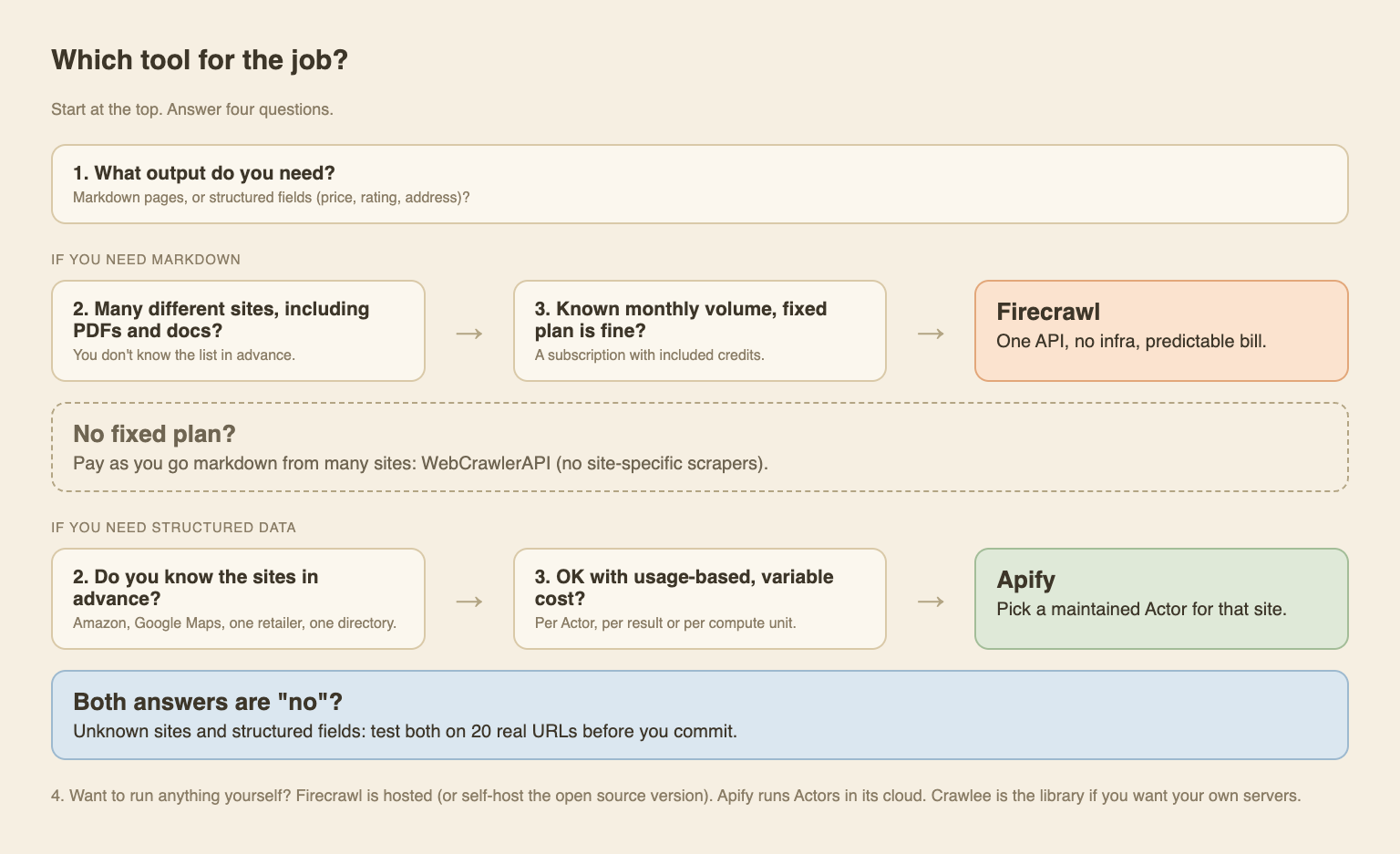
The short answer
Five questions, asked of each tool in the same order.
Pick Firecrawl if:
- You need mostly markdown.
- The sites vary a lot, and some are PDFs or docs.
- You don't want to run or tune any infrastructure.
- A monthly plan with included credits is fine.
- You roughly know your volume.
Pick Apify if:
- You need mostly structured data (fields, rows, JSON).
- You know the sites in advance (a shop, Google Maps, a directory, social profiles).
- An agent will act on the data, or you'll store it and process it later.
- Variable usage-based pricing is OK.
- Some platform complexity, or using their cloud, is fine.
What each tool actually is
Firecrawl
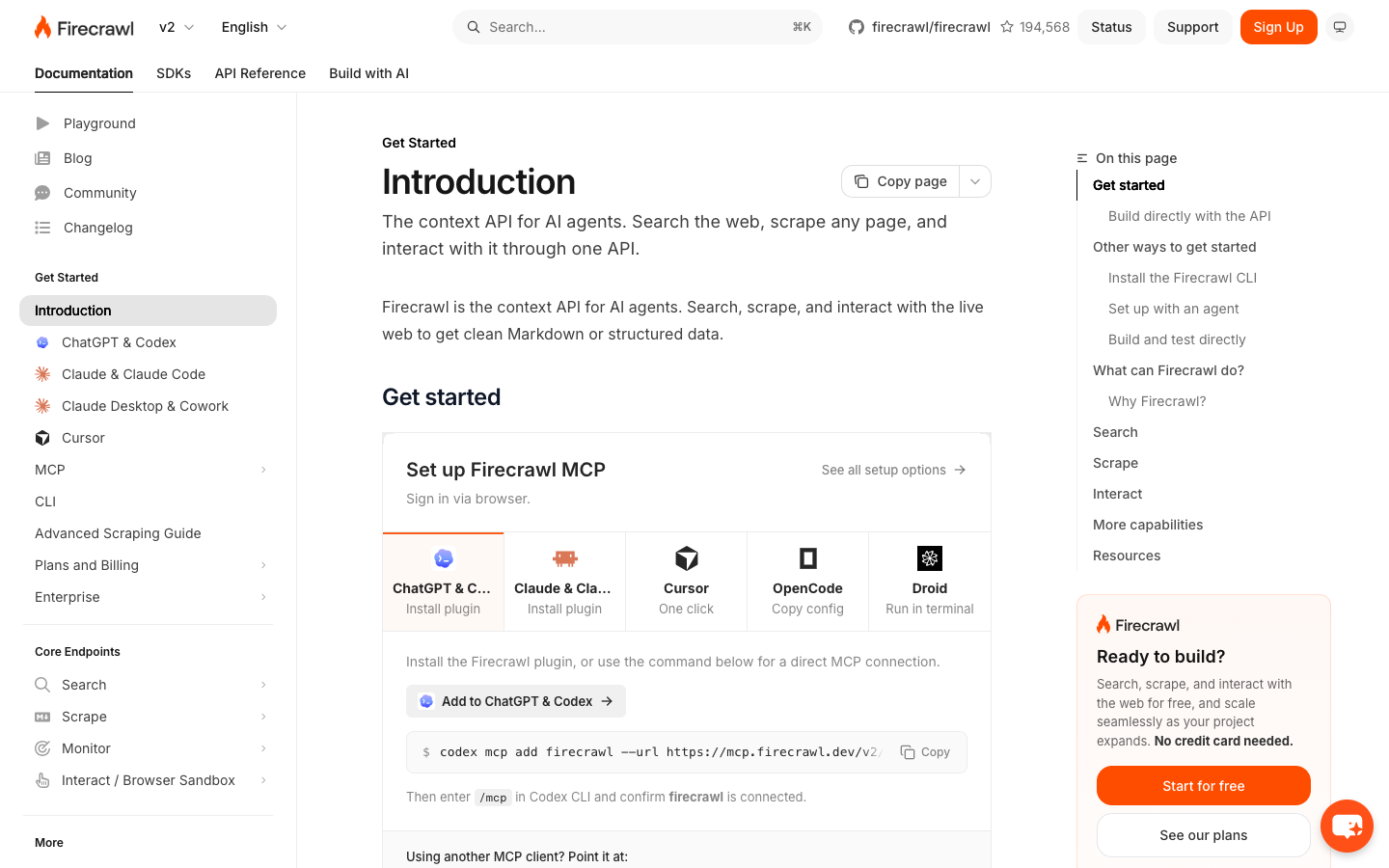
Firecrawl calls itself "the context API for AI agents". You send a URL, you get clean markdown or JSON back. The docs introduction lists search, scrape and interact as the main endpoints, and the pricing page also bills crawl and map.
The first request needs no account. The docs show POST /v2/scrape working without an API key (low limits, higher with a key). That's why I could run a real test below.
It also parses documents. The document parsing docs list PDF (text and scanned, with OCR) at 1 credit per page. Firecrawl is open source and can be self-hosted.
Apify
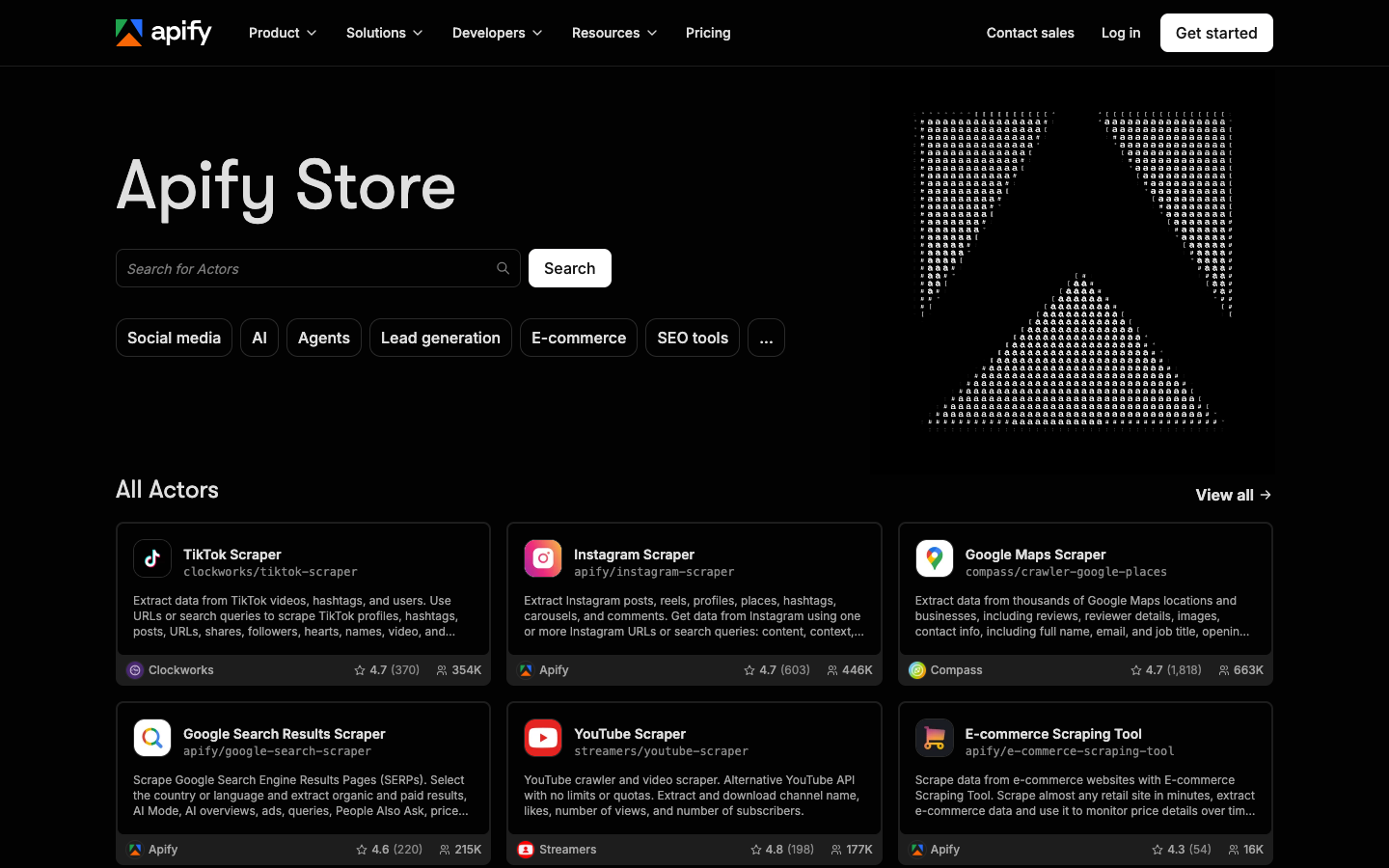
Apify is a platform. Developers publish Actors (serverless programs) to the Apify Store, and you run them in Apify's cloud. The Store has thousands of them. The front page I captured lists TikTok, Instagram, Google Maps, Google Search, YouTube and e-commerce scrapers.
Each Actor has its own input fields, output shape and price. Quality varies by author, so check the last run date, rating and pricing before you depend on one.
There's also a "Firecrawl-like" Actor: Website Content Crawler. It saves pages as plain text, markdown or HTML and is built on Crawlee, Apify's open source library. The Apify platform itself is cloud only. Crawlee is what you can run yourself.
Head-to-head comparison
The last column is who I'd pick on that row, not a score.
| Dimension | Firecrawl | Apify | Fits better |
|---|---|---|---|
| Core model | One API for any URL | Marketplace of Actors, one per job | Depends on job |
| Output | Markdown or JSON | Per-Actor structured datasets; markdown via Website Content Crawler | Firecrawl for markdown, Apify for fields |
| Site coverage | Any URL | Best on sites that have an Actor; you can write your own | Firecrawl for unknown sites |
| PDFs and documents | Parsed to markdown, 1 credit per page | Website Content Crawler downloads PDF, DOC, DOCX, XLS, XLSX files (its docs do not say it converts them to markdown) | Firecrawl |
| JS rendering and anti-bot | Handled by the API | Handled per Actor and proxy settings | Firecrawl on my 401/403 set, one sample only |
| Pricing model | Credits on a monthly plan | Plan plus usage: compute units, or per result per Actor | Firecrawl if volume is known |
| Cost predictability | High | Varies by site and by Actor | Firecrawl |
| Infra to manage | None | None on their cloud; some if you use Crawlee yourself | Firecrawl |
| Open source / self-host | Yes | Platform no, Crawlee yes | Tie |
| Agent and MCP | Fixed tools, plus keyless scrape and CLI | Hosted MCP that discovers and runs any Actor | Apify for variety, Firecrawl for "read any page" |
| Time to first result | One HTTP call | Pick an Actor, set input, start a run, read a dataset | Firecrawl |
Sources: Firecrawl pricing and docs, Apify pricing, the Actor pages, all read October 23, 2026.
Markdown for an AI knowledge base
Say you're building an AI knowledge base from product docs, help centers and blogs. You want clean markdown for every page, from many different sites. That's the Firecrawl job.
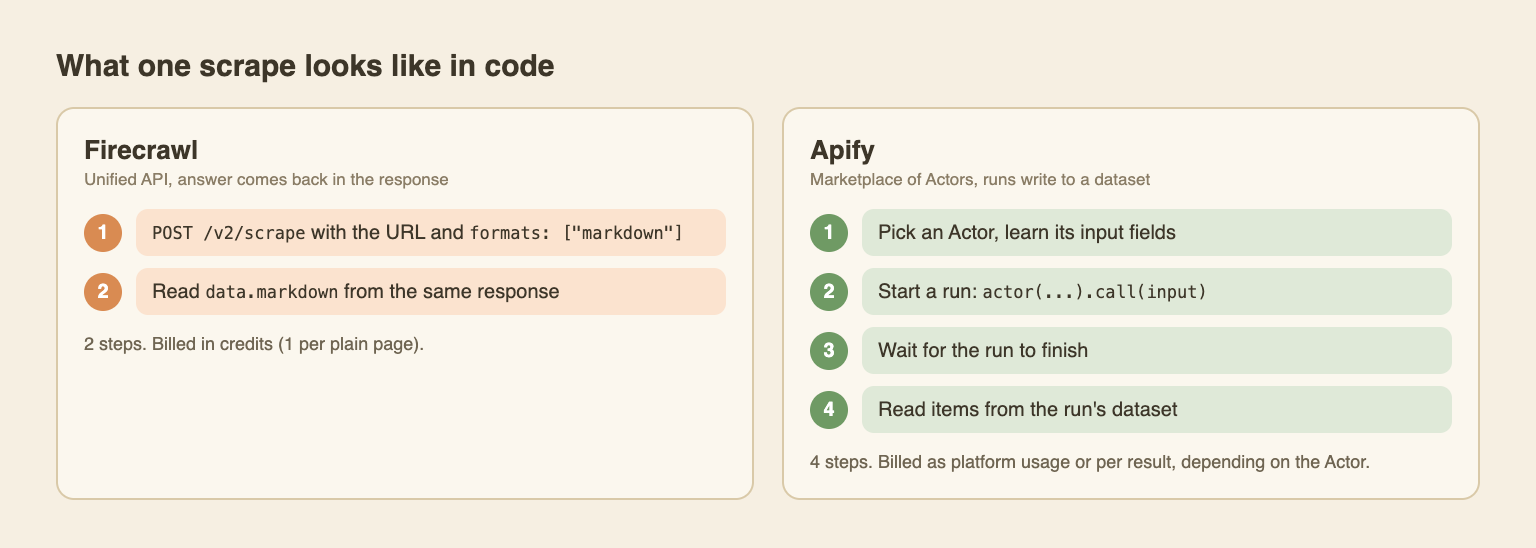
Task A: one docs page to markdown
Firecrawl, with plain fetch (Node 18+):
const res = await fetch("https://api.firecrawl.dev/v2/scrape", {
  method: "POST",
  headers: {
    "Content-Type": "application/json",
    // optional, keyless works with low limits
    ...(process.env.FIRECRAWL_API_KEY && {
      Authorization: `Bearer ${process.env.FIRECRAWL_API_KEY}`,
    }),
  },
  body: JSON.stringify({
    url: "https://docs.apify.com/platform/integrations/mcp",
    formats: ["markdown"],
  }),
});
const { data } = await res.json();
console.log(data.markdown);
I ran this against Apify's own MCP docs page. This is what came back:
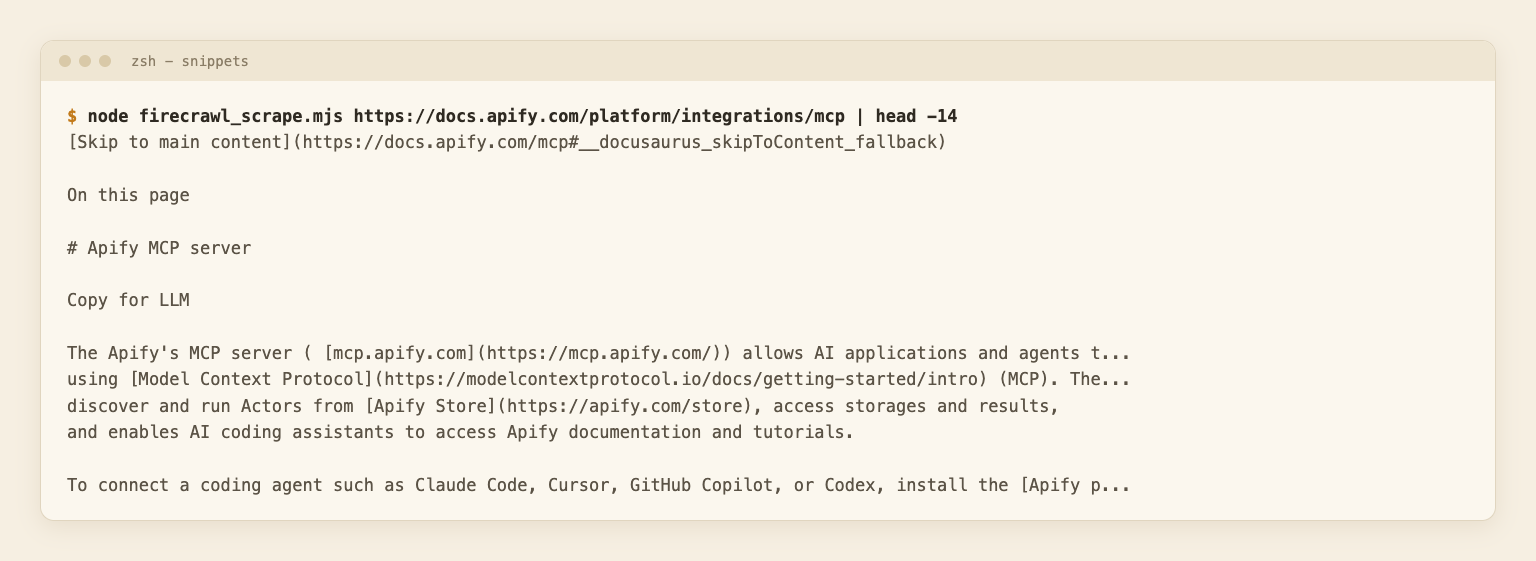
The first lines contain page chrome ("Skip to main content", "Copy for LLM") that you'd strip before indexing. The headings, links and text survive fine.
Apify, with Website Content Crawler:
import { ApifyClient } from "apify-client";

const client = new ApifyClient({ token: process.env.APIFY_TOKEN });

// 1. start the Actor and wait for the run to finish
const run = await client.actor("apify/website-content-crawler").call({
  startUrls: [{ url: "https://docs.apify.com/platform/integrations/mcp" }],
  maxCrawlPages: 1,
  saveMarkdown: true,
});

// 2. the markdown lives in the run's dataset, not in the response
const { items } = await client.dataset(run.defaultDatasetId).listItems();
console.log(items[0].markdown);
This is the same Actor and input I used in the benchmark above, through the Apify API. The snippet itself is a sketch, I ran the equivalent REST calls rather than this exact file.
The shape is the point: a run, a wait and a dataset read, against one request. For one URL, Apify's own Website Content Crawler page suggests a separate Actor in standby mode instead. There's also a single-URL Actor, apify/url-to-markdown (its page now shows the name Web Fetch, from $1 per 1,000 fetches). I did not test it. So Apify can do this job, after you pick an Actor and its input.
PDFs
Firecrawl takes a PDF URL on the same /v2/scrape endpoint and returns markdown. Text PDFs and scanned ones (OCR) are covered, at 1 credit per page. It also handles DOCX, XLSX and similar files.
Website Content Crawler has a "Save files" option that downloads PDF, DOC, DOCX, XLS and XLSX files linked from a page. Its docs describe saving them. They don't say it converts them to markdown. To get text out, you'd add a separate PDF Actor or your own parser.
What I tested: one PDF through Firecrawl (the W3C sample file). It worked, but that file only contains the line "Dummy PDF file", so it proves the path works and nothing about OCR quality. What I did not test: any PDF through Apify.
For more on picking an output format, see HTML vs markdown. For a full crawl-to-knowledge-base flow, see docs site to knowledge base with n8n and Dify.
Structured data from known sites
Now the other job. You want product rows, business listings or profile data from a handful of known sites. A maintained Actor for that site has already solved pagination, variants and field names. You pass a few inputs and get JSON rows.
Writing a Google Maps scraper that survives for a year costs more than most people think, and in the Store someone else maintains it. The catch is that you depend on that person, so check the last update, rating and pricing as above.
Task B: product fields from a shop page
I used books.toscrape.com, a sandbox built for scraping practice. A dedicated Actor for a sandbox doesn't exist, so on the Apify side I used the generic Cheerio Scraper with a small pageFunction:
// runs inside the Actor for every page; $ is Cheerio
async function pageFunction({ $, request }) {
  const rating = $("p.star-rating").attr("class").replace("star-rating", "").trim();
  return {
    url: request.url,
    title: $("h1").text().trim(),
    price: $("p.price_color").first().text().trim(),
    availability: $("p.availability").text().replace(/\s+/g, " ").trim(),
    rating, // "One" to "Five", stored in a CSS class
  };
}
I did not run it on Apify. I ran the same selectors with Cheerio on the downloaded page, locally. They returned {"title":"A Light in the Attic","price":"£51.77","availability":"In stock (22 available)","rating":"Three"}. That checks the logic, not the Apify platform, cost or speed.
On the Firecrawl side, I asked for JSON with a schema (title, price, availability, rating). This costs 4 extra credits per page, so 5 in total:
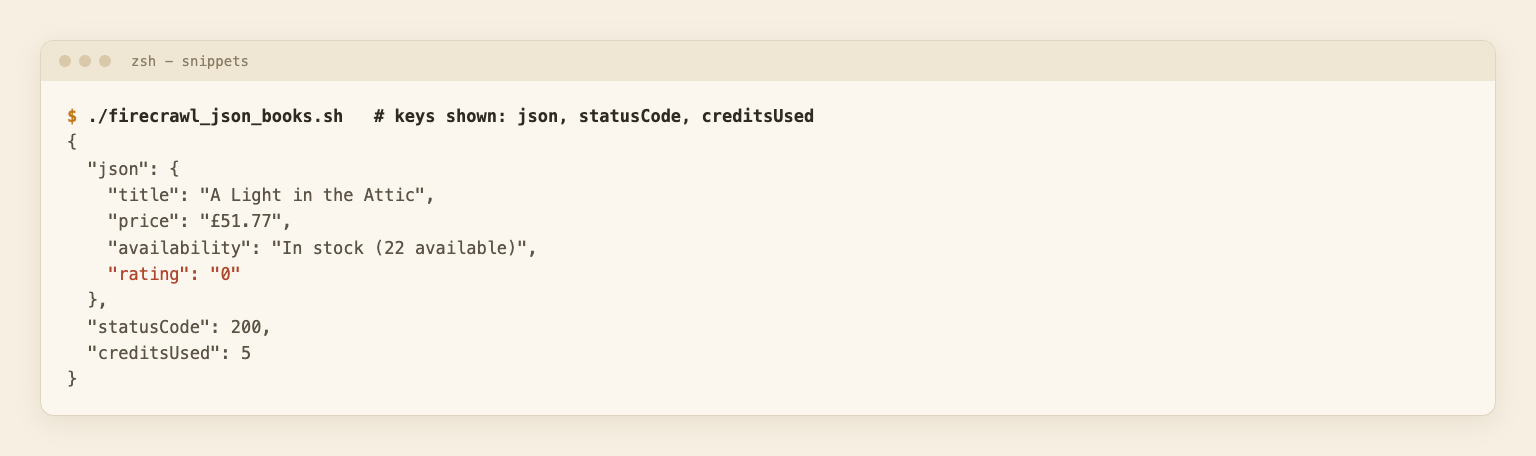
Title, price and availability came back right. The rating came back as "0". The page shows three stars, but that value sits in a CSS class, not in visible text, and the extraction missed it. One page proves little. But it matches the general rule: for known sites with odd markup, a selector you control (or an Actor someone maintains) is more reliable than generic extraction.
Pricing: how the two models behave
This section isn't a price list. For the Firecrawl numbers, see Firecrawl pricing. For other vendors, see best web scraping APIs.
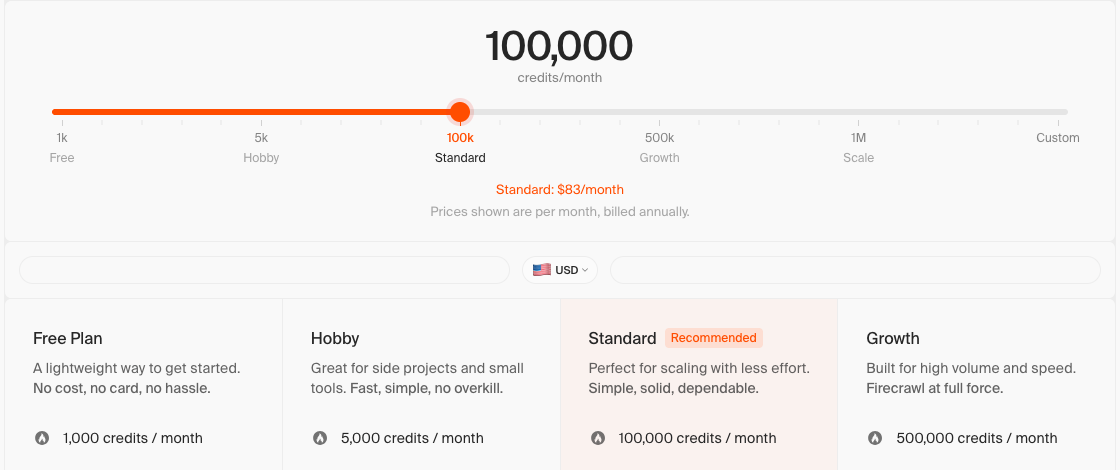
Firecrawl sells a plan with included credits. Read October 23, 2026:
- Free: 1,000 credits a month.
- Hobby: $16 a month billed yearly ($19 monthly), 5,000 credits.
- Standard $83, Growth $333, Scale $599 (yearly billing, 100,000, 500,000 and 1,000,000 credits).
- 1 credit is 1 page on scrape or crawl, and 1 per call on map. Search is 2 credits per 10 results. JSON adds 4 per page.
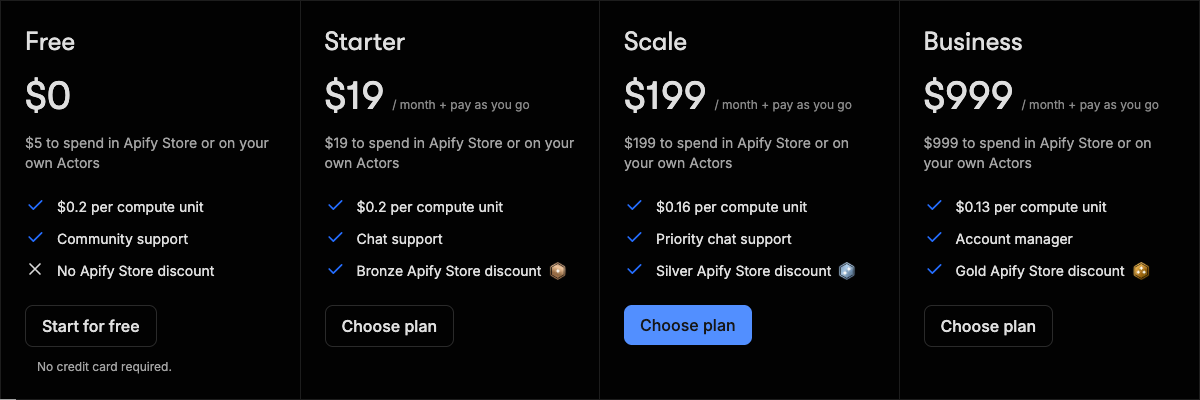
Apify is a plan plus usage. Read the same day:
- Free: $5 of prepaid usage a month. Starter $19, Scale $199, Business $999, all plus pay as you go.
- Compute units cost $0.20 (Free, Starter), $0.16 (Scale) and $0.13 (Business).
- Actors can bill by compute, by result, or by event, set by the Actor's author.
- Website Content Crawler's page estimates about $0.5 to $5 per 1,000 pages with a browser, and about $0.2 per 1,000 on plain HTTP. That page quotes a "baseline price" of $0.25 per compute unit, while the pricing page says $0.20 for Free and Starter. I can't tell which is current, so read "about".
A rough 10,000 pages a month of plain docs pages, computed from those published rules (not measured):
- Firecrawl: Hobby covers 5,000 credits, and 5,000 more cost $25 in top-ups, so about $41 on yearly billing.
- Apify with Website Content Crawler: roughly $2 on plain HTTP, up to $50 with a browser, on top of any plan you need. Whatever your site mix is, it moves the number.
Apify can come out cheaper, and it can also surprise you. Firecrawl's bill is easier to predict, which is why "known volume" is on the Firecrawl list.
AI agents and MCP
Firecrawl gives an agent a fixed set of tools (search, scrape, interact) and a CLI with skills for coding agents. The keyless scrape endpoint means an agent can read a page with no setup.
Apify's hosted MCP server at mcp.apify.com lets an agent search the Store, read an Actor's details and run it. The hosted server infers output schemas, so the agent knows the field types before it calls an Actor. It signs in with OAuth. Without an account, only the discovery and docs tools work (search-actors, fetch-actor-details, search-apify-docs, fetch-apify-docs). Agents can also pay per run through agentic payment protocols (x402 and MPP, per Apify's pricing page), no account needed. Those are all docs claims, read October 23, 2026. I did not test any of them.
The tradeoff: an agent that needs "read any page" fits Firecrawl. An agent that needs "get the Google Maps listings for these cities" fits Apify. With Apify, the agent can also pick a weak Actor, and the cost per call varies.
Earlier sandbox test (Firecrawl, 11 URLs)
Before the 200 URL benchmark at the top I ran a smaller keyless test of Firecrawl on sandbox and docs pages.
Run: 11 public URLs through Firecrawl's keyless POST /v2/scrape with formats: ["markdown"], one request each, 3 seconds apart, one run. All targets were sandboxes, vendor docs, a sample PDF or my own blog. About 16 requests in total, counting the snippet runs above.
| Page | HTTP | Markdown returned | Time | Chars | Notes |
|---|---|---|---|---|---|
| example.com | 200 | Yes | 428 ms | 959 | Page text only |
| httpbin.org/html | 200 | Yes | 155 ms | 3,597 | |
| books.toscrape.com | 200 | Yes | 164 ms | 9,116 | |
| Books product page | 200 | Yes | 175 ms | 1,809 | Description text appears twice, as it does on the page |
| quotes.toscrape.com | 200 | Yes | 166 ms | 4,240 | |
| quotes.toscrape.com/js/ | 200 | Yes | 224 ms | 1,505 | JS-rendered page worked |
| Firecrawl docs intro | 200 | Yes | 637 ms | 187,886 | One line holds about 171,000 chars of site config JSON |
| Apify docs (Academy page) | 200 | Yes | 2,665 ms | 10,433 | That course page is now archived, so this is its notice |
| My blog post | 200 | Yes | 3,101 ms | 31,546 | |
| W3C sample PDF | 200 | Yes | 173 ms | 17 | The PDF only says "Dummy PDF file" |
| httpbin.org/status/403 | 200 | No | 535 ms | 0 | HTTP 200 from the API, empty markdown |
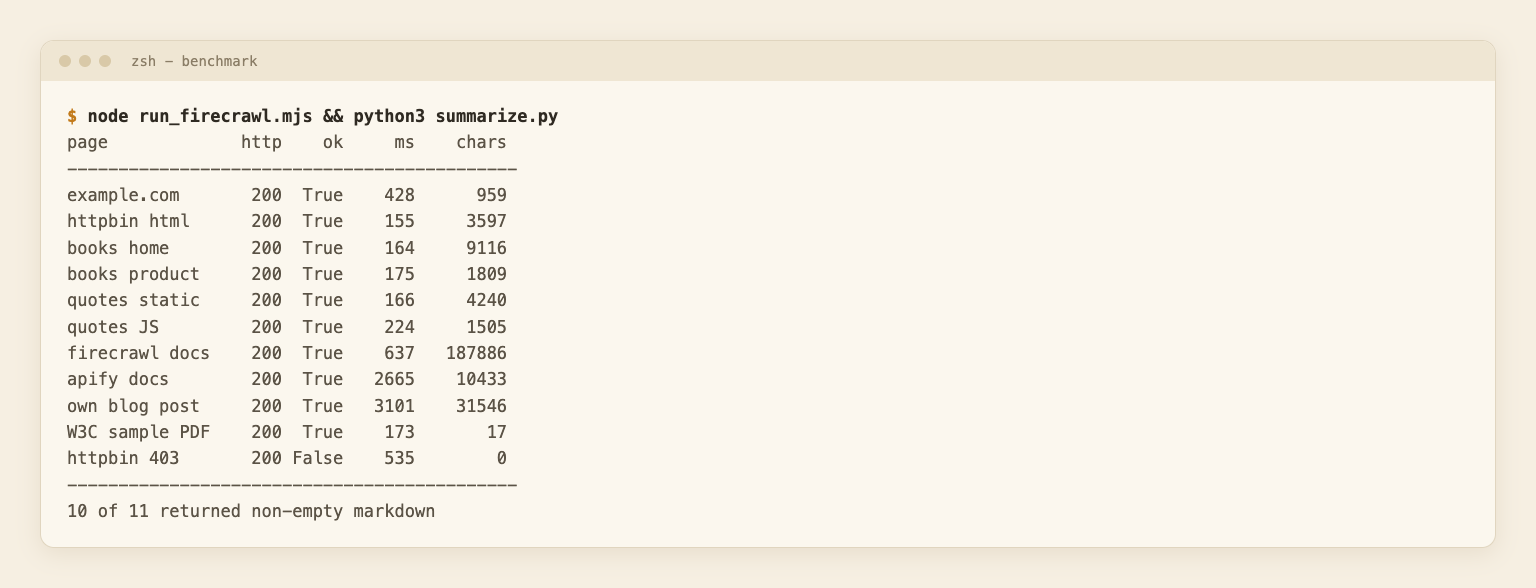
What the numbers show:
- Latency looks cache-assisted. Nine pages came back in under 700 ms. The one full response I saved (the books product JSON call) reported cacheState: "hit". So treat those times as best case, not what a first-time fetch costs. The 2.7 and 3.1 second pages are probably the honest ones.
- A failed page can look like success. The 403 case returned HTTP 200 from the API with empty markdown. Check the page's own status code in the response metadata, not only the outer status. I did not save that response body, so I can't show its credit count. The pricing FAQ says a returned 403 or 404 page still costs 1 credit.
- Docs sites can be noisy. The Firecrawl docs page returned 187,886 characters, mostly one embedded config line. For an AI knowledge base, filter output by length or run it through a cleanup step. See clean markdown from a website with an LLM.
- The test is tiny. Eleven pages, one run, friendly targets. For harder pages, see the 200 URL benchmark at the top.
You can repeat the Firecrawl half in a few minutes: loop over your own URLs with the snippet above and log status, time and length. For Apify, run the same URLs through Website Content Crawler with maxCrawlPages: 1 and read run.usageTotalUsd for the cost. Use each tool's default setup and note it, since Actor choice changes results.
Where WebCrawlerAPI fits
I build this one, so weigh it accordingly.
If you want markdown from many sites, like the Firecrawl job, but prefer pay as you go to a monthly plan, WebCrawlerAPI is the third option. You send URLs and get markdown, HTML or text back, billed per page. No subscription to size.
What it doesn't do: there are no site-specific scrapers and no Actor marketplace. If you need Amazon, Google Maps or social data in structured form, pick Apify. And per plain page, Firecrawl's larger plans are cheaper than WebCrawlerAPI's pay as you go price. The numbers are in Firecrawl pricing.
When neither fits
- One or two pages. A plain fetch and an HTML to markdown library is enough.
- Heavily protected sites. My hard set was pages that returned 401 or 403 to WebCrawlerAPI once, not the toughest anti-bot setups. Test your own targets first.
- A site with an official API or feed. Use that. It's more stable than any scraper.
- Legal or terms-of-service blockers. Read web scraping ethics first.
- You have infra time and want full control. Crawlee, or Crawl4AI. See best open source web crawlers and web crawler with Crawl4AI.
If your answers to the five questions above are mixed, test both on 20 of your own URLs before committing.
FAQ
Is Firecrawl safe to use?
It's a hosted API, so your URLs and the fetched content pass through a third party. That's fine for public pages. Don't send secrets or logged-in content without reading its security and data retention terms. I haven't audited Firecrawl, so I can't certify it. It's also open source, if you'd rather run it yourself.
What is the difference between web scraping and an API?
Scraping means getting data out of web pages meant for people. An API is a documented interface built for programs. Both tools here are scraping APIs: you call an API, and it scrapes for you. Firecrawl returns the page as markdown. Apify returns whatever the Actor extracts. See crawling vs scraping.
Is AI scraping illegal?
Not by default, but it depends on the site's terms, the data (personal data is its own problem) and your country. I'm not a lawyer and this isn't legal advice. Start with is web scraping legal and web scraping ethics.
Which scraper API is the cheapest?
It depends on pages per month, and whether you need JavaScript rendering or extraction. Firecrawl's larger plans are cheap on plain pages. Apify can be cheap on plain HTTP crawls and costly with a browser. For a vendor-by-vendor table, see best web scraping APIs and ScrapingBee alternatives.
Can I self-host Firecrawl or Apify?
Firecrawl is open source and can be self-hosted. The Apify platform runs only in Apify's cloud. Crawlee, its open source library, runs anywhere. So if "must run on my servers" is a hard rule, that's Firecrawl self-hosted or Crawlee, not the Apify platform.
Can I use both?
Yes. Firecrawl for docs, blogs and PDFs. Apify for the few specific sites that need structured data. They don't depend on each other, so you can add the second one later.
Is Apify or Firecrawl better for AI agents and MCP?
Depends on the agent. Firecrawl's fixed tools suit an agent that reads arbitrary pages. Apify's MCP lets an agent discover and run Actors, which suits an agent with many different data tasks, at the cost of variable pricing and Actor quality. Both claims come from their docs, not my tests.
Conclusion
Firecrawl fits markdown from many sites and PDFs, with a plan you can budget. Apify fits structured data from sites you know, with usage-based pricing you'll have to watch. If you want pay as you go markdown instead of a plan, take a look at WebCrawlerAPI.
Found a wrong price or claim? Email hello@webcrawlerapi.com.
