
Tested on October 18, 2026. The DeepSeek Fetch API is days old, so these numbers may change. Full disclosure: we build WebCrawlerAPI, which is the service DeepSeek is compared against in this post. Everything here is reproducible.
DeepSeek launched a Fetch API next to its new Search API: send a URL, get the page back as Markdown, pay $0.75 per 1,000 successful requests. We ran the same 1000-page test we use in our benchmark results for scraping APIs. In short: 70.97% success rate, 20.84% error rate, median latency 7.1 seconds, p95 61 seconds. WebCrawlerAPI on the same pages: 87.97% success, 5.09% errors.
DeepSeek Fetch API benchmark results
Same 1000 pages, DeepSeek Fetch against WebCrawlerAPI, nothing else.
Test settings:
- Dataset: 1000 pages from firecrawl/scrape-content-dataset-v1. 133 pages are skipped (marked broken in the dataset) and 61 dead pages are dropped for both services, so the percentages below are calculated on the 806 pages that remain.
- Markdown requested from both services, cache off where possible, 1 retry.
- DeepSeek timeout: 120 seconds. WebCrawlerAPI timeout: 60 seconds.
- Runs: DeepSeek on 2026-10-18, WebCrawlerAPI on 2026-09-28.
Headline numbers
| Metric | DeepSeek Fetch | WebCrawlerAPI |
|---|---|---|
| Pages scored (returned markdown, of 806 valid) | 638 of 806 | 765 of 806 |
| Errors | 168 | 41 |
| Error rate | 20.84% | 5.09% |
| Success rate | 70.97% | 87.97% |
| Coverage (covered / scored) | 89.66% | 92.68% |
| Content recall | 67.8% | 72.76% |
| Extraction F1 | 0.58 | 0.623 |
| Noise avoidance | 99.06% | 99.08% |
| Median latency | 7,082 ms | 8,487 ms |
| p95 latency | 61,022 ms | 49,296 ms |
How to read it:
- DeepSeek is faster at the median (7.1s vs 8.5s). That is a real win.
- WebCrawlerAPI wins on reliability, recall and F1. Noise avoidance is a tie.
- WebCrawlerAPI is better at p95: 49 seconds against 61.
- DeepSeek's p95 sits around 61 seconds even though we gave it a 120 second timeout. Its 504 errors come from DeepSeek itself, not from our client.
- Success rate and coverage are both shown on purpose. Coverage ignores errors, so 89.66% looks fine until the 20.84% error rate is read next to it.
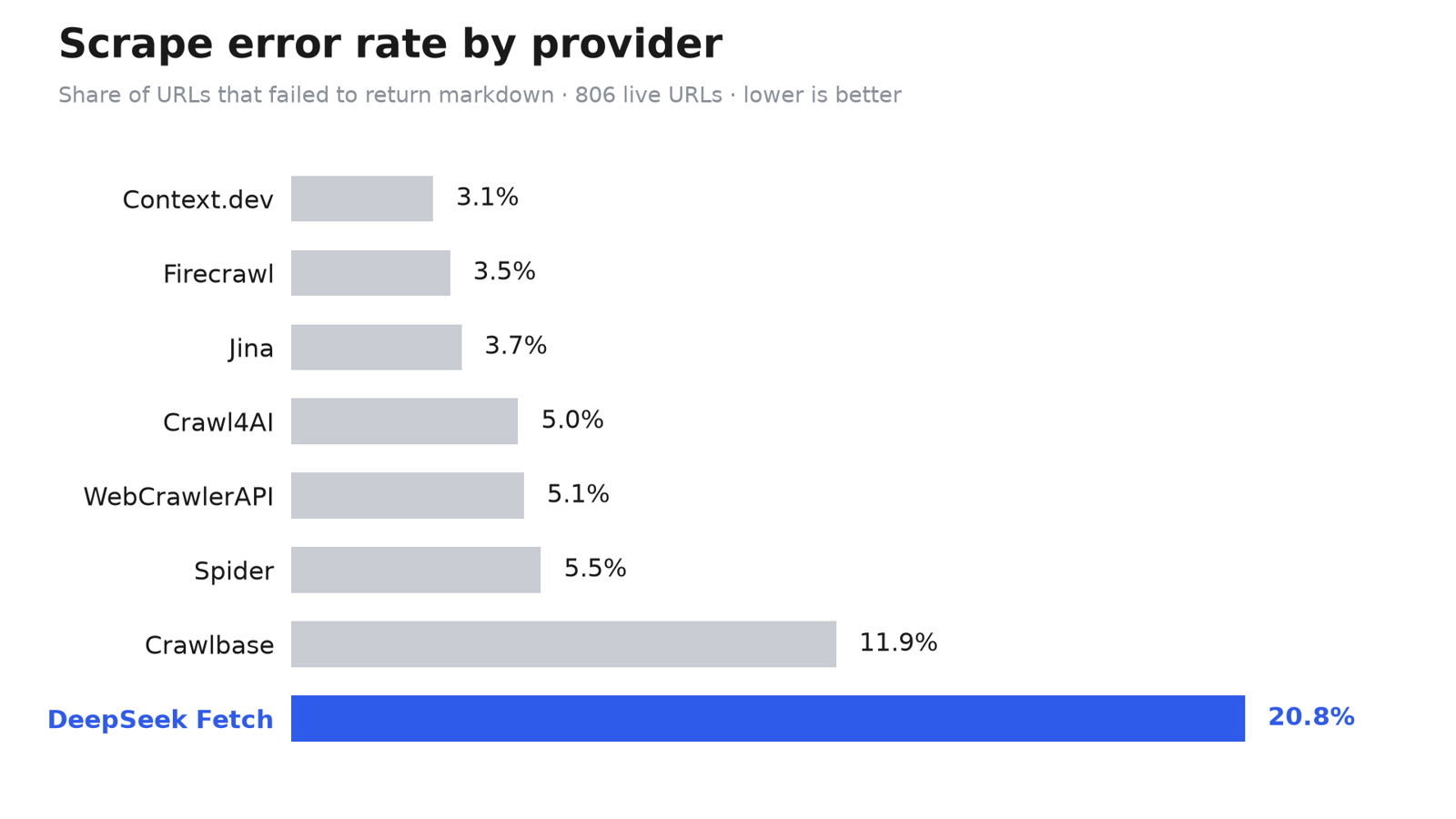
Error rate on the same 1000-page test set (calculated on the 806 valid pages) for every provider in our main benchmark. Lower is better. Full numbers and methodology for all providers are on the benchmark page.
How each URL was scored
- Every URL has a truth_text (about 100 words of main content that must appear) and a lie_text (about 10 words of noise that must not).
- A page counts as covered when at least 10% of truth_text is found in the returned Markdown. Content recall is the share of truth_text found.
- Noise avoidance checks that lie_text is absent. Extraction F1 is our approximation: we only have a short noise sample per row, so precision is a proxy (1 minus noise overlap).
- The URL set is identical for every provider, and real 404s (dead pages) were removed for all of them. The full method is on the benchmarks page. Caveats are at the end of this post.
Recall distribution
Per-page outcomes, out of the 806 valid pages:
| Bucket | DeepSeek | WebCrawlerAPI |
|---|---|---|
| Error / timeout | 168 | 41 |
| Miss (<10% of content) | 66 | 56 |
| Partial (10-50%) | 129 | 113 |
| Most (50-90%) | 162 | 244 |
| Full (>=90%) | 281 | 352 |
DeepSeek returned the full page 281 times against 352. The biggest gap is errors: 168 against 41.
Where DeepSeek failed: 404s and 504s
All 168 DeepSeek errors fall into two codes:
- 113 x HTTP 404 ("failed to fetch URL")
- 55 x HTTP 504 (a downstream request timed out)
The 404 is a catch-all. The DeepSeek docs say it covers an unavailable URL, a URL blocked by site policy, an error from the target site, an unsupported content type, or a page with no extractable Markdown. The response does not tell which one happened.
Most of the 113 404s were on pages that other providers fetched fine. Truly dead URLs were already removed from the set, so these are DeepSeek failures, not dead links. The docs say to retry 408, 429 and 5xx only, and not to retry other 4xx errors. So a 404 on a live page is a dead end.
One good point: failed requests are not billed. Errors cost time, not money.
What is the DeepSeek Fetch API?
The Fetch API is half of DeepSeek's Search & Fetch launch. The Search API finds pages for a query. The Fetch API takes one URL and returns the content as Markdown.
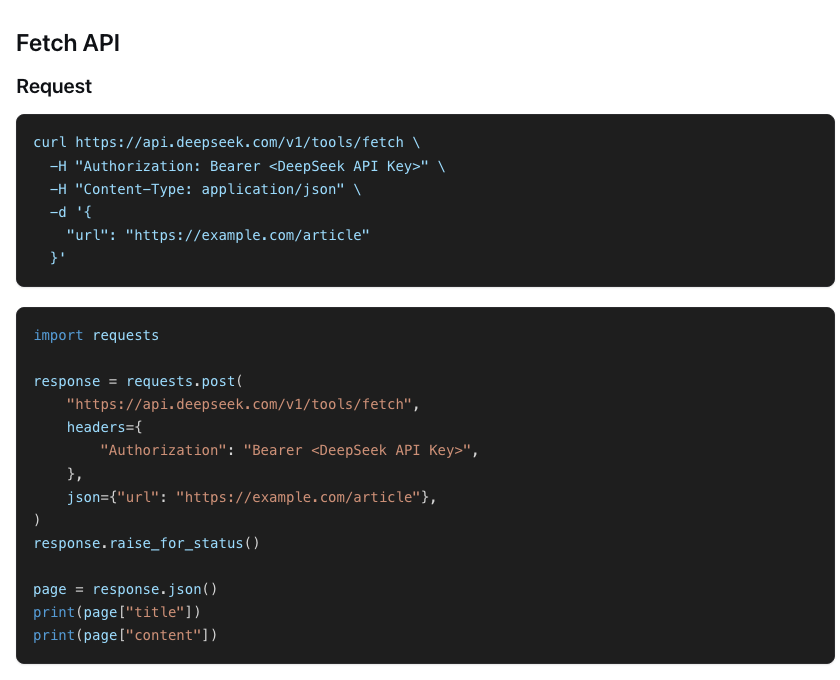
The call is a POST to https://api.deepseek.com/v1/tools/fetch with a Bearer token (your DeepSeek API key):
curl https://api.deepseek.com/v1/tools/fetch \
  -H "Authorization: Bearer <DeepSeek API Key>" \
  -H "Content-Type: application/json" \
  -d '{"url": "https://example.com/article"}'
The response has two fields:
{
  "title": "Example article",
  "content": "# Example article\n\nArticle content."
}
Facts from the docs:
- The url must be http or https, at most 8192 characters, and cannot contain a username or password.
- Limit: 5 QPS per account (separate from Search), plus a per-domain limit. Above it you get a 429.
- One URL per call. No crawling.
- No parameters besides url. No documented controls for caching, main-content-only, JavaScript rendering, formats or screenshots. Output is Markdown only.
- Error codes: 400, 401, 402 (insufficient balance), 403 (security policy), 404, 408, 413, 429, 500, 504. Retry 408, 429 and 5xx.
For the benchmark we throttled requests to stay under the 5 QPS limit.
DeepSeek Fetch markdown output quality
When the Fetch API returns content, it is decent. Content recall of 67.8% and F1 of 0.58 mean it found about two thirds of the expected main content, and it kept boilerplate out almost as well as WebCrawlerAPI (noise avoidance 99.06% vs 99.08%).
Short definitions, so the table above is clear (full versions on the benchmark page):
- Coverage: share of returned pages where at least 10% of the expected text was found.
- Content recall: how much of the expected main content was found.
- Extraction F1: recall and precision combined. Our precision is a proxy, so treat F1 as an approximation.
- Noise avoidance: how often unwanted text (menus, footers, banners) is kept out.
- Error rate: requests that returned an error instead of Markdown.
So the quality problem is not noisy output. The problem is that a fifth of the pages return nothing, and there is no switch to try again differently: no JavaScript rendering option, no main-content option.
DeepSeek Fetch API pricing
The price is $0.75 per 1,000 successful requests, the same as Search. A request is billed only when it returns HTTP 200 with page content. Failures, empty results and timeouts are free.
There is a promo: calls made through DeepSeek Harness, Claude Code or Codex server-side tools are free until per-request billing starts at 00:00 Beijing time on November 1, 2026.
What that means with our numbers (our own derived figure, not a DeepSeek price). 638 of the 806 valid pages returned content, so 79.2% would be billed. Cost per 1,000 pages attempted is about 0.75 x 0.792 = $0.59. Cost per 1,000 usable pages stays $0.75, because you only pay for successes. But you still need a retry or a fallback for the roughly 21% that fail, and that fallback has its own cost.
For WebCrawlerAPI prices, see the pricing docs.
DeepSeek Fetch API review: verdict
What is good:
- Very cheap, and failures are not billed.
- Trivial API: one endpoint, one input field.
- Good median latency (7.1s).
- Clean output when it works (99.06% noise avoidance).
What is not:
- 20.84% error rate in our run.
- Opaque 404: you cannot tell blocked from dead from unsupported.
- 55 downstream 504s and a p95 of 61 seconds.
- 5 QPS cap.
- No JavaScript, caching, main-content or format controls.
- One URL per call, no crawl. Markdown only.
Verdict by use case:
| Use case | Fit |
|---|---|
| Best-effort tool inside an agent loop that can retry or fall back | Good |
| Cheap lookups where a miss is fine | Good |
| Only fetch step for an AI knowledge base ingestion pipeline | Not enough. Every missing page is a hole |
Compared with WebCrawlerAPI. 87.97% vs 70.97% success, 5.09% vs 20.84% error rate, higher recall and F1, equal noise avoidance. The trade-off is a slower median (8.5s vs 7.1s). The scrape endpoint takes a url and returns Markdown by default, and a whole site can be crawled with the same API. You can run your own URLs against it and compare. For more providers, see the full multi-provider comparison.
How we ran the benchmark (methodology and caveats)
- Dataset: firecrawl/scrape-content-dataset-v1 on Hugging Face, 1000 pages. 133 were skipped as broken and 61 dead pages (real 404s) were removed for every provider. 806 valid pages remain, the same set for both services.
- Runs: DeepSeek on 2026-10-18, WebCrawlerAPI on 2026-09-28. Cache disabled where possible, 1 retry.
- Timeouts: DeepSeek ran with 120s, WebCrawlerAPI with 60s. DeepSeek's long tail is despite the higher timeout.
- Single run: one run per provider on one date, three weeks apart. DeepSeek's service is days old and may improve.
- F1 is an approximation. Precision is a proxy because only a short noise sample exists per row.
- One dataset, mostly English public pages.
- Conflict of interest. We are a vendor of the compared product. This is not an endorsement of any provider.
FAQ
What is the DeepSeek Fetch API?
A POST endpoint at https://api.deepseek.com/v1/tools/fetch. You send one URL as {"url": "..."} with your DeepSeek API key as a Bearer token. It returns title and content, where content is the page as Markdown.
How reliable is the DeepSeek Fetch API?
In our 1000-page test it succeeded on 70.97% of the valid pages. The rest failed with an error. It is usable as a best-effort tool, but any pipeline that needs every page should have a retry or a fallback.
What is the DeepSeek Fetch API error rate?
20.84% in our run: 168 errors out of 806 valid pages. That is 113 HTTP 404 errors and 55 HTTP 504 errors. It is one run on one date, so expect some variation.
Why does the DeepSeek Fetch API return 404?
404 is its catch-all failure. The docs list an unavailable URL, a URL blocked by site policy, an error from the target site, an unsupported content type, or no extractable Markdown. In our run most 404s were on pages that were alive and fetched fine elsewhere.
Why does DeepSeek Fetch return 504?
A 504 means a downstream request timed out. It happened 55 times in our run. The docs say to wait and retry on 5xx errors. Since failed requests are not billed, retrying costs only time.
How much does the DeepSeek Fetch API cost?
$0.75 per 1,000 successful requests. Failed requests, empty results and timeouts are not billed. Calls through DeepSeek Harness, Claude Code or Codex server-side tools are free until November 1, 2026, per the DeepSeek docs.
What are the DeepSeek Fetch API rate limits?
5 QPS per account, counted separately from Search, plus a per-domain QPS limit. Going over returns HTTP 429. The docs say to wait and retry.
Does DeepSeek Fetch render JavaScript or return only the main content?
The docs describe no such controls. The only request field is url, so we cannot say how it handles JavaScript-heavy pages beyond what our test showed.
Can the DeepSeek Fetch API convert a URL to markdown for an AI knowledge base?
Yes, for single pages. The Markdown is clean when it comes back. Plan a fallback for the roughly one in five URLs that fail, otherwise your knowledge base will have gaps.
How does DeepSeek Fetch compare to other URL-to-markdown APIs?
On our dataset it is cheap and quick at the median, but less reliable. See the full benchmark results for a multi-provider comparison.
Is there a DeepSeek web scraping API that crawls whole sites?
No. The Fetch API takes one URL per call and does not follow links. Crawling a site means building it yourself or using a crawler API.
