
MarkItDown vs Docling vs Jina Reader vs Crawl4AI: Which markdown converter for websites?
If the goal is a docs or help-center site feeding an AI knowledge base or support bot, I would use Crawl4AI with fit_markdown when you can run a browser, a crawl API when you cannot, and Docling only for the PDFs. The file converters (MarkItDown and Docling) are not the weak link once they have the page HTML. The weak link is everything around the conversion. They do not render JavaScript, they keep the navigation, and MarkItDown got a 403 from Wikipedia when it fetched the URL itself. Crawl4AI renders JavaScript but leaks the most boilerplate unless fit_markdown is on. Jina Reader is the cleanest and drops the most content. For PDFs, Docling is the best of the four.
That comes from one run on 10 URLs on 2026-10-30. It is the end-to-end companion to the HTML to markdown library benchmark, and step 1 of the website to markdown knowledge base pipeline. Eight of the 10 pages are shared with that benchmark. Two are new, a JavaScript-rendered page and a PDF.
I run WebCrawlerAPI, so one of the five rows below is ours. It is labeled, it ran with the same rules as the others, and it lost on some pages. The method, code and per-page numbers are linked at the end of the test section.
Short verdict
| If you need | Use | Why, from this run |
|---|---|---|
| PDFs and Office files | Docling | 24 of 24 headings and 4 pipe tables on the PDF, but 36 to 61 s on CPU |
| One URL now, no setup | Jina Reader | Lowest leakage (3.1%), but 72.0% heading recall and a near-empty result on the JS page |
| Self-hosted, JS-rendered pages | Crawl4AI | Only open tool here that rendered the JS page; use fit_markdown to cut leakage from 8.5% to 4.3% |
| HTML already in hand | MarkItDown or Docling | 97.7% and 99.4% heading recall, 0.1 to 0.2 s per page, no navigation removal |
| A whole site, on a schedule, hosted | A crawl API (ours: WebCrawlerAPI) | 4.1% leakage and no hard failures on the 9 web pages, but 51.8% word recall on the Guardian front page and the PDF returned as base64 |
What each tool is built for
MarkItDown
MarkItDown (0.1.9) is a Microsoft library that turns files into markdown for LLM pipelines. For HTML it wraps markdownify, which the library benchmark already measured. A plain pip install markitdown raised MissingDependencyException on the PDF. The markitdown[pdf] extra fixed it. Given a URL, it fetches the page itself with a plain HTTP client and converts what comes back.
Docling
Docling (2.145.0) is a layout-aware document parser for PDF, DOCX, HTML and more. PDFs go through machine-learning models (a 506 MB model cache and a 1.5 GB virtual environment here, with PyTorch 2.15.0). HTML does not. The HTML pages converted in under 0.8 s each, with no model load. I did not run it with a GPU, so the PDF times are CPU times on an Apple Silicon laptop.
Jina Reader
Jina Reader is a hosted service: a GET request to https://r.jina.ai/<url> returns markdown. The Jina Reader page (read 2026-10-30) says it is free and lists 20 requests per minute without a key. This run used no key, 10 requests, 4 s apart. It fetches on its own servers, so the target site sees Jina, not you.
Crawl4AI
Crawl4AI (0.9.5) is an open-source Python crawler on top of Playwright with a markdown generator and content filters. What it is and how to set it up is covered in the open-source crawler roundup and the Crawl4AI tutorial. Here it ran in the smallest configuration: default markdown generator, check_robots_txt=True, plus a PruningContentFilter so that both raw_markdown and fit_markdown came from the same crawl. The project's README now also advertises a hosted Crawl4AI service; I did not test it, so everything below is the open-source library.
How the test was run
Ten URLs, one machine (Apple Silicon, macOS 15.6.1, Python 3.11.2), one day.
| Type | Page | Note |
|---|---|---|
| Docs | Python tutorial, classes | shared with the library benchmark |
| Docs | Requests quickstart | shared |
| Docs | Flask quickstart | shared |
| Table-heavy | Wikipedia, comparison of lightweight markup languages | shared, 23 tables |
| Table-heavy | Python built-in functions | shared |
| Article | Martin Fowler, Microservices | shared |
| Article | Joel on Software, The Joel Test | shared |
| Front page | The Guardian, technology | shared, cookie banner, list of stories |
| JS-rendered | quotes.toscrape.com/js/ | content is absent from the raw HTML (0 quote elements raw, 10 after rendering) |
| arxiv.org/pdf/1706.03762 | 15 pages, 2.2 MB |
The JS page is a public sandbox built for scrapers, so it is not typical. It only tests whether a tool renders JavaScript.
Metrics:
- Heading recall: share of the h1 to h4 headings in the main region found in the output. For the PDF, a hand list of 24 section titles that must match a whole output line.
- Leakage: share of output tokens (cl100k_base) that are not words of the main region. The main region is one CSS selector per page, taken from the raw HTML (the rendered DOM for the JS page). This is a simpler rule than the hand labels in the library benchmark, so the leakage numbers of the two posts do not compare.
- Tokens and seconds: median per page. Seconds are end to end (fetch plus convert) when a tool is given a URL.
- Failures: an error, or under 20% of the main words in the output.
Each tool ran once per URL. Two variants cover the fairness question: MarkItDown and Docling were also fed the cached HTML (the rendered DOM for the JS page), which separates the converter from the missing fetch step. Crawl4AI reports raw_markdown and fit_markdown from one crawl.
Requests were small. robots.txt was checked before every fetch (quotes.toscrape.com has none, it returns 404), the User-Agent was WebCrawlerAPI-benchmark/1.0, and requests were spaced 2 to 4 s apart (15 s for arXiv, which asks for a 15 s crawl delay). Crawl4AI ran with check_robots_txt=True and the API with respect_robots_txt: true. Jina fetches on its side, so I only chose sites that allow it. WebCrawlerAPI got 10 calls to POST /v2/scrape with output_formats: ["markdown"] and main_content_only: true. arXiv saw one extra request because the MarkItDown PDF row was rerun after installing the PDF extra.
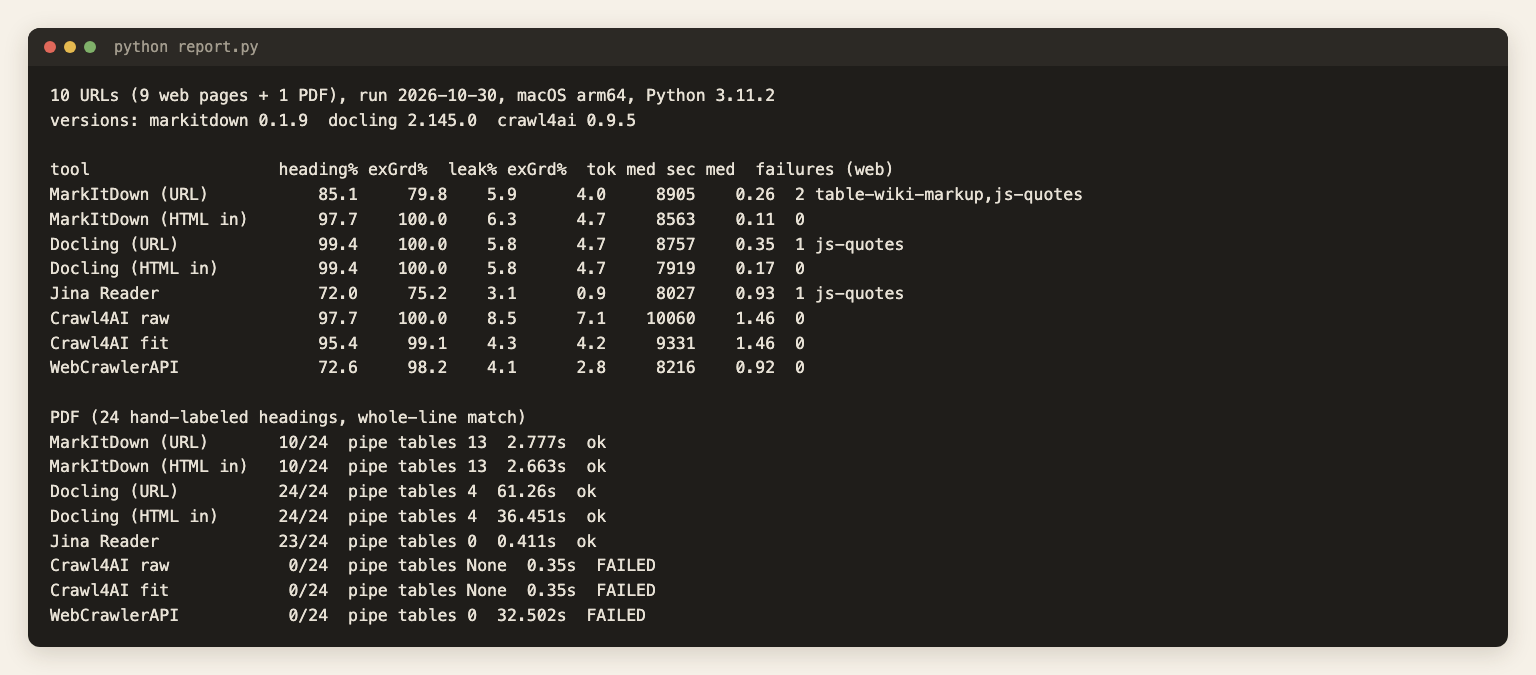
Limits: one labeler, 10 pages, one machine, one day, a text-match heuristic. The code, results.json and trimmed output excerpts are in the post's assets folder. Robots rules are explained in what is robots.txt.
Results
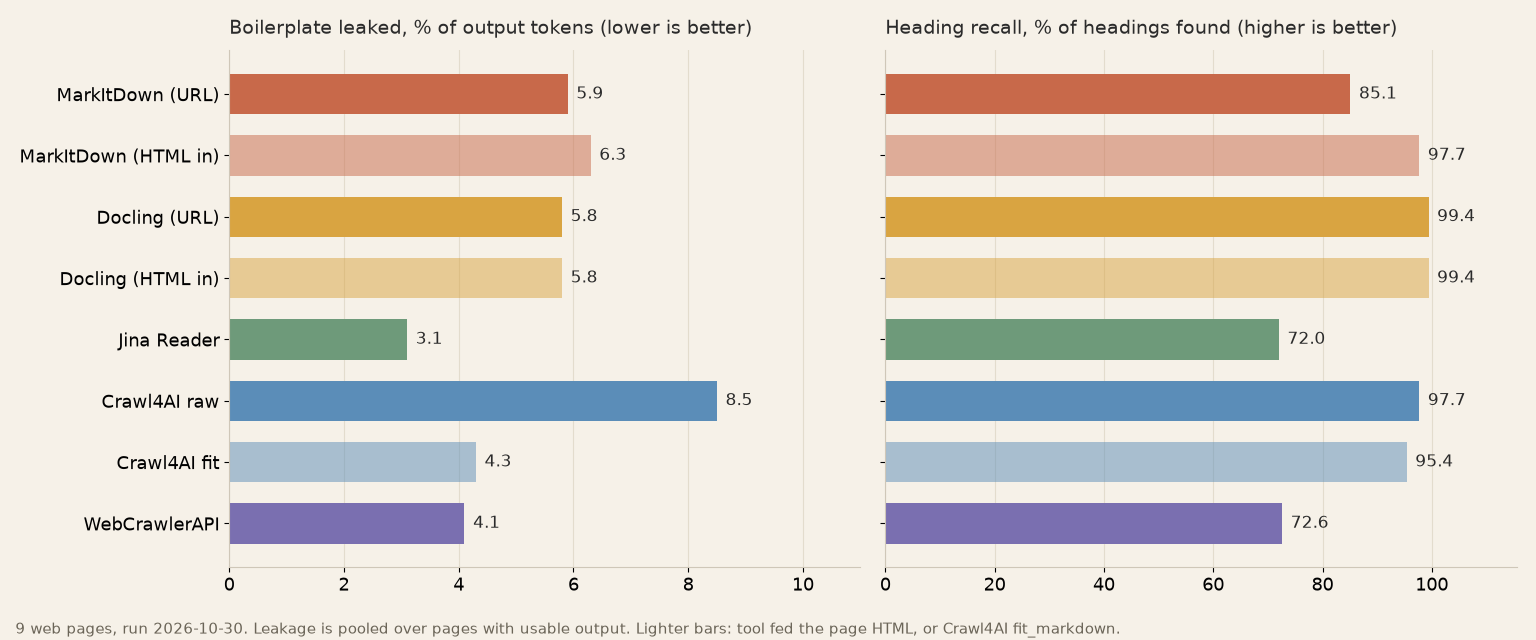
Heading recall and leakage are pooled over the 9 web pages. The Guardian front page is 66 of the 175 headings and dominates several rows, so each metric is also shown without it.
| Tool | Headings, 9 pages | Headings, excl. Guardian | Leakage, 9 pages | Leakage, excl. Guardian | Median tokens | Median s | Web failures | PDF headings (of 24) |
|---|---|---|---|---|---|---|---|---|
| MarkItDown, given URL | 85.1% | 79.8% | 5.9% | 4.0% | 8,905 | 0.26 | 2 | 10 |
| MarkItDown, given HTML | 97.7% | 100% | 6.3% | 4.7% | 8,563 | 0.11 | 0 | 10 |
| Docling, given URL | 99.4% | 100% | 5.8% | 4.7% | 8,757 | 0.35 | 1 | 24 |
| Docling, given HTML | 99.4% | 100% | 5.8% | 4.7% | 7,919 | 0.17 | 0 | 24 |
| Jina Reader | 72.0% | 75.2% | 3.1% | 0.9% | 8,027 | 0.93 | 1 | 23 |
| Crawl4AI, raw markdown | 97.7% | 100% | 8.5% | 7.1% | 10,060 | 1.46 | 0 | failed |
| Crawl4AI, fit_markdown | 95.4% | 99.1% | 4.3% | 4.2% | 9,331 | 1.46 | 0 | failed |
| WebCrawlerAPI (ours) | 72.6% | 98.2% | 4.1% | 2.8% | 8,216 | 0.92 | 0 | base64 file, not text |
The failures are: MarkItDown by URL on the Wikipedia page (403) and the JS page, Docling by URL on the JS page, Jina Reader on the JS page. Median tokens count pages with usable output only. Seconds for the "given HTML" rows exclude the fetch, so they are not comparable with the rows that fetch. Network time dominates for Jina and the API, so none of this is a speed ranking.
Static docs pages
The leakage figure is kind to the file converters here, and it hides the navigation. On the Python docs page, MarkItDown, Docling and Crawl4AI raw leak only 7.3%, 7.4% and 14.8%, because the sidebar table of contents repeats the headings that count as main words. In the output, 50 (MarkItDown), 44 (Docling) and 45 (Crawl4AI) non-empty lines come before the first sentence of the page. The API had 15, Crawl4AI fit_markdown 8 and Jina Reader 3.
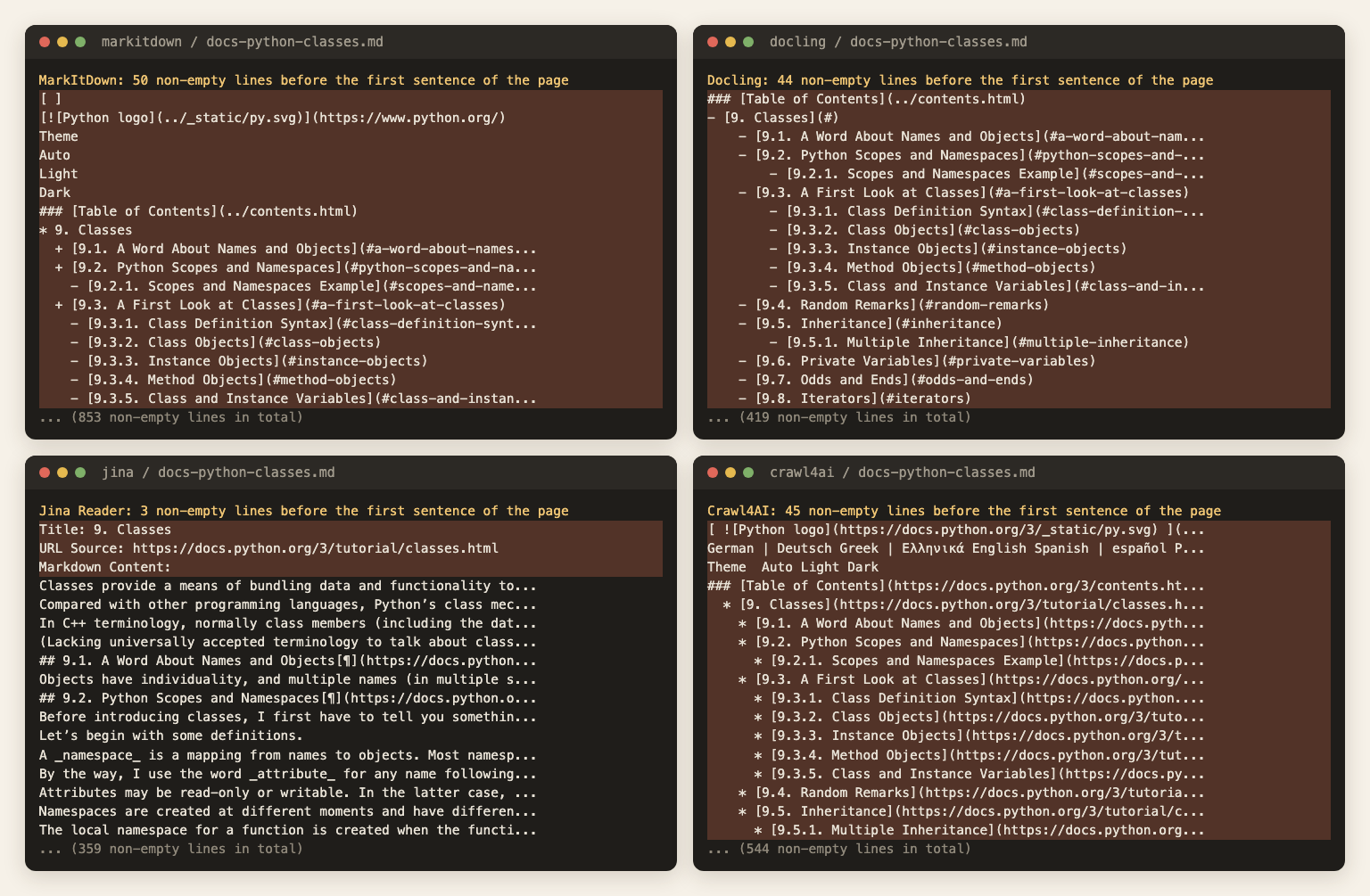
The strings "Previous topic" and "Report a bug" (both sidebar text) appear in MarkItDown, Docling, Crawl4AI raw and the API output. Jina Reader has neither. Crawl4AI fit_markdown has the first one. So main_content_only: true did not strip the Sphinx sidebar on this page. It targets article-style pages, and a docs page with a sidebar is a miss.
JS-heavy page
MarkItDown returned 60 tokens, Docling 25 and Jina Reader 118: the title, a login link and "Next". Jina's output carried its own warning, "This page maybe not yet fully loaded". Crawl4AI returned 412 tokens and the API 420, with the quotes. The API took 3.5 s on this page, against 0.6 to 1.3 s on the static ones.
Docling given the rendered DOM returned all of it (100% word recall). What the file converters lack here is the browser, not the conversion. See how to scrape JavaScript-heavy sites if that part is new.
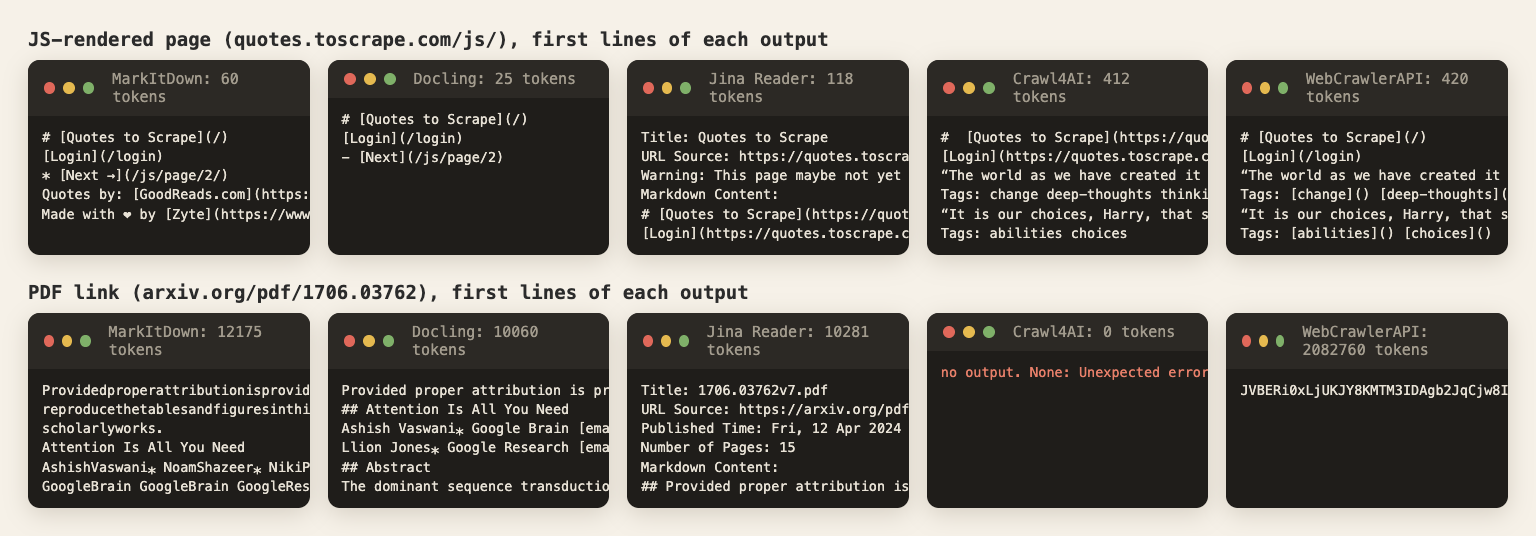
Table-heavy pages
Tables survived in nearly every tool. On the Wikipedia page (23 tables), MarkItDown (given HTML), Docling and the API wrote 23 pipe tables. Crawl4AI wrote 22 and Jina Reader 16. On the Python built-ins page, fit_markdown found only 80.95% of the table cell text against 100% for raw markdown: the content filter pruned table rows. If tables matter, fit_markdown needs a second look. MarkItDown never fetched the Wikipedia page, because it got a 403 (one of its 2 URL-mode failures).
Jina Reader keeps less than it should
Jina's leakage is the lowest (3.1%), but it gets there by dropping content. It found 12 of 25 headings on Fowler's article, and only 69.2% of that page's main words. On Wikipedia it found 10 of 22 headings. On the Guardian page it kept 76.9% of the main words, where most tools kept more than 99%. A missing section in a knowledge base is a question your support bot cannot answer, and nothing in the output says the section was ever there. The Firecrawl alternatives roundup covers hosted tools with the same trade.
The PDF link
The bottom row of the screenshot above shows the PDF outputs. Docling found all 24 headings and wrote 4 pipe tables. It took 61 s the first time (which includes loading the models) and 36 s on the second pass, CPU only. Jina Reader found 23 of 24 headings in 0.4 s and wrote no pipe tables. MarkItDown found 10 of 24 because words were glued together ("Providedproperattributionis..."), though it ran in 2.8 s. Crawl4AI failed with Page.goto: Download is starting: the browser tried to download the file.
The API call succeeded (HTTP 200) but its markdown field held the PDF itself, base64-encoded, 2,082,760 tokens of JVBERi0.... That is what the run returned for this one PDF. The scrape docs do not document PDF output, so I would not build on it.
Speed and setup cost
Per web page, MarkItDown and Docling took under 0.8 s (given a URL), Crawl4AI 1.1 to 1.9 s, Jina Reader 0.4 to 2.6 s and WebCrawlerAPI 0.6 to 3.5 s. Crawl4AI is slower because it launches a browser. It needs 572 MB of Chromium, and its virtual environment (867 MB) also holds MarkItDown, so that figure covers both. Docling is the heavy install: 1.5 GB of virtual environment plus the 506 MB model cache.
Where the file converters fall down on websites
They were built for files, so the missing pieces are the ones a web crawler provides. There is no readability step, which is why all of the navigation reached the output. There is no browser: the JS page gave 60 and 25 tokens. And the fetch is basic. MarkItDown sent a plain request and Wikipedia answered 403.
Given HTML, the picture flips. Docling kept 99.4% of headings and 99.3% of the main words, level with Crawl4AI raw. If your pipeline already has a fetcher that renders pages, either one works as the converter. Put a selector or a content filter in front, since neither strips the sidebar.
Firecrawl was out of scope for this test; for hosted crawlers see best Firecrawl alternatives.
MarkItDown vs Docling, and when MarkItDown is the wrong tool
On HTML, MarkItDown and Docling came out level once both had the page (97.7% and 99.4% of headings, 6.3% and 5.8% leakage). On the PDF the gap was large: 24 of 24 headings for Docling against 10 of 24 for MarkItDown, which glued words together. So the choice between them is about files, not websites. For websites, neither is the tool to start with.
MarkItDown is the wrong tool when the input is a URL (it fetched Wikipedia with a plain request and got a 403, and it cannot render JavaScript), when the PDF text must be clean, or when navigation must go. MarkItDown alternatives, by job: Docling for PDFs, Crawl4AI for JavaScript pages, a crawl API for whole sites.
Jina Reader alternative, and Jina Reader vs Crawl4AI
Jina Reader vs Crawl4AI in one line: Jina is cleaner and needs no setup but dropped sections here, Crawl4AI kept 97.7% of headings and rendered the JS page but needs a browser and a filter. As a Jina Reader alternative, Crawl4AI is the self-hosted pick, and a crawl API is the hosted pick.
Which one to use
- PDFs and Office files: Docling. Budget minutes of CPU per batch, or a GPU. MarkItDown with the PDF extra is lighter, but only if word spacing does not matter. It mattered in this PDF: MarkItDown found 10 of 24 headings and glued words together.
- One URL, no infrastructure, a human reading the answer: Jina Reader, and accept that it drops sections.
- Self-hosted, JS-rendered pages, full control: Crawl4AI with fit_markdown (4.3% leakage, 95.4% headings), and a check on table-heavy pages. You pay in operations: a browser per worker, memory and retries.
- Whole-site crawl on a schedule into an AI knowledge base, hosted: a crawl API. It has no browser fleet to run, and no hard failures on the 9 web pages here, though it dropped about half of the Guardian front page.
- Docs site feeding a support bot: crawl the site, keep the main content, then chunk it. If the sidebar survives (it did on the Python docs page with main_content_only: true), the scrape docs list clean_selectors for removing CSS selectors from the output. I did not test that option here. With Crawl4AI, fit_markdown removed more of the sidebar than raw markdown did (8 lines before the first sentence against 45).
- A free tool is enough when the site is small, the volume is low and you own the infrastructure. Crawl4AI plus a selector costs nothing per page.
To try it on your own pages, start with one URL in the free URL to markdown tool, then move to the crawl API for a whole site. The web scraping API covers single pages from code. For WebCrawlerAPI, one request looked like this. Pay-as-you-go pricing is $0.002 per page (pricing docs, read 2026-10-30), so the 10 calls cost $0.02.
// Node 18+: one page to markdown, main content only, robots.txt respected
const res = await fetch("https://api.webcrawlerapi.com/v2/scrape", {
  method: "POST",
  headers: {
    Authorization: "Bearer YOUR_API_KEY",
    "Content-Type": "application/json",
  },
  body: JSON.stringify({
    url: "https://docs.python.org/3/tutorial/classes.html",
    output_formats: ["markdown"],
    main_content_only: true,
    respect_robots_txt: true,
  }),
});
const { markdown } = await res.json();
console.log(markdown.slice(0, 500));
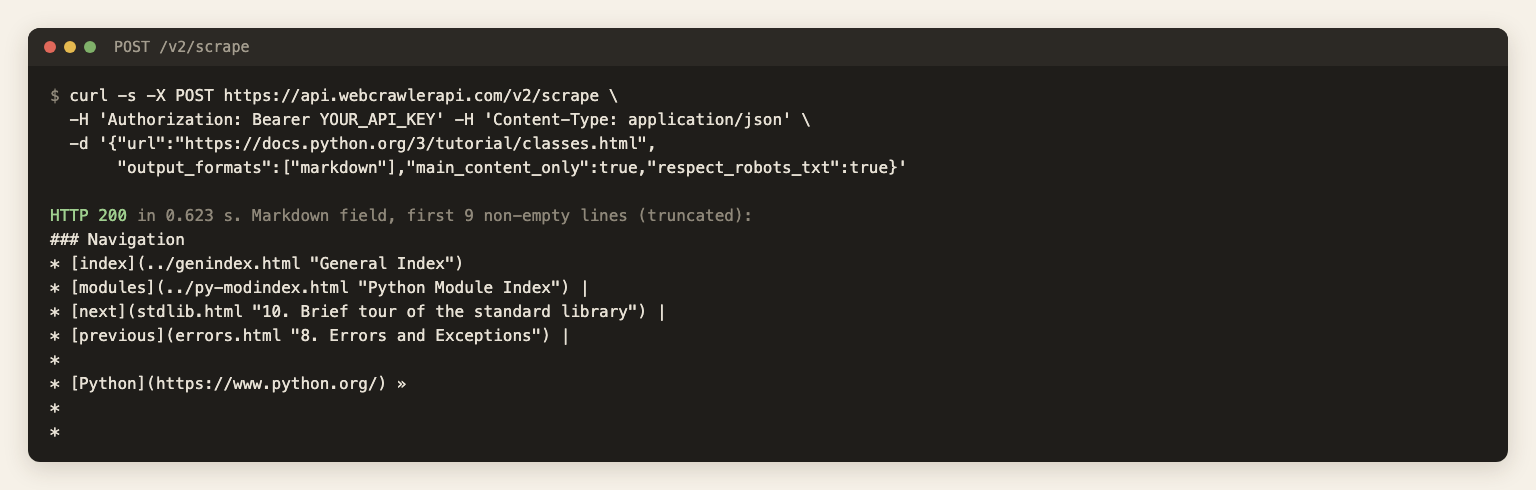
Where it was weak: 51.8% word recall and 20 of 66 headings on the Guardian front page (a list of stories), the Sphinx sidebar kept on the docs page, and the base64 PDF. Where it was strong: 98.2% heading recall and 2.8% leakage on the 8 other web pages. Options are described in /docs/api/scrape and cleaning.
Next steps
- Try one URL free, without code: URL to markdown, then crawl the whole site with the crawl API.
- Keep a support bot current as docs change: recrawl changed pages.
- Crawl a whole site to files: Crawl a website to markdown files.
- Cut the markdown into pieces: Chunking strategies for a knowledge base.
- Compare the other web scraping options: best web scraping tools.
