
Sooner or later someone asks "do we have an llms.txt?", and the question lands on whoever already crawls the docs for the support bot. That crawl has everything you need to generate llms.txt and llms-full.txt.
Below I build a small llms.txt generator from two Node scripts. One crawls a site to markdown and writes both files. The other validates them against the spec. I ran both on the Alpine.js docs on November 21, 2026, and every number below comes from those runs. WebCrawlerAPI is my company, and the crawl step uses it.
No code? The free llms.txt generator builds a first-draft index (no llms-full.txt).
TL;DR
- llms.txt is a markdown index of your best pages at /llms.txt. llms-full.txt is one file with the full content, a Mintlify and Anthropic convention that isn't in the llmstxt.org spec.
- Google Search doesn't use either file, and they won't move your rankings.
- Most files get no traffic: in Ahrefs' May 2026 log study, 97% of valid llms.txt files got zero requests. Among named AI tools, GPTBot fetched most and Claude-Code came second.
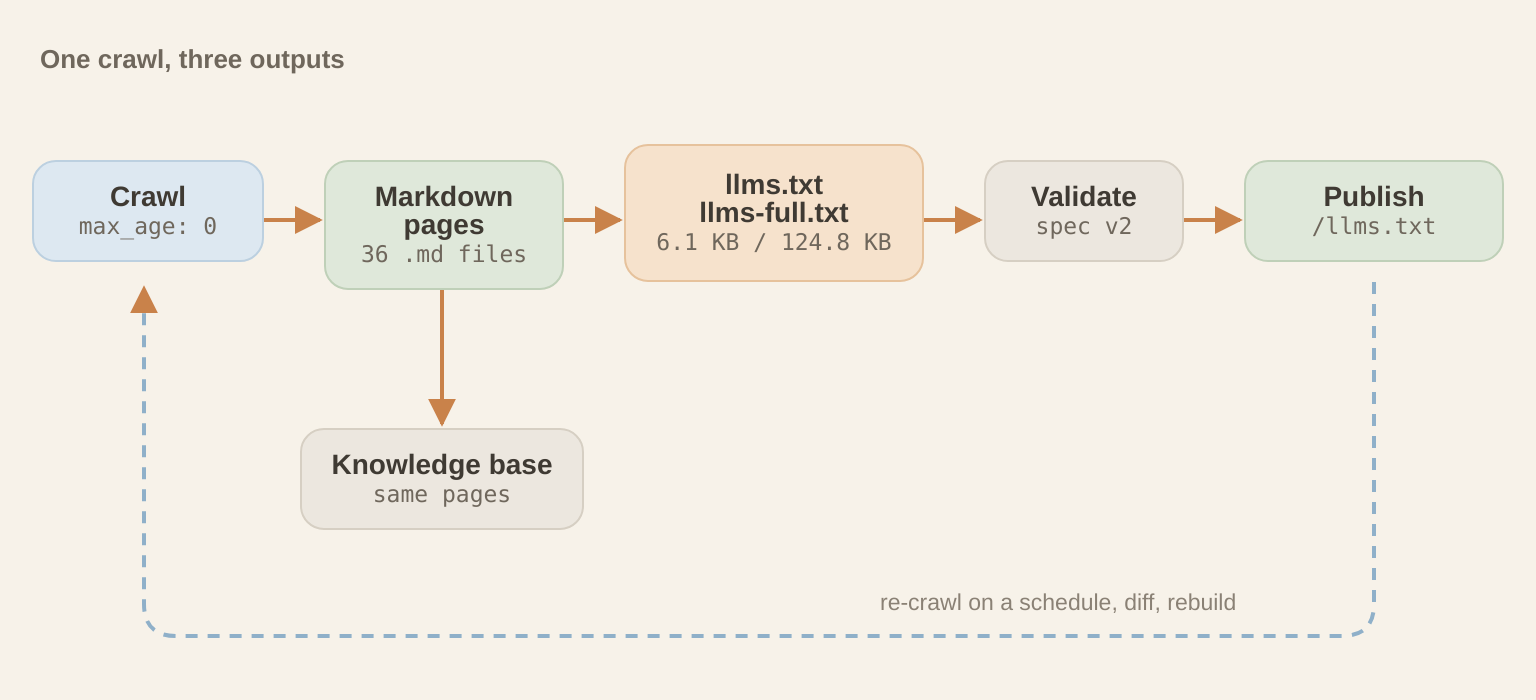
- The pipeline is generate-llms.mjs, then validate-llms.mjs, then two files copied to your web root. The same crawl feeds your knowledge base.
- Rebuild with the crawl cache off (max_age: 0). The 7-day default cache hides changes from a weekly job.
How to create an llms.txt file
- Pick the pages an agent needs, like the docs and the API reference. Don't dump the whole sitemap.
- Start the file with an H1 (the site name) and a one-line blockquote summary.
- Add H2 sections with one - [name](url): note line per page. Point the links at .md versions of the pages if you publish them.
- Save it as llms.txt in your web root and serve it as text/plain; charset=utf-8.
- Check it with curl -sI for status and Content-Type, then run a format check like the validator below.
The smallest useful file:
# Example Docs

> Example is a CLI for syncing files to object storage.

## Docs

- [Quick start](https://example.com/docs/quick-start.md): install and first sync
Writing it by hand works for a small site. For llms-full.txt, a bigger site or a weekly rebuild, generate both files from a crawl, as the rest of this post does.
Plugin, one-click tool or crawl pipeline?
Use what your platform already has if it writes the files you need. Build the pipeline when the content sits on more than one stack, or when you need llms-full.txt on a schedule.
| Option | Use it when | Limits |
|---|---|---|
| Docs platform built-in (Mintlify, GitBook) | Your docs are hosted there | Mintlify writes both files and adds a truncation note when llms-full.txt passes 100 KB. One docs site only |
| Static site generator plugin (docusaurus-plugin-llms, vitepress-plugin-llms, Drupal llm_support) | You build the docs from source | Runs at build time on one site |
| WordPress (Yoast SEO, AIOSEO) | Everything is in WordPress | Yoast generates and refreshes llms.txt automatically. Its feature page doesn't mention llms-full.txt |
| Shopify | You run a store | Stores serve both files by default, as copies of /agents.md. templates/llms.txt.liquid overrides it, but Shopify says most stores shouldn't |
| Webflow | The site is on Webflow | Upload only (Site settings > SEO > LLMs.txt), UTF-8, under 100 KB. Webflow doesn't write the file, and its help article doesn't cover llms-full.txt |
| One-click generator (our free tool and others) | You want a first draft | Ours: up to 100 pages, index only, a generic summary, no link notes, no refresh |
| Crawl pipeline (this post) | Docs, blog and help center live on different stacks, your CMS has no plugin, pages need JavaScript, or you need llms-full.txt on a schedule | You write the summary yourself. The crawl doesn't log in, so gated docs need a build plugin or an auth-aware platform |
If you used Firecrawl's hosted generator: its /llmstxt endpoint will be removed on Thursday, December 10, 2026, 15:00 UTC, and Firecrawl points users to /v2/map plus /v2/batch/scrape. The script below does the same job and also writes llms-full.txt.
llms.txt, llms-full.txt and .md pages: what each one is
llms.txt is a markdown file at /llms.txt, proposed by Jeremy Howard of Answer.AI in September 2024. It's a curated list of links with short notes, small enough to fit in a model's context. Spec v2 came out in August 2026. The file blocks nothing; access rules stay in robots.txt.
llms-full.txt isn't in the llmstxt.org spec at all. Mintlify says it created the format with Anthropic: the whole docs site in one file. Anthropic and Cloudflare serve one. Every Shopify store serves one by default, though Shopify's is a copy of the store's /agents.md.
Per-page markdown is the part of spec v2 most guides skip: pages should have a .md version at the same URL (page.md or page.html.md), and llms.txt links should point at those when they exist.
| File | What it holds | Alpine.js run |
|---|---|---|
| llms.txt | H1, summary, sections of links with notes | 6,239 bytes, 1,478 tokens |
| llms-full.txt | Every page's markdown in one file | 127,797 bytes, 30,954 tokens |
| page.md copies | One clean markdown file per page | 36 files on disk, not published |
If you only need the definition and the full spec v2 format, what is llms.txt covers it with real examples.
Build your own llms.txt generator: crawl to llms.txt and llms-full.txt
The demo site is alpinejs.dev: small, server-rendered, with a robots.txt that allows everything (User-agent: *, empty Disallow). It has no real llms.txt, and that comes back in the validation section.
Step 1. Pick what goes in
Don't dump the whole sitemap. The spec wants llms.txt small enough for a context window. For Alpine I kept five docs sections and left out plugins, advanced topics, the 20 component URLs and the login. The sitemap lists 38 URLs in the five I kept: start-here 1, essentials 5, directives 19, magics 10, globals 3. The regexes:
whitelist: ^https://alpinejs\.dev/(start-here|essentials|directives|magics|globals)
blacklist: /(login|forgot-password|components?)(/|$)
The whitelist is matched against the full URL. Set items_limit above the scope (45 here): a capped job gives you an incomplete file, and two capped runs can pick different pages.
The run created 38 items and stopped. Two failed: /magics/next-tick and /directives/bind.md are in Alpine's sitemap, but both answer with a 302 to /essentials/installation. The crawler flagged them as duplicate_item and didn't charge for them (errors docs). A generator built from the sitemap alone would have listed two links to the install page.
More on scoping: crawling a documentation site for an LLM knowledge base and the filters guide.
Step 2. Crawl the site to markdown
Node 18 or newer, no dependencies. The first part of generate-llms.mjs starts a crawl and downloads each page's markdown once the job is done:
// generate-llms.mjs: crawl a site with WebCrawlerAPI, write llms.txt and llms-full.txt
// Node 18+, no dependencies. API key in WEBCRAWLER_API_KEY.
import { mkdir, readFile, writeFile } from "node:fs/promises";
import { createHash } from "node:crypto";
import { parseArgs } from "node:util";

const { values: opt } = parseArgs({
  options: {
    url: { type: "string" }, // seed URL
    whitelist: { type: "string" }, // regexp, matched against the full URL
    blacklist: { type: "string" },
    limit: { type: "string", default: "45" },
    name: { type: "string" }, // H1 of llms.txt
    summary: { type: "string" }, // the blockquote: write it yourself
    details: { type: "string" }, // optional paragraph after the blockquote
    optional: { type: "string", default: "" }, // sections that go under "## Optional"
    "main-content-only": { type: "boolean", default: false },
    "md-base": { type: "string" }, // link to your .md copies instead of HTML pages
    out: { type: "string", default: "out" },
  },
});

const API = "https://api.webcrawlerapi.com/v1";
const auth = { Authorization: `Bearer ${process.env.WEBCRAWLER_API_KEY}` };
const sleep = (ms) => new Promise((r) => setTimeout(r, ms));
const t0 = Date.now();

// 1. Start the crawl
const res = await fetch(`${API}/crawl`, {
  method: "POST",
  headers: { ...auth, "Content-Type": "application/json" },
  body: JSON.stringify({
    url: opt.url,
    items_limit: Number(opt.limit),
    output_formats: ["markdown"],
    whitelist_regexp: opt.whitelist,
    blacklist_regexp: opt.blacklist,
    respect_robots_txt: true,
    main_content_only: opt["main-content-only"],
    max_age: 0, // crawls are cached for 7 days by default; 0 = fetch fresh pages
  }),
});
if (!res.ok) throw new Error(`crawl: ${res.status} ${await res.text()}`);
const { id } = await res.json();
console.log(`job ${id.slice(0, 8)}... started`);

// 2. Poll every 5 s until done or error (a fresh job can report "new" first)
let job;
for (let i = 0; i < 120; i++) {
  await sleep(5000);
  job = await (await fetch(`${API}/job/${id}`, { headers: auth })).json();
  if (job.status === "done" || job.status === "error") break;
}
if (job.status !== "done") throw new Error(`job ended with status ${job.status}`);

// 3. Download the markdown of every finished page, 5 at a time.
// Crawl order changes between runs, so sort by path depth, then URL: same pages = same files.
const depth = (u) => new URL(u).pathname.split("/").filter(Boolean).length;
const items = job.job_items
  .filter((i) => i.status === "done" && i.markdown_content_url)
  .sort((a, b) => depth(a.original_url) - depth(b.original_url) || a.original_url.localeCompare(b.original_url));
const failed = job.job_items.filter((i) => !items.includes(i));
for (const f of failed) console.log(`failed ${f.original_url}: ${f.last_error} ${f.error_code ?? ""}`);
const pages = [];
for (let i = 0; i < items.length; i += 5) {
  const batch = items.slice(i, i + 5).map(async (it) => {
    const r = await fetch(it.markdown_content_url);
    if (!r.ok) throw new Error(`markdown ${r.status} for ${it.original_url}`);
    return { url: it.original_url, title: it.title ?? "", md: (await r.text()).trim() };
  });
  pages.push(...(await Promise.all(batch)));
}
I didn't set main_content_only. A 5-page dry run with and without it returned byte-identical markdown (same MD5 for all 5 files), because Alpine's markdown has no sidebar to strip. Test it on your own site: a big sidebar repeats on every page and bloats llms-full.txt.
Failed items get logged with last_error, plus error_code when the API returns one. The JS SDK does the same with crawlAsync, getJob and getContent. Pages that need JavaScript rendering are rendered before conversion; Alpine didn't need it.
The crawl returns pages in a different order each run, so the script sorts them by path depth, then URL. In my first two runs, before the sort, the Essentials links came out in two different orders from identical content. Sorting loses the docs' reading order (x-bind now comes before x-data); sort by your own list if that matters.
Step 3. Assemble llms.txt (spec v2 format)
The spec fixes the order of the parts:
- An optional byte-order mark.
- An H1 with the site name, the only required part.
- A blockquote summary.
- Optional paragraphs or lists, no headings.
- H2 sections of file lists: - [name](url), optionally followed by : notes.
## Optional is still allowed, but in v2 it's only a convention for links an agent can skip (changes).
A file can also sit under a path, like /docs/llms.txt. Where more than one file applies, the most specific one wins. The minimal example is at the top of this post.
The second part of the script turns each page into a link line and groups the lines into sections:
// 4. A name and a one-line note for each page
const plain = (s) => s.replace(/!?\[([^\]]*)\]\([^)]*\)/g, "$1").replace(/[`*_]/g, "").replace(/\s+/g, " ").trim();
const cut = (s, n) => (s.length <= n ? s : s.slice(0, s.lastIndexOf(" ", n)) + "...");
const suffix = commonTitleSuffix(pages.map((p) => p.title)); // e.g. " - Alpine.js"
let fromH1 = 0;
for (const p of pages) {
  const h1 = p.md.match(/^# +(.+)$/m)?.[1];
  if (h1) fromH1++;
  p.name = plain(h1 ?? p.title.slice(0, p.title.length - suffix.length)) || p.url;
  // first block of plain prose: skip headings, code, lists, tables, quotes, images
  const para = p.md.split(/\n\s*\n/).find((b) => b.trim() && !/^\s*(#|```|[-*>|<!]|\d+\.)/.test(b));
  p.note = para ? cut(plain(para), 150) : "";
  p.section = new URL(p.url).pathname.split("/").filter(Boolean)[0] ?? "home";
}

// 5. llms.txt: H1, blockquote, one H2 per first path segment, Optional last
const optional = opt.optional.split(",").filter(Boolean);
const label = (s) => s[0].toUpperCase() + s.slice(1).replace(/-/g, " ");
const link = (p) => (opt["md-base"] ? opt["md-base"] + new URL(p.url).pathname.replace(/\/$/, "") + ".md" : p.url);
const sections = new Map();
for (const p of pages) {
  const key = optional.includes(p.section) ? "Optional" : label(p.section);
  sections.set(key, [...(sections.get(key) ?? []), p]);
}
const order = [...sections.keys()].sort((a, b) => (a === "Optional") - (b === "Optional"));
const head = `# ${opt.name}\n\n> ${opt.summary}\n` + (opt.details ? `\n${opt.details}\n` : "");
let llms = head;
for (const key of order) {
  const lines = sections.get(key).map((p) => `- [${p.name.replace(/[[\]]/g, "")}](${link(p)})${p.note ? `: ${p.note}` : ""}`);
  llms += `\n## ${key}\n\n${lines.join("\n")}\n`;
}
Link names come from the page's first # heading, with the <title> (minus a shared - Site tail) as the fallback. All 36 Alpine names came from the H1.
Link notes come from the first paragraph of plain prose, cut near 150 characters. <meta name="description"> is empty on the 3 Alpine pages I checked, so it wasn't an option. The result is usable, not great: 13 of 36 notes got cut with "...", and 3 end with a colon because the paragraph introduced a code sample.
No generator writes the summary and the notes well. I wrote the summary by hand. Read the notes before you publish.
--details exists because Answer.AI's llms-txt parser (0.0.7) returned an empty summary when an H2 followed the blockquote directly, though the file was valid. One paragraph after the blockquote fixed it.
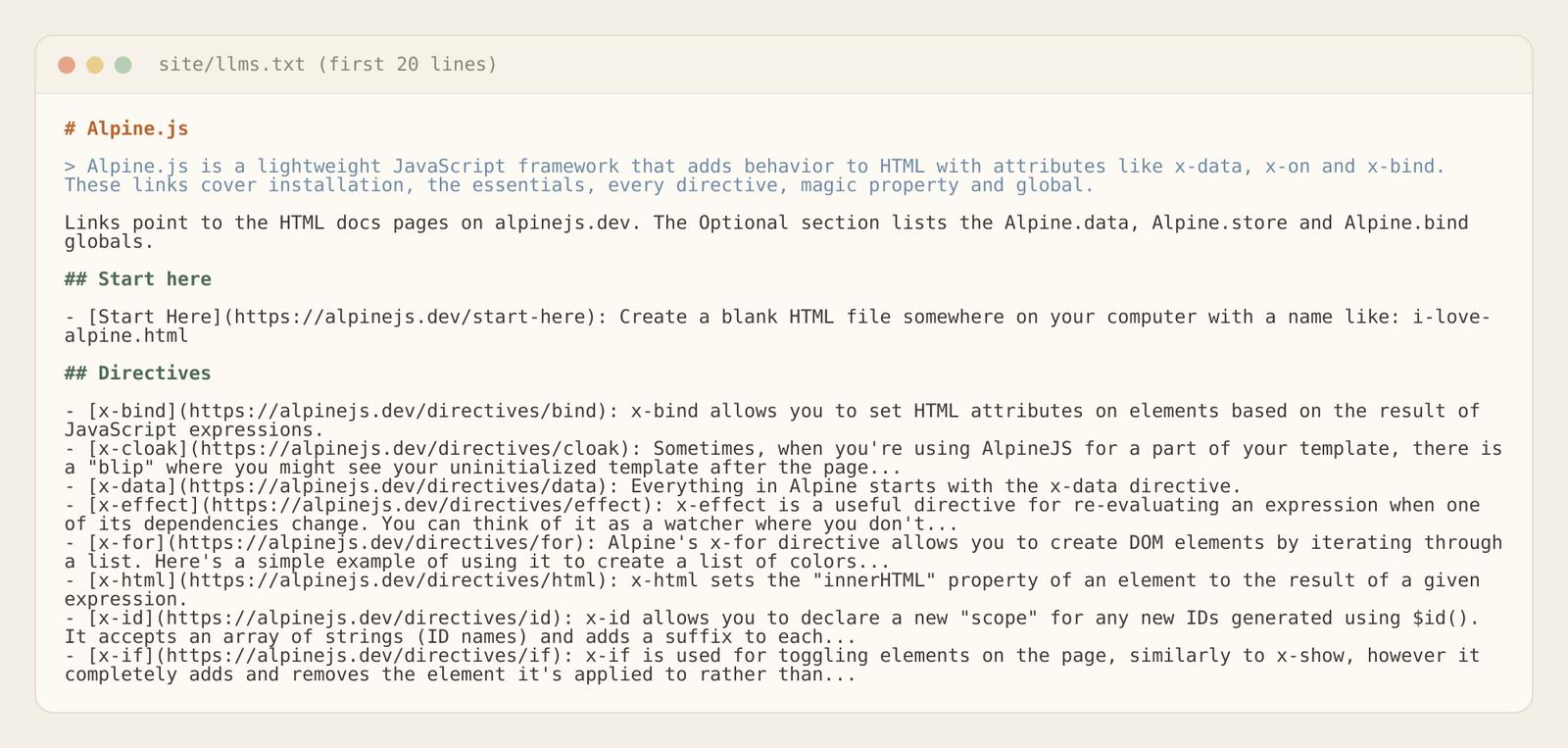
The top of the generated llms.txt:
# Alpine.js

> Alpine.js is a lightweight JavaScript framework that adds behavior to HTML with attributes like x-data, x-on and x-bind. These links cover installation, the essentials, every directive, magic property and global.

Links point to the HTML docs pages on alpinejs.dev. The Optional section lists the Alpine.data, Alpine.store and Alpine.bind globals.

## Start here

- [Start Here](https://alpinejs.dev/start-here): Create a blank HTML file somewhere on your computer with a name like: i-love-alpine.html

## Directives

- [x-bind](https://alpinejs.dev/directives/bind): x-bind allows you to set HTML attributes on elements based on the result of JavaScript expressions.
Step 4. Assemble llms-full.txt
The last part writes llms-full.txt and compares the run with the previous one:
// 6. llms-full.txt: same header, then every page with its source URL.
// The page H1 is replaced by our own, and root-relative links become absolute.
const body = (p) => p.md.replace(/^# +.+\n+/, "").replace(/\]\(\//g, `](${new URL(p.url).origin}/`);
const full = head + pages.map((p) => `\n# ${p.name}\n\nSource: ${p.url}\n\n${body(p)}\n`).join("");

// 7. Write files and compare with the previous run
await mkdir(`${opt.out}/pages`, { recursive: true });
for (const p of pages) {
  const file = new URL(p.url).pathname.replace(/^\/|\/$/g, "").replace(/\//g, "__") || "index";
  await writeFile(`${opt.out}/pages/${file}.md`, `<!-- ${p.url} -->\n${p.md}\n`);
}
await writeFile(`${opt.out}/llms.txt`, llms);
await writeFile(`${opt.out}/llms-full.txt`, full);
const hash = (s) => createHash("sha256").update(s.replace(/\s+/g, " ").trim()).digest("hex");
const manifest = Object.fromEntries(pages.map((p) => [p.url, hash(p.md)]));
const prev = JSON.parse(await readFile(`${opt.out}/manifest.json`, "utf8").catch(() => "{}"));
const added = Object.keys(manifest).filter((u) => !(u in prev));
const removed = Object.keys(prev).filter((u) => !(u in manifest));
const changed = Object.keys(manifest).filter((u) => u in prev && prev[u] !== manifest[u]);
await writeFile(`${opt.out}/manifest.json`, JSON.stringify(manifest, null, 2));

const cost = job.job_items.reduce((s, i) => s + (i.cost ?? 0), 0);
const jobSecs = (new Date(job.finished_at) - new Date(job.created_at)) / 1000;
console.log(`pages done=${pages.length} failed=${failed.length} limit=${opt.limit}`);
console.log(`names: ${fromH1} from the page H1, ${pages.length - fromH1} from <title>`);
console.log(`job ${jobSecs.toFixed(0)} s, script ${((Date.now() - t0) / 1000).toFixed(0)} s, cost $${cost.toFixed(3)}`);
console.log(`llms.txt ${Buffer.byteLength(llms)} bytes, llms-full.txt ${Buffer.byteLength(full)} bytes`);
console.log(`vs previous run: ${added.length} added, ${removed.length} removed, ${changed.length} changed`);
for (const u of changed) console.log(`  changed ${u}`);
// Cloudflare hides anything that looks like an email (alpinejs@3.x.x) behind a script
const cf = pages.filter((p) => /\[email.protected\]/.test(p.md));
if (cf.length) console.log(`warning: ${cf.length} pages contain "[email protected]": fix them by hand`);

// Longest " - Site" style tail shared by all titles
function commonTitleSuffix(titles) {
  if (titles.length < 2) return "";
  let s = titles[0];
  while (s && !titles.every((t) => t.endsWith(s))) s = s.slice(1);
  return s.match(/\s[-|:\u2013\u2014]\s.*$/)?.[0] ?? "";
}
llms-full.txt has no spec, so I copied the shape Mintlify documents: title, source URL, content (Mintlify also adds a page description). Page headings stay as they are, so a header-based chunker can still split the file.
Reading the first file led to two fixes:
- Relative links. The page markdown had 109 root-relative links such as (/directives/data). Inside one big file they point nowhere, so the script makes them absolute.
- Cloudflare email obfuscation. The install snippet came back as npm/[email protected]/dist/cdn.min.js in 2 pages. Cloudflare hides anything that looks like an email (alpinejs@3.x.x) in the served HTML and restores it with a script, so the script can only warn.
The full command and its output:
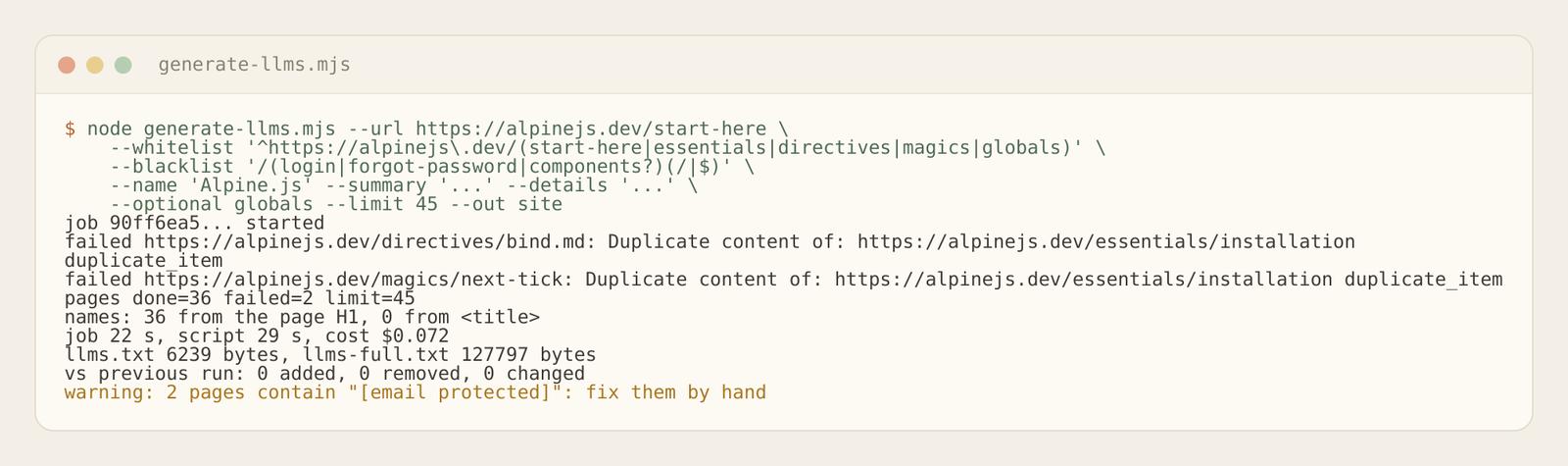
I ran the full crawl 4 times. Every run gave the same 36 pages and the same cost:
| Measure | Value |
|---|---|
| In-scope URLs in the sitemap | 38 |
| Pages done / failed | 36 / 2 (duplicate_item) |
| Job time (created to finished) | 10 to 22 s (22 s on the run above) |
| Script time, including downloads | 13 to 29 s |
| llms.txt | 6,239 bytes, 1,478 tokens |
| llms-full.txt | 127,797 bytes, 30,954 tokens |
| Cost (sum of item cost) | $0.072 |
Tokens are o200k_base counts, the same tokenizer as in the HTML vs markdown token count. The cost is 36 pages at $0.002, pay as you go, no plan needed (pricing).
At 124.8 KB, this 36-page llms-full.txt is already past Webflow's 100 KB limit and Mintlify's truncation-note threshold. For bigger sites, write one per section, like /docs/llms-full.txt.
If you don't need per-page titles, GET /v1/job/:id/markdown/content returns every page in one file, separated by url: blocks (docs).
Step 5. Same crawl, three outputs
The pages/ folder from Step 2 is the input for an AI knowledge base (website to markdown for knowledge bases, crawl a website to markdown files). Both llms files come from the same data. One manifest of page hashes tells all three when to rebuild.
Validate it: a small llms.txt validator script
Online checkers exist, but I wanted something for CI. validate-llms.mjs takes a file path or a URL and exits with 1 on errors:
// validate-llms.mjs: check an llms.txt file or URL against the llmstxt.org format (v2)
// Node 18+, no dependencies. Usage: node validate-llms.mjs <file|url> [--check-links]
import { readFile } from "node:fs/promises";

const [target, flag] = process.argv.slice(2);
const errors = [], warnings = [], info = [];
let text;

if (/^https?:\/\//.test(target)) {
  // fetch() follows redirects silently, so compare the final URL with the input
  const res = await fetch(target, { headers: { "User-Agent": "llms-txt-validator/1.0" } });
  text = await res.text();
  const type = res.headers.get("content-type") ?? "none";
  info.push(`HTTP ${res.status}, content-type: ${type}`);
  if (res.redirected) info.push(`redirected to ${res.url}`);
  if (!res.ok) errors.push(`HTTP status ${res.status}`);
  if (!/^text\/(plain|markdown)/.test(type)) warnings.push(`content-type is ${type}, expected text/plain or text/markdown`);
} else {
  text = await readFile(target, "utf8");
}

const bytes = Buffer.byteLength(text);
const lines = text.replace(/^\uFEFF/, "").split(/\r?\n/); // the spec allows a BOM
if (/^\s*<(!doctype|html)/i.test(lines.find((l) => l.trim()) ?? "")) {
  errors.push("body is HTML, not markdown: this is a web page, not an llms.txt");
  report();
}

// Walk the lines once, skipping fenced code blocks
let inCode = false, h1 = 0, firstH2 = false, blockquote = false, sawContent = false, afterH1 = false;
const links = [], sections = [];
for (const [i, line] of lines.entries()) {
  const n = i + 1;
  if (/^(```|~~~)/.test(line.trim())) inCode = !inCode;
  if (inCode || !line.trim()) continue;
  const heading = line.match(/^(#{1,6})\s+(.*)/);
  if (!sawContent) {
    sawContent = true;
    if (!heading || heading[1] !== "#") errors.push(`line ${n}: the file must start with an H1 (# Name)`);
  } else if (h1 === 1 && !afterH1) {
    afterH1 = true; // the spec puts the summary right after the H1
    blockquote = line.startsWith(">");
  }
  if (heading) {
    const level = heading[1].length;
    if (level === 1 && ++h1 > 1) errors.push(`line ${n}: more than one H1`);
    if (level === 2) { firstH2 = true; sections.push(heading[2].trim()); }
    if (level > 2 && !firstH2) errors.push(`line ${n}: H${level} before the first H2 (only H1, then H2 sections)`);
    if (level > 2 && firstH2) warnings.push(`line ${n}: H${level} inside a file list section`);
    continue;
  }
  if (firstH2 && /^[-*+]\s/.test(line)) {
    const m = line.match(/^[-*+]\s+\[([^\]]+)\]\(([^)\s]+)\)(?:\s*:\s*(.*))?\s*$/);
    if (!m) errors.push(`line ${n}: list item is not "- [name](url): notes"`);
    else links.push({ n, name: m[1], url: m[2], notes: m[3] ?? "" });
  }
}
if (h1 === 1 && !blockquote) warnings.push("no blockquote summary right after the H1");
if (bytes > 100 * 1024) warnings.push(`size ${(bytes / 1024).toFixed(0)} KB is over 100 KB (heuristic, not in the spec)`);
for (const l of links) if (!/^https?:\/\//.test(l.url)) warnings.push(`line ${l.n}: relative URL ${l.url}`);
const seen = new Set();
for (const l of links) seen.has(l.url) ? warnings.push(`line ${l.n}: duplicate URL ${l.url}`) : seen.add(l.url);
const withNotes = links.filter((l) => l.notes).length;
info.push(`${sections.length} H2 sections, ${links.length} links, ${withNotes} with notes (${links.length ? Math.round((100 * withNotes) / links.length) : 0}%)`);
if (sections.includes("Optional")) info.push("has an Optional section");

// --check-links: GET every link, 5 at a time (use it on your own file only)
if (flag === "--check-links") {
  for (let i = 0; i < links.length; i += 5) {
    await Promise.all(links.slice(i, i + 5).map(async (l) => {
      const r = await fetch(l.url).catch((e) => ({ status: e.message }));
      if (r.status !== 200) errors.push(`line ${l.n}: ${l.url} returned ${r.status}`);
      else if (r.redirected) warnings.push(`line ${l.n}: ${l.url} redirects to ${r.url}`);
    }));
  }
  info.push(`checked ${links.length} links`);
}
report();

function report() {
  for (const m of errors) console.log(`ERROR  ${m}`);
  for (const m of warnings) console.log(`WARN   ${m}`);
  for (const m of info) console.log(`INFO   ${m}`);
  console.log(`${target}: ${(bytes / 1024).toFixed(1)} KB, ${errors.length} errors, ${warnings.length} warnings`);
  process.exit(errors.length ? 1 : 0);
}
- Errors (spec): no H1 first, more than one H1, a deeper heading before the first H2, a list item under an H2 that isn't a [name](url) link, or an HTML body.
- Warnings (my heuristics): the Content-Type, size over 100 KB (from Webflow's limit and Mintlify's note), no blockquote right after the H1, H3s in file lists, relative or duplicate URLs.
Here it is on the generated file and on alpinejs.dev:
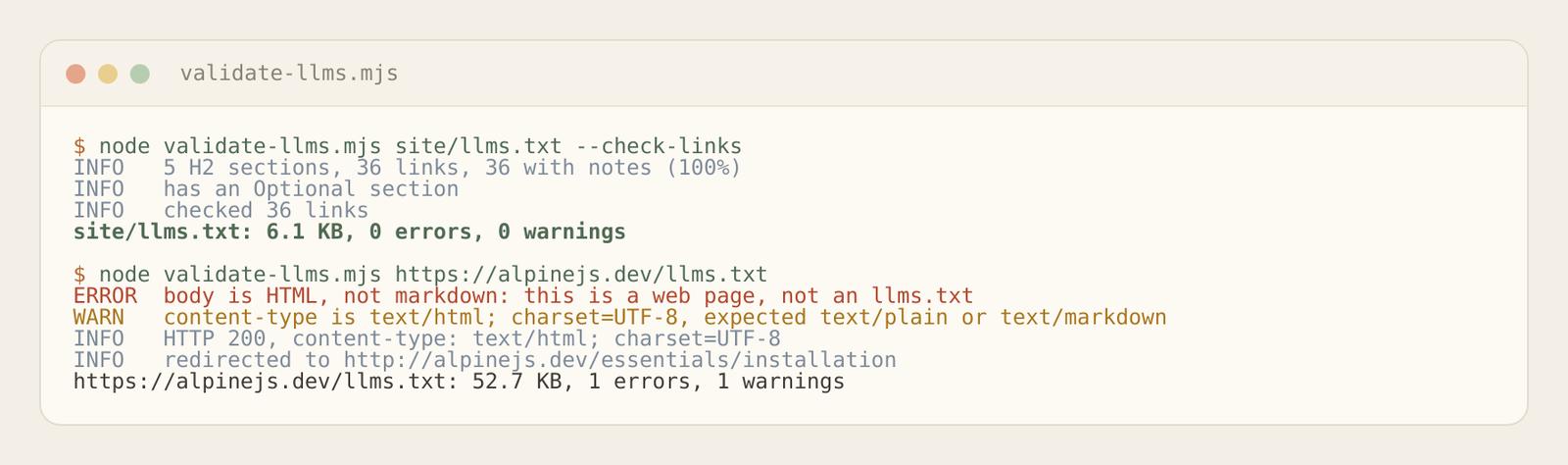
All 36 links in our file returned 200. Use --check-links on your own file only. It sends one GET per link.
The Alpine case is the trap I wanted to catch. curl -sI https://alpinejs.dev/llms.txt shows a 302 to http://alpinejs.dev/essentials/installation, and Node's fetch follows it and reports 200. A status check says the file exists, while the body is a 52.7 KB HTML page.
Answer.AI's parser agreed with the validator on our file: 5 sections, 36 links, 36 with notes. No format check can tell you whether the file matches your site or whether any agent reads it. For the second question, see the last section.
Publish at /llms.txt and /llms-full.txt
The easiest way is a static file: put both files in public/ (Next.js, Astro, Vite) or your web root.
Our own route handler on webcrawlerapi.com sends text/plain with no charset, as the survey shows. This version adds it; built with Next.js 16.4.5 in a container, it returned 200 text/plain; charset=utf-8:
// app/llms.txt/route.ts: serve the generated file from the project root
import { readFile } from "node:fs/promises";
import path from "node:path";

export async function GET() {
  const body = await readFile(path.join(process.cwd(), "llms.txt"), "utf-8");
  return new Response(body, {
    headers: {
      "Content-Type": "text/plain; charset=utf-8",
      "Cache-Control": "public, max-age=3600",
    },
  });
}
Spec v2 lets pages point to the llms.txt that covers them with a header such as Link: </llms.txt>; rel="describedby". Mintlify uses its own names, rel="llms-txt" and rel="llms-full-txt"; no standard relation exists for llms-full.txt yet. For Nginx, tested on nginx:1.27-alpine:
server {
    listen 80;
    root /usr/share/nginx/html;

    # llms.txt and llms-full.txt: plain text, UTF-8, kept out of search results
    location ~ ^/llms(-full)?\.txt$ {
        charset utf-8;
        add_header Cache-Control "public, max-age=3600";
        add_header X-Robots-Tag "noindex";
    }

    # every other page points agents to the llms.txt that covers it (spec v2)
    location / {
        add_header Link '</llms.txt>; rel="describedby"';
    }
}
Both files came back as text/plain; charset=utf-8, and the home page carried the Link header. The noindex is optional. John Mueller said in July 2025 that "using noindex for it could make sense", because sites might link to the file and it could get indexed.
Then check the live file: curl -sI https://yoursite.com/llms.txt for status and headers, and node validate-llms.mjs https://yoursite.com/llms.txt for the body.
Keep llms.txt fresh on a schedule
Turn the cache off first. WebCrawlerAPI caches crawl results for 7 days by default (max_age 604800 seconds, caching docs), so a weekly job can get week-old pages and a diff that says "nothing changed" for the wrong reason. The script sends max_age: 0; a value below your interval, like 86400, works too.
Here's a GitHub Actions workflow that rebuilds every Monday and commits only when something changed. It parses, but I didn't run it in CI for this post:
# .github/workflows/llms-txt.yml: rebuild llms.txt every Monday, commit only when pages changed
name: Rebuild llms.txt
on:
  schedule:
    - cron: "0 6 * * 1"
  workflow_dispatch:
permissions:
  contents: write
jobs:
  build:
    runs-on: ubuntu-latest
    steps:
      - uses: actions/checkout@v4
      - uses: actions/setup-node@v4
        with:
          node-version: 22
      - name: Crawl and generate
        env:
          WEBCRAWLER_API_KEY: ${{ secrets.WEBCRAWLER_API_KEY }}
        run: >
          node scripts/generate-llms.mjs --url https://docs.example.com/
          --whitelist '^https://docs\.example\.com/' --name 'Example'
          --summary 'Example is ...' --limit 200 --out .llms
      - run: node scripts/validate-llms.mjs .llms/llms.txt
      - name: Commit if anything changed
        run: |
          cp .llms/llms.txt .llms/llms-full.txt public/
          git add public/llms.txt public/llms-full.txt .llms/manifest.json
          git diff --cached --quiet && exit 0
          git config user.name "github-actions[bot]"
          git config user.email "41898282+github-actions[bot]@users.noreply.github.com"
          git commit -m "Update llms.txt" && git push
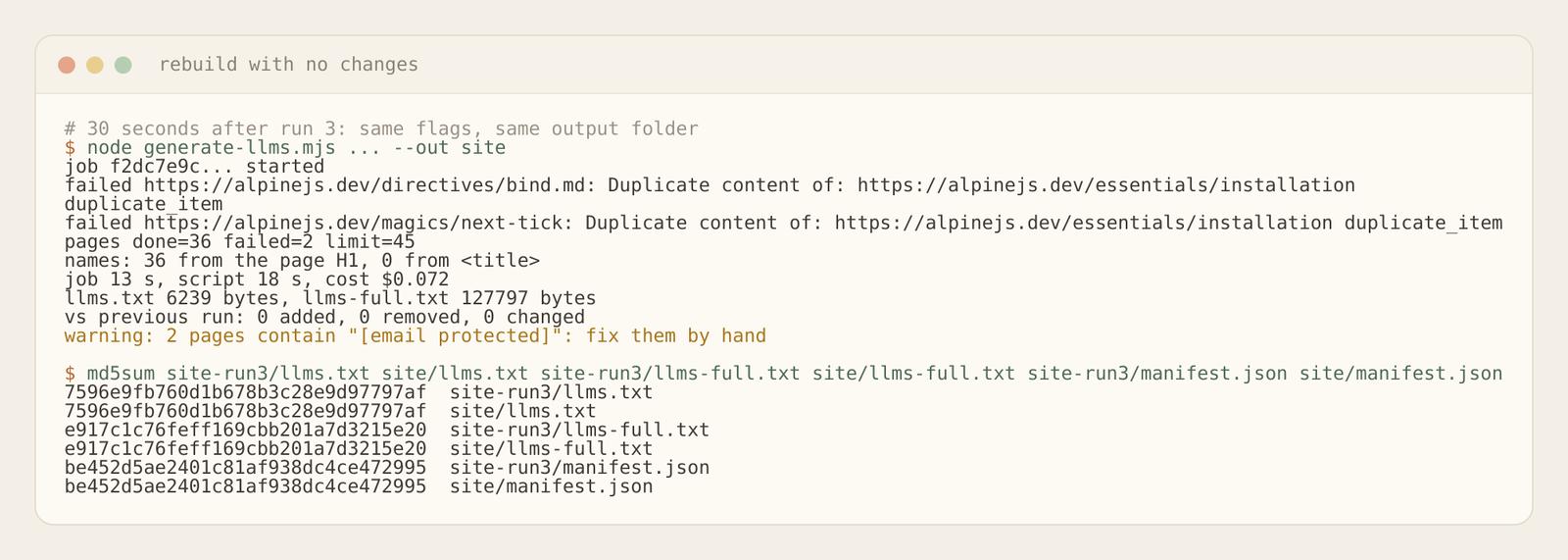
The diff comes from manifest.json: a SHA-256 per URL over the markdown with whitespace collapsed. Each run covers the full scope (38 items, limit 45), so "added" and "removed" mean real pages.
Run 3 went into the same folder 53 minutes after run 2, with max_age: 0, and printed vs previous run: 0 added, 0 removed, 0 changed: none of the 36 pages changed in that hour. A fourth run 30 seconds later wrote byte-identical files, so the workflow above would make no commit:
If a fixed schedule doesn't fit, there are two event-driven options. webhook_url on the crawl calls your server when the job is done (async requests); treat the webhook as a trigger and re-fetch the job. Feeds re-crawl a site periodically and post changed pages to a webhook.
The same changed-page logic keeps a support bot in sync with your docs. For picking an interval, see how often to recrawl a website for an AI knowledge base and the glossary entry on keeping a crawled knowledge base in sync.
How real llms.txt files score
I ran the validator in URL mode against 10 published files, ours included, on November 21, 2026: one GET per file, no link checking, plus a HEAD (or a small range GET) for llms-full.txt at the same path. alpinejs.dev is the extra row for the redirect case.
| Publisher | Size | Links | With notes | Spec errors | What stood out | llms-full.txt |
|---|---|---|---|---|---|---|
| Anthropic | 102.5 KB | 748 | 0% | 200 | Redirect; no blockquote; plain bullets under H2s; 14 warnings | Yes |
| OpenAI | 6.2 KB | 41 | 83% | 0 | Clean | Yes |
| Gemini API | 70.7 KB | 392 | 99% | 4 | Redirect; bulleted instructions under an H2; 2 duplicate URLs | Yes |
| Cloudflare | 16.2 KB | 111 | 100% | 0 | Paragraph instead of a blockquote | Yes |
| Stripe | 96.8 KB | 475 | 93% | 5 | Text before the link in list items; H3s in file lists; 24 warnings | No |
| Vercel | 14.6 KB | 87 | 99% | 12 | Text between link and colon, like (beta) | 12.4 MB under /docs |
| Zod | 21.6 KB | 326 | 5% | 0 | Clean, almost no notes | Yes |
| FastHTML (/docs) | 4.7 KB | 21 | 100% | 0 | Clean; the spec's own example | No |
| Mintlify (/docs) | 26.5 KB | 115 | 79% | 0 | Redirect; H3 groups in file lists (49 warnings) | Yes |
| WebCrawlerAPI (ours) | 29.3 KB | 219 | 0% | 0 | Clean; no charset, generic summary | No |
| alpinejs.dev | 52.7 KB | n/a | n/a | 1 | 302 to an HTML page | 302 to HTML |
Four of the ten files are clean: OpenAI, Zod, FastHTML and ours. That doesn't make ours good. It has 219 links and not one note, and no llms-full.txt. The check passes it because it only looks at shape.
Anthropic's file is the biggest and bends the format most. It reads like a docs page of its own, with prose sections and plain bullets instead of link notes. Six of the ten serve llms-full.txt at the same path.
Does llms.txt work? Who actually reads it
Google Search doesn't read it. Google's AI optimization guide (last updated July 10, 2026) says you don't need AI text files to appear in Google Search, "as Google Search itself doesn't use them", and lists llms.txt among things you "can ignore". The June 15, 2026 Search Central update adds that the files "won't negatively or positively impact your visibility or rankings".
Google's people have said the same since 2025. Gary Illyes said Google doesn't support it (as reported by Kenichi Suzuki from a Q&A at Google's Search Central Deep Dive in Asia Pacific) and compared it to the 1990s keywords meta tag. John Mueller said the llms.txt files on Google's own developer docs are not an endorsement.
Chrome's Lighthouse has an llms.txt audit in its agentic browsing checks. A missing file (404) is marked Not Applicable, and only a server error gets flagged.
The best usage data I found is Ahrefs' study of 137K domains using its own analytics in May 2026:
- 28% of the domains publish llms.txt. Ahrefs calls that an upper bound, because its customers skew technical.
- 97% of the roughly 38,000 valid files got zero requests that month.
- 96% of the requests that did arrive came from bots, and 77% of those bots weren't AI tools.
- Among named AI tools, GPTBot fetched most and Claude-Code was second in Ahrefs' summary. Ahrefs calls the Lighthouse audits experimental and saw them cause about 1 in 1,000 fetches.
Ahrefs' verdict for AI search visibility: the cons outweigh the pros right now. It also quotes Mueller calling the file "not done for search" and a "temporary crutch" for coding tools that read developer docs.
Two claims point the other way, and both come from interested parties. Mintlify, which hosts llms.txt files, published Profound data in June 2025, covering 25 companies over 7 days: median 79 visits to llms-full.txt against 14 to llms.txt. The spec author writes in the v2 changes that coding agents use the files "reliably".
Your own logs settle it for your site. This counts requests for both files by bot in a combined-format access log:
grep -E '"(GET|HEAD) /llms(-full)?\.txt ' access.log \
  | awk -F'"' '{ split($2, req, " "); ua = tolower($6); bot = "other";
      if (match(ua, /gptbot|claudebot|claude-user|claude-code|chatgpt-user|oai-searchbot|perplexitybot/)) bot = substr(ua, RSTART, RLENGTH);
      print req[2], bot }' \
  | sort | uniq -c | sort -rn
I tested it on a synthetic 11-line log (made-up IPs and user agents); it prints one count per file and bot. User agents can be faked. Checking that a request came from OpenAI or Anthropic needs the vendor's published IP ranges, which the AI crawlers list links for the bots whose vendors publish them.
My take for teams that already crawl their docs: make both files for coding agents and your own pipelines, not for SEO or AI-search citations. On developer docs they cost one extra step in a crawl you already run. For a marketing site, skip them until your logs show requests.
To try the pipeline on your own docs, get an API key and run generate-llms.mjs with --limit 10 first.
FAQ
How do I create an llms.txt file?
Write a markdown file with an H1 (the site name), a one-line blockquote summary and H2 sections of - [name](url): note links, and serve it at /llms.txt as plain text. For a quick draft, use your platform's plugin or the free llms.txt generator. To keep it current, crawl the site to markdown and generate the file with a script, as this post does.
How do I generate llms-full.txt?
Crawl the site to markdown, then write one file with the site H1 and summary on top and every page below it as a heading, a Source: line and the page markdown. For the Alpine.js docs that gave 36 pages, 127,797 bytes and 30,954 tokens (o200k_base). GET /v1/job/:id/markdown/content returns a combined file directly if you don't need per-page titles.
Do llms.txt files actually work?
Not for Google Search, which says it doesn't use them. Ahrefs found that 97% of about 38,000 valid llms.txt files got zero requests in May 2026, and among named AI tools GPTBot fetched most, with Claude-Code second. Check your own access logs before you put more work in.
Is llms.txt needed for SEO?
No. Google's AI optimization guide says Google Search doesn't use them, and the June 15, 2026 Search Central update says they won't negatively or positively impact visibility or rankings. Make one for coding agents and for your own pipelines.
How do I check the llms.txt on a website?
Run curl -sI on the URL to see the status, redirects and Content-Type, then validate the body. alpinejs.dev/llms.txt answers with a 302 to an HTML docs page, so a client that follows redirects sees HTTP 200 while the body is a web page.
Should llms.txt links point to HTML pages or .md files?
Spec v2 says links should point to LLM-friendly content, such as a .md version of each page (page.md or page.html.md). If you don't publish .md copies, link the HTML pages, as the Alpine example in this post does.
Why did my scheduled crawl return old content?
WebCrawlerAPI caches crawl results for 7 days by default (max_age 604800 seconds). Set max_age to 0, or to a value below your schedule interval, so a weekly job fetches fresh pages.
What replaces Firecrawl's llms.txt endpoint?
Firecrawl says its /llmstxt endpoint will be removed on Thursday, December 10, 2026, 15:00 UTC, and points users to /v2/map plus /v2/batch/scrape. The generate-llms.mjs script in this post writes both files from one WebCrawlerAPI crawl.