

How Many Tokens Is a Web Page? HTML, Cleaned Text and Markdown Counted on 20 Sites
To count tokens in a web page, fetch it in the format you plan to send and run it through tiktoken. I did that for 20 real pages. The median page was 35,775 tokens as raw HTML and about 2,813 as markdown (o200k_base), which is 12.7 times fewer. The median of the per-page ratios is 15.5x, and all 20 pages added together give 7.5x. The spread matters more than any of them: one essay shrank by only 1.1x, one documentation page by 293x.
Two earlier posts measured this on 10 pages each: AI web scraping found about 5x on book pages, and the website to markdown knowledge base guide found 2.6x on htmx docs. This one covers 20 sites of different types, three formats and two encodings, and shows why the token count of a page is a range. Everything was fetched on 2026-11-01 from one machine. The tiktoken Python script is below.
I run WebCrawlerAPI, and the markdown and HTML columns come from our scrape endpoint. The script, the 20 URLs and every per-page number are linked in the measurement section.
The short answer
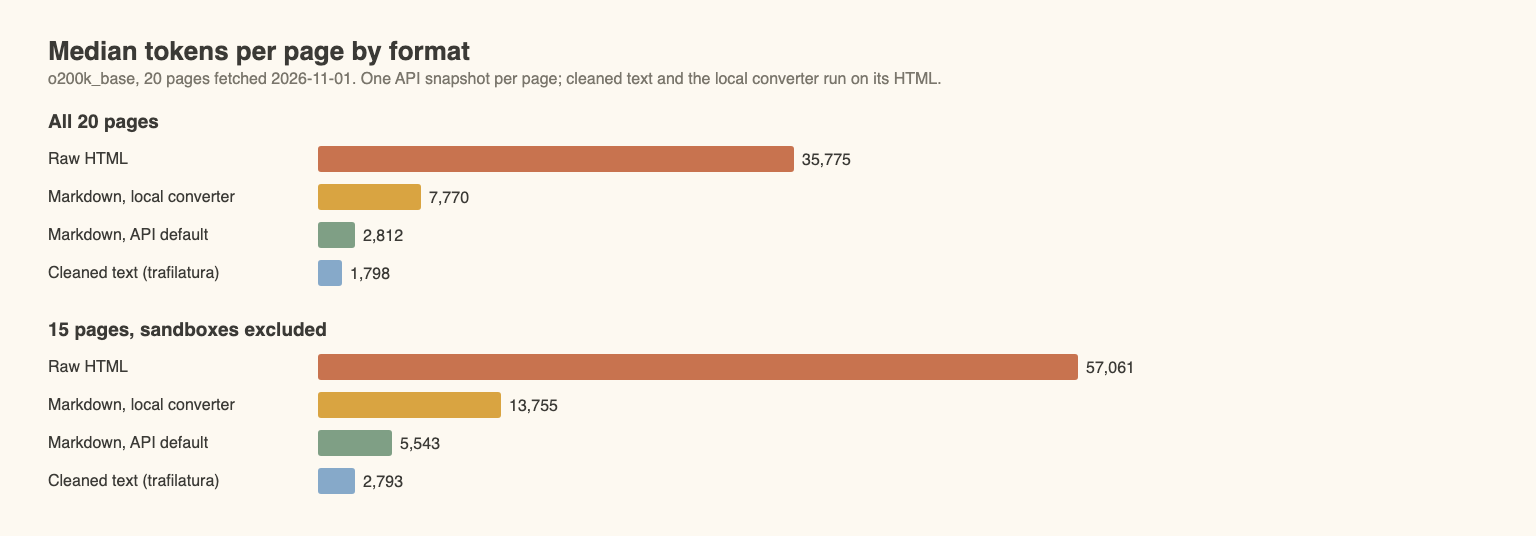
Median tokens per page, 20 pages:
| Format | cl100k_base | o200k_base |
|---|---|---|
| Raw HTML (rendered snapshot) | 36,527 | 35,775 |
| Markdown (local converter, markdownify) | 7,792 | 7,770 |
| Markdown (WebCrawlerAPI, default settings) | 2,831 | 2,813 |
| Cleaned text (trafilatura) | 1,804 | 1,798 |
Counting is four lines:
import tiktoken

enc = tiktoken.get_encoding("o200k_base")  # or "cl100k_base"

def count_tokens(text: str) -> int:
    return len(enc.encode(text, disallowed_special=()))
disallowed_special=() makes tiktoken treat strings like <|endoftext|> as plain text. None of the 20 pages needed it (a strict encode worked on all of them), but a page about tokenizers could.
How the pages were measured
Twenty pages of mixed types: 4 docs, 3 blogs, 2 news articles, 3 shop pages, 2 JavaScript-rendered pages, 2 Wikipedia articles, 2 government pages, a PyPI page and a Hacker News thread. Five of them are scraping sandboxes (marked with * below), so results are also given without them.
Each page produced these formats from one snapshot, so HTML and markdown describe the same page:
- Raw HTML: the raw_content field of one POST /v2/scrape call with output_formats: ["html", "markdown"].
- Markdown, default settings: the markdown field of the same call. It is not "full page": default settings already strip scripts, styles and page chrome (see the cleaning guide), so part of the saving is cleanup, not conversion.
- Markdown, main content only: a second call with main_content_only: true.
- Markdown, local converter: markdownify 1.2.3 (heading_style="ATX") on the same HTML. This is conversion with no cleanup.
- Cleaned text: trafilatura 2.3.1, extract(..., output_format="txt", include_comments=False), on the same HTML.
- No-JS fetch: a plain requests GET, used only to see which pages need JavaScript.
Before the first request a script read each host's robots.txt with urllib.robotparser and the user agent WebCrawlerAPI-benchmark/1.0. All 20 URLs were allowed (two hosts have no robots.txt). Every API call used respect_robots_txt: true. Requests to one host were spaced by the host's Crawl-delay or 3 seconds, whichever is longer: 10 s on usa.gov and 30 s on Hacker News. Each page was fetched three times (one plain GET from my machine, two API calls from WebCrawlerAPI's side).
The run used 42 API calls and 21 plain GETs, plus a few requests to feeds and APIs to pick four current URLs (Cloudflare, BBC, gov.uk and Hacker News). The extra two calls and one GET are for a replaced page: usa.gov/renew-drivers-license returned 404 on both fetches (API error_code host_returned_error) and I swapped in usa.gov/social-security-card. At the pay-as-you-go price of $0.002 per page (pricing docs, read 2026-11-01) the 40 successful calls cost about $0.08.
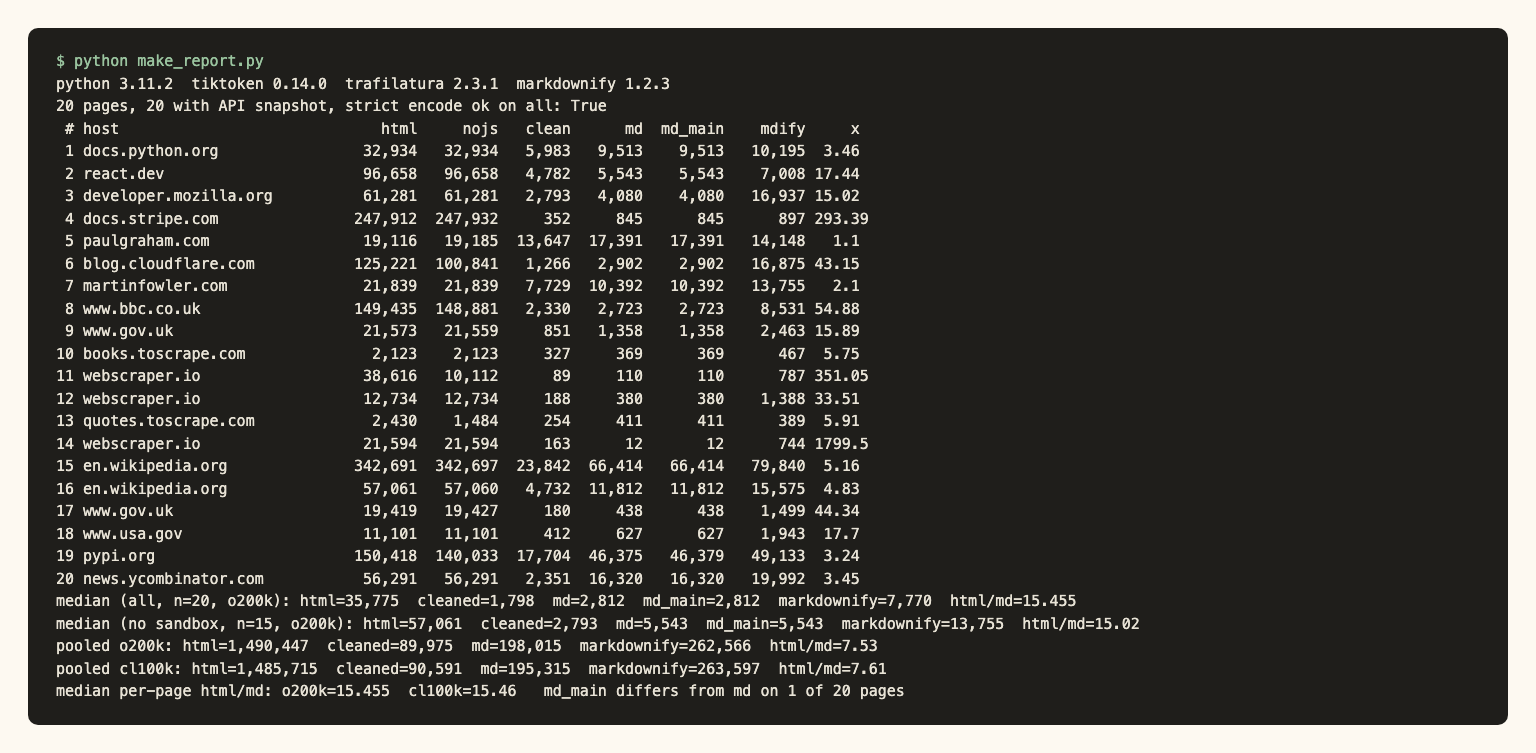
Limits: 20 pages, one fetch round on one day, one person's choice of sites, 5 of them sandboxes, mostly large English-language sites (three of the 20 are UK sites: the BBC and two gov.uk pages). Trafilatura ran with defaults. I counted tokens, not content kept: a smaller markdown page is only better if it still holds the text you need. Data and code are in the post's assets folder.
The script: count tokens in a web page with tiktoken in Python
This tiktoken Python script is complete: save it as token_count.py and run python token_count.py https://example.com. Install and set the key first (the script reads it from the environment):
pip install tiktoken trafilatura markdownify requests
export WEBCRAWLERAPI_API_KEY=YOUR_API_KEY
import os, sys, requests, tiktoken, trafilatura
from markdownify import markdownify

enc = tiktoken.get_encoding("o200k_base")  # or "cl100k_base"

def count_tokens(text: str) -> int:
    # disallowed_special=() treats strings like "<|endoftext|>" as plain text
    return len(enc.encode(text, disallowed_special=()))

def scrape(url: str, **options) -> dict:
    r = requests.post(
        "https://api.webcrawlerapi.com/v2/scrape",
        headers={"Authorization": f"Bearer {os.environ['WEBCRAWLERAPI_API_KEY']}"},
        json={"url": url, "respect_robots_txt": True, **options},
        timeout=180,
    )
    r.raise_for_status()  # some errors, such as an unresolvable domain, return 400
    data = r.json()
    if not data.get("success"):  # a failed scrape can be HTTP 200 with success: false
        raise RuntimeError(data.get("error_code"))
    return data

def page_formats(url: str) -> dict[str, str]:
    full = scrape(url, output_formats=["html", "markdown"])  # one snapshot
    main = scrape(url, output_formats=["markdown"], main_content_only=True)
    html = full["raw_content"]
    return {
        "html": html,
        "cleaned text": trafilatura.extract(html, output_format="txt", include_comments=False) or "",
        "markdown (default)": full["markdown"],
        "markdown (main only)": main["markdown"],
        "markdownify": markdownify(html, heading_style="ATX"),
    }

if __name__ == "__main__":
    for name, text in page_formats(sys.argv[1]).items():
        print(f"{name:22} {count_tokens(text):>8,}")
A failed scrape can come back as HTTP 200 with success: false and an error_code, per the scrape docs, and some errors (an unresolvable domain) return 400. The script handles both. The same file is token_count.py in the assets folder. Prefer a different HTML to markdown library for the local step? The Python library benchmark compares four.
Results: tokens per format on 20 sites
All columns are o200k_base. "Ratio" is HTML tokens divided by markdown (default settings) tokens. The cl100k_base columns are in results.csv.
| # | Type | Page | HTML | Cleaned text | Markdown | Markdown, main only | Ratio |
|---|---|---|---|---|---|---|---|
| 1 | Docs | docs.python.org json | 32,934 | 5,983 | 9,513 | 9,513 | 3.5x |
| 2 | Docs | react.dev | 96,658 | 4,782 | 5,543 | 5,543 | 17.4x |
| 3 | Docs | developer.mozilla.org | 61,281 | 2,793 | 4,080 | 4,080 | 15.0x |
| 4 | Docs | docs.stripe.com | 247,912 | 352 | 845 | 845 | 293.4x |
| 5 | Blog | paulgraham.com | 19,116 | 13,647 | 17,391 | 17,391 | 1.1x |
| 6 | Blog | blog.cloudflare.com | 125,221 | 1,266 | 2,902 | 2,902 | 43.1x |
| 7 | Blog | martinfowler.com | 21,839 | 7,729 | 10,392 | 10,392 | 2.1x |
| 8 | News | bbc.co.uk | 149,435 | 2,330 | 2,723 | 2,723 | 54.9x |
| 9 | Public-sector news | gov.uk news story | 21,573 | 851 | 1,358 | 1,358 | 15.9x |
| 10 | Shop product * | books.toscrape.com | 2,123 | 327 | 369 | 369 | 5.8x |
| 11 | Shop product * | webscraper.io | 38,616 | 89 | 110 | 110 | 351.1x |
| 12 | Shop listing * | webscraper.io | 12,734 | 188 | 380 | 380 | 33.5x |
| 13 | JS-rendered * | quotes.toscrape.com/js | 2,430 | 254 | 411 | 411 | 5.9x |
| 14 | JS-rendered * | webscraper.io ajax | 21,594 | 163 | 12 | 12 | 1,799.5x |
| 15 | Wikipedia | Large language model | 342,691 | 23,842 | 66,414 | 66,414 | 5.2x |
| 16 | Wikipedia | Lexical analysis | 57,061 | 4,732 | 11,812 | 11,812 | 4.8x |
| 17 | Government | gov.uk/vat-rates | 19,419 | 180 | 438 | 438 | 44.3x |
| 18 | Government | usa.gov | 11,101 | 412 | 627 | 627 | 17.7x |
| 19 | Package page | pypi.org | 150,418 | 17,704 | 46,375 | 46,379 | 3.2x |
| 20 | Forum | news.ycombinator.com | 56,291 | 2,351 | 16,320 | 16,320 | 3.5x |
Summary of the ratio, o200k_base:
| Set | Median per-page ratio | Pooled ratio (total HTML / total markdown) |
|---|---|---|
| All 20 pages | 15.5x | 7.5x (1,490,447 / 198,015) |
| 15 pages without sandboxes | 15.0x | 7.2x |
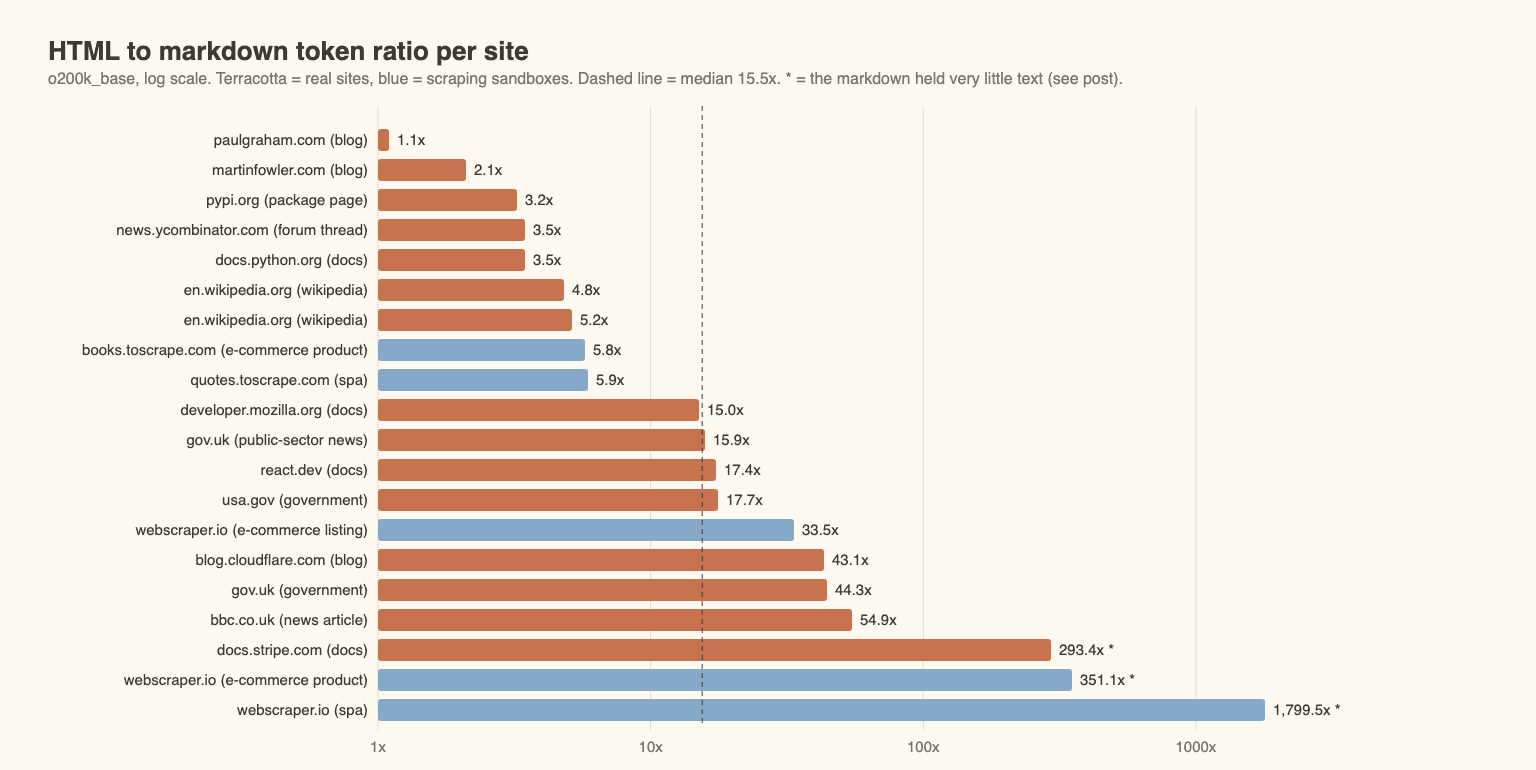
The pages split into two groups. Nine pages sit between 1.1x and 5.9x. Eleven sit at 15.0x or higher. Nothing is in between, so "markdown saves X%" is the wrong summary. For a page that is mostly text, the HTML is close to the text. For a page that carries a framework, analytics and inline data, the HTML is mostly not text.
Where the savings come from
Conversion explains only part of the saving. Markdownify on the same HTML had a median ratio of 6.0x. The API's default markdown was about 2.8x smaller again than markdownify's (7,770 against 2,813 tokens at the median), which is the default cleanup before conversion. On MDN, markdownify produced 16,937 tokens and the API 4,080. On two pages the API output was larger than the local converter's: Paul Graham's essay (17,391 against 14,148) and quotes.toscrape.com (411 against 389). I did not dig into why.
The biggest HTML files were not the biggest markdown files. Stripe's quickstart was 247,912 tokens of HTML (771 kB) and 845 tokens of markdown. BBC: 149,435 against 2,723. Wikipedia's article on large language models kept 66,414 tokens of markdown, because it is long text with tables and references.
Cleaned text vs markdown
Cleaned text was the smallest format on 19 of 20 pages (the exception is row 14, below). At the median, markdown was 1.6 times larger than cleaned text. That gap is headings, link targets and table syntax. Trafilatura keeps tables by default, but its plain-text output has no heading marks or link targets, and it kept only 89 tokens on the shop product page. I did not check why. On the Hacker News thread the 2,351 tokens exclude the comments (include_comments=False); with comments on it was 7,414. If headings matter for chunking, the extra 60% is cheap. HTML vs cleaned text covers what else is lost.
Where markdown barely helps
The HTML vs markdown token count was nearly the same on essays, long reference pages and threads. Paul Graham's essay: 19,116 HTML tokens, 17,391 markdown (1.1x). Fowler's microservices article: 21,839 against 10,392 (2.1x). The Hacker News thread was 3.5x, and did not balloon the way I expected from table-based markup: markdownify gave 19,992 tokens against 16,320 from the API. The PyPI page for tiktoken (3.2x) is mostly the rendered README.
These pages were light to start with. If your sources look like this, markdown gives you structure, not savings. HTML vs markdown for LLMs argues for markdown on quality grounds, and that argument does not depend on the ratio.
The JavaScript trap: few tokens can mean no content
A small number is not always a good number. Three rows show it.
Row 13 (quotes.toscrape.com/js): the plain GET was 1,484 tokens and held none of the 10 quotes. The rendered snapshot was 2,430 tokens with all of them. A script that counts a plain GET would report a small, wrong page.
Row 14 (webscraper.io ajax listing): markdown was 12 tokens, # Test Sites, # Computers / Laptops, 117 items. The product data is inside a data-items attribute of one div as a JSON string, and the snapshot has no rendered cards. Markdown conversion drops attribute values, so the page's content never reached any of the text formats. The 1,799.5x ratio in the table is a failure, not a saving. I did not test whether a longer wait would have rendered the cards.
Row 11 (webscraper.io product): the rendered HTML was 38,616 tokens against 10,112 from the plain GET, and the extra came from a JavaScript-injected cookie consent banner. Its text is the first thing in the markdown.
On 16 of the 20 pages the snapshot and the plain GET differed by under 2% in tokens, so for most pages a plain GET returns nearly the same HTML. The four exceptions are rows 11 and 13, Cloudflare's blog (snapshot 24% larger) and PyPI (7% larger).
I also did not score how much of each page's real text survived. Stripe's 845 markdown tokens and 352 cleaned-text tokens agree with each other, which suggests the page is mostly code and chrome, but I did not check it by hand.
Full-page vs main-content-only markdown
I expected main_content_only: true to help on article-like pages. In this run it did not lower the token count. Markdown was the same with and without it on 19 of 20 pages, including the BBC article, the Cloudflare post, Fowler, Paul Graham and the gov.uk news story. PyPI differed by 4 tokens (46,379 against 46,375).
The earlier htmx test saw the same thing: 32,779 tokens both ways. So in this test I would not count on main_content_only as a token-saving step. Default cleanup is described in the cleaning guide.
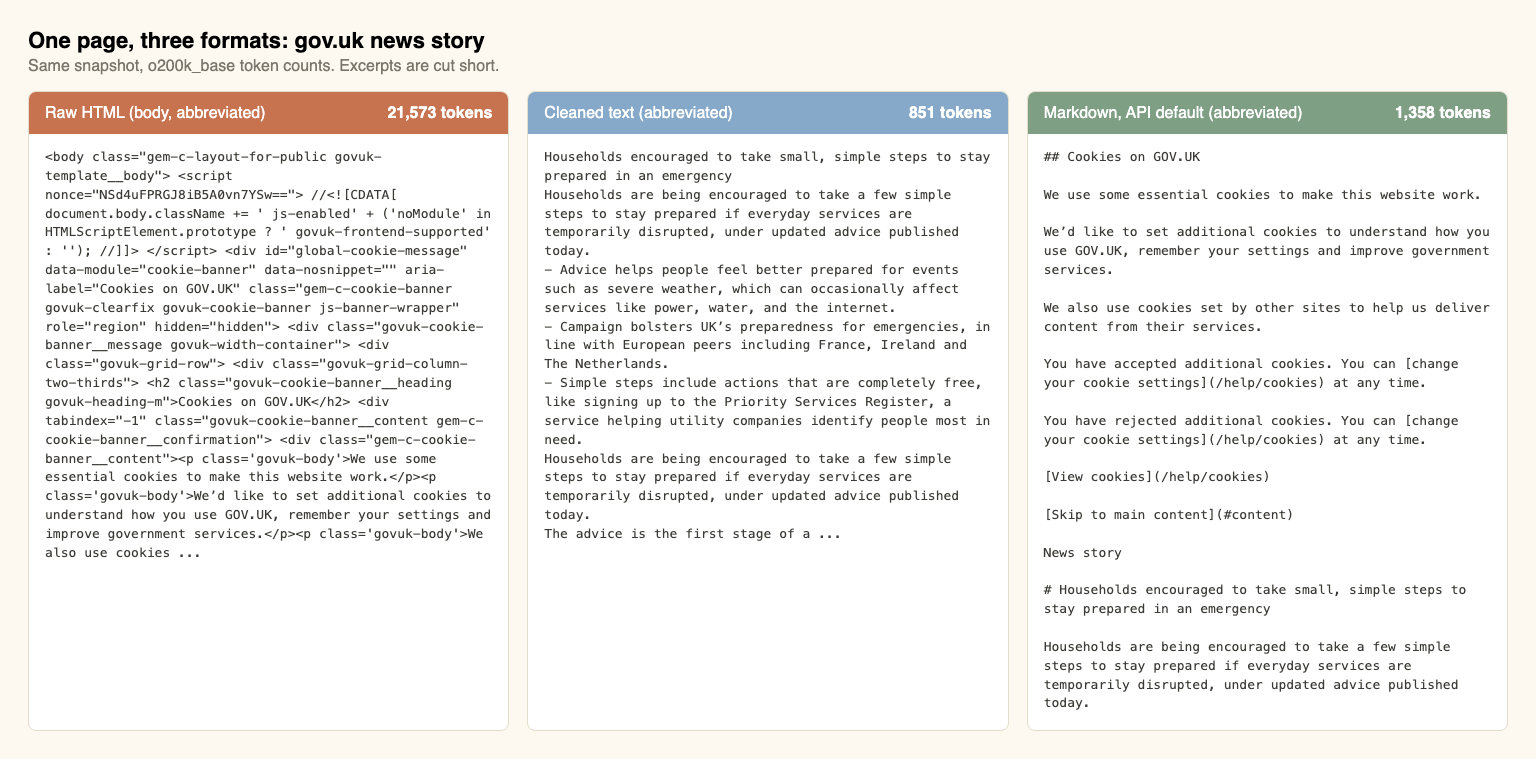
Default settings did not remove everything. The gov.uk markdown still begins with the site's cookie banner text, as the side-by-side image shows. If chrome like that matters, clean_selectors is the documented knob (scrape docs). I did not test it here.
Why the ratio varies: 5x, 2.6x and 20 sites
The three numbers fit together once you look at the site type. Book pages in this run were 5.8x (books.toscrape.com), and the earlier post measured about 5x. The htmx docs were lean, and 2.6x pooled is in the same range as the lean group here (1.1x to 5.9x). The 15x-plus group is news, framework, government and docs sites whose HTML is mostly markup, attributes, inline SVG and scripts. Scripts and styles alone were more than half of the HTML on only 3 of those 11 pages (Stripe, BBC and one webscraper.io shop page).
By type (medians, small n): docs 16.2x (n=4, from 3.5x to 293.4x), blogs 2.1x (n=3), Wikipedia 5.0x (n=2), government 31.0x (n=2), news 35.4x (n=2, including the public-sector story). Do not read much into any of them. There is no single number for the HTML to markdown saving. Quote a range, or run the script on 20 of your own pages.
Context windows and cost per 1,000 pages
Pages per context window is floor(window / median tokens per page), from the o200k medians above.
| Window | Raw HTML (35,775) | Markdown (2,813) | Cleaned text (1,798) |
|---|---|---|---|
| 128,000 tokens | 3 pages | 45 pages | 71 pages |
| 1,050,000 tokens | 29 pages | 373 pages | 583 pages |
The 1,050,000 figure is the context window shown on OpenAI's gpt-6.1-sol model page, read 2026-11-01. 128,000 is a reference size, not a vendor claim.
Cost per 1,000 pages is median tokens x 1,000 / 1,000,000 x input price per million tokens. Input prices come from the OpenAI pricing page, standard tier, read with webcr on 2026-11-01. Verify them before you rely on them.
| Model | Input $ / 1M tokens | Raw HTML | Markdown | Cleaned text |
|---|---|---|---|---|
| gpt-6.1-sol | $2.00 | $71.55 | $5.63 | $3.60 |
| gpt-6.1-terra | $1.00 | $35.78 | $2.81 | $1.80 |
| gpt-6-luna | $0.10 | $3.58 | $0.28 | $0.18 |
Output tokens, prompt caching and batch discounts are excluded. I also did not confirm which tokenizer these newer models use, so treat the o200k_base counts as an estimate for them. Claude and Gemini tokenizers produce different counts again, and I did not measure by how much.
Fetching adds $2.00 per 1,000 pages at WebCrawlerAPI's pay-as-you-go price ($0.002 per page, pricing docs, read 2026-11-01). Against that, markdown tokens cost more than the fetch on gpt-6.1-sol ($5.63) and less on gpt-6-luna ($0.28). Raw HTML on gpt-6.1-sol costs 36 times the fetch. The median hides a skew: the mean page was 9,901 markdown tokens (Wikipedia and PyPI are large), which is $19.80 per 1,000 pages on gpt-6.1-sol.
What a 500-page help center costs in tokens
Median tokens per page times 500: 17,887,500 as raw HTML (about 140 windows of 128,000), 1,406,250 as markdown (11 windows) and 899,000 as cleaned text (7 windows). At $2.00 per million input tokens (gpt-6.1-sol) one pass over 500 pages costs $35.78 as HTML and $2.81 as markdown, and a help center is processed again on every re-crawl. It is usually leaner than this mixed set, so measure your own pages. Either way it does not go into one prompt. It is chunked and retrieved, which is the job of chunking strategies for a knowledge base. The full pipeline from crawl to answers is in the website to markdown knowledge base guide, and build a knowledge base from a website in Python shows it in code.
Which format should you send?
- Markdown, for most pages. It kept headings, links and tables, and the median page cost 2,813 tokens.
- Cleaned text, when headings and links do not matter. It was smaller on 19 of 20 pages, but it has no heading marks or link targets.
- Raw HTML, only when the model has to read markup. Selector writing and attribute extraction need it. It cost 12.7 times more tokens at the median (35,775 against 2,813).
- Check the small ones. A page with a tiny markdown output may be an empty shell or data stored in attributes, as rows 11 and 14 were.
To get markdown for your own pages without writing the fetch code, use the web scraping API (scrape docs). To see what one page turns into, convert one of your own pages with the URL to markdown tool, then count it with the script above.
Next steps
- Build the whole pipeline: website to markdown knowledge base.
- Pick a local converter: HTML to markdown in Python.
- Save a crawl as files: crawl a website to markdown files.
- Chunking markdown by headers is covered in the next post of the series (coming soon). A comparison of MarkItDown, Docling, Jina Reader and Crawl4AI for websites is also coming.
