

Last updated: October 23, 2026. I run WebCrawlerAPI, which is mentioned once near the end. Everything above that section is plain Playwright.
Playwright works on Ubuntu 26.04 once you are on version 1.61.0 or newer. Older versions stop with Playwright does not support chromium on ubuntu26.04-x64. The fix is npm i playwright@latest, then npx playwright install --with-deps chromium.
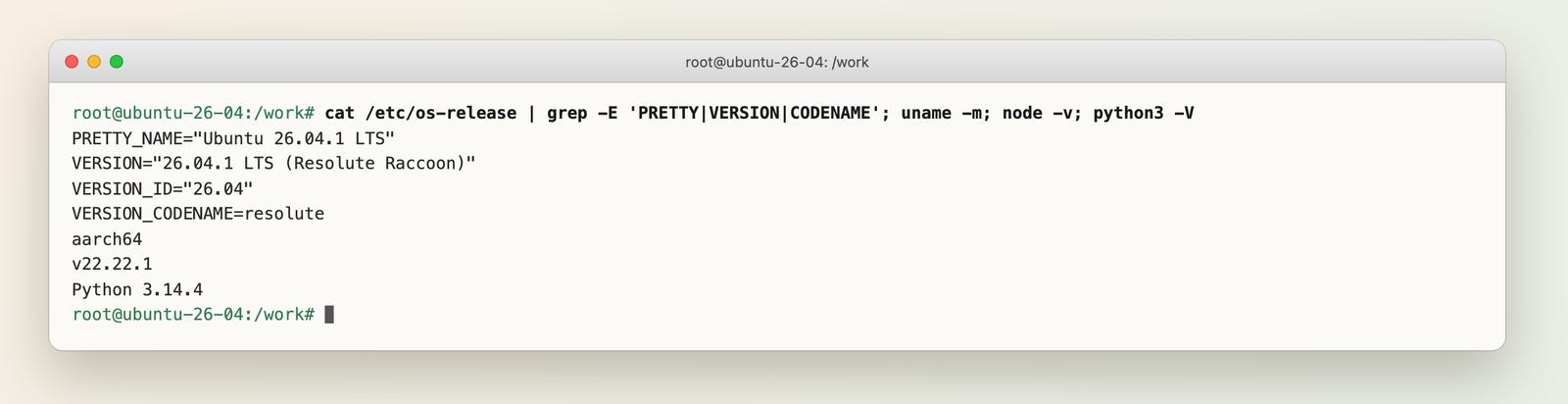
I ran every command in this post on October 23, 2026, inside a clean ubuntu:26.04 Docker container (Ubuntu 26.04.1 LTS, Docker on Apple Silicon, so aarch64). The latest Playwright at that time was 1.64.1. Below are the Node.js and Python steps, the errors I actually hit, a headless script that takes a screenshot, and a Dockerfile.
Quick answer: the commands
apt-get update && apt-get install -y curl ca-certificates nodejs npm   # Node v22.22.1 from the Ubuntu repo
mkdir pw && cd pw && npm init -y
npm i playwright@latest                                                # 1.64.1 when I ran it
npx playwright install --with-deps chromium                            # browser + OS libraries
node check.mjs                                                         # script from Step 5
If you are not root, put sudo in front of the apt-get lines. That is the whole install. The rest of this post is what to do when it does not work.
What Ubuntu 26.04 changes for Playwright
Ubuntu 26.04 LTS ("Resolute Raccoon") was released on April 23, 2026. playwright install reads /etc/os-release and looks the result up in a table of supported systems. That table ships inside the npm package, so a Playwright version released before 26.04 does not know the new release. The tracking issue is microsoft/playwright #40117, and PR #41290 added an official resolute Docker image. For the full explanation of how the lookup works, see the glossary page on this error.
This is what the test container reported:
Step 1: Prepare a clean Ubuntu 26.04
On a VPS the apt commands are the same. For a throwaway box, use Docker:
docker run --rm -it -v "$PWD:/work" -w /work ubuntu:26.04 bash
apt-get update && apt-get install -y curl ca-certificates nodejs npm
Note the architecture. On Apple Silicon Docker gives aarch64 (arm64). On a normal server it is x86_64, and the error and the fix are the same, only the platform name changes (ubuntu26.04-arm64 vs ubuntu26.04-x64). I reproduced the failure on both. The full browser run (screenshots, Node, Python, Docker) was on arm64 only. I did not launch Chromium under x86 emulation.
Step 2: Install Playwright with Node.js
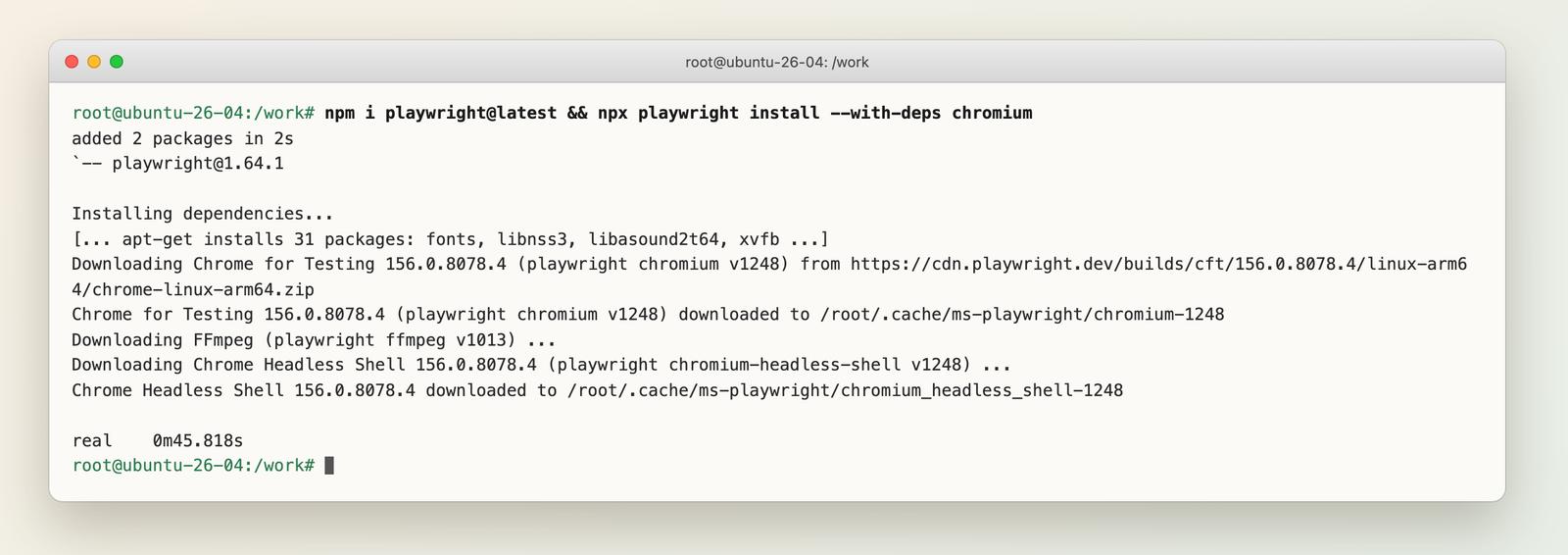
npm i playwright@latest
npx playwright install --with-deps chromium
Three things happen here:
- npm i playwright installs the library and the CLI.
- playwright install chromium downloads the browser to ~/.cache/ms-playwright.
- --with-deps runs apt-get for the system libraries Chromium needs. On a fresh 26.04 that was 31 packages (fonts, libnss3, libasound2t64, xvfb, and so on).
On 1.64.1 it ran without any warning. It took 45 seconds, and Chromium 156.0.8078.4 was installed.
Step 3: The error on older versions, and the fix
On older versions the same command stops. This is Playwright 1.59.1 (released April 1, 2026), exactly as printed:
BEWARE: your OS is not officially supported by Playwright; installing dependencies for ubuntu26.04-x64 as a fallback.
Cannot install dependencies for ubuntu26.04-x64 with Playwright 1.59.1!
Failed to install browsers
Error: ERROR: Playwright does not support chromium on ubuntu26.04-x64
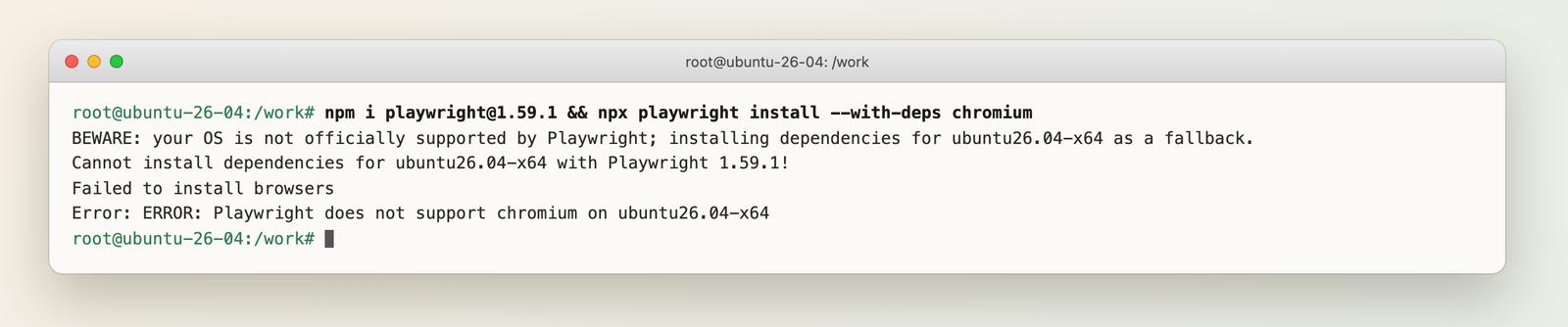
On arm64 the last word is ubuntu26.04-arm64. Nothing is broken in Ubuntu or in the browser. The CLI just does not have a row for 26.04. I went through the versions from 1.59.1 up. 1.60.0 (May 11, 2026) gives the same "Cannot install dependencies" error (I checked it with install-deps --dry-run, not a full install). 1.61.0 (June 15, 2026) is the first one that installed and ran on 26.04. I installed 1.61.0 with --with-deps, launched Chromium 149 and got the page title back. That matches the v1.61 label on the GitHub issue.
There are three ways out, from best to worst.
1. Upgrade. npm i playwright@latest and run the install again. This is the only fix I recommend.
2. Override the platform (stopgap). The value needs the architecture suffix. This works on 1.59.1:
PLAYWRIGHT_HOST_PLATFORM_OVERRIDE=ubuntu24.04-arm64 npx playwright install --with-deps chromium
# on x86 servers: ubuntu24.04-x64
The shorter form ubuntu24.04 (without -x64 or -arm64) failed for me with Playwright does not support chromium on ubuntu24.04. The glossary page currently shows the short form, so check yours. With the suffix, the install exited 0 in 38 seconds, apt installed the libraries and Playwright downloaded Chromium 147 (the older version's browser). The override is only needed at install time. Launching worked without it.
3. Install the libraries yourself. Skip --with-deps, install the apt packages by hand, then download the browser. I took the 31 package names from npx playwright install-deps --dry-run chromium on 1.64.1 and ran:
apt-get install -y --no-install-recommends at-spi2-common fonts-liberation fonts-noto-color-emoji \
  libasound2t64 libatk-bridge2.0-0t64 libcups2t64 libnss3 libxdamage1 xvfb   # ...and the rest of the list
PLAYWRIGHT_HOST_PLATFORM_OVERRIDE=ubuntu24.04-arm64 npx playwright install chromium
On 1.59.1 this worked too. You still need the override for the browser download, since the CLI cannot name the platform. All package names resolved on 26.04. I saw no missing or renamed package in this run. The t64 names (libasound2t64, libatk-bridge2.0-0t64) were already needed on 24.04.
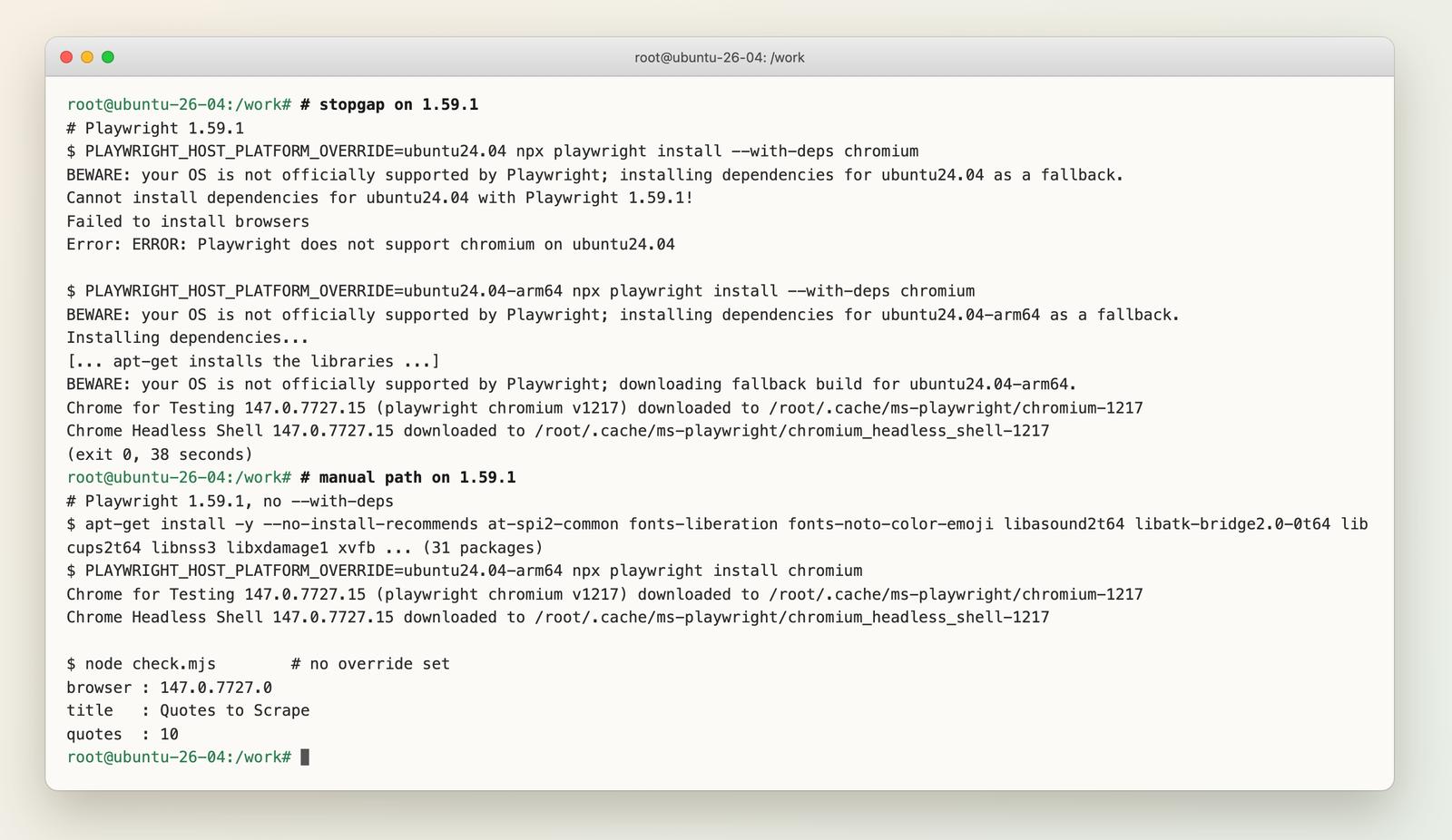
The override is a stopgap. Chromium 147 on a 26.04 libc worked in my test, but nobody guarantees that for every library version.
Step 4: Install Playwright with Python
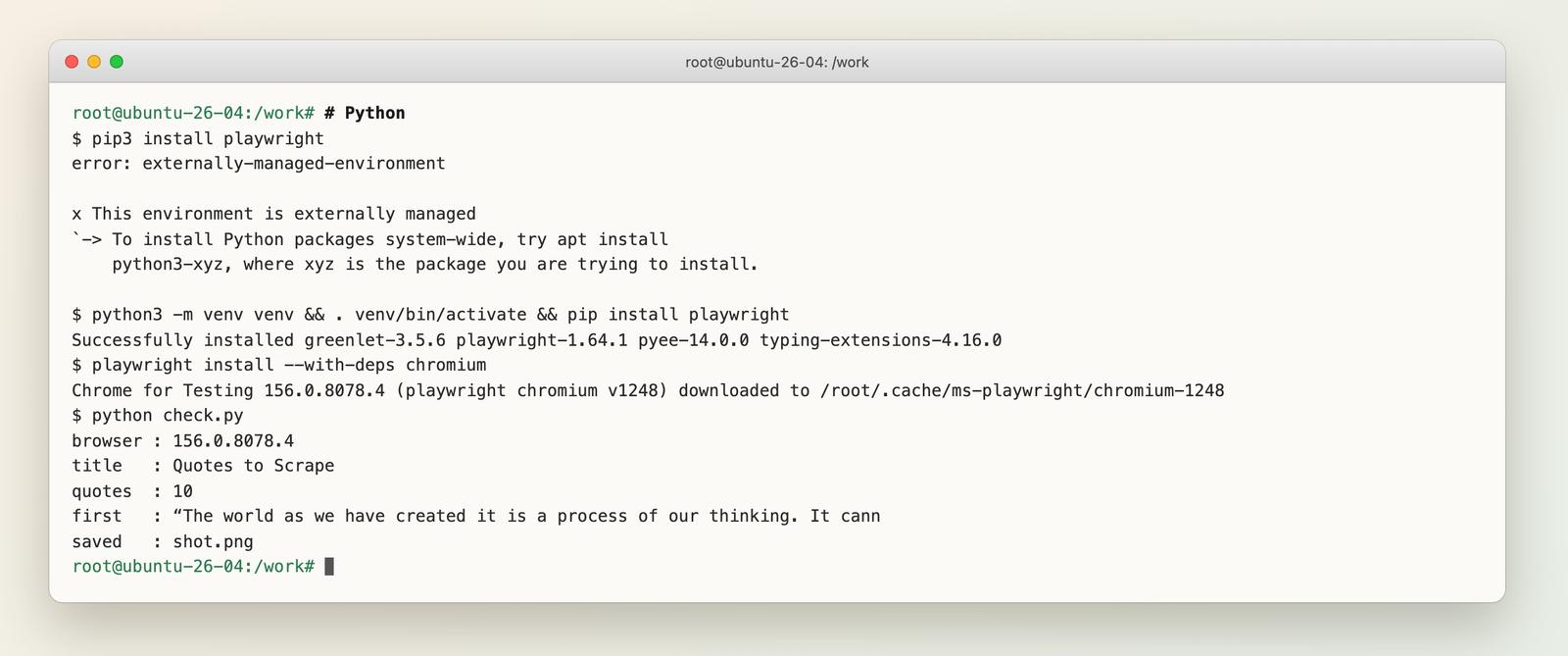
Ubuntu 26.04 ships Python 3.14.4 and blocks system-wide pip:
$ pip3 install playwright
error: externally-managed-environment

x This environment is externally managed
Use a virtual environment inside the project:
apt-get install -y python3 python3-venv python3-pip
python3 -m venv venv && . venv/bin/activate
pip install playwright                      # 1.64.1
playwright install --with-deps chromium
Same result as Node: no warning, Chromium 156.0.8078.4. If you leave the venv and type playwright, you get playwright: command not found. Activate it again or call venv/bin/playwright. See command not found for other causes.
Step 5: Run Chromium headless and take a screenshot
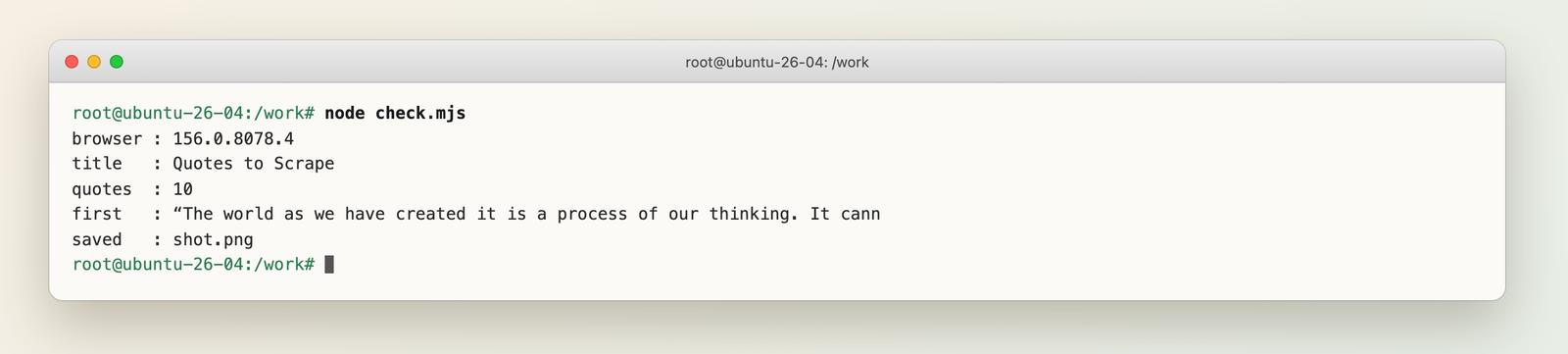
Node (check.mjs, Node 18+). It opens a JavaScript-rendered practice page, prints a few facts and saves a full-page screenshot:
import { chromium } from "playwright";

const browser = await chromium.launch(); // headless by default
const page = await browser.newPage({
  userAgent: "playwright-ubuntu-check/1.0 (+https://webcrawlerapi.com/blog)",
});

await page.goto("https://quotes.toscrape.com/js/", { waitUntil: "networkidle" });

console.log("browser :", browser.version());
console.log("title   :", await page.title());
console.log("quotes  :", await page.locator(".quote").count());
console.log("first   :", (await page.locator(".quote .text").first().innerText()).slice(0, 70));

await page.screenshot({ path: "shot.png", fullPage: true });
await browser.close();
The Python version is the same in sync API (check.py):
from playwright.sync_api import sync_playwright

with sync_playwright() as p:
    browser = p.chromium.launch()  # headless by default
    page = browser.new_page()
    page.goto("https://quotes.toscrape.com/js/", wait_until="networkidle")
    print("browser :", browser.version)
    print("title   :", page.title())
    print("quotes  :", page.locator(".quote").count())
    page.screenshot(path="shot.png", full_page=True)
    browser.close()
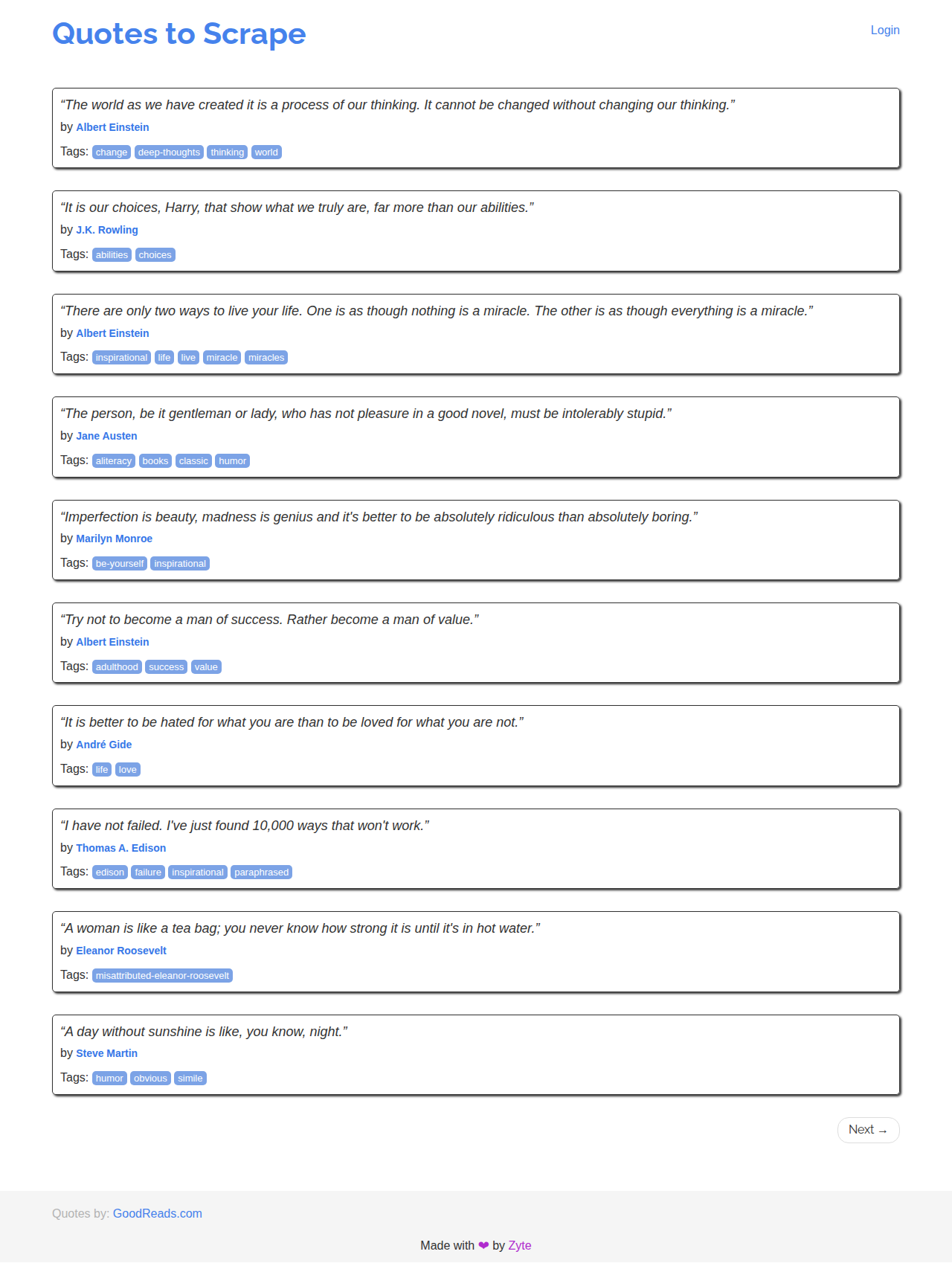
Both printed the same thing: title Quotes to Scrape and 10 quotes. That means the scripts really ran in the browser, since the quotes are written by JavaScript.
This is the screenshot the script produced inside the container:
I also tried the other browsers on 1.64.1. All three installed with npx playwright install --with-deps firefox webkit and launched:
| Browser | Version | Result on 26.04 (arm64) |
|---|---|---|
| Chromium | 156.0.8078.4 | installs and launches |
| Firefox | 157.0 | installs and launches (the download is named firefox-ubuntu-24.04-arm64) |
| WebKit | 27.2 | installs and launches (webkit-ubuntu-26.04-arm64 build) |
chromium.launch({ channel: "chromium" }) (the new headless mode) launched as well. For when to pick which mode, see headless vs headed mode. To go from this check to real scraping, continue with Web Scraping with Playwright.
Step 6: Run it in Docker
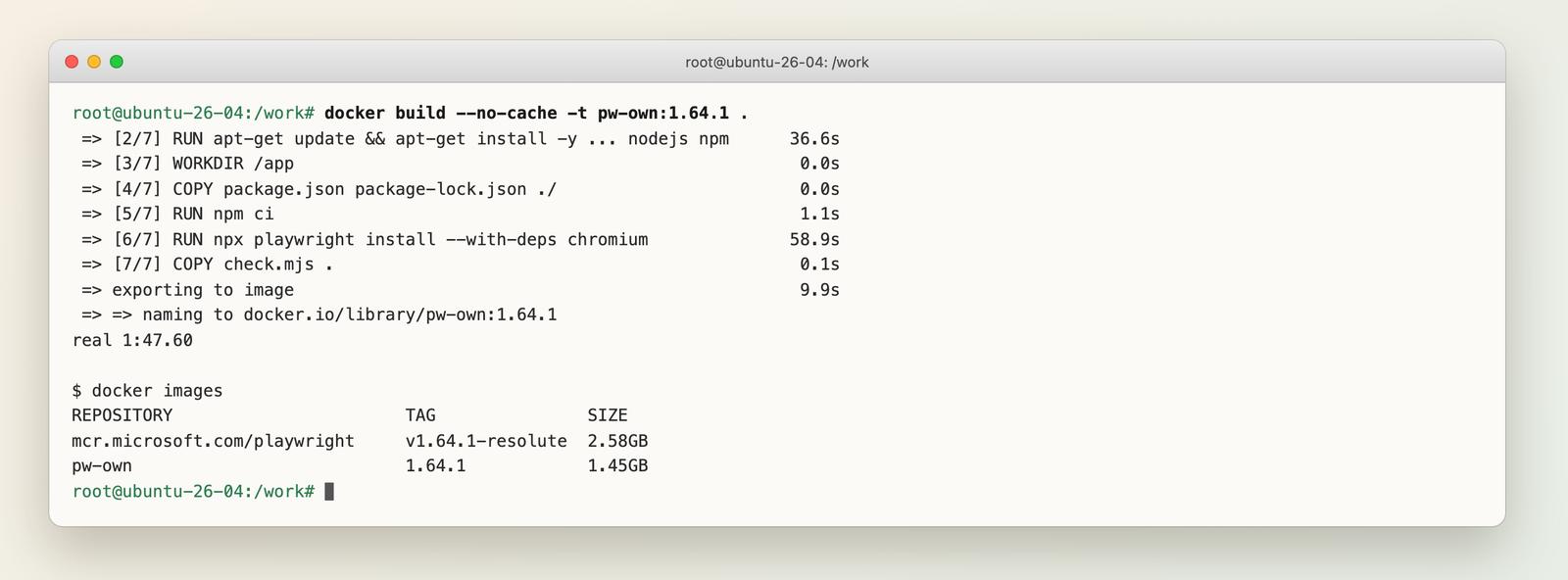
You have two options. I built and ran both on the same arm64 machine:
| Own Dockerfile (FROM ubuntu:26.04) | Official image | |
|---|---|---|
| Image | pw-own:1.64.1 | mcr.microsoft.com/playwright:v1.64.1-resolute |
| Size | 1.45 GB | 2.58 GB |
| Build | 1 min 48 s, no cache | pull only |
| Contains | Node, Chromium only | all three browsers and more |
| You maintain | the Dockerfile | the tag matching your package version |
The official resolute tag exists for v1.64.1 and v1.61.0. v1.60.0-resolute did not exist (I checked the registry manifests), which fits the support timeline above. If you only need Chromium, your own image is smaller. If you run Chrome, Firefox and WebKit tests, use the official one. This Dockerfile built and ran for me:
FROM ubuntu:26.04

ENV DEBIAN_FRONTEND=noninteractive
RUN apt-get update \
 && apt-get install -y --no-install-recommends ca-certificates nodejs npm \
 && rm -rf /var/lib/apt/lists/*

WORKDIR /app
COPY package.json package-lock.json ./
RUN npm ci

# browser binary + OS libraries (apt), then clean the apt cache
RUN npx playwright install --with-deps chromium \
 && rm -rf /var/lib/apt/lists/*

COPY check.mjs .
CMD ["node", "check.mjs"]
Pin the exact version in package.json ("playwright": "1.64.1") so the image does not change under you.
Non-root users. Browsers install to the home directory of whoever runs playwright install. I installed as root and then ran the script as a new user pw, which failed:
browserType.launch: Executable doesn't exist at /home/pw/.cache/ms-playwright/chromium_headless_shell-1248/chrome-headless-shell-linux-arm64/chrome-headless-shell
Run npx playwright install chromium as that user (the system libraries from --with-deps need root and only have to be installed once), or set PLAYWRIGHT_BROWSERS_PATH to a shared directory. After I installed as pw, the Python script ran fine as non-root. I did not hit a "no usable sandbox" error in any run, so I have no --no-sandbox advice to give. If you add that flag, you turn off a real security layer. For crashes in CI, see random browser crashes in CI.
Troubleshooting: errors I hit and fixes
| Error | Cause | Fix |
|---|---|---|
| Playwright does not support chromium on ubuntu26.04-x64 (or -arm64) | Playwright older than 1.61.0 | npm i playwright@latest (why) |
| Playwright does not support chromium on ubuntu24.04 | override value without -x64 or -arm64 | use ubuntu24.04-x64 or ubuntu24.04-arm64 |
| error: externally-managed-environment | pip on Ubuntu's system Python | create a venv |
| playwright: command not found | venv not active | . venv/bin/activate |
| Executable doesn't exist at /home/pw/.cache/... | browser was installed for another user | run playwright install chromium as that user (more) |
If screenshots show empty boxes instead of emoji or CJK text, the fonts are missing; see missing OS deps and fonts. If it works headed but not headless, see headless-only failures. I did not hit either in these runs.
When a local browser is the wrong tool
If you wanted this for tests or for pages that need clicking and logins, Playwright is the right tool. If the goal is only page content, a browser on a server means that you maintain this install across OS releases, plus memory and blocking. WebCrawlerAPI has a scrape endpoint that returns a page as Markdown or HTML in one request, so there is no Chromium to host. It does not scroll or click for you. The trade-offs are covered in Playwright vs Plain HTTP vs a Scraping API. For a Python or Node starting point, see Web Scraping with Python and Web Scraping with JavaScript and Node.js.
FAQ
Does Playwright support Ubuntu 26.04?
Yes, from version 1.61.0 (released June 15, 2026). 1.59.1 and 1.60.0 failed in my test. I confirmed the full install and launch on 1.61.0 and 1.64.1.
How do I install Playwright on Ubuntu?
Install Node (or Python), install the playwright package, then run npx playwright install --with-deps chromium. --with-deps needs root because it calls apt.
How do I install Playwright with pip?
Create a venv first, because Ubuntu 26.04 refuses system-wide pip. Then pip install playwright and playwright install --with-deps chromium.
How do I install Playwright with npm?
npm i playwright, then npx playwright install --with-deps chromium. Add -D @playwright/test if you also want the test runner.
What does playwright install --with-deps do?
It downloads the browser and also installs the system libraries and fonts through apt. npx playwright install-deps does only the second part, and --dry-run lists the missing packages without installing them.
Does the Playwright Docker image have a 26.04 (resolute) tag?
Yes. mcr.microsoft.com/playwright:v1.64.1-resolute and v1.61.0-resolute exist. v1.60.0-resolute does not.
Can I use the Ubuntu 24.04 override on 26.04?
Yes, on an old Playwright, with the architecture suffix (ubuntu24.04-x64 or -arm64). It worked on 1.59.1 in my test. Upgrading is better.
Wrap-Up
On Ubuntu 26.04 use Playwright 1.61.0 or newer, install in a venv for Python, and install the browser as the user that runs it. If you are stuck on an old version, the override with the architecture suffix gets you through. The short error-to-fix page is Chromium install failing on Ubuntu 26.04. The next step after install is Web Scraping with Playwright.
